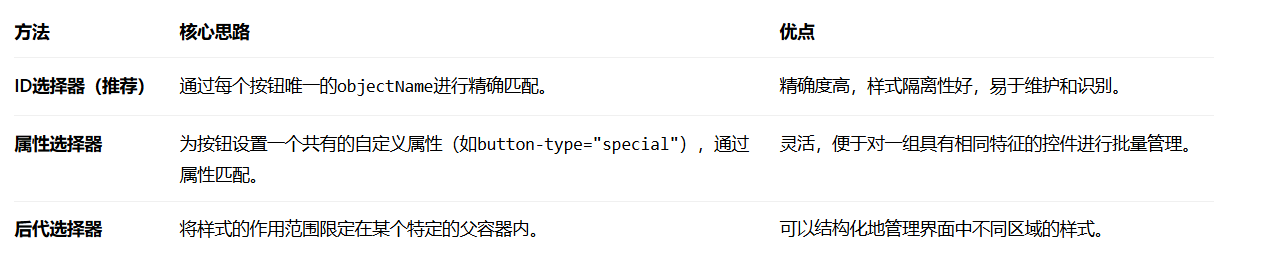
ID选择器
test.qss样式表文件内容如下:
如下样式表中通过 ID选择器指定控件
如下是QPushButton控件的obejctname分别为btn1、btn2和btn3
bash
QWidget{
	border:1px solid red;
	background-color:#f0f0f0;  /*浅灰色背景*/
}

QPushButton#btn1, QPushButton#btn2, QPushButton#btn3
{
    border:1px solid blue;    /*按钮蓝色边框*/
    background-color:white;  /*白色背景*/
    min-height: 30px; /* 确保按钮有足够高度显示边框 */
}

QLabel{
	border:1px solid blue;
	background-color:#f0f0f0;  /*浅灰色背景*/
	font-size:20px;
}
代码中读取test.qss文件并全局设置
bash
//从test.qss样式表文件中读取并全局设置样式表
    QFile file(":/style/test.qss");
    if (file.open(QFile::ReadOnly)) {
        QString styleSheet = QLatin1String(file.readAll());
        file.close();
        qDebug() << "Loaded QSS:" << styleSheet; // 在输出台查看内容
        qApp->setStyleSheet(styleSheet);
    }
代码中设置QPushButton的objectname如下:
bash
QPushButton *button = new QPushButton("btn1", &window);
    button->setObjectName("btn1");
    QPushButton *button2 = new QPushButton("btn2", &window);
    button2->setObjectName("btn2");
    QPushButton *button3 = new QPushButton("btn3", &window);
    button3->setObjectName("btn3");
属性选择器
如果想要为某个按钮设置属性,如下为button设置button_type属性值为normal,button2设置button_type属性值为warning.
bash
button->setProperty("button_type", "normal");
button2->setProperty("button_type", "warning");
同时test.qss样式针对不同属性设置不同样式表格式
bash
QPushButton[button_type="normal"]
{
    border:1px solid blue;    /*按钮蓝色边框*/
    background-color:white;  /*白色背景*/
    min-height: 30px; /* 确保按钮有足够高度显示边框 */
}

QPushButton[button_type="warning"]
{
    border:1px solid green;    /*按钮蓝色边框*/
    background-color:white;  /*白色背景*/
    min-height: 30px; /* 确保按钮有足够高度显示边框 */
}
另外:
重要提示:如果在程序运行过程中通过代码改变了控件的属性,需要调用
widget->style()->unpolish(widget);
widget->style()->polish(widget);来强制刷新样式,或者重新设置整个窗口的样式表才能立即使样式生效
后代选择器(结构化限定)
如果这三个按钮都放在一个特定的父控件里(比如一个名为buttonContainer的QWidget)
样式表写法:
bash
/* 匹配 ID 为 buttonContainer 的控件内的所有 QPushButton */
#buttonContainer QPushButton {
    border: 1px solid blue;
    background-color: white;
    min-height: 30px;
}
代码中的设置:为存放按钮的容器设置一个objectName。
bash
// 假设有一个QWidget容器存放这些按钮
ui->buttonContainer->setObjectName("buttonContainer");
总结