Spring AI + MCP:从入门到实战
一、什么是MCP?
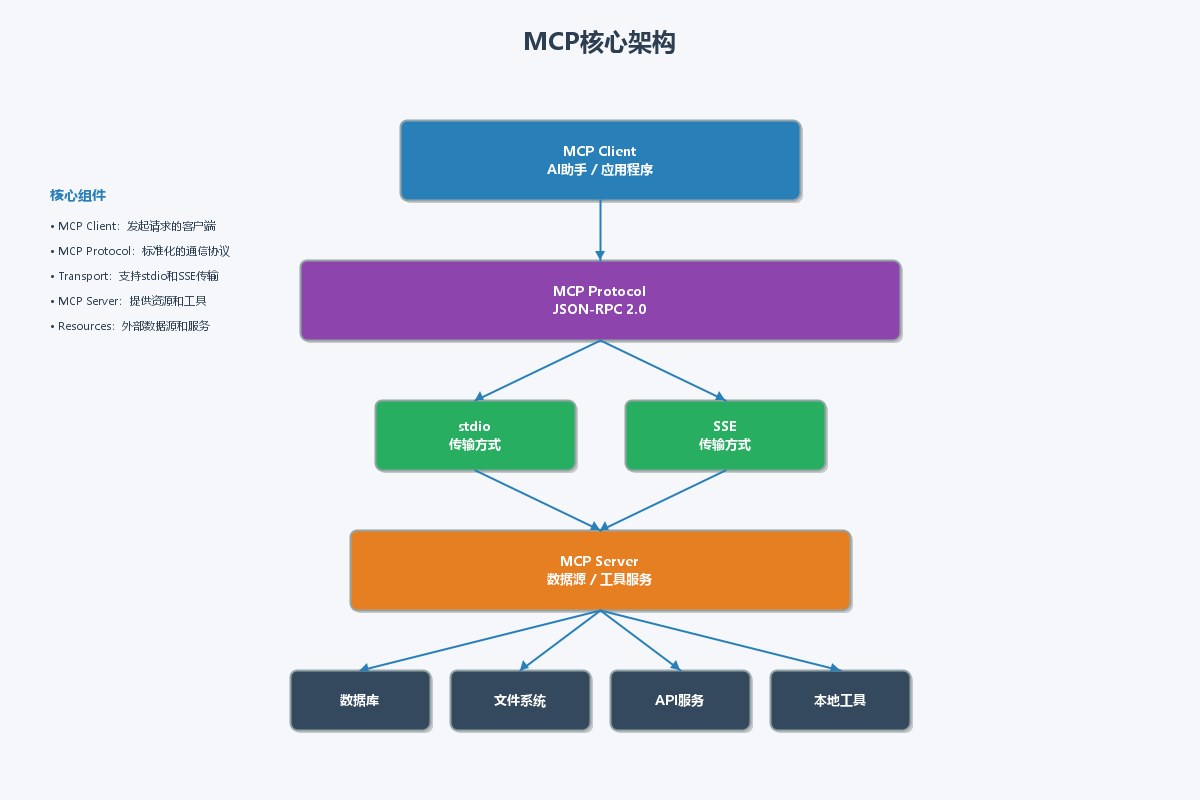
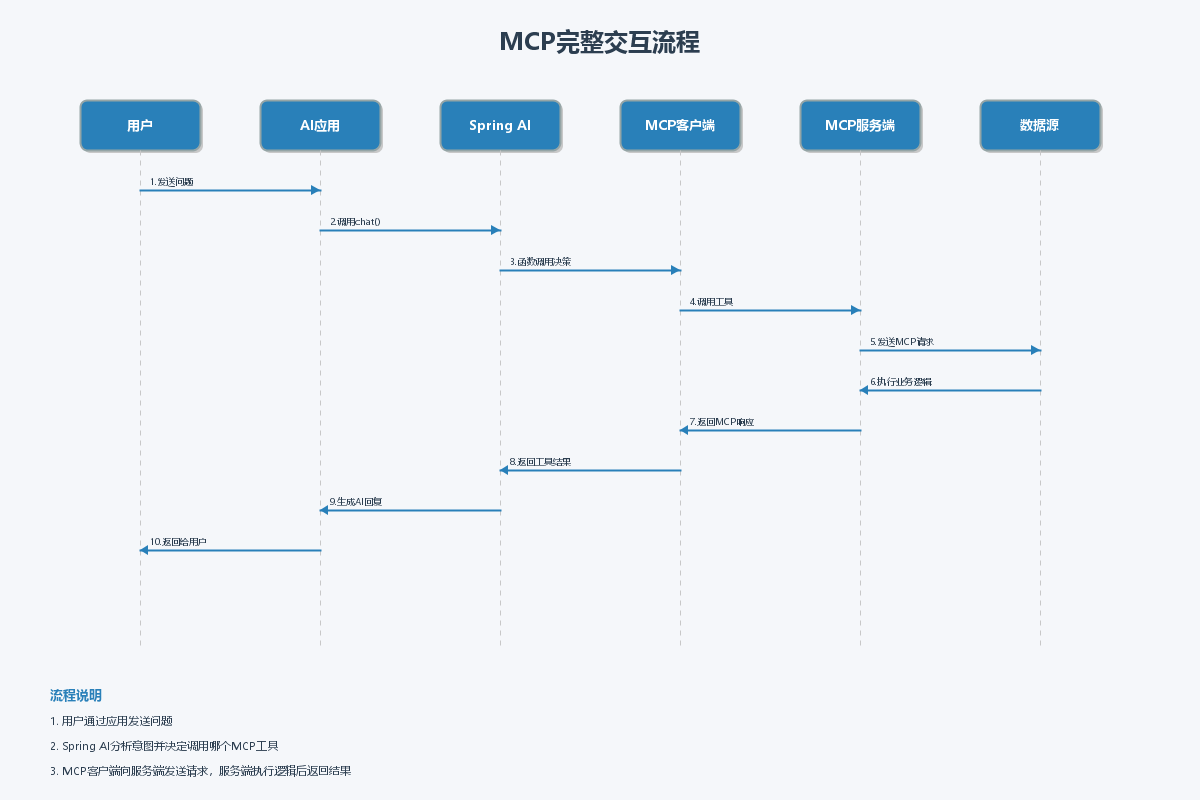
MCP(Model Context Protocol,模型上下文协议)是由Anthropic推出的一种开放协议,旨在解决AI助手与外部数据源和工具之间的连接问题。MCP定义了一套标准化的通信机制,使得AI应用能够安全、高效地访问外部资源。
1.1 MCP核心概念
MCP协议主要包含三个核心角色:
- MCP Client(客户端) :发起请求的应用程序,通常是AI助手或应用
- MCP Server(服务端) :提供资源和工具的服务,封装了数据访问逻辑
- Host(宿主) :运行MCP客户端的应用程序
1.2 MCP工作原理
MCP使用JSON-RPC 2.0协议进行通信,支持两种传输方式:
- stdio(标准输入输出) :适用于本地进程间通信
- SSE(Server-Sent Events) :适用于基于HTTP的远程通信
1.3 为什么选择MCP?
- 标准化接口:统一的协议,降低集成复杂度
- 安全性:清晰的权限控制机制
- 可扩展性:支持自定义资源和工具
- 跨平台:语言无关的协议标准
二、环境搭建
2.1 Maven依赖配置
<?xml version="1.0" encoding="UTF-8"?>
<project xmlns="http://maven.apache.org/POM/4.0.0"
         xmlns:xsi="http://www.w3.org/2001/XMLSchema-instance"
         xsi:schemaLocation="http://maven.apache.org/POM/4.0.0
         http://maven.apache.org/xsd/maven-4.0.0.xsd">
    <modelVersion>4.0.0</modelVersion>

    <parent>
        <groupId>org.springframework.boot</groupId>
        <artifactId>spring-boot-starter-parent</artifactId>
        <version>3.2.5</version>
        <relativePath/>
    </parent>

    <groupId>com.example</groupId>
    <artifactId>mcp-demo</artifactId>
    <version>1.0.0</version>
    <name>MCP Demo Project</name>
    <description>Spring AI + MCP Integration Demo</description>

    <properties>
        <java.version>17</java.version>
        <spring-ai.version>1.0.0-M4</spring-ai.version>
    </properties>

    <dependencies>
        <!-- Spring Boot Web -->
        <dependency>
            <groupId>org.springframework.boot</groupId>
            <artifactId>spring-boot-starter-web</artifactId>
        </dependency>

        <!-- Spring AI OpenAI -->
        <dependency>
            <groupId>org.springframework.ai</groupId>
            <artifactId>spring-ai-openai-spring-boot-starter</artifactId>
        </dependency>

        <!-- MCP SDK -->
        <dependency>
            <groupId>org.anthropic</groupId>
            <artifactId>mcp-sdk</artifactId>
            <version>0.1.0</version>
        </dependency>

        <!-- JSON处理 -->
        <dependency>
            <groupId>com.fasterxml.jackson.core</groupId>
            <artifactId>jackson-databind</artifactId>
        </dependency>

        <!-- Lombok -->
        <dependency>
            <groupId>org.projectlombok</groupId>
            <artifactId>lombok</artifactId>
            <optional>true</optional>
        </dependency>

        <!-- 测试依赖 -->
        <dependency>
            <groupId>org.springframework.boot</groupId>
            <artifactId>spring-boot-starter-test</artifactId>
            <scope>test</scope>
        </dependency>

        <dependency>
            <groupId>org.junit.jupiter</groupId>
            <artifactId>junit-jupiter</artifactId>
            <scope>test</scope>
        </dependency>
    </dependencies>

    <dependencyManagement>
        <dependencies>
            <dependency>
                <groupId>org.springframework.ai</groupId>
                <artifactId>spring-ai-bom</artifactId>
                <version>${spring-ai.version}</version>
                <type>pom</type>
                <scope>import</scope>
            </dependency>
        </dependencies>
    </dependencyManagement>

    <build>
        <plugins>
            <plugin>
                <groupId>org.springframework.boot</groupId>
                <artifactId>spring-boot-maven-plugin</artifactId>
            </plugin>
        </plugins>
    </build>

    <repositories>
        <repository>
            <id>spring-milestones</id>
            <name>Spring Milestones</name>
            <url>https://repo.spring.io/milestone</url>
            <snapshots>
                <enabled>false</enabled>
            </snapshots>
        </repository>
    </repositories>
</project>
2.2 配置文件
# application.yml
spring:
  application:
    name: mcp-demo
  ai:
    openai:
      api-key: ${OPENAI_API_KEY:sk-your-api-key}
      chat:
        options:
          model: gpt-4
          temperature: 0.7

server:
  port: 8080

mcp:
  server:
    name: demo-mcp-server
    version: 1.0.0
  client:
    timeout: 30000
logging:
  level:
    com.example.mcp: DEBUG
    org.springframework.ai: DEBUG
三、MCP服务端实现
3.1 MCP服务端核心接口
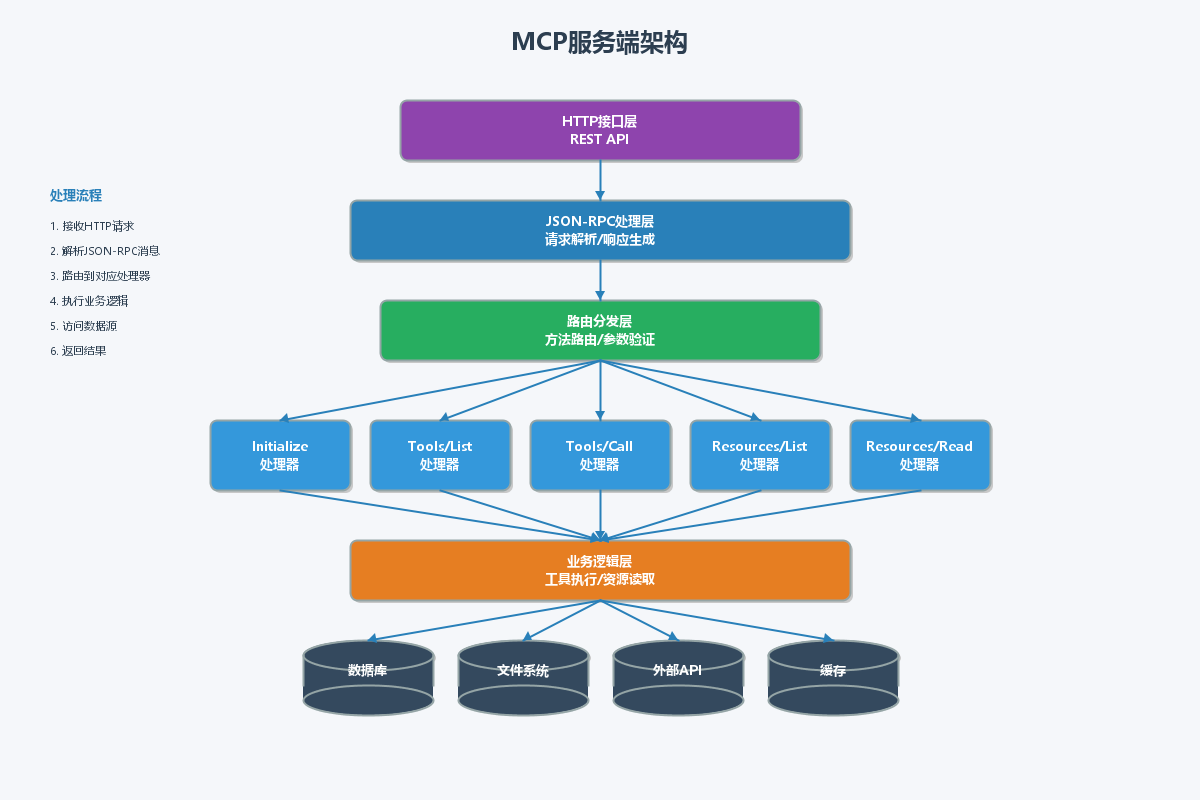
MCP服务端需要实现以下核心功能:
3.2 实现MCP服务端
package com.example.mcp.server;

import com.fasterxml.jackson.core.JsonProcessingException;
import com.fasterxml.jackson.databind.JsonNode;
import com.fasterxml.jackson.databind.ObjectMapper;
import lombok.extern.slf4j.Slf4j;
import org.springframework.stereotype.Component;

import java.util.*;

/**
 * MCP服务端核心实现
 */
@Slf4j
@Component
public class McpServer {

    private final ObjectMapper objectMapper = new ObjectMapper();
    private final Map<String, McpTool> tools = new HashMap<>();
    private final Map<String, McpResource> resources = new HashMap<>();

    public McpServer() {
        initializeTools();
        initializeResources();
    }

    /**
     * 初始化可用工具
     */
    private void initializeTools() {
        // 用户查询工具
        tools.put("query_user", McpTool.builder()
                .name("query_user")
                .description("根据用户ID查询用户信息")
                .inputSchema(Map.of(
                    "type", "object",
                    "properties", Map.of(
                        "userId", Map.of(
                            "type", "string",
                            "description", "用户ID"
                        )
                    ),
                    "required", List.of("userId")
                ))
                .build());

        // 数据分析工具
        tools.put("analyze_data", McpTool.builder()
                .name("analyze_data")
                .description("分析业务数据并生成报告")
                .inputSchema(Map.of(
                    "type", "object",
                    "properties", Map.of(
                        "dataType", Map.of(
                            "type", "string",
                            "description", "数据类型",
                            "enum", List.of("sales", "traffic", "user")
                        ),
                        "dateRange", Map.of(
                            "type", "object",
                            "description", "日期范围",
                            "properties", Map.of(
                                "start", Map.of("type", "string", "format", "date"),
                                "end", Map.of("type", "string", "format", "date")
                            )
                        )
                    ),
                    "required", List.of("dataType")
                ))
                .build());

        // 文件操作工具
        tools.put("read_file", McpTool.builder()
                .name("read_file")
                .description("读取文件内容")
                .inputSchema(Map.of(
                    "type", "object",
                    "properties", Map.of(
                        "filePath", Map.of(
                            "type", "string",
                            "description", "文件路径"
                        )
                    ),
                    "required", List.of("filePath")
                ))
                .build());

        log.info("Initialized {} tools", tools.size());
    }

    /**
     * 初始化可用资源
     */
    private void initializeResources() {
        // 用户列表资源
        resources.put("user://list", McpResource.builder()
                .uri("user://list")
                .name("用户列表")
                .description("系统中的所有用户列表")
                .mimeType("application/json")
                .build());

        // 系统配置资源
        resources.put("config://system", McpResource.builder()
                .uri("config://system")
                .name("系统配置")
                .description("系统级别的配置信息")
                .mimeType("application/json")
                .build());

        log.info("Initialized {} resources", resources.size());
    }

    /**
     * 处理MCP请求
     */
    public String handleRequest(String requestJson) {
        try {
            JsonNode root = objectMapper.readTree(requestJson);
            String method = root.get("method").asText();

            log.debug("Handling MCP request: {}", method);

            return switch (method) {
                case "initialize" -> handleInitialize(root);
                case "tools/list" -> handleListTools();
                case "tools/call" -> handleCallTool(root);
                case "resources/list" -> handleListResources();
                case "resources/read" -> handleReadResource(root);
                default -> createErrorResponse(-32601, "Method not found: " + method);
            };
        } catch (Exception e) {
            log.error("Error handling MCP request", e);
            return createErrorResponse(-32603, "Internal error: " + e.getMessage());
        }
    }

    /**
     * 处理初始化请求
     */
    private String handleInitialize(JsonNode request) {
        Map<String, Object> result = new HashMap<>();
        result.put("protocolVersion", "2024-11-05");
        result.put("serverInfo", Map.of(
            "name", "demo-mcp-server",
            "version", "1.0.0"
        ));
        result.put("capabilities", Map.of(
            "tools", Map.of(),
            "resources", Map.of()
        ));

        return createSuccessResponse(request, result);
    }

    /**
     * 处理工具列表请求
     */
    private String handleListTools() {
        List<Map<String, Object>> toolList = new ArrayList<>();
        for (McpTool tool : tools.values()) {
            Map<String, Object> toolInfo = new HashMap<>();
            toolInfo.put("name", tool.getName());
            toolInfo.put("description", tool.getDescription());
            toolInfo.put("inputSchema", tool.getInputSchema());
            toolList.add(toolInfo);
        }

        Map<String, Object> result = new HashMap<>();
        result.put("tools", toolList);

        return createSuccessResponse(null, result);
    }

    /**
     * 处理工具调用请求
     */
    private String handleCallTool(JsonNode request) throws JsonProcessingException {
        String toolName = request.get("params").get("name").asText();
        Map<String, Object> arguments = objectMapper.convertValue(
            request.get("params").get("arguments"),
            Map.class
        );

        log.info("Calling tool: {} with arguments: {}", toolName, arguments);

        Map<String, Object> result = executeTool(toolName, arguments);
        return createSuccessResponse(request, result);
    }

    /**
     * 执行工具逻辑
     */
    private Map<String, Object> executeTool(String toolName, Map<String, Object> arguments) {
        return switch (toolName) {
            case "query_user" -> executeQueryUser(arguments);
            case "analyze_data" -> executeAnalyzeData(arguments);
            case "read_file" -> executeReadFile(arguments);
            default -> Map.of("error", "Unknown tool: " + toolName);
        };
    }

    /**
     * 查询用户工具实现
     */
    private Map<String, Object> executeQueryUser(Map<String, Object> arguments) {
        String userId = (String) arguments.get("userId");

        // 模拟数据库查询
        Map<String, Object> user = new HashMap<>();
        user.put("id", userId);
        user.put("name", "张三");
        user.put("email", "zhangsan@example.com");
        user.put("role", "管理员");
        user.put("status", "活跃");
        user.put("createdAt", "2024-01-15T10:30:00Z");

        return Map.of(
            "success", true,
            "data", user
        );
    }

    /**
     * 数据分析工具实现
     */
    private Map<String, Object> executeAnalyzeData(Map<String, Object> arguments) {
        String dataType = (String) arguments.get("dataType");

        // 模拟数据分析
        Map<String, Object> analysis = new HashMap<>();
        analysis.put("dataType", dataType);
        analysis.put("totalRecords", 15420);
        analysis.put("growth", "+23.5%");
        analysis.put("trend", "上升");

        // 详细数据
        List<Map<String, Object>> details = new ArrayList<>();
        for (int i = 0; i < 7; i++) {
            Map<String, Object> dayData = new HashMap<>();
            dayData.put("date", "2024-01-" + (15 + i));
            dayData.put("value", 1000 + (int)(Math.random() * 500));
            details.add(dayData);
        }
        analysis.put("details", details);

        return Map.of(
            "success", true,
            "analysis", analysis
        );
    }

    /**
     * 读取文件工具实现
     */
    private Map<String, Object> executeReadFile(Map<String, Object> arguments) {
        String filePath = (String) arguments.get("filePath");

        // 模拟文件读取
        return Map.of(
            "success", true,
            "content", "文件内容示例:\n这是从 " + filePath + " 读取的内容。\n" +
                      "在实际应用中,这里应该返回真实的文件内容。",
            "lineCount", 2
        );
    }

    /**
     * 处理资源列表请求
     */
    private String handleListResources() {
        List<Map<String, Object>> resourceList = new ArrayList<>();
        for (McpResource resource : resources.values()) {
            Map<String, Object> resourceInfo = new HashMap<>();
            resourceInfo.put("uri", resource.getUri());
            resourceInfo.put("name", resource.getName());
            resourceInfo.put("description", resource.getDescription());
            resourceInfo.put("mimeType", resource.getMimeType());
            resourceList.add(resourceInfo);
        }

        Map<String, Object> result = new HashMap<>();
        result.put("resources", resourceList);

        return createSuccessResponse(null, result);
    }

    /**
     * 处理资源读取请求
     */
    private String handleReadResource(JsonNode request) {
        String uri = request.get("params").get("uri").asText();

        McpResource resource = resources.get(uri);
        if (resource == null) {
            return createErrorResponse(-32602, "Resource not found: " + uri);
        }

        // 模拟资源内容
        String content = switch (uri) {
            case "user://list" -> """
                {
                  "users": [
                    {"id": "1", "name": "张三", "email": "zhangsan@example.com"},
                    {"id": "2", "name": "李四", "email": "lisi@example.com"},
                    {"id": "3", "name": "王五", "email": "wangwu@example.com"}
                  ],
                  "total": 3
                }
                """;
            case "config://system" -> """
                {
                  "appName": "MCP Demo",
                  "version": "1.0.0",
                  "environment": "production",
                  "features": ["mcp", "ai", "analytics"]
                }
                """;
            default -> "{}";
        };

        Map<String, Object> result = new HashMap<>();
        result.put("contents", List.of(Map.of(
            "uri", uri,
            "mimeType", resource.getMimeType(),
            "text", content
        )));

        return createSuccessResponse(request, result);
    }

    /**
     * 创建成功响应
     */
    private String createSuccessResponse(JsonNode request, Map<String, Object> result) {
        Map<String, Object> response = new HashMap<>();
        response.put("jsonrpc", "2.0");

        if (request != null && request.has("id")) {
            response.put("id", request.get("id"));
        }

        response.put("result", result);

        try {
            return objectMapper.writeValueAsString(response);
        } catch (JsonProcessingException e) {
            return "{"error":"Failed to serialize response"}";
        }
    }

    /**
     * 创建错误响应
     */
    private String createErrorResponse(int code, String message) {
        Map<String, Object> response = new HashMap<>();
        response.put("jsonrpc", "2.0");
        response.put("error", Map.of(
            "code", code,
            "message", message
        ));
        response.put("id", null);

        try {
            return objectMapper.writeValueAsString(response);
        } catch (JsonProcessingException e) {
            return "{"error":"Failed to serialize error"}";
        }
    }
}
3.3 MCP数据模型
package com.example.mcp.server;

import lombok.AllArgsConstructor;
import lombok.Builder;
import lombok.Data;
import lombok.NoArgsConstructor;

import java.util.Map;

/**
 * MCP工具定义
 */
@Data
@Builder
@NoArgsConstructor
@AllArgsConstructor
public class McpTool {
    private String name;
    private String description;
    private Map<String, Object> inputSchema;
}

/**
 * MCP资源定义
 */
@Data
@Builder
@NoArgsConstructor
@AllArgsConstructor
class McpResource {
    private String uri;
    private String name;
    private String description;
    private String mimeType;
}
3.4 MCP服务端HTTP接口
package com.example.mcp.controller;

import com.example.mcp.server.McpServer;
import lombok.RequiredArgsConstructor;
import lombok.extern.slf4j.Slf4j;
import org.springframework.web.bind.annotation.*;

/**
 * MCP服务端HTTP接口
 */
@Slf4j
@RestController
@RequestMapping("/mcp")
@RequiredArgsConstructor
public class McpController {

    private final McpServer mcpServer;

    /**
     * 处理MCP请求
     */
    @PostMapping
    public String handleMcpRequest(@RequestBody String request) {
        log.info("Received MCP request: {}", request);
        String response = mcpServer.handleRequest(request);
        log.info("Sending MCP response: {}", response);
        return response;
    }

    /**
     * 健康检查
     */
    @GetMapping("/health")
    public Map<String, String> health() {
        return Map.of("status", "healthy", "service", "mcp-server");
    }
}
四、MCP客户端实现
4.1 MCP客户端架构
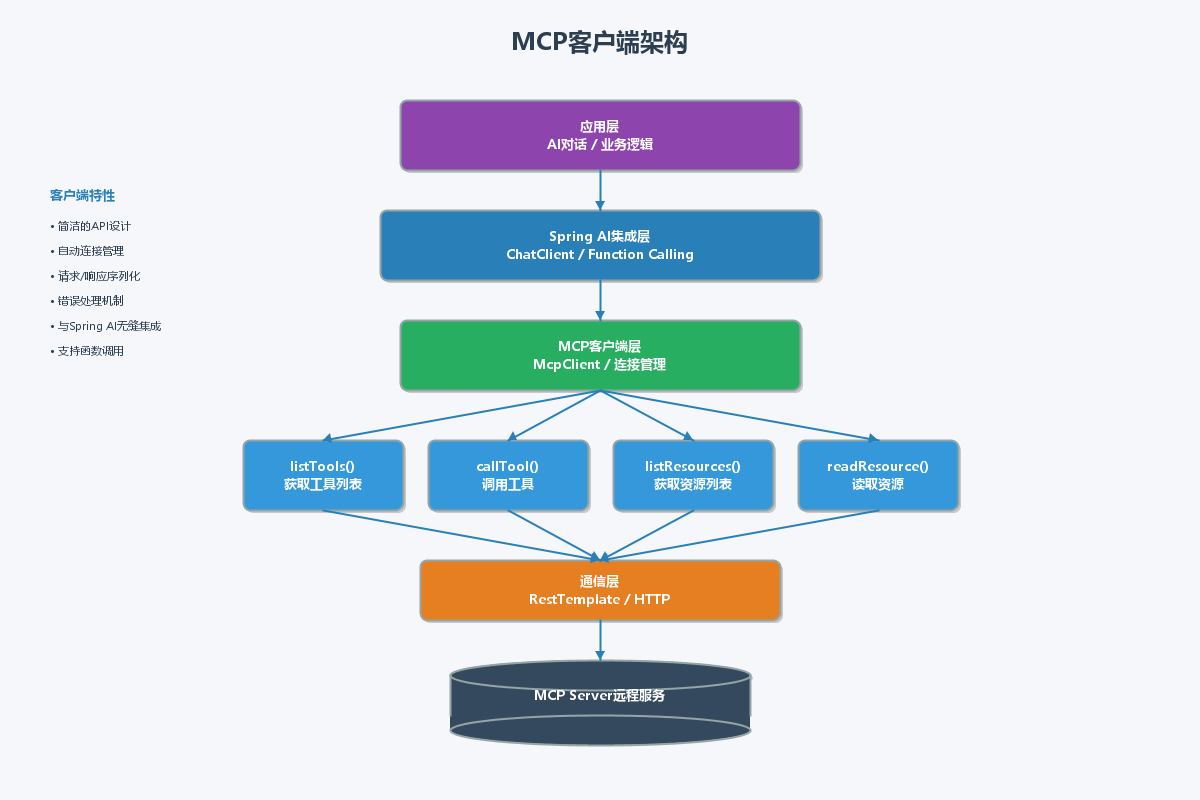
MCP客户端负责与MCP服务端通信,并向应用层提供简洁的API。
4.2 实现MCP客户端
package com.example.mcp.client;

import com.fasterxml.jackson.databind.JsonNode;
import com.fasterxml.jackson.databind.ObjectMapper;
import lombok.extern.slf4j.Slf4j;
import org.springframework.http.HttpEntity;
import org.springframework.http.HttpHeaders;
import org.springframework.http.MediaType;
import org.springframework.stereotype.Component;
import org.springframework.web.client.RestTemplate;

import java.util.*;

/**
 * MCP客户端实现
 */
@Slf4j
@Component
public class McpClient {

    private final ObjectMapper objectMapper = new ObjectMapper();
    private final RestTemplate restTemplate = new RestTemplate();
    private final String serverUrl;
    private long requestId = 0;

    public McpClient(String serverUrl) {
        this.serverUrl = serverUrl;
    }

    /**
     * 初始化连接
     */
    public void initialize() {
        Map<String, Object> params = new HashMap<>();
        params.put("protocolVersion", "2024-11-05");
        params.put("capabilities", Map.of(
            "roots", Map.of("listChanged", true),
            "sampling", Map.of()
        ));

        JsonNode response = sendRequest("initialize", params);
        log.info("MCP client initialized: {}", response);
    }

    /**
     * 获取可用工具列表
     */
    public List<McpClientTool> listTools() {
        JsonNode response = sendRequest("tools/list", null);
        JsonNode toolsArray = response.get("result").get("tools");

        List<McpClientTool> tools = new ArrayList<>();
        for (JsonNode toolNode : toolsArray) {
            McpClientTool tool = new McpClientTool(
                toolNode.get("name").asText(),
                toolNode.get("description").asText(),
                toolNode.get("inputSchema").toString()
            );
            tools.add(tool);
        }

        log.info("Retrieved {} tools from MCP server", tools.size());
        return tools;
    }

    /**
     * 调用工具
     */
    public Map<String, Object> callTool(String toolName, Map<String, Object> arguments) {
        Map<String, Object> params = new HashMap<>();
        params.put("name", toolName);
        params.put("arguments", arguments);

        JsonNode response = sendRequest("tools/call", params);
        JsonNode resultNode = response.get("result");

        return objectMapper.convertValue(resultNode, Map.class);
    }

    /**
     * 获取可用资源列表
     */
    public List<McpClientResource> listResources() {
        JsonNode response = sendRequest("resources/list", null);
        JsonNode resourcesArray = response.get("result").get("resources");

        List<McpClientResource> resources = new ArrayList<>();
        for (JsonNode resourceNode : resourcesArray) {
            McpClientResource resource = new McpClientResource(
                resourceNode.get("uri").asText(),
                resourceNode.get("name").asText(),
                resourceNode.get("description").asText(),
                resourceNode.get("mimeType").asText()
            );
            resources.add(resource);
        }

        log.info("Retrieved {} resources from MCP server", resources.size());
        return resources;
    }

    /**
     * 读取资源
     */
    public String readResource(String uri) {
        Map<String, Object> params = new HashMap<>();
        params.put("uri", uri);

        JsonNode response = sendRequest("resources/read", params);
        JsonNode contentsArray = response.get("result").get("contents");

        if (contentsArray != null && contentsArray.size() > 0) {
            return contentsArray.get(0).get("text").asText();
        }

        return null;
    }

    /**
     * 发送JSON-RPC请求
     */
    private JsonNode sendRequest(String method, Map<String, Object> params) {
        try {
            Map<String, Object> request = new HashMap<>();
            request.put("jsonrpc", "2.0");
            request.put("id", ++requestId);
            request.put("method", method);
            if (params != null) {
                request.put("params", params);
            }

            String requestJson = objectMapper.writeValueAsString(request);

            HttpHeaders headers = new HttpHeaders();
            headers.setContentType(MediaType.APPLICATION_JSON);

            HttpEntity<String> entity = new HttpEntity<>(requestJson, headers);

            String responseJson = restTemplate.postForObject(
                serverUrl, entity, String.class
            );

            log.debug("MCP request: {}", requestJson);
            log.debug("MCP response: {}", responseJson);

            return objectMapper.readTree(responseJson);
        } catch (Exception e) {
            log.error("Error sending MCP request", e);
            throw new RuntimeException("MCP request failed: " + e.getMessage(), e);
        }
    }

    /**
     * 客户端工具定义
     */
    public record McpClientTool(String name, String description, String inputSchema) {}

    /**
     * 客户端资源定义
     */
    public record McpClientResource(String uri, String name, String description, String mimeType) {}
}
4.3 MCP客户端配置
package com.example.mcp.config;

import com.example.mcp.client.McpClient;
import org.springframework.beans.factory.annotation.Value;
import org.springframework.context.annotation.Bean;
import org.springframework.context.annotation.Configuration;

/**
 * MCP客户端配置
 */
@Configuration
public class McpClientConfig {

    @Value("${mcp.server.url:http://localhost:8080/mcp}")
    private String serverUrl;

    @Bean
    public McpClient mcpClient() {
        McpClient client = new McpClient(serverUrl);
        client.initialize();
        return client;
    }
}
五、Spring AI集成
5.1 创建MCP函数调用
package com.example.mcp.ai;

import com.example.mcp.client.McpClient;
import com.fasterxml.jackson.databind.ObjectMapper;
import lombok.RequiredArgsConstructor;
import lombok.extern.slf4j.Slf4j;
import org.springframework.context.annotation.Description;
import org.springframework.stereotype.Component;

import java.util.Map;
import java.util.function.Function;

/**
 * MCP工具函数,供Spring AI调用
 */
@Slf4j
@Component
@RequiredArgsConstructor
public class McpFunction {

    private final McpClient mcpClient;
    private final ObjectMapper objectMapper = new ObjectMapper();

    /**
     * 查询用户信息
     */
    @Description("根据用户ID查询用户详细信息,包括姓名、邮箱、角色等")
    public Function<String, String> queryUser() {
        return userId -> {
            log.info("AI调用queryUser工具,参数: {}", userId);

            Map<String, Object> arguments = Map.of("userId", userId);
            Map<String, Object> result = mcpClient.callTool("query_user", arguments);

            return formatResult("查询用户", result);
        };
    }

    /**
     * 分析数据
     */
    @Description("分析业务数据并生成分析报告,支持销售、流量、用户等数据类型")
    public Function<String, String> analyzeData() {
        return dataTypeJson -> {
            log.info("AI调用analyzeData工具,参数: {}", dataTypeJson);

            try {
                @SuppressWarnings("unchecked")
                Map<String, Object> arguments = objectMapper.readValue(dataTypeJson, Map.class);
                Map<String, Object> result = mcpClient.callTool("analyze_data", arguments);

                return formatResult("数据分析", result);
            } catch (Exception e) {
                log.error("数据分析失败", e);
                return "数据分析失败: " + e.getMessage();
            }
        };
    }

    /**
     * 读取文件
     */
    @Description("读取指定路径的文件内容")
    public Function<String, String> readFile() {
        return filePath -> {
            log.info("AI调用readFile工具,参数: {}", filePath);

            Map<String, Object> arguments = Map.of("filePath", filePath);
            Map<String, Object> result = mcpClient.callTool("read_file", arguments);

            return formatResult("读取文件", result);
        };
    }

    /**
     * 获取系统资源
     */
    @Description("获取系统配置和资源信息")
    public Function<String, String> getSystemResource() {
        return uri -> {
            log.info("AI调用getSystemResource工具,参数: {}", uri);

            String content = mcpClient.readResource(uri);

            if (content != null) {
                return String.format("资源 %s 的内容:\n%s", uri, content);
            }

            return "未找到资源: " + uri;
        };
    }

    /**
     * 格式化结果
     */
    private String formatResult(String operation, Map<String, Object> result) {
        if (Boolean.TRUE.equals(result.get("success"))) {
            return String.format("%s成功:\n%s", operation,
                result.get("data") != null ? result.get("data") : result.get("content"));
        } else {
            return String.format("%s失败: %s", operation, result.get("error"));
        }
    }
}
5.2 AI服务实现
package com.example.mcp.service;

import com.example.mcp.ai.McpFunction;
import lombok.RequiredArgsConstructor;
import lombok.extern.slf4j.Slf4j;
import org.springframework.ai.chat.client.ChatClient;
import org.springframework.ai.chat.client.advisor.MessageChatMemoryAdvisor;
import org.springframework.ai.chat.memory.ChatMemory;
import org.springframework.ai.chat.memory.InMemoryChatMemory;
import org.springframework.stereotype.Service;

/**
 * AI对话服务
 */
@Slf4j
@Service
@RequiredArgsConstructor
public class AiChatService {

    private final ChatClient.Builder chatClientBuilder;
    private final McpFunction mcpFunction;
    private final ChatMemory chatMemory = new InMemoryChatMemory();

    /**
     * 处理用户消息
     */
    public String chat(String userId, String message) {
        log.info("用户 {} 发送消息: {}", userId, message);

        // 创建带记忆和工具调用的ChatClient
        ChatClient chatClient = chatClientBuilder
            .defaultAdvisors(new MessageChatMemoryAdvisor(chatMemory))
            .defaultFunctions(
                mcpFunction.queryUser(),
                mcpFunction.analyzeData(),
                mcpFunction.readFile(),
                mcpFunction.getSystemResource()
            )
            .build();

        String response = chatClient.prompt()
            .user(message)
            .call()
            .content();

        log.info("AI回复: {}", response);
        return response;
    }

    /**
     * 清除对话历史
     */
    public void clearHistory(String userId) {
        chatMemory.clear(userId);
        log.info("已清除用户 {} 的对话历史", userId);
    }
}
5.3 ChatClient配置
package com.example.mcp.config;

import org.springframework.ai.chat.client.ChatClient;
import org.springframework.ai.openai.OpenAiChatModel;
import org.springframework.context.annotation.Configuration;

/**
 * ChatClient配置
 */
@Configuration
public class ChatClientConfig {

    public ChatClient.Builder chatClientBuilder(OpenAiChatModel model) {
        return ChatClient.builder(model);
    }
}
六、生产环境实战案例
6.1 智能客服系统
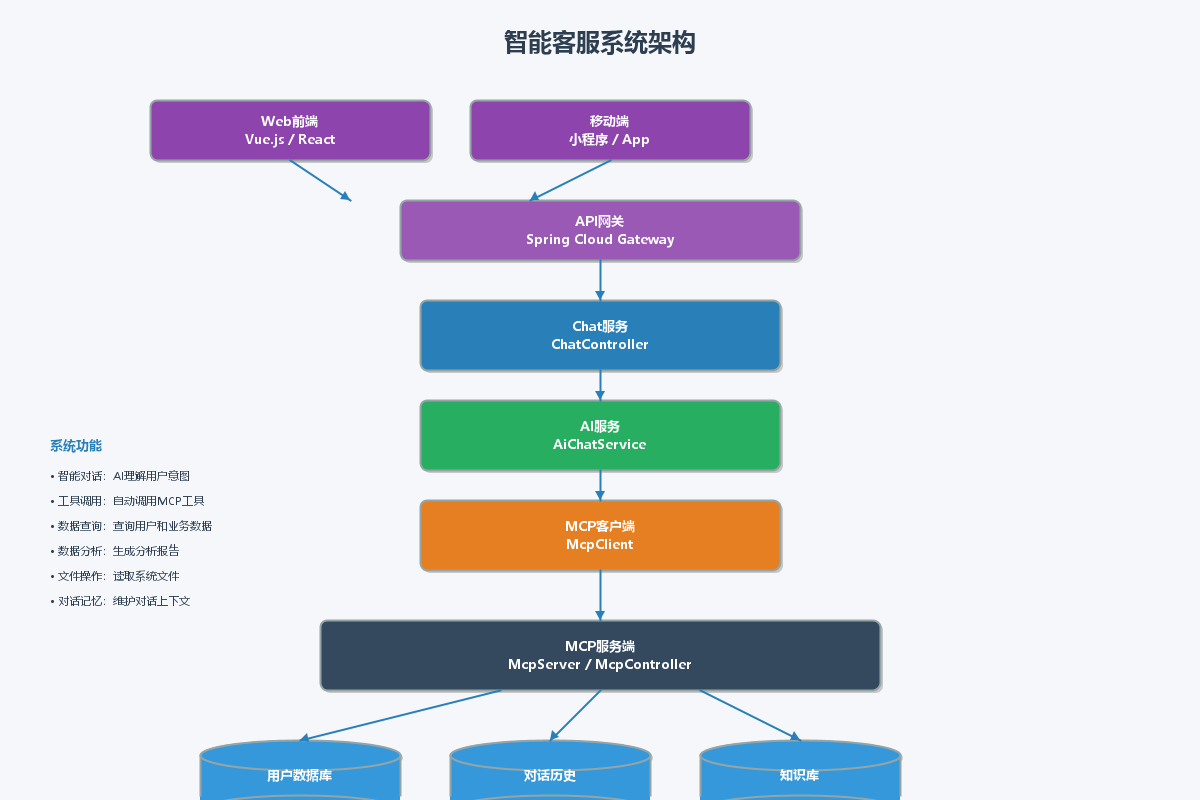
下面是一个完整的智能客服系统实现,展示如何使用Spring AI + MCP构建实际应用。
6.2 客服控制器
package com.example.mcp.controller;

import com.example.mcp.service.AiChatService;
import lombok.RequiredArgsConstructor;
import lombok.extern.slf4j.Slf4j;
import org.springframework.web.bind.annotation.*;

import java.util.Map;

/**
 * 智能客服控制器
 */
@Slf4j
@RestController
@RequestMapping("/api/chat")
@RequiredArgsConstructor
public class ChatController {

    private final AiChatService aiChatService;

    /**
     * 发送消息
     */
    @PostMapping("/send")
    public Map<String, Object> sendMessage(@RequestBody Map<String, String> request) {
        String userId = request.get("userId");
        String message = request.get("message");

        if (userId == null || message == null) {
            return Map.of("success", false, "error", "userId和message不能为空");
        }

        try {
            String response = aiChatService.chat(userId, message);
            return Map.of(
                "success", true,
                "response", response,
                "timestamp", System.currentTimeMillis()
            );
        } catch (Exception e) {
            log.error("处理消息失败", e);
            return Map.of("success", false, "error", e.getMessage());
        }
    }

    /**
     * 清除历史
     */
    @PostMapping("/clear")
    public Map<String, Object> clearHistory(@RequestBody Map<String, String> request) {
        String userId = request.get("userId");
        aiChatService.clearHistory(userId);
        return Map.of("success", true, "message", "对话历史已清除");
    }
}
七、MCP通信流程
7.1 完整的交互流程
7.2 消息格式示例
// 客户端请求示例
{
  "jsonrpc": "2.0",
  "id": 1,
  "method": "tools/call",
  "params": {
    "name": "query_user",
    "arguments": {
      "userId": "12345"
    }
  }
}

// 服务端响应示例
{
  "jsonrpc": "2.0",
  "id": 1,
  "result": {
    "success": true,
    "data": {
      "id": "12345",
      "name": "张三",
      "email": "zhangsan@example.com",
      "role": "管理员"
    }
  }
}
八、测试与调试
8.1 单元测试
package com.example.mcp.server;

import org.junit.jupiter.api.BeforeEach;
import org.junit.jupiter.api.Test;
import static org.junit.jupiter.api.Assertions.*;

/**
 * MCP服务端测试
 */
class McpServerTest {

    private McpServer mcpServer;

    @BeforeEach
    void setUp() {
        mcpServer = new McpServer();
    }

    @Test
    void testInitialize() {
        String request = "{"jsonrpc":"2.0","id":1,"method":"initialize","params":{}}";
        String response = mcpServer.handleRequest(request);

        assertNotNull(response);
        assertTrue(response.contains(""serverInfo""));
        assertTrue(response.contains("demo-mcp-server"));
    }

    @Test
    void testListTools() {
        String request = "{"jsonrpc":"2.0","id":2,"method":"tools/list"}";
        String response = mcpServer.handleRequest(request);

        assertNotNull(response);
        assertTrue(response.contains("query_user"));
        assertTrue(response.contains("analyze_data"));
        assertTrue(response.contains("read_file"));
    }

    @Test
    void testCallTool() {
        String request = "{"jsonrpc":"2.0","id":3,"method":"tools/call","params":{" +
                         ""name":"query_user"," +
                         ""arguments":{"userId":"123"}" +
                         "}}";
        String response = mcpServer.handleRequest(request);

        assertNotNull(response);
        assertTrue(response.contains(""success":true"));
        assertTrue(response.contains("张三"));
    }

    @Test
    void testListResources() {
        String request = "{"jsonrpc":"2.0","id":4,"method":"resources/list"}";
        String response = mcpServer.handleRequest(request);

        assertNotNull(response);
        assertTrue(response.contains("user://list"));
        assertTrue(response.contains("config://system"));
    }

    @Test
    void testReadResource() {
        String request = "{"jsonrpc":"2.0","id":5,"method":"resources/read"," +
                         ""params":{"uri":"user://list"}}";
        String response = mcpServer.handleRequest(request);

        assertNotNull(response);
        assertTrue(response.contains("users"));
    }
}
8.2 客户端测试
package com.example.mcp.client;

import org.junit.jupiter.api.BeforeEach;
import org.junit.jupiter.api.Test;
import org.mockserver.integration.ClientAndServer;
import org.mockserver.model.HttpRequest;
import org.mockserver.model.HttpResponse;

import static org.junit.jupiter.api.Assertions.*;
import static org.mockserver.model.JsonBody.json;

/**
 * MCP客户端测试
 */
class McpClientTest {

    private ClientAndServer mockServer;
    private McpClient mcpClient;

    @BeforeEach
    void setUp() {
        mockServer = ClientAndServer.startLocal(1080);
        mcpClient = new McpClient("http://localhost:1080/mcp");
    }

    @Test
    void testListTools() {
        // 模拟服务端响应
        mockServer.when(HttpRequest.request()
            .withMethod("POST")
            .withPath("/mcp"))
            .respond(HttpResponse.response()
                .withBody("{"jsonrpc":"2.0","id":1," +
                          ""result":{"tools":[{" +
                          ""name":"test_tool"," +
                          ""description":"测试工具"," +
                          ""inputSchema":{"type":"object"}" +
                          "]}}"));

        var tools = mcpClient.listTools();

        assertNotNull(tools);
        assertEquals(1, tools.size());
        assertEquals("test_tool", tools.get(0).name());
    }

    @Test
    void testCallTool() {
        mockServer.when(HttpRequest.request()
            .withMethod("POST")
            .withPath("/mcp"))
            .respond(HttpResponse.response()
                .withBody("{"jsonrpc":"2.0","id":2," +
                          ""result":{"success":true,"data":{"result":"test"}}}"));

        var result = mcpClient.callTool("test_tool", Map.of("param", "value"));

        assertNotNull(result);
        assertTrue((Boolean) result.get("success"));
    }

    @Test
    void testReadResource() {
        mockServer.when(HttpRequest.request()
            .withMethod("POST")
            .withPath("/mcp"))
            .respond(HttpResponse.response()
                .withBody("{"jsonrpc":"2.0","id":3," +
                          ""result":{"contents":[{" +
                          ""uri":"test://resource"," +
                          ""text":"resource content"}]}}"));

        String content = mcpClient.readResource("test://resource");

        assertNotNull(content);
        assertEquals("resource content", content);
    }
}
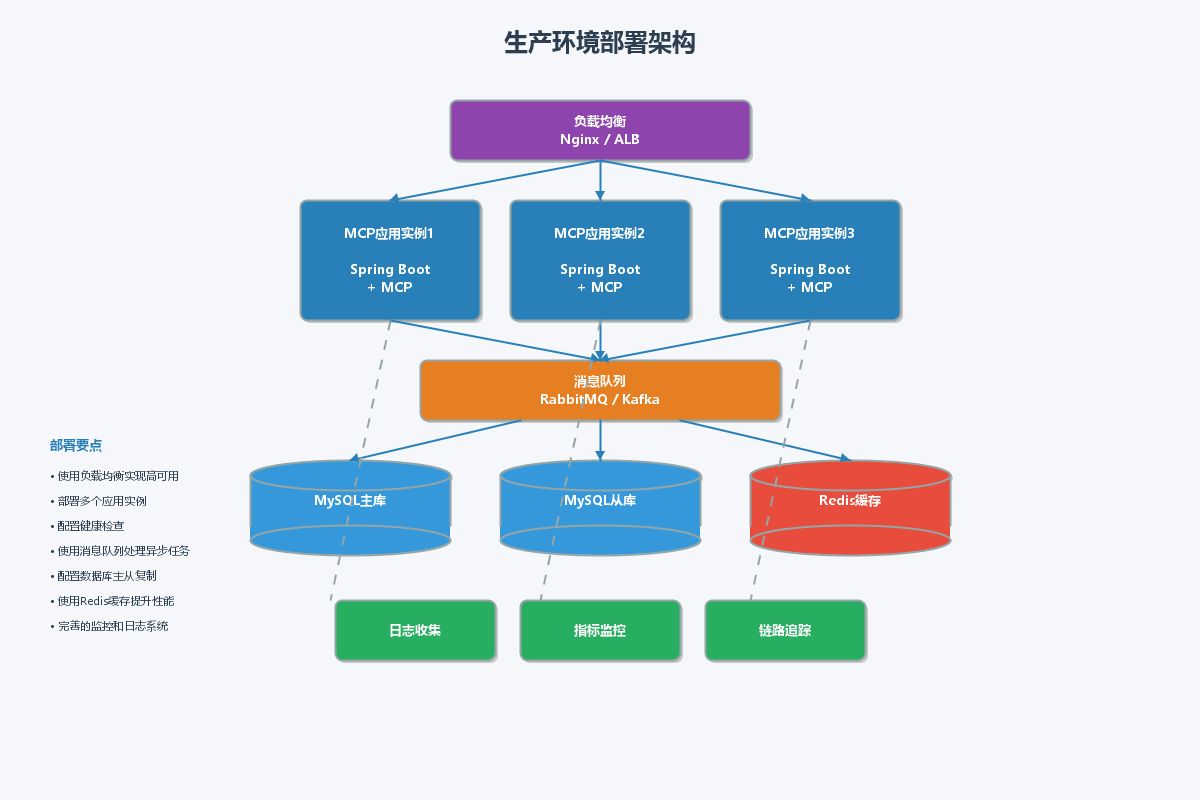
九、部署架构
9.1
9.2 Docker部署
# Dockerfile
FROM openjdk:17-slim

WORKDIR /app

COPY target/mcp-demo-1.0.0.jar app.jar

EXPOSE 8080

ENTRYPOINT ["java", "-jar", "app.jar"]

# docker-compose.yml
version: '3.8'
services:
  mcp-demo:
    build: .
    ports:
      - "8080:8080"
    environment:
      - OPENAI_API_KEY=${OPENAI_API_KEY}
      - SPRING_PROFILES_ACTIVE=production
    restart: unless-stopped
十、总结
Spring AI + MCP为构建AI应用提供了强大的基础设施。随着AI技术的不断发展,MCP协议将成为连接AI应用和外部服务的重要标准。建议持续关注MCP生态的发展,积极探索更多的应用场景。