🚀运行效果展示
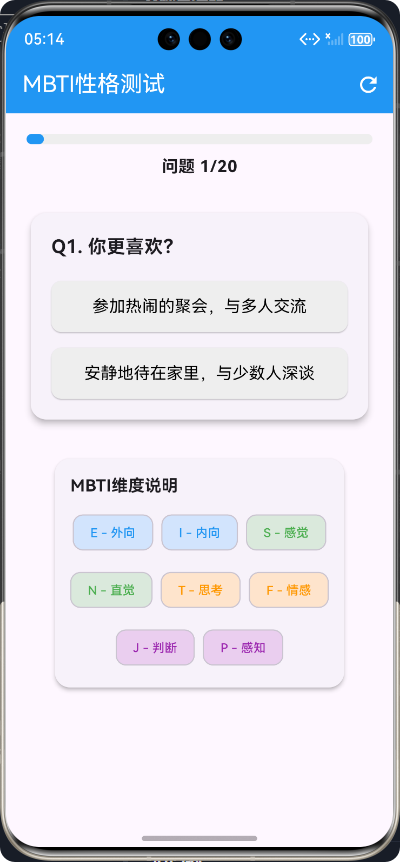
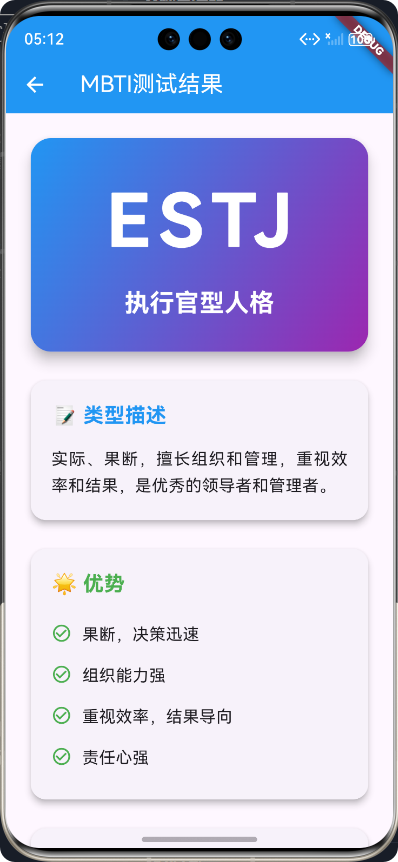
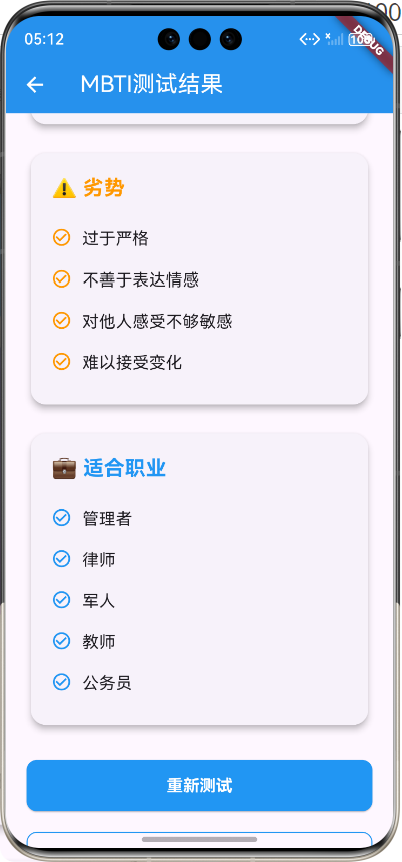
Flutter框架跨平台鸿蒙开发------MBTI性格测试APP的开发流程
📝 前言
随着移动互联网的快速发展,跨平台开发框架逐渐成为移动应用开发的主流趋势。Flutter作为Google推出的开源UI工具包,凭借其"一次编写,多端运行"的优势,在跨平台开发领域占据了重要地位。鸿蒙操作系统(HarmonyOS)作为华为自主研发的分布式操作系统,为移动应用提供了全新的发展机遇。
本次开发基于Flutter框架,实现了一款跨平台的MBTI性格测试APP,该APP不仅能在Android和iOS平台运行,还能适配鸿蒙系统。本文将详细介绍该APP的开发流程,包括需求分析、技术选型、核心功能实现、测试优化等环节,旨在为Flutter开发者提供跨平台鸿蒙开发的实践参考。
🎮 应用介绍
MBTI性格测试简介
MBTI(Myers-Briggs Type Indicator)是一种基于卡尔·荣格心理学理论的性格类型评估工具,通过四个维度将人的性格分为16种类型:
| 维度 | 类型1 | 类型2 |
|---|---|---|
| 能量获取方式 | 外向(E) | 内向(I) |
| 信息获取方式 | 感觉(S) | 直觉(N) |
| 决策方式 | 思考(T) | 情感(F) |
| 生活方式 | 判断(J) | 感知(P) |
应用功能特点
本次开发的MBTI性格测试APP具有以下特点:
- 📱 跨平台兼容:基于Flutter框架开发,支持Android、iOS和鸿蒙系统
- 🎨 美观的UI设计:采用现代化的设计风格,界面简洁友好
- 📊 科学的测试体系:包含20道涵盖四个维度的测试题目
- 🎯 精准的结果分析:提供16种MBTI类型的详细解释
- 🔄 流畅的用户体验:响应式布局,适配不同屏幕尺寸
- 💾 数据本地化存储:无需网络连接即可完成测试
🔧 开发流程
1. 需求分析
在开发前,我们需要明确APP的核心需求:
- 实现MBTI性格测试功能,包含20道测试题目
- 支持用户选择选项并记录答案
- 自动计算MBTI类型并展示详细结果
- 支持重新测试功能
- 采用响应式布局,适配不同设备
- 确保跨平台兼容性,尤其是鸿蒙系统
2. 技术选型
| 技术/框架 | 版本 | 用途 |
|---|---|---|
| Flutter | 3.0+ | 跨平台UI框架 |
| Dart | 2.17+ | 开发语言 |
| Material Design | - | UI设计规范 |
3. 项目架构设计
采用分层架构设计,将项目分为以下几个层次:
- 模型层(Models):定义数据结构,如MBTI问题模型、结果模型等
- 数据层(Data):存储测试数据,如问题列表、结果数据等
- 页面层(Pages):实现UI界面,如测试页面、结果页面等
- 组件层(Components):封装可复用的UI组件
否
是
用户
MBTI测试页面
问题展示
用户选择选项
记录答案
是否完成测试?
计算MBTI类型
跳转到结果页面
展示结果详情
重新测试
🚀 核心功能实现
1. 数据模型设计
首先,我们需要定义MBTI测试相关的数据模型,包括问题模型、结果模型和维度枚举。
1.1 MBTI维度枚举
dart
/// MBTI维度枚举
enum MbtiDimension {
  e, // 外向(E)
  i, // 内向(I)
  s, // 感觉(S)
  n, // 直觉(N)
  t, // 思考(T)
  f, // 情感(F)
  j, // 判断(J)
  p, // 感知(P)
}
1.2 MBTI问题模型
dart
/// MBTI问题模型
class MbtiQuestion {
  /// 问题ID
  final int id;

  /// 问题内容
  final String question;

  /// 对应维度
  final MbtiDimension dimension;

  /// 选项A的内容
  final String optionA;

  /// 选项A对应的维度值(1: 第一个维度,2: 第二个维度)
  final int optionAValue;

  /// 选项B的内容
  final String optionB;

  /// 选项B对应的维度值(1: 第一个维度,2: 第二个维度)
  final int optionBValue;

  /// 创建MBTI问题
  const MbtiQuestion({
    required this.id,
    required this.question,
    required this.dimension,
    required this.optionA,
    required this.optionAValue,
    required this.optionB,
    required this.optionBValue,
  });
}
1.3 MBTI结果模型
dart
/// MBTI结果模型
class MbtiResult {
  /// MBTI类型(如ISTJ、ENFP等)
  final String type;

  /// 类型名称
  final String name;

  /// 类型描述
  final String description;

  /// 优势
  final List<String> strengths;

  /// 劣势
  final List<String> weaknesses;

  /// 适合职业
  final List<String> careers;

  /// 创建MBTI结果
  const MbtiResult({
    required this.type,
    required this.name,
    required this.description,
    required this.strengths,
    required this.weaknesses,
    required this.careers,
  });
}
2. 测试数据设计
测试数据包括20道涵盖四个维度的测试题目和16种MBTI类型的详细
结果数据。
dart
/// MBTI测试问题列表
const List<MbtiQuestion> mbtiQuestions = [
  // E/I维度问题
  MbtiQuestion(
    id: 1,
    question: '你更喜欢?',
    dimension: MbtiDimension.e,
    optionA: '参加热闹的聚会,与多人交流',
    optionAValue: 1,
    optionB: '安静地待在家里,与少数人深谈',
    optionBValue: 2,
  ),
  // 更多问题...
];

/// MBTI测试结果列表
const List<MbtiResult> mbtiResults = [
  // ISTJ - 物流师
  MbtiResult(
    type: 'ISTJ',
    name: '物流师型人格',
    description: '实际、可靠,注重传统和秩序,擅长组织和管理,是优秀的执行者。',
    strengths: [
      '责任心强,值得信赖',
      '注重细节,做事严谨',
      '有条理,组织能力强',
      '忠于职责,坚持不懈',
    ],
    weaknesses: [
      '过于保守,拒绝变化',
      '不善于表达情感',
      '对新想法持怀疑态度',
      '有时过于严格',
    ],
    careers: ['会计', '律师', '工程师', '项目经理', '教师'],
  ),
  // 更多结果...
];
3. 测试页面实现
测试页面是APP的核心功能之一,负责展示测试题目、收集用户答案,并在测试完成后计算MBTI类型。
dart
class MbtiTestPage extends StatefulWidget {
  /// 创建MBTI测试页面
  const MbtiTestPage({super.key});

  @override
  State<MbtiTestPage> createState() => _MbtiTestPageState();
}

class _MbtiTestPageState extends State<MbtiTestPage> {
  /// 当前问题索引
  int _currentQuestionIndex = 0;

  /// 用户选择结果映射(问题ID -> 选择的选项值)
  final Map<int, int> _userAnswers = {};

  /// 各维度得分
  final Map<MbtiDimension, Map<int, int>> _dimensionScores = {
    MbtiDimension.e: {1: 0, 2: 0}, // E/I维度得分
    MbtiDimension.s: {1: 0, 2: 0}, // S/N维度得分
    MbtiDimension.t: {1: 0, 2: 0}, // T/F维度得分
    MbtiDimension.j: {1: 0, 2: 0}, // J/P维度得分
  };

  /// 计算MBTI类型
  String _calculateMbtiType() {
    // 计算各维度的最终类型
    String eOrI = _dimensionScores[MbtiDimension.e]![1]! > _dimensionScores[MbtiDimension.e]![2]! ? 'E' : 'I';
    String sOrN = _dimensionScores[MbtiDimension.s]![1]! > _dimensionScores[MbtiDimension.s]![2]! ? 'S' : 'N';
    String tOrF = _dimensionScores[MbtiDimension.t]![1]! > _dimensionScores[MbtiDimension.t]![2]! ? 'T' : 'F';
    String jOrP = _dimensionScores[MbtiDimension.j]![1]! > _dimensionScores[MbtiDimension.j]![2]! ? 'J' : 'P';

    return eOrI + sOrN + tOrF + jOrP;
  }

  /// 处理选项选择
  void _handleOptionSelected(int optionValue) {
    // 获取当前问题
    final currentQuestion = mbtiQuestions[_currentQuestionIndex];

    // 记录用户选择
    _userAnswers[currentQuestion.id] = optionValue;

    // 更新维度得分
    if (optionValue == 1) {
      _dimensionScores[currentQuestion.dimension]![1] =
          (_dimensionScores[currentQuestion.dimension]![1] ?? 0) + 1;
    } else {
      _dimensionScores[currentQuestion.dimension]![2] =
          (_dimensionScores[currentQuestion.dimension]![2] ?? 0) + 1;
    }

    // 检查是否还有下一题
    if (_currentQuestionIndex < mbtiQuestions.length - 1) {
      // 有下一题,切换到下一题
      setState(() {
        _currentQuestionIndex++;
      });
    } else {
      // 测试完成,计算结果并跳转到结果页面
      final mbtiType = _calculateMbtiType();
      Navigator.pushNamed(
        context,
        '/mbti_result',
        arguments: mbtiType,
      );
    }
  }

  @override
  Widget build(BuildContext context) {
    // 获取当前问题
    final currentQuestion = mbtiQuestions[_currentQuestionIndex];

    // 计算进度百分比
    final progress = (_currentQuestionIndex + 1) / mbtiQuestions.length;

    return Scaffold(
      appBar: AppBar(
        title: const Text('MBTI性格测试'),
        backgroundColor: Colors.blue,
        foregroundColor: Colors.white,
      ),
      body: SingleChildScrollView(
        padding: const EdgeInsets.all(20.0),
        child: Column(
          crossAxisAlignment: CrossAxisAlignment.center,
          children: [
            // 进度条
            LinearProgressIndicator(
              value: progress,
              backgroundColor: Colors.grey[200],
              color: Colors.blue,
              minHeight: 10,
              borderRadius: BorderRadius.circular(5),
            ),
            // 问题卡片
            Card(
              elevation: 5,
              shape: RoundedRectangleBorder(
                borderRadius: BorderRadius.circular(15),
              ),
              child: Padding(
                padding: const EdgeInsets.all(20.0),
                child: Column(
                  crossAxisAlignment: CrossAxisAlignment.start,
                  children: [
                    Text(
                      'Q${_currentQuestionIndex + 1}. ${currentQuestion.question}',
                      style: const TextStyle(
                        fontSize: 18,
                        fontWeight: FontWeight.bold,
                      ),
                    ),
                    const SizedBox(height: 20),

                    // 选项A
                    _buildOptionButton(
                      label: currentQuestion.optionA,
                      optionValue: 1,
                      isSelected: _userAnswers[currentQuestion.id] == 1,
                    ),
                    const SizedBox(height: 15),

                    // 选项B
                    _buildOptionButton(
                      label: currentQuestion.optionB,
                      optionValue: 2,
                      isSelected: _userAnswers[currentQuestion.id] == 2,
                    ),
                  ],
                ),
              ),
            ),
            // 维度说明
            _buildDimensionInfo(),
          ],
        ),
      ),
    );
  }

  // 其他辅助方法...
}
4. 结果页面实现
结果页面负责展示用户的MBTI类型及详细信息,包括类型名称、描述、优势、劣势和适合职业等。
dart
class MbtiResultPage extends StatelessWidget {
  /// 创建MBTI测试结果页面
  const MbtiResultPage({super.key});

  @override
  Widget build(BuildContext context) {
    // 获取传递的MBTI类型参数
    final String mbtiType = ModalRoute.of(context)?.settings.arguments as String;

    // 获取对应的MBTI结果
    final result = getMbtiResult(mbtiType);

    return Scaffold(
      appBar: AppBar(
        title: const Text('MBTI测试结果'),
        backgroundColor: Colors.blue,
        foregroundColor: Colors.white,
      ),
      body: SingleChildScrollView(
        padding: const EdgeInsets.all(20.0),
        child: Column(
          crossAxisAlignment: CrossAxisAlignment.center,
          children: [
            // MBTI类型卡片
            _buildTypeCard(result.type, result.name),
            const SizedBox(height: 20),

            // 类型描述
            _buildDescriptionCard(result.description),
            const SizedBox(height: 20),

            // 优势
            _buildSectionCard(
              title: '🌟 优势',
              items: result.strengths,
              color: Colors.green,
            ),
            const SizedBox(height: 20),

            // 劣势
            _buildSectionCard(
              title: '⚠️ 劣势',
              items: result.weaknesses,
              color: Colors.orange,
            ),
            const SizedBox(height: 20),

            // 适合职业
            _buildSectionCard(
              title: '💼 适合职业',
              items: result.careers,
              color: Colors.blue,
            ),
            const SizedBox(height: 30),

            // 重新测试按钮
            ElevatedButton(
              onPressed: () {
                Navigator.pushReplacementNamed(context, '/mbti_test');
              },
              style: ElevatedButton.styleFrom(
                minimumSize: const Size(double.infinity, 50),
                padding: const EdgeInsets.symmetric(horizontal: 40, vertical: 15),
                shape: RoundedRectangleBorder(
                  borderRadius: BorderRadius.circular(10),
                ),
                backgroundColor: Colors.blue,
                foregroundColor: Colors.white,
                textStyle: const TextStyle(fontSize: 16, fontWeight: FontWeight.bold),
              ),
              child: const Text('重新测试'),
            ),
          ],
        ),
      ),
    );
  }

  // 其他辅助方法...
}
5. 路由配置
最后,我们需要在main.dart文件中配置路由,将测试页面和结果页面连接起来。
dart
import 'package:flutter/material.dart';
import './pages/mbti_test_page.dart';
import './pages/mbti_result_page.dart';

void main() {
  runApp(const MyApp());
}

class MyApp extends StatelessWidget {
  const MyApp({Key? key}) : super(key: key);

  @override
  Widget build(BuildContext context) {
    return MaterialApp(
      title: 'MBTI性格测试',
      theme: ThemeData(
        // 主色调
        primarySwatch: Colors.blue,
        // 文本主题
        textTheme: const TextTheme(
          headline5: TextStyle(fontSize: 24, fontWeight: FontWeight.bold),
          headline6: TextStyle(fontSize: 20, fontWeight: FontWeight.bold),
          bodyText1: TextStyle(fontSize: 16),
          bodyText2: TextStyle(fontSize: 14),
        ),
      ),
      // 路由配置
      initialRoute: '/mbti_test',
      routes: {
        '/mbti_test': (context) => const MbtiTestPage(),
        '/mbti_result': (context) => const MbtiResultPage(),
      },
    );
  }
}
🧪 测试与优化
在开发过程中,我们需要进行多轮测试,确保APP在不同平台、不同设备上都能正常运行。测试内容包括:
- 功能测试:测试APP的核心功能,如测试流程、结果计算、重新测试等
- UI测试:测试APP的UI界面,确保布局合理、美观,适配不同屏幕尺寸
- 性能测试:测试APP的运行性能,确保流畅度和响应速度
- 兼容性测试:测试APP在不同平台(Android、iOS、鸿蒙)上的兼容性
在测试过程中,我们发现并解决了以下问题:
- pubspec.yaml文件格式错误:修复了缩进问题,确保依赖能正常加载
- 路由配置问题:确保路由名称和参数传递正确
- 响应式布局问题:优化了UI布局,确保在不同屏幕尺寸下都能正常显示
📊 项目结构
lib/
├── components/          # 可复用组件
├── data/               # 数据层
│   └── mbti_data.dart  # MBTI测试数据
├── models/             # 模型层
│   └── mbti_models.dart # MBTI模型定义
├── pages/              # 页面层
│   ├── mbti_test_page.dart  # 测试页面
│   └── mbti_result_page.dart # 结果页面
└── main.dart           # 入口文件
🎯 开发经验总结
- 合理的架构设计:采用分层架构设计,使代码结构清晰、易于维护
- 响应式布局:使用Flutter的响应式布局组件,确保APP适配不同屏幕尺寸
- 数据驱动UI:将UI与数据分离,通过状态管理实现UI的动态更新
- 跨平台兼容性:在开发过程中,注意考虑不同平台的特性和限制
- 充分测试:进行多轮测试,确保APP在不同平台、不同设备上都能正常运行
🔮 未来展望
本次开发的MBTI性格测试APP已经实现了核心功能,但仍有一些可以优化和扩展的方向:
- 添加更多测试题目:丰富测试题库,提高测试结果的准确性
- 实现测试结果分享功能:支持将测试结果分享到社交媒体
- 添加MBTI类型匹配功能:分析不同MBTI类型之间的匹配度
- 实现数据统计功能:统计用户的测试历史和偏好
- 优化鸿蒙系统适配:进一步优化APP在鸿蒙系统上的性能和体验
📋 开发流程总结
| 阶段 | 主要工作 | 成果 |
|---|---|---|
| 需求分析 | 明确APP核心需求和功能 | 需求文档 |
| 技术选型 | 选择Flutter框架和相关技术 | 技术方案 |
| 项目架构设计 | 设计分层架构和数据结构 | 架构设计文档 |
| 核心功能实现 | 实现数据模型、测试页面、结果页面 | 功能代码 |
| 测试与优化 | 进行功能测试、UI测试、性能测试和兼容性测试 | 测试报告和优化方案 |
| 发布与部署 | 打包发布APP到各应用商店 | 发布版本 |
🎉 结语
通过本次开发,我们成功实现了一款基于Flutter框架的跨平台MBTI性格测试APP,该APP不仅能在Android和iOS平台运行,还能适配鸿蒙系统。在开发过程中,我们积累了丰富的跨平台开发经验,尤其是在鸿蒙系统适配方面。
Flutter框架的跨平台特性为移动应用开发带来了全新的机遇,使得开发者能够以更低的成本、更高的效率开发出高质量的跨平台应用。未来,随着鸿蒙系统的不断发展和普及,跨平台鸿蒙开发将成为移动应用开发的重要方向。
希望本文能为Flutter开发者提供一些跨平台鸿蒙开发的实践参考,也希望更多的开发者加入到跨平台开发的行列中来,共同推动移动应用开发的发展和进步。
🔗 相关链接:
欢迎加入开源鸿蒙跨平台社区:https://openharmonycrossplatform.csdn.net