Harproxy的四层负载

1.环境设定
-
两台或多台运行 MariaDB(示例 IP: 192.168.0.10 / 192.168.0.20,server_id 分别为 10 和 20)。
-
一台运行 HAProxy,用于做 TCP(第 4 层)负载均衡(示例监听端口 6663)。
-
客户端使用 mysql 客户端连接到 HAProxy 的 IP:Port(示例 172.25.254.100:6663)。
- 在后端部署 MariaDB
在后端节点上安装 mariadb-server 与 mariadb 客户端
[root@webserver1+2 ~]# dnf install mariadb-server mariadb -y
- 在后端部署 MariaDB
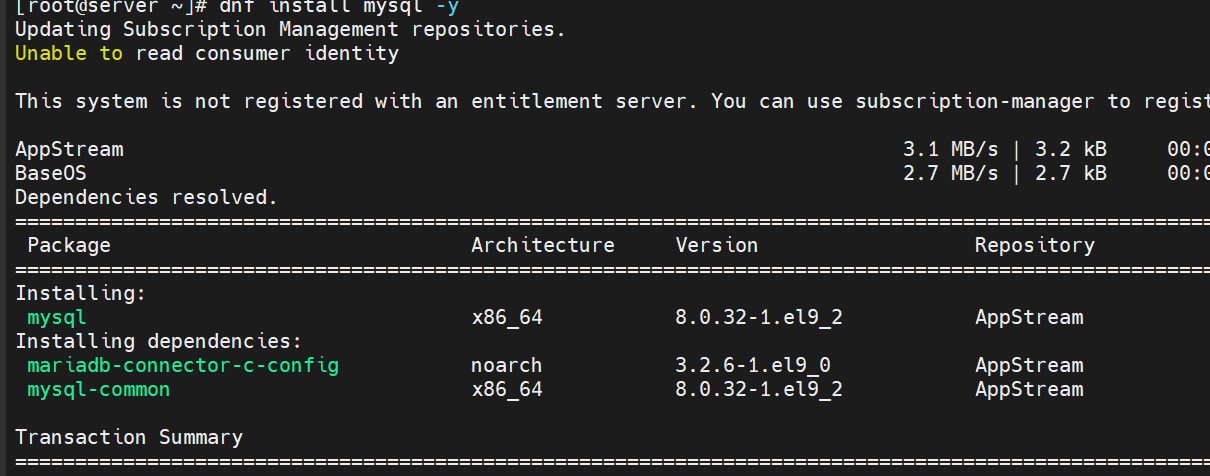
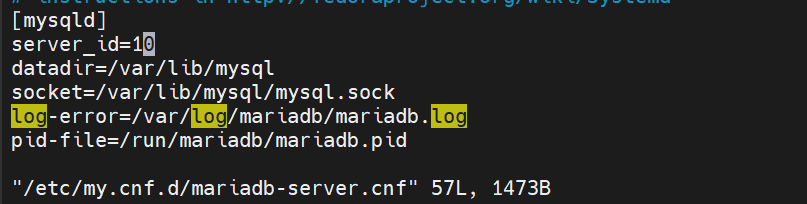
配置 MariaDB(my.cnf)在每台 MariaDB 主机上设置唯一的 server_id(例如一台 10,一台 20)
[root@webserver1+1 ~]# vim /etc/my.cnf.d/mariadb-server.cnf
[mysqld]
server_id=10			#设定数据库所在主机的id标识,在20上设定id为20
datadir=/var/lib/mysql
socket=/var/lib/mysql/mysql.sock
log-error=/var/log/mariadb/mariadb.log
pid-file=/run/mariadb/mariadb.pid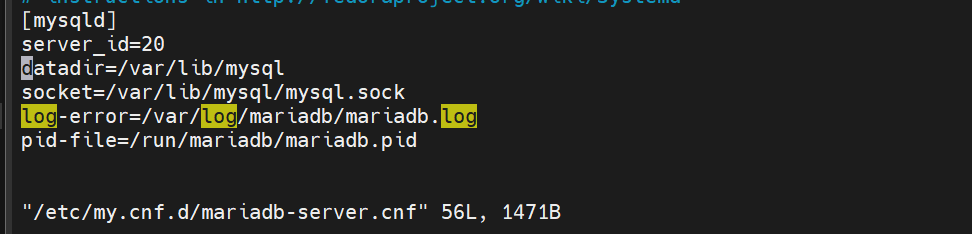
初始化以及开机启动 MariaDB 并确保端口 3306 可达:
(可参考系统服务命令:`systemctl enable --now mariadb`)
4. 创建远程登录用户并授权
#建立远程登录用户并授权
示例中创建了 `swp`,但后续示例授权使用 `lee`,存在不一致。确保创建和授权的用户名一致:
[root@webserver2+1 ~]# mysql
MariaDB [(none)]>  CREATE USER 'swp'@'%' identified by 'swp';
Query OK, 0 rows affected (0.001 sec)

MariaDB [(none)]> CREATE USER 'swp'@'%' identified by 'swp';
MariaDB [(none)]> GRANT ALL ON *.* TO 'swp'@'%';
Query OK, 0 rows affected (0.000 sec)

#测试
[root@webserver2 ~]# mysql -uswp -pswp -h 192.168.0.20   #测试10时修改ip即可
MariaDB [(none)]>
5. HAProxy 四层(TCP)负载配置
在 HAProxy 主机上编`/etc/haproxy/haproxy.cfg`,添加一个 listen 段用于 MariaDB 的 TCP 转发。示例配置:
[root@haproxy ~]# vim /etc/haproxy/haproxy.cfg
listen mariadbcluster
    bind        *:6663
    mode        tcp
    balance     roundrobin
    server haha 192.168.0.10:3306  check inter 3s fall 3 rise 5 weight 1
    server hehe 192.168.0.20:3306  check inter 3s fall 3 rise 5 weight 1
    配置项说明:

- bind *:6663:监听本机 6663 端口(客户端连接到该端口)。
- mode tcp:第四层 TCP 转发,适用于数据库连接。
- balance roundrobin:轮询分发连接。
- server ... check inter 3s fall 3 rise 5:开启健康检查,间隔 3s,连续 3 次失败判定 down,连续 5 次成功判定 up。
- weight:权重(可根据性能调整)。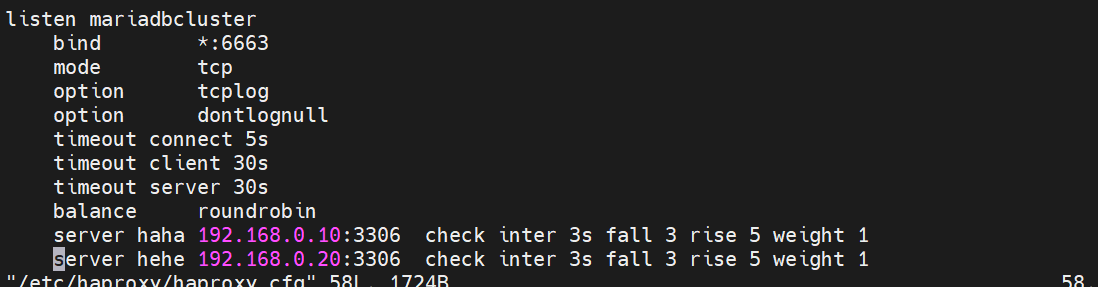
重载/重启 haproxy 生效:
systemctl reload haproxy
# 或
systemctl restart haproxy
检查监听端口:
netstat -antlupe | grep haproxy
# 或使用 ss:
ss -lntp | grep haproxy

tcp        0      0 0.0.0.0:5000            0.0.0.0:*               LISTEN      0          31912      1687/haproxy
tcp        0      0 0.0.0.0:6663            0.0.0.0:*               LISTEN      0          31913      1687/haproxy
udp        0      0 0.0.0.0:35938           0.0.0.0:*                           983        31919      1687/haproxy
udp        0      0 0.0.0.0:50794           0.0.0.0:*                           983        30890      1687/haproxy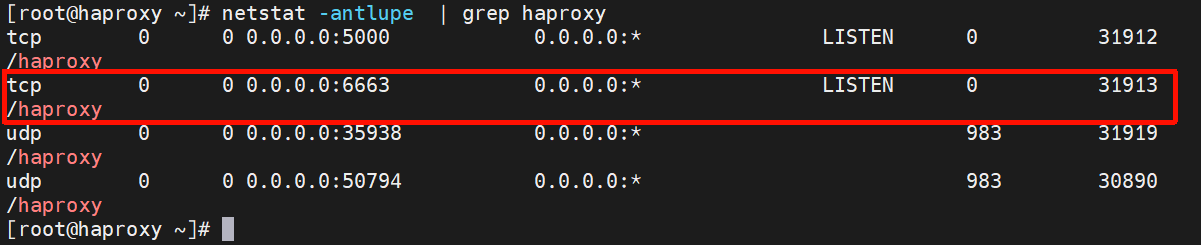
6. 测试连接与验证后端
#测试:
[Administrator.DESKTOP-VJ307M3] ➤ mysql -uswp -pswp -h172.25.254.100 -P 6663
Welcome to the MariaDB monitor.  Commands end with ; or \g.
Your MariaDB connection id is 7
Server version: 10.5.27-MariaDB MariaDB Server

Copyright (c) 2000, 2017, Oracle, MariaDB Corporation Ab and others.

Type 'help;' or '\h' for help. Type '\c' to clear the current input statement.

MariaDB [(none)]> SELECT @@server_id;
+-------------+
| @@server_id |
+-------------+
|          20 |
+-------------+
1 row in set (0.00 sec)

MariaDB [(none)]> quit
Bye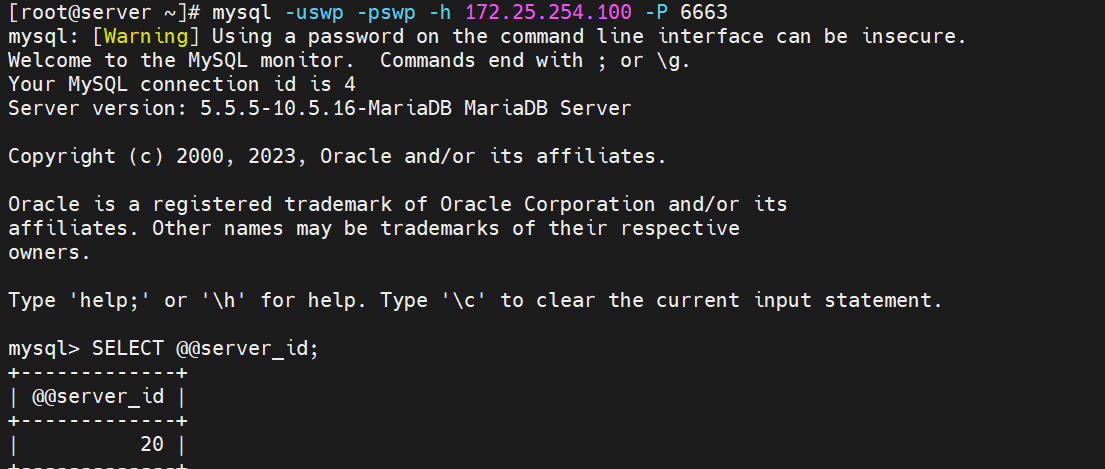
[Administrator.DESKTOP-VJ307M3] ➤ mysql -uswp -pswp -h172.25.254.100 -P 6663
Welcome to the MariaDB monitor.  Commands end with ; or \g.
Your MariaDB connection id is 8
Server version: 10.5.27-MariaDB MariaDB Server

Copyright (c) 2000, 2017, Oracle, MariaDB Corporation Ab and others.

Type 'help;' or '\h' for help. Type '\c' to clear the current input statement.

MariaDB [(none)]> SELECT @@server_id;
+-------------+
| @@server_id |
+-------------+
|          10 |
+-------------+
1 row in set (0.00 sec)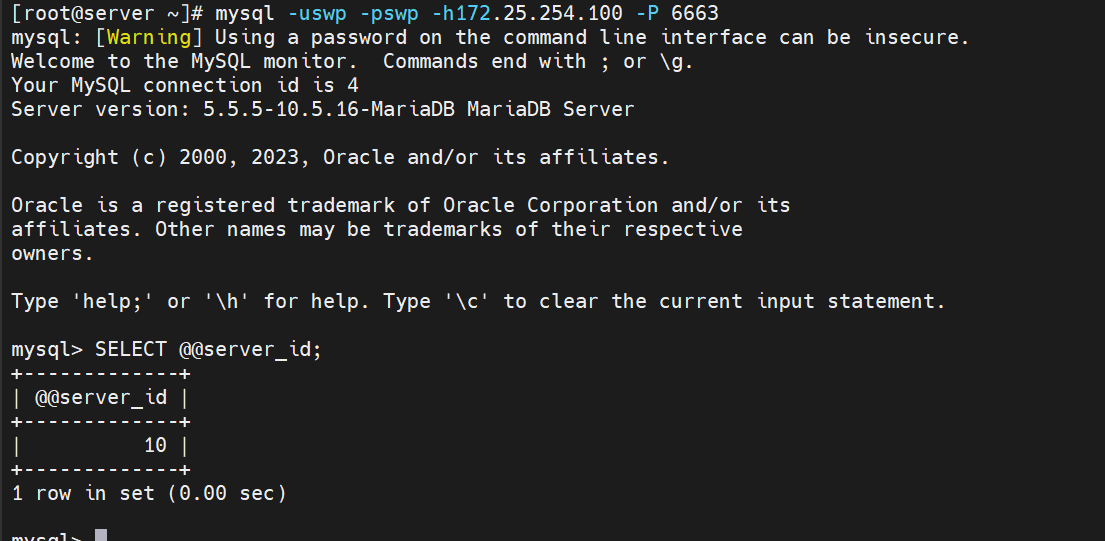
7.backup参数(备用节点)
将其中一台设为 backup,这台只有在主节点不可用时才会被使用:backup 节点不会接收常规流量,仅在其它非备份节点全部 down 时才接手。
[root@haproxy ~]# vim /etc/haproxy/haproxy.cfg
listen mariadbcluster
    bind        *:6663
    mode        tcp
    balance     roundrobin
    server haha 192.168.0.10:3306  check inter 3s fall 3 rise 5 weight 1
    server hehe 192.168.0.20:3306  check inter 3s fall 3 rise 5 weight 1 backup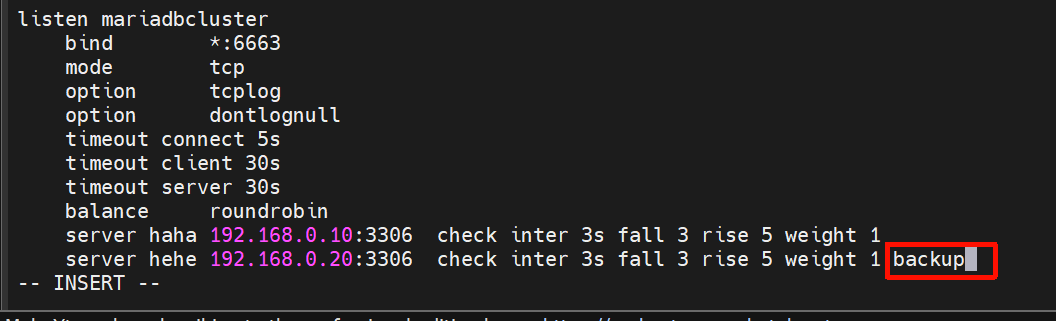
故障切换测试示例流程
-
使用客户端连接 HAProxy 并确认当前连接的 server_id。
-
在被分发到的一个后端(如 server_id=10)执行
systemctl stop mariadb。 -
等待 healthcheck(示例设置 inter 3s fall 3,约需数个检查周期)使该节点被标记为 down。
-
再次从客户端连接 HAProxy,确认连接切换到另一台后端(server_id=20)。
-
恢复原节点(systemctl start mariadb),等待 healthcheck 判定为 up,流量恢复到轮询/权重策略下。
#测试
[Administrator.DESKTOP-VJ307M3] ➤ mysql -ulee -plee -h172.25.254.100 -P 6663
Welcome to the MariaDB monitor. Commands end with ; or \g.
Your MariaDB connection id is 4
Server version: 10.5.27-MariaDB MariaDB ServerCopyright (c) 2000, 2017, Oracle, MariaDB Corporation Ab and others.
Type 'help;' or '\h' for help. Type '\c' to clear the current input statement.
MariaDB [(none)]> SELECT @@server_id;
+-------------+
| @@server_id |
+-------------+
| 10 |
+-------------+
1 row in set (0.00 sec)MariaDB [(none)]> quit
Bye[Administrator.DESKTOP-VJ307M3] ➤ mysql -ulee -plee -h172.25.254.100 -P 6663
Welcome to the MariaDB monitor. Commands end with ; or \g.
Your MariaDB connection id is 4
Server version: 10.5.27-MariaDB MariaDB ServerCopyright (c) 2000, 2017, Oracle, MariaDB Corporation Ab and others.
Type 'help;' or '\h' for help. Type '\c' to clear the current input statement.
MariaDB [(none)]> SELECT @@server_id;
+-------------+
| @@server_id |
+-------------+
| 10 |
+-------------+
1 row in set (0.00 sec)MariaDB [(none)]> quit
Bye#关闭10的mariadb并等待1分钟
[root@webserver1 ~]# systemctl stop mariadb
[Administrator.DESKTOP-VJ307M3] ➤ mysql -ulee -plee -h172.25.254.100 -P 6663
ERROR 2013 (HY000): Lost connection to MySQL server at 'reading initial communication packet', system error: 1 "Operation not permitted" #标识haproxy 没有完成故障转换,需要等待[Administrator.DESKTOP-VJ307M3] ➤ mysql -ulee -plee -h172.25.254.100 -P 6663
Welcome to the MariaDB monitor. Commands end with ; or \g.
Your MariaDB connection id is 11
Server version: 10.5.27-MariaDB MariaDB ServerCopyright (c) 2000, 2017, Oracle, MariaDB Corporation Ab and others.
Type 'help;' or '\h' for help. Type '\c' to clear the current input statement.
MariaDB [(none)]> SELECT @@server_id;
+-------------+
| @@server_id |
+-------------+
| 20 |
+-------------+
1 row in set (0.00 sec)MariaDB [(none)]>
#还原故障主机等待片刻
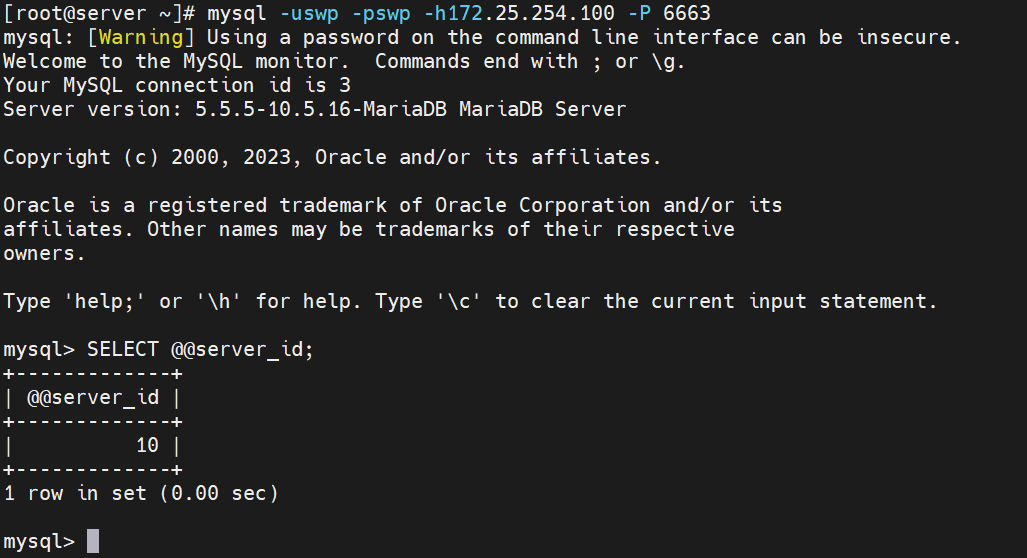
[root@webserver1 ~]# systemctl start mariadb[Administrator.DESKTOP-VJ307M3] ➤ mysql -ulee -plee -h172.25.254.100 -P 6663
Welcome to the MariaDB monitor. Commands end with ; or \g.
Your MariaDB connection id is 4
Server version: 10.5.27-MariaDB MariaDB ServerCopyright (c) 2000, 2017, Oracle, MariaDB Corporation Ab and others.
Type 'help;' or '\h' for help. Type '\c' to clear the current input statement.
MariaDB [(none)]> SELECT @@server_id;
+-------------+
| @@server_id |
+-------------+
| 10 |
+-------------+
1 row in set (0.00 sec)MariaDB [(none)]>
常见问题与排查建议
- 用户与授权不一致:确认创建的用户与授权的用户一致(示例中
swp)。 - 防火墙/安全组:确保 haproxy 和后端 3306 的网络规则允许彼此通信,并允许客户端访问 haproxy 的 6663 端口。
- SELinux:若启用 SELinux,确保 haproxy 允许进行网络转发(或根据需要设置相关布尔值)。
- 长连接与会话粘滞:MySQL 客户端通常建立长连接,haproxy 的四层转发不会做 SQL 级别的会话保持。若需要会话粘滞,请在业务层或��用 read/write 分离设计。
- 健康检查失败:检查后端是否仅在某些阶段接受连接(如需要登录前的初始包),必要时调整
option tcp-check或自定义 check 脚本。 - 权限问题导致连接失败:客户端报错如 "reading initial communication packet" 可能是网络或后端安全设置(如 skip-networking、bind-address、用户权限)问题。
10. 参考常用命令速查
- 检查 haproxy 状态:
bash
systemctl status haproxy
journalctl -u haproxy -f- 查看 haproxy 配置是否有语法错误:
bash
haproxy -c -f /etc/haproxy/haproxy.cfg- 检查端口监听:
bash
ss -lntp | grep haproxy- MariaDB 日志定位:
bash
tail -n 200 /var/log/mariadb/mariadb.log11. 小结与建议
- 第四层(TCP)负载均衡适合将数据库连接转发到后端实例,但并不管理 MySQL 的主从切换或复制一致性。若需要更复杂的 DB 高可用(读写分离、主从自动晋升),建议配合数据库层的复制与仲裁工具(如 MHA、Orchestrator、Galera、ProxySQL 等)。
- 对于生产环境,建议:
- 使用专用的健康检查配置(例如 TCP-level 或 mysql-specific 检查)。
- 在 HAProxy 上启用监控(stats 页面)以便实时观察后端状态。
- 规划好会话保持/重连策略,确保客户端在后端切换时能正确重连并处理事务或连接中断。
11. 小结与建议
- 第四层(TCP)负载均衡适合将数据库连接转发到后端实例,但并不管理 MySQL 的主从切换或复制一致性。若需要更复杂的 DB 高可用(读写分离、主从自动晋升),建议配合数据库层的复制与仲裁工具(如 MHA、Orchestrator、Galera、ProxySQL 等)。
- 对于生产环境,建议:
- 使用专用的健康检查配置(例如 TCP-level 或 mysql-specific 检查)。
- 在 HAProxy 上启用监控(stats 页面)以便实时观察后端状态。
- 规划好会话保持/重连策略,确保客户端在后端切换时能正确重连并处理事务或连接中断。