ListView卡片样式详解
概述
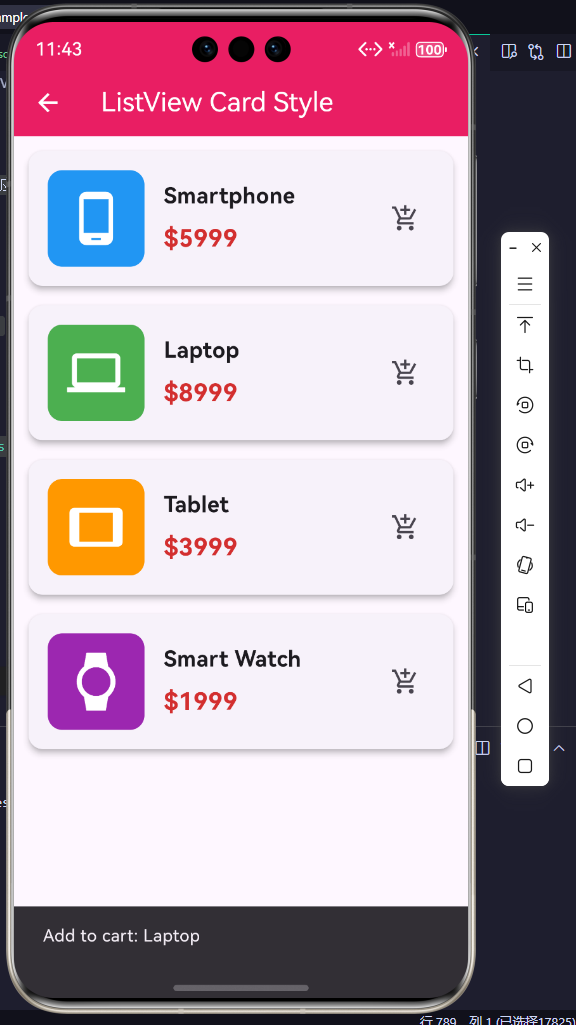
在ListView中使用Card作为列表项是一种常见且美观的设计模式。Card组件提供了圆角、阴影、背景色等装饰效果,能够提升列表的视觉层次和用户体验。
Card样式的优势
|| 特性 | 普通ListTile | Card样式 |
|------|---------------|----------|
| 视觉层次 | 平淡 | 立体感强 |
| 分隔效果 | 需要Divider | 自然分隔 |
| 装饰能力 | 有限 | 丰富 |
| 性能 | 较好 | 稍差 |
| 适用场景 | 简单列表 | 内容丰富的列表 |
基础Card样式
1. 简单Card列表
dart
ListView.builder(
  itemCount: items.length,
  itemBuilder: (context, index) {
    return Card(
      margin: const EdgeInsets.all(8),
      child: ListTile(
        title: Text(items[index]),
      ),
    );
  },
)
2. 带间距的Card
dart
ListView.builder(
  padding: const EdgeInsets.all(16),
  itemCount: items.length,
  itemBuilder: (context, index) {
    return Card(
      margin: const EdgeInsets.only(bottom: 12),
      child: Padding(
        padding: const EdgeInsets.all(16),
        child: Text(items[index]),
      ),
    );
  },
)
实际应用场景
场景1:产品卡片列表
dart
class ProductList extends StatelessWidget {
  final List<Map<String, dynamic>> products = [
    {'name': '智能手机', 'price': 5999, 'desc': '最新旗舰机型', 'icon': Icons.phone_android, 'color': Colors.blue},
    {'name': '笔记本电脑', 'price': 8999, 'desc': '高性能办公本', 'icon': Icons.laptop, 'color': Colors.green},
    {'name': '平板电脑', 'price': 3999, 'desc': '轻薄便携', 'icon': Icons.tablet, 'color': Colors.orange},
    {'name': '智能手表', 'price': 1999, 'desc': '健康监测', 'icon': Icons.watch, 'color': Colors.purple},
  ];

  @override
  Widget build(BuildContext context) {
    return Scaffold(
      appBar: AppBar(title: const Text('产品列表')),
      body: ListView.builder(
        padding: const EdgeInsets.all(12),
        itemCount: products.length,
        itemBuilder: (context, index) {
          final product = products[index];
          return Card(
            elevation: 4,
            margin: const EdgeInsets.only(bottom: 16),
            shape: RoundedRectangleBorder(
              borderRadius: BorderRadius.circular(16),
            ),
            child: Padding(
              padding: const EdgeInsets.all(16),
              child: Row(
                children: [
                  Container(
                    padding: const EdgeInsets.all(16),
                    decoration: BoxDecoration(
                      color: (product['color'] as Color).withOpacity(0.1),
                      borderRadius: BorderRadius.circular(12),
                    ),
                    child: Icon(
                      product['icon'] as IconData,
                      size: 48,
                      color: product['color'] as Color,
                    ),
                  ),
                  const SizedBox(width: 16),
                  Expanded(
                    child: Column(
                      crossAxisAlignment: CrossAxisAlignment.start,
                      children: [
                        Text(
                          product['name'] as String,
                          style: const TextStyle(
                            fontSize: 18,
                            fontWeight: FontWeight.bold,
                          ),
                        ),
                        const SizedBox(height: 4),
                        Text(
                          product['desc'] as String,
                          style: const TextStyle(
                            fontSize: 14,
                            color: Colors.grey,
                          ),
                        ),
                        const SizedBox(height: 8),
                        Text(
                          '¥${product['price']}',
                          style: TextStyle(
                            fontSize: 20,
                            fontWeight: FontWeight.bold,
                            color: Colors.red[700],
                          ),
                        ),
                      ],
                    ),
                  ),
                  IconButton(
                    icon: const Icon(Icons.add_shopping_cart),
                    onPressed: () {
                      ScaffoldMessenger.of(context).showSnackBar(
                        SnackBar(content: Text('已加入购物车:${product['name']}')),
                      );
                    },
                  ),
                ],
              ),
            ),
          );
        },
      ),
    );
  }
}
场景2:文章卡片列表
dart
class ArticleList extends StatelessWidget {
  final List<Map<String, dynamic>> articles = [
    {
      'title': 'Flutter开发入门指南',
      'author': '张三',
      'date': '2024-01-15',
      'views': 1234,
      'likes': 56,
      'image': '📱',
    },
    {
      'title': 'Dart语言高级特性解析',
      'author': '李四',
      'date': '2024-01-14',
      'views': 2345,
      'likes': 89,
      'image': '🎯',
    },
    {
      'title': 'HarmonyOS跨平台开发实践',
      'author': '王五',
      'date': '2024-01-13',
      'views': 3456,
      'likes': 123,
      'image': '🚀',
    },
  ];

  @override
  Widget build(BuildContext context) {
    return Scaffold(
      appBar: AppBar(title: const Text('文章列表')),
      body: ListView.builder(
        padding: const EdgeInsets.all(12),
        itemCount: articles.length,
        itemBuilder: (context, index) {
          final article = articles[index];
          return Card(
            margin: const EdgeInsets.only(bottom: 16),
            clipBehavior: Clip.antiAlias,
            child: InkWell(
              onTap: () {
                ScaffoldMessenger.of(context).showSnackBar(
                  SnackBar(content: Text('查看文章:${article['title']}')),
                );
              },
              child: Column(
                crossAxisAlignment: CrossAxisAlignment.start,
                children: [
                  // 图片区域
                  Container(
                    height: 150,
                    decoration: BoxDecoration(
                      gradient: LinearGradient(
                        colors: [
                          Colors.primaries[index % Colors.primaries.length].shade300,
                          Colors.primaries[index % Colors.primaries.length].shade500,
                        ],
                      ),
                    ),
                    child: Center(
                      child: Text(
                        article['image'] as String,
                        style: const TextStyle(fontSize: 64),
                      ),
                    ),
                  ),
                  // 内容区域
                  Padding(
                    padding: const EdgeInsets.all(16),
                    child: Column(
                      crossAxisAlignment: CrossAxisAlignment.start,
                      children: [
                        Text(
                          article['title'] as String,
                          style: const TextStyle(
                            fontSize: 18,
                            fontWeight: FontWeight.bold,
                          ),
                        ),
                        const SizedBox(height: 8),
                        Row(
                          children: [
                            const Icon(Icons.person, size: 16),
                            const SizedBox(width: 4),
                            Text(article['author'] as String),
                            const SizedBox(width: 16),
                            const Icon(Icons.calendar_today, size: 16),
                            const SizedBox(width: 4),
                            Text(article['date'] as String),
                          ],
                        ),
                        const SizedBox(height: 12),
                        Row(
                          children: [
                            Row(
                              children: [
                                const Icon(Icons.visibility, size: 16),
                                const SizedBox(width: 4),
                                Text('${article['views']}'),
                              ],
                            ),
                            const SizedBox(width: 24),
                            Row(
                              children: [
                                const Icon(Icons.thumb_up, size: 16),
                                const SizedBox(width: 4),
                                Text('${article['likes']}'),
                              ],
                            ),
                          ],
                        ),
                      ],
                    ),
                  ),
                ],
              ),
            ),
          );
        },
      ),
    );
  }
}
场景3:任务卡片列表
dart
class TaskList extends StatefulWidget {
  @override
  _TaskListState createState() => _TaskListState();
}

class _TaskListState extends State<TaskList> {
  final List<Map<String, dynamic>> tasks = [
    {'title': '完成项目文档', 'priority': '高', 'status': '进行中', 'color': Colors.red},
    {'title': '代码审查', 'priority': '中', 'status': '待处理', 'color': Colors.orange},
    {'title': '更新测试用例', 'priority': '低', 'status': '已完成', 'color': Colors.green},
    {'title': '性能优化', 'priority': '高', 'status': '进行中', 'color': Colors.blue},
  ];

  @override
  Widget build(BuildContext context) {
    return Scaffold(
      appBar: AppBar(
        title: const Text('任务列表'),
        backgroundColor: Colors.blue,
        foregroundColor: Colors.white,
      ),
      body: ListView.builder(
        padding: const EdgeInsets.all(12),
        itemCount: tasks.length,
        itemBuilder: (context, index) {
          final task = tasks[index];
          final color = task['color'] as Color;
          return Card(
            elevation: 2,
            margin: const EdgeInsets.only(bottom: 12),
            shape: RoundedRectangleBorder(
              borderRadius: BorderRadius.circular(12),
              side: BorderSide(
                color: color.withOpacity(0.5),
                width: 2,
              ),
            ),
            child: Padding(
              padding: const EdgeInsets.all(16),
              child: Column(
                crossAxisAlignment: CrossAxisAlignment.start,
                children: [
                  Row(
                    children: [
                      Container(
                        padding: const EdgeInsets.symmetric(
                          horizontal: 8,
                          vertical: 4,
                        ),
                        decoration: BoxDecoration(
                          color: color,
                          borderRadius: BorderRadius.circular(12),
                        ),
                        child: Text(
                          task['priority'] as String,
                          style: const TextStyle(
                            color: Colors.white,
                            fontSize: 12,
                          ),
                        ),
                      ),
                      const Spacer(),
                      Container(
                        padding: const EdgeInsets.symmetric(
                          horizontal: 8,
                          vertical: 4,
                        ),
                        decoration: BoxDecoration(
                          color: color.withOpacity(0.2),
                          borderRadius: BorderRadius.circular(12),
                        ),
                        child: Text(
                          task['status'] as String,
                          style: TextStyle(
                            color: color,
                            fontSize: 12,
                            fontWeight: FontWeight.bold,
                          ),
                        ),
                      ),
                    ],
                  ),
                  const SizedBox(height: 12),
                  Text(
                    task['title'] as String,
                    style: const TextStyle(
                      fontSize: 16,
                      fontWeight: FontWeight.bold,
                    ),
                  ),
                  const SizedBox(height: 12),
                  Row(
                    children: [
                      _buildActionButton(
                        icon: Icons.play_arrow,
                        label: '开始',
                        color: Colors.green,
                        onTap: () {},
                      ),
                      const SizedBox(width: 8),
                      _buildActionButton(
                        icon: Icons.check,
                        label: '完成',
                        color: Colors.blue,
                        onTap: () {},
                      ),
                      const SizedBox(width: 8),
                      _buildActionButton(
                        icon: Icons.delete,
                        label: '删除',
                        color: Colors.red,
                        onTap: () {},
                      ),
                    ],
                  ),
                ],
              ),
            ),
          );
        },
      ),
    );
  }

  Widget _buildActionButton({
    required IconData icon,
    required String label,
    required Color color,
    required VoidCallback onTap,
  }) {
    return Expanded(
      child: OutlinedButton.icon(
        icon: Icon(icon, size: 18),
        label: Text(label),
        onPressed: onTap,
        style: OutlinedButton.styleFrom(
          foregroundColor: color,
          side: BorderSide(color: color),
          shape: RoundedRectangleBorder(
            borderRadius: BorderRadius.circular(8),
          ),
        ),
      ),
    );
  }
}
场景4:音乐卡片列表
dart
class MusicList extends StatelessWidget {
  final List<Map<String, dynamic>> songs = [
    {'title': '夜曲', 'artist': '周杰伦', 'album': '十一月的萧邦', 'duration': '3:45', 'cover': '🎵'},
    {'title': '晴天', 'artist': '周杰伦', 'album': '叶惠美', 'duration': '4:29', 'cover': '🎵'},
    {'title': '稻香', 'artist': '周杰伦', 'album': '魔杰座', 'duration': '3:42', 'cover': '🎵'},
    {'title': '青花瓷', 'artist': '周杰伦', 'album': '我很忙', 'duration': '3:59', 'cover': '🎵'},
  ];

  @override
  Widget build(BuildContext context) {
    return Scaffold(
      appBar: AppBar(
        title: const Text('音乐列表'),
        backgroundColor: Colors.purple,
        foregroundColor: Colors.white,
      ),
      body: ListView.builder(
        padding: const EdgeInsets.all(12),
        itemCount: songs.length,
        itemBuilder: (context, index) {
          final song = songs[index];
          return Card(
            margin: const EdgeInsets.only(bottom: 12),
            clipBehavior: Clip.antiAlias,
            child: InkWell(
              onTap: () {
                ScaffoldMessenger.of(context).showSnackBar(
                  SnackBar(content: Text('播放:${song['title']}')),
                );
              },
              child: Container(
                decoration: BoxDecoration(
                  gradient: LinearGradient(
                    colors: [
                      Colors.primaries[index % Colors.primaries.length].shade100,
                      Colors.primaries[index % Colors.primaries.length].shade200,
                    ],
                  ),
                ),
                child: Padding(
                  padding: const EdgeInsets.all(12),
                  child: Row(
                    children: [
                      // 专辑封面
                      Container(
                        width: 64,
                        height: 64,
                        decoration: BoxDecoration(
                          color: Colors.primaries[index % Colors.primaries.length],
                          borderRadius: BorderRadius.circular(8),
                        ),
                        child: Center(
                          child: Text(
                            song['cover'] as String,
                            style: const TextStyle(fontSize: 32),
                          ),
                        ),
                      ),
                      const SizedBox(width: 16),
                      // 歌曲信息
                      Expanded(
                        child: Column(
                          crossAxisAlignment: CrossAxisAlignment.start,
                          children: [
                            Text(
                              song['title'] as String,
                              style: const TextStyle(
                                fontSize: 16,
                                fontWeight: FontWeight.bold,
                              ),
                            ),
                            const SizedBox(height: 4),
                            Text(
                              '${song['artist']} - ${song['album']}',
                              style: const TextStyle(
                                fontSize: 14,
                                color: Colors.grey,
                              ),
                            ),
                          ],
                        ),
                      ),
                      // 时长和操作
                      Column(
                        children: [
                          Text(
                            song['duration'] as String,
                            style: const TextStyle(
                              fontSize: 12,
                              color: Colors.grey,
                            ),
                          ),
                          const SizedBox(height: 4),
                          IconButton(
                            icon: const Icon(Icons.play_circle_filled),
                            color: Colors.primaries[index % Colors.primaries.length],
                            onPressed: () {},
                          ),
                        ],
                      ),
                    ],
                  ),
                ),
              ),
            ),
          );
        },
      ),
    );
  }
}
高级应用
1. 可滑动删除的Card
dart
class SwipeableCard extends StatelessWidget {
  final String title;
  final VoidCallback onDelete;

  const SwipeableCard({
    super.key,
    required this.title,
    required this.onDelete,
  });

  @override
  Widget build(BuildContext context) {
    return Dismissible(
      key: Key(title),
      direction: DismissDirection.endToStart,
      onDismissed: (direction) => onDelete(),
      background: Container(
        alignment: Alignment.centerRight,
        padding: const EdgeInsets.only(right: 20),
        color: Colors.red,
        child: const Icon(Icons.delete, color: Colors.white, size: 32),
      ),
      child: Card(
        child: ListTile(title: Text(title)),
      ),
    );
  }
}
2. 可展开的Card
dart
class ExpandableCard extends StatefulWidget {
  final String title;
  final String content;
  final List<Widget> actions;

  const ExpandableCard({
    super.key,
    required this.title,
    required this.content,
    required this.actions,
  });

  @override
  _ExpandableCardState createState() => _ExpandableCardState();
}

class _ExpandableCardState extends State<ExpandableCard> {
  bool _expanded = false;

  @override
  Widget build(BuildContext context) {
    return Card(
      elevation: _expanded ? 8 : 2,
      margin: const EdgeInsets.all(8),
      child: Column(
        children: [
          ListTile(
            title: Text(widget.title),
            trailing: Icon(
              _expanded ? Icons.expand_less : Icons.expand_more,
            ),
            onTap: () {
              setState(() {
                _expanded = !_expanded;
              });
            },
          ),
          if (_expanded)
            Padding(
              padding: const EdgeInsets.all(16),
              child: Column(
                crossAxisAlignment: CrossAxisAlignment.start,
                children: [
                  Text(widget.content),
                  const SizedBox(height: 16),
                  Wrap(
                    spacing: 8,
                    runSpacing: 8,
                    children: widget.actions,
                  ),
                ],
              ),
            ),
        ],
      ),
    );
  }
}
性能优化
1. 使用const构造函数
dart
Card(
  margin: const EdgeInsets.all(8),  // const
  child: const ListTile(title: Text('固定内容')),
)
2. 避免嵌套过深
dart
// ❌ 不推荐:嵌套过深
Card(
  child: Container(
    child: Padding(
      child: Column(
        children: [
          Container(
            child: ...,
          ),
        ],
      ),
    ),
  ),
)

// ✓ 推荐:合理使用参数
Card(
  margin: const EdgeInsets.all(8),
  padding: const EdgeInsets.all(16),
  child: ListTile(title: Text('简化结构')),
)
3. 使用clipBehavior
dart
Card(
  clipBehavior: Clip.antiAlias,  // 避免内容溢出
  child: ...,
)
常见问题
Q1: Card和ListTile如何选择?
- 简单列表项:使用ListTile
- 内容丰富、需要装饰的列表项:使用Card包裹ListTile或自定义内容
Q2: 如何实现卡片间的间距?
使用margin参数设置Card的外边距。
Q3: 如何让Card可点击?
使用InkWell包裹Card,或在Card内部使用可点击组件。
总结
ListView + Card组合是一种强大的UI模式:
- ✅ 提供美观的视觉效果
- ✅ 支持丰富的装饰和交互
- ✅ 适合展示复杂内容
- ✅ 略低于普通列表的性能
合理使用Card样式,可以显著提升应用的视觉品质。