Decimal.js 完全指南:解决前端数值精度痛点的核心方案
- 一、简介
- 二、安装
- 三、原生精确度与Decimal对比
- 四、静态方法-普通运算
- 五、静态方法-科学计算
- 六、静态方法-三角函数(参数为弧度)
- 七、静态方法-双曲函数(参数为弧度)
- 八、静态方法-工具方法
- [九、静态属性,可使用Decimal.set() 设置属性](#九、静态属性,可使用Decimal.set() 设置属性)
- 十、实例方法-普通运算
- 十一、实例方法-科学计算
- 十二、实例方法-三角函数(实例值为弧度)
- 十三、实例方法-双曲函数(实例值为弧度)
- [十四、实例方法-比较 / 判断](#十四、实例方法-比较 / 判断)
- 十五、实例方法-格式转换
- 十六、实例属性
夸克资源分享:
表情包:https://pan.quark.cn/s/5b9ddeb237fe
工具箱:https://pan.quark.cn/s/aa2d6a730482,图吧、美蛋、路遥、入梦等
Fiddler Everywhere抓包:https://pan.quark.cn/s/6b1e2fbae019,
Adobe:https://pan.quark.cn/s/13e39cfeaadb,先看安装教程
JetBranis开发者工具:https://pan.quark.cn/s/16e94dcff1f7,先看安装教程下的jetbra教程
逆向工具:https://pan.quark.cn/s/50e93c8ca54c
数据库工具:https://pan.quark.cn/s/2f14eda13d24
kettle:https://pan.quark.cn/s/62f320634c75
前端项目搭建集锦:https://blog.csdn.net/randy521520/article/details/146998467
前端接单》前端接单 》前端接单: https://www.goofish.com/item?id=1008883794643
一、简介
Decimal 是为解决原生 Number 类型精度缺陷而生的高精度数值处理方案。前端原生 Number 遵循 IEEE 754 双精度浮点数标准,无法精确表示 0.1、0.2 等十进制小数,导致 0.1+0.2=0.30000000000000004 这类精度偏差,这在高精度敏感场景中是不可接受的,Decimal 由此成为核心解决方案。
需要注意的是,前端无内置 Decimal 类型,需依赖第三方库实现,主流选择包括功能全面的 decimal.js、轻量简洁的 bignumber.js 以及轻量化的 decimal.js-light。使用时需先通过 npm 或 yarn 安装,初始化实例时推荐传入字符串格式的数值(避免原生 Number 提前丢失精度),再通过库提供的方法完成高精度运算,运算后可通过 toString、toFixed 等方法实现格式转换与格式化。
Decimal 的核心优势在于以十进制存储数值,彻底规避二进制转换带来的精度偏差,且实例具有不可变性,运算后返回新实例,保证数据安全。其典型应用场景集中在金融财务(金额计算、转账结算)、税务计算(税率换算、应纳税额统计)等对精度要求极高的领域。使用时需注意避免入参为原生不精确 Number、避免混合类型运算,按需选择合适的库即可满足各类高精度需求。
官网地址:https://mikemcl.github.io/decimal.js/
二、安装
javascript
yarn install decimal.js三、原生精确度与Decimal对比
1.四则运算、取余精确度差异
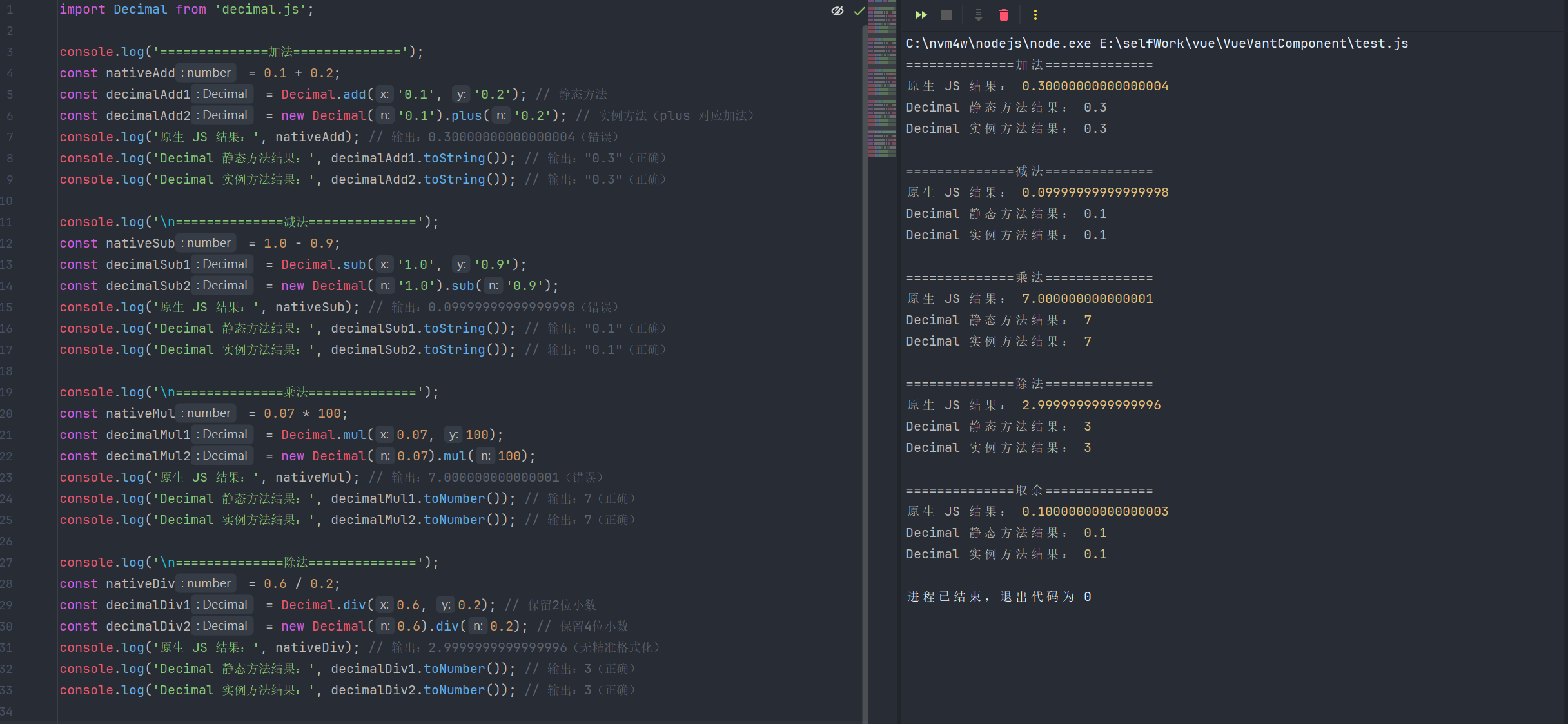
javascript
import Decimal from 'decimal.js';

console.log('==============加法==============');
const nativeAdd = 0.1 + 0.2;
const decimalAdd1 = Decimal.add('0.1', '0.2'); // 静态方法
const decimalAdd2 = new Decimal('0.1').plus('0.2'); // 实例方法(plus 对应加法)
console.log('原生 JS 结果:', nativeAdd); // 输出:0.30000000000000004(错误)
console.log('Decimal 静态方法结果:', decimalAdd1.toString()); // 输出:"0.3"(正确)
console.log('Decimal 实例方法结果:', decimalAdd2.toString()); // 输出:"0.3"(正确)

console.log('\n==============减法==============');
const nativeSub = 1.0 - 0.9;
const decimalSub1 = Decimal.sub('1.0', '0.9');
const decimalSub2 = new Decimal('1.0').sub('0.9');
console.log('原生 JS 结果:', nativeSub); // 输出:0.09999999999999998(错误)
console.log('Decimal 静态方法结果:', decimalSub1.toString()); // 输出:"0.1"(正确)
console.log('Decimal 实例方法结果:', decimalSub2.toString()); // 输出:"0.1"(正确)

console.log('\n==============乘法==============');
const nativeMul = 0.07 * 100;
const decimalMul1 = Decimal.mul(0.07, 100);
const decimalMul2 = new Decimal(0.07).mul(100);
console.log('原生 JS 结果:', nativeMul); // 输出:7.000000000000001(错误)
console.log('Decimal 静态方法结果:', decimalMul1.toNumber()); // 输出:7(正确)
console.log('Decimal 实例方法结果:', decimalMul2.toNumber()); // 输出:7(正确)

console.log('\n==============除法==============');
const nativeDiv = 0.6 / 0.2;
const decimalDiv1 = Decimal.div(0.6, 0.2); // 保留2位小数
const decimalDiv2 = new Decimal(0.6).div(0.2); // 保留4位小数
console.log('原生 JS 结果:', nativeDiv); // 输出:2.9999999999999996(无精准格式化)
console.log('Decimal 静态方法结果:', decimalDiv1.toNumber()); // 输出:3(正确)
console.log('Decimal 实例方法结果:', decimalDiv2.toNumber()); // 输出:3(正确)

console.log('\n==============取余==============');
const nativeMod = 1.1 % 0.2;
const decimalMod1 = Decimal.mod(1.1, 0.2);
const decimalMod2 = new Decimal(1.1).mod(0.2);
console.log('原生 JS 结果:', nativeMod); // 输出:0.10000000000000003(错误,预期 0.1)
console.log('Decimal 静态方法结果:', decimalMod1.toNumber()); // 输出:0.1(正确)
console.log('Decimal 实例方法结果:', decimalMod2.toNumber()); // 输出:0.1(正确)
2.幂运算(次方 / 开方)精确度差异
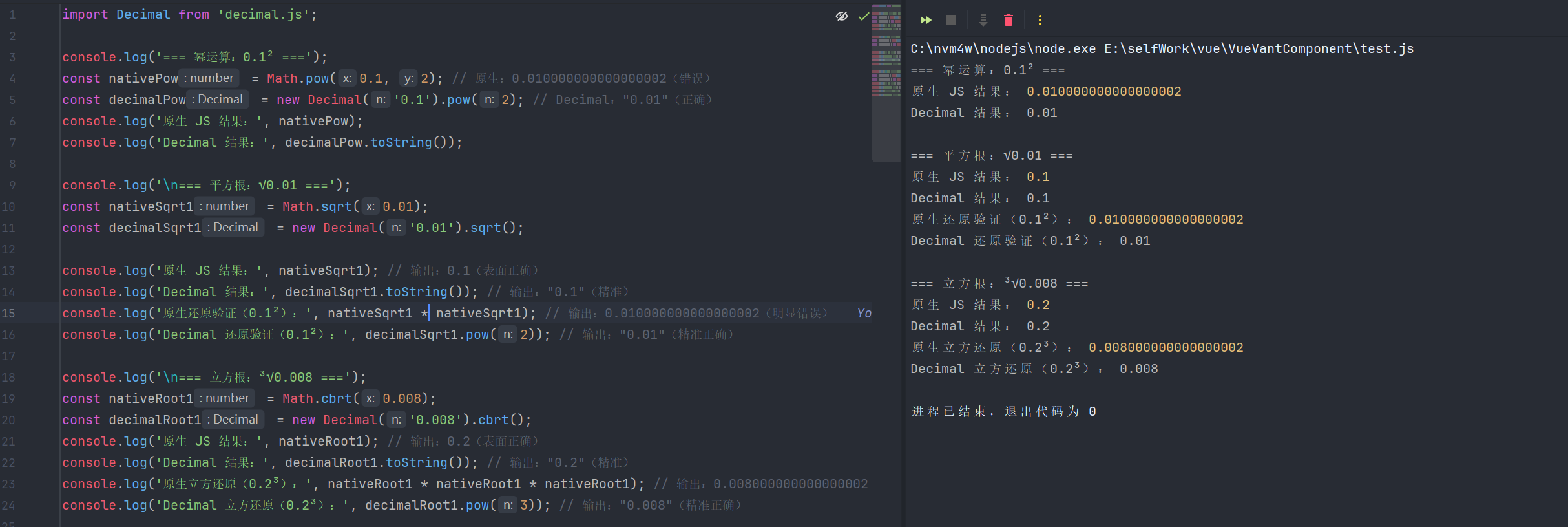
javascript
import Decimal from 'decimal.js';

console.log('=== 幂运算:0.1² ===');
const nativePow = Math.pow(0.1, 2); // 原生:0.010000000000000002(错误)
const decimalPow = new Decimal('0.1').pow(2); // Decimal:"0.01"(正确)
console.log('原生 JS 结果:', nativePow);
console.log('Decimal 结果:', decimalPow.toString());

console.log('\n=== 平方根:√0.01 ===');
const nativeSqrt1 = Math.sqrt(0.01);
const decimalSqrt1 = new Decimal('0.01').sqrt();

console.log('原生 JS 结果:', nativeSqrt1); // 输出:0.1(表面正确)
console.log('Decimal 结果:', decimalSqrt1.toString()); // 输出:"0.1"(精准)
console.log('原生还原验证(0.1²):', nativeSqrt1 * nativeSqrt1); // 输出:0.010000000000000002(明显错误)
console.log('Decimal 还原验证(0.1²):', decimalSqrt1.pow(2)); // 输出:"0.01"(精准正确)

console.log('\n=== 立方根:³√0.008 ===');
const nativeRoot1 = Math.cbrt(0.008);
const decimalRoot1 = new Decimal('0.008').cbrt();
console.log('原生 JS 结果:', nativeRoot1); // 输出:0.2(表面正确)
console.log('Decimal 结果:', decimalRoot1.toString()); // 输出:"0.2"(精准)
console.log('原生立方还原(0.2³):', nativeRoot1 * nativeRoot1 * nativeRoot1); // 输出:0.008000000000000002(明显错误)
console.log('Decimal 立方还原(0.2³):', decimalRoot1.pow(3)); // 输出:"0.008"(精准正确)
3.三角函数精确度差异
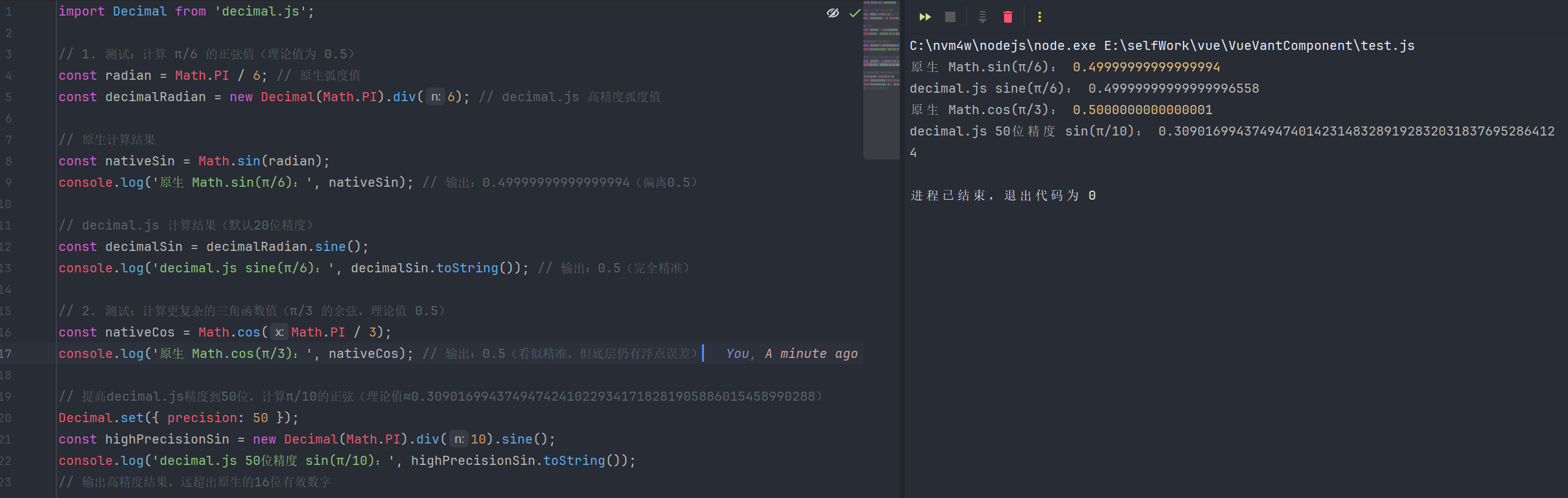
javascript
import Decimal from 'decimal.js';

// 1. 测试:计算 π/6 的正弦值(理论值为 0.5)
const radian = Math.PI / 6; // 原生弧度值
const decimalRadian = new Decimal(Math.PI).div(6); // decimal.js 高精度弧度值

// 原生计算结果
const nativeSin = Math.sin(radian);
console.log('原生 Math.sin(π/6):', nativeSin); // 输出:0.49999999999999994(偏离0.5)

// decimal.js 计算结果(默认20位精度)
const decimalSin = decimalRadian.sine();
console.log('decimal.js sine(π/6):', decimalSin.toString()); // 输出:0.5(完全精准)

// 2. 测试:计算更复杂的三角函数值(π/3 的余弦,理论值 0.5)
const nativeCos = Math.cos(Math.PI / 3);
console.log('原生 Math.cos(π/3):', nativeCos); // 输出:0.5(看似精准,但底层仍有浮点误差)

// 提高decimal.js精度到50位,计算π/10的正弦(理论值≈0.30901699437494742410229341718281905886015458990288)
Decimal.set({ precision: 50 });
const highPrecisionSin = new Decimal(Math.PI).div(10).sine();
console.log('decimal.js 50位精度 sin(π/10):', highPrecisionSin.toString());
// 输出高精度结果,远超出原生的16位有效数字
四、静态方法-普通运算
| 函数名 | 描述 | 案例 |
|---|---|---|
| Decimal.add() | 多个数值求和 | Decimal.add(0.1, 0.2);// 返回 Decimal 实例 |
| Decimal.sub() | 两个数值相减 | Decimal.sub(1.0, 0.9);// 返回 Decimal 实例 |
| Decimal.mul() | 多个数值相乘 | Decimal.mul(0.1, 0.2);// 返回 Decimal 实例 |
| Decimal.div() | 两个数值相除 | Decimal.div(1, 3);// 返回 Decimal 实例 |
| Decimal.mod() | 取模运算(余数) | Decimal.mod(10, 3);// 返回 Decimal 实例 |
| Decimal.max() | 取多个数值的最大值 | Decimal.max(1.2, 3.4, 2.1);// 返回 Decimal 实例 |
| Decimal.min() | 取多个数值的最小值 | Decimal.min(1.2, 3.4, 2.1);// 返回 Decimal 实例 |
| Decimal.abs() | 取绝对值 | Decimal.abs(-123.45);// 返回 Decimal 实例 |
| Decimal.round() | 四舍五入(默认保留 0 位小数) | Decimal.round(123.456, 2);// 返回 Decimal 实例 |
| Decimal.ceil() | 向上取整 | Decimal.ceil(123.1);// 返回 Decimal 实例 |
| Decimal.floor() | 向下取整 | Decimal.floor(123.9);// 返回 Decimal 实例 |
| Decimal.trunc() | 截断取整(直接去掉小数部分) | Decimal.trunc(123.999);// 返回 Decimal 实例 |
| Decimal.sign() | 返回符号(1 = 正,-1 = 负,0 = 零) | Decimal.sign(-456);// 返回 Decimal 实例 |
| Decima.clamp() | 限制数值范围(静态方法),参数为(value, min, max),返回值被限定在 min, max 区间内 | Decimal.clamp(5, 1, 4);// 返回 Decimal 实例,即超过最大值,取最大值 |
| Decimal.sum() | 多个数值求和 | Decimal.sum(0.1, 0.2, 0.3);// 返回 Decimal 实例 |
五、静态方法-科学计算
| 函数名 | 描述 | 案例 |
|---|---|---|
| Decimal.pow() | 幂运算(base^exponent) | Decimal.pow(2, 10); // 返回 Decimal 实例 |
| Decimal.sqrt() | 开平方 | Decimal.sqrt(16); // 返回 Decimal 实例 |
| Decimal.cbrt() | 开立方 | Decimal.cbrt(8); // 返回 Decimal 实例 |
| Decimal.hypot() | 平方和的平方根(√(a²+b²+...)) | Decimal.hypot(3, 4); // 返回 Decimal 实例 |
| Decimal.exp() | 自然指数(e^x,e≈2.71828) | Decimal.exp(1); // 返回 Decimal 实例 |
| Decimal.ln() | 自然对数(ln(x)) | Decimal.ln(Math.E); // 返回 Decimal 实例 |
| Decimal.log() | 自定义任意底数对数 | Decimal.log(25, 5); // 返回 Decimal 实例 |
| Decimal.log10() | 以10为底的对数 | Decimal.log10(100); // 返回 Decimal 实例 |
| Decimal.log2() | 以2为底的对数 | Decimal.log2(8); // 返回 Decimal 实例 |
| Decimal.random() | 生成0到1之间的随机数(可指定精度) | Decimal.random(2); // 返回 Decimal 实例 |
六、静态方法-三角函数(参数为弧度)
| 函数名 | 描述 | 案例 |
|---|---|---|
| Decimal.sin() | 正弦函数 sin(x) | Decimal.sin(Decimal.pi/2); // 返回 Decimal 实例 |
| Decimal.cos() | 余弦函数 cos(x) | Decimal.cos(0); // 返回 Decimal 实例 |
| Decimal.tan() | 正切函数 tan(x) | Decimal.tan(Decimal.pi/4); // 返回 Decimal 实例 |
| Decimal.asin() | 反正弦函数 arcsin(x)(x∈-1,1) | Decimal.asin(1); // 返回 Decimal 实例 |
| Decimal.acos() | 反余弦函数 arccos(x)(x∈-1,1) | Decimal.acos(1); // 返回 Decimal 实例 |
| Decimal.atan() | 反正切函数 arctan(x) | Decimal.atan(1); // 返回 Decimal 实例 |
| Decimal.atan2() | 反正切函数 atan2(y, x) | Decimal.atan2(1, 1); // 返回 Decimal 实例 |
七、静态方法-双曲函数(参数为弧度)
| 函数名 | 描述 | 案例 |
|---|---|---|
| Decimal.sinh() | 双曲正弦 sinh(x) | Decimal.sinh(0);// 返回 Decimal 实例 |
| Decimal.cosh() | 双曲余弦 cosh(x) | Decimal.cosh(0); // 返回 Decimal 实例 |
| Decimal.tanh() | 双曲正切 tanh(x) | Decimal.tanh(0); // 返回 Decimal 实例 |
| Decimal.asinh() | 反双曲正弦 asinh(x) | Decimal.asinh(0); // 返回 Decimal 实例 |
| Decimal.acosh() | 反双曲余弦 acosh(x)(x≥1) | Decimal.acosh(1); // 返回 Decimal 实例 |
| Decimal.atanh() | 反双曲正切 atanh(x)(x<1) | Decimal.atanh(0);// 返回 Decimal 实例 |
八、静态方法-工具方法
| 函数名 | 描述 | 案例 |
|---|---|---|
| Decimal.isDecimal() | 判断是否为 Decimal 实例 | const num = new Decimal('123'); Decimal.isDecimal(num); // 返回 true |
| Decimal.clone() | 克隆 Decimal 构造函数(可自定义配置) | const Decimal2 = Decimal.clone({ precision: 20 }); new Decimal2(1/3); // 保留20位精度 |
| Decimal.set() | 全局设置 Decimal 配置(精度、舍入模式等) | Decimal.set({ precision: 10, rounding: Decimal.ROUND_UP }); |
| Decimal.noConflict() | 释放 Decimal 变量名(避免冲突) | const D = Decimal.noConflict(); // 后续用D代替Decimal |
九、静态属性,可使用Decimal.set() 设置属性
| 属性名 | 描述 | 案例 |
|---|---|---|
| Decimal.precision | 全局计算精度(默认20位),控制数值运算的小数/有效数字保留位数 | Decimal.set({ precision: 10 }); new Decimal(1).div(3).toString();// 输出 "0.3333333333" |
| Decimal.rounding | 全局舍入模式(默认ROUND_HALF_UP),指定数值取舍的规则 | Decimal.set({ rounding: Decimal.ROUND_UP }); new Decimal(1.1).div(2).toString();// 输出 "0.6" |
| Decimal.minE | 最小可表示指数(默认-9e15),低于该指数的数值会被视为0 | Decimal.set({ minE: -5 }); new Decimal(1e-6).toString();// 输出 "0" |
| Decimal.maxE | 最大可表示指数(默认9e15),高于该指数的数值会抛出范围错误 | Decimal.set({ maxE: 3 }); new Decimal(1e4);// 抛出 RangeError: Number out of range |
| Decimal.toExpNeg | 切换为科学计数法的最小指数(默认-7),数值指数≤此值时用科学计数法显示 | Decimal.set({ toExpNeg: -2 }); new Decimal(0.01).toString();// 输出 "0.01";new Decimal(0.009).toString();// 输出 "9e-3" |
| Decimal.toExpPos | 切换为科学计数法的最大指数(默认20),数值指数≥此值时用科学计数法显示 | Decimal.set({ toExpPos: 2 }); new Decimal(100).toString();// 输出 "100";new Decimal(1000).toString();// 输出 "1e+3" |
| Decimal.modulo | 取模运算的模式(默认TRUNC),控mod()方法的余数符号规则 | Decimal.set({ modulo: Decimal.EUCLID }); Decimal.mod(-5, 3).toString();// 输出 "1"(欧几里得取模,余数为正) |
| Decimal.crypto | 启用加密安全的随机数生成(默认false),开启后random()更安全 | Decimal.set({ crypto: true }); Decimal.random(2).toString();// 输出加密级随机数,如 "0.78" |
| Decimal.ROUND_UP | 舍入模式:向远离0的方向舍入(进一法) | new Decimal(1.234).toFixed(2, Decimal.ROUND_UP);// 输出 "1.24" |
| Decimal.ROUND_DOWN | 舍入模式:向靠近0的方向舍入(去尾法) | new Decimal(1.239).toFixed(2, Decimal.ROUND_DOWN);// 输出 "1.23" |
| Decimal.ROUND_CEIL | 舍入模式:向正无穷方向舍入 | new Decimal(-1.234).toFixed(2, Decimal.ROUND_CEIL);// 输出 "-1.23" |
| Decimal.ROUND_FLOOR | 舍入模式:向负无穷方向舍入 | new Decimal(1.239).toFixed(2, Decimal.ROUND_FLOOR);// 输出 "1.23" |
| Decimal.ROUND_HALF_UP | 舍入模式:四舍五入(0.5向上舍入),默认模式 | new Decimal(1.235).toFixed(2, Decimal.ROUND_HALF_UP);// 输出 "1.24" |
| Decimal.ROUND_HALF_DOWN | 舍入模式:五舍六入(0.5向下舍入) | new Decimal(1.235).toFixed(2, Decimal.ROUND_HALF_DOWN);// 输出 "1.23" |
| Decimal.ROUND_HALF_EVEN | 舍入模式:银行家舍入(0.5向最近偶数舍入) | new Decimal(1.235).toFixed(2, Decimal.ROUND_HALF_EVEN);// 输出 "1.24";new Decimal(1.245).toFixed(2, Decimal.ROUND_HALF_EVEN);// 输出 "1.24" |
| Decimal.ROUND_HALF_CEIL | 舍入模式:0.5向正无穷舍入 | new Decimal(-1.235).toFixed(2,Decimal.ROUND_HALF_CEIL);// 输出 "-1.23" |
| Decimal.ROUND_HALF_FLOOR | 舍入模式:0.5向负无穷舍入 | new Decimal(-1.235).toFixed(2, Decimal.ROUND_HALF_FLOOR);// 输出 "-1.24" |
| Decimal.EUCLID | 取模运算模式:欧几里得取模(余数与除数同号) | Decimal.mod(5, -3, Decimal.EUCLID).toString();// 输出 "-1"(余数与除数-3同号) |
十、实例方法-普通运算
| 函数名 | 别名 | 描述 | 案例 |
|---|---|---|---|
| new Decimal(x).plus(y) | add | 实例值x与目标值y相加 | new Decimal(0.1).plus(0.2); // 返回 Decimal 实例 |
| new Decimal(x).minus(y) | sub | 实例值x与目标值y相减 | new Decimal(1.0).minus(0.9); // 返回 Decimal 实例 |
| new Decimal(x).times(y) | mul | 实例值x与目标值y相乘 | new Decimal(0.1).times(0.2); // 返回 Decimal 实例 |
| new Decimal(x).dividedBy(y) | div | 实例值x与目标值y相除 | new Decimal(1).dividedBy(3); // 返回 Decimal 实例 |
| new Decimal(x).dividedToIntegerBy(y) | divToInt | 实例值x除以目标值y,返回整数结果(截断小数) | new Decimal(7).dividedToIntegerBy(3); // 返回 Decimal 实例 |
| new Decimal(x).modulo(y) | mod | 实例值x对目标值y取模(求余数) | new Decimal(10).modulo(3); // 返回 Decimal 实例 |
| new Decimal(x).toPower(y) | pow | 实例值x的y次幂运算(x^y) | new Decimal(2).toPower(10); // 返回 Decimal 实例 |
| new Decimal(x).absoluteValue() | abs | 获取实例值x的绝对值 | new Decimal(-123.45).absoluteValue(); // 返回 Decimal 实例 |
| new Decimal(x).negated() | neg | 获取实例值x的相反数(取负) | new Decimal(123.45).negated(); // 返回 Decimal 实例 |
| new Decimal(x).ceil() | 无 | 实例值x向上取整 | new Decimal(123.1).ceil(); // 返回 Decimal 实例 |
| new Decimal(x).floor() | 无 | 实例值x向下取整 | new Decimal(123.9).floor(); // 返回 Decimal 实例 |
| new Decimal(x).round(y) | 无 | 实例值x四舍五入(y为保留小数位数) | new Decimal(123.456).round(2); // 返回 Decimal 实例 |
| new Decimal(x).truncated() | trunc | 实例值x截断取整(去掉小数部分) | new Decimal(123.999).truncated(); // 返回 Decimal 实例 |
| new Decimal(x).toNearest(y) | 无 | 实例值x按步长y舍入 | new Decimal(1.23).toNearest(0.1); // 返回 Decimal 实例 |
| new Decimal(x).clampedTo(min, max) | clamp | 实例值x限制在min, max区间 | new Decimal(5).clampedTo(1, 4); // 返回 Decimal 实例 |
十一、实例方法-科学计算
| 函数名 | 别名 | 描述 | 案例 |
|---|---|---|---|
| new Decimal(x).squareRoot() | sqrt | 计算实例值x的平方根 | new Decimal(16).squareRoot(); // 返回 Decimal 实例 |
| new Decimal(x).cubeRoot() | cbrt | 计算实例值x的立方根 | new Decimal(8).cubeRoot();// 返回 Decimal 实例 |
| new Decimal(x).naturalExponential() | exp | 计算实例值x的自然指数(e^x) | new Decimal(1).naturalExponential(); // 返回 Decimal 实例 |
| new Decimal(x).naturalLogarithm() | ln | 计算实例值x的自然对数(ln(x)) | new Decimal(Math.E).naturalLogarithm();// 返回 Decimal 实例 |
| new Decimal(x).logarithm(y) | log | 计算实例值x以y为底的对数 | new Decimal(25).logarithm(5); // 返回 Decimal 实例 |
十二、实例方法-三角函数(实例值为弧度)
| 函数名 | 别名 | 描述 | 案例 |
|---|---|---|---|
| new Decimal(x).sine() | sin | 计算实例值x的正弦值 | new Decimal(Decimal.pi/2).sine(); // 返回 Decimal 实例 |
| new Decimal(x).cosine() | cos | 计算实例值x的余弦值 | new Decimal(0).cosine(); // 返回 Decimal 实例 |
| new Decimal(x).tangent() | tan | 计算实例值x的正切值 | new Decimal(Decimal.pi/4).tangent();// 返回 Decimal 实例 |
| new Decimal(x).inverseSine() | asin | 计算实例值x的反正弦值(x∈-1,1) | new Decimal(1).inverseSine(); // 返回 Decimal 实例 |
| new Decimal(x).inverseCosine() | acos | 计算实例值x的反余弦值(x∈-1,1) | new Decimal(1).inverseCosine();// 返回 Decimal 实例 |
| new Decimal(x).inverseTangent() | atan | 计算实例值x的反正切值 | new Decimal(1).inverseTangent();// 返回 Decimal 实例 |
十三、实例方法-双曲函数(实例值为弧度)
| 函数名 | 别名 | 描述 | 案例 |
|---|---|---|---|
| new Decimal(x).hyperbolicSine() | sinh | 计算实例值x的双曲正弦值 | new Decimal(0).hyperbolicSine(); // 返回 Decimal 实例 |
| new Decimal(x).hyperbolicCosine() | cosh | 计算实例值x的双曲余弦值 | new Decimal(0).hyperbolicCosine(); // 返回 Decimal 实例 |
| new Decimal(x).hyperbolicTangent() | tanh | 计算实例值x的双曲正切值 | new Decimal(0).hyperbolicTangent(); // 返回 Decimal 实例 |
| new Decimal(x).inverseHyperbolicSine() | asinh | 计算实例值x的反双曲正弦值 | new Decimal(0).inverseHyperbolicSine(); // 返回 Decimal 实例 |
| new Decimal(x).inverseHyperbolicCosine() | acosh | 计算实例值x的反双曲余弦值(x≥1) | new Decimal(1).inverseHyperbolicCosine(); // 返回 Decimal 实例 |
| new Decimal(x).inverseHyperbolicTangent() | atanh | 计算实例值x的反双曲正切值(x<1) | new Decimal(0).inverseHyperbolicTangent(); // 返回 Decimal 实例 |
十四、实例方法-比较 / 判断
| 函数名 | 别名 | 描述 | 案例 |
|---|---|---|---|
| new Decimal(x).comparedTo(y) | cmp | 实例值x与y比较(1/-1/0) | new Decimal(3).comparedTo(5);// 输出 -1; new Decimal(5).comparedTo(3);// 输出 1 |
| new Decimal(x).equals(y) | eq | 判断x是否等于y | new Decimal(0.1).plus(0.2).equals(0.3);// 输出 true |
| new Decimal(x).greaterThan(y) | gt | 判断x是否大于y | new Decimal(5).greaterThan(3);// 输出 true |
| new Decimal(x).greaterThanOrEqualTo(y) | gte | 判断x是否大于等于y | new Decimal(3).greaterThanOrEqualTo(3);// 输出 true |
| new Decimal(x).lessThan(y) | lt | 判断x是否小于y | new Decimal(3).lessThan(5);// 输出 true |
| new Decimal(x).lessThanOrEqualTo(y) | lte | 判断x是否小于等于y | new Decimal(5).lessThanOrEqualTo(5);// 输出 true |
| new Decimal(x).isFinite() | 无 | 判断x是否为有限数 | new Decimal(1/0).isFinite();// 输出 false; new Decimal(123).isFinite();// 输出 true |
| new Decimal(x).isInteger() | isInt | 判断x是否为整数 | new Decimal(123.45).isInteger();// 输出 false; new Decimal(123).isInteger();// 输出 true |
| new Decimal(x).isNaN() | 无 | 判断x是否为NaN | new Decimal(NaN).isNaN();// 输出 true; new Decimal(123).isNaN();// 输出 false |
| new Decimal(x).isNegative() | isNeg | 判断x是否为负数 | new Decimal(-123).isNegative();// 输出 true; new Decimal(123).isNegative();// 输出 false |
| new Decimal(x).isPositive() | isPos | 判断x是否为正数 | new Decimal(123).isPositive();// 输出 true; new Decimal(-123).isPositive();// 输出 false |
| new Decimal(x).isZero() | 无 | 判断x是否为0 | new Decimal(0).isZero();// 输出 true; new Decimal(0.1).isZero();// 输出 false |
十五、实例方法-格式转换
| 函数名 | 别名 | 描述 | 案例 |
|---|---|---|---|
| new Decimal(x).precision() | sd | 获取x的有效数字位数 | new Decimal(123.456).precision();// 结果为6 |
| new Decimal(x).decimalPlaces() | dp | 获取x的小数位数 | new Decimal(123.456).decimalPlaces();// 输出3 |
| new Decimal(x).toDecimalPlaces(y) | toDP | 保留y位小数(返回新实例) | new Decimal(123.456).toDecimalPlaces(2);// 返回 Decimal 实例 |
| new Decimal(x).toSignificantDigits(y) | toSD | 保留y位有效数字 | new Decimal(123.456).toSignificantDigits(3);// 返回 Decimal 实例 |
| new Decimal(x).toExponential(y) | 无 | 转为科学计数法字符串 | new Decimal(1234).toExponential(2);// 输出 "1.23e+3" |
| new Decimal(x).toFixed(y) | 无 | 转为固定y位小数的字符串 | new Decimal(123.456).toFixed(2);// 输出 "123.46" |
| new Decimal(x).toFraction() | 无 | 转为分数字符串 | new Decimal(0.5).toFraction();// 返回 Decimal 实例数组 |
| new Decimal(x).toBinary() | 无 | 转为二进制字符串 | new Decimal(8).toBinary();// 输出 "1000" |
| new Decimal(x).toOctal() | 无 | 转为八进制字符串 | new Decimal(8).toOctal();// 输出 "10" |
| new Decimal(x).toHexadecimal() | toHex | 转为十六进制字符串 | new Decimal(16).toHexadecimal();// 输出 "10" |
| new Decimal(x).toString() | 无 | 转为普通字符串 | new Decimal(0.1).plus(0.2).toString();// 输出 "0.3" |
| new Decimal(x).toJSON() | 无 | 转为JSON兼容字符串 | new Decimal(123.45).toJSON();// 输出 "123.45" |
| new Decimal(x).toNumber() | 无 | 转为原生Number类型 | new Decimal(0.1).plus(0.2).toNumber();// 输出 0.3 |
| new Decimal(x).valueOf() | 无 | 转为原生Number(隐式转换) | new Decimal(123.45).valueOf();// 输出 123.45 |
| new Decimal(x).toPrecision(y) | 无 | 保留y位有效数字(等价toSignificantDigits) | new Decimal(123.456).toPrecision(3);// 返回123 |
十六、实例属性
| 属性名 | 别名 | 描述 |
|---|---|---|
| d | digits | 数值的位数(以数组形式存储的有效数字) |
| e | exponent | 数值的指数(决定小数点位置) |
| s | sign | 数值的符号(1 表示正数,-1 表示负数) |