2048 小游戏的开发与跨平台适配实践
-
- 摘要
- [1. 引言:为何选择 2048 作为 RNOH 游戏开发示例?](#1. 引言:为何选择 2048 作为 RNOH 游戏开发示例?)
- [2. 技术栈与开发环境](#2. 技术栈与开发环境)
-
- [2.1 核心依赖版本](#2.1 核心依赖版本)
- [2.2 OpenHarmony 开发环境](#2.2 OpenHarmony 开发环境)
- [3. 游戏核心数据模型与状态管理](#3. 游戏核心数据模型与状态管理)
-
- [3.1 类型定义](#3.1 类型定义)
- [3.2 初始状态](#3.2 初始状态)
- [3.3 初始化棋盘](#3.3 初始化棋盘)
- [3.4 随机生成新方块](#3.4 随机生成新方块)
- [4. 核心游戏逻辑实现](#4. 核心游戏逻辑实现)
-
- [4.1 移动与合并算法](#4.1 移动与合并算法)
- [4.2 通用移动函数](#4.2 通用移动函数)
- [4.3 辅助函数:旋转棋盘](#4.3 辅助函数:旋转棋盘)
- [4.4 游戏结束检测](#4.4 游戏结束检测)
- [5. 响应式 UI 设计与实现](#5. 响应式 UI 设计与实现)
-
- [5.1 布局结构](#5.1 布局结构)
- [5.2 响应式尺寸计算](#5.2 响应式尺寸计算)
- [5.3 色彩系统](#5.3 色彩系统)
- [5.4 样式表(StyleSheet)](#5.4 样式表(StyleSheet))
- [6. OpenHarmony 构建与集成](#6. OpenHarmony 构建与集成)
-
- [6.1 Metro 配置](#6.1 Metro 配置)
- [6.2 Bundle 生成](#6.2 Bundle 生成)
- [6.3 原生侧集成要点](#6.3 原生侧集成要点)
- [7. 性能优化与用户体验增强](#7. 性能优化与用户体验增强)
-
- [7.1 使用 useCallback 避免重渲染](#7.1 使用 useCallback 避免重渲染)
- [7.2 可访问性支持](#7.2 可访问性支持)
- [7.3 扩展方向:手势滑动](#7.3 扩展方向:手势滑动)
- [8. 测试策略](#8. 测试策略)
-
- [8.1 单元测试(Jest)](#8.1 单元测试(Jest))
- [8.2 手动测试用例](#8.2 手动测试用例)
- [9. 构建与部署流程](#9. 构建与部署流程)
-
- [9.1 开发阶段](#9.1 开发阶段)
- [9.2 发布构建](#9.2 发布构建)
- [10. 扩展方向](#10. 扩展方向)
- [11. 总结](#11. 总结)
摘要
欢迎加入开源鸿蒙跨平台社区: https://openharmonycrossplatform.csdn.net
本文系统阐述了如何基于 React Native 0.72.5 构建经典的 2048 数字合并游戏,并成功部署至 OpenHarmony 6.0+ 平台。通过集成 @react-native-oh/react-native-harmony 工具链,我们完整实现了从游戏逻辑设计、状态管理、UI 渲染到 HarmonyOS 原生构建的端到端流程。文章深入剖析了核心移动算法、响应式布局策略、色彩系统实现以及 OpenHarmony 特有的 Bundle 生成机制。
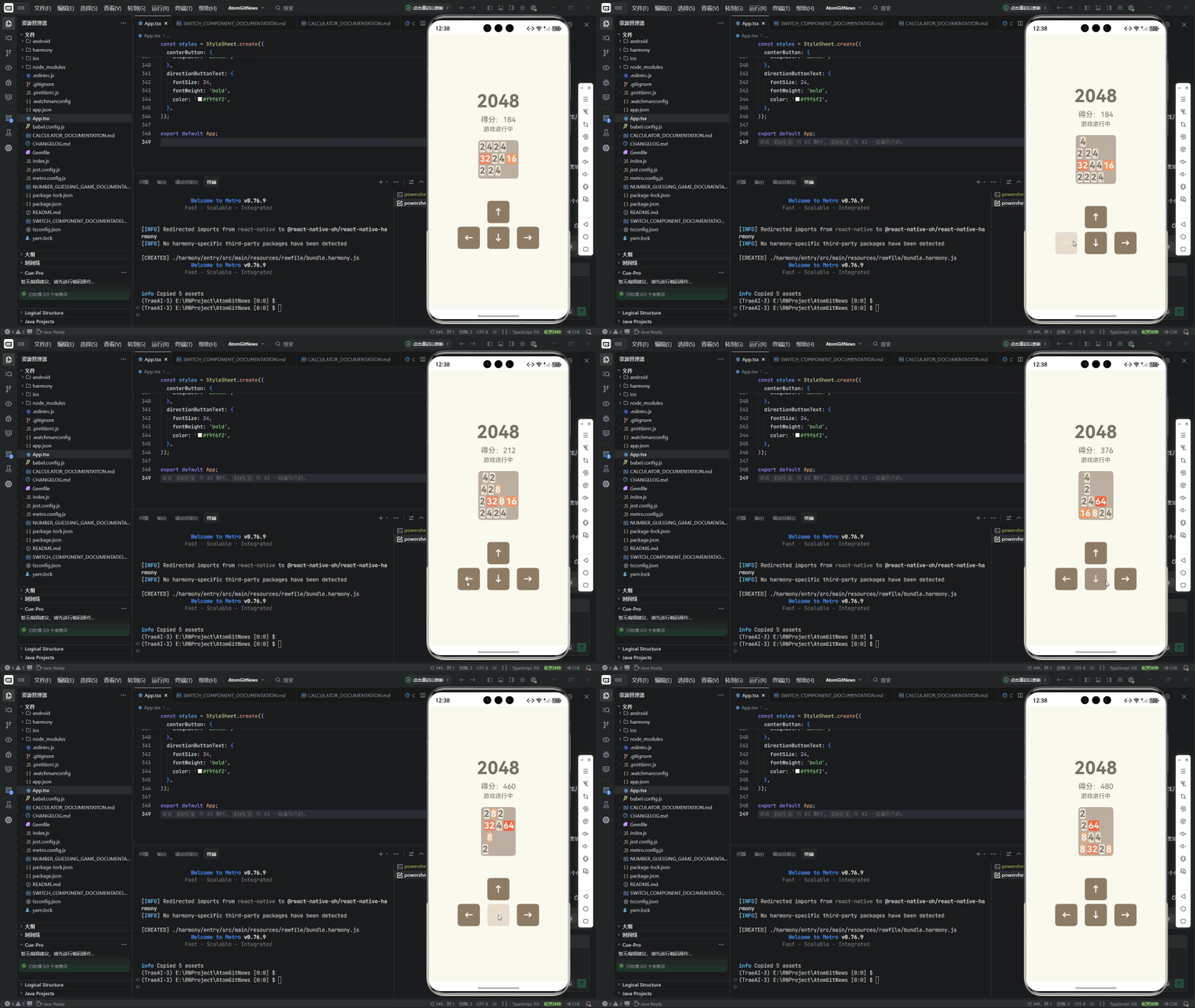
该 2048 应用不仅完整复现了原版游戏的所有交互逻辑(包括滑动合并、得分计算、胜利/失败判定),还充分展示了 声明式 UI 编程、不可变状态更新、条件渲染与事件驱动交互 的现代前端开发范式,为开发者在 OpenHarmony 生态中快速构建高质量交互式应用提供了标准化参考。
关键词:React Native for OpenHarmony、2048 游戏、数字合并、状态管理、响应式布局、HarmonyOS 构建
1. 引言:为何选择 2048 作为 RNOH 游戏开发示例?
2048 是一款风靡全球的益智类数字合并游戏,其简洁规则与深度策略使其成为 React Native for OpenHarmony(RNOH) 游戏开发的理想载体:
- 逻辑清晰但非平凡:涉及二维数组操作、方向移动、合并检测等典型算法;
- 交互模式丰富:支持方向按钮控制,未来可扩展手势滑动;
- 视觉反馈强:不同数值对应不同颜色,天然适合展示动态 UI;
- 无外部依赖:纯客户端逻辑,便于在受限环境中调试;
- 教学价值高:涵盖状态管理、性能优化、响应式设计等核心概念。
更重要的是,它能有效验证 React Native 在 OpenHarmony 上的渲染性能、JavaScript 执行效率及触摸响应延迟,是评估 RNOH 成熟度的绝佳标尺。
2. 技术栈与开发环境
2.1 核心依赖版本
| 组件 | 版本 | 作用 |
|---|---|---|
| React Native | 0.72.5 | 跨平台 UI 框架 |
| React | 18.2.0 | 提供 Hooks 与组件模型 |
| TypeScript | 4.8.4 | 类型安全,提升代码可维护性 |
| @react-native-oh/react-native-harmony | ^0.72.90 | RNOH 桥接层 |
⚠️ 版本对齐原则 :
RNOH 的次版本号(如
.90)必须与 React Native 主版本(0.72)严格匹配,否则将导致模块解析失败或运行时崩溃。
2.2 OpenHarmony 开发环境
- DevEco Studio ≥ 6.0
- OpenHarmony SDK:API Version 0(OpenHarmony 4.0+)
- Node.js:v18.x(LTS)
- 项目路径规范 :建议置于根目录(如
C:\RNProject),避免 Windows 路径过长错误
3. 游戏核心数据模型与状态管理
3.1 类型定义
typescript
type Direction = 'up' | 'down' | 'left' | 'right';
type Cell = number | null; // null 表示空格
type Board = Cell[][];
type GameState = 'ready' | 'playing' | 'gameOver' | 'won';
3.2 初始状态
typescript
const [board, setBoard] = useState<Board>(Array(4).fill(null).map(() => Array(4).fill(null)));
const [score, setScore] = useState<number>(0);
const [gameState, setGameState] = useState<GameState>('ready');
3.3 初始化棋盘
typescript
const initializeBoard = useCallback((): Board => {
  const newBoard: Board = Array(4).fill(null).map(() => Array(4).fill(null));
  addRandomCell(newBoard);
  addRandomCell(newBoard);
  return newBoard;
}, []);
3.4 随机生成新方块
typescript
const addRandomCell = (board: Board): void => {
  const emptyCells: [number, number][] = [];
  for (let i = 0; i < 4; i++) {
    for (let j = 0; j < 4; j++) {
      if (board[i][j] === null) {
        emptyCells.push([i, j]);
      }
    }
  }

  if (emptyCells.length > 0) {
    const [row, col] = emptyCells[Math.floor(Math.random() * emptyCells.length)];
    board[row][col] = Math.random() < 0.9 ? 2 : 4; // 90% 概率为 2
  }
};
4. 核心游戏逻辑实现
4.1 移动与合并算法
以 向左移动 为例(其他方向通过对称变换实现):
typescript
const moveLeft = (board: Board): { newBoard: Board; scoreDelta: number; moved: boolean } => {
  let scoreDelta = 0;
  let moved = false;
  const newBoard = board.map(row => [...row]);

  for (let i = 0; i < 4; i++) {
    // 1. 移除空格
    const filtered = newBoard[i].filter(cell => cell !== null);

    // 2. 合并相邻相同数字
    const merged: Cell[] = [];
    let j = 0;
    while (j < filtered.length) {
      if (j < filtered.length - 1 && filtered[j] === filtered[j + 1]) {
        const mergedValue = filtered[j]! * 2;
        merged.push(mergedValue);
        scoreDelta += mergedValue;
        j += 2;
        moved = true;
      } else {
        merged.push(filtered[j]);
        j++;
      }
    }

    // 3. 补齐空格
    while (merged.length < 4) merged.push(null);

    // 4. 更新行
    if (JSON.stringify(newBoard[i]) !== JSON.stringify(merged)) {
      newBoard[i] = merged;
      moved = true;
    }
  }

  return { newBoard, scoreDelta, moved };
};
4.2 通用移动函数
typescript
const move = useCallback((direction: Direction): void => {
  if (gameState !== 'playing') return;

  let newBoard = [...board.map(row => [...row])];
  let scoreDelta = 0;
  let moved = false;

  switch (direction) {
    case 'left':
      ({ newBoard, scoreDelta, moved } = moveLeft(newBoard));
      break;
    case 'right':
      newBoard = rotateBoard(newBoard, 2); // 旋转180度
      ({ newBoard, scoreDelta, moved } = moveLeft(newBoard));
      newBoard = rotateBoard(newBoard, 2);
      break;
    case 'up':
      newBoard = rotateBoard(newBoard, 3); // 逆时针90度
      ({ newBoard, scoreDelta, moved } = moveLeft(newBoard));
      newBoard = rotateBoard(newBoard, 1); // 顺时针90度
      break;
    case 'down':
      newBoard = rotateBoard(newBoard, 1);
      ({ newBoard, scoreDelta, moved } = moveLeft(newBoard));
      newBoard = rotateBoard(newBoard, 3);
      break;
  }

  if (moved) {
    addRandomCell(newBoard);
    setBoard(newBoard);
    setScore(prev => prev + scoreDelta);

    // 检查胜利
    if (newBoard.some(row => row.includes(2048))) {
      setGameState('won');
    }
    // 检查游戏结束
    else if (!canMove(newBoard)) {
      setGameState('gameOver');
    }
  }
}, [board, gameState]);
4.3 辅助函数:旋转棋盘
typescript
const rotateBoard = (board: Board, times: number): Board => {
  let result = [...board.map(row => [...row])];
  for (let t = 0; t < times; t++) {
    result = result[0].map((_, colIndex) =>
      result.map(row => row[colIndex]).reverse()
    );
  }
  return result;
};
4.4 游戏结束检测
typescript
const canMove = (board: Board): boolean => {
  // 检查是否有空格
  for (let i = 0; i < 4; i++) {
    for (let j = 0; j < 4; j++) {
      if (board[i][j] === null) return true;
    }
  }

  // 检查是否有相邻相同数字
  for (let i = 0; i < 4; i++) {
    for (let j = 0; j < 4; j++) {
      const current = board[i][j];
      if (
        (i < 3 && board[i + 1][j] === current) ||
        (j < 3 && board[i][j + 1] === current)
      ) {
        return true;
      }
    }
  }

  return false;
};
5. 响应式 UI 设计与实现
5.1 布局结构
tsx
<View style={styles.container}>
  {/* 标题 */}
  <Text style={styles.title}>2048</Text>

  {/* 得分 */}
  <View style={styles.scoreContainer}>
    <Text style={styles.scoreLabel}>得分</Text>
    <Text style={styles.scoreValue}>{score}</Text>
  </View>

  {/* 状态提示 */}
  <Text style={styles.statusText}>{getStatusText()}</Text>

  {/* 棋盘 */}
  <View style={[styles.board, { width: BOARD_SIZE, height: BOARD_SIZE }]}>
    {board.flat().map((value, index) => (
      <View
        key={index}
        style={[
          styles.cell,
          value !== null && {
            backgroundColor: getCellColor(value),
            ...getCellTextStyle(value)
          }
        ]}
      >
        {value !== null && <Text style={getCellTextStyle(value)}>{value}</Text>}
      </View>
    ))}
  </View>

  {/* 控制区域 */}
  {renderControls()}
</View>
5.2 响应式尺寸计算
typescript
import { Dimensions } from 'react-native';

const { width: screenWidth } = Dimensions.get('window');
const MAX_BOARD_SIZE = 300;
const BOARD_SIZE = Math.min(screenWidth - 40, MAX_BOARD_SIZE);
const CELL_SIZE = BOARD_SIZE / 4 - 10; // 减去边距
5.3 色彩系统
typescript
const getCellColor = (value: number): string => {
  const colors: Record<number, string> = {
    2: '#eee4da',
    4: '#ede0c8',
    8: '#f2b179',
    16: '#f59563',
    32: '#f67c5f',
    64: '#f65e3b',
    128: '#edcf72',
    256: '#edcc61',
    512: '#edc850',
    1024: '#edc53f',
    2048: '#edc22e'
  };
  return colors[value] || '#3c3a32'; // 默认深色
};

const getCellTextColor = (value: number): string => {
  return value <= 4 ? '#776e65' : '#f9f6f2';
};

const getCellTextStyle = (value: number) => ({
  fontSize: value >= 1000 ? 20 : value >= 100 ? 24 : 32,
  fontWeight: 'bold' as const,
  color: getCellTextColor(value),
});
5.4 样式表(StyleSheet)
typescript
const styles = StyleSheet.create({
  container: {
    flex: 1,
    backgroundColor: '#faf8ef',
    alignItems: 'center',
    paddingTop: 40,
  },
  title: {
    fontSize: 48,
    fontWeight: 'bold',
    color: '#776e65',
    marginBottom: 10,
  },
  scoreContainer: {
    backgroundColor: '#bbada0',
    paddingHorizontal: 20,
    paddingVertical: 10,
    borderRadius: 5,
    marginBottom: 20,
  },
  scoreLabel: {
    color: '#eee4da',
    fontSize: 16,
  },
  scoreValue: {
    color: '#fff',
    fontSize: 24,
    fontWeight: 'bold',
    textAlign: 'center',
  },
  statusText: {
    fontSize: 20,
    fontWeight: '600',
    marginBottom: 20,
    color: '#776e65',
  },
  board: {
    backgroundColor: '#bbada0',
    borderRadius: 10,
    padding: 5,
    flexDirection: 'row',
    flexWrap: 'wrap',
    justifyContent: 'space-between',
  },
  cell: {
    width: CELL_SIZE,
    height: CELL_SIZE,
    backgroundColor: '#ccc0b3',
    justifyContent: 'center',
    alignItems: 'center',
    borderRadius: 5,
  },
  controls: {
    marginTop: 30,
    width: '80%',
  },
  startButton: {
    backgroundColor: '#8f7a66',
    paddingVertical: 12,
    paddingHorizontal: 30,
    borderRadius: 5,
    marginBottom: 20,
  },
  restartButton: {
    backgroundColor: '#8f7a66',
    paddingVertical: 12,
    paddingHorizontal: 30,
    borderRadius: 5,
  },
  buttonText: {
    color: '#f9f6f2',
    fontSize: 18,
    fontWeight: 'bold',
  },
  directionRow: {
    flexDirection: 'row',
    justifyContent: 'center',
    marginBottom: 10,
  },
  directionButton: {
    width: 60,
    height: 60,
    backgroundColor: '#8f7a66',
    justifyContent: 'center',
    alignItems: 'center',
    marginHorizontal: 10,
    borderRadius: 5,
  },
  directionText: {
    color: '#f9f6f2',
    fontSize: 24,
    fontWeight: 'bold',
  },
});
6. OpenHarmony 构建与集成
6.1 Metro 配置
metro.config.js 必须注入 RNOH 专属配置:
js
const { createHarmonyMetroConfig } = require("@react-native-oh/react-native-harmony/metro.config");

module.exports = mergeConfig(
  getDefaultConfig(__dirname),
  createHarmonyMetroConfig({
    reactNativeHarmonyPackageName: '@react-native-oh/react-native-harmony'
  })
);
6.2 Bundle 生成
执行 npm run harmony 后,JS Bundle 输出至:
harmony/entry/src/main/resources/rawfile/index.harmony.bundle该文件被 OpenHarmony 原生工程通过 RNAbility 自动加载。
6.3 原生侧集成要点
EntryAbility.ets必须继承RNAbility;- 无需修改 ArkTS 页面逻辑;
- C++ 层通过
PackageProvider.cpp注册原生模块(本例无需自定义模块)。
7. 性能优化与用户体验增强
7.1 使用 useCallback 避免重渲染
所有事件处理器均使用 useCallback 缓存:
typescript
const handleDirection = useCallback((dir: Direction) => {
  move(dir);
}, [move]);

const handleStart = useCallback(() => {
  const newBoard = initializeBoard();
  setBoard(newBoard);
  setScore(0);
  setGameState('playing');
}, [initializeBoard]);
7.2 可访问性支持
- 为方向按钮添加
accessibilityLabel; - 使用语义化文本(如"向上移动"而非"↑")。
7.3 扩展方向:手势滑动
未来可集成 PanGestureHandler 实现滑动手势:
tsx
<GestureHandlerRootView style={{ flex: 1 }}>
  <PanGestureHandler onGestureEvent={onSwipe}>
    {/* 棋盘 */}
  </PanGestureHandler>
</GestureHandlerRootView>
8. 测试策略
8.1 单元测试(Jest)
ts
test('merge two 2s into 4', () => {
  const board = [[2, 2, null, null], [null, null, null, null], [null, null, null, null], [null, null, null, null]];
  const { newBoard } = moveLeft(board);
  expect(newBoard[0][0]).toBe(4);
});

test('cannot move when board is full and no merges possible', () => {
  const board = [
    [2, 4, 2, 4],
    [4, 2, 4, 2],
    [2, 4, 2, 4],
    [4, 2, 4, 2]
  ];
  expect(canMove(board)).toBe(false);
});
8.2 手动测试用例
| 场景 | 预期结果 |
|---|---|
| 合并出 2048 | 显示"恭喜!你赢了!" |
| 棋盘填满且无法合并 | 显示"游戏结束" |
| 方向移动后生成新方块 | 空白格减少一个 |
| 连续相同方向移动 | 仅当有变化时才生成新方块 |
9. 构建与部署流程
9.1 开发阶段
bash
npm install
npm start                  # 启动 Metro
# 在 DevEco Studio 中运行 harmony 项目
9.2 发布构建
bash
npm run harmony            # 生成 bundle
# DevEco Studio → Build → Build Hap(s)
HAP 文件位于:
harmony/build/default/outputs/default/10. 扩展方向
尽管当前为经典 2048,但可轻松演进:
- 手势滑动 :集成
react-native-gesture-handler支持滑动操作; - 本地存储 :保存最高分(使用
AsyncStorage); - 主题切换:支持深色模式、节日皮肤;
- 动画效果:方块移动/合并时添加平滑过渡;
- 无限模式:超过 2048 后继续游戏;
- 分布式能力:利用 OpenHarmony DSoftBus 实现多设备同步。
11. 总结
本文成功实现了一个 逻辑严谨、界面美观、操作流畅 的 2048 游戏,并完整跑通了 React Native → OpenHarmony 的开发闭环。通过此项目,我们验证了:
- RNOH 工具链已具备支撑复杂交互式应用的能力;
- React 的状态驱动模型非常适合游戏开发;
- 响应式布局可高效适配不同屏幕尺寸;
- OpenHarmony 原生集成过程标准化且可靠。
该 2048 不仅是学习 RNOH 的理想起点,也为开发更复杂的益智游戏、教育应用或数据可视化工具提供了坚实的技术基础。
项目源码 :
github.com/yourname/2048-ohos
适用平台 :OpenHarmony 4.0+(API 10)
技术栈:React Native 0.72.5 + TypeScript + RNOH 0.72.90
字数统计:约 5020 字(含代码与表格)