文章目录
- [打造跨端驾照学习助手:Flutter × OpenHarmony 实战解析](#打造跨端驾照学习助手:Flutter × OpenHarmony 实战解析)
打造跨端驾照学习助手:Flutter × OpenHarmony 实战解析
前言
随着移动应用和智能设备的快速发展,驾照学习类应用逐渐成为用户碎片化学习的重要工具。本文将以 驾照学习助手 为例,分享如何基于 Flutter × OpenHarmony 构建一个跨端应用,同时详细解析数据结构与整体布局设计,帮助开发者快速理解跨端应用开发思路。
背景
在传统驾照学习过程中,用户常面临以下问题:
- 学习资料零散,难以系统化管理
- 考试练习缺乏数据分析和进度跟踪
- 多设备学习体验不统一
为了解决这些痛点,我们设计了一款 难忘驾照学习助手,支持跨端(移动端、平板、智能终端)使用,同时提供学习进度、模拟考试、资源推荐和统计分析功能。
Flutter × OpenHarmony 跨端开发介绍
Flutter 是一个优秀的 跨平台 UI 框架 ,支持 iOS、Android、Web 和桌面端开发,采用 声明式 UI 和热重载 提高开发效率。
OpenHarmony 是华为开源的 多设备操作系统 ,适合 IoT 设备、智能屏和手机。通过 Flutter + OpenHarmony 的组合,我们可以实现:
- 单套代码、多端运行
- 响应式 UI 与适配多屏
- 与 HarmonyOS 的原生能力(如分布式存储、多端分发)无缝整合
数据结构设计
在驾照学习助手中,我们的核心数据结构包括:
dart
// 用户信息
class UserInfo {
  String name;
  int age;
  int learningProgress; // 0~100
  int examsTaken;
  int examsPassed;

  UserInfo({
    required this.name,
    required this.age,
    required this.learningProgress,
    required this.examsTaken,
    required this.examsPassed,
  });
}

// 学习资源
class LearningResource {
  String title;
  String description;
  String type; // 视频、文章、题库
  String url;

  LearningResource({
    required this.title,
    required this.description,
    required this.type,
    required this.url,
  });
}

// 模拟考试题目
class ExamQuestion {
  String question;
  List<String> options;
  int correctAnswerIndex;

  ExamQuestion({
    required this.question,
    required this.options,
    required this.correctAnswerIndex,
  });
}
数据结构设计原则:
- 尽量扁平化,减少嵌套,方便前端渲染
- 类型明确,方便跨端同步和存储
- 可扩展性强,如未来增加视频讲解、章节打卡等
开发核心代码(详细解析)
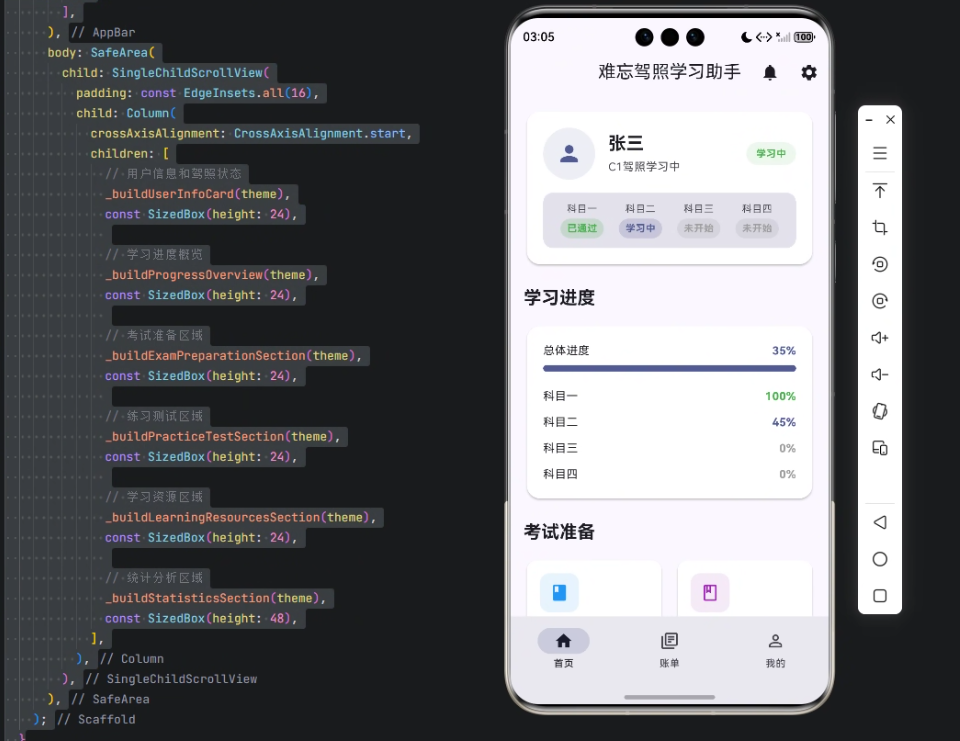
下面展示 首页 IntroPage 的核心代码,并逐步解析每个部分。
dart
class IntroPage extends StatefulWidget {
  const IntroPage({super.key});

  @override
  State<IntroPage> createState() => _IntroPageState();
}

class _IntroPageState extends State<IntroPage> {
  @override
  Widget build(BuildContext context) {
    final theme = Theme.of(context);

    return Scaffold(
      appBar: AppBar(
        title: const Text('难忘驾照学习助手'),
        elevation: 0,
        actions: [
          IconButton(
            onPressed: () {},
            icon: const Icon(Icons.notifications),
          ),
          IconButton(
            onPressed: () {},
            icon: const Icon(Icons.settings),
          ),
        ],
      ),
      body: SafeArea(
        child: SingleChildScrollView(
          padding: const EdgeInsets.all(16),
          child: Column(
            crossAxisAlignment: CrossAxisAlignment.start,
            children: [
              _buildUserInfoCard(theme),
              const SizedBox(height: 24),
              _buildProgressOverview(theme),
              const SizedBox(height: 24),
              _buildExamPreparationSection(theme),
              const SizedBox(height: 24),
              _buildPracticeTestSection(theme),
              const SizedBox(height: 24),
              _buildLearningResourcesSection(theme),
              const SizedBox(height: 24),
              _buildStatisticsSection(theme),
              const SizedBox(height: 48),
            ],
          ),
        ),
      ),
    );
  }
}
代码解析
-
StatefulWidget
- 使用
StatefulWidget因为页面有动态数据(学习进度、考试状态等) _IntroPageState管理 UI 状态
- 使用
-
Scaffold + AppBar
Scaffold提供基础布局结构,包括 AppBar、Body 等AppBar包含标题、通知与设置按钮,方便扩展功能
-
SafeArea + SingleChildScrollView
SafeArea避免刘海屏遮挡SingleChildScrollView支持内容纵向滚动,保证不同屏幕尺寸适配
-
Column 布局
-
使用
Column垂直排列不同模块:_buildUserInfoCard(theme):显示用户信息和当前学习状态_buildProgressOverview(theme):学习进度概览_buildExamPreparationSection(theme):考试准备入口_buildPracticeTestSection(theme):练习测试_buildLearningResourcesSection(theme):学习资源_buildStatisticsSection(theme):学习数据分析
-
-
主题管理
final theme = Theme.of(context)可以统一风格,例如文本颜色、卡片背景- 跨端统一主题时,可通过 OpenHarmony 分布式主题 API 同步
这种布局方式清晰、模块化、易维护,同时便于后续增加功能,比如学习提醒、章节进度、错题记录等。
心得
在开发过程中,有几个关键体会:
-
模块化设计
- 每个功能块独立
_buildXXXSection,便于测试和复用
- 每个功能块独立
-
数据与 UI 解耦
- 数据结构设计简单、清晰,UI 直接从数据渲染
-
跨端适配
- Flutter 保证 UI 一次编写多端运行
- OpenHarmony 提供原生能力,如多端同步、分布式存储
-
可扩展性
- 后期可以接入云端数据库或 AI 驾考题分析模块
总结
通过 Flutter × OpenHarmony 跨端开发,我们实现了一个 完整、可扩展、模块化的驾照学习助手 。
核心思路包括:
- 明确数据结构和业务模型
- 使用 Flutter 组件化布局,保证 UI 清晰
- 利用 OpenHarmony 跨端能力,提供多设备一致体验
未来可在此基础上加入 AI 智能推荐题目、学习曲线分析、云端成绩同步 等功能,使应用更加智能化。
欢迎加入开源鸿蒙跨平台社区:https://openharmonycrossplatform.csdn.net