文章目录
- [Ⅰ. props完整语法](#Ⅰ. props完整语法)
- [Ⅱ. 非父子组件通信](#Ⅱ. 非父子组件通信)
-
- [一、祖先传后代:`provide` && `inject`](#一、祖先传后代:
provide&&inject) - 二、任意两个组件通信:`eventBus`
- [一、祖先传后代:`provide` && `inject`](#一、祖先传后代:

Ⅰ. props完整语法
一、语法
javascript
defineProps({
  属性名: {
    type: 类型,       // Number、String、Boolean ...
    required: true,  // 是否必填
    default: 默认值,  // 默认值

    // value: 父传子的值
    validator (value) {
      // 自定义校验逻辑,比如判断value的范围
      return 布尔值
    }
  }
})default和required最好不要同时写(因为当required=true时,默认值也就无效了)default后面如果是简单类型的值,可以直接写默认。如果是复杂类型的值,则需要以函数的形式return一个默认值
二、代码示例
App.vue文件:
javascript
<template>
    <MyProgress :width="20"/>
    <MyProgress :width="50"/>
    <MyProgress />
    <MyProgress :width="-10"/>
    <MyProgress :width="210"/>
</template>

<script setup>
    import MyProgress from './components3/MyProgress.vue';
</script>

<style scoped></style>MyProgress.vue文件:
javascript
<script setup>
    defineProps({
        width: {
            type: Number,
            required: false,
            default: 50,

            validator(value) {
                // 控制范围
                if(value < 0 || value > 100) {
                    return false;
                }
                return true;
            }
        }
    })
</script>

<template>
  <div class="my-progress">
    <div
      class="inner"
      :style="{width : width + '%'}">
      <span>{{ width }}%</span>
    </div>
  </div>
</template>

<style scoped>
.my-progress {
  height: 26px;
  width: 400px;
  border-radius: 15px;
  background-color: #272425;
  border: 3px solid #272425;
  box-sizing: border-box;
  margin-bottom: 30px;
}
.inner {
  position: relative;
  background: #379bff;
  border-radius: 15px;
  height: 25px;
  box-sizing: border-box;
  left: -3px;
  top: -2px;
}
.inner span {
  position: absolute;
  right: -30px;
  top: 26px;
}
</style>三、ref/reactive 与 props 的区别
| 特性 | ref | reactive | props |
|---|---|---|---|
| 定义位置 | 组件内部 | 组件内部 | 由父组件传入 |
| 数据类型 | 基本类型/单值 | 对象/数组 | 任意类型 |
| 是否响应式 | ✅ | ✅ | ✅(来自父) |
| 能否修改 | ✅(.value) | ✅ | ❌(建议复制副本修改) |
| 模板使用 | 自动解包({{ count }}) | 直接访问({{ state.age }}) | 直接访问({{ title }}) |
Ⅱ. 非父子组件通信
一、祖先传后代:provide && inject
祖先组件通过 provide 给后代提供数据:
javascript
import { provide } from 'vue'
provide('数据名称', 值)
后代组件通过 inject 获取到祖先提供的数据:
javascript
import { inject } from 'vue'
const value = inject('数据名称')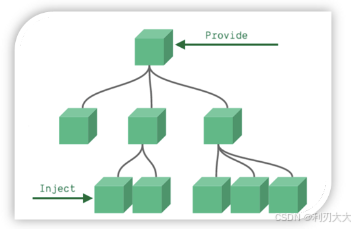
下面举个例子,模拟三代中祖先传给孙子的情况:
App.vue文件:
javascript
<template>
<div class="app">
    <h3>我是祖先组件</h3>
    <my-parent />
</div>
</template>

<script setup>
    import { provide, ref } from 'vue';
    import MyParent from './components5/MyParent.vue';

    const money = ref(520)
    provide('rmb', money)
</script>

<style scoped>
    .app {
        background-color: aqua;
        padding: 20px;
    }
</style>components5/MyParent.vue文件:
javascript
<template>
    <div class="my-parent">
        <h3>我是父组件</h3>
        <my-child />
    </div>
</template>

<script setup>
    import MyChild from './MyChild.vue';
</script>

<style scoped>
    .my-parent {
        padding: 20px;
        background-color: chartreuse;
    }
</style>components5/MyChild.vue文件:
javascript
<template>
    <div class="my-child">
        <h3>我是子组件</h3>
        <p>收到爷爷的压岁钱:{{ money }}</p>
    </div>
</template>

<script setup>
    import {inject} from 'vue'

    const money = inject('rmb')
</script>

<style scoped>
    .my-child {
        background-color: blanchedalmond;
        padding: 20px;
    }
</style>二、任意两个组件通信:eventBus
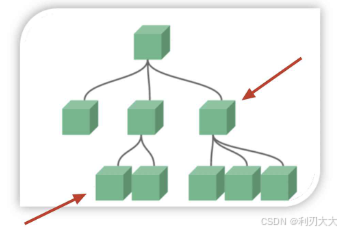
首先下载 mitt 模块包:
javascript
npm install --save mitt然后创建公共中间人模块(类似媒婆和中介),即创建一个 eventBus.js 文件:
javascript
// 导入中介模块
import mitt from 'mitt'

// 通过 mitt() 拿到中介
const meipo = mitt()

// 默认导出:目的是给别的组件拿到 meipo 中间人
export default meipo
接着按照以下步骤走:
- 消息发送方: 使用
meipo.emit('消息名称', 数据)发送消息 - 消息接收方: 使用
meipo.on('消息名称', (数据) => { 处理消息代码块 })接收消息并进行处理
举个例子:
App.vue文件:
javascript
<template>
<div class="app">
    <my-left />
    <my-right />
</div>
</template>

<script setup>
    import MyLeft from './components6/MyLeft.vue';
    import MyRight from './components6/MyRight.vue';
</script>

<style scoped>
 .app {
    display: flex;
    align-items: center;
    justify-content: center;
 }
</style>eventBus.js文件:
javascript
import mitt from 'mitt'

// 拿到中介
const meipo = mitt()

// 默认导出:目的是给别的组件拿到 meipo 中间人
export default meipocomponents6/MyLeft.vue文件:
javascript
<template>
<div class="my-left">
    <p>我是左组件</p>
    <button @click="sendMsg">点击我发送消息给右组件</button>
</div>
</template>

<script setup>
    import { ref } from 'vue';
    import meipo from './eventBug';

    const text = ref('i like you~')

    const sendMsg = () => {
        // 发送方调用emit()发送消息
        meipo.emit('msg', text.value)
    }
</script>

<style scoped>
    .my-left {
        flex: 1;
        background-color: antiquewhite;
        text-align: center;
        height: 100px;
    }
</style>components6/MyRight.vue文件:
javascript
<template>
<div class="my-right">
    <p>我是右组件</p>
</div>
</template>

<script setup>
    import meipo from './eventBug';

    // 接收方调用 on() 接收消息并且进行处理
    meipo.on('msg', (text) => {
        console.log(text);
    })
</script>

<style scoped>
    .my-right {
        flex: 1;
        background-color: palegreen;
        text-align: center;
        height: 100px;
    }
</style>