langchain没法用skills,而且调用llm的方式很怪
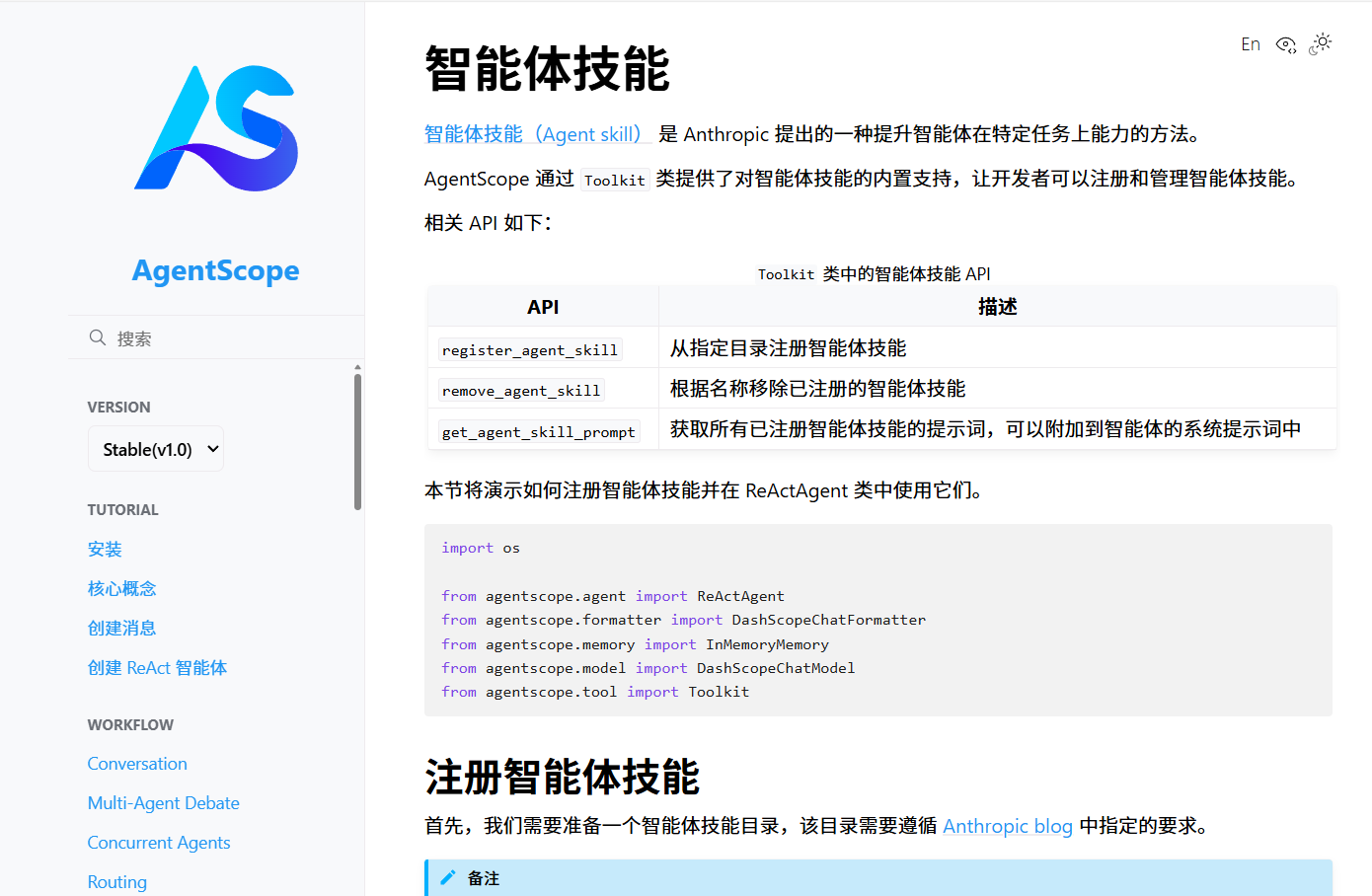
参考代码
python
跳过模块: blender_server
已加载工具: activate_blender_window 来自 blender_tools
已加载工具: add_vertex_group_transfer 来自 blender_tools
已加载工具: delete_all_objects 来自 blender_tools
已加载工具: delete_object 来自 blender_tools
已加载工具: fix_model 来自 blender_tools
已加载工具: import_pmx 来自 blender_tools
已加载工具: import_psk 来自 blender_tools
已加载工具: open_blender_folder 来自 blender_tools
已加载工具: scale_to_object_name 来自 blender_tools
已加载工具: set_parent_bone 来自 blender_tools
已加载工具: set_scale 来自 blender_tools
已加载工具: switch_pose_mode 来自 blender_tools
已加载工具: activate_ue_window 来自 ue_tools
已加载工具: build_sifu_mod 来自 ue_tools
已加载工具: import_fbx 来自 ue_tools
已加载工具: check_download_bar 来自 web_tools
已加载工具: click_position 来自 web_tools
已加载工具: ocr_recognize 来自 web_tools
已加载工具: open_webpage 来自 web_tools
已加载工具: scroll_down 来自 web_tools
已加载工具: wait_for_download 来自 web_tools
已加载工具: yolo_detect 来自 web_tools
已注册工具: activate_blender_window
已注册工具: add_vertex_group_transfer
已注册工具: delete_all_objects
已注册工具: delete_object
已注册工具: fix_model
已注册工具: import_pmx
已注册工具: import_psk
已注册工具: open_blender_folder
已注册工具: scale_to_object_name
已注册工具: set_parent_bone
已注册工具: set_scale
已注册工具: switch_pose_mode
已注册工具: activate_ue_window
已注册工具: build_sifu_mod
已注册工具: import_fbx
已注册工具: check_download_bar
已注册工具: click_position
已注册工具: ocr_recognize
已注册工具: open_webpage
已注册工具: scroll_down
已注册工具: wait_for_download
已注册工具: yolo_detect
2026-01-29 21:57:42,801 | INFO    | _toolkit:register_agent_skill:1093 - Registered agent skill 'blender-mod-assistant' from directory 'skills\blender_mod制作助手'.
已注册技能: blender_mod制作助手
2026-01-29 21:57:42,802 | INFO    | _toolkit:register_agent_skill:1093 - Registered agent skill 'ue-mod-assistant' from directory 'skills\ue_mod制作助手'.
已注册技能: ue_mod制作助手
2026-01-29 21:57:42,804 | INFO    | _toolkit:register_agent_skill:1093 - Registered agent skill 'webpage-mod-assistant' from directory 'skills\网页_mod制作助手'.
已注册技能: 网页_mod制作助手

智能体技能提示词:
# Agent Skills
The agent skills are a collection of folds of instructions, scripts, and resources that you can load dynamically to improve performance on specialized tasks. Each agent skill has a `SKILL.md` file in its folder that describes how to use the skill. If you want to use a skill, you MUST read its `SKILL.md` file carefully.
## blender-mod-assistant
专业的Blender 3D模型处理助手,提供模型导入、修复、缩放和骨骼绑定等完 整工作流。 适合需要处理3D模型、进行骨骼绑定、调整模型缩放的开发者。  常见触发场景:Blender模型处理、导入PMX模型、修复3D模型、骨骼绑定、调 整模型缩放
Check "skills\blender_mod制作助手/SKILL.md" for how to use this skill
## ue-mod-assistant
专业的UE(Unreal Engine)游戏模组制作助手,提供从模型导入到MOD构建的 完整工作流。 适合需要创建、修改或构建UE游戏MOD的开发者。 常见触发场景:制作UE MOD、导入模型到UE、构建Sifu MOD、UE模组制作、Unreal Engine mod
Check "skills\ue_mod制作助手/SKILL.md" for how to use this skill
## webpage-mod-assistant
专业的网页操作和自动化助手,提供网页打开、OCR识别、点击操作和下载管理等功能。 适合需要自动化网页操作、数据提取、下载管理的场景。 常见触发 场景:打开网页、识别文字、点击网页元素、滚动网页、检测网页内容、管理 下载
Check "skills\网页_mod制作助手/SKILL.md" for how to use this skill

================================================================================

用户查询: 打开blender
2026-01-29 21:57:42,806 | WARNING | _openai_formatter:_format:335 - Unsupported block type None in the message, skipped.
MCP Agent(thinking): 用户现在需要处理一个关于Blender工具的任务,首先 分析问题。用户的问题是关于在Blender中处理模型,比如导入PMX或PSK文件,或者调整模型缩放等。首先看可用的工具列表,有blender相关的工具如import_pmx, import_psk, delete_all_objects等。

首先,用户可能需要导入模型,或者进行其他操作。首先,先检查当前状态, 但根据初始状态,可能需要先打开Blender或者导入文件。首先,用户的问题可能是关于如何使用这些工具来处理模型。

首先,确定用户的需求。比如,如果用户想要导入PMX文件,就可以使用import_pmx工具。或者如果是PSK,用import_psk。另外,还有scale_to_object_name用于缩放模型到特定对象大小,fix_model用于修复模型等。

现在,用户的问题没有明确给出具体操作,但根据上下文,可能是需要帮助使 用Blender工具。首先,先尝试理解用户的问题。假设用户想要导入一个PMX文 件,比如需要导入一个PMX模型,那么可以调用import_pmx工具。

不过,首先需要确认用户的具体需求。但根据当前信息,可能用户是询问如何 使用这些工具,或者需要执行某个操作。首先,先检查工具列表,然后决定调 用哪个工具。

首先,假设用户想要导入PMX文件,那么调用import_pmx。但需要文件路径。不过,可能用户还没有提供文件路径,这时候可能需要先让用户提供文件路径, 或者假设一个示例。

不过,根据系统提示,用户现在需要我使用工具来帮助用户完成任务。首先, 先分析用户的问题,然后选择合适的工具。

现在,用户的问题可能是关于Blender模型处理,比如导入模型、修复模型等。首先,先尝试打开Blender,或者导入文件。

首先,调用open_blender_folder来启动Blender,然后导入模型。

步骤:
1. 打开Blender文件夹
2. 导入PMX文件(如果需要)
3. 进行其他操作如缩放、修复等。

首先,先调用open_blender_folder来启动Blender。
MCP Agent:
我将调用open_blender_folder工具来打开Blender文件夹。

结果:
Msg(id='fV4gNtxE9EC9h6KPtajztV', name='MCP Agent', content=[{'type': 'thinking', 'thinking': '用户现在需要处理一个关于Blender工具的任务, 首先分析问题。用户的问题是关于在Blender中处理模型,比如导入PMX或PSK文件,或者调整模型缩放等。首先看可用的工具列表,有blender相关的工具如import_pmx, import_psk, delete_all_objects等。\n\n首先,用户可能需要导 入模型,或者进行其他操作。首先,先检查当前状态,但根据初始状态,可能 需要先打开Blender或者导入文件。首先,用户的问题可能是关于如何使用这些工具来处理模型。\n\n首先,确定用户的需求。比如,如果用户想要导入PMX文件,就可以使用import_pmx工具。或者如果是PSK,用import_psk。另外,还有scale_to_object_name用于缩放模型到特定对象大小,fix_model用于修复模型等。\n\n现在,用户的问题没有明确给出具体操作,但根据上下文,可能是需 要帮助使用Blender工具。首先,先尝试理解用户的问题。假设用户想要导入一个PMX文件,比如需要导入一个PMX模型,那么可以调用import_pmx工具。\n\n 不过,首先需要确认用户的具体需求。但根据当前信息,可能用户是询问如何 使用这些工具,或者需要执行某个操作。首先,先检查工具列表,然后决定调 用哪个工具。\n\n首先,假设用户想要导入PMX文件,那么调用import_pmx。但需要文件路径。不过,可能用户还没有提供文件路径,这时候可能需要先让用 户提供文件路径,或者假设一个示例。\n\n不过,根据系统提示,用户现在需 要我使用工具来帮助用户完成任务。首先,先分析用户的问题,然后选择合适 的工具。\n\n现在,用户的问题可能是关于Blender模型处理,比如导入模型、修复模型等。首先,先尝试打开Blender,或者导入文件。\n\n首先,调用open_blender_folder来启动Blender,然后导入模型。\n\n步骤:\n1. 打开Blender文件夹\n2. 导入PMX文件(如果需要)\n3. 进行其他操作如缩放、修复等。\n\n首先,先调用open_blender_folder来启动Blender。'}, {'type': 'text', 'text': '\n我将调用open_blender_folder工具来打开Blender文件夹。\n'}], role='assistant', metadata=None, timestamp='2026-01-29 21:57:44.115', invocation_id='None')
python
#!/usr/bin/env python3
"""
MCP AI Caller (AgentScope)

这是系统的核心模块,负责处理用户输入、调用工具和生成响应。
使用 AgentScope 框架实现,支持智能体技能系统。
"""

import os
import asyncio
from pathlib import Path
from agentscope.model import OpenAIChatModel, OllamaChatModel
from agentscope.message import Msg, TextBlock
from agentscope import agent, tool, memory, formatter
from agentscope.tool import execute_shell_command, execute_python_code, view_text_file
import agentscope
agentscope.init(studio_url="http://localhost:3000")
# 工具列表
tools = []

# 从tools文件夹加载工具
def load_tools_from_directory():
    """从tools文件夹加载工具"""
    tools_dir = Path("./tools")
    if not tools_dir.exists():
        print(f"工具目录不存在: {tools_dir}")
        return

    # 排除的模块列表
    excluded_modules = ["blender_server", "cad_server", "excel_server", "ezdxf_server", "file_server", "grounding_dino", "make_exe", "my_models", "ocr", "pdf_server", "solidworks_server", "tekla_server", "ue_server"]

    # 需要加载的工具列表
    required_tools = {
        "blender_tools": ["activate_blender_window", "delete_all_objects", "import_pmx", "fix_model", "set_scale", "import_psk", "scale_to_object_name", "set_parent_bone", "switch_pose_mode", "add_vertex_group_transfer", "delete_object", "open_blender_folder"],
        "web_tools": ["open_webpage", "ocr_recognize", "click_position", "scroll_down", "yolo_detect", "check_download_bar"],
        "ue_tools": ["activate_ue_window", "import_fbx", "build_sifu_mod"]
    }

    for tool_subdir in tools_dir.iterdir():
        if tool_subdir.is_dir():
            # 检查是否在排除列表中
            module_name = tool_subdir.name
            if module_name in excluded_modules:
                print(f"跳过模块: {module_name}")
                continue

            # 检查是否在需要加载的工具列表中
            if module_name not in required_tools:
                print(f"跳过模块: {module_name} (不在需要加载的工具列表中)")
                continue

            # 遍历模块中的所有py文件
            for py_file in tool_subdir.glob("*.py"):
                if py_file.name == "__init__.py":
                    continue

                try:
                    # 动态导入模块
                    import sys
                    sys.path.insert(0, str(tools_dir))

                    # 从py文件导入模块
                    module_name_from_file = py_file.stem
                    module = __import__(f"{module_name}.{module_name_from_file}")
                    submodule = getattr(module, module_name_from_file)

                    # 查找模块中的工具函数
                    for attr_name in dir(submodule):
                        attr = getattr(submodule, attr_name)
                        # 只加载函数,不加载类,并且只加载需要的工具
                        if callable(attr) and not attr_name.startswith("_") and not isinstance(attr, type) and attr_name in required_tools[module_name]:
                            # 为工具创建定义
                            tool_def = {
                                "name": attr_name,
                                "function": attr,
                                "description": f"来自 {module_name}.{module_name_from_file} 模块的工具函数"
                            }
                            tools.append(tool_def)
                            print(f"已加载工具: {attr_name} 来自 {module_name}.{module_name_from_file}")
                except Exception as e:
                    print(f"加载工具模块 {tool_subdir.name}/{py_file.name} 失败: {e}")

# 加载工具
load_tools_from_directory()

async def main():
    """主函数"""
    # 模型配置
    model_name = "qwen3:4b"

    # 初始化模型
    model = OllamaChatModel(
        model_name=model_name,
        stream=True,
        options={
            "temperature": 0.5,
        },
    )

    # 创建 Toolkit 实例
    toolkit = tool.Toolkit()

    # 注册必要工具(查看文件是使用 Skill 的前提)
    toolkit.register_tool_function(execute_shell_command)
    toolkit.register_tool_function(execute_python_code)
    toolkit.register_tool_function(view_text_file)

    # 注册工具到 toolkit
    for tool_def in tools:
        toolkit.register_tool_function(
            tool_func=tool_def["function"],
            func_name=tool_def["name"],
            func_description=tool_def["description"],
        )
        print(f"已注册工具: {tool_def['name']}")

    # 注册技能目录
    skills_dir = Path("./skills")
    if skills_dir.exists():
        for skill_dir in skills_dir.iterdir():
            if skill_dir.is_dir():
                skill_name = skill_dir.name
                try:
                    toolkit.register_agent_skill(str(skill_dir))
                    print(f"已注册技能: {skill_name}")
                except Exception as e:
                    print(f"注册技能 {skill_name} 失败: {e}")
    else:
        print(f"技能目录不存在: {skills_dir}")

    # 获取技能提示词
    agent_skill_prompt = toolkit.get_agent_skill_prompt()
    print("\n智能体技能提示词:")
    print(agent_skill_prompt)
    print("\n" + "=" * 80 + "\n")

    # 创建 ReActAgent
    agent_instance = agent.ReActAgent(
        name="MCP Agent",
        sys_prompt="""你是一个名为 MCP Agent 的助手。
# 重要提示
- 不要做出任何假设。所有关于 AgentScope 库的知识必须来自你装备的技能。
- 当需要查询信息时,请使用提供的工具查看相关文件。""",
        model=model,
        formatter=formatter.OllamaChatFormatter(),
        memory=memory.InMemoryMemory(),
        toolkit=toolkit,
    )

    # 处理用户查询
    print("请输入您的查询(输入 'exit' 退出):")
    print("示例查询: 用activate_blender_window激活blender窗口")

    while True:
        # 获取用户输入
        user_input = input("\n请输入您的查询: ")

        if user_input.lower() == 'exit':
            print("退出程序...")
            break

        if not user_input.strip():
            print("请输入有效的查询内容")
            continue

        # 创建用户消息
        user_msg = Msg(
            name="User",
            content=[TextBlock(text=user_input)],
            role="user",
        )

        # 运行agent
        response = await agent_instance(user_msg)
        print("\n结果:")
        print(response)
        print("\n" + "=" * 80 + "\n")

if __name__ == '__main__':
    asyncio.run(main())
AgentScope 是由 阿里通义实验室 推出的 开源多智能体(Multi-Agent)开发框架 ,专注于构建、部署和监控基于大语言模型(LLM)的 生产级 AI 智能体应用 。它于 2025年9月2日 正式发布 1.0 版本,目标是解决智能体在 开发复杂、协作混乱、工程化缺失 等企业落地难题。
🔑 核心定位
"让开发者聚焦业务逻辑,而非重复造轮子"
AgentScope 提供覆盖 开发 → 部署 → 监控 → 调优 全生命周期的解决方案,特别适合需要 多智能体协作、工具调用、长期记忆、实时介入 的复杂场景(如客服系统、研发协同、智能旅行助手等)。
🧱 架构设计
1. 三层核心架构
表格
| 层级 | 功能 |
|---|---|
| AgentScope Core(核心框架) | 提供消息、模型、记忆、工具四大基础组件,支持 ReAct 范式、并行工具调用、结构化输出 |
| AgentScope Runtime(运行时) | 基于容器/Sandbox 的安全执行环境,支持 Serverless(如阿里云函数计算 FC)、分布式部署 |
| AgentScope Studio(可视化平台) | Web UI 实时监控智能体行为、调试对话流、评估性能、A/B 测试 |
2. 五层模块化架构(企业视角)
- 应用层:定义业务场景(YAML/低代码配置)
- 智能体层:ChatAgent / ToolAgent / CustomAgent
- 能力抽象层:工具封装 + Graph/Chain 编排(Orchestrator)
- 数据存储层:短期记忆(内存) + 长期记忆(向量库/关系库)
- 工程化支撑层:全链路追踪、Token 成本统计、重试机制、日志监控
⚡ 核心特性
表格
| 特性 | 说明 |
|---|---|
| ✅ ReAct 范式原生支持 | LLM 自主推理(Reason)→ 调用工具(Act)→ 迭代循环,实现动态任务规划 |
| ✅ 实时介入(Realtime Steering) | 可随时打断 Agent 执行,插入新指令或人工干预,状态自动保存恢复 |
| ✅ 高效工具调用 | 支持并行调用、工具组(Tool Group)、元工具(Meta-Tool),缓解上下文压力 |
| ✅ 结构化输出 | 内置 JSON Schema 校验,确保 LLM 输出可直接映射为 POJO/字典,无需正则解析 |
| ✅ 长期记忆 | 跨会话语义记忆,支持 Mem0、向量检索(RAG) |
| ✅ 多模态支持 | 文本、图像、音频、视频通过 url 字段传递 |
| ✅ 模型无关 | 统一接口支持 Qwen、GPT、Llama、DeepSeek、Ollama 等 |
| ✅ 分布式 & Serverless | 原生集成 RocketMQ、A2A 协议;支持阿里云 FC 毫秒级弹性伸缩 |
💡 典型应用场景
- 智能客服系统:多 Agent 分工(意图识别 → 知识库检索 → 工单生成)
- 深度研究助手:自动查资料、写报告、引用来源
- 浏览器自动化:Agent 控制浏览器完成信息提取、表单填写
- 复杂任务规划:如"安排一次带天气考量的旅行"(Supervisor + WeatherAgent + TravelAgent)
- 代码生成与审查:CodeAct 智能体执行 Python/Shell 并反馈结果
🛠️ 快速上手示例(Python)
python
编辑
python
from agentscope.agent import ReActAgent
from agentscope.model import DashScopeChatModel
from agentscope.tool import Toolkit, execute_python_code
from agentscope.message import Msg
import os

# 初始化工具包
toolkit = Toolkit()
toolkit.register_tool_function(execute_python_code)

# 创建智能体
agent = ReActAgent(
    name="DevHelper",
    sys_prompt="你是一个能执行Python代码的开发助手",
    model=DashScopeChatModel(
        model_name="qwen-max",
        api_key=os.getenv("DASHSCOPE_API_KEY")
    ),
    toolkit=toolkit
)

# 发送任务
response = await agent(Msg("user", "用Python打印'Hello, AgentScope!'"))
print(response.content)
🌐 多语言支持
- Python 版:功能最全,社区活跃
- Java 版(1.0+):与 Spring Boot 无缝集成,支持 GraalVM 原生镜像,毫秒级冷启动,适合金融/政务等企业场景
📦 开源与生态
- GitHub : https://github.com/agentscope-ai/agentscope
- 文档 : https://doc.agentscope.io
- ArXiv 论文 : 2508.16279
- Star 数: 超 14,000+(截至 2025 年底)
总结
AgentScope = ReAct 智能体 + 企业级工程能力 + 可视化运维
它不是简单的 LLM 调用封装,而是为 复杂、可靠、可维护的多智能体系统 提供的 生产级基础设施。
如果你正在构建需要 自主决策、工具使用、多角色协作 的 AI 应用,AgentScope 是一个值得优先考虑的框架。