一、下拉框Spinner
1、Spinner用于从一串列表中选择某项,功能类似于单选按钮的组合
2、android:spinnerMode属性,有两个选项
(1)dropdown为下拉菜单
(2)dialog为弹窗显示菜单
(3)不写默认下拉菜单
3、下拉框要显示数据列表,涉及到适配器
二、适配器
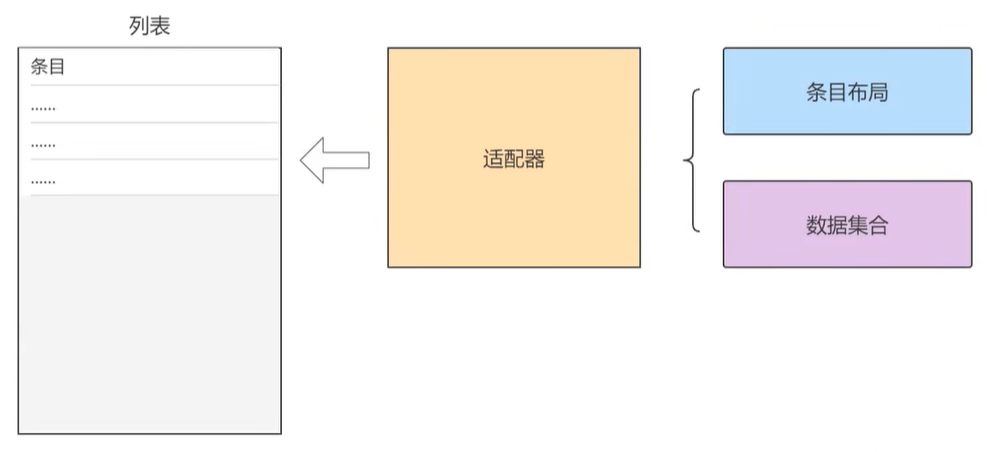
1、适配器负责从数据集合中取出对应的数据显示到条目布局上
适配器是个大管家,它管理布局和元素,把布局和元素绑定
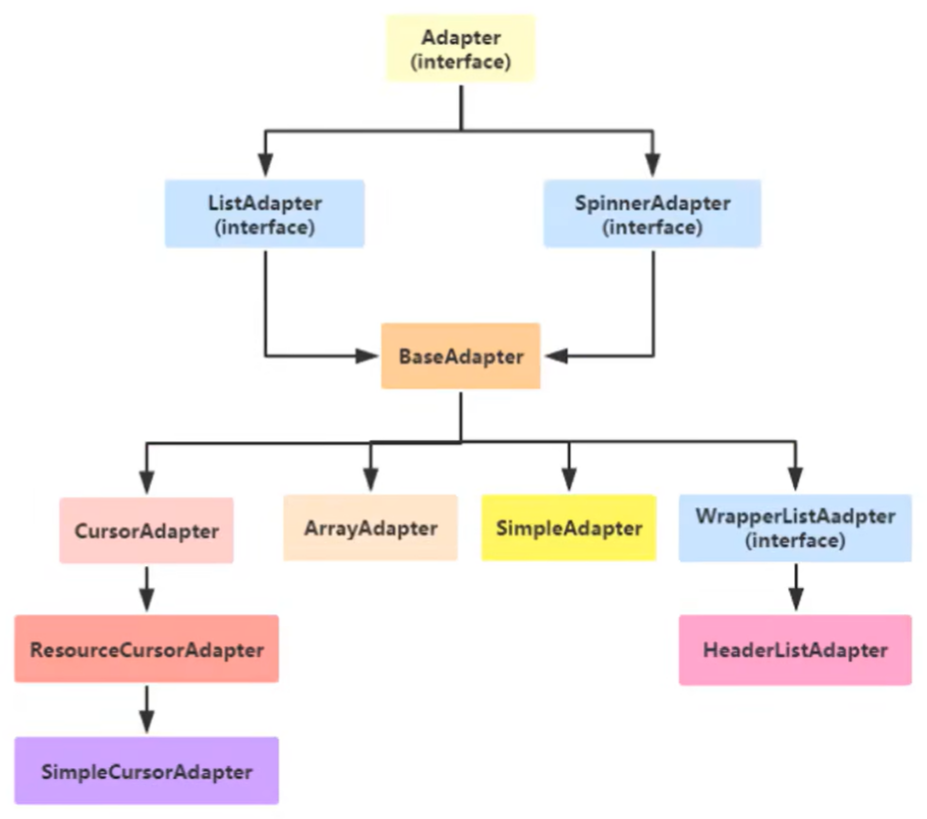
2、Adapter继承结构
三、数组适配器ArrayAdapter
1、ArrayAdapter是最简单的适配器,只展示一行文字
2、运用数组适配器分成下列步骤
(1)编写列表项的XML文件,内部布局只有一个TextView标签(根节点)
(2)调用ArrayAdapter的构造方法,填入待展现的字符串数组,以及列表项的XML文件(R.layout.item_select)
(3)调用下拉框控件的setAdapter方法,传入第二步得到的适配器实例
3、例子
下拉列表模式
SpinnerDropdownActivity.java
java
package com.example.chapter08;

import androidx.appcompat.app.AppCompatActivity;

import android.os.Bundle;
import android.view.View;
import android.widget.AdapterView;
import android.widget.ArrayAdapter;
import android.widget.Spinner;

import com.example.chapter08.util.ToastUtil;

public class SpinnerDropdownActivity extends AppCompatActivity implements AdapterView.OnItemSelectedListener {

    // 定义下拉列表需要显示的文本数组
    private final static String[] starArray = {"水星", "金星", "地球", "火星", "木星", "土星"};

    private Spinner sp_dropdown;

    @Override
    protected void onCreate(Bundle savedInstanceState) {
        super.onCreate(savedInstanceState);
        setContentView(R.layout.activity_spinner_dropdown);

        sp_dropdown = findViewById(R.id.sp_dropdown);

        // 声明一个下拉列表的数组适配器
        // 第一个参数:上下文
        // 第二个参数:条目布局
        // 第三个参数:数据
        ArrayAdapter<String> starAdapter = new ArrayAdapter<>(this, R.layout.item_select, starArray);
        sp_dropdown.setAdapter(starAdapter);
        // 设置下拉框默认显示第一项
        sp_dropdown.setSelection(0);
        // 给下拉框设置选择监听器,一旦用户选中某一项,就触发监听器的onItemSelected方法
        sp_dropdown.setOnItemSelectedListener(this);
    }

    // 选中了之后
    @Override
    public void onItemSelected(AdapterView<?> adapterView, View view, int position, long id) {
        ToastUtil.show(this, "您选择的是:" + starArray[position]);
    }

    // 啥也没选
    @Override
    public void onNothingSelected(AdapterView<?> adapterView) {

    }
}
布局文件activity_spinner_dropdown.xml
XML
<?xml version="1.0" encoding="utf-8"?>
<LinearLayout xmlns:android="http://schemas.android.com/apk/res/android"
    xmlns:app="http://schemas.android.com/apk/res-auto"
    xmlns:tools="http://schemas.android.com/tools"
    android:layout_width="match_parent"
    android:layout_height="match_parent"
    android:orientation="vertical"
    tools:context=".SpinnerDropdownActivity">

    <TextView
        android:layout_width="match_parent"
        android:layout_height="wrap_content"
        android:text="下拉模式的列表框"
        android:textSize="17sp"/>

    <Spinner
        android:id="@+id/sp_dropdown"
        android:layout_width="match_parent"
        android:layout_height="wrap_content"
        android:spinnerMode="dropdown"/>
</LinearLayout>
条目布局文件item_select.xml
XML
<?xml version="1.0" encoding="utf-8"?>
<TextView xmlns:android="http://schemas.android.com/apk/res/android"
    xmlns:tools="http://schemas.android.com/tools"
    android:layout_width="match_parent"
    android:layout_height="50dp"
    android:gravity="center"
    android:textColor="#0000ff"
    android:textSize="17sp"
    tools:text="火星"> <!-- tools命名空间,可以用来预览效果 -->

</TextView>
4、例子2
对话框模式,只有对话框模式可以设置标题
SpinnerDialogActivity.java
java
package com.example.chapter08;

import android.os.Bundle;
import android.view.View;
import android.widget.AdapterView;
import android.widget.ArrayAdapter;
import android.widget.Spinner;

import androidx.appcompat.app.AppCompatActivity;

import com.example.chapter08.util.ToastUtil;

public class SpinnerDialogActivity extends AppCompatActivity implements AdapterView.OnItemSelectedListener {

    // 定义下拉列表需要显示的文本数组
    private final static String[] starArray = {"水星", "金星", "地球", "火星", "木星", "土星"};

    private Spinner sp_dialog;

    @Override
    protected void onCreate(Bundle savedInstanceState) {
        super.onCreate(savedInstanceState);
        setContentView(R.layout.activity_spinner_dialog);

        sp_dialog = findViewById(R.id.sp_dialog);

        // 声明一个下拉列表的数组适配器
        // 第一个参数:上下文
        // 第二个参数:条目布局
        // 第三个参数:数据
        ArrayAdapter<String> starAdapter = new ArrayAdapter<>(this, R.layout.item_select, starArray);
        sp_dialog.setAdapter(starAdapter);
        // 设置对话框的标题
        sp_dialog.setPrompt("请选择行星");
        // 设置下拉框默认显示第一项
        sp_dialog.setSelection(0);
        // 给下拉框设置选择监听器,一旦用户选中某一项,就触发监听器的onItemSelected方法
        sp_dialog.setOnItemSelectedListener(this);
    }

    // 选中了之后
    @Override
    public void onItemSelected(AdapterView<?> adapterView, View view, int position, long id) {
        ToastUtil.show(this, "您选择的是:" + starArray[position]);
    }

    // 啥也没选
    @Override
    public void onNothingSelected(AdapterView<?> adapterView) {

    }
}
布局文件activity_spinner_dialog.xml
XML
<?xml version="1.0" encoding="utf-8"?>
<LinearLayout xmlns:android="http://schemas.android.com/apk/res/android"
    xmlns:app="http://schemas.android.com/apk/res-auto"
    xmlns:tools="http://schemas.android.com/tools"
    android:layout_width="match_parent"
    android:layout_height="match_parent"
    android:orientation="vertical"
    tools:context=".SpinnerDialogActivity">

    <TextView
        android:layout_width="match_parent"
        android:layout_height="wrap_content"
        android:text="对话框模式的列表框"
        android:textSize="17sp"/>

    <Spinner
        android:id="@+id/sp_dialog"
        android:layout_width="match_parent"
        android:layout_height="wrap_content"
        android:spinnerMode="dialog"/>
</LinearLayout>
条目布局文件item_select.xml不变
四、简单适配器SimpleAdapter
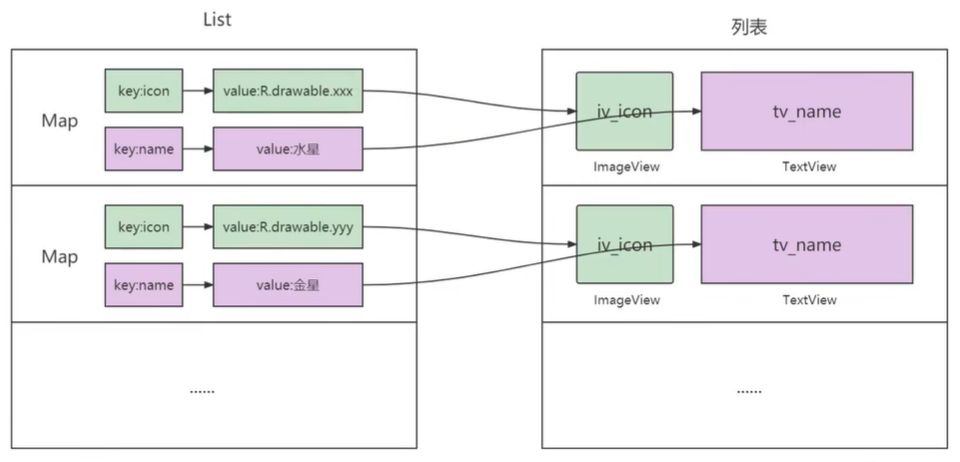
1、SimpleAdapter允许在列表项中同时展示文本与图片
2、集合当中的数据与条目布局的对应关系
3、例子
SpinnerIconActivity.java
java
package com.example.chapter08;

import androidx.appcompat.app.AppCompatActivity;

import android.os.Bundle;
import android.view.View;
import android.widget.AdapterView;
import android.widget.SimpleAdapter;
import android.widget.Spinner;

import com.example.chapter08.util.ToastUtil;

import java.util.ArrayList;
import java.util.HashMap;
import java.util.List;
import java.util.Map;

public class SpinnerIconActivity extends AppCompatActivity implements AdapterView.OnItemSelectedListener {

    // 定义下拉列表需要显示的行星图标数组
    private static final int[] iconArray = {
            R.drawable.shuixing, R.drawable.jinxing, R.drawable.diqiu,
            R.drawable.huoxing, R.drawable.muxing, R.drawable.tuxing
    };

    // 定义下拉列表需要显示的文本数组
    private final static String[] starArray = {"水星", "金星", "地球", "火星", "木星", "土星"};

    @Override
    protected void onCreate(Bundle savedInstanceState) {
        super.onCreate(savedInstanceState);
        setContentView(R.layout.activity_spinner_icon);
        // 声明一个映射对象的列表,用于保存行星的图标与名称配对信息
        List<Map<String,Object>> list = new ArrayList<>();
        // iconArray是行星的图标数组,starArray是行星的名称数组
        for (int i = 0; i < iconArray.length; i++) {
            Map<String, Object> item = new HashMap<>();
            item.put("icon", iconArray[i]);
            item.put("name", starArray[i]);
            list.add(item);
        }
        // Context context:上下文
        // List<? extends Map<String, ?>> data:图标与名称映射关系
        // int resource:条目布局
        // String[] from:来源的key
        // int[] to:映射到哪个id上
        SimpleAdapter starAdapter = new SimpleAdapter(this, list, R.layout.item_simple,
                new String[] {"icon", "name"},
                new int[] {R.id.iv_icon, R.id.tv_name});

        Spinner sp_icon = findViewById(R.id.sp_icon);
        sp_icon.setAdapter(starAdapter);
        sp_icon.setSelection(0);
        sp_icon.setOnItemSelectedListener(this);
    }

    @Override
    public void onItemSelected(AdapterView<?> adapterView, View view, int position, long id) {
        ToastUtil.show(this, "您选择的是:" + starArray[position]);
    }

    @Override
    public void onNothingSelected(AdapterView<?> adapterView) {

    }
}
布局文件activity_spinner_icon.xml
XML
<?xml version="1.0" encoding="utf-8"?>
<LinearLayout xmlns:android="http://schemas.android.com/apk/res/android"
    xmlns:app="http://schemas.android.com/apk/res-auto"
    xmlns:tools="http://schemas.android.com/tools"
    android:layout_width="match_parent"
    android:layout_height="match_parent"
    android:orientation="vertical"
    tools:context=".SpinnerIconActivity">

    <TextView
        android:layout_width="match_parent"
        android:layout_height="wrap_content"
        android:text="行星的简单适配器"
        android:textSize="17sp"/>

    <Spinner
        android:id="@+id/sp_icon"
        android:layout_width="match_parent"
        android:layout_height="wrap_content"
        android:spinnerMode="dropdown"/>

</LinearLayout>
条目布局item_simple.xml
XML
<?xml version="1.0" encoding="utf-8"?>
<LinearLayout xmlns:android="http://schemas.android.com/apk/res/android"
    xmlns:tools="http://schemas.android.com/tools"
    android:orientation="horizontal"
    android:layout_width="match_parent"
    android:layout_height="wrap_content">

    <ImageView
        android:id="@+id/iv_icon"
        android:layout_width="0dp"
        android:layout_height="50dp"
        android:layout_weight="1"
        tools:src="@drawable/shuixing"/>

    <TextView
        android:id="@+id/tv_name"
        android:layout_width="0dp"
        android:layout_height="50dp"
        android:layout_weight="3"
        android:gravity="center"
        android:textSize="17sp"
        android:textColor="#ff0000"
        tools:text="水星"/>

</LinearLayout>