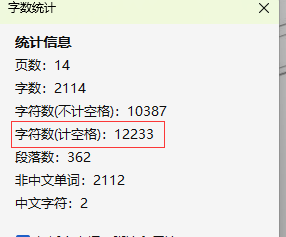
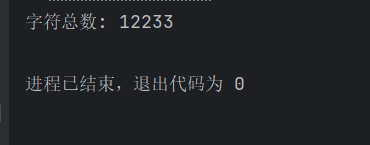
自动 fallback 全量扫描(100%准确)
java
import org.apache.poi.ooxml.POIXMLProperties;
import org.apache.poi.xwpf.usermodel.*;

import java.io.FileInputStream;
import java.io.InputStream;
import java.util.List;

/**
 * Word 字符统计工具
 *
 * 功能:
 * 自动 fallback 全量扫描(100%准确)
 *
 * 适用:
 * 上传限制 / 翻译计费 / 文档校验
 */
public class WordCharCounter {

    /**
     * 根据文件路径统计
     */
    public static int count(String path) throws Exception {
        try (InputStream is = new FileInputStream(path)) {
            return count(is);
        }
    }

    /**
     * 根据流统计
     */
    public static int count(InputStream is) throws Exception {

        try (XWPFDocument doc = new XWPFDocument(is)) {

//            // ========= ① 极速模式(读取 metadata) =========
//            int fast = readFastCount(doc);
//
//            if (fast > 0) {
//                return fast;
//            }

            // ========= ② fallback 全量扫描 =========
            return slowCount(doc);
        }
    }

    /**
     * 读取 Office/WPS 预计算字数(极快)
     */
    private static int readFastCount(XWPFDocument doc) {
        try {
            POIXMLProperties.ExtendedProperties props =
                    doc.getProperties().getExtendedProperties();

            return props.getUnderlyingProperties().getCharacters();
        } catch (Exception e) {
            return 0;
        }
    }

    /**
     * 全量扫描统计(绝对准确)
     */
    private static int slowCount(XWPFDocument doc) {

        int total = 0;

        // 正文
        total += countElements(doc.getBodyElements());

        // header
        for (XWPFHeader header : doc.getHeaderList()) {
            total += countElements(header.getBodyElements());
        }

        // footer
        for (XWPFFooter footer : doc.getFooterList()) {
            total += countElements(footer.getBodyElements());
        }

        return total;
    }

    /**
     * 统计 bodyElements(段落 + 表格)
     */
    private static int countElements(List<IBodyElement> elements) {

        int total = 0;

        for (IBodyElement element : elements) {

            // 段落
            if (element instanceof XWPFParagraph) {
                total += ((XWPFParagraph) element).getText().length();
            }

            // 表格
            else if (element instanceof XWPFTable) {
                XWPFTable table = (XWPFTable) element;

                for (XWPFTableRow row : table.getRows()) {
                    for (XWPFTableCell cell : row.getTableCells()) {
                        total += cell.getText().length();
                    }
                }
            }
        }

        return total;
    }

    // ================= 测试入口 =================

    public static void main(String[] args) throws Exception {

        int count = WordCharCounter.count(
                "d:\\测试解读word内容.docx"
        );

        System.out.println("字符总数: " + count);
    }
}