前言
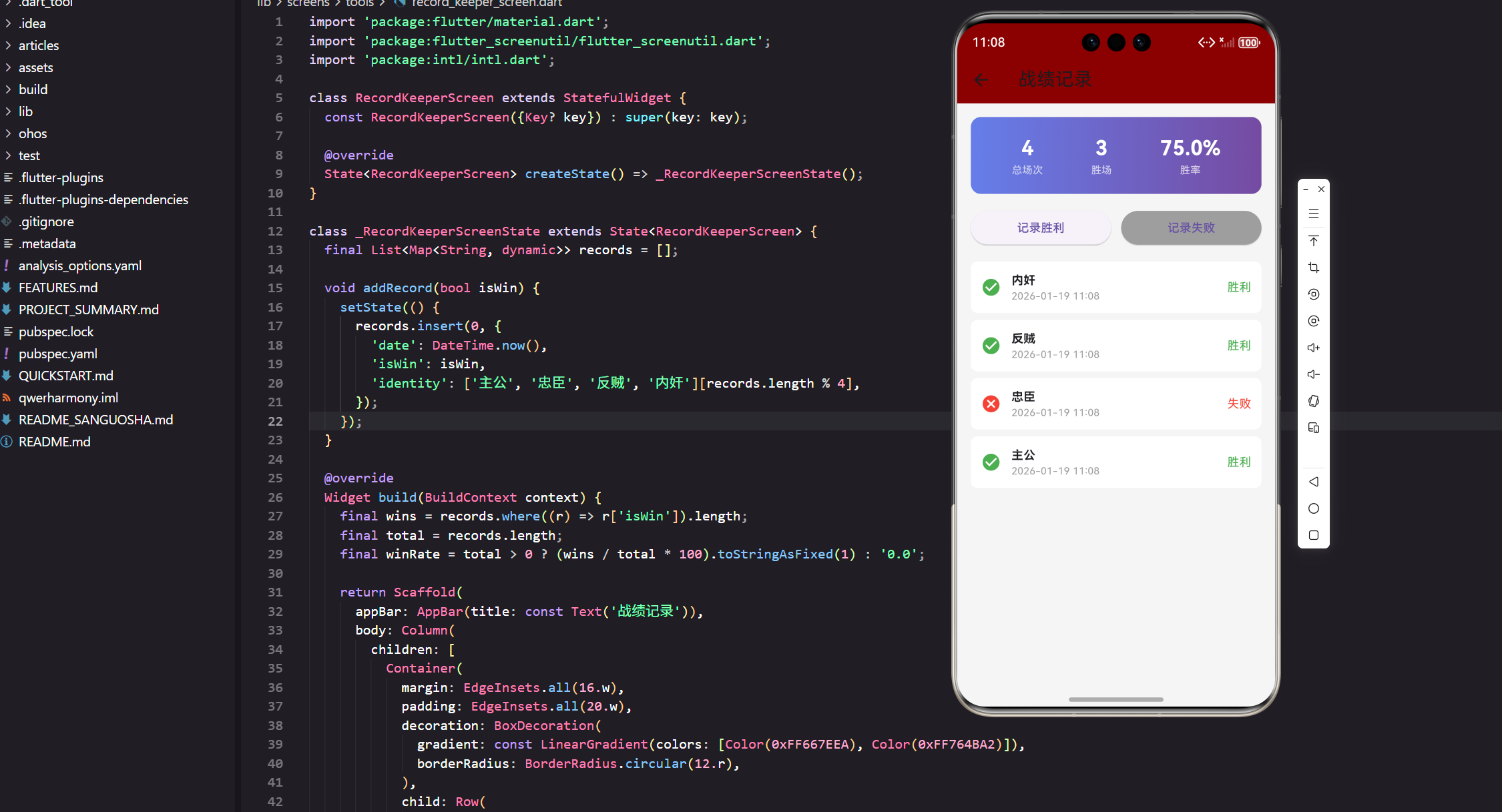
在三国杀游戏中,记录和分析自己的战绩是提升技能的重要方式。本文将基于真实项目代码,详细实现一个功能完整的战绩记录系统,包括胜负记录、统计分析、数据展示等核心功能。
功能需求分析
核心功能设计
我们的战绩记录系统需要实现以下功能:
- 快速记录:一键记录胜利或失败
- 统计分析:实时计算总场次、胜场数、胜率
- 历史查看:按时间顺序展示历史战绩
- 身份记录:记录每局游戏的身份信息
- 数据持久化:保存战绩数据到本地
页面结构实现
基础类定义
dart
import 'package:flutter/material.dart';
import 'package:flutter_screenutil/flutter_screenutil.dart';
import 'package:intl/intl.dart';

class RecordKeeperScreen extends StatefulWidget {
  const RecordKeeperScreen({Key? key}) : super(key: key);

  @override
  State<RecordKeeperScreen> createState() => _RecordKeeperScreenState();
}
这里我们使用 StatefulWidget 来管理战绩记录的状态变化。引入了 intl 包用于日期格式化,这是处理时间显示的标准做法。flutter_screenutil 确保在不同设备上的适配效果。
数据模型设计
dart
class _RecordKeeperScreenState extends State<RecordKeeperScreen> {
  final List<Map<String, dynamic>> records = [];

  void addRecord(bool isWin) {
    setState(() {
      records.insert(0, {
        'date': DateTime.now(),
        'isWin': isWin,
        'identity': ['主公', '忠臣', '反贼', '内奸'][records.length % 4],
      });
    });
  }
数据模型采用 Map 结构存储每条战绩记录,包含日期、胜负状态和身份信息。使用 records.insert(0, ...) 将新记录插入到列表开头,确保最新记录显示在顶部。身份信息通过取模运算循环分配,模拟真实游戏场景。
统计数据计算
实时统计实现
dart
@override
Widget build(BuildContext context) {
  final wins = records.where((r) => r['isWin']).length;
  final total = records.length;
  final winRate = total > 0 ? (wins / total * 100).toStringAsFixed(1) : '0.0';
统计计算使用 函数式编程 的思想,通过 where 方法筛选胜利记录。胜率计算考虑了除零情况,使用 toStringAsFixed(1) 保留一位小数,提供精确的数据展示。这种实时计算方式确保数据的准确性和及时性。
统计卡片设计
渐变背景实现
dart
Container(
  margin: EdgeInsets.all(16.w),
  padding: EdgeInsets.all(20.w),
  decoration: BoxDecoration(
    gradient: const LinearGradient(
      colors: [Color(0xFF667EEA), Color(0xFF764BA2)]
    ),
    borderRadius: BorderRadius.circular(12.r),
  ),
统计卡片使用了 紫色渐变背景 ,从浅紫色过渡到深紫色,营造出专业的数据分析氛围。BorderRadius.circular(12.r) 提供了圆角效果,让界面更加现代化。渐变色的选择既美观又不会影响文字的可读性。
统计数据展示
dart
child: Row(
  mainAxisAlignment: MainAxisAlignment.spaceAround,
  children: [
    _buildStat('总场次', '$total'),
    _buildStat('胜场', '$wins'),
    _buildStat('胜率', '$winRate%'),
  ],
),
使用 Row 布局将三个关键统计数据水平排列,MainAxisAlignment.spaceAround 确保数据均匀分布。这种布局方式让用户可以一目了然地看到自己的游戏表现。
统计组件封装
dart
Widget _buildStat(String label, String value) {
  return Column(
    children: [
      Text(
        value,
        style: TextStyle(
          fontSize: 24.sp,
          fontWeight: FontWeight.bold,
          color: Colors.white
        )
      ),
      Text(
        label,
        style: TextStyle(
          fontSize: 12.sp,
          color: Colors.white70
        )
      ),
    ],
  );
}
_buildStat 方法封装了统计数据的显示逻辑,采用上下布局,数值在上,标签在下。使用不同的字体大小和颜色来区分重要性,白色数值突出显示,半透明标签提供说明。这种设计符合用户的阅读习惯。
操作按钮实现
双按钮布局
dart
Padding(
  padding: EdgeInsets.symmetric(horizontal: 16.w),
  child: Row(
    children: [
      Expanded(
        child: ElevatedButton(
          onPressed: () => addRecord(true),
          child: const Text('记录胜利')
        )
      ),
      SizedBox(width: 12.w),
      Expanded(
        child: ElevatedButton(
          onPressed: () => addRecord(false),
          style: ElevatedButton.styleFrom(
            backgroundColor: Colors.grey
          ),
          child: const Text('记录失败')
        )
      ),
    ],
  ),
),
操作区域采用 双按钮并排布局 ,使用 Expanded 确保两个按钮等宽。胜利按钮使用默认的主题色,失败按钮使用灰色,通过颜色区分不同的操作类型。SizedBox(width: 12.w) 在按钮间提供适当的间距。
历史记录列表
列表容器实现
dart
Expanded(
  child: ListView.builder(
    padding: EdgeInsets.symmetric(horizontal: 16.w),
    itemCount: records.length,
    itemBuilder: (context, index) {
      final record = records[index];
使用 ListView.builder 实现高性能的列表渲染,只渲染可见区域的项目。Expanded 让列表占用剩余的所有空间,确保界面布局的合理性。这种懒加载方式在数据量大时能保持良好的性能。
记录项设计
dart
return Container(
  margin: EdgeInsets.only(bottom: 8.h),
  padding: EdgeInsets.all(12.w),
  decoration: BoxDecoration(
    color: Colors.white,
    borderRadius: BorderRadius.circular(8.r),
  ),
每个记录项使用 白色卡片 设计,与背景形成对比。margin 在项目间提供间距,padding 确保内容不会贴边显示。圆角设计让整体界面更加协调统一。
记录内容布局
dart
child: Row(
  children: [
    Icon(
      record['isWin'] ? Icons.check_circle : Icons.cancel,
      color: record['isWin'] ? Colors.green : Colors.red
    ),
    SizedBox(width: 12.w),
    Expanded(
      child: Column(
        crossAxisAlignment: CrossAxisAlignment.start,
        children: [
          Text(
            record['identity'],
            style: const TextStyle(fontWeight: FontWeight.bold)
          ),
          Text(
            DateFormat('yyyy-MM-dd HH:mm').format(record['date']),
            style: TextStyle(fontSize: 12.sp, color: Colors.grey)
          ),
        ],
      ),
    ),
    Text(
      record['isWin'] ? '胜利' : '失败',
      style: TextStyle(
        color: record['isWin'] ? Colors.green : Colors.red
      )
    ),
  ],
),
记录项采用 左中右 三段式布局:左侧是状态图标,中间是身份和时间信息,右侧是结果文字。使用绿色表示胜利,红色表示失败,这种颜色约定符合用户直觉。DateFormat 提供了标准的时间格式化。
日期格式化处理
时间显示优化
dart
Text(
  DateFormat('yyyy-MM-dd HH:mm').format(record['date']),
  style: TextStyle(fontSize: 12.sp, color: Colors.grey)
),
使用 DateFormat 类将 DateTime 对象格式化为易读的字符串。格式 'yyyy-MM-dd HH:mm' 提供了年月日和时分信息,满足用户查看历史记录的需求。灰色字体表明这是辅助信息,不会干扰主要内容的阅读。
状态图标设计
视觉反馈实现
dart
Icon(
  record['isWin'] ? Icons.check_circle : Icons.cancel,
  color: record['isWin'] ? Colors.green : Colors.red
),
状态图标使用 Material Design 的标准图标,check_circle 表示成功,cancel 表示失败。图标颜色与结果文字保持一致,形成统一的视觉语言。这种设计让用户可以快速识别每条记录的结果。
数据持久化扩展
本地存储方案
虽然当前实现使用内存存储,但可以轻松扩展为本地持久化:
dart
// 可扩展的存储方案
import 'package:shared_preferences/shared_preferences.dart';
import 'dart:convert';

Future<void> saveRecords() async {
  final prefs = await SharedPreferences.getInstance();
  final recordsJson = records.map((r) => {
    'date': r['date'].millisecondsSinceEpoch,
    'isWin': r['isWin'],
    'identity': r['identity'],
  }).toList();
  await prefs.setString('game_records', json.encode(recordsJson));
}
这种扩展方案使用 SharedPreferences 进行本地存储,将 DateTime 转换为时间戳,确保数据的序列化和反序列化。JSON 格式便于数据的读写和迁移。
性能优化策略
列表性能优化
dart
ListView.builder(
  padding: EdgeInsets.symmetric(horizontal: 16.w),
  itemCount: records.length,
  itemBuilder: (context, index) {
    // 只渲染可见项目
  },
),
ListView.builder 采用懒加载机制,只创建屏幕可见区域的 widget,大大提升了大数据量时的性能。这种方式即使有数千条记录也能保持流畅的滚动体验。
状态更新优化
dart
void addRecord(bool isWin) {
  setState(() {
    records.insert(0, {
      'date': DateTime.now(),
      'isWin': isWin,
      'identity': ['主公', '忠臣', '反贼', '内奸'][records.length % 4],
    });
  });
}
使用 setState 进行状态更新,确保界面能够响应数据变化。将新记录插入到列表开头,避免了遍历整个列表的性能开销。
用户体验优化
交互反馈设计
dart
ElevatedButton(
  onPressed: () => addRecord(true),
  child: const Text('记录胜利')
),
按钮点击后立即更新界面,提供即时的视觉反馈。这种响应式设计让用户感受到操作的有效性,提升了使用体验。
视觉层次设计
通过不同的字体大小、颜色和布局来建立清晰的视觉层次:
- 大号白色数字:突出重要统计数据
- 中等黑色文字:显示身份等主要信息
- 小号灰色文字:展示时间等辅助信息
- 彩色图标:提供状态指示
功能扩展建议
高级统计功能
dart
// 可扩展的统计分析
Map<String, int> getIdentityStats() {
  final stats = <String, int>{};
  for (final record in records) {
    final identity = record['identity'] as String;
    stats[identity] = (stats[identity] ?? 0) + 1;
  }
  return stats;
}

double getIdentityWinRate(String identity) {
  final identityRecords = records.where((r) => r['identity'] == identity);
  if (identityRecords.isEmpty) return 0.0;
  final wins = identityRecords.where((r) => r['isWin']).length;
  return wins / identityRecords.length * 100;
}
这些扩展方法可以提供更详细的统计分析,比如各身份的胜率、游戏频率等,为玩家提供更深入的数据洞察。
总结
通过本文的实现,我们构建了一个功能完整的战绩记录系统。这个系统不仅提供了基础的记录功能,还包含了实时统计、历史查看、视觉反馈等多个方面的优化。
核心技术要点:
- 使用 ListView.builder 实现高性能列表
- 通过 DateFormat 提供标准时间格式化
- 采用函数式编程进行数据统计
- 运用 Material Design 设计语言
- 实现响应式的用户交互
这个战绩记录系统为玩家提供了便捷的数据管理工具,帮助他们更好地分析和提升自己的游戏水平。在下一篇文章中,我们将实现讨论区功能,为玩家提供交流互动的平台。
欢迎加入开源鸿蒙跨平台社区:https://openharmonycrossplatform.csdn.net