总纲:
上篇文章我们进行了线程的初步学习,接下来我们将用线程来解决无人机防空平台的开发。我们的目标是建立一个完善的功能系统,包含雷达扫描,追击敌机,补充弹药,停靠机场等功能。
一、窗体
无人机自动防空平台的第一步是要绘制窗体提供一个背景平台。我们目前是要通过按钮来生成无人机和入侵者,所以我们需要在窗体下面设置按钮,因为我们不采取流式布局,接下来添加按钮需要使用Jpanel面板。我会用代码来进行无人机自动防空平台窗体的绘制。
java
public class DroneUI extends JFrame {
    ArrayList<Intruder> IntruderArrayList = new ArrayList<>();

    ArrayList<Drone> droneArrayList = new ArrayList<>();

    public DroneUI(){
        setTitle("智能无人机平台");
        setSize(1200,1000);
        setDefaultCloseOperation(EXIT_ON_CLOSE);
        setLocationRelativeTo(null);

        JPanel jPanel = new JPanel();
        jPanel.setBackground(Color.LIGHT_GRAY);

        JButton button = new JButton("生产无人机");
        jPanel.add(button);

        JButton button1 = new JButton("生产入侵者");
        jPanel.add(button1);

        add(jPanel,BorderLayout.SOUTH);
        setVisible(true);
        Graphics g = this.getGraphics();
        //无人机线程
        DroneThread droneThread = new DroneThread(g);
        //监听器
        DroneListener droneListener = new DroneListener();
        //按钮注册监听
        button.addActionListener(droneListener);
        button1.addActionListener(droneListener);

        //将共享内存空间的数组 传入两个线程中

        droneListener.droneArrayList=droneArrayList;//监听器线程
        droneThread.droneArrayList=droneArrayList;//无人机线程
        droneListener.IntruderArrayList=IntruderArrayList;
        droneThread.IntruderArrayList=IntruderArrayList;
        droneThread.start();


    }
    //绘制窗体 刷新窗体
    public  void paint(Graphics g){
        super.paint(g);

    }

    public static void main(String[] args) {
        new DroneUI();
    }
}
二、无人机和入侵者的生成
因为无人机和入侵者的数量是不固定的,所以我们需要将无人机和入侵者设置成类,类中包含无人机入侵者的属性和方法。
无人机
目前我们的无人机防空系统目前是一个很基础的初始板块儿,所以无人机先限制在一个红色框内移动。
属性:
java
 //属性
     int x,y;//坐标
    int speedx,speedy;//速度
    int size;//无人机尺寸
    int state;//无人机状态
    int stateSize;//无人机状态圆的大小
    int scanSize;//雷达范围
构造方法:
java
//构造方法
    public Drone(int x,int y,int state,int speedx,int speedy){
        this.x = x;
        this.y = y;
        this.state = state;
        this.size = 30;
        this.stateSize = 15;
        this.scanSize = 100;
        this.speedx = speedx;
        this.speedy = speedy;

    }
用构造方法赋予无人机各属性的初始值或指定值。
绘制方法和移动方法:
java
// 方法

    public void drawDrone(Graphics bg){
        Color color1 = new Color(0,0,255,60);
        bg.setColor(color1);
        bg.fillOval(x,y,scanSize,scanSize);
        Color color2 = new Color(64, 195, 66);
        bg.setColor(color2);
        bg.fillOval(x+35,y+35,size,size);
        Color color3 = new Color(255, 0, 0);
        bg.setColor(color3);
        bg.fillOval(x+42,y+42,stateSize,stateSize);
    }

    public void move(){
        if(x>600+300||x<200){
            speedx=-speedx;
        }
        if(y>400+175||y<175){
            speedy=-speedy;
        }
        x+=speedx;
        y+=speedy;
    }
这就是无人机类所包含的内容,先定义属性,通过构造方法再赋予属性初始值,再绘制它的外观以及移动方法生成一个初始简易无人机。
入侵者
入侵者类与无人机类的方法大同小异。但是入侵者因为并不在红色框内移动,所以它的移动和反弹范围要有所调整。
属性
java
 int x,y,speedx,speedy,size;
    int blood;
构造方法
java
public Intruder(int x,int y,int size,int speedx,int speedy){
    this.x = x;
    this.y = y;
    this.speedx = speedx;
    this.speedy = speedy;
    this.size = size;
    this.blood=100;

}
绘制和移动方法
java
 public void drawIntruder(Graphics g){
        if(blood<=0){
            return;
        }
        g.setColor(Color.BLACK);
        g.fillOval(x,y,size,size);
//        g.setColor(Color.RED);
//        g.drawOval(x-1,y-1,size+2,size+2);

    }

    public void  move (){
        if(blood<=0){
            return;
        }
        if(x>1200-size||x<10){
            speedx=-speedx;
        }
        if(y>750-size||y<10){
            speedy=-speedy;
        }
        x+=speedx;
        y+=speedy;
    }

}
三、多线程运行
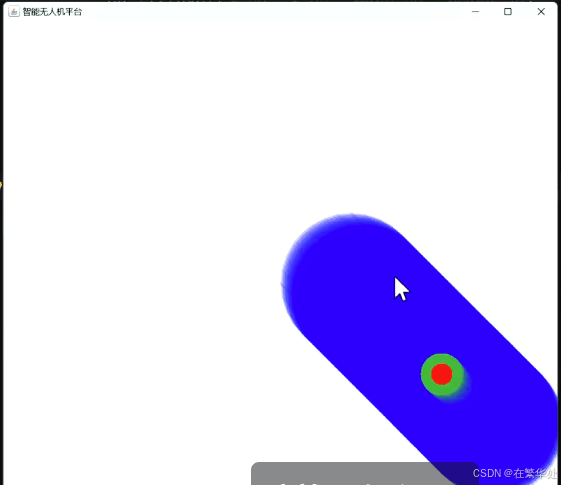
无人机和入侵者的运行在我们的初始代码下会呈现下图状态,这并不是我们想要的结果。所以我们可以把它们绘制在图片上,然后让图片不断的刷新窗体来达到呈现无人机运行轨迹的目的。此时我们就需要用到线程的知识。
java
public class DroneThread extends Thread{

    ArrayList<Drone> droneArrayList;
    ArrayList<Intruder> IntruderArrayList;


    Graphics g;

    public DroneThread(Graphics g){

        this.g=g;
    }
    @Override
    public void run() {

        while (true) {

            BufferedImage image = new BufferedImage(1200,750,2);
            Graphics bg = image.getGraphics();
            bg.setColor(Color.WHITE);
            bg.fillRect(0,0,1200,750);
            bg.setColor(Color.RED);
            bg.drawRect(200,175,800,500);

            //遍历无人机数组 取出无人机对象 调用绘制 和移动的方法
            for (int j = 0; j <droneArrayList.size() ; j++) {
                Drone drone = droneArrayList.get(j);
                drone.drawDrone(bg);
                drone.move();
            }

            for (int j = 0; j <IntruderArrayList.size() ; j++) {
                Intruder intruder = IntruderArrayList.get(j);
                intruder.drawIntruder(bg);
                intruder.move();
            }

            // 检测周围是否有颜色变化
            if(droneArrayList.size()>0) {
                //System.out.println("进入检测~");
                Drone drone = droneArrayList.get(0);
                for (int i = drone.x; i <drone.x+ drone.scanSize; i++) {
                    for (int j = drone.y; j < drone.y+drone.scanSize; j++) {
                        int colorNum = image.getRGB(i , j);
                        Color color = new Color(colorNum);
                        if ((color.getRed() + color.getBlue() + color.getGreen()) / 3 < 10) {
                            System.out.println("雷达扫描到了~");
                        }

                    }

                }

            }


            g.drawImage(image,0,0,null);
            try {
                Thread.sleep(15);
            } catch (InterruptedException e) {
                throw new RuntimeException(e);
            }

        }

    }

}
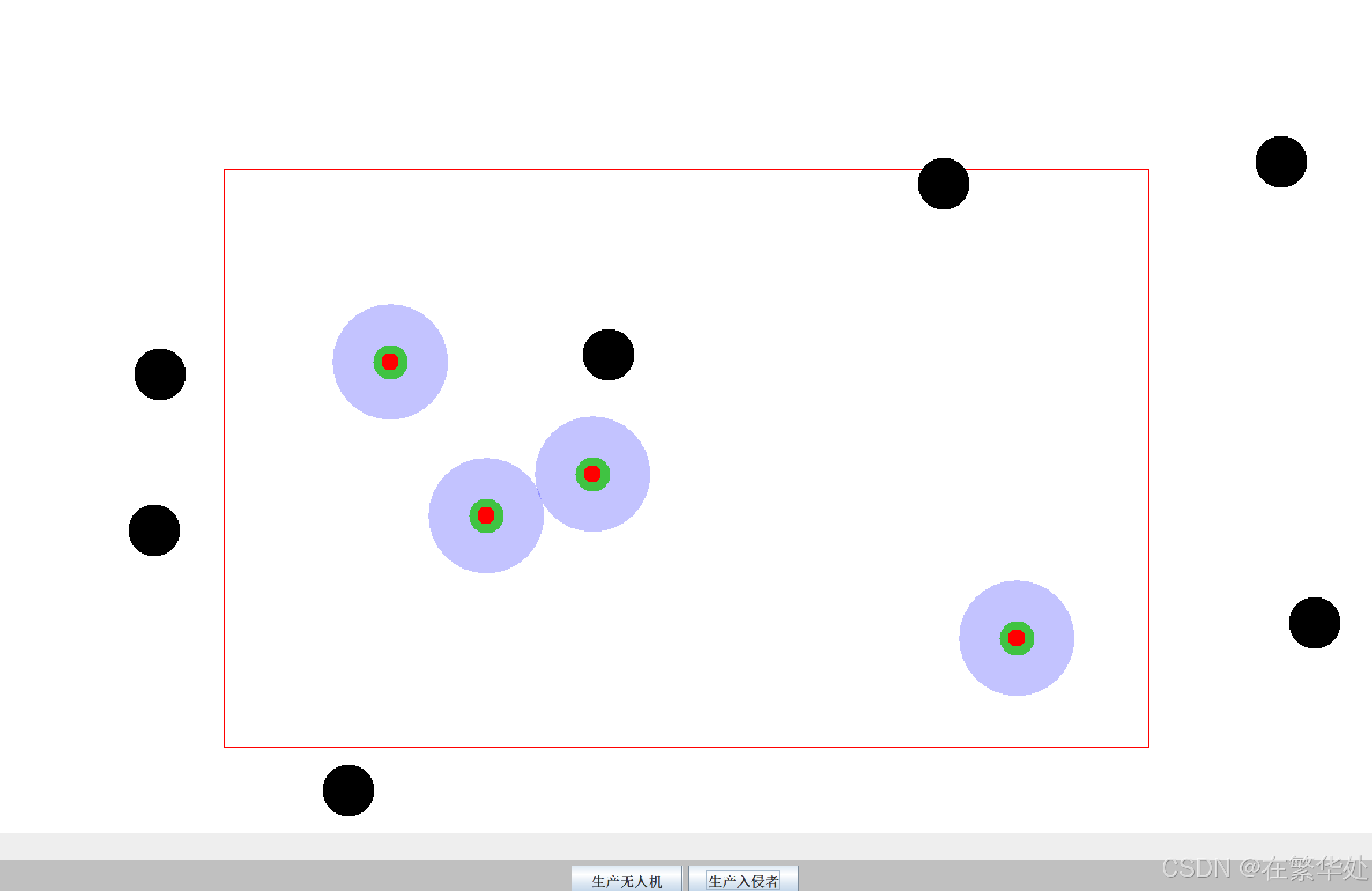
在这里我设置的间隔时间是15ms,使无人机和入侵者的运行速度较为均衡
什么是 ArrayList
ArrayList<Drone> droneList = new ArrayList<>(); 含义:
-
动态数组
-
里面装的是
Drone对象
为什么不用普通数组?
| 数组 | ArrayList |
|---|---|
| 长度固定 | 可变 |
| 不方便增删 | 很方便 |
仿真程序一定要用 ArrayList,是多个线程共享的数据
四、监听器
java
public class DroneListener implements ActionListener {

    ArrayList<Drone> droneArrayList;
    ArrayList<Intruder> IntruderArrayList;
    Random random = new Random();
    public void actionPerformed(ActionEvent e){
        String ac = e.getActionCommand();


    if (ac.equals("生产无人机")){
        int x = random.nextInt(700)+200;
        int y = random.nextInt(400)+175;
        int speedx = random.nextInt(5)-2;//-2-2
        int speedy = random.nextInt(5)-2;//-2-2
        Drone drone = new Drone(x,y,0,speedx,speedy);

        droneArrayList.add(drone);
        } else if (ac.equals("生产入侵者")) {
        int x = random.nextInt(1150);
        int y = random.nextInt(705);

        while (true){
            if (x<200||x>1000||y<175||y>775) {
                break;
            }
            x = random.nextInt(1150);
            y = random.nextInt(900);

        }

        int speedx = random.nextInt(5)-2;//-2-2
        int speedy = random.nextInt(5)-2;//-2-2
        Intruder intruder = new Intruder(x, y, 45, speedx, speedy);


        IntruderArrayList.add(intruder);
    }
    }
}
完整代码如下:
DroneUI类
java
import javax.swing.*;
import java.awt.*;
import java.util.ArrayList;

public class DroneUI extends JFrame {
    ArrayList<Intruder> IntruderArrayList = new ArrayList<>();

    ArrayList<Drone> droneArrayList = new ArrayList<>();

    public DroneUI(){
        setTitle("智能无人机平台");
        setSize(1200,1000);
        setDefaultCloseOperation(EXIT_ON_CLOSE);
        setLocationRelativeTo(null);

        JPanel jPanel = new JPanel();
        jPanel.setBackground(Color.LIGHT_GRAY);

        JButton button = new JButton("生产无人机");
        jPanel.add(button);

        JButton button1 = new JButton("生产入侵者");
        jPanel.add(button1);

        add(jPanel,BorderLayout.SOUTH);
        setVisible(true);
        Graphics g = this.getGraphics();
        //无人机线程
        DroneThread droneThread = new DroneThread(g);
        //监听器
        DroneListener droneListener = new DroneListener();
        //按钮注册监听
        button.addActionListener(droneListener);
        button1.addActionListener(droneListener);

        //将共享内存空间的数组 传入两个线程中

        droneListener.droneArrayList=droneArrayList;//监听器线程
        droneThread.droneArrayList=droneArrayList;//无人机线程
        droneListener.IntruderArrayList=IntruderArrayList;
        droneThread.IntruderArrayList=IntruderArrayList;
        droneThread.start();


    }
    //绘制窗体 刷新窗体
    public  void paint(Graphics g){
        super.paint(g);

    }

    public static void main(String[] args) {
        new DroneUI();
    }
}
Drone类
java
import java.awt.*;

public class Drone {
    //属性
    int x,y,speedx,speedy,size;
    int state;
    int stateSize;
    int scanSize;

    //构造方法
    public Drone(int x,int y,int state,int speedx,int speedy){
        this.x = x;
        this.y = y;
        this.state = state;
        this.size = 30;
        this.stateSize = 15;
        this.scanSize = 100;
        this.speedx = speedx;
        this.speedy = speedy;

    }

    // 方法

    public void drawDrone(Graphics bg){
        Color color1 = new Color(0,0,255,60);
        bg.setColor(color1);
        bg.fillOval(x,y,scanSize,scanSize);
        Color color2 = new Color(64, 195, 66);
        bg.setColor(color2);
        bg.fillOval(x+35,y+35,size,size);
        Color color3 = new Color(255, 0, 0);
        bg.setColor(color3);
        bg.fillOval(x+42,y+42,stateSize,stateSize);
    }

    public void move(){
        if(x>600+300||x<200){
            speedx=-speedx;
        }
        if(y>400+175||y<175){
            speedy=-speedy;
        }
        x+=speedx;
        y+=speedy;
    }

}
Intruder类
java
import java.awt.*;

public class Intruder {
    int x,y,speedx,speedy,size;
    int blood;

    public Intruder(int x,int y,int size,int speedx,int speedy){
        this.x = x;
        this.y = y;
        this.speedx = speedx;
        this.speedy = speedy;
        this.size = size;
        this.blood=100;

    }

    public void drawIntruder(Graphics g){
        if(blood<=0){
            return;
        }
        g.setColor(Color.BLACK);
        g.fillOval(x,y,size,size);
//        g.setColor(Color.RED);
//        g.drawOval(x-1,y-1,size+2,size+2);

    }

    public void  move (){
        if(blood<=0){
            return;
        }
        if(x>1200-size||x<10){
            speedx=-speedx;
        }
        if(y>750-size||y<10){
            speedy=-speedy;
        }
        x+=speedx;
        y+=speedy;
    }

}
线程类
java
import java.awt.*;
import java.awt.image.BufferedImage;
import java.util.ArrayList;

public class DroneThread extends Thread{

    ArrayList<Drone> droneArrayList;
    ArrayList<Intruder> IntruderArrayList;


    Graphics g;

    public DroneThread(Graphics g){

        this.g=g;
    }
    @Override
    public void run() {

        while (true) {

            BufferedImage image = new BufferedImage(1200,750,2);
            Graphics bg = image.getGraphics();
            bg.setColor(Color.WHITE);
            bg.fillRect(0,0,1200,750);
            bg.setColor(Color.RED);
            bg.drawRect(200,175,800,500);

            //遍历无人机数组 取出无人机对象 调用绘制 和移动的方法
            for (int j = 0; j <droneArrayList.size() ; j++) {
                Drone drone = droneArrayList.get(j);
                drone.drawDrone(bg);
                drone.move();
            }

            for (int j = 0; j <IntruderArrayList.size() ; j++) {
                Intruder intruder = IntruderArrayList.get(j);
                intruder.drawIntruder(bg);
                intruder.move();
            }

            // 检测周围是否有颜色变化
            if(droneArrayList.size()>0) {
                //System.out.println("进入检测~");
                Drone drone = droneArrayList.get(0);
                for (int i = drone.x; i <drone.x+ drone.scanSize; i++) {
                    for (int j = drone.y; j < drone.y+drone.scanSize; j++) {
                        int colorNum = image.getRGB(i , j);
                        Color color = new Color(colorNum);
                        if ((color.getRed() + color.getBlue() + color.getGreen()) / 3 < 10) {
                            System.out.println("雷达扫描到了~");
                        }

                    }

                }

            }


            g.drawImage(image,0,0,null);
            try {
                Thread.sleep(15);
            } catch (InterruptedException e) {
                throw new RuntimeException(e);
            }

        }

    }

}
监听器类
java
import javax.swing.*;
import java.awt.event.ActionEvent;
import java.awt.event.ActionListener;
import java.util.ArrayList;
import java.util.Random;

public class DroneListener implements ActionListener {

    ArrayList<Drone> droneArrayList;
    ArrayList<Intruder> IntruderArrayList;
    Random random = new Random();
    public void actionPerformed(ActionEvent e){
        String ac = e.getActionCommand();


    if (ac.equals("生产无人机")){
        int x = random.nextInt(700)+200;
        int y = random.nextInt(400)+175;
        int speedx = random.nextInt(5)-2;//-2-2
        int speedy = random.nextInt(5)-2;//-2-2
        Drone drone = new Drone(x,y,0,speedx,speedy);

        droneArrayList.add(drone);
        } else if (ac.equals("生产入侵者")) {
        int x = random.nextInt(1150);
        int y = random.nextInt(705);

        while (true){
            if (x<200||x>1000||y<175||y>775) {
                break;
            }
            x = random.nextInt(1150);
            y = random.nextInt(900);

        }

        int speedx = random.nextInt(5)-2;//-2-2
        int speedy = random.nextInt(5)-2;//-2-2
        Intruder intruder = new Intruder(x, y, 45, speedx, speedy);


        IntruderArrayList.add(intruder);
    }
    }
}