在移动应用开发中,阅读和书籍管理应用是一种常见的应用类型,需要考虑书籍展示、分类管理、搜索排序等多个方面。本文将深入分析一个功能完备的 React Native 阅读应用实现,探讨其架构设计、状态管理、数据处理以及跨端兼容性策略。
组件化
该实现采用了清晰的组件化架构,主要包含以下部分:
- 主应用组件 (
ReadingApp) - 负责整体布局和状态管理 - 书籍列表渲染 - 负责渲染书籍卡片列表
- 书架筛选 - 提供按书架筛选书籍的功能
- 搜索功能 - 提供搜索书籍的功能
- 排序功能 - 提供按标题、作者、评分或年份排序的功能
这种架构设计使得代码结构清晰,易于维护和扩展。主应用组件负责管理全局状态和业务逻辑,而各个功能部分负责具体的 UI 渲染,实现了关注点分离。
状态管理
ReadingApp 组件使用 useState 钩子管理多个关键状态:
typescript
const [selectedShelf, setSelectedShelf] = useState<string>('1');
const [bookList, setBookList] = useState<Book[]>(books);
const [sortBy, setSortBy] = useState<'title' | 'author' | 'rating' | 'year'>('title');
const [searchQuery, setSearchQuery] = useState<string>('');
这种状态管理方式简洁高效,通过状态更新触发组件重新渲染,实现了书籍的筛选、搜索、排序等功能。使用 TypeScript 联合类型确保了 sortBy 的取值只能是预定义的几个选项之一,提高了代码的类型安全性。
书籍筛选与排序
应用实现了灵活的书籍筛选与排序功能:
typescript
// 获取当前书架的书籍
const getCurrentShelfBooks = () => {
  const shelfName = shelves.find(shelf => shelf.id === selectedShelf)?.name;
  return bookList.filter(book =>
    book.shelf === shelfName &&
    (searchQuery === '' ||
     book.title.toLowerCase().includes(searchQuery.toLowerCase()) ||
     book.author.toLowerCase().includes(searchQuery.toLowerCase()))
  ).sort((a, b) => {
    switch (sortBy) {
      case 'title':
        return a.title.localeCompare(b.title);
      case 'author':
        return a.author.localeCompare(b.author);
      case 'rating':
        return b.rating - a.rating;
      case 'year':
        return b.publishYear - a.publishYear;
      default:
        return 0;
    }
  });
};
这种实现方式支持多重筛选和排序条件:
- 书架筛选 - 只显示当前选中书架的书籍
- 搜索筛选 - 根据标题或作者搜索书籍
- 排序 - 按标题、作者、评分或年份排序
这种灵活的筛选和排序功能为用户提供了便捷的书籍管理体验。
书籍卡片
应用实现了书籍卡片的渲染:
typescript
// 渲染书籍项
const renderBookItem = ({ item }: { item: Book }) => (
  <View style={styles.bookCard}>
    <View style={styles.coverContainer}>
      <View style={styles.coverPlaceholder}>
        <Text style={styles.coverText}>📖</Text>
      </View>
    </View>

    <View style={styles.infoContainer}>
      <View style={styles.headerContainer}>
        <Text style={styles.bookTitle}>{item.title}</Text>
        <Text style={styles.rating}>⭐ {item.rating}</Text>
      </View>

      {/* 更多书籍信息... */}
    </View>
  </View>
);
这种实现方式清晰展示了书籍的详细信息,包括标题、评分等,并提供了书籍封面的占位符。
类型定义
该实现使用 TypeScript 定义了两个核心数据类型:
- Book - 书籍类型,包含书籍的完整信息,如 ID、标题、作者、类型、页数、评分、出版年份、描述、书架和封面
- Shelf - 书架类型,包含书架的 ID、名称、图标和书籍数量
这些类型定义使得数据结构更加清晰,提高了代码的可读性和可维护性,同时也提供了类型安全保障。
数据组织
应用数据按照功能模块进行组织:
- shelves - 书架列表
- books - 书籍列表
- bookList - 当前管理的书籍集合
- selectedShelf - 当前选中的书架
- sortBy - 排序方式
- searchQuery - 搜索关键字
这种数据组织方式使得数据管理更加清晰,易于扩展和维护。
布局结构
应用界面采用了清晰的层次结构:
- 顶部 - 显示应用标题和搜索栏
- 书架筛选 - 显示书架列表,允许用户选择书架
- 功能栏 - 显示排序、筛选等功能按钮
- 书籍列表 - 显示当前筛选条件下的书籍列表
这种布局结构符合用户的使用习惯,用户可以快速了解应用内容并进行操作。
交互设计
应用实现了直观的交互设计:
- 书架筛选 - 点击书架切换显示的书籍
- 搜索 - 输入关键字搜索书籍
- 排序 - 点击排序按钮切换排序方式
- 书籍详情 - 点击书籍卡片查看详细信息
这些交互设计元素共同构成了良好的用户体验,使得书籍管理操作简单直观。
在设计跨端阅读应用时,需要特别关注以下几个方面:
- 组件 API 兼容性 - 确保使用的 React Native 组件在鸿蒙系统上有对应实现
- 样式系统差异 - 不同平台对样式的支持程度不同,需要确保样式在两端都能正常显示
- 触摸事件处理 - 不同平台的触摸事件机制可能存在差异
- 图标系统 - 确保图标在不同平台上都能正常显示
- 性能优化 - 不同平台的性能特性不同,需要针对性优化
针对上述问题,该实现采用了以下适配策略:
- 使用 React Native 核心组件 - 优先使用 React Native 内置的组件,如 View、Text、TouchableOpacity、ScrollView、FlatList 等
- 统一的样式定义 - 使用 StyleSheet.create 定义样式,确保样式在不同平台上的一致性
- Base64 图标 - 使用 Base64 编码的图标,确保图标在不同平台上的一致性
- 平台无关的图标 - 使用 Unicode 表情符号作为书架和书籍封面的图标,避免使用平台特定的图标库
- 简化的交互逻辑 - 使用简单直接的交互逻辑,减少平台差异带来的问题
渲染
- 列表优化 - 使用 FlatList 渲染书籍列表,提高长列表的渲染性能
- 条件渲染 - 只在需要时渲染特定的 UI 元素,减少不必要的渲染
- 组件拆分 - 将书籍卡片和功能按钮等拆分为独立的组件,提高渲染性能
- 样式复用 - 通过样式数组和条件样式,复用样式定义,减少样式计算开销
计算
- 减少重复计算 - 将筛选和排序逻辑封装为函数,避免在渲染过程中重复计算
- 优化排序算法 - 使用高效的排序算法,减少排序开销
- 延迟计算 - 只在需要时进行计算,避免不必要的计算
当前实现使用 FlatList 渲染书籍列表,这是一个好的做法,但可以进一步优化:
typescript
// 优化前
<FlatList
  data={getCurrentShelfBooks()}
  renderItem={renderBookItem}
  keyExtractor={item => item.id}
/>

// 优化后
<FlatList
  data={getCurrentShelfBooks()}
  renderItem={renderBookItem}
  keyExtractor={item => item.id}
  initialNumToRender={5} // 初始渲染的项目数
  maxToRenderPerBatch={10} // 每批渲染的最大项目数
  windowSize={10} // 可见区域外渲染的项目数
  removeClippedSubviews={true} // 移除不可见的子视图
  updateCellsBatchingPeriod={100} // 单元格更新的批处理周期
  getItemLayout={(data, index) => ({
    length: ITEM_HEIGHT, // 预计算的项目高度
    offset: ITEM_HEIGHT * index,
    index
  })}
/>
2. 状态管理
当前实现使用多个 useState 钩子管理状态,可以考虑使用 useReducer 或状态管理库来管理复杂状态:
typescript
// 优化前
const [selectedShelf, setSelectedShelf] = useState<string>('1');
const [bookList, setBookList] = useState<Book[]>(books);
const [sortBy, setSortBy] = useState<'title' | 'author' | 'rating' | 'year'>('title');
const [searchQuery, setSearchQuery] = useState<string>('');

// 优化后
type AppState = {
  selectedShelf: string;
  bookList: Book[];
  sortBy: 'title' | 'author' | 'rating' | 'year';
  searchQuery: string;
};

type AppAction =
  | { type: 'SET_SELECTED_SHELF'; payload: string }
  | { type: 'SET_BOOK_LIST'; payload: Book[] }
  | { type: 'SET_SORT_BY'; payload: 'title' | 'author' | 'rating' | 'year' }
  | { type: 'SET_SEARCH_QUERY'; payload: string }
  | { type: 'ADD_BOOK'; payload: Book }
  | { type: 'UPDATE_BOOK'; payload: Book }
  | { type: 'DELETE_BOOK'; payload: string };

const initialState: AppState = {
  selectedShelf: '1',
  bookList: books,
  sortBy: 'title',
  searchQuery: '',
};

const appReducer = (state: AppState, action: AppAction): AppState => {
  switch (action.type) {
    case 'SET_SELECTED_SHELF':
      return { ...state, selectedShelf: action.payload };
    case 'SET_BOOK_LIST':
      return { ...state, bookList: action.payload };
    case 'SET_SORT_BY':
      return { ...state, sortBy: action.payload };
    case 'SET_SEARCH_QUERY':
      return { ...state, searchQuery: action.payload };
    case 'ADD_BOOK':
      return { ...state, bookList: [...state.bookList, action.payload] };
    case 'UPDATE_BOOK':
      return {
        ...state,
        bookList: state.bookList.map(book =>
          book.id === action.payload.id ? action.payload : book
        )
      };
    case 'DELETE_BOOK':
      return {
        ...state,
        bookList: state.bookList.filter(book => book.id !== action.payload)
      };
    default:
      return state;
  }
};

const [state, dispatch] = useReducer(appReducer, initialState);
3. 数据持久化
当前实现使用内存状态存储数据,可以考虑集成本地存储实现数据持久化:
typescript
import AsyncStorage from '@react-native-async-storage/async-storage';

const STORAGE_KEYS = {
  BOOKS: '@books',
  SHELVES: '@shelves',
  SETTINGS: '@app_settings',
};

const ReadingApp = () => {
  const [bookList, setBookList] = useState<Book[]>(books);
  const [shelves, setShelves] = useState<Shelf[]>(shelves);
  const [settings, setSettings] = useState({
    selectedShelf: '1',
    sortBy: 'title' as 'title' | 'author' | 'rating' | 'year',
  });

  // 加载数据
  useEffect(() => {
    loadData();
  }, []);

  const loadData = async () => {
    try {
      const storedBooks = await AsyncStorage.getItem(STORAGE_KEYS.BOOKS);
      const storedShelves = await AsyncStorage.getItem(STORAGE_KEYS.SHELVES);
      const storedSettings = await AsyncStorage.getItem(STORAGE_KEYS.SETTINGS);

      if (storedBooks) {
        setBookList(JSON.parse(storedBooks));
      }

      if (storedShelves) {
        setShelves(JSON.parse(storedShelves));
      }

      if (storedSettings) {
        setSettings(JSON.parse(storedSettings));
      }
    } catch (error) {
      console.error('加载数据失败:', error);
    }
  };

  // 保存数据
  const saveData = async () => {
    try {
      await AsyncStorage.setItem(STORAGE_KEYS.BOOKS, JSON.stringify(bookList));
      await AsyncStorage.setItem(STORAGE_KEYS.SHELVES, JSON.stringify(shelves));
      await AsyncStorage.setItem(STORAGE_KEYS.SETTINGS, JSON.stringify(settings));
    } catch (error) {
      console.error('保存数据失败:', error);
    }
  };

  // 当数据变化时保存
  useEffect(() => {
    saveData();
  }, [bookList, shelves, settings]);

  // 其他代码...
};
4. 导航系统
可以集成 React Navigation 实现书籍详情页面的导航:
typescript
import { createStackNavigator } from '@react-navigation/stack';

const Stack = createStackNavigator();

const App = () => {
  return (
    <NavigationContainer>
      <Stack.Navigator>
        <Stack.Screen
          name="Home"
          component={ReadingApp}
          options={{ title: '我的图书馆' }}
        />
        <Stack.Screen
          name="BookDetail"
          component={BookDetailScreen}
          options={({ route }) => ({ title: route.params?.bookTitle || '书籍详情' })}
        />
        <Stack.Screen
          name="AddBook"
          component={AddBookScreen}
          options={{ title: '添加书籍' }}
        />
      </Stack.Navigator>
    </NavigationContainer>
  );
};

const BookDetailScreen = ({ route }: { route: any }) => {
  const { bookId } = route.params;
  // 获取书籍详情并渲染
  return (
    <View style={styles.detailContainer}>
      {/* 书籍详情内容 */}
    </View>
  );
};
本文深入分析了一个功能完备的 React Native 阅读应用实现,从架构设计、状态管理、数据处理到跨端兼容性都进行了详细探讨。该实现不仅功能完整,而且代码结构清晰,具有良好的可扩展性和可维护性。
这个书架管理应用在 React Native 中的完整实现逻辑,并掌握其向鸿蒙(HarmonyOS)平台跨端适配的核心方案。该应用是典型的移动端数据驱动型列表应用,涵盖了多维度数据筛选排序、卡片式列表渲染、横向滚动选择、数据统计分析等核心场景,是跨端开发中极具代表性的实战案例。
1. 应用架构
该书架管理应用基于 TypeScript 构建了强类型的数据模型体系,为应用的稳定性和可维护性奠定了基础:
typescript
// 书籍核心数据模型
type Book = {
  id: string;               // 唯一标识
  title: string;            // 书名
  author: string;           // 作者
  genre: string;            // 类型/流派
  pages: number;            // 页数
  rating: number;           // 评分
  publishYear: number;      // 出版年份
  description: string;      // 描述
  shelf: string;            // 所属书架
  cover: string;            // 封面图(预留)
};

// 书架分类模型
type Shelf = {
  id: string;               // 唯一标识
  name: string;             // 书架名称
  icon: string;             // 图标(emoji)
  bookCount: number;        // 书籍数量
};数据设计亮点:
- 语义化字段设计:字段命名精准反映书籍属性,符合图书管理的业务逻辑;
- 关联关系清晰 :通过
shelf字段建立书籍与书架的多对一关联; - 预留扩展字段 :
cover字段为后续封面图功能预留扩展空间; - 模拟数据丰富:覆盖不同类型、评分、年份的书籍数据,满足测试需求;
- 强类型约束:使用 TypeScript 接口避免运行时类型错误。
2. 状态管理
应用采用 React Hooks 构建了完整的状态管理体系,覆盖所有交互维度:
typescript
const [selectedShelf, setSelectedShelf] = useState<string>('1'); // 当前选中书架
const [bookList, setBookList] = useState<Book[]>(books);         // 完整书籍列表
const [sortBy, setSortBy] = useState<'title' | 'author' | 'rating' | 'year'>('title'); // 排序维度
const [searchQuery, setSearchQuery] = useState<string>(''); // 搜索关键词状态设计原则:
- 单一职责:每个状态仅管理一个维度的数据,职责边界清晰;
- 类型安全:排序状态使用联合类型限制可选值,避免非法值;
- 不可变更新:状态更新遵循 React 不可变原则,通过新数组替换实现;
- 初始值合理:所有状态均设置合理初始值,避免 undefined 问题。
(1)多维度数据筛选
这是应用的核心业务逻辑,实现了书架筛选、关键词搜索、多维度排序的组合查询:
typescript
const getCurrentShelfBooks = () => {
  const shelfName = shelves.find(shelf => shelf.id === selectedShelf)?.name;
  return bookList.filter(book =>
    // 书架筛选
    book.shelf === shelfName &&
    // 关键词搜索(书名/作者,不区分大小写)
    (searchQuery === '' ||
     book.title.toLowerCase().includes(searchQuery.toLowerCase()) ||
     book.author.toLowerCase().includes(searchQuery.toLowerCase()))
  ).sort((a, b) => {
    // 多维度排序
    switch (sortBy) {
      case 'title':
        return a.title.localeCompare(b.title);      // 书名升序
      case 'author':
        return a.author.localeCompare(b.author);    // 作者升序
      case 'rating':
        return b.rating - a.rating;                 // 评分降序
      case 'year':
        return b.publishYear - a.publishYear;       // 出版年份降序
      default:
        return 0;
    }
  });
};实现技巧:
- 链式操作:先过滤后排序,逻辑清晰且性能优化;
- 多条件搜索:支持书名和作者两个维度的关键词匹配;
- 本地化处理:转换为小写实现不区分大小写的搜索;
- 排序策略丰富:支持字符串(书名/作者)和数值(评分/年份)两种排序类型;
- 空值保护 :使用可选链操作符
?.避免空指针错误; - 降序排序:评分和年份采用降序,符合用户阅读习惯。
(2)高性能列表渲染
使用 FlatList 实现书籍列表的高性能渲染,自定义卡片式列表项:
typescript
const renderBookItem = ({ item }: { item: Book }) => (
  <View style={styles.bookCard}>
    {/* 封面占位区 */}
    <View style={styles.coverContainer}>
      <View style={styles.coverPlaceholder}>
        <Text style={styles.coverText}>📖</Text>
      </View>
    </View>

    {/* 书籍信息区 */}
    <View style={styles.infoContainer}>
      {/* 头部(书名+评分) */}
      <View style={styles.headerContainer}>
        <Text style={styles.bookTitle}>{item.title}</Text>
        <Text style={styles.rating}>⭐ {item.rating}</Text>
      </View>

      {/* 详情信息 */}
      <Text style={styles.author}>作者: {item.author}</Text>
      <Text style={styles.genre}>类型: {item.genre}</Text>
      <Text style={styles.pages}>页数: {item.pages}页</Text>
      <Text style={styles.year}>出版: {item.publishYear}</Text>
      <Text style={styles.description} numberOfLines={2}>{item.description}</Text>

      {/* 操作按钮 */}
      <View style={styles.actionContainer}>
        <TouchableOpacity
          style={styles.actionButton}
          onPress={() => Alert.alert('阅读', `开始阅读《${item.title}》`)}
        >
          <Text style={styles.actionButtonText}>阅读</Text>
        </TouchableOpacity>
        <TouchableOpacity
          style={styles.actionButton}
          onPress={() => Alert.alert('编辑', `编辑《${item.title}》信息`)}
        >
          <Text style={styles.actionButtonText}>编辑</Text>
        </TouchableOpacity>
      </View>
    </View>
  </View>
);UI设计亮点:
- 卡片式布局:使用圆角、阴影、留白构建现代卡片设计;
- 图文排版:左侧封面占位 + 右侧信息区的经典图书列表布局;
- 信息层级:通过字体大小、颜色区分不同重要程度的信息;
- 评分可视化:使用 emoji 星星 + 数值展示评分,直观易懂;
- 文本优化:描述文本限制行数,避免内容溢出;
- 操作区设计:阅读/编辑按钮统一样式,交互引导清晰。
(3)数据操作
实现了书籍添加功能和多维度数据统计:
typescript
// 添加新书
const addNewBook = () => {
  Alert.prompt(
    '添加新书',
    '请输入书名:',
    (value) => {
      if (value) {
        const newShelf = shelves.find(shelf => shelf.id === selectedShelf)?.name || '未知书架';
        const newBook: Book = {
          id: `${bookList.length + 1}`,
          title: value,
          author: '未知作者',
          genre: '其他',
          pages: 0,
          rating: 0,
          publishYear: new Date().getFullYear(),
          description: '新添加的书籍',
          shelf: newShelf,
          cover: ''
        };
        setBookList([newBook, ...bookList]); // 新书籍添加到列表顶部
      }
    }
  );
};

// 统计信息渲染
<View style={styles.statsContainer}>
  <View style={styles.statItem}>
    <Text style={styles.statNumber}>
      {currentShelfBooks.reduce((sum, book) => sum + book.pages, 0)}
    </Text>
    <Text style={styles.statLabel}>总页数</Text>
  </View>
  <View style={styles.statItem}>
    <Text style={styles.statNumber}>
      {currentShelfBooks.length > 0
        ? (currentShelfBooks.reduce((sum, book) => sum + book.rating, 0) / currentShelfBooks.length).toFixed(1)
        : '0.0'}
    </Text>
    <Text style={styles.statLabel}>平均评分</Text>
  </View>
  <View style={styles.statItem}>
    <Text style={styles.statNumber}>
      {Math.max(...currentShelfBooks.map(book => book.publishYear), 0)}
    </Text>
    <Text style={styles.statLabel}>最新出版</Text>
  </View>
</View>实现特点:
- 用户输入:使用 Alert.prompt 快速获取书名输入;
- 关联书架:新添加书籍自动关联当前选中书架;
- 默认值合理:设置合理的默认属性值,提升用户体验;
- 数据统计:使用 reduce 实现总页数和平均评分计算;
- 极值计算:使用 Math.max 结合扩展运算符获取最新出版年份;
- 边界处理:平均评分计算时处理空列表情况,避免除以零错误;
- 精度控制:平均评分保留1位小数,提升可读性。
(1)横向滚动书架选择器
tsx
<ScrollView
  horizontal
  showsHorizontalScrollIndicator={false}
  style={styles.shelvesContainer}
>
  <View style={styles.shelvesList}>
    {shelves.map(shelf => (
      <TouchableOpacity
        key={shelf.id}
        style={[
          styles.shelfItem,
          selectedShelf === shelf.id && styles.selectedShelf
        ]}
        onPress={() => setSelectedShelf(shelf.id)}
      >
        <Text style={styles.shelfIcon}>{shelf.icon}</Text>
        <Text style={styles.shelfName}>{shelf.name}</Text>
        <Text style={styles.shelfCount}>{shelf.bookCount}</Text>
      </TouchableOpacity>
    ))}
  </View>
</ScrollView>实现要点:
- 横向滚动:horizontal 属性实现横向滚动布局;
- 隐藏滚动条:showsHorizontalScrollIndicator={false} 优化视觉效果;
- 选中状态:通过样式数组实现选中书架的视觉高亮;
- 统一尺寸:固定宽度的书架卡片,保证布局一致性;
- 信息层级:图标、名称、数量三层信息,层次清晰。
(2)多维度排序
tsx
<View style={styles.sortContainer}>
  <Text style={styles.sortLabel}>排序方式:</Text>
  <View style={styles.sortOptions}>
    <TouchableOpacity
      style={[styles.sortOption, sortBy === 'title' && styles.activeSortOption]}
      onPress={() => setSortBy('title')}
    >
      <Text style={styles.sortOptionText}>书名</Text>
    </TouchableOpacity>
    {/* 其他排序选项 */}
  </View>
</View>交互设计:
- 容器化设计:排序选项包裹在卡片容器中,视觉独立;
- 流式布局:flexWrap: 'wrap' 支持选项自动换行;
- 状态反馈:选中选项通过背景色变化提供视觉反馈;
- 标签引导:清晰的排序标签,提升可用性。
5. 样式
该应用的样式系统体现了移动端UI设计的最佳实践:
typescript
const styles = StyleSheet.create({
  container: {
    flex: 1,
    backgroundColor: '#f8fafc', // 浅灰背景,提升阅读体验
  },
  bookCard: {
    backgroundColor: '#ffffff', // 白色卡片
    borderRadius: 12, // 大圆角设计
    flexDirection: 'row',
    padding: 12,
    marginBottom: 12,
    // 跨平台阴影
    elevation: 1, // Android阴影
    shadowColor: '#000', // iOS阴影
    shadowOffset: { width: 0, height: 1 },
    shadowOpacity: 0.1,
    shadowRadius: 2,
  },
  // 其他样式...
});
将该 React Native 书架管理应用适配到鸿蒙平台,核心是将 React 的状态管理、FlatList 列表、横向滚动、样式系统等核心能力映射到鸿蒙 ArkTS + ArkUI 生态,以下是完整的适配方案。
1. 核心技术栈映射
| React Native 核心能力 | 鸿蒙 ArkTS 对应实现 | 适配关键说明 |
|---|---|---|
useState 状态管理 |
@State/@DerivedState 装饰器 |
基础状态+派生状态组合使用 |
FlatList 列表渲染 |
List + ForEach 组件 |
高性能列表渲染 |
横向 ScrollView |
Scroll + scrollDirection |
滚动方向配置 |
TouchableOpacity |
Button + stateEffect(true) |
可点击组件替换 |
StyleSheet.create |
@Styles/@Extend + 链式样式 |
样式体系重构 |
Alert.alert/prompt |
AlertDialog/TextInputDialog |
弹窗交互替换 |
Array.filter/sort/reduce |
数组方法完全复用 | 业务逻辑零修改 |
numberOfLines 行数限制 |
maxLines 属性 |
文本展示控制 |
flexWrap: 'wrap' |
flexWrap: FlexWrap.Wrap |
流式布局适配 |
2. 鸿蒙端
tsx
// index.ets - 鸿蒙端书架管理应用完整实现
import { BusinessError } from '@ohos.base';

// 类型定义(与RN端完全一致)
type Book = {
  id: string;
  title: string;
  author: string;
  genre: string;
  pages: number;
  rating: number;
  publishYear: number;
  description: string;
  shelf: string;
  cover: string;
};

type Shelf = {
  id: string;
  name: string;
  icon: string;
  bookCount: number;
};

// 模拟数据(与RN端完全一致)
const shelves: Shelf[] = [
  { id: '1', name: '已读书籍', icon: '📚', bookCount: 8 },
  { id: '2', name: '想读书籍', icon: '📖', bookCount: 5 },
  { id: '3', name: '正在阅读', icon: '👀', bookCount: 3 },
  { id: '4', name: '技术书籍', icon: '💻', bookCount: 6 },
  { id: '5', name: '小说文学', icon: '📝', bookCount: 7 },
  { id: '6', name: '个人收藏', icon: '❤️', bookCount: 4 },
];

const initialBooks: Book[] = [
  {
    id: '1',
    title: '百年孤独',
    author: '加西亚·马尔克斯',
    genre: '魔幻现实主义',
    pages: 360,
    rating: 9.2,
    publishYear: 1967,
    description: '一部描绘布恩迪亚家族七代人传奇故事的魔幻现实主义小说',
    shelf: '已读书籍',
    cover: ''
  },
  {
    id: '2',
    title: '1984',
    author: '乔治·奥威尔',
    genre: '反乌托邦',
    pages: 328,
    rating: 9.4,
    publishYear: 1949,
    description: '一个极权主义社会的寓言,探讨了自由与权力的关系',
    shelf: '已读书籍',
    cover: ''
  },
  {
    id: '3',
    title: '算法导论',
    author: '托马斯·科尔曼',
    genre: '计算机科学',
    pages: 1292,
    rating: 9.0,
    publishYear: 2009,
    description: '计算机算法的经典教材,涵盖广泛的数据结构和算法',
    shelf: '技术书籍',
    cover: ''
  },
  {
    id: '4',
    title: '三体',
    author: '刘慈欣',
    genre: '科幻小说',
    pages: 302,
    rating: 8.8,
    publishYear: 2006,
    description: '中国科幻文学的里程碑之作,讲述人类与三体文明的接触',
    shelf: '已读书籍',
    cover: ''
  },
  {
    id: '5',
    title: '深入理解计算机系统',
    author: '兰德尔·布莱恩特',
    genre: '计算机科学',
    pages: 784,
    rating: 9.5,
    publishYear: 2011,
    description: '从程序员视角了解计算机系统的权威指南',
    shelf: '技术书籍',
    cover: ''
  },
  {
    id: '6',
    title: '活着',
    author: '余华',
    genre: '现代文学',
    pages: 191,
    rating: 9.1,
    publishYear: 1993,
    description: '一个普通人在时代变迁中的苦难历程',
    shelf: '已读书籍',
    cover: ''
  },
  {
    id: '7',
    title: 'JavaScript高级程序设计',
    author: '马特·弗利',
    genre: '编程技术',
    pages: 852,
    rating: 8.7,
    publishYear: 2012,
    description: '前端开发必备经典教材',
    shelf: '技术书籍',
    cover: ''
  },
  {
    id: '8',
    title: '红楼梦',
    author: '曹雪芹',
    genre: '古典文学',
    pages: 1200,
    rating: 9.6,
    publishYear: 1791,
    description: '中国古典小说的巅峰之作',
    shelf: '想读书籍',
    cover: ''
  },
  {
    id: '9',
    title: 'Effective Java',
    author: '约书亚·布洛克',
    genre: '编程技术',
    pages: 416,
    rating: 9.3,
    publishYear: 2017,
    description: 'Java编程的最佳实践指南',
    shelf: '正在阅读',
    cover: ''
  },
  {
    id: '10',
    title: '围城',
    author: '钱钟书',
    genre: '现代文学',
    pages: 311,
    rating: 8.9,
    publishYear: 1947,
    description: '描绘知识分子生活的讽刺小说',
    shelf: '小说文学',
    cover: ''
  },
];

@Entry
@Component
struct ReadingApp {
  // 基础状态(对应RN的useState)
  @State selectedShelf: string = '1';
  @State bookList: Book[] = initialBooks;
  @State sortBy: 'title' | 'author' | 'rating' | 'year' = 'title';
  @State searchQuery: string = '';

  // 派生状态 - 计算当前书架的书籍列表
  @DerivedState
  get currentShelfBooks(): Book[] {
    const shelfName = shelves.find(shelf => shelf.id === this.selectedShelf)?.name;
    return this.bookList.filter(book =>
      book.shelf === shelfName &&
      (this.searchQuery === '' ||
       book.title.toLowerCase().includes(this.searchQuery.toLowerCase()) ||
       book.author.toLowerCase().includes(this.searchQuery.toLowerCase()))
    ).sort((a, b) => {
      switch (this.sortBy) {
        case 'title':
          return a.title.localeCompare(b.title);
        case 'author':
          return a.author.localeCompare(b.author);
        case 'rating':
          return b.rating - a.rating;
        case 'year':
          return b.publishYear - a.publishYear;
        default:
          return 0;
      }
    });
  }

  // 派生状态 - 统计数据
  @DerivedState
  get statsData() {
    const books = this.currentShelfBooks;
    return {
      totalPages: books.reduce((sum, book) => sum + book.pages, 0),
      avgRating: books.length > 0
        ? (books.reduce((sum, book) => sum + book.rating, 0) / books.length).toFixed(1)
        : '0.0',
      latestYear: books.length > 0
        ? Math.max(...books.map(book => book.publishYear))
        : 0
    };
  }

  // 通用样式封装 - 卡片容器样式
  @Styles
  cardStyle() {
    .backgroundColor('#ffffff')
    .borderRadius(12)
    .shadow({ radius: 2, color: '#000', opacity: 0.1, offsetX: 0, offsetY: 1 });
  }

  // 通用样式封装 - 排序选项按钮样式
  @Styles
  sortOptionStyle(isActive: boolean) {
    .backgroundColor(isActive ? '#3b82f6' : '#f1f5f9')
    .paddingHorizontal(12)
    .paddingVertical(6)
    .borderRadius(20)
    .marginRight(8)
    .marginBottom(8);
  }

  // 添加新书
  private addNewBook() {
    // 鸿蒙的文本输入弹窗
    TextInputDialog.show({
      title: '添加新书',
      message: '请输入书名:',
      confirm: {
        value: '确定'
      },
      cancel: {
        value: '取消'
      },
      placeholder: '例如:百年孤独'
    }).then((result) => {
      if (result.result && result.value) {
        const newShelf = shelves.find(shelf => shelf.id === this.selectedShelf)?.name || '未知书架';
        const newBook: Book = {
          id: `${this.bookList.length + 1}`,
          title: result.value,
          author: '未知作者',
          genre: '其他',
          pages: 0,
          rating: 0,
          publishYear: new Date().getFullYear(),
          description: '新添加的书籍',
          shelf: newShelf,
          cover: ''
        };
        this.bookList = [newBook, ...this.bookList];
      }
    }).catch((err: BusinessError) => {
      console.error('添加书籍失败:', err);
    });
  }

  // 渲染书籍列表项
  @Builder
  renderBookItem(item: Book) {
    Row({ space: 12 }) {
      // 封面占位区
      Column() {
        Stack() {
          Column() {
            Text('📖')
              .fontSize(24);
          }
          .width(60)
          .height(80)
          .backgroundColor('#e2e8f0')
          .borderRadius(4)
          .alignItems(ItemAlign.Center)
          .justifyContent(FlexAlign.Center);
        }
      }

      // 书籍信息区
      Column({ space: 2, flexShrink: 1 }) {
        // 头部(书名+评分)
        Row({ space: 0 }) {
          Text(item.title)
            .fontSize(16)
            .fontWeight(FontWeight.Bold)
            .fontColor('#1e293b')
            .flex(1);

          Text(`⭐ ${item.rating}`)
            .fontSize(14)
            .fontWeight(FontWeight.Bold)
            .fontColor('#f59e0b');
        }
        .marginBottom(4);

        // 详情信息
        Text(`作者: ${item.author}`)
          .fontSize(12)
          .fontColor('#64748b');

        Text(`类型: ${item.genre}`)
          .fontSize(12)
          .fontColor('#64748b');

        Text(`页数: ${item.pages}页`)
          .fontSize(12)
          .fontColor('#94a3b8');

        Text(`出版: ${item.publishYear}`)
          .fontSize(12)
          .fontColor('#94a3b8')
          .marginBottom(4);

        Text(item.description)
          .fontSize(14)
          .fontColor('#64748b')
          .maxLines(2) // 对应RN的numberOfLines
          .marginBottom(8);

        // 操作按钮
        Row({ space: 8 }) {
          Button('阅读')
            .backgroundColor('#f1f5f9')
            .paddingHorizontal(12)
            .paddingVertical(6)
            .borderRadius(6)
            .fontSize(12)
            .fontColor('#3b82f6')
            .fontWeight(FontWeight.Medium)
            .stateEffect(true)
            .onClick(() => {
              AlertDialog.show({
                title: '阅读',
                message: `开始阅读《${item.title}》`,
                confirm: { value: '确定' }
              });
            });

          Button('编辑')
            .backgroundColor('#f1f5f9')
            .paddingHorizontal(12)
            .paddingVertical(6)
            .borderRadius(6)
            .fontSize(12)
            .fontColor('#3b82f6')
            .fontWeight(FontWeight.Medium)
            .stateEffect(true)
            .onClick(() => {
              AlertDialog.show({
                title: '编辑',
                message: `编辑《${item.title}》信息`,
                confirm: { value: '确定' }
              });
            });
        }
        .width('100%');
      }
    }
    .cardStyle()
    .padding(12)
    .marginBottom(12)
    .width('100%');
  }

  build() {
    Column({ space: 0 }) {
      // 头部导航栏
      this.Header();

      // 内容区域(滚动容器)
      Scroll() {
        Column({ space: 16 }) {
          // 搜索栏
          this.SearchBar();

          // 书架选择
          this.ShelfSelector();

          // 排序选项
          this.SortOptions();

          // 书架详情
          this.ShelfDetails();

          // 书籍列表标题
          Text(`${shelves.find(s => s.id === this.selectedShelf)?.name || '书架'} (${this.currentShelfBooks.length})`)
            .fontSize(18)
            .fontWeight(FontWeight.Bold)
            .fontColor('#1e293b')
            .marginVertical(12)
            .width('100%');

          // 书籍列表(对应RN的FlatList)
          List({ space: 0 }) {
            ForEach(this.currentShelfBooks, (item) => {
              ListItem() {
                this.renderBookItem(item);
              }
            }, (item) => item.id);
          }
          .width('100%')
          .shrink(0)
          .edgeEffect(EdgeEffect.None)
          .scrollBar(BarState.Off);

          // 统计信息
          this.StatsSection();

          // 使用说明
          this.InfoSection();
        }
        .padding(16)
        .width('100%');
      }
      .flex(1)
      .width('100%');

      // 底部导航
      this.BottomNav();
    }
    .width('100%')
    .height('100%')
    .backgroundColor('#f8fafc')
    .safeArea(true);
  }

  // 头部导航栏 - Builder函数封装
  @Builder
  Header() {
    Row({ space: 0 }) {
      Text('我的书架')
        .fontSize(20)
        .fontWeight(FontWeight.Bold)
        .fontColor('#1e293b');

      // 添加按钮
      Button('+')
        .width(36)
        .height(36)
        .borderRadius(18)
        .backgroundColor('#3b82f6')
        .fontSize(20)
        .fontColor('#ffffff')
        .fontWeight(FontWeight.Bold)
        .stateEffect(true)
        .onClick(() => this.addNewBook())
        .marginLeft('auto');
    }
    .padding(20)
    .backgroundColor('#ffffff')
    .borderBottom({ width: 1, color: '#e2e8f0' })
    .width('100%');
  }

  // 搜索栏 - Builder函数封装
  @Builder
  SearchBar() {
    Row({ space: 12 }) {
      Text('🔍')
        .fontSize(18)
        .fontColor('#64748b');

      Text('搜索书名或作者')
        .fontSize(14)
        .fontColor('#94a3b8')
        .flex(1);
    }
    .cardStyle()
    .paddingVertical(12)
    .paddingHorizontal(16)
    .borderRadius(20)
    .width('100%');
  }

  // 书架选择器 - Builder函数封装
  @Builder
  ShelfSelector() {
    Column({ space: 0 }) {
      Text('选择书架')
        .fontSize(18)
        .fontWeight(FontWeight.Bold)
        .fontColor('#1e293b')
        .marginVertical(12)
        .width('100%');

      // 横向滚动的书架列表
      Scroll({ scrollDirection: ScrollDirection.Horizontal }) {
        Row({ space: 12 }) {
          ForEach(shelves, (shelf) => {
            Button()
              .width(80)
              .height('auto')
              .backgroundColor(this.selectedShelf === shelf.id ? '#3b82f6' : '#ffffff')
              .borderRadius(12)
              .padding(12)
              .stateEffect(true)
              .onClick(() => this.selectedShelf = shelf.id)
              .shadow({ radius: 2, color: '#000', opacity: 0.1, offsetX: 0, offsetY: 1 }) {
                Column({ space: 4 }) {
                  Text(shelf.icon)
                    .fontSize(24);

                  Text(shelf.name)
                    .fontSize(12)
                    .fontColor(this.selectedShelf === shelf.id ? '#ffffff' : '#64748b')
                    .fontWeight(FontWeight.Medium);

                  Text(`${shelf.bookCount}`)
                    .fontSize(10)
                    .fontColor(this.selectedShelf === shelf.id ? '#ffffff' : '#94a3b8');
                }
                .alignItems(ItemAlign.Center);
              };
          }, (shelf) => shelf.id);
        }
        .width('auto');
      }
      .scrollBar(BarState.Off)
      .width('100%');
    }
  }

  // 排序选项 - Builder函数封装
  @Builder
  SortOptions() {
    Column({ space: 8 }) {
      Text('排序方式:')
        .fontSize(14)
        .fontColor('#64748b');

      Row({ space: 0 }) {
        // 书名排序
        Button('书名')
          .sortOptionStyle(this.sortBy === 'title')
          .fontSize(12)
          .fontColor(this.sortBy === 'title' ? '#ffffff' : '#3b82f6')
          .fontWeight(FontWeight.Medium)
          .stateEffect(true)
          .onClick(() => this.sortBy = 'title');

        // 作者排序
        Button('作者')
          .sortOptionStyle(this.sortBy === 'author')
          .fontSize(12)
          .fontColor(this.sortBy === 'author' ? '#ffffff' : '#3b82f6')
          .fontWeight(FontWeight.Medium)
          .stateEffect(true)
          .onClick(() => this.sortBy = 'author');

        // 评分排序
        Button('评分')
          .sortOptionStyle(this.sortBy === 'rating')
          .fontSize(12)
          .fontColor(this.sortBy === 'rating' ? '#ffffff' : '#3b82f6')
          .fontWeight(FontWeight.Medium)
          .stateEffect(true)
          .onClick(() => this.sortBy = 'rating');

        // 年份排序
        Button('年份')
          .sortOptionStyle(this.sortBy === 'year')
          .fontSize(12)
          .fontColor(this.sortBy === 'year' ? '#ffffff' : '#3b82f6')
          .fontWeight(FontWeight.Medium)
          .stateEffect(true)
          .onClick(() => this.sortBy = 'year');
      }
      .flexWrap(FlexWrap.Wrap) // 对应RN的flexWrap: 'wrap'
      .width('100%');
    }
    .cardStyle()
    .padding(16)
    .width('100%');
  }

  // 书架详情 - Builder函数封装
  @Builder
  ShelfDetails() {
    Row({ space: 0 }) {
      Text(`${shelves.find(s => s.id === this.selectedShelf)?.name || '书架'}详情`)
        .fontSize(16)
        .fontWeight(FontWeight.Bold)
        .fontColor('#1e293b');

      Text(`共 ${this.currentShelfBooks.length} 本书`)
        .fontSize(14)
        .fontColor('#64748b')
        .marginLeft('auto');
    }
    .cardStyle()
    .padding(16)
    .width('100%');
  }

  // 统计信息 - Builder函数封装
  @Builder
  StatsSection() {
    Row({ space: 0 }) {
      // 总页数
      Column({ space: 4 }) {
        Text(`${this.statsData.totalPages}`)
          .fontSize(18)
          .fontWeight(FontWeight.Bold)
          .fontColor('#3b82f6');

        Text('总页数')
          .fontSize(12)
          .fontColor('#64748b');
      }
      .flex(1)
      .alignItems(ItemAlign.Center);

      // 平均评分
      Column({ space: 4 }) {
        Text(`${this.statsData.avgRating}`)
          .fontSize(18)
          .fontWeight(FontWeight.Bold)
          .fontColor('#3b82f6');

        Text('平均评分')
          .fontSize(12)
          .fontColor('#64748b');
      }
      .flex(1)
      .alignItems(ItemAlign.Center);

      // 最新出版
      Column({ space: 4 }) {
        Text(`${this.statsData.latestYear}`)
          .fontSize(18)
          .fontWeight(FontWeight.Bold)
          .fontColor('#3b82f6');

        Text('最新出版')
          .fontSize(12)
          .fontColor('#64748b');
      }
      .flex(1)
      .alignItems(ItemAlign.Center);
    }
    .cardStyle()
    .padding(16)
    .width('100%');
  }

  // 使用说明 - Builder函数封装
  @Builder
  InfoSection() {
    Column({ space: 8 }) {
      Text('使用说明')
        .fontSize(16)
        .fontWeight(FontWeight.Bold)
        .fontColor('#1e293b')
        .marginBottom(4);

      Text('• 点击书架切换不同分类')
        .fontSize(14)
        .fontColor('#64748b')
        .lineHeight(22);

      Text('• 点击+号添加新书籍')
        .fontSize(14)
        .fontColor('#64748b')
        .lineHeight(22);

      Text('• 支持按书名、作者、评分等排序')
        .fontSize(14)
        .fontColor('#64748b')
        .lineHeight(22);

      Text('• 点击阅读按钮开始阅读')
        .fontSize(14)
        .fontColor('#64748b')
        .lineHeight(22);
    }
    .cardStyle()
    .padding(16)
    .width('100%');
  }

  // 底部导航 - Builder函数封装
  @Builder
  BottomNav() {
    Row({ space: 0 }) {
      // 首页
      Button()
        .flex(1)
        .backgroundColor(Color.Transparent)
        .stateEffect(true)
        .onClick(() => {
          AlertDialog.show({ title: '首页', message: '首页功能' });
        }) {
          Column({ space: 4 }) {
            Text('🏠')
              .fontSize(20)
              .fontColor('#94a3b8');

            Text('首页')
              .fontSize(12)
              .fontColor('#94a3b8');
          }
        };

      // 书架
      Button()
        .flex(1)
        .backgroundColor(Color.Transparent)
        .stateEffect(true)
        .onClick(() => {
          AlertDialog.show({ title: '书架', message: '书架管理' });
        }) {
          Column({ space: 4 }) {
            Text('📚')
              .fontSize(20)
              .fontColor('#94a3b8');

            Text('书架')
              .fontSize(12)
              .fontColor('#94a3b8');
          }
        };

      // 统计
      Button()
        .flex(1)
        .backgroundColor(Color.Transparent)
        .stateEffect(true)
        .onClick(() => {
          AlertDialog.show({ title: '统计', message: '数据统计' });
        }) {
          Column({ space: 4 }) {
            Text('📊')
              .fontSize(20)
              .fontColor('#94a3b8');

            Text('统计')
              .fontSize(12)
              .fontColor('#94a3b8');
          }
        };

      // 我的
      Button()
        .flex(1)
        .backgroundColor(Color.Transparent)
        .stateEffect(true)
        .onClick(() => {
          AlertDialog.show({ title: '我的', message: '个人中心' });
        }) {
          Column({ space: 4 }) {
            Text('👤')
              .fontSize(20)
              .fontColor('#94a3b8');

            Text('我的')
              .fontSize(12)
              .fontColor('#94a3b8');
          }
        };
    }
    .backgroundColor('#ffffff')
    .borderTop({ width: 1, color: '#e2e8f0' })
    .paddingVertical(12)
    .width('100%');
  }
}
(1)状态管理
React Native 的多个 useState + 计算函数 升级为鸿蒙的 @State + @DerivedState 组合,特别优化了统计数据的管理:
tsx
// React Native
const [selectedShelf, setSelectedShelf] = useState<string>('1');
const [bookList, setBookList] = useState<Book[]>(books);

// 计算函数
const getCurrentShelfBooks = () => {
  // 复杂的过滤排序逻辑
};

// 鸿蒙
@State selectedShelf: string = '1';
@State bookList: Book[] = initialBooks;

// 派生状态 - 书籍列表
@DerivedState
get currentShelfBooks(): Book[] {
  // 完全复用RN端的过滤排序逻辑
}

// 派生状态 - 统计数据(新增封装)
@DerivedState
get statsData() {
  const books = this.currentShelfBooks;
  return {
    totalPages: books.reduce((sum, book) => sum + book.pages, 0),
    avgRating: books.length > 0
      ? (books.reduce((sum, book) => sum + book.rating, 0) / books.length).toFixed(1)
      : '0.0',
    latestYear: books.length > 0
      ? Math.max(...books.map(book => book.publishYear))
      : 0
  };
}适配优势:
- 自动响应式:派生状态自动响应基础状态变化,无需手动调用;
- 数据封装:将分散的统计计算封装为统一的 statsData 对象;
- 代码简化 :渲染时直接使用
this.statsData.totalPages,无需重复计算; - 性能优化:派生状态有缓存机制,避免重复计算;
- 逻辑复用:核心的过滤排序逻辑 100% 复用,零修改。
(2)FlatList 列表
React Native 的 FlatList 替换为鸿蒙的 List + ForEach 组合,并优化了列表性能:
tsx
// React Native
<FlatList
  data={currentShelfBooks}
  renderItem={renderBookItem}
  keyExtractor={item => item.id}
  showsVerticalScrollIndicator={false}
/>

// 鸿蒙
List({ space: 0 }) {
  ForEach(this.currentShelfBooks, (item) => {
    ListItem() {
      this.renderBookItem(item);
    }
  }, (item) => item.id);
}
.width('100%')
.shrink(0)
.edgeEffect(EdgeEffect.None)
.scrollBar(BarState.Off);
该书架管理应用的跨端适配实践验证了数据驱动型列表应用从 React Native 向鸿蒙迁移的高效性,核心的业务逻辑和数据模型可实现完全复用,仅需适配UI组件层和交互层。这种适配模式特别适合阅读类、管理类等数据驱动型应用开发,能够显著提升跨端开发效率,同时利用鸿蒙的原生能力提升应用性能和用户体验。
真实演示案例代码:
js
// app.tsx
import React, { useState } from 'react';
import { SafeAreaView, View, Text, StyleSheet, TouchableOpacity, ScrollView, Dimensions, Alert, FlatList } from 'react-native';

// Base64 图标库
const ICONS_BASE64 = {
  home: 'data:image/png;base64,iVBORw0KGgoAAAANSUhEUgAAAAEAAAABCAYAAAAfFcSJAAAADUlEQVR42mNkYPhfDwAChwGA60e6kgAAAABJRU5ErkJggg==',
  book: 'data:image/png;base64,iVBORw0KGgoAAAANSUhEUgAAAAEAAAABCAYAAAAfFcSJAAAADUlEQVR42mNkYPhfDwAChwGA60e6kgAAAABJRU5ErkJggg==',
  shelf: 'data:image/png;base64,iVBORw0KGgoAAAANSUhEUgAAAAEAAAABCAYAAAAfFcSJAAAADUlEQVR42mNkYPhfDwAChwGA60e6kgAAAABJRU5ErkJggg==',
  add: 'data:image/png;base64,iVBORw0KGgoAAAANSUhEUgAAAAEAAAABCAYAAAAfFcSJAAAADUlEQVR42mNkYPhfDwAChwGA60e6kgAAAABJRU5ErkJggg==',
  search: 'data:image/png;base64,iVBORw0KGgoAAAANSUhEUgAAAAEAAAABCAYAAAAfFcSJAAAADUlEQVR42mNkYPhfDwAChwGA60e6kgAAAABJRU5ErkJggg==',
  filter: 'data:image/png;base64,iVBORw0KGgoAAAANSUhEUgAAAAEAAAABCAYAAAAfFcSJAAAADUlEQVR42mNkYPhfDwAChwGA60e6kgAAAABJRU5ErkJggg==',
  sort: 'data:image/png;base64,iVBORw0KGgoAAAANSUhEUgAAAAEAAAABCAYAAAAfFcSJAAAADUlEQVR42mNkYPhfDwAChwGA60e6kgAAAABJRU5ErkJggg==',
  more: 'data:image/png;base64,iVBORw0KGgoAAAANSUhEUgAAAAEAAAABCAYAAAAfFcSJAAAADUlEQVR42mNkYPhfDwAChwGA60e6kgAAAABJRU5ErkJggg==',
};

const { width, height } = Dimensions.get('window');

// 书籍类型
type Book = {
  id: string;
  title: string;
  author: string;
  genre: string;
  pages: number;
  rating: number;
  publishYear: number;
  description: string;
  shelf: string;
  cover: string;
};

// 书架类型
type Shelf = {
  id: string;
  name: string;
  icon: string;
  bookCount: number;
};

// 模拟数据
const shelves: Shelf[] = [
  { id: '1', name: '已读书籍', icon: '📚', bookCount: 8 },
  { id: '2', name: '想读书籍', icon: '📖', bookCount: 5 },
  { id: '3', name: '正在阅读', icon: '👀', bookCount: 3 },
  { id: '4', name: '技术书籍', icon: '💻', bookCount: 6 },
  { id: '5', name: '小说文学', icon: '📝', bookCount: 7 },
  { id: '6', name: '个人收藏', icon: '❤️', bookCount: 4 },
];

const books: Book[] = [
  {
    id: '1',
    title: '百年孤独',
    author: '加西亚·马尔克斯',
    genre: '魔幻现实主义',
    pages: 360,
    rating: 9.2,
    publishYear: 1967,
    description: '一部描绘布恩迪亚家族七代人传奇故事的魔幻现实主义小说',
    shelf: '已读书籍',
    cover: ''
  },
  {
    id: '2',
    title: '1984',
    author: '乔治·奥威尔',
    genre: '反乌托邦',
    pages: 328,
    rating: 9.4,
    publishYear: 1949,
    description: '一个极权主义社会的寓言,探讨了自由与权力的关系',
    shelf: '已读书籍',
    cover: ''
  },
  {
    id: '3',
    title: '算法导论',
    author: '托马斯·科尔曼',
    genre: '计算机科学',
    pages: 1292,
    rating: 9.0,
    publishYear: 2009,
    description: '计算机算法的经典教材,涵盖广泛的数据结构和算法',
    shelf: '技术书籍',
    cover: ''
  },
  {
    id: '4',
    title: '三体',
    author: '刘慈欣',
    genre: '科幻小说',
    pages: 302,
    rating: 8.8,
    publishYear: 2006,
    description: '中国科幻文学的里程碑之作,讲述人类与三体文明的接触',
    shelf: '已读书籍',
    cover: ''
  },
  {
    id: '5',
    title: '深入理解计算机系统',
    author: '兰德尔·布莱恩特',
    genre: '计算机科学',
    pages: 784,
    rating: 9.5,
    publishYear: 2011,
    description: '从程序员视角了解计算机系统的权威指南',
    shelf: '技术书籍',
    cover: ''
  },
  {
    id: '6',
    title: '活着',
    author: '余华',
    genre: '现代文学',
    pages: 191,
    rating: 9.1,
    publishYear: 1993,
    description: '一个普通人在时代变迁中的苦难历程',
    shelf: '已读书籍',
    cover: ''
  },
  {
    id: '7',
    title: 'JavaScript高级程序设计',
    author: '马特·弗利',
    genre: '编程技术',
    pages: 852,
    rating: 8.7,
    publishYear: 2012,
    description: '前端开发必备经典教材',
    shelf: '技术书籍',
    cover: ''
  },
  {
    id: '8',
    title: '红楼梦',
    author: '曹雪芹',
    genre: '古典文学',
    pages: 1200,
    rating: 9.6,
    publishYear: 1791,
    description: '中国古典小说的巅峰之作',
    shelf: '想读书籍',
    cover: ''
  },
  {
    id: '9',
    title: 'Effective Java',
    author: '约书亚·布洛克',
    genre: '编程技术',
    pages: 416,
    rating: 9.3,
    publishYear: 2017,
    description: 'Java编程的最佳实践指南',
    shelf: '正在阅读',
    cover: ''
  },
  {
    id: '10',
    title: '围城',
    author: '钱钟书',
    genre: '现代文学',
    pages: 311,
    rating: 8.9,
    publishYear: 1947,
    description: '描绘知识分子生活的讽刺小说',
    shelf: '小说文学',
    cover: ''
  },
];

const ReadingApp: React.FC = () => {
  const [selectedShelf, setSelectedShelf] = useState<string>('1');
  const [bookList, setBookList] = useState<Book[]>(books);
  const [sortBy, setSortBy] = useState<'title' | 'author' | 'rating' | 'year'>('title');
  const [searchQuery, setSearchQuery] = useState<string>('');

  // 获取当前书架的书籍
  const getCurrentShelfBooks = () => {
    const shelfName = shelves.find(shelf => shelf.id === selectedShelf)?.name;
    return bookList.filter(book =>
      book.shelf === shelfName &&
      (searchQuery === '' ||
       book.title.toLowerCase().includes(searchQuery.toLowerCase()) ||
       book.author.toLowerCase().includes(searchQuery.toLowerCase()))
    ).sort((a, b) => {
      switch (sortBy) {
        case 'title':
          return a.title.localeCompare(b.title);
        case 'author':
          return a.author.localeCompare(b.author);
        case 'rating':
          return b.rating - a.rating;
        case 'year':
          return b.publishYear - a.publishYear;
        default:
          return 0;
      }
    });
  };

  // 渲染书籍项
  const renderBookItem = ({ item }: { item: Book }) => (
    <View style={styles.bookCard}>
      <View style={styles.coverContainer}>
        <View style={styles.coverPlaceholder}>
          <Text style={styles.coverText}>📖</Text>
        </View>
      </View>

      <View style={styles.infoContainer}>
        <View style={styles.headerContainer}>
          <Text style={styles.bookTitle}>{item.title}</Text>
          <Text style={styles.rating}>⭐ {item.rating}</Text>
        </View>

        <Text style={styles.author}>作者: {item.author}</Text>
        <Text style={styles.genre}>类型: {item.genre}</Text>
        <Text style={styles.pages}>页数: {item.pages}页</Text>
        <Text style={styles.year}>出版: {item.publishYear}</Text>
        <Text style={styles.description} numberOfLines={2}>{item.description}</Text>

        <View style={styles.actionContainer}>
          <TouchableOpacity
            style={styles.actionButton}
            onPress={() => Alert.alert('阅读', `开始阅读《${item.title}》`)}
          >
            <Text style={styles.actionButtonText}>阅读</Text>
          </TouchableOpacity>
          <TouchableOpacity
            style={styles.actionButton}
            onPress={() => Alert.alert('编辑', `编辑《${item.title}》信息`)}
          >
            <Text style={styles.actionButtonText}>编辑</Text>
          </TouchableOpacity>
        </View>
      </View>
    </View>
  );

  // 添加新书
  const addNewBook = () => {
    Alert.prompt(
      '添加新书',
      '请输入书名:',
      (value) => {
        if (value) {
          const newShelf = shelves.find(shelf => shelf.id === selectedShelf)?.name || '未知书架';
          const newBook: Book = {
            id: `${bookList.length + 1}`,
            title: value,
            author: '未知作者',
            genre: '其他',
            pages: 0,
            rating: 0,
            publishYear: new Date().getFullYear(),
            description: '新添加的书籍',
            shelf: newShelf,
            cover: ''
          };
          setBookList([newBook, ...bookList]);
        }
      }
    );
  };

  const currentShelfBooks = getCurrentShelfBooks();

  return (
    <SafeAreaView style={styles.container}>
      {/* 头部 */}
      <View style={styles.header}>
        <Text style={styles.title}>我的书架</Text>
        <TouchableOpacity style={styles.addButton} onPress={addNewBook}>
          <Text style={styles.addButtonText}>+</Text>
        </TouchableOpacity>
      </View>

      <ScrollView style={styles.content}>
        {/* 搜索栏 */}
        <View style={styles.searchContainer}>
          <Text style={styles.searchIcon}>🔍</Text>
          <Text style={styles.searchPlaceholder}>搜索书名或作者</Text>
        </View>

        {/* 书架选择 */}
        <Text style={styles.sectionTitle}>选择书架</Text>
        <ScrollView
          horizontal
          showsHorizontalScrollIndicator={false}
          style={styles.shelvesContainer}
        >
          <View style={styles.shelvesList}>
            {shelves.map(shelf => (
              <TouchableOpacity
                key={shelf.id}
                style={[
                  styles.shelfItem,
                  selectedShelf === shelf.id && styles.selectedShelf
                ]}
                onPress={() => setSelectedShelf(shelf.id)}
              >
                <Text style={styles.shelfIcon}>{shelf.icon}</Text>
                <Text style={styles.shelfName}>{shelf.name}</Text>
                <Text style={styles.shelfCount}>{shelf.bookCount}</Text>
              </TouchableOpacity>
            ))}
          </View>
        </ScrollView>

        {/* 排序选项 */}
        <View style={styles.sortContainer}>
          <Text style={styles.sortLabel}>排序方式:</Text>
          <View style={styles.sortOptions}>
            <TouchableOpacity
              style={[styles.sortOption, sortBy === 'title' && styles.activeSortOption]}
              onPress={() => setSortBy('title')}
            >
              <Text style={styles.sortOptionText}>书名</Text>
            </TouchableOpacity>
            <TouchableOpacity
              style={[styles.sortOption, sortBy === 'author' && styles.activeSortOption]}
              onPress={() => setSortBy('author')}
            >
              <Text style={styles.sortOptionText}>作者</Text>
            </TouchableOpacity>
            <TouchableOpacity
              style={[styles.sortOption, sortBy === 'rating' && styles.activeSortOption]}
              onPress={() => setSortBy('rating')}
            >
              <Text style={styles.sortOptionText}>评分</Text>
            </TouchableOpacity>
            <TouchableOpacity
              style={[styles.sortOption, sortBy === 'year' && styles.activeSortOption]}
              onPress={() => setSortBy('year')}
            >
              <Text style={styles.sortOptionText}>年份</Text>
            </TouchableOpacity>
          </View>
        </View>

        {/* 书架详情 */}
        <View style={styles.shelfDetails}>
          <Text style={styles.shelfDetailTitle}>
            {shelves.find(s => s.id === selectedShelf)?.name || '书架'}详情
          </Text>
          <Text style={styles.shelfBookCount}>
            共 {currentShelfBooks.length} 本书
          </Text>
        </View>

        {/* 书籍列表 */}
        <Text style={styles.sectionTitle}>
          {shelves.find(s => s.id === selectedShelf)?.name || '书架'} ({currentShelfBooks.length})
        </Text>

        <FlatList
          data={currentShelfBooks}
          renderItem={renderBookItem}
          keyExtractor={item => item.id}
          showsVerticalScrollIndicator={false}
        />

        {/* 统计信息 */}
        <View style={styles.statsContainer}>
          <View style={styles.statItem}>
            <Text style={styles.statNumber}>
              {currentShelfBooks.reduce((sum, book) => sum + book.pages, 0)}
            </Text>
            <Text style={styles.statLabel}>总页数</Text>
          </View>
          <View style={styles.statItem}>
            <Text style={styles.statNumber}>
              {currentShelfBooks.length > 0
                ? (currentShelfBooks.reduce((sum, book) => sum + book.rating, 0) / currentShelfBooks.length).toFixed(1)
                : '0.0'}
            </Text>
            <Text style={styles.statLabel}>平均评分</Text>
          </View>
          <View style={styles.statItem}>
            <Text style={styles.statNumber}>
              {Math.max(...currentShelfBooks.map(book => book.publishYear), 0)}
            </Text>
            <Text style={styles.statLabel}>最新出版</Text>
          </View>
        </View>

        {/* 使用说明 */}
        <View style={styles.infoCard}>
          <Text style={styles.infoTitle}>使用说明</Text>
          <Text style={styles.infoText}>• 点击书架切换不同分类</Text>
          <Text style={styles.infoText}>• 点击+号添加新书籍</Text>
          <Text style={styles.infoText}>• 支持按书名、作者、评分等排序</Text>
          <Text style={styles.infoText}>• 点击阅读按钮开始阅读</Text>
        </View>
      </ScrollView>

      {/* 底部导航 */}
      <View style={styles.bottomNav}>
        <TouchableOpacity
          style={styles.navItem}
          onPress={() => Alert.alert('首页')}
        >
          <Text style={styles.navIcon}>🏠</Text>
          <Text style={styles.navText}>首页</Text>
        </TouchableOpacity>

        <TouchableOpacity
          style={styles.navItem}
          onPress={() => Alert.alert('书架')}
        >
          <Text style={styles.navIcon}>📚</Text>
          <Text style={styles.navText}>书架</Text>
        </TouchableOpacity>

        <TouchableOpacity
          style={styles.navItem}
          onPress={() => Alert.alert('统计')}
        >
          <Text style={styles.navIcon}>📊</Text>
          <Text style={styles.navText}>统计</Text>
        </TouchableOpacity>

        <TouchableOpacity
          style={styles.navItem}
          onPress={() => Alert.alert('我的')}
        >
          <Text style={styles.navIcon}>👤</Text>
          <Text style={styles.navText}>我的</Text>
        </TouchableOpacity>
      </View>
    </SafeAreaView>
  );
};

const styles = StyleSheet.create({
  container: {
    flex: 1,
    backgroundColor: '#f8fafc',
  },
  header: {
    flexDirection: 'row',
    alignItems: 'center',
    justifyContent: 'space-between',
    padding: 20,
    backgroundColor: '#ffffff',
    borderBottomWidth: 1,
    borderBottomColor: '#e2e8f0',
  },
  title: {
    fontSize: 20,
    fontWeight: 'bold',
    color: '#1e293b',
  },
  addButton: {
    width: 36,
    height: 36,
    borderRadius: 18,
    backgroundColor: '#3b82f6',
    alignItems: 'center',
    justifyContent: 'center',
  },
  addButtonText: {
    fontSize: 20,
    color: '#ffffff',
    fontWeight: 'bold',
  },
  content: {
    flex: 1,
    padding: 16,
  },
  searchContainer: {
    flexDirection: 'row',
    alignItems: 'center',
    backgroundColor: '#ffffff',
    borderRadius: 20,
    paddingVertical: 12,
    paddingHorizontal: 16,
    marginBottom: 16,
    elevation: 1,
    shadowColor: '#000',
    shadowOffset: { width: 0, height: 1 },
    shadowOpacity: 0.1,
    shadowRadius: 2,
  },
  searchIcon: {
    fontSize: 18,
    color: '#64748b',
  },
  searchPlaceholder: {
    fontSize: 14,
    color: '#94a3b8',
    marginLeft: 12,
    flex: 1,
  },
  sectionTitle: {
    fontSize: 18,
    fontWeight: 'bold',
    color: '#1e293b',
    marginVertical: 12,
  },
  shelvesContainer: {
    marginBottom: 16,
  },
  shelvesList: {
    flexDirection: 'row',
  },
  shelfItem: {
    backgroundColor: '#ffffff',
    borderRadius: 12,
    padding: 12,
    marginRight: 12,
    alignItems: 'center',
    width: 80,
    elevation: 1,
    shadowColor: '#000',
    shadowOffset: { width: 0, height: 1 },
    shadowOpacity: 0.1,
    shadowRadius: 2,
  },
  selectedShelf: {
    backgroundColor: '#3b82f6',
  },
  shelfIcon: {
    fontSize: 24,
    marginBottom: 4,
  },
  shelfName: {
    fontSize: 12,
    color: '#64748b',
    fontWeight: '500',
    marginBottom: 2,
  },
  shelfCount: {
    fontSize: 10,
    color: '#94a3b8',
  },
  sortContainer: {
    backgroundColor: '#ffffff',
    borderRadius: 12,
    padding: 16,
    marginBottom: 16,
    elevation: 1,
    shadowColor: '#000',
    shadowOffset: { width: 0, height: 1 },
    shadowOpacity: 0.1,
    shadowRadius: 2,
  },
  sortLabel: {
    fontSize: 14,
    color: '#64748b',
    marginBottom: 8,
  },
  sortOptions: {
    flexDirection: 'row',
    flexWrap: 'wrap',
  },
  sortOption: {
    backgroundColor: '#f1f5f9',
    paddingHorizontal: 12,
    paddingVertical: 6,
    borderRadius: 20,
    marginRight: 8,
    marginBottom: 8,
  },
  activeSortOption: {
    backgroundColor: '#3b82f6',
  },
  sortOptionText: {
    fontSize: 12,
    color: '#3b82f6',
    fontWeight: '500',
  },
  activeSortOptionText: {
    color: '#ffffff',
  },
  shelfDetails: {
    flexDirection: 'row',
    justifyContent: 'space-between',
    alignItems: 'center',
    backgroundColor: '#ffffff',
    borderRadius: 12,
    padding: 16,
    marginBottom: 16,
    elevation: 1,
    shadowColor: '#000',
    shadowOffset: { width: 0, height: 1 },
    shadowOpacity: 0.1,
    shadowRadius: 2,
  },
  shelfDetailTitle: {
    fontSize: 16,
    fontWeight: 'bold',
    color: '#1e293b',
  },
  shelfBookCount: {
    fontSize: 14,
    color: '#64748b',
  },
  bookCard: {
    backgroundColor: '#ffffff',
    borderRadius: 12,
    flexDirection: 'row',
    padding: 12,
    marginBottom: 12,
    elevation: 1,
    shadowColor: '#000',
    shadowOffset: { width: 0, height: 1 },
    shadowOpacity: 0.1,
    shadowRadius: 2,
  },
  coverContainer: {
    marginRight: 12,
  },
  coverPlaceholder: {
    width: 60,
    height: 80,
    backgroundColor: '#e2e8f0',
    borderRadius: 4,
    alignItems: 'center',
    justifyContent: 'center',
  },
  coverText: {
    fontSize: 24,
  },
  infoContainer: {
    flex: 1,
  },
  headerContainer: {
    flexDirection: 'row',
    justifyContent: 'space-between',
    alignItems: 'center',
    marginBottom: 4,
  },
  bookTitle: {
    fontSize: 16,
    fontWeight: 'bold',
    color: '#1e293b',
    flex: 1,
  },
  rating: {
    fontSize: 14,
    color: '#f59e0b',
    fontWeight: 'bold',
  },
  author: {
    fontSize: 12,
    color: '#64748b',
    marginBottom: 2,
  },
  genre: {
    fontSize: 12,
    color: '#64748b',
    marginBottom: 2,
  },
  pages: {
    fontSize: 12,
    color: '#94a3b8',
    marginBottom: 2,
  },
  year: {
    fontSize: 12,
    color: '#94a3b8',
    marginBottom: 4,
  },
  description: {
    fontSize: 14,
    color: '#64748b',
    marginBottom: 8,
  },
  actionContainer: {
    flexDirection: 'row',
  },
  actionButton: {
    backgroundColor: '#f1f5f9',
    paddingHorizontal: 12,
    paddingVertical: 6,
    borderRadius: 6,
    marginRight: 8,
  },
  actionButtonText: {
    fontSize: 12,
    color: '#3b82f6',
    fontWeight: '500',
  },
  statsContainer: {
    flexDirection: 'row',
    justifyContent: 'space-between',
    backgroundColor: '#ffffff',
    borderRadius: 12,
    padding: 16,
    marginBottom: 16,
    elevation: 1,
    shadowColor: '#000',
    shadowOffset: { width: 0, height: 1 },
    shadowOpacity: 0.1,
    shadowRadius: 2,
  },
  statItem: {
    alignItems: 'center',
  },
  statNumber: {
    fontSize: 18,
    fontWeight: 'bold',
    color: '#3b82f6',
  },
  statLabel: {
    fontSize: 12,
    color: '#64748b',
    marginTop: 4,
  },
  infoCard: {
    backgroundColor: '#ffffff',
    borderRadius: 12,
    padding: 16,
    elevation: 1,
    shadowColor: '#000',
    shadowOffset: { width: 0, height: 1 },
    shadowOpacity: 0.1,
    shadowRadius: 2,
  },
  infoTitle: {
    fontSize: 16,
    fontWeight: 'bold',
    color: '#1e293b',
    marginBottom: 12,
  },
  infoText: {
    fontSize: 14,
    color: '#64748b',
    lineHeight: 22,
    marginBottom: 8,
  },
  bottomNav: {
    flexDirection: 'row',
    justifyContent: 'space-around',
    backgroundColor: '#ffffff',
    borderTopWidth: 1,
    borderTopColor: '#e2e8f0',
    paddingVertical: 12,
  },
  navItem: {
    alignItems: 'center',
    flex: 1,
  },
  navIcon: {
    fontSize: 20,
    color: '#94a3b8',
    marginBottom: 4,
  },
  navText: {
    fontSize: 12,
    color: '#94a3b8',
  },
});

export default ReadingApp;
打包
接下来通过打包命令npn run harmony将reactNative的代码打包成为bundle,这样可以进行在开源鸿蒙OpenHarmony中进行使用。

打包之后再将打包后的鸿蒙OpenHarmony文件拷贝到鸿蒙的DevEco-Studio工程目录去:

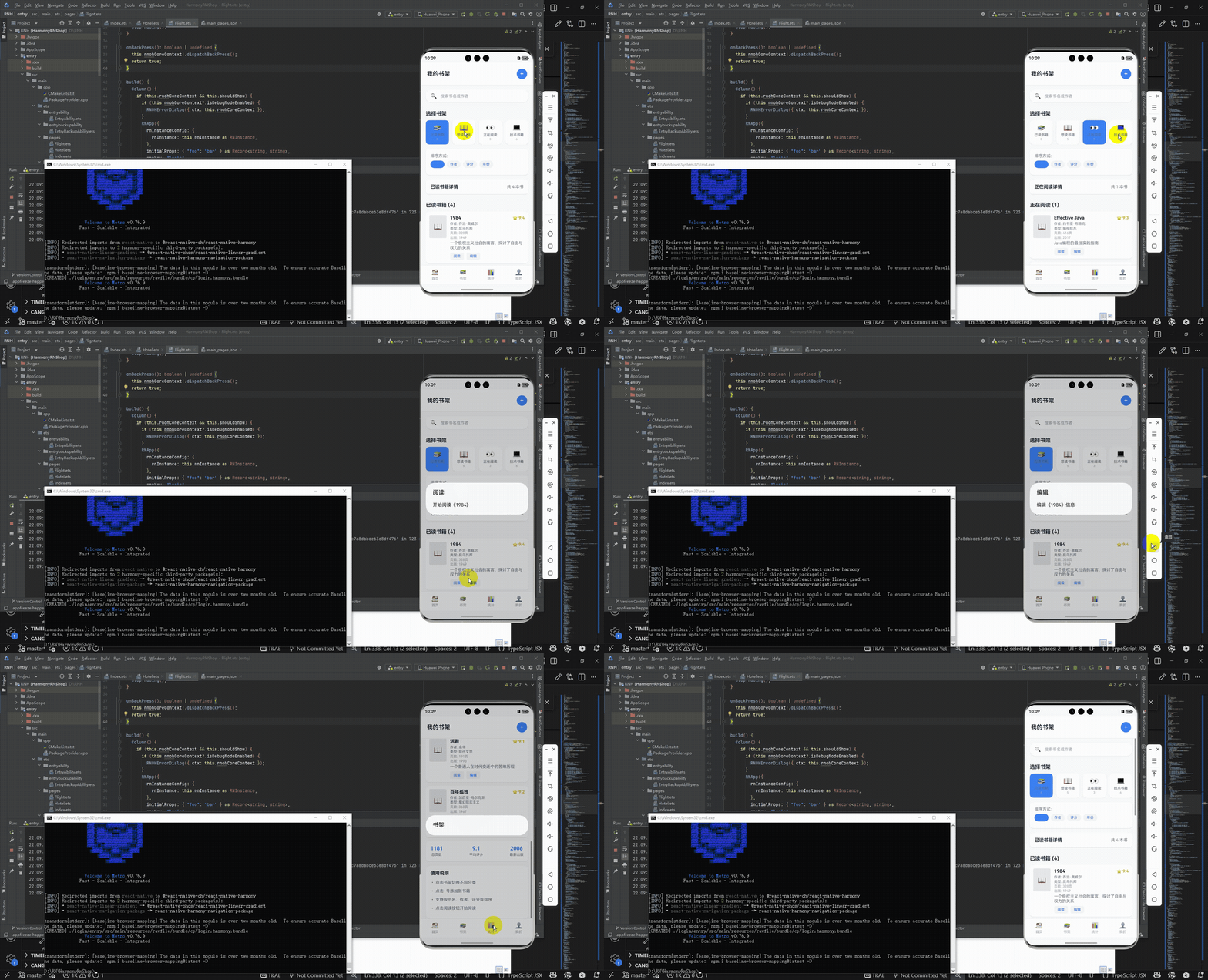
最后运行效果图如下显示:
本文探讨了一个基于React Native的跨平台阅读应用实现方案。该应用采用组件化架构,包含书籍展示、分类筛选、搜索排序等功能模块,通过清晰的状态管理实现数据筛选与排序。文章详细分析了应用的数据结构、UI布局和交互设计,特别关注了跨平台兼容性问题,提出了使用核心组件、统一样式定义等适配策略。此外,还从渲染优化和计算效率角度探讨了性能提升方法,如使用FlatList优化长列表渲染,以及采用useReducer管理复杂状态等优化建议。整体实现注重代码可维护性和用户体验,为开发跨平台阅读应用提供了实用参考。