一、MyBatis 缓存核心原理深度解析
1.1 缓存架构全景图
java
┌─────────────────────────────────────────────────┐
│                  Spring Boot 应用                 │
├─────────────────────────────────────────────────┤
│            Service 层 (Spring Cache)             │
├─────────────────────────────────────────────────┤
│          Mapper 层 (MyBatis 二级缓存)             │
├─────────────────────────────────────────────────┤
│          SqlSession 层 (MyBatis 一级缓存)          │
├─────────────────────────────────────────────────┤
│             数据库连接池 (HikariCP)                │
└─────────────────────────────────────────────────┘
1.2 缓存查询完整流程
java
// 企业级缓存查询流程图
public Object executeQuery(Object param) {
    // 1. 检查Spring Cache(如果有)
    // 2. 检查MyBatis二级缓存(开启且命中)
    // 3. 检查MyBatis一级缓存(当前SqlSession内)
    // 4. 执行SQL查询数据库
    // 5. 填充一级缓存
    // 6. 事务提交时刷入二级缓存
    // 7. 更新Spring Cache(如果有)
}
二、Spring 整合下的"一级缓存陷阱"深度剖析
2.1 Spring 事务管理对一级缓存的影响
2.1.1 核心机制
java
// Spring事务管理下的SqlSession生命周期
@Component
@Slf4j
public class CacheTransactionAnalysis {

    @Autowired
    private UserService userService;

    @Autowired
    private SqlSessionFactory sqlSessionFactory;

    /**
     * 场景1:Spring事务中的一级缓存行为
     */
    @Test
    void testCacheWithTransaction() {
        // 开启事务(默认REQUIRED)
        userService.getUserInTransaction(1L);
        // 事务提交,SqlSession关闭,一级缓存失效
    }

    /**
     * 场景2:非事务环境下的缓存行为
     */
    @Test
    void testCacheWithoutTransaction() {
        // 每次Mapper调用都创建新SqlSession
        User user1 = userService.getUser(1L); // SqlSession1
        User user2 = userService.getUser(1L); // SqlSession2
        // 无法命中一级缓存!
    }
}

@Service
@Slf4j
class UserService {

    @Autowired
    private UserMapper userMapper;

    /**
     * 事务方法 - 一级缓存有效
     */
    @Transactional
    public User getUserInTransaction(Long id) {
        log.info("事务开始,创建SqlSession");

        // 第一次查询,访问数据库
        User user1 = userMapper.selectById(id);
        log.info("第一次查询完成,一级缓存: {}",
                System.identityHashCode(user1));

        // 第二次查询,命中一级缓存(同一个SqlSession)
        User user2 = userMapper.selectById(id);
        log.info("第二次查询完成,一级缓存命中: {}",
                System.identityHashCode(user2));

        // 验证缓存命中(同一个对象)
        log.info("是否为同一对象: {}", user1 == user2); // true

        return user2;
    }

    /**
     * 非事务方法 - 一级缓存失效
     */
    public User getUser(Long id) {
        // 每次调用都会创建新的SqlSession
        return userMapper.selectById(id);
    }
}
2.1.2 生产环境配置优化
java
# application.yml - 一级缓存优化配置
mybatis:
  configuration:
    # 关键配置:控制一级缓存作用域
    local-cache-scope: SESSION  # 生产环境推荐SESSION

    # Spring整合下的特殊配置
    default-executor-type: REUSE  # 重用Statement,提升性能

    # 连接超时设置
    default-statement-timeout: 30000

    # 自动映射行为
    auto-mapping-behavior: FULL
2.1.3 一级缓存失效场景检测
java
@Component
@Slf4j
public class FirstLevelCacheMonitor {

    @Autowired
    private DataSource dataSource;

    @Autowired
    private SqlSessionFactory sqlSessionFactory;

    /**
     * 检测一级缓存命中率
     */
    public void monitorCacheHitRate() {
        try (SqlSession sqlSession = sqlSessionFactory.openSession()) {
            Configuration config = sqlSession.getConfiguration();

            // 模拟多次查询
            long start = System.currentTimeMillis();
            for (int i = 0; i < 100; i++) {
                sqlSession.selectOne("com.example.UserMapper.selectById", 1L);
            }
            long end = System.currentTimeMillis();

            log.info("查询耗时: {}ms", end - start);
            // 一级缓存特性:后续查询几乎0耗时
        }
    }

    /**
     * 检测Spring事务对缓存的影响
     */
    public void testSpringTransactionCache() {
        // 模拟不同传播行为
        // REQUIRED(默认):加入现有事务或创建新事务
        // REQUIRES_NEW:总是创建新事务,新SqlSession
        // NESTED:嵌套事务,特殊的一级缓存行为

        // 重点:不同传播级别会影响SqlSession的生命周期
    }
}
2.2 一级缓存最佳实践
java
// 一级缓存使用规范
@Service
@Slf4j
class CacheBestPracticeService {

    @Autowired
    private UserMapper userMapper;

    @Autowired
    private OrderMapper orderMapper;

    /**
     * 场景1:事务内批量查询 - 充分利用一级缓存
     */
    @Transactional
    public void batchProcess(Long userId) {
        // 同一个事务,同一个SqlSession
        User user = userMapper.selectById(userId); // 首次查询

        // 后续多次查询同一数据(命中缓存)
        for (int i = 0; i < 10; i++) {
            User cachedUser = userMapper.selectById(userId); // 命中一级缓存
            processUser(cachedUser);
        }
    }

    /**
     * 场景2:避免跨事务缓存依赖
     */
    public void crossTransactionIssue() {
        // ❌ 错误示例:依赖跨事务缓存
        User user1 = getUserInNewTransaction(1L); // 事务1
        User user2 = getUserInNewTransaction(1L); // 事务2,重新查询

        // ✅ 正确做法:事务外部缓存
        User user = getFromExternalCache(1L); // 使用Redis等外部缓存
    }

    @Transactional(propagation = Propagation.REQUIRES_NEW)
    public User getUserInNewTransaction(Long id) {
        return userMapper.selectById(id);
    }
}
三、二级缓存"提交才生效"机制深度解析
3.1 二级缓存写入时机详解
java
/**
 * 二级缓存生命周期演示
 */
@Component
@Slf4j
public class SecondLevelCacheLifecycle {

    @Autowired
    private SqlSessionFactory sqlSessionFactory;

    /**
     * 演示二级缓存写入时机
     */
    public void demonstrateCacheWriteTiming() {
        log.info("=== 二级缓存写入时机演示 ===");

        // 场景1:没有提交,二级缓存不写入
        SqlSession session1 = sqlSessionFactory.openSession();
        try {
            UserMapper mapper1 = session1.getMapper(UserMapper.class);

            log.info("第一次查询(Session1)");
            User user1 = mapper1.selectById(1L); // 查询数据库

            // ❌ 重要:此时二级缓存还没有数据!
            log.info("查询完成,但未提交,二级缓存为空");

            // session1.close(); // 关闭也会触发写入
        } finally {
            session1.rollback(); // 回滚,二级缓存不写入
        }

        // 场景2:提交后,二级缓存才有数据
        SqlSession session2 = sqlSessionFactory.openSession();
        try {
            UserMapper mapper2 = session2.getMapper(UserMapper.class);

            log.info("第二次查询(Session2,新会话)");
            User user2 = mapper2.selectById(1L); // 仍然查数据库

            log.info("说明:没有提交,二级缓存未生效");

            // 提交事务,写入二级缓存
            session2.commit();
            log.info("提交成功,数据已写入二级缓存");

        } finally {
            session2.close();
        }

        // 场景3:新会话命中二级缓存
        SqlSession session3 = sqlSessionFactory.openSession();
        try {
            UserMapper mapper3 = session3.getMapper(UserMapper.class);

            log.info("第三次查询(Session3)");
            User user3 = mapper3.selectById(1L); // 命中二级缓存

            log.info("二级缓存命中成功!");
        } finally {
            session3.close();
        }
    }
}
3.2 二级缓存配置的黄金法则
java
<!-- mybatis-config.xml 二级缓存企业级配置 -->
<configuration>

    <!-- 全局缓存设置 -->
    <settings>
        <!-- 开启缓存(默认true) -->
        <setting name="cacheEnabled" value="true"/>

        <!-- 本地缓存作用域 -->
        <setting name="localCacheScope" value="SESSION"/>
    </settings>

    <!-- 缓存配置模板 -->
    <cache-template id="defaultCache">
        <!-- 回收策略:LRU最近最少使用 -->
        <property name="eviction" value="LRU"/>

        <!-- 刷新间隔:5分钟 -->
        <property name="flushInterval" value="300000"/>

        <!-- 缓存大小:1000个对象 -->
        <property name="size" value="1000"/>

        <!-- 只读缓存(性能最好) -->
        <property name="readOnly" value="true"/>

        <!-- 序列化策略:Kryo(可选) -->
        <!-- <property name="serializer" value="org.mybatis.caches.kryo.KryoCacheSerializer"/> -->
    </cache-template>
</configuration>
<!-- UserMapper.xml - 企业级配置示例 -->
<mapper namespace="com.example.mapper.UserMapper">

    <!-- 继承默认模板,可覆盖属性 -->
    <cache-ref namespace="defaultCache"/>

    <!-- 或者自定义配置 -->
    <cache
        eviction="LRU"
        flushInterval="300000"
        size="1000"
        readOnly="true"
        blocking="false"  <!-- 防止缓存击穿 -->
        type="org.mybatis.caches.ehcache.EhcacheCache">

        <!-- Ehcache 特有配置 -->
        <property name="memoryStoreEvictionPolicy" value="LRU"/>
        <property name="maxEntriesLocalHeap" value="1000"/>
        <property name="timeToLiveSeconds" value="300"/>
        <property name="timeToIdleSeconds" value="180"/>
    </cache>

    <!-- 查询语句配置 -->
    <select id="selectById" resultType="User" useCache="true">
        SELECT * FROM user WHERE id = #{id}
    </select>

    <!-- 企业级规范:所有DML操作必须清空缓存 -->
    <update id="updateUser" parameterType="User" flushCache="true">
        UPDATE user
        SET name = #{name},
            updated_at = NOW()
        WHERE id = #{id}
    </update>

    <insert id="insertUser" parameterType="User" flushCache="true">
        INSERT INTO user (name, email)
        VALUES (#{name}, #{email})
    </insert>

    <delete id="deleteUser" parameterType="Long" flushCache="true">
        DELETE FROM user WHERE id = #{id}
    </delete>
</mapper>
3.3 生产环境二级缓存监控
java
/**
 * 二级缓存监控与统计
 */
@Component
@Slf4j
public class SecondLevelCacheMonitor {

    @Autowired
    private SqlSessionFactory sqlSessionFactory;

    /**
     * 获取缓存统计信息
     */
    public CacheStats getCacheStats(String namespace) {
        Configuration configuration = sqlSessionFactory.getConfiguration();
        Cache cache = configuration.getCache(namespace);

        if (cache == null) {
            return null;
        }

        CacheStats stats = new CacheStats();
        stats.setNamespace(namespace);
        stats.setCacheSize(cache.getSize());
        stats.setCacheType(cache.getClass().getSimpleName());

        // 如果是Ehcache,获取更多信息
        if (cache instanceof EhcacheCache) {
            EhcacheCache ehcache = (EhcacheCache) cache;
            net.sf.ehcache.Ehcache underlyingCache = ehcache.getEhcache();
            stats.setMemoryStoreSize(underlyingCache.getMemoryStoreSize());
            stats.setDiskStoreSize(underlyingCache.getDiskStoreSize());
            stats.setHitCount(underlyingCache.getStatistics().cacheHitCount());
            stats.setMissCount(underlyingCache.getStatistics().cacheMissCount());
            stats.setHitRatio(underlyingCache.getStatistics().cacheHitRatio());
        }

        return stats;
    }

    /**
     * 清理指定命名空间缓存
     */
    public void clearCache(String namespace) {
        Configuration configuration = sqlSessionFactory.getConfiguration();
        Cache cache = configuration.getCache(namespace);
        if (cache != null) {
            cache.clear();
            log.info("已清理缓存: {}", namespace);
        }
    }

    /**
     * 批量清理缓存
     */
    public void batchClearCache(Set<String> namespaces) {
        Configuration configuration = sqlSessionFactory.getConfiguration();
        Collection<Cache> caches = configuration.getCaches();

        for (Cache cache : caches) {
            String cacheId = cache.getId();
            if (namespaces.contains(cacheId)) {
                cache.clear();
                log.info("已清理缓存: {}", cacheId);
            }
        }
    }

    @Data
    public static class CacheStats {
        private String namespace;
        private int cacheSize;
        private String cacheType;
        private long memoryStoreSize;
        private long diskStoreSize;
        private long hitCount;
        private long missCount;
        private double hitRatio;
    }
}
四、二级缓存 Key 结构深度解析与优化
4.1 CacheKey 组成原理
java
/**
 * MyBatis CacheKey 结构分析
 */
@Component
@Slf4j
public class CacheKeyAnalyzer {

    @Autowired
    private SqlSessionFactory sqlSessionFactory;

    /**
     * 分析缓存Key的组成
     */
    public void analyzeCacheKey(String statementId, Object parameter) {
        Configuration configuration = sqlSessionFactory.getConfiguration();
        MappedStatement ms = configuration.getMappedStatement(statementId);

        // 模拟创建CacheKey的过程
        CacheKey cacheKey = ms.getCacheKey(
            parameter,
            RowBounds.DEFAULT,
            ms.getBoundSql(parameter)
        );

        log.info("=== CacheKey 结构分析 ===");
        log.info("MappedStatement ID: {}", ms.getId());
        log.info("SQL: {}", ms.getBoundSql(parameter).getSql());
        log.info("参数: {}", parameter);
        log.info("RowBounds: {}", RowBounds.DEFAULT);
        log.info("Environment ID: {}", configuration.getEnvironment().getId());

        // 获取hashcode(MyBatis用于比较的hash)
        log.info("CacheKey HashCode: {}", cacheKey.hashCode());
        log.info("CacheKey UpdateCount: {}", cacheKey.getUpdateCount());

        // 重要结论:以下情况会产生不同的CacheKey
        // 1. SQL语句不同(即使一个空格差异)
        // 2. 参数值不同
        // 3. 分页参数不同
        // 4. 不同的Mapper方法
    }

    /**
     * 演示动态SQL对缓存的影响
     */
    public void demonstrateDynamicSqlCacheIssue() {
        // 场景:动态SQL会产生大量不同的CacheKey
        // SELECT * FROM users WHERE 1=1
        //   AND name = ?      --> CacheKey1
        //   AND age > ?       --> CacheKey2
        //   AND name=? AND age>? --> CacheKey3

        // 解决方案:使用固定SQL或控制参数组合
    }
}
4.2 缓存碎片化问题解决方案
java
<!-- 优化前:动态SQL导致缓存碎片 -->
<select id="searchUsers" parameterType="UserQuery" resultType="User">
    SELECT * FROM users WHERE 1=1
    <if test="name != null">
        AND name LIKE CONCAT('%', #{name}, '%')
    </if>
    <if test="age != null">
        AND age > #{age}
    </if>
    <if test="email != null">
        AND email = #{email}
    </if>
    <!-- 问题:参数组合爆炸,缓存命中率极低 -->
</select>

<!-- 优化方案1:固定SQL,应用层过滤 -->
<select id="searchAllUsers" resultType="User">
    SELECT * FROM users
    WHERE created_at > DATE_SUB(NOW(), INTERVAL 30 DAY)
    <!-- 限制数据量,缓存全部数据 -->
</select>

<!-- 优化方案2:关键查询单独缓存 -->
<select id="searchUsersByName" parameterType="String" resultType="User">
    SELECT * FROM users
    WHERE name LIKE CONCAT('%', #{name}, '%')
    <!-- 单独缓存,命中率高 -->
</select>

<!-- 优化方案3:参数标准化 -->
<select id="searchUsersByStandardQuery" parameterType="StandardQuery" resultType="User">
    SELECT * FROM users
    WHERE
    <choose>
        <when test="queryType == 'RECENT'">
            created_at > DATE_SUB(NOW(), INTERVAL 7 DAY)
        </when>
        <when test="queryType == 'ACTIVE'">
            last_login > DATE_SUB(NOW(), INTERVAL 30 DAY)
        </when>
        <otherwise>
            1=1
        </otherwise>
    </choose>
    <!-- 标准化查询类型,减少参数组合 -->
</select>
/**
 * 缓存Key优化策略
 */
@Service
@Slf4j
public class CacheKeyOptimizationService {

    /**
     * 方法1:参数标准化
     */
    public List<User> searchUsers(UserQuery query) {
        // 标准化参数
        StandardizedQuery stdQuery = standardizeQuery(query);

        // 使用标准化参数查询
        return userMapper.searchWithStandardQuery(stdQuery);
    }

    private StandardizedQuery standardizeQuery(UserQuery query) {
        StandardizedQuery stdQuery = new StandardizedQuery();

        // 标准化名称查询(忽略大小写,trim)
        if (query.getName() != null) {
            stdQuery.setName(query.getName().trim().toLowerCase());
        }

        // 标准化年龄查询(按年龄段)
        if (query.getAge() != null) {
            stdQuery.setAgeGroup(calculateAgeGroup(query.getAge()));
        }

        // 标准化分页(固定分页大小)
        stdQuery.setPageSize(20);
        stdQuery.setPageNum(query.getPageNum() != null ? query.getPageNum() : 1);

        return stdQuery;
    }

    /**
     * 方法2:查询结果二次过滤
     */
    public List<User> searchWithPostFilter(UserQuery query) {
        // 1. 获取基础数据集(缓存友好)
        List<User> allUsers = userMapper.getRecentUsers(1000);

        // 2. 应用层过滤
        return allUsers.stream()
            .filter(user -> matchesQuery(user, query))
            .collect(Collectors.toList());
    }
}
五、二级缓存不适用场景全解析
5.1 禁止使用二级缓存的场景清单
java
/**
 * 二级缓存禁用场景检测器
 */
@Component
@Slf4j
public class CacheSuitabilityChecker {

    /**
     * 检查是否适合使用二级缓存
     */
    public CacheSuitability checkSuitability(String mapperName, CacheConfig config) {
        CacheSuitability result = new CacheSuitability();
        result.setMapperName(mapperName);

        // 规则1:高并发写场景
        if (config.getWriteQps() > 100) { // QPS > 100
            result.setSuitable(false);
            result.addReason("高并发写场景,缓存失效频繁");
        }

        // 规则2:强一致性要求
        if (config.isStrongConsistency()) {
            result.setSuitable(false);
            result.addReason("强一致性要求,缓存可能导致脏读");
        }

        // 规则3:数据频繁变更
        if (config.getUpdateFrequency() == UpdateFrequency.SECONDS) {
            result.setSuitable(false);
            result.addReason("数据秒级变更,缓存价值低");
        }

        // 规则4:大结果集查询
        if (config.getAvgResultSize() > 1000) {
            result.setSuitable(false);
            result.addReason("结果集过大,内存压力大");
        }

        // 规则5:动态SQL复杂
        if (config.isDynamicSql()) {
            result.setSuitable(false);
            result.addReason("动态SQL导致缓存碎片化");
        }

        // 规则6:分页查询多变
        if (config.isPaginationVolatile()) {
            result.setSuitable(false);
            result.addReason("分页参数多变,缓存命中率低");
        }

        return result;
    }

    /**
     * 适合使用缓存的场景
     */
    public List<String> getSuitableScenarios() {
        return Arrays.asList(
            "1. 配置表/字典表(极少变更)",
            "2. 地区信息表(只读)",
            "3. 商品分类表(低频变更)",
            "4. 用户角色权限(低频变更)",
            "5. 历史数据查询(只读)",
            "6. 统计结果缓存(定时更新)"
        );
    }

    @Data
    public static class CacheSuitability {
        private String mapperName;
        private boolean suitable;
        private List<String> reasons = new ArrayList<>();

        public void addReason(String reason) {
            reasons.add(reason);
        }
    }

    public enum UpdateFrequency {
        SECONDS, MINUTES, HOURS, DAYS, MONTHS
    }

    @Data
    public static class CacheConfig {
        private int writeQps;               // 写入QPS
        private boolean strongConsistency;  // 强一致性要求
        private UpdateFrequency updateFrequency; // 更新频率
        private int avgResultSize;          // 平均结果集大小
        private boolean dynamicSql;         // 是否动态SQL
        private boolean paginationVolatile; // 分页是否多变
    }
}
5.2 生产环境缓存决策矩阵
java
/**
 * 企业级缓存决策框架
 */
@Service
public class CacheDecisionFramework {

    private static final Map<CacheScenario, CacheStrategy> DECISION_MATRIX = new HashMap<>();

    static {
        // 初始化决策矩阵
        DECISION_MATRIX.put(CacheScenario.CONFIG_TABLE,
            CacheStrategy.SECOND_LEVEL_CACHE);
        DECISION_MATRIX.put(CacheScenario.HOT_DATA,
            CacheStrategy.REDIS_CACHE);
        DECISION_MATRIX.put(CacheScenario.TRANSACTIONAL_DATA,
            CacheStrategy.NO_CACHE);
        DECISION_MATRIX.put(CacheScenario.REPORT_QUERY,
            CacheStrategy.QUERY_CACHE);
        DECISION_MATRIX.put(CacheScenario.USER_SESSION,
            CacheStrategy.REDIS_CACHE);
    }

    /**
     * 根据场景选择缓存策略
     */
    public CacheStrategy decideStrategy(CacheScenario scenario, CacheMetrics metrics) {
        CacheStrategy baseStrategy = DECISION_MATRIX.get(scenario);

        // 根据指标动态调整
        if (metrics != null) {
            if (metrics.getHitRatio() < 0.3) {
                // 命中率太低,考虑禁用缓存
                return CacheStrategy.NO_CACHE;
            }

            if (metrics.getMemoryUsage() > 0.8) {
                // 内存使用率高,考虑使用外部缓存
                return CacheStrategy.REDIS_CACHE;
            }
        }

        return baseStrategy;
    }

    public enum CacheScenario {
        CONFIG_TABLE,      // 配置表
        HOT_DATA,          // 热点数据
        TRANSACTIONAL_DATA,// 事务数据
        REPORT_QUERY,      // 报表查询
        USER_SESSION,      // 用户会话
        PRODUCT_CATALOG    // 商品目录
    }

    public enum CacheStrategy {
        NO_CACHE,           // 不使用缓存
        FIRST_LEVEL_CACHE,  // 仅一级缓存
        SECOND_LEVEL_CACHE, // MyBatis二级缓存
        REDIS_CACHE,        // Redis缓存
        QUERY_CACHE,        // 查询结果缓存
        HYBRID_CACHE        // 混合缓存
    }

    @Data
    public static class CacheMetrics {
        private double hitRatio;     // 命中率
        private double memoryUsage;  // 内存使用率
        private long qps;           // 查询QPS
        private long updateQps;     // 更新QPS
    }
}
六、MyBatis 二级缓存 vs Spring Cache 架构对比
6.1 技术栈对比分析
java
/**
 * 缓存技术栈对比分析
 */
@Component
@Slf4j
public class CacheStackComparison {

    /**
     * 技术选型对比表
     */
    public void compareCacheStacks() {
        CacheComparison mybatisCache = new CacheComparison("MyBatis二级缓存");
        CacheComparison springCache = new CacheComparison("Spring Cache");
        CacheComparison redisDirect = new CacheComparison("直接Redis操作");

        // MyBatis二级缓存特点
        mybatisCache.setInvasionLevel("DAO层");
        mybatisCache.setGranularity("SQL级别");
        mybatisCache.setConsistency("弱一致性");
        mybatisCache.setDistributedSupport("不支持");
        mybatisCache.setLearningCurve("简单");
        mybatisCache.setPerformance("中等");

        // Spring Cache特点
        springCache.setInvasionLevel("Service层");
        springCache.setGranularity("方法级别");
        springCache.setConsistency("可配置");
        springCache.setDistributedSupport("支持");
        springCache.setLearningCurve("中等");
        springCache.setPerformance("高");

        // 直接Redis操作特点
        redisDirect.setInvasionLevel("任意层");
        redisDirect.setGranularity("业务级别");
        redisDirect.setConsistency("强一致性");
        redisDirect.setDistributedSupport("原生支持");
        redisDirect.setLearningCurve("较高");
        redisDirect.setPerformance("最高");

        log.info("=== 缓存技术栈对比 ===");
        log.info("1. MyBatis二级缓存: 适合简单的DAO层优化");
        log.info("2. Spring Cache: 企业级推荐,灵活可控");
        log.info("3. 直接Redis: 高性能要求,完全控制");
    }

    @Data
    static class CacheComparison {
        private String name;
        private String invasionLevel;   // 侵入层次
        private String granularity;     // 控制粒度
        private String consistency;     // 一致性
        private String distributedSupport; // 分布式支持
        private String learningCurve;   // 学习曲线
        private String performance;     // 性能

        public CacheComparison(String name) {
            this.name = name;
        }
    }

    /**
     * 生产环境推荐方案
     */
    public RecommendedSolution getRecommendedSolution() {
        RecommendedSolution solution = new RecommendedSolution();

        // 分层缓存架构
        solution.setLayer1("Caffeine/Guava本地缓存 - 毫秒级热点数据");
        solution.setLayer2("Redis集群 - 秒级业务数据");
        solution.setLayer3("MySQL + MyBatis一级缓存 - 基础数据源");

        // 使用策略
        solution.setStrategy("Spring Cache抽象层 + 多级缓存实现");

        // 监控体系
        solution.setMonitoring("缓存命中率监控 + 内存使用告警 + 一致性检查");

        return solution;
    }

    @Data
    static class RecommendedSolution {
        private String layer1;
        private String layer2;
        private String layer3;
        private String strategy;
        private String monitoring;
    }
}
6.2 混合缓存架构实现
java
/**
 * 企业级混合缓存架构
 */
@Configuration
@EnableCaching
@Slf4j
public class HybridCacheConfig {

    /**
     * 一级缓存:Caffeine(本地缓存)
     */
    @Bean
    public CacheManager caffeineCacheManager() {
        CaffeineCacheManager cacheManager = new CaffeineCacheManager();

        // 配置不同的缓存策略
        cacheManager.setCaffeine(Caffeine.newBuilder()
            .expireAfterWrite(10, TimeUnit.MINUTES)  // 写后10分钟过期
            .maximumSize(1000)                       // 最大1000个条目
            .recordStats());                         // 记录统计信息

        return cacheManager;
    }

    /**
     * 二级缓存:Redis(分布式缓存)
     */
    @Bean
    public RedisCacheManager redisCacheManager(RedisConnectionFactory factory) {
        RedisCacheConfiguration config = RedisCacheConfiguration.defaultCacheConfig()
            .entryTtl(Duration.ofMinutes(30))        // 30分钟过期
            .serializeKeysWith(RedisSerializationContext.SerializationPair
                .fromSerializer(new StringRedisSerializer()))
            .serializeValuesWith(RedisSerializationContext.SerializationPair
                .fromSerializer(new GenericJackson2JsonRedisSerializer()))
            .disableCachingNullValues();              // 不缓存null值

        return RedisCacheManager.builder(factory)
            .cacheDefaults(config)
            .transactionAware()                       // 支持事务
            .build();
    }

    /**
     * MyBatis二级缓存:Ehcache(可选)
     */
    @Bean
    public EhCacheManagerFactoryBean ehCacheManagerFactoryBean() {
        EhCacheManagerFactoryBean factoryBean = new EhCacheManagerFactoryBean();
        factoryBean.setConfigLocation(new ClassPathResource("ehcache.xml"));
        factoryBean.setShared(true);  // 共享缓存实例
        return factoryBean;
    }

    /**
     * 统一的缓存抽象层
     */
    @Component
    @Primary
    public class UnifiedCacheService {

        @Autowired
        private CacheManager caffeineCacheManager;

        @Autowired
        private CacheManager redisCacheManager;

        @Autowired
        private SqlSessionFactory sqlSessionFactory;

        /**
         * 智能缓存获取
         */
        public <T> T getWithSmartCache(String key, Class<T> type,
                                       Supplier<T> loader, CacheLevel level) {

            // L1: 检查本地缓存
            Cache localCache = caffeineCacheManager.getCache("local");
            T value = localCache.get(key, type);
            if (value != null) {
                log.debug("L1缓存命中: {}", key);
                return value;
            }

            // L2: 检查Redis缓存
            Cache redisCache = redisCacheManager.getCache("redis");
            value = redisCache.get(key, type);
            if (value != null) {
                log.debug("L2缓存命中: {}", key);
                // 回填本地缓存
                localCache.put(key, value);
                return value;
            }

            // L3: 检查MyBatis二级缓存(如果适用)
            if (level == CacheLevel.DAO) {
                // 这里可以集成MyBatis二级缓存检查
            }

            // 都没有命中,从数据源加载
            value = loader.get();

            // 写入缓存
            if (value != null) {
                switch (level) {
                    case LOCAL:
                        localCache.put(key, value);
                        break;
                    case DISTRIBUTED:
                        redisCache.put(key, value);
                        break;
                    case DAO:
                        // 依赖MyBatis自动缓存
                        break;
                }
            }

            return value;
        }

        public enum CacheLevel {
            LOCAL,      // 仅本地缓存
            DISTRIBUTED, // 分布式缓存
            DAO         // DAO层缓存
        }
    }
}
七、Redis 二级缓存生产级实现
7.1 安全的 Redis 缓存实现
java
/**
 * 生产级 Redis 缓存实现
 */
@Component
@Slf4j
public class ProductionRedisCache implements Cache {

    private final String id;
    private final String namespace;
    private final RedisTemplate<String, Object> redisTemplate;
    private final ReadWriteLock readWriteLock = new ReentrantReadWriteLock();

    // 缓存配置
    private static final long DEFAULT_EXPIRE = 3600; // 默认1小时
    private static final String KEY_PREFIX = "mybatis:cache:";

    public ProductionRedisCache(String id) {
        this.id = id;
        this.namespace = extractNamespace(id);
        ApplicationContext context = ApplicationContextHolder.getContext();
        this.redisTemplate = context.getBean("redisTemplate", RedisTemplate.class);

        log.info("初始化Redis缓存: {}, namespace: {}", id, namespace);
    }

    private String extractNamespace(String mapperId) {
        // 从Mapper ID提取命名空间
        // com.example.mapper.UserMapper -> user
        String[] parts = mapperId.split("\\.");
        String className = parts[parts.length - 1];
        return className.replace("Mapper", "").toLowerCase();
    }

    @Override
    public String getId() {
        return this.id;
    }

    @Override
    public void putObject(Object key, Object value) {
        if (value == null) {
            return;
        }

        readWriteLock.writeLock().lock();
        try {
            String redisKey = buildRedisKey(key);
            redisTemplate.opsForValue().set(
                redisKey,
                value,
                DEFAULT_EXPIRE,
                TimeUnit.SECONDS
            );

            // 记录缓存Key,便于管理
            String cacheKeyList = KEY_PREFIX + namespace + ":keys";
            redisTemplate.opsForSet().add(cacheKeyList, redisKey);

            log.debug("缓存写入成功: {}", redisKey);
        } catch (Exception e) {
            log.error("缓存写入失败: {}", key, e);
            // 生产环境:降级处理,不影响主流程
        } finally {
            readWriteLock.writeLock().unlock();
        }
    }

    @Override
    public Object getObject(Object key) {
        readWriteLock.readLock().lock();
        try {
            String redisKey = buildRedisKey(key);
            Object value = redisTemplate.opsForValue().get(redisKey);

            if (value != null) {
                log.debug("缓存命中: {}", redisKey);
                // 续期(可选)
                redisTemplate.expire(redisKey, DEFAULT_EXPIRE, TimeUnit.SECONDS);
            }

            return value;
        } catch (Exception e) {
            log.error("缓存读取失败: {}", key, e);
            return null; // 降级:返回null,走数据库查询
        } finally {
            readWriteLock.readLock().unlock();
        }
    }

    @Override
    public Object removeObject(Object key) {
        readWriteLock.writeLock().lock();
        try {
            String redisKey = buildRedisKey(key);
            Object oldValue = redisTemplate.opsForValue().getAndDelete(redisKey);

            // 从Key集合中移除
            String cacheKeyList = KEY_PREFIX + namespace + ":keys";
            redisTemplate.opsForSet().remove(cacheKeyList, redisKey);

            log.debug("缓存删除成功: {}", redisKey);
            return oldValue;
        } catch (Exception e) {
            log.error("缓存删除失败: {}", key, e);
            return null;
        } finally {
            readWriteLock.writeLock().unlock();
        }
    }

    @Override
    public void clear() {
        readWriteLock.writeLock().lock();
        try {
            // 批量删除该命名空间下的所有Key
            String pattern = KEY_PREFIX + namespace + ":*";
            Set<String> keys = redisTemplate.keys(pattern);

            if (keys != null && !keys.isEmpty()) {
                redisTemplate.delete(keys);
                log.info("清理缓存命名空间: {}, 删除 {} 个Key", namespace, keys.size());
            }
        } catch (Exception e) {
            log.error("缓存清理失败: {}", namespace, e);
        } finally {
            readWriteLock.writeLock().unlock();
        }
    }

    @Override
    public int getSize() {
        readWriteLock.readLock().lock();
        try {
            String cacheKeyList = KEY_PREFIX + namespace + ":keys";
            Long size = redisTemplate.opsForSet().size(cacheKeyList);
            return size != null ? size.intValue() : 0;
        } finally {
            readWriteLock.readLock().unlock();
        }
    }

    @Override
    public ReadWriteLock getReadWriteLock() {
        return readWriteLock;
    }

    /**
     * 构建安全的Redis Key
     */
    private String buildRedisKey(Object key) {
        // 格式:mybatis:cache:{namespace}:{keyHash}
        return KEY_PREFIX + namespace + ":" + String.valueOf(key).hashCode();
    }

    /**
     * 缓存统计信息
     */
    public CacheStats getStats() {
        CacheStats stats = new CacheStats();
        stats.setNamespace(namespace);
        stats.setSize(getSize());

        // 获取内存使用情况(需要Redis info命令)
        // 这里可以扩展获取更多Redis统计信息

        return stats;
    }

    @Data
    public static class CacheStats {
        private String namespace;
        private int size;
        private long memoryUsage;
        private double hitRatio;
    }
}
7.2 Redis 缓存管理控制台
java
/**
 * Redis 缓存管理端点
 */
@RestController
@RequestMapping("/api/cache")
@Slf4j
public class CacheManagementController {

    @Autowired
    private SqlSessionFactory sqlSessionFactory;

    @Autowired
    private RedisTemplate<String, Object> redisTemplate;

    /**
     * 获取所有缓存统计
     */
    @GetMapping("/stats")
    public Map<String, Object> getCacheStats() {
        Map<String, Object> result = new HashMap<>();
        Configuration configuration = sqlSessionFactory.getConfiguration();
        Collection<Cache> caches = configuration.getCaches();

        List<Map<String, Object>> cacheList = new ArrayList<>();
        for (Cache cache : caches) {
            Map<String, Object> cacheInfo = new HashMap<>();
            cacheInfo.put("id", cache.getId());
            cacheInfo.put("size", cache.getSize());
            cacheInfo.put("type", cache.getClass().getSimpleName());

            cacheList.add(cacheInfo);
        }

        result.put("caches", cacheList);
        result.put("total", cacheList.size());

        // Redis全局统计
        Properties info = redisTemplate.getRequiredConnectionFactory()
            .getConnection().info();
        result.put("redisInfo", info);

        return result;
    }

    /**
     * 清理指定缓存
     */
    @PostMapping("/clear/{namespace}")
    public ApiResponse clearCache(@PathVariable String namespace) {
        try {
            Configuration configuration = sqlSessionFactory.getConfiguration();
            Cache cache = configuration.getCache(namespace);

            if (cache != null) {
                cache.clear();
                log.info("手动清理缓存: {}", namespace);
                return ApiResponse.success("缓存清理成功");
            } else {
                return ApiResponse.error("缓存不存在");
            }
        } catch (Exception e) {
            log.error("清理缓存失败", e);
            return ApiResponse.error("缓存清理失败: " + e.getMessage());
        }
    }

    /**
     * 预热缓存
     */
    @PostMapping("/warmup/{namespace}")
    public ApiResponse warmupCache(@PathVariable String namespace) {
        // 根据业务逻辑预热缓存
        // 例如:加载热点数据到缓存中
        return ApiResponse.success("缓存预热开始");
    }

    @Data
    public static class ApiResponse {
        private boolean success;
        private String message;
        private Object data;

        public static ApiResponse success(String message) {
            ApiResponse response = new ApiResponse();
            response.setSuccess(true);
            response.setMessage(message);
            return response;
        }

        public static ApiResponse error(String message) {
            ApiResponse response = new ApiResponse();
            response.setSuccess(false);
            response.setMessage(message);
            return response;
        }
    }
}
八、线程安全与并发控制
8.1 生产环境线程安全配置
java
/**
 * 线程安全的缓存配置
 */
@Configuration
public class ThreadSafeCacheConfig {

    /**
     * 线程安全的Cache实现
     */
    @Bean
    public CacheFactory cacheFactory() {
        return new ThreadSafeCacheFactory();
    }

    /**
     * 自定义Cache工厂,确保线程安全
     */
    public static class ThreadSafeCacheFactory implements CacheFactory {

        @Override
        public Cache getCache(String id) {
            // 根据id返回相应的Cache实现
            // 确保每个Cache都有独立的锁
            return new ThreadSafeCacheImpl(id);
        }
    }

    /**
     * 线程安全的Cache实现
     */
    public static class ThreadSafeCacheImpl implements Cache {

        private final String id;
        private final Map<Object, Object> cache = new ConcurrentHashMap<>();
        private final ReadWriteLock lock = new ReentrantReadWriteLock();

        // 统计信息(线程安全)
        private final AtomicLong hitCount = new AtomicLong(0);
        private final AtomicLong missCount = new AtomicLong(0);
        private final AtomicLong putCount = new AtomicLong(0);
        private final AtomicLong evictionCount = new AtomicLong(0);

        public ThreadSafeCacheImpl(String id) {
            this.id = id;
        }

        @Override
        public String getId() {
            return id;
        }

        @Override
        public void putObject(Object key, Object value) {
            lock.writeLock().lock();
            try {
                cache.put(key, value);
                putCount.incrementAndGet();
            } finally {
                lock.writeLock().unlock();
            }
        }

        @Override
        public Object getObject(Object key) {
            lock.readLock().lock();
            try {
                Object value = cache.get(key);
                if (value != null) {
                    hitCount.incrementAndGet();
                } else {
                    missCount.incrementAndGet();
                }
                return value;
            } finally {
                lock.readLock().unlock();
            }
        }

        @Override
        public Object removeObject(Object key) {
            lock.writeLock().lock();
            try {
                evictionCount.incrementAndGet();
                return cache.remove(key);
            } finally {
                lock.writeLock().unlock();
            }
        }

        @Override
        public void clear() {
            lock.writeLock().lock();
            try {
                cache.clear();
                evictionCount.addAndGet(cache.size());
            } finally {
                lock.writeLock().unlock();
            }
        }

        @Override
        public int getSize() {
            lock.readLock().lock();
            try {
                return cache.size();
            } finally {
                lock.readLock().unlock();
            }
        }

        @Override
        public ReadWriteLock getReadWriteLock() {
            return lock;
        }

        /**
         * 获取缓存统计信息
         */
        public CacheStats getStats() {
            CacheStats stats = new CacheStats();
            stats.setHitCount(hitCount.get());
            stats.setMissCount(missCount.get());
            stats.setPutCount(putCount.get());
            stats.setEvictionCount(evictionCount.get());
            stats.setSize(getSize());

            long total = hitCount.get() + missCount.get();
            stats.setHitRatio(total > 0 ?
                (double) hitCount.get() / total : 0.0);

            return stats;
        }

        @Data
        public static class CacheStats {
            private long hitCount;
            private long missCount;
            private long putCount;
            private long evictionCount;
            private int size;
            private double hitRatio;
        }
    }
}
8.2 并发场景下的缓存策略
java
/**
 * 并发缓存策略
 */
@Service
@Slf4j
public class ConcurrentCacheStrategy {

    @Autowired
    private CacheManager cacheManager;

    /**
     * 防止缓存击穿:互斥锁
     */
    public <T> T getWithMutex(String key, Class<T> type,
                             Supplier<T> loader, long expireSeconds) {
        Cache cache = cacheManager.getCache("default");

        // 1. 尝试从缓存获取
        T value = cache.get(key, type);
        if (value != null) {
            return value;
        }

        // 2. 获取分布式锁
        String lockKey = "lock:" + key;
        boolean locked = acquireLock(lockKey, 3000); // 3秒超时

        if (locked) {
            try {
                // 双重检查
                value = cache.get(key, type);
                if (value != null) {
                    return value;
                }

                // 3. 加载数据
                value = loader.get();

                if (value != null) {
                    // 4. 写入缓存
                    cache.put(key, value);
                } else {
                    // 缓存空值,防止缓存穿透
                    cache.put(key, new NullValue(), expireSeconds);
                }

                return value;
            } finally {
                releaseLock(lockKey);
            }
        } else {
            // 获取锁失败,等待重试或返回默认值
            log.warn("获取缓存锁失败: {}", key);
            return null;
        }
    }

    /**
     * 防止缓存雪崩:随机过期时间
     */
    public void putWithRandomExpire(String key, Object value) {
        Cache cache = cacheManager.getCache("default");

        // 基础过期时间 + 随机偏移(防止同时过期)
        long baseExpire = 3600; // 1小时
        long randomOffset = ThreadLocalRandom.current().nextInt(300); // 0-5分钟随机
        long expireTime = baseExpire + randomOffset;

        // 使用带过期时间的put方法
        // 注意:Spring Cache默认不支持,需要自定义Cache实现
    }

    /**
     * 缓存预热:启动时加载热点数据
     */
    @PostConstruct
    public void warmUpCache() {
        ExecutorService executor = Executors.newFixedThreadPool(5);

        List<Callable<Void>> tasks = Arrays.asList(
            () -> { warmUpUserCache(); return null; },
            () -> { warmUpProductCache(); return null; },
            () -> { warmUpConfigCache(); return null; }
        );

        try {
            executor.invokeAll(tasks);
        } catch (InterruptedException e) {
            log.error("缓存预热被中断", e);
            Thread.currentThread().interrupt();
        } finally {
            executor.shutdown();
        }
    }

    private boolean acquireLock(String lockKey, long timeout) {
        // 使用Redis分布式锁
        // 实现略...
        return true;
    }

    private void releaseLock(String lockKey) {
        // 释放锁
    }

    // 空值标记类
    private static class NullValue implements Serializable {
        private static final long serialVersionUID = 1L;
    }
}
九、监控、告警与故障处理
9.1 缓存监控体系
java
# prometheus.yml - 缓存监控指标
scrape_configs:
  - job_name: 'mybatis-cache'
    metrics_path: '/actuator/prometheus'
    static_configs:
      - targets: ['localhost:8080']

  - job_name: 'redis-cache'
    static_configs:
      - targets: ['localhost:9121']  # Redis Exporter

# 关键监控指标
# mybatis_cache_hit_total{namespace="UserMapper"}
# mybatis_cache_miss_total{namespace="UserMapper"}
# mybatis_cache_size{namespace="UserMapper"}
# redis_memory_used_bytes
# redis_connected_clients
java
/**
 * 缓存监控端点
 */
@Component
@Slf4j
public class CacheMetricsCollector {

    @Autowired
    private SqlSessionFactory sqlSessionFactory;

    @Autowired
    private MeterRegistry meterRegistry;

    private final Map<String, CacheMetrics> metricsMap = new ConcurrentHashMap<>();

    /**
     * 定时收集缓存指标
     */
    @Scheduled(fixedRate = 60000) // 每分钟收集一次
    public void collectCacheMetrics() {
        Configuration config = sqlSessionFactory.getConfiguration();
        Collection<Cache> caches = config.getCaches();

        for (Cache cache : caches) {
            String cacheId = cache.getId();
            CacheMetrics metrics = getOrCreateMetrics(cacheId);

            // 收集指标
            metrics.setSize(cache.getSize());

            // 发布到监控系统
            Gauge.builder("mybatis.cache.size", metrics, CacheMetrics::getSize)
                .tags("namespace", cacheId)
                .register(meterRegistry);

            Counter.builder("mybatis.cache.hit")
                .tags("namespace", cacheId)
                .register(meterRegistry)
                .increment(metrics.getHitCount());

            // 计算命中率
            double hitRatio = calculateHitRatio(metrics);
            Gauge.builder("mybatis.cache.hit.ratio", () -> hitRatio)
                .tags("namespace", cacheId)
                .register(meterRegistry);
        }
    }

    /**
     * 缓存健康检查
     */
    @Component
    public class CacheHealthIndicator implements HealthIndicator {

        @Override
        public Health health() {
            Map<String, Object> details = new HashMap<>();
            Configuration config = sqlSessionFactory.getConfiguration();

            boolean healthy = true;
            List<String> issues = new ArrayList<>();

            // 检查所有缓存
            Collection<Cache> caches = config.getCaches();
            for (Cache cache : caches) {
                String cacheId = cache.getId();
                int size = cache.getSize();

                details.put(cacheId + ".size", size);

                // 检查缓存大小是否异常
                if (size > 10000) {
                    issues.add(cacheId + "缓存过大: " + size);
                    healthy = false;
                }
            }

            if (healthy) {
                return Health.up().withDetails(details).build();
            } else {
                return Health.down()
                    .withDetail("issues", issues)
                    .withDetails(details)
                    .build();
            }
        }
    }

    /**
     * 缓存告警规则
     */
    @Component
    public class CacheAlertRules {

        private static final double HIT_RATIO_THRESHOLD = 0.3; // 命中率低于30%告警
        private static final int SIZE_THRESHOLD = 10000;      // 缓存大小超过10000告警

        @Autowired
        private AlertService alertService;

        @Scheduled(fixedRate = 300000) // 每5分钟检查一次
        public void checkCacheAlerts() {
            Configuration config = sqlSessionFactory.getConfiguration();

            for (Cache cache : config.getCaches()) {
                String cacheId = cache.getId();
                CacheMetrics metrics = getOrCreateMetrics(cacheId);

                // 规则1:命中率过低
                double hitRatio = calculateHitRatio(metrics);
                if (hitRatio < HIT_RATIO_THRESHOLD) {
                    alertService.sendAlert(
                        "CACHE_LOW_HIT_RATIO",
                        String.format("缓存%s命中率过低: %.2f%%",
                            cacheId, hitRatio * 100)
                    );
                }

                // 规则2:缓存过大
                int size = cache.getSize();
                if (size > SIZE_THRESHOLD) {
                    alertService.sendAlert(
                        "CACHE_SIZE_TOO_LARGE",
                        String.format("缓存%s大小异常: %d", cacheId, size)
                    );
                }
            }
        }
    }

    @Data
    public static class CacheMetrics {
        private String namespace;
        private int size;
        private long hitCount;
        private long missCount;
        private long putCount;
        private long evictionCount;
    }
}
9.2 缓存故障处理预案
java
/**
 * 缓存故障降级方案
 */
@Component
@Slf4j
public class CacheFailureHandler {

    @Autowired
    private CircuitBreakerFactory circuitBreakerFactory;

    /**
     * 带熔断的缓存操作
     */
    public <T> T getWithCircuitBreaker(String key, Supplier<T> supplier) {
        CircuitBreaker cb = circuitBreakerFactory.create("cache-circuit");

        return cb.run(
            () -> {
                // 正常缓存操作
                return getFromCache(key, supplier);
            },
            throwable -> {
                // 降级处理
                log.error("缓存操作失败,执行降级", throwable);
                return fallback(key, supplier);
            }
        );
    }

    /**
     * 多级降级策略
     */
    private <T> T fallback(String key, Supplier<T> supplier) {
        try {
            // 降级1:尝试本地内存缓存
            T value = getFromLocalMemory(key);
            if (value != null) {
                return value;
            }

            // 降级2:直接访问数据库(限流)
            return supplier.get();

        } catch (Exception e) {
            // 降级3:返回默认值
            log.error("所有降级策略都失败", e);
            return getDefaultValue();
        }
    }

    /**
     * 缓存重建策略
     */
    public <T> T rebuildCache(String key, Supplier<T> loader) {
        // 1. 标记缓存正在重建
        markRebuilding(key);

        try {
            // 2. 异步重建缓存
            CompletableFuture.supplyAsync(loader)
                .thenAccept(value -> {
                    // 3. 更新缓存
                    updateCache(key, value);
                    // 4. 清除重建标记
                    clearRebuildingMark(key);
                })
                .exceptionally(throwable -> {
                    log.error("缓存重建失败", throwable);
                    clearRebuildingMark(key);
                    return null;
                });

            // 5. 返回旧数据或null
            return getOldValue(key);

        } catch (Exception e) {
            clearRebuildingMark(key);
            throw e;
        }
    }

    /**
     * 缓存一致性检查
     */
    @Scheduled(cron = "0 0 2 * * ?") // 每天凌晨2点执行
    public void checkCacheConsistency() {
        log.info("开始缓存一致性检查");

        // 1. 采样检查
        List<String> sampleKeys = getSampleKeys();

        for (String key : sampleKeys) {
            Object cacheValue = getFromCache(key);
            Object dbValue = getFromDatabase(key);

            if (!Objects.equals(cacheValue, dbValue)) {
                log.warn("缓存不一致: key={}, cache={}, db={}",
                    key, cacheValue, dbValue);

                // 自动修复
                fixInconsistency(key, dbValue);
            }
        }
    }
}
十、企业级缓存架构总结与最佳实践
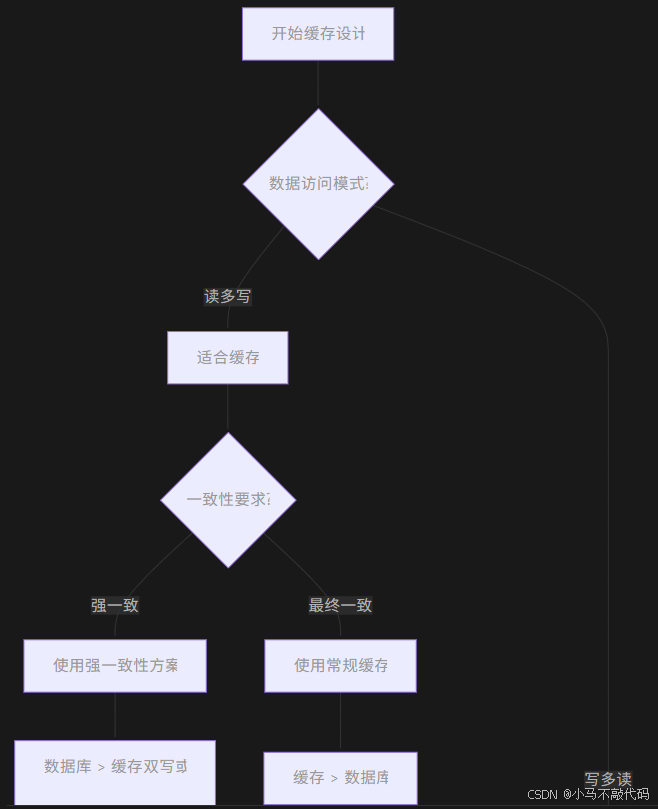
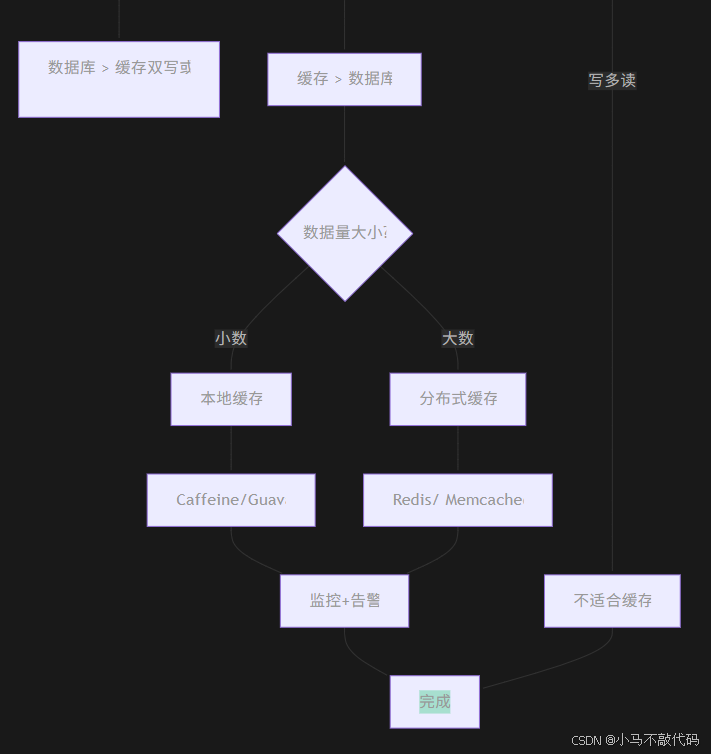
10.1 缓存架构决策树
10.2 缓存使用黄金法则
java
/**
 * 企业级缓存使用规范
 */
public class CacheGoldenRules {

    /**
     * 法则1:明确缓存目的
     */
    public static final class Rule1 {
        // ❌ 不要为了缓存而缓存
        // ✅ 明确缓存要解决的问题:降低延迟、减少数据库压力、提升吞吐量
    }

    /**
     * 法则2:选择合适的缓存粒度
     */
    public static final class Rule2 {
        // ❌ 大对象整体缓存
        // ✅ 按需缓存,精细控制
    }

    /**
     * 法则3:设置合理的过期时间
     */
    public static final class Rule3 {
        // ❌ 永久缓存
        // ✅ 根据业务特点设置TTL
        // ✅ 热数据长TTL,冷数据短TTL
    }

    /**
     * 法则4:处理缓存失效
     */
    public static final class Rule4 {
        // ❌ 忽略缓存失效
        // ✅ 有降级方案
        // ✅ 有重建策略
    }

    /**
     * 法则5:监控一切
     */
    public static final class Rule5 {
        // ❌ 无监控上线
        // ✅ 监控命中率、内存使用、响应时间
        // ✅ 设置告警阈值
    }

    /**
     * 法则6:容量规划
     */
    public static final class Rule6 {
        // ❌ 无限制使用内存
        // ✅ 根据业务量规划容量
        // ✅ 设置淘汰策略
    }

    /**
     * 法则7:线程安全
     */
    public static final class Rule7 {
        // ❌ 忽略并发问题
        // ✅ 读写锁保护
        // ✅ 避免缓存击穿
    }

    /**
     * 法则8:可观测性
     */
    public static final class Rule8 {
        // ❌ 黑盒缓存
        // ✅ 详细日志
        // ✅ 统计信息
        // ✅ 管理接口
    }
}
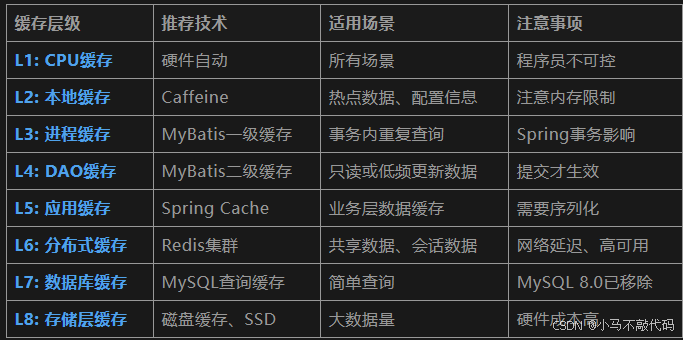
10.3 各层级缓存推荐方案
10.4 工程级结论与建议
MyBatis 缓存体系工程实践总结
核心理念
1. 缓存是补偿机制,不是架构核心
• 优先优化数据库和业务逻辑
• 缓存是用来弥补其他组件不足的
2. 分层缓存,各司其职
• 本地缓存解决热点数据
• 分布式缓存解决数据共享
• MyBatis缓存作为DAO层优化
3. 数据一致性高于性能
• 宁可慢,不能错
• 最终一致性要有明确预期
生产环境建议
针对MyBatis缓存:
• ✅ 一级缓存:默认开启,无需特殊关注
• ⚠️ 二级缓存:谨慎使用,仅适合特定场景
• ❌ 动态SQL缓存:避免使用,缓存碎片严重
企业级缓存架构:
• 推荐方案:Spring Cache + Redis + Caffeine 多级缓存
• 监控体系:命中率、内存使用、响应时间
• 降级方案:缓存失效时的业务降级策略
团队规范:
- 新项目默认禁用MyBatis二级缓存
- 使用缓存必须添加监控
- 重要数据必须有降级方案
- 定期进行缓存一致性检查
性能数据参考(仅供参考)
• 一级缓存:纳秒级访问,命中率>99%(事务内)
• 二级缓存:微秒级访问,命中率30%-80%
• Redis缓存:毫秒级访问,命中率>95%
• 数据库查询:10ms-100ms
缓存能提升性能,但也增加复杂度。
在添加缓存前,先问自己:
- 真的需要缓存吗?
- 数据一致性如何保证?
- 缓存失效怎么办?
- 如何监控和告警?
附录:完整配置示例
java
 application-production.yml
mybatis:
  configuration:
    cache-enabled: false  # 生产环境默认关闭二级缓存
    local-cache-scope: SESSION
    lazy-loading-enabled: true
    aggressive-lazy-loading: false

    # 日志配置
    log-prefix: MYBATIS
    log-impl: org.apache.ibatis.logging.slf4j.Slf4jImpl

# 缓存配置
cache:
  multi-level:
    enabled: true
    levels:
      - name: local
        type: caffeine
        spec: maximumSize=1000,expireAfterWrite=10m
      - name: redis
        type: redis
        ttl: 30m
        key-prefix: app:cache:
        use-key-prefix: true

  # 缓存预热
  warmup:
    enabled: true
    cron: "0 0 6 * * ?"  # 每天6点预热
    batch-size: 100

  # 监控
  monitor:
    enabled: true
    export-metrics: true
    alert-thresholds:
      hit-ratio: 0.3
      memory-usage: 0.8