一、路由入门
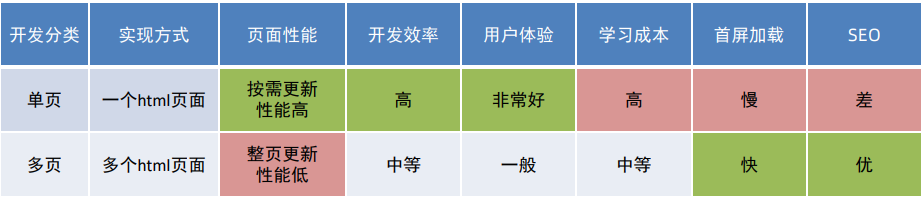
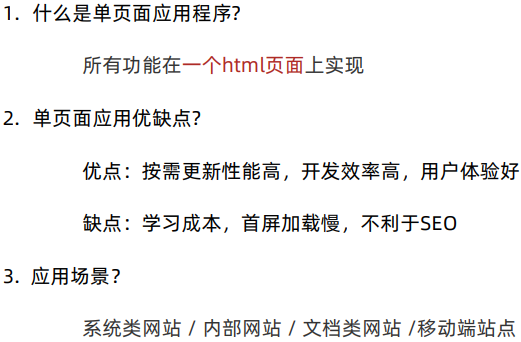
**1.**单页应用程序
**2.**路由概念
Vue中的路由是路径和组件的映射关系
3. VueRouter的介绍
(1)作用:修改地址栏路径时,切换显示匹配的组件
(2)说明:Vue 官方的一个路由插件,是一个第三方包
(3)官网:https://v3.router.vuejs.org/zh/
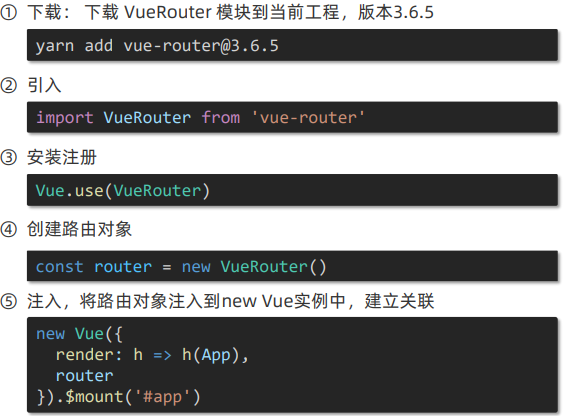
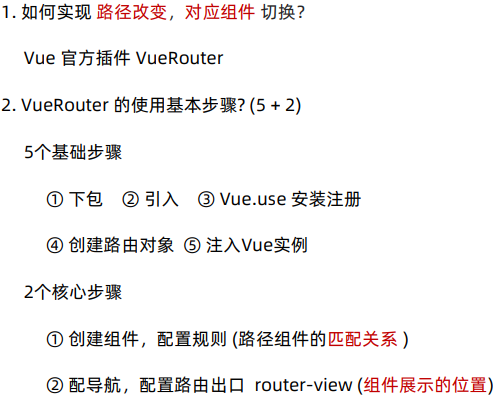
(4)5个基础步骤:
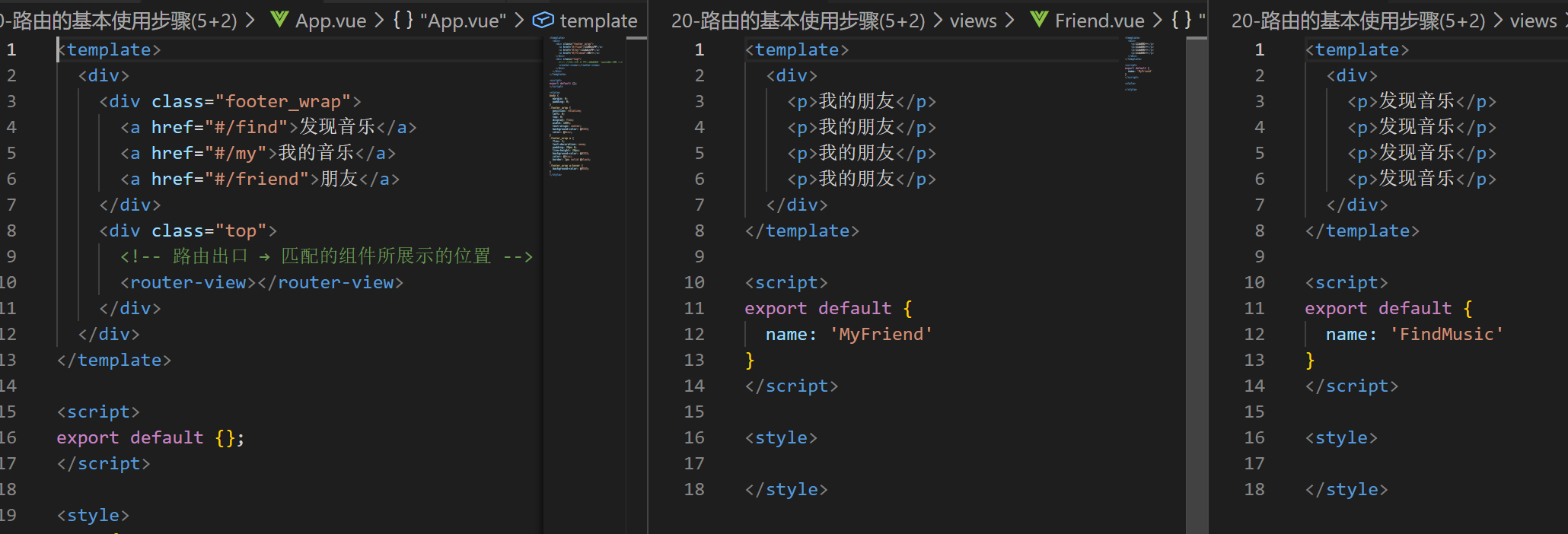
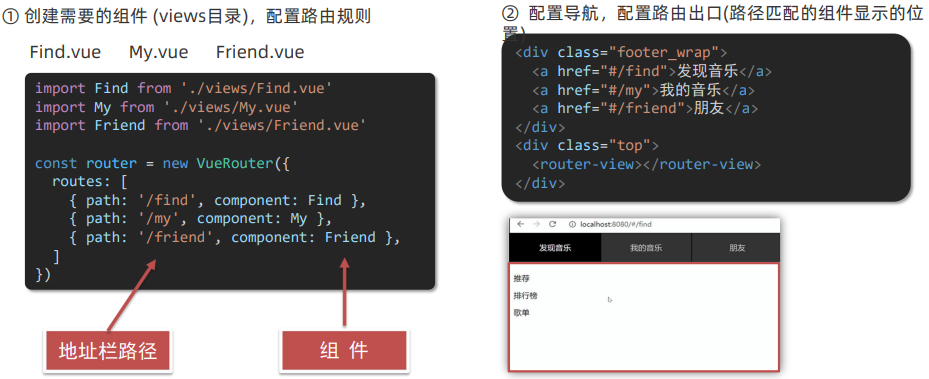
(5)2 个核心步骤:
**4.**组件目录存放问题
组件分类: .vue文件分2类; 页面组件 和 复用组件
注意:都是 .vue文件 (本质无区别)
分类:页面组件 - views文件夹 => 配合路由,页面展示
复用组件 - components文件夹 => 封装复用
二、路由进阶
**1.**路由模块封装
目标:将路由模块抽离出来。 好处:拆分模块,利于维护
绝对路径:@指代src目录,可以用于快速引入组件
**2.**声明式导航和导航高亮
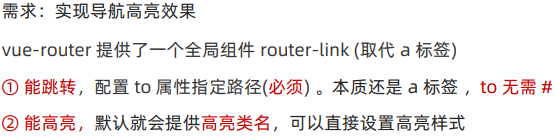
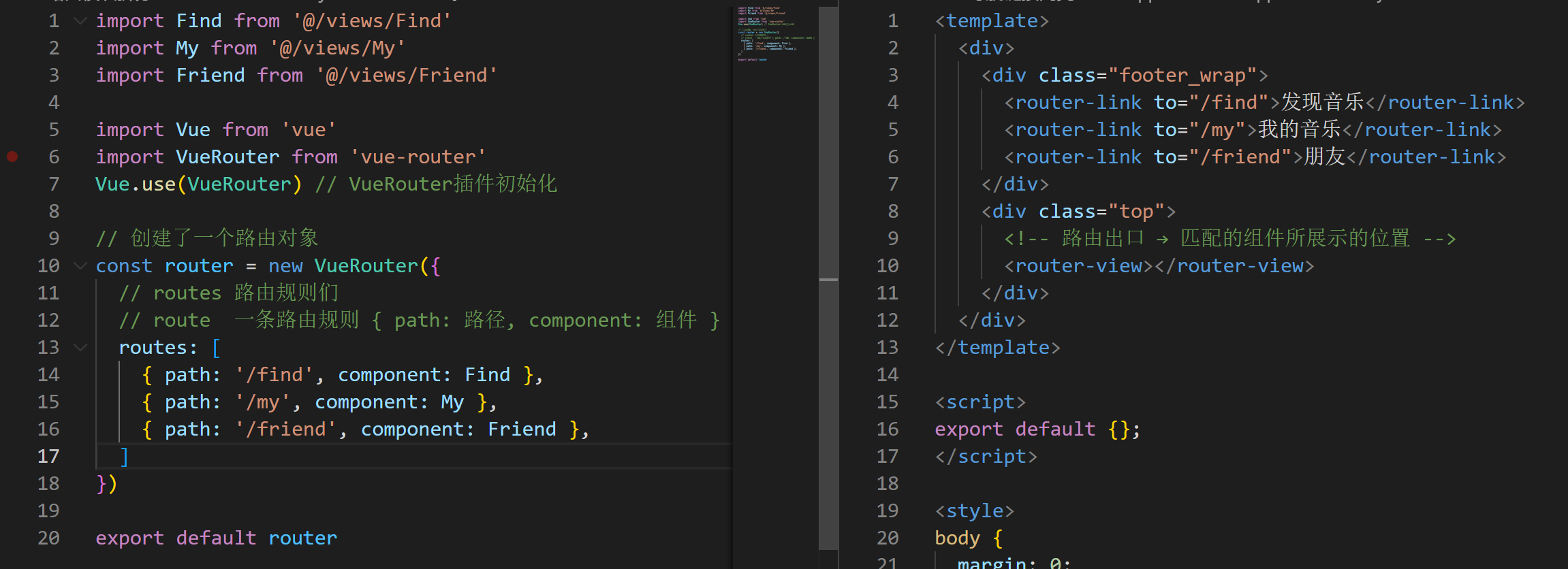
router-link:能跳转,能高亮 (自带激活时的类名)
<router-link to="/路径值" ></router-link>
<a href="#/路径值" ></router-link>
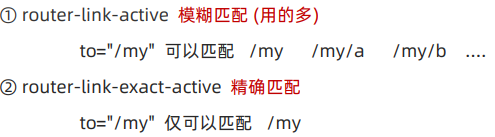
**3.**精确匹配和模糊匹配
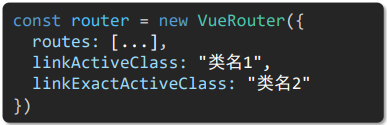
**4.**自定义高亮类名
javascript
// router index.js
import Find from '@/views/Find'
import My from '@/views/My'
import Friend from '@/views/Friend'

import Vue from 'vue'
import VueRouter from 'vue-router'
Vue.use(VueRouter) // VueRouter插件初始化

// 创建了一个路由对象
const router = new VueRouter({
  // routes 路由规则们
  // route  一条路由规则 { path: 路径, component: 组件 }
  routes: [
    { path: '/find', component: Find },
    { path: '/my', component: My },
    { path: '/friend', component: Friend },
  ],
  // link自定义高亮类名
  linkActiveClass: 'active', // 配置模糊匹配的类名
  linkExactActiveClass: 'exact-active' // 配置精确匹配的类名
})

export default router
**5.**声明式导航传参 ( 查询参数传参和动态路由传参 )
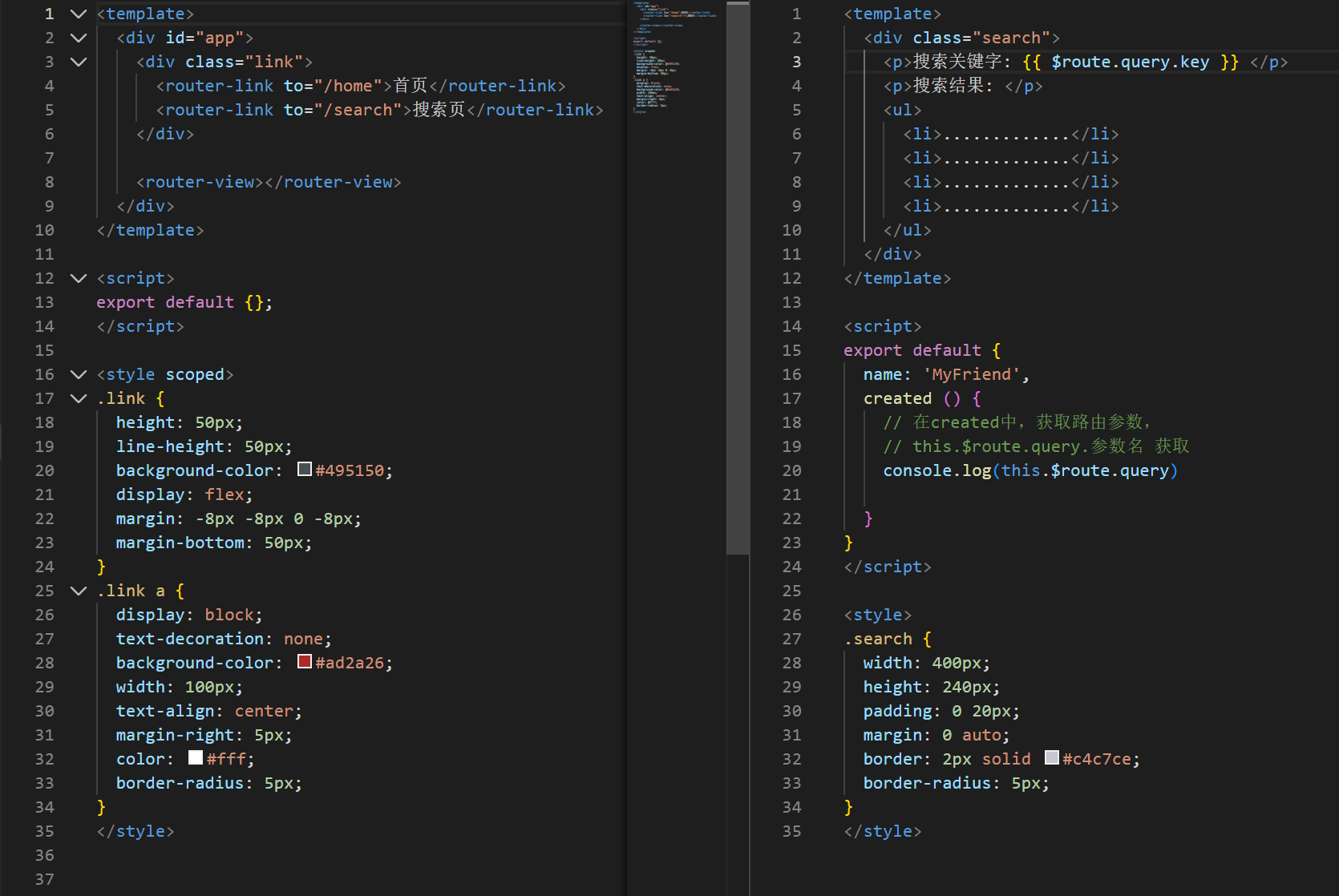
(1)查询参数传参(比较适合传多个参数)
① 语法格式如下 to="/path?参数名=值"
② 对应页面组件接收传递过来的值 $route.query.参数名
(2)动态路由传参(优雅简洁,传单个参数比较方便)
① 配置动态路由
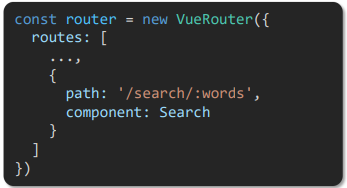
② 配置导航链接 to="/path/参数值"
③ 对应页面组件接收传递过来的值 $route.params.参数名
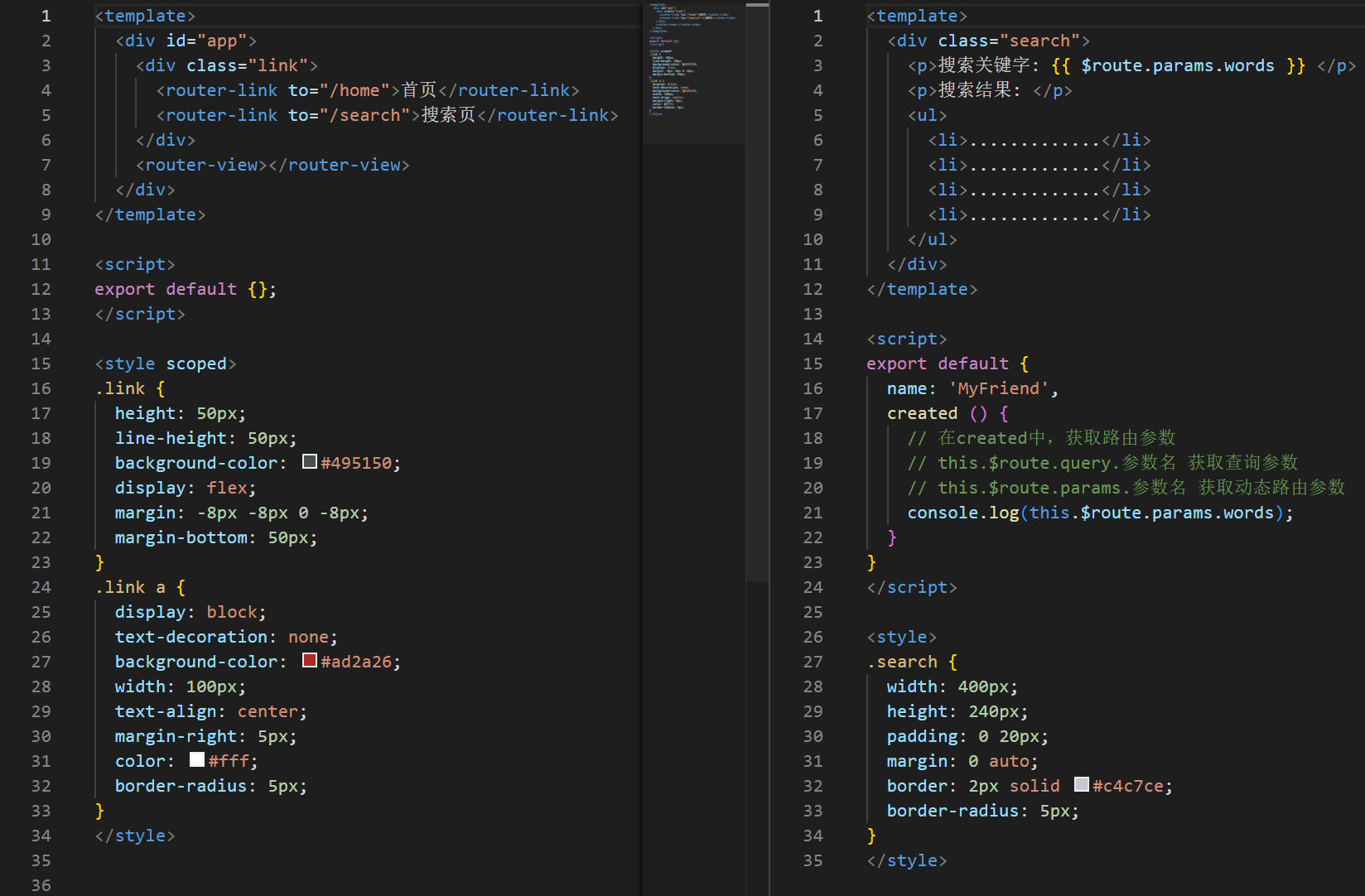
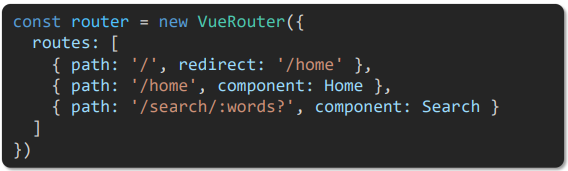
(3)动态路由参数可选符
/search/:words 表示,必须要传参数。如果不传参数,也希望匹配,可以加个可选符 "?"
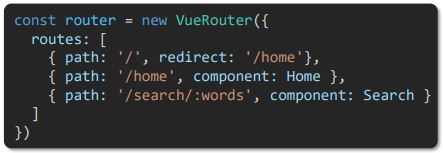
**6.**路由重定向
说明:重定向 → 匹配path后, 强制跳转path路径
语法: { path: 匹配路径, redirect: 重定向到的路径 }
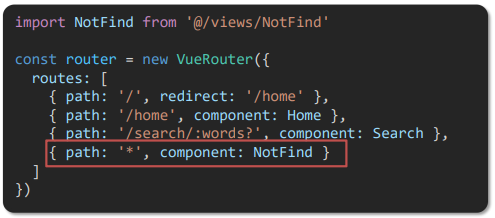
**7.**路由404
作用:当路径找不到匹配时,给个提示页面
位置:配在路由最后
语法:path: "*" (任意路径) -- 前面不匹配就命中最后这个
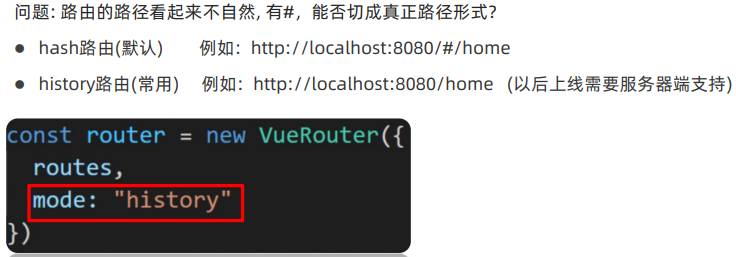
**8.**路由模式
**9.**编程式导航 - 基本跳转
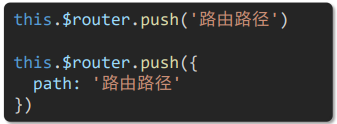
(1)path 路径跳转 (简易方便)
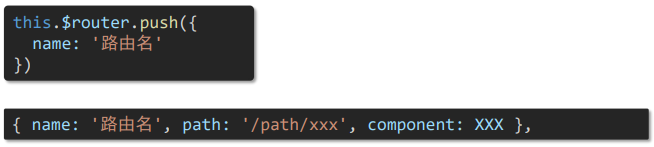
(2)name 命名路由跳转 (适合 path 路径长的场景)
javascript
<template>
  <div class="home">
    <div class="logo-box"></div>
    <div class="search-box">
      <input v-model="inpValue" type="text">
      <button @click="goSearch">搜索一下</button>
    </div>
    <div class="hot-link">
      热门搜索:
      <router-link to="/search/黑马程序员">黑马程序员</router-link>
      <router-link to="/search/前端培训">前端培训</router-link>
      <router-link to="/search/如何成为前端大牛">如何成为前端大牛</router-link>
    </div>
  </div>
</template>

<script>
export default {
  name: 'FindMusic',
  data () {
    return {
      inpValue: ''
    }
  },
  methods: {
    goSearch () {
      // 1. 通过路径的方式跳转
      // (1) this.$router.push('路由路径') [简写]
      // this.$router.push('路由路径?参数名=参数值')
      // this.$router.push('/search')
      // this.$router.push(`/search?key=${this.inpValue}`)
      // this.$router.push(`?search/${this.inpValue}`)

      // (2) this.$router.push({  [完整写法] 更适合传参
      //         path: '路由路径'
      //         query: {
      //            参数名:参数值,
      //            参数名:参数值
      //         }
      // })
      // this.$router.push({
      //   path: '/search',
      //   query: {
      //     key: this.inpValue
      //   }
      // })
      this.$router.push({
        path: `/search/${this.inpValue}`
      })

      // 2. 通过命名路由的方式跳转(需要给路由取名字) 适合长路径
      //    this.$router.push({
      //        name: '路由名',
      //        query: {参数名:参数值},
      //        params: { 参数名:参数值}
      // })
      this.$router.push({
        name: 'search',
        // query: {
        //   key: this.inpValue
        // }
        params: {
          words: this.inpValue
        }
      })
    }
  }
}
</script>

<style>
.logo-box {
  height: 150px;
  background: url('@/assets/logo.jpeg') no-repeat center;
}
.search-box {
  display: flex;
  justify-content: center;
}
.search-box input {
  width: 400px;
  height: 30px;
  line-height: 30px;
  border: 2px solid #c4c7ce;
  border-radius: 4px 0 0 4px;
  outline: none;
}
.search-box input:focus {
  border: 2px solid #ad2a26;
}
.search-box button {
  width: 100px;
  height: 36px;
  border: none;
  background-color: #ad2a26;
  color: #fff;
  position: relative;
  left: -2px;
  border-radius: 0 4px 4px 0;
}
.hot-link {
  width: 508px;
  height: 60px;
  line-height: 60px;
  margin: 0 auto;
}
.hot-link a {
  margin: 0 5px;
}
</style>
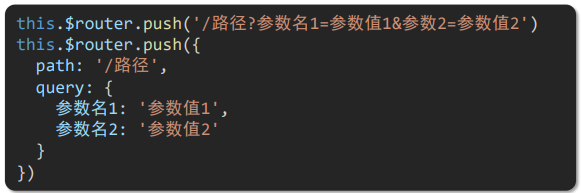
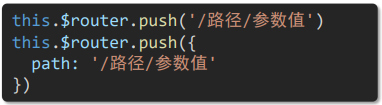
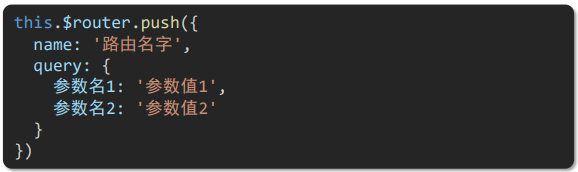
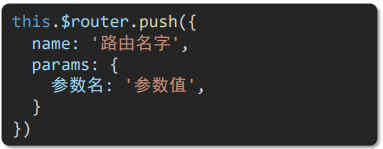
10.编程式导航传参 ( 查询参数传参和动态路由传参)
(1)①path 路径跳转传参 (query传参)
②path 路径跳转传参 (动态路由传参)
(2)①name 命名路由跳转传参 (query传参)
②name 命名路由跳转传参 (动态路由传参)
javascript
<template>
  <div class="home">
    <div class="logo-box"></div>
    <div class="search-box">
      <input v-model="inpValue" type="text">
      <button @click="goSearch">搜索一下</button>
    </div>
    <div class="hot-link">
      热门搜索:
      <router-link to="/search/黑马程序员">黑马程序员</router-link>
      <router-link to="/search/前端培训">前端培训</router-link>
      <router-link to="/search/如何成为前端大牛">如何成为前端大牛</router-link>
    </div>
  </div>
</template>

<script>
export default {
  name: 'FindMusic',
  data () {
    return {
      inpValue: ''
    }
  },
  methods: {
    goSearch () {
      // 1. 通过路径的方式跳转
      // (1) this.$router.push('路由路径') [简写]
      //     this.$router.push('路由路径?参数名=参数值')
      // this.$router.push('/search')
      // this.$router.push(`/search?key=${this.inpValue}`)
      // this.$router.push(`/search/${this.inpValue}`)

      // (2) this.$router.push({     [完整写法] 更适合传参
      //         path: '路由路径'
      //         query: {
      //            参数名: 参数值,
      //            参数名: 参数值
      //         }
      //     })
      // this.$router.push({
      //   path: '/search',
      //   query: {
      //     key: this.inpValue
      //   }
      // })
      // this.$router.push({
      //   path: `/search/${this.inpValue}`
      // })


      // 2. 通过命名路由的方式跳转 (需要给路由起名字) 适合长路径
      //    this.$router.push({
      //        name: '路由名'
      //        query: { 参数名: 参数值 },
      //        params: { 参数名: 参数值 }
      //    })
      this.$router.push({
        name: 'search',
        // query: {
        //   key: this.inpValue
        // }
        params: {
          words: this.inpValue
        }
      })
    }
  }
}
</script>

<style>
.logo-box {
  height: 150px;
  background: url('@/assets/logo.jpeg') no-repeat center;
}
.search-box {
  display: flex;
  justify-content: center;
}
.search-box input {
  width: 400px;
  height: 30px;
  line-height: 30px;
  border: 2px solid #c4c7ce;
  border-radius: 4px 0 0 4px;
  outline: none;
}
.search-box input:focus {
  border: 2px solid #ad2a26;
}
.search-box button {
  width: 100px;
  height: 36px;
  border: none;
  background-color: #ad2a26;
  color: #fff;
  position: relative;
  left: -2px;
  border-radius: 0 4px 4px 0;
}
.hot-link {
  width: 508px;
  height: 60px;
  line-height: 60px;
  margin: 0 auto;
}
.hot-link a {
  margin: 0 5px;
}
</style>