文章目录
需求
根据视频链接生成时间轴,并添加音频的对齐
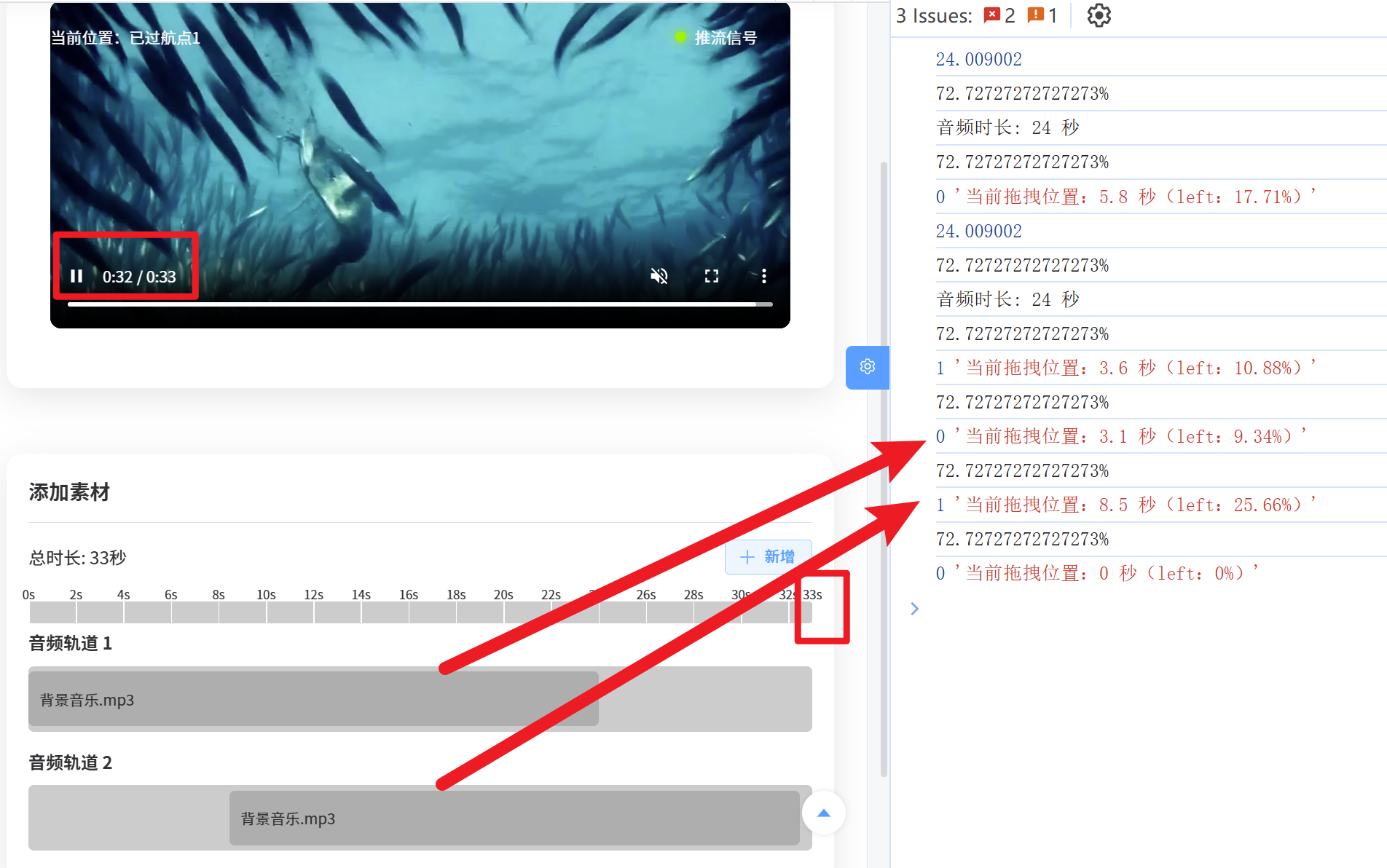
分析
1. 获取视频链接的时长
javascript
const durationVideo = ref<number | null>(null)
const errorMsg = ref('')

/**
 * 获取远程音视频的时长(单位:秒)
 * @param {string} videoUrl - 视频链接
 * @returns {Promise<number>} 视频时长(秒)
 */
const getVideoDurationInSeconds = async (videoUrl: string): Promise<number> => {
  return new Promise((resolve, reject) => {
    // 修复:创建新的video元素,避免影响页面中的播放器
    const video = document.createElement('video')
    video.crossOrigin = 'anonymous'
    video.onloadedmetadata = () => {
      const duration = Number(video.duration?.toFixed(0))
      // 释放资源
      video.removeAttribute('src')
      video.load()
      URL.revokeObjectURL(video.src)
      resolve(duration)
    }
    video.onerror = () => {
      reject(new Error('视频加载失败'))
      video.removeAttribute('src')
      video.load()
      URL.revokeObjectURL(video.src)
    }
    setTimeout(() => {
      reject(new Error('获取视频时长超时'))
    }, 10000)
    video.src = videoUrl
    video.load()
  })
}
2. 绘制刻度时间轴
javascript
/**
 * 初始化时间标尺
 */
const audioItems = ref([]) // 音频数组
function initTimelineRuler() {
  const timelineRuler = document.getElementById('timelineRuler')
  if (!timelineRuler) return
  timelineRuler.innerHTML = ''

  // 获取视频时长(确保为有效正整数,默认60秒)
  const timelineDuration = Math.max(Number(durationVideo.value) || 60, 1) // 至少1秒
  // 最小刻度数量(视觉下限,避免刻度太少)
  const MIN_MARKS = 8
  // 最大刻度数量(视觉上限,避免刻度太密)
  const MAX_MARKS = 20
  // 新增:间隔的最小限制(1秒,且为整数)
  const MIN_INTERVAL = 1

  /**
   * 核心算法:计算最优刻度间隔(保证是整数,且≥1秒)
   * 思路:
   * 1. 先计算初始间隔(总时长 / 最大刻度数,保证不超最大数量),取整后至少为1秒
   * 2. 把间隔向上取整为「1、2、5、10、20、50、100...」这类易读的整数(人类视觉友好)
   * 3. 最终保证刻度覆盖0到总时长,且数量在MIN~MAX之间
   */
  function getOptimalInterval(total, minMarks, maxMarks, minInterval) {
    // 初始间隔:按最大刻度数平分总时长,取整后至少为最小间隔(1秒)
    let initialInterval = Math.max(Math.ceil(total / maxMarks), minInterval)
    // 易读的间隔基数(人类习惯的整数刻度单位,避免出现3、7这类不规则数)
    const baseIntervals = [1, 2, 5, 10, 20, 50, 100, 200, 500, 1000]

    // 找到比初始间隔大的最小基数(比如初始间隔是8,取10;初始间隔是3,取5)
    let optimalInterval = baseIntervals.find((interval) => interval >= initialInterval)
    // 若初始间隔超过所有基数,取最大基数的整数倍(比如总时长1000,初始间隔50,取50)
    if (!optimalInterval) {
      const maxBase = baseIntervals[baseIntervals.length - 1]
      optimalInterval = Math.ceil(initialInterval / maxBase) * maxBase
    }

    // 校验刻度数量:如果按当前间隔计算的刻度数太少,缩小间隔(保证至少minMarks个,且不小于最小间隔)
    let markCount = Math.ceil(total / optimalInterval) + 1 // +1 包含0
    while (markCount < minMarks) {
      // 找到当前间隔的前一个更小的基数(比如当前是10,前一个是5)
      const currentIndex = baseIntervals.indexOf(optimalInterval)
      if (currentIndex > 0) {
        optimalInterval = baseIntervals[currentIndex - 1]
        // 确保缩小后的间隔不小于最小间隔(1秒)
        if (optimalInterval < minInterval) {
          optimalInterval = minInterval
          break
        }
      } else {
        // 已经是最小基数(1秒),无法再缩小,直接退出
        break
      }
      markCount = Math.ceil(total / optimalInterval) + 1
    }

    // 最终确保间隔是整数且≥最小间隔
    return Math.max(Math.round(optimalInterval), minInterval)
  }

  // 获取最优间隔(整数,≥1秒)
  const interval = getOptimalInterval(timelineDuration, MIN_MARKS, MAX_MARKS, MIN_INTERVAL)
  // 计算刻度的起始(0)和结束(总时长),以及所有中间刻度
  let time = 0
  // 循环生成刻度,直到超过总时长(最后一个刻度强制为总时长)
  while (time <= timelineDuration) {
    // 处理最后一个刻度:如果当前时间+间隔超过总时长,直接用总时长作为最后一个刻度
    let currentTime = time
    // 避免出现超过总时长的刻度,且保证currentTime是整数
    if (currentTime > timelineDuration) {
      currentTime = timelineDuration
    }
    // 强制转为整数(防止精度问题出现小数)
    currentTime = Math.floor(currentTime)

    // 创建刻度元素
    const mark = document.createElement('div')
    mark.className = 'ruler-mark'
    mark.style.left = `${(currentTime / timelineDuration) * 100}%`
    mark.setAttribute('data-time', `${currentTime}s`)
    timelineRuler.appendChild(mark)

    // 最后一个刻度如果是总时长,停止循环
    if (currentTime === timelineDuration) {
      break
    }

    // 增加间隔(确保是整数,避免小数)
    time += interval
    // 处理极端情况:如果time累加后变成小数(如精度问题),强制取整
    time = Math.floor(time)
  }

  // 兜底:如果上述循环未生成最后一个刻度(极端精度问题),手动添加总时长刻度
  const lastMark = timelineRuler.lastChild
  const lastMarkTime = lastMark ? Number(lastMark.getAttribute('data-time').replace('s', '')) : -1
  if (lastMarkTime !== timelineDuration) {
    const mark = document.createElement('div')
    mark.className = 'ruler-mark'
    mark.style.left = '100%'
    mark.setAttribute('data-time', `${timelineDuration}s`)
    timelineRuler.appendChild(mark)
  }
}
let flvPlayer: any = null
const handlePlay = () => {
  if (flvjs.isSupported()) {
    const videoElement = document.getElementById('player') as HTMLVideoElement
    // 直播
    if (templateInfo.value.type == 0) {
      flvPlayer = flvjs.createPlayer({
        type: 'flv',
        url: templateInfo.value.streamUrl
      })
      flvPlayer.attachMediaElement(videoElement)
      flvPlayer.load()
      flvPlayer.play()
    } else {
      // 录播
      videoElement.src = templateInfo.value.videoUrl
      // 获取视频时长并更新时间轴总时长
      fetchDuration(videoElement.src, 'video').then(() => {
        initTimelineRuler()
      })
    }
  }
}
3. 添加音频轨道,并可拖拽移动,且鼠标抬起时输出当前位置
javascript
const startDrag = (el: MouseEvent, item: any, index: number) => {
  console.log(item.width)
  function checkWidth(width) {
    const widthValue = parseFloat(width)
    if (isNaN(widthValue)) {
      console.error('Invalid width value')
      return false
    }
    return widthValue <= 100
  }

  if (!checkWidth(item.width)) {
    return
  }
  // 判断事件源是否是按钮或按钮的子元素(如图标),若是则直接返回
  const target = el.target as HTMLElement
  if (
    target.tagName === 'BUTTON' ||
    target.closest('.track-item-actions') || // 按钮所在的容器
    target.classList.contains('el-icon') // 图标元素
  ) {
    return // 不执行拖拽逻辑
  }

  const element = document.getElementById(`mouseDiv-${index + 1}`)
  if (!element) return

  // 声明拖拽相关变量(使用let保证每次拖拽都是新的变量,避免作用域污染)
  let isDragging = false
  let startX = 0 // 鼠标按下时的X坐标
  let startLeftPx = 0 // 元素按下时的左侧像素位置
  let parentWidthPx = 0 // 父容器的宽度(像素)
  let itemWidthPx = 0 // 音频元素的宽度(像素)
  let animationFrameId: number | null = null
  let currentSecond = 0 // 当前拖拽秒数
  let newLeftPercent = 0 // 新的左侧位置百分比
  // 获取时间轴总时长(视频时长或默认60秒)
  const timelineDuration = durationVideo.value || 60

  // 1. 缓存父容器宽度(像素):拖拽开始时就获取,避免过程中变化
  const parentElement = element.parentElement
  if (!parentElement) return
  parentWidthPx = parentElement.offsetWidth
  // 2. 缓存音频元素的宽度(像素):实时获取,避免百分比精度问题
  itemWidthPx = element.offsetWidth
  // 3. 缓存元素按下时的左侧像素位置(使用offsetLeft,更稳定)
  startLeftPx = element.offsetLeft
  // 4. 鼠标按下时的X坐标
  startX = el.clientX

  // 禁用文本选择,优化拖拽体验
  document.body.style.userSelect = 'none'
  document.body.style.cursor = 'grabbing'

  // 鼠标移动处理函数
  const handleMouseMove = (e: MouseEvent) => {
    if (!isDragging || parentWidthPx === 0) return

    // 取消之前的动画帧,避免累积
    if (animationFrameId) {
      cancelAnimationFrame(animationFrameId)
    }

    // 使用requestAnimationFrame优化性能
    animationFrameId = requestAnimationFrame(() => {
      // 计算鼠标移动的像素偏移量
      const deltaX = e.clientX - startX

      // 新的左侧像素位置 = 初始左侧位置 + 鼠标偏移量
      let newLeftPx = startLeftPx + deltaX

      // 左边界:不能小于0
      newLeftPx = Math.max(0, newLeftPx)
      // 右边界:不能大于父容器宽度 - 元素宽度(避免元素超出右侧)
      newLeftPx = Math.min(newLeftPx, parentWidthPx - itemWidthPx)
      // 保留整数像素,避免亚像素渲染问题
      newLeftPx = Math.round(newLeftPx)

      // 转换为百分比,更新元素位置
      newLeftPercent = Number(((newLeftPx / parentWidthPx) * 100).toFixed(2))
      element.style.left = `${newLeftPercent}%`

      // 计算当前秒数
      currentSecond = Number(((newLeftPercent / 100) * timelineDuration).toFixed(1))

      // 更新数据中的开始时间
      item.startTime = currentSecond
    })
  }

  // 鼠标抬起处理函数
  const handleMouseUp = () => {
    console.log(index, `当前拖拽位置:${currentSecond} 秒(left:${newLeftPercent}%)`)
    isDragging = false

    // 恢复默认样式
    document.body.style.userSelect = ''
    document.body.style.cursor = ''

    // 取消最后的动画帧
    if (animationFrameId) {
      cancelAnimationFrame(animationFrameId)
    }

    // 移除事件监听(关键:避免多次拖拽时事件叠加)
    document.removeEventListener('mousemove', handleMouseMove)
    document.removeEventListener('mouseup', handleMouseUp)
  }

  // 初始化拖拽状态(必须在变量缓存后)
  isDragging = true

  // 阻止默认行为和冒泡,避免事件冲突
  el.preventDefault()
  el.stopPropagation()

  // 先移除可能存在的旧监听,再添加新监听
  document.removeEventListener('mousemove', handleMouseMove)
  document.removeEventListener('mouseup', handleMouseUp)
  document.addEventListener('mousemove', handleMouseMove)
  document.addEventListener('mouseup', handleMouseUp)
}
const loading_add = ref(false)
// 获取音频时长(秒)
async function getAudioDuration(url) {
  return new Promise((resolve, reject) => {
    const audio = new Audio(url)

    audio.addEventListener('loadedmetadata', () => {
      console.log(audio.duration)
      // 返回四舍五入后的秒数
      resolve(Math.round(audio.duration))
    })

    audio.addEventListener('error', (e) => {
      reject(new Error('Failed to load audio file'))
    })
  })
}
// 初始化音频可视化条
const initAudio = async () => {
  loading_add.value = true
  const divID = 'audioTrack1'
  const exampleAudioItem = {
    id: 1001,
    divID: divID,
    type: 'audio',
    name: '背景音乐.mp3',
    startTime: 5,
    durationVideo: 20,
    volume: 70,
    audioFileUrl:
      'https://www.dkifly.com/ifly-api/admin-api/infra/file/29/get/20251216/24s_1765852490272.mp3'
  }
  try {
    durationAudio.value = await getAudioDuration(exampleAudioItem.audioFileUrl)
    exampleAudioItem.width = `${(durationAudio.value / durationVideo.value) * 100}%`
    console.log(exampleAudioItem.width)

    audioItems.value.push(exampleAudioItem)
    loading_add.value = false
    console.log(`音频时长: ${durationAudio.value} 秒`)
  } catch (error) {
    console.error('获取音频时长失败:', error.message)
  }
}
4. 总代码
javascript
<template>
  <!-- 模板子集 -->
  <ContentWrap class="content">
    <div
      style="
        display: flex;
        align-items: center;
        text-align: center;
        width: 100%;
        justify-content: space-between;
        margin-bottom: 20px;
      "
    >
      <h2>
        <el-button @click.stop="handleCancel" plain type="primary" text>
          <Icon icon="ep:arrow-left" />
        </el-button>
      </h2>
      <h2>{{ mixedTitle }}</h2>
      <h2></h2>
    </div>
    <!-- 内容 -->
    <div class="main">
      <div class="main-content">
        <h3>视频流</h3>
        <div style="height: 1px; background-color: #dcdfe6; margin: 15px 0"></div>
        <div class="content-child">
          <div class="video-container">
            <video id="player" controls preload="auto" muted autoplay></video>
            <div class="sync-indicator">
              <div style="display: flex; align-items: center">
                <span>当前位置:已过航点1</span>
              </div>
              <div style="display: flex; align-items: center">
                <div class="sync-dot sync-good"></div>
                <span>推流信号</span>
              </div>
            </div>
          </div>
          <div class="control-bottom" v-if="1 == 0">
            <div class="info"></div>
            <div class="controls">
              <button class="btn btn-primary" id="startBtn">
                <Icon icon="ep:video-play" :size="20" class="mr-5px" />
                开始
              </button>
              <button class="btn btn-warning" id="stopBtn">
                <Icon icon="ep:video-pause" :size="20" class="mr-5px" /> 停止
              </button>
            </div>
          </div>
        </div>
      </div>
    </div>
    <div class="main-content" style="margin: 60px 0 20px 0; background-color: rgba(42, 66, 100, 0)">
      <h3>添加素材</h3>
      <div style="height: 1px; background-color: #dcdfe6; margin: 15px 0"></div>

      <div class="timeline-header">
        <div class="timeline-info">
          <div
            >总时长: <span id="totalDuration">{{ durationVideo }}</span
            >秒</div
          >
        </div>
        <div class="timeline-controls">
          <el-button plain type="primary" @click="handleAdd" :loading="loading_add">
            <Icon class="mr-5px" icon="ep:plus" />
            新增
          </el-button>
        </div>
      </div>
      <!-- 时间标尺将通过JS生成 -->
      <div class="timeline-ruler" id="timelineRuler"> </div>
      <!-- 音频轨道 -->
      <div class="timeline-track" v-for="(item, index) in audioItems" :key="index">
        <div class="track-header">
          <div class="track-title">
            <span>音频轨道 {{ index + 1 }}</span>
          </div>
          <div class="track-controls">
            <button class="btn btn-icon btn-primary">
              <i class="fas fa-plus"></i>
            </button>
          </div>
        </div>
        <div class="track-items" :id="item.divID">
          <div class="current-time-marker" id="currentTimeMarker" style="left: 0%"></div>
          <div
            class="track-item track-item-audio"
            :id="`mouseDiv-${index + 1}`"
            :style="{ width: `${item.width}` }"
            @mousedown="startDrag($event, item, index)"
          >
            <div class="track-item-content">{{ item.name }}</div>
            <div class="track-item-handle track-item-handle-left"></div>
            <div class="track-item-handle track-item-handle-right"></div>
            <div class="track-item-actions">
              <el-button
                type="primary"
                size="small"
                circle
                @click="handleEdit($event, item)"
                @mousedown.stop.prevent
              >
                <Icon icon="ep:edit" />
              </el-button>
              <el-button
                type="danger"
                size="small"
                circle
                @click="handleDelete($event, item)"
                @mousedown.stop.prevent
              >
                <Icon icon="ep:delete" />
              </el-button>
            </div>
          </div>
        </div>
      </div>
    </div>
    <!-- 弹窗 -->
    <Dialog v-model="dialogVisible" :title="dialogTitle">
      <el-form
        ref="formRef"
        v-loading="formLoading"
        :model="formData"
        :rules="formRules"
        label-width="90px"
      >
        <el-form-item label="音频文件" prop="audioFileUrl">
          <UploadFile
            v-model="formData.audioFileUrl"
            :file-type="['mp3']"
            :limit="1"
            :file-size="10"
            class="min-w-80px"
          />
        </el-form-item>
        <el-form-item label="文本文件" prop="textFileUrl">
          <UploadFile
            v-model="formData.textFileUrl"
            :file-type="[]"
            :limit="1"
            :file-size="0"
            class="min-w-80px"
          />
        </el-form-item>
        <el-form-item label="音量" prop="audioVolume">
          <el-row :gutter="24" style="width: 100%">
            <el-col :span="21">
              <el-slider
                v-model="formData.audioVolume"
                :max="100"
                :min="0"
                :show-input-controls="true"
                :format-tooltip="formatTooltip"
                style="width: 100%"
              />
            </el-col>
            <el-col :span="3" style="display: flex; justify-content: center">
              {{ formData.audioVolume }} %
            </el-col>
          </el-row>
        </el-form-item>
        <el-form-item label="备注">
          <el-input
            v-model="formData.remark"
            placeholder="请输入备注"
            type="textarea"
            :autosize="{ minRows: 3, maxRows: 3 }"
          />
        </el-form-item>
      </el-form>
      <template #footer>
        <el-button :disabled="formLoading" type="primary" @click="submitForm">保 存</el-button>
        <el-button @click="dialogVisible = false">关 闭</el-button>
      </template>
    </Dialog>
  </ContentWrap>
</template>

<script lang="ts" setup>
import * as DirectApi from '@/api/direct/direct'
import { FormRules } from 'element-plus'
import flvjs from 'flv.js'

const emit = defineEmits(['success', 'close']) // 定义事件,用于操作成功后的回调

const handleCancel = () => {
  emit('close', 'origin')
}

const message = useMessage() // 消息弹窗
const dialogVisible = ref(false) // 是否显示弹窗

const props = defineProps({
  title: {
    type: String,
    default: ''
  },
  currentId: {
    type: Number,
    default: 0
  }
})

const Tableloading = ref(false) // 列表的加载中
const total = ref(0) // 列表的总页数
const list = ref([]) // 列表的数据
const dialogTitle = ref('') // 表单的类型:create - 新增;update - 修改

const queryParams = ref({
  pageNo: 1,
  pageSize: 10
}) // 查询参数
const getList = async () => {
  Tableloading.value = true
  try {
    const data = await DirectApi.getMixDetailPage(queryParams.value)
    list.value = data.list
    total.value = data.total
  } finally {
    Tableloading.value = false
  }
}

const mixedTitle = ref(props.title)

/**
 * 表单模块
 */
const formLoading = ref(false)
const resetFrom = () => {
  return {
    templateId: undefined,
    routeId: undefined,
    routeDrawId: undefined,
    pointName: '',
    lng: 138.222321,
    lat: 138.222321,
    alt: 138.222321,
    audioFileUrl: '',
    textFileUrl: '',
    audioText: '文本文字测试',
    audioVolume: 80,
    remark: ''
  }
}
const formData = ref(resetFrom())
const formRules = reactive<FormRules>({
  routeDrawId: [{ required: true, message: '请选择航点', trigger: 'blur' }],
  pointName: [{ required: true, message: '请输入航点名称', trigger: 'blur' }],
  audioFileUrl: [{ required: true, message: '请上传音频', trigger: 'blur' }],
  textFileUrl: [{ required: true, message: '请上传文本', trigger: 'blur' }]
})
const formRef = ref() // 表单 Ref
const submitForm = async () => {
  // 校验表单
  if (!formRef) return
  const valid = await formRef.value.validate()
  if (!valid) return
  // 提交请求
  formData.value.id == undefined ? (dialogTitle.value = '新增') : (dialogTitle.value = '修改')
  let tempData = {}
  try {
    // 提交请求
    if (dialogTitle.value === '新增') {
      tempData = {
        ...formData.value,
        templateId: templateInfo.value?.id,
        routeId: templateInfo.value?.routeId,
        routeDrawId: formData.value.routeDrawId
      }
      await DirectApi.createMixDetail(tempData)
      message.success('保存成功')
    } else {
      tempData = formData.value
      await DirectApi.updateMixDetail(tempData)
      message.success(dialogTitle.value + '成功')
    }
    // 发送操作成功的事件
    dialogVisible.value = false
  } finally {
    formLoading.value = false
    handlerouteDrawChange(formData.value.routeDrawId)
  }
}

// 初始化音量
const formatTooltip = (val: number) => {
  return val + '%'
}

const routeDrawList = ref([])
const templateInfo = ref([])
const getCurrentDetail = async () => {
  const id = props.currentId
  if (id) {
    formLoading.value = true
    try {
      const res = await DirectApi.getDirectDetail(id)
      templateInfo.value = res
      handlePlay()
      routeDrawList.value = res.routeInfo?.routeDrawList
      handlerouteDrawChange(formData.value.routeDrawId)
    } finally {
      formLoading.value = false
    }
  }
}

const handlerouteDrawChange = async (val: number | string) => {
  // 查询当前航点的音频文件和文本文件
  const tempData = {
    templateId: props.currentId,
    routeId: templateInfo.value?.routeId,
    routeDrawId: val
  }
  await DirectApi.getMixRouteDetail(tempData).then((res) => {
    if (res.list?.length > 0) {
      formData.value = res.list?.[0]
    } else {
      formData.value = resetFrom()
      const currentRoute = routeDrawList.value.find((item: any) => item.id == val)
      if (currentRoute) {
        formData.value.pointName = currentRoute.pointName
        formData.value.lng = currentRoute.lng
        formData.value.lat = currentRoute.lat
        formData.value.alt = currentRoute.alt
      }
    }
  })
}

/**
 * 视频播放
 */
let flvPlayer: any = null
const handlePlay = () => {
  if (flvjs.isSupported()) {
    const videoElement = document.getElementById('player') as HTMLVideoElement
    // 直播
    if (templateInfo.value.type == 0) {
      flvPlayer = flvjs.createPlayer({
        type: 'flv',
        url: templateInfo.value.streamUrl
      })
      flvPlayer.attachMediaElement(videoElement)
      flvPlayer.load()
      flvPlayer.play()
    } else {
      // 录播
      videoElement.src = templateInfo.value.videoUrl
      // 获取视频时长并更新时间轴总时长
      fetchDuration(videoElement.src, 'video').then(() => {
        initTimelineRuler()
      })
    }
  }
}

onMounted(async () => {
  formData.value = resetFrom()
  await getCurrentDetail()
  initTimelineRuler()
})

onBeforeUnmount(() => {
  // 销毁播放器
  if (flvPlayer) {
    flvPlayer.destroy()
  }
})

// 获取视频时长
const durationVideo = ref<number | null>(null)
const durationAudio = ref<number | null>(null)
const errorMsg = ref('')

/**
 * 获取远程音视频的时长(单位:秒)
 * @param {string} videoUrl - 视频链接
 * @returns {Promise<number>} 视频时长(秒)
 */
const getVideoDurationInSeconds = async (videoUrl: string): Promise<number> => {
  return new Promise((resolve, reject) => {
    // 修复:创建新的video元素,避免影响页面中的播放器
    const video = document.createElement('video')
    video.crossOrigin = 'anonymous'
    video.onloadedmetadata = () => {
      const duration = Number(video.duration?.toFixed(0))
      // 释放资源
      video.removeAttribute('src')
      video.load()
      URL.revokeObjectURL(video.src)
      resolve(duration)
    }
    video.onerror = () => {
      reject(new Error('视频加载失败'))
      video.removeAttribute('src')
      video.load()
      URL.revokeObjectURL(video.src)
    }
    setTimeout(() => {
      reject(new Error('获取视频时长超时'))
    }, 10000)
    video.src = videoUrl
    video.load()
  })
}

const getMediaDurationInSeconds = async (mediaUrl: string): Promise<number> => {
  return new Promise((resolve, reject) => {
    const media = document.createElement('audio')
    media.crossOrigin = 'anonymous'

    media.onloadedmetadata = () => {
      if (isNaN(media.duration)) {
        reject(new Error('媒体文件元数据缺失,无法获取时长'))
        return
      }
      const duration = Math.round(Number(media.duration.toFixed(2)))

      media.removeAttribute('src')
      media.load()
      URL.revokeObjectURL(media.src)
      resolve(duration)
    }

    media.onerror = () => {
      reject(new Error('加载失败:可能是跨域、链接无效或格式不支持'))
      media.removeAttribute('src')
      media.load()
      URL.revokeObjectURL(media.src)
    }

    setTimeout(() => {
      reject(new Error('获取时长超时,请检查链接'))
    }, 10000)

    media.src = mediaUrl
    media.load()
  })
}

// 触发获取时长
const fetchDuration = async (Url: string, type: string) => {
  if (type == 'video') {
    try {
      durationVideo.value = await getVideoDurationInSeconds(Url)
      errorMsg.value = ''
    } catch (err) {
      durationVideo.value = 60 // 失败时使用默认60秒
      errorMsg.value = (err as Error).message
    }
  }
}

/**
 * 初始化时间标尺
 */
const audioItems = ref([]) // 音频数组
function initTimelineRuler() {
  const timelineRuler = document.getElementById('timelineRuler')
  if (!timelineRuler) return
  timelineRuler.innerHTML = ''

  // 获取视频时长(确保为有效正整数,默认60秒)
  const timelineDuration = Math.max(Number(durationVideo.value) || 60, 1) // 至少1秒
  // 最小刻度数量(视觉下限,避免刻度太少)
  const MIN_MARKS = 8
  // 最大刻度数量(视觉上限,避免刻度太密)
  const MAX_MARKS = 20
  // 新增:间隔的最小限制(1秒,且为整数)
  const MIN_INTERVAL = 1

  /**
   * 核心算法:计算最优刻度间隔(保证是整数,且≥1秒)
   * 思路:
   * 1. 先计算初始间隔(总时长 / 最大刻度数,保证不超最大数量),取整后至少为1秒
   * 2. 把间隔向上取整为「1、2、5、10、20、50、100...」这类易读的整数(人类视觉友好)
   * 3. 最终保证刻度覆盖0到总时长,且数量在MIN~MAX之间
   */
  function getOptimalInterval(total, minMarks, maxMarks, minInterval) {
    // 初始间隔:按最大刻度数平分总时长,取整后至少为最小间隔(1秒)
    let initialInterval = Math.max(Math.ceil(total / maxMarks), minInterval)
    // 易读的间隔基数(人类习惯的整数刻度单位,避免出现3、7这类不规则数)
    const baseIntervals = [1, 2, 5, 10, 20, 50, 100, 200, 500, 1000]

    // 找到比初始间隔大的最小基数(比如初始间隔是8,取10;初始间隔是3,取5)
    let optimalInterval = baseIntervals.find((interval) => interval >= initialInterval)
    // 若初始间隔超过所有基数,取最大基数的整数倍(比如总时长1000,初始间隔50,取50)
    if (!optimalInterval) {
      const maxBase = baseIntervals[baseIntervals.length - 1]
      optimalInterval = Math.ceil(initialInterval / maxBase) * maxBase
    }

    // 校验刻度数量:如果按当前间隔计算的刻度数太少,缩小间隔(保证至少minMarks个,且不小于最小间隔)
    let markCount = Math.ceil(total / optimalInterval) + 1 // +1 包含0
    while (markCount < minMarks) {
      // 找到当前间隔的前一个更小的基数(比如当前是10,前一个是5)
      const currentIndex = baseIntervals.indexOf(optimalInterval)
      if (currentIndex > 0) {
        optimalInterval = baseIntervals[currentIndex - 1]
        // 确保缩小后的间隔不小于最小间隔(1秒)
        if (optimalInterval < minInterval) {
          optimalInterval = minInterval
          break
        }
      } else {
        // 已经是最小基数(1秒),无法再缩小,直接退出
        break
      }
      markCount = Math.ceil(total / optimalInterval) + 1
    }

    // 最终确保间隔是整数且≥最小间隔
    return Math.max(Math.round(optimalInterval), minInterval)
  }

  // 获取最优间隔(整数,≥1秒)
  const interval = getOptimalInterval(timelineDuration, MIN_MARKS, MAX_MARKS, MIN_INTERVAL)
  // 计算刻度的起始(0)和结束(总时长),以及所有中间刻度
  let time = 0
  // 循环生成刻度,直到超过总时长(最后一个刻度强制为总时长)
  while (time <= timelineDuration) {
    // 处理最后一个刻度:如果当前时间+间隔超过总时长,直接用总时长作为最后一个刻度
    let currentTime = time
    // 避免出现超过总时长的刻度,且保证currentTime是整数
    if (currentTime > timelineDuration) {
      currentTime = timelineDuration
    }
    // 强制转为整数(防止精度问题出现小数)
    currentTime = Math.floor(currentTime)

    // 创建刻度元素
    const mark = document.createElement('div')
    mark.className = 'ruler-mark'
    mark.style.left = `${(currentTime / timelineDuration) * 100}%`
    mark.setAttribute('data-time', `${currentTime}s`)
    timelineRuler.appendChild(mark)

    // 最后一个刻度如果是总时长,停止循环
    if (currentTime === timelineDuration) {
      break
    }

    // 增加间隔(确保是整数,避免小数)
    time += interval
    // 处理极端情况:如果time累加后变成小数(如精度问题),强制取整
    time = Math.floor(time)
  }

  // 兜底:如果上述循环未生成最后一个刻度(极端精度问题),手动添加总时长刻度
  const lastMark = timelineRuler.lastChild
  const lastMarkTime = lastMark ? Number(lastMark.getAttribute('data-time').replace('s', '')) : -1
  if (lastMarkTime !== timelineDuration) {
    const mark = document.createElement('div')
    mark.className = 'ruler-mark'
    mark.style.left = '100%'
    mark.setAttribute('data-time', `${timelineDuration}s`)
    timelineRuler.appendChild(mark)
  }
}

const startDrag = (el: MouseEvent, item: any, index: number) => {
  console.log(item.width)
  function checkWidth(width) {
    const widthValue = parseFloat(width)
    if (isNaN(widthValue)) {
      console.error('Invalid width value')
      return false
    }
    return widthValue <= 100
  }

  if (!checkWidth(item.width)) {
    return
  }
  // 判断事件源是否是按钮或按钮的子元素(如图标),若是则直接返回
  const target = el.target as HTMLElement
  if (
    target.tagName === 'BUTTON' ||
    target.closest('.track-item-actions') || // 按钮所在的容器
    target.classList.contains('el-icon') // 图标元素
  ) {
    return // 不执行拖拽逻辑
  }

  const element = document.getElementById(`mouseDiv-${index + 1}`)
  if (!element) return

  // 声明拖拽相关变量(使用let保证每次拖拽都是新的变量,避免作用域污染)
  let isDragging = false
  let startX = 0 // 鼠标按下时的X坐标
  let startLeftPx = 0 // 元素按下时的左侧像素位置
  let parentWidthPx = 0 // 父容器的宽度(像素)
  let itemWidthPx = 0 // 音频元素的宽度(像素)
  let animationFrameId: number | null = null
  let currentSecond = 0 // 当前拖拽秒数
  let newLeftPercent = 0 // 新的左侧位置百分比
  // 获取时间轴总时长(视频时长或默认60秒)
  const timelineDuration = durationVideo.value || 60

  // 1. 缓存父容器宽度(像素):拖拽开始时就获取,避免过程中变化
  const parentElement = element.parentElement
  if (!parentElement) return
  parentWidthPx = parentElement.offsetWidth
  // 2. 缓存音频元素的宽度(像素):实时获取,避免百分比精度问题
  itemWidthPx = element.offsetWidth
  // 3. 缓存元素按下时的左侧像素位置(使用offsetLeft,更稳定)
  startLeftPx = element.offsetLeft
  // 4. 鼠标按下时的X坐标
  startX = el.clientX

  // 禁用文本选择,优化拖拽体验
  document.body.style.userSelect = 'none'
  document.body.style.cursor = 'grabbing'

  // 鼠标移动处理函数
  const handleMouseMove = (e: MouseEvent) => {
    if (!isDragging || parentWidthPx === 0) return

    // 取消之前的动画帧,避免累积
    if (animationFrameId) {
      cancelAnimationFrame(animationFrameId)
    }

    // 使用requestAnimationFrame优化性能
    animationFrameId = requestAnimationFrame(() => {
      // 计算鼠标移动的像素偏移量
      const deltaX = e.clientX - startX

      // 新的左侧像素位置 = 初始左侧位置 + 鼠标偏移量
      let newLeftPx = startLeftPx + deltaX

      // 左边界:不能小于0
      newLeftPx = Math.max(0, newLeftPx)
      // 右边界:不能大于父容器宽度 - 元素宽度(避免元素超出右侧)
      newLeftPx = Math.min(newLeftPx, parentWidthPx - itemWidthPx)
      // 保留整数像素,避免亚像素渲染问题
      newLeftPx = Math.round(newLeftPx)

      // 转换为百分比,更新元素位置
      newLeftPercent = Number(((newLeftPx / parentWidthPx) * 100).toFixed(2))
      element.style.left = `${newLeftPercent}%`

      // 计算当前秒数
      currentSecond = Number(((newLeftPercent / 100) * timelineDuration).toFixed(1))

      // 更新数据中的开始时间
      item.startTime = currentSecond
    })
  }

  // 鼠标抬起处理函数
  const handleMouseUp = () => {
    console.log(index, `当前拖拽位置:${currentSecond} 秒(left:${newLeftPercent}%)`)
    isDragging = false

    // 恢复默认样式
    document.body.style.userSelect = ''
    document.body.style.cursor = ''

    // 取消最后的动画帧
    if (animationFrameId) {
      cancelAnimationFrame(animationFrameId)
    }

    // 移除事件监听(关键:避免多次拖拽时事件叠加)
    document.removeEventListener('mousemove', handleMouseMove)
    document.removeEventListener('mouseup', handleMouseUp)
  }

  // 初始化拖拽状态(必须在变量缓存后)
  isDragging = true

  // 阻止默认行为和冒泡,避免事件冲突
  el.preventDefault()
  el.stopPropagation()

  // 先移除可能存在的旧监听,再添加新监听
  document.removeEventListener('mousemove', handleMouseMove)
  document.removeEventListener('mouseup', handleMouseUp)
  document.addEventListener('mousemove', handleMouseMove)
  document.addEventListener('mouseup', handleMouseUp)
}
const loading_add = ref(false)
// 获取音频时长(秒)
async function getAudioDuration(url) {
  return new Promise((resolve, reject) => {
    const audio = new Audio(url)

    audio.addEventListener('loadedmetadata', () => {
      console.log(audio.duration)
      // 返回四舍五入后的秒数
      resolve(Math.round(audio.duration))
    })

    audio.addEventListener('error', (e) => {
      reject(new Error('Failed to load audio file'))
    })
  })
}
// 初始化音频可视化条
const initAudio = async () => {
  loading_add.value = true
  const divID = 'audioTrack1'
  const exampleAudioItem = {
    id: 1001,
    divID: divID,
    type: 'audio',
    name: '背景音乐.mp3',
    startTime: 5,
    durationVideo: 20,
    volume: 70,
    audioFileUrl:
      'https://www.dkifly.com/ifly-api/admin-api/infra/file/29/get/20251216/24s_1765852490272.mp3'
  }
  try {
    durationAudio.value = await getAudioDuration(exampleAudioItem.audioFileUrl)
    exampleAudioItem.width = `${(durationAudio.value / durationVideo.value) * 100}%`
    console.log(exampleAudioItem.width)

    audioItems.value.push(exampleAudioItem)
    loading_add.value = false
    console.log(`音频时长: ${durationAudio.value} 秒`)
  } catch (error) {
    console.error('获取音频时长失败:', error.message)
  }
}
const handleAdd = () => {
  // dialogVisible.value = true
  // dialogTitle.value = '新增'
  initAudio()
}

// 编辑方法
const handleEdit = function (el: MouseEvent, item: any) {
  console.log('编辑', item)
  // 这里可以添加编辑逻辑,比如打开弹窗赋值
  // formData.value = { ...item }
  // dialogVisible.value = true
  // dialogTitle.value = '编辑'
}

// 删除方法
const handleDelete = async (el: MouseEvent, item: any) => {
  try {
    // 删除的二次确认
    await message.delConfirm()
    // 发起删除
    await DirectApi.deleteMixDetail(item.id || formData.value.id)
    message.success('删除成功')
    // 刷新列表
    handlerouteDrawChange(formData.value.routeDrawId)
  } catch (err) {
    console.log('删除取消', err)
  }
}
</script>

<style scoped>
.content {
  padding: 20px;
}
.content-child {
  padding: 15px 20px;
}
.main {
  width: 100%;
  display: flex;
  justify-content: space-between;
  --primary: #4361ee;
  --secondary: #3f37c9;
  --success: #95f204;
  --warning: #f72585;
  --dark: #1d3557;
  --light: #f8f9fa;
  --gray: #adb5bd;
}
.main-content {
  width: 100%;
  border-radius: 15px;
  padding: 20px;
  box-shadow: 0 8px 32px rgba(0, 0, 0, 0.1);
  backdrop-filter: blur(10px);
}
.video-container {
  position: relative;
  width: 100%;
  height: 300px;
  background: #000;
  border-radius: 10px;
  overflow: hidden;
  margin-bottom: 20px;
}

video {
  width: 100%;
  height: 100%;
  object-fit: cover;
}

.sync-indicator {
  position: absolute;
  top: 15px;
  width: 100%;
  background: rgba(0, 0, 0, 0);
  padding: 8px 15px;
  border-radius: 20px;
  font-size: 0.9rem;
  display: flex;
  justify-content: space-between;
  align-items: center;
  color: var(--light);
}

.sync-dot {
  width: 10px;
  height: 10px;
  border-radius: 50%;
  margin-right: 8px;
}

.sync-good {
  background: var(--success);
  box-shadow: 0 0 10px var(--success);
}

.sync-warning {
  background: var(--warning);
  box-shadow: 0 0 10px var(--warning);
}
.control-bottom {
  display: flex;
  justify-content: space-between;
}
.info {
  font-size: 0.9rem;
}
.controls {
  display: grid;
  grid-template-columns: repeat(2, 1fr);
  gap: 15px;
  margin-bottom: 20px;
}

.btn {
  padding: 12px 15px;
  border: none;
  border-radius: 8px;
  font-weight: 600;
  cursor: pointer;
  transition: all 0.3s ease;
  display: flex;
  align-items: center;
  justify-content: center;
}

.btn i {
  margin-right: 8px;
}

.btn-primary {
  background: var(--primary);
  color: white;
}

.btn-primary:hover {
  background: var(--secondary);
  transform: translateY(-2px);
}

.btn-success {
  background: #4cc9f0;
  color: var(--dark);
}

.btn-success:hover {
  background: #3aa8d0;
  transform: translateY(-2px);
}

.btn-warning {
  background: var(--warning);
  color: white;
}

.btn-warning:hover {
  background: #ecf5ff;
  transform: translateY(-2px);
}

.btn:disabled {
  background: var(--gray);
  cursor: not-allowed;
  transform: none;
}
/* 时间轴样式 */
.timeline-header {
  display: flex;
  justify-content: space-between;
  align-items: center;
  margin-bottom: 25px;
}
</style>

<style>
/* 时间轴样式 */
.timeline-ruler {
  display: flex;
  height: 20px;
  background: rgba(204, 204, 204, 0.05);
  border-radius: 3px;
  margin-bottom: 5px;
  position: relative;
}
.ruler-mark {
  position: absolute;
  height: 100%;
  width: 1px;
  background: rgba(255, 255, 255, 0.2);
  text-align: center;
  font-size: 0.7rem;
  color: var(--gray);
}

.ruler-mark::after {
  content: attr(data-time);
  position: absolute;
  top: -15px;
  left: -10px;
  width: 20px;
}

.subtitle {
  font-size: 1.1rem;
  color: var(--gray);
}

.dashboard {
  display: grid;
  grid-template-columns: 1fr 1fr;
  gap: 20px;
  margin-bottom: 30px;
}

@media (max-width: 1024px) {
  .dashboard {
    grid-template-columns: 1fr;
  }
}

.panel {
  background: rgba(29, 53, 87, 0.7);
  border-radius: 15px;
  padding: 20px;
  box-shadow: 0 8px 32px rgba(0, 0, 0, 0.2);
  backdrop-filter: blur(10px);
}

.panel-title {
  display: flex;
  align-items: center;
  margin-bottom: 20px;
  padding-bottom: 10px;
  border-bottom: 1px solid rgba(255, 255, 255, 0.1);
}

.panel-title i {
  margin-right: 10px;
  color: var(--success);
}

video {
  width: 100%;
  height: 100%;
  object-fit: cover;
}

.sync-indicator {
  position: absolute;
  top: 15px;
  right: 15px;
  background: rgba(0, 0, 0, 0.6);
  padding: 8px 15px;
  border-radius: 20px;
  font-size: 0.9rem;
  display: flex;
  align-items: center;
}

.sync-dot {
  width: 10px;
  height: 10px;
  border-radius: 50%;
  margin-right: 8px;
}

.sync-good {
  background: var(--success);
  box-shadow: 0 0 10px var(--success);
}

.sync-warning {
  background: var(--warning);
  box-shadow: 0 0 10px var(--warning);
}

.controls {
  display: grid;
  grid-template-columns: repeat(3, 1fr);
  gap: 15px;
  margin-bottom: 20px;
}

.btn {
  padding: 12px 15px;
  border: none;
  border-radius: 8px;
  font-weight: 600;
  cursor: pointer;
  transition: all 0.3s ease;
  display: flex;
  align-items: center;
  justify-content: center;
}

.btn i {
  margin-right: 8px;
}

.btn-primary {
  background: var(--primary);
  color: white;
}

.btn-primary:hover {
  background: var(--secondary);
  transform: translateY(-2px);
}

.btn-success {
  background: var(--success);
  color: var(--dark);
}

.btn-success:hover {
  background: #3aa8d0;
  transform: translateY(-2px);
}

.btn-warning {
  background: var(--warning);
  color: white;
}

.btn-warning:hover {
  background: #d41c6c;
  transform: translateY(-2px);
}

.btn:disabled {
  background: var(--gray);
  cursor: not-allowed;
  transform: none;
}

.stats {
  display: grid;
  grid-template-columns: repeat(2, 1fr);
  gap: 15px;
  margin-top: 20px;
}

.stat-card {
  background: rgba(255, 255, 255, 0.1);
  padding: 15px;
  border-radius: 10px;
  text-align: center;
}

.stat-value {
  font-size: 1.8rem;
  font-weight: 700;
  margin: 10px 0;
}

.stat-label {
  font-size: 0.9rem;
  color: var(--gray);
}

.settings {
  margin-top: 20px;
}

.setting-group {
  margin-bottom: 20px;
}

.setting-label {
  display: block;
  margin-bottom: 8px;
  font-weight: 500;
}

.slider-container {
  display: flex;
  align-items: center;
}

.slider {
  flex: 1;
  height: 8px;
  -webkit-appearance: none;
  background: rgba(255, 255, 255, 0.1);
  border-radius: 4px;
  outline: none;
}

.slider::-webkit-slider-thumb {
  -webkit-appearance: none;
  width: 20px;
  height: 20px;
  border-radius: 50%;
  background: var(--primary);
  cursor: pointer;
}

.slider-value {
  width: 50px;
  text-align: right;
  margin-left: 10px;
}

.visualizer {
  height: 120px;
  background: rgba(0, 0, 0, 0.3);
  border-radius: 10px;
  margin-top: 20px;
  position: relative;
  overflow: hidden;
}

.sync-timeline {
  height: 10px;
  background: rgba(255, 255, 255, 0.1);
  border-radius: 5px;
  margin-top: 20px;
  position: relative;
}

.sync-marker {
  position: absolute;
  top: 0;
  width: 4px;
  height: 100%;
  background: var(--success);
  transform: translateX(-50%);
}

.video-marker {
  position: absolute;
  top: 0;
  width: 4px;
  height: 100%;
  background: var(--primary);
  transform: translateX(-50%);
}

.audio-marker {
  position: absolute;
  top: 0;
  width: 4px;
  height: 100%;
  background: var(--warning);
  transform: translateX(-50%);
}

.timeline-labels {
  display: flex;
  justify-content: space-between;
  margin-top: 5px;
  font-size: 0.8rem;
  color: var(--gray);
}

.log-container {
  margin-top: 20px;
  max-height: 150px;
  overflow-y: auto;
  background: rgba(0, 0, 0, 0.3);
  border-radius: 8px;
  padding: 10px;
  font-size: 0.85rem;
}

.log-entry {
  padding: 5px 0;
  border-bottom: 1px solid rgba(255, 255, 255, 0.05);
}

.log-time {
  color: var(--success);
  margin-right: 10px;
}

.log-info {
  color: var(--gray);
}

.log-warning {
  color: var(--warning);
}

/* 多轨道时间轴样式 */
.timeline-container {
  margin-top: 30px;
}

.timeline-header {
  display: flex;
  justify-content: space-between;
  align-items: center;
  margin-bottom: 15px;
}

.timeline-controls {
  display: flex;
  gap: 10px;
}

.timeline-track {
  background: rgba(255, 255, 255, 0.05);
  border-radius: 8px;
  margin-bottom: 15px;
}

.track-header {
  display: flex;
  justify-content: space-between;
  align-items: center;
  margin-bottom: 10px;
}

.track-title {
  display: flex;
  align-items: center;
  font-weight: 600;
}

.track-title i {
  margin-right: 10px;
  color: var(--success);
}

.track-items {
  display: flex;
  align-items: center;
  height: 60px;
  background: rgba(0, 0, 0, 0.2);
  border-radius: 5px;
  position: relative;
  overflow-x: auto;
  padding: 5px;
  overflow-y: hidden;
}

.timeline-ruler {
  display: flex;
  height: 20px;
  background: rgba(204, 204, 204, 1);
  border-radius: 3px;
  margin-bottom: 5px;
  position: relative;
}

.ruler-mark {
  position: absolute;
  height: 100%;
  width: 1px;
  background: rgba(255, 255, 255, 1);
  text-align: center;
  font-size: 0.7rem;
  color: var(--gray);
}

.ruler-mark::after {
  content: attr(data-time);
  position: absolute;
  top: -15px;
  left: -10px;
  width: 20px;
}

.track-item {
  position: absolute;
  height: 50px;
  border-radius: 5px;
  display: flex;
  align-items: center;
  padding: 0 10px;
  cursor: move;
  overflow: hidden;
  transition: all 0.2s ease;
}

.track-item:hover {
  filter: brightness(1.1);
}

.track-item-audio {
  background: rgba(153, 153, 153, 0.6);
}

.track-item-tts {
  background: linear-gradient(135deg, #f72585, #b5179e);
}

.track-item-content {
  white-space: nowrap;
  overflow: hidden;
  text-overflow: ellipsis;
  font-size: 0.85rem;
}

.track-item-handle {
  position: absolute;
  top: 0;
  width: 10px;
  height: 100%;
  opacity: 0.7;
}

.track-item-handle-left {
  left: 0;
}

.track-item-handle-right {
  right: 0;
}

.track-item-actions {
  position: absolute;
  top: 5px;
  right: 5px;
  display: none;
  gap: 4px; /* 添加间距,按钮更美观 */
}

.track-item:hover .track-item-actions {
  display: flex;
}

.btn-icon {
  width: 20px;
  height: 20px;
  padding: 0;
  display: flex;
  align-items: center;
  justify-content: center;
  background: rgba(0, 0, 0, 0.5);
  border-radius: 3px;
  margin-left: 3px;
}

.btn-icon i {
  margin-right: 0;
  font-size: 0.7rem;
}

.current-time-marker {
  position: absolute;
  top: 0;
  width: 2px;
  height: 100%;
  background: var(--success);
  z-index: 10;
}

.current-time-marker::after {
  content: '';
  position: absolute;
  top: 0;
  left: -4px;
  width: 10px;
  height: 10px;
  background: var(--success);
  border-radius: 50%;
}

.mixing-controls {
  display: grid;
  grid-template-columns: 1fr 1fr;
  gap: 20px;
  margin-top: 20px;
}

@media (max-width: 768px) {
  .mixing-controls {
    grid-template-columns: 1fr;
  }
}

.mixing-section {
  background: rgba(255, 255, 255, 0.05);
  border-radius: 10px;
  padding: 15px;
}

.mixing-section h3 {
  margin-bottom: 15px;
  display: flex;
  align-items: center;
}

.mixing-section h3 i {
  margin-right: 10px;
  color: var(--success);
}

.form-group {
  margin-bottom: 15px;
}

.form-group label {
  display: block;
  margin-bottom: 5px;
  font-size: 0.9rem;
}

.form-control {
  width: 100%;
  padding: 10px;
  border-radius: 5px;
  border: none;
  background: rgba(255, 255, 255, 0.1);
  color: white;
}

textarea.form-control {
  min-height: 80px;
  resize: vertical;
}

.time-inputs {
  display: grid;
  grid-template-columns: 1fr 1fr;
  gap: 10px;
}
</style>