1 职前通应用介绍
职前通鸿蒙应用APP是依托职前通平台开发的一款专门针对鸿蒙系统手机端的客户端工具,聚焦于ICT(信息与通信技术)领域,致力于为用户提供专业且便捷的在线学习服务。
1.1 核心功能与服务
(1)多样化学习模块
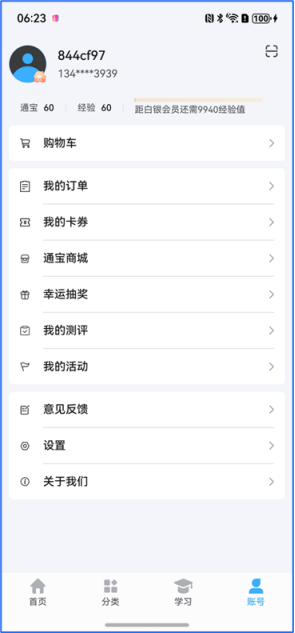
个人中心:为用户打造个性化的专属空间,在此可进行个人信息管理、设置偏好等操作,方便用户根据自身需求定制学习体验。
课程模块:汇聚ICT领域丰富多样的课程资源,涵盖众多细分方向和专业内容,满足不同用户的学习需求,无论是初学者还是进阶者都能找到适合自己的课程。
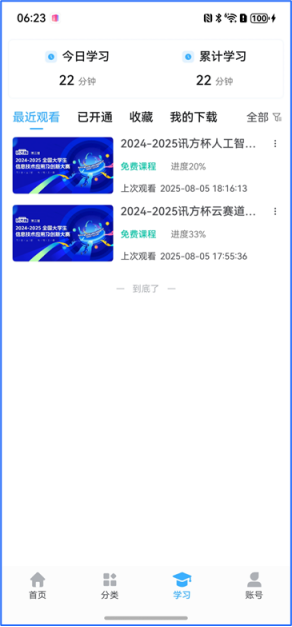
学习中心:作为用户学习过程的核心枢纽,集中展示学习进度、课程安排等重要信息,便于用户随时掌握自己的学习动态。
(2)实用学习功能
学习过程记录:能够精准记录用户在课程学习过程中的每一个环节,包括学习时长、完成的章节、参与的学习活动等。这些记录不仅可以帮助用户回顾学习历程,还能为后续的学习计划制定提供数据支持。
在线下载与离线观看:支持用户将感兴趣的课程在线下载到本地,在没有网络连接的情况下也能随时进行离线观看。这一功能极大地提升了学习的灵活性,用户可以利用碎片化时间,如乘坐公共交通、出差途中等进行学习,不受网络环境的限制。
1.2 PC版本适配升级
职前通拥有PC电脑端版本,而鸿蒙应用版本与之紧密相连。PC端可能更适合进行较为系统、长时间的学习,例如在大块时间的课堂上或者办公室环境中,用户可以借助PC端的大屏幕和全键盘等优势,更高效地进行课程学习、资料查阅等操作。而鸿蒙应用版本则充分发挥了移动设备的便携性特点,让用户能够在任何时间、任何地点,只要有鸿蒙系统的手机在手,就可以轻松开启学习之旅。两者相辅相成,共同为用户构建了一个全方位、无缝衔接的学习环境,助力用户在ICT领域的知识获取和技能提升。
职前通PC版本,如图所示:

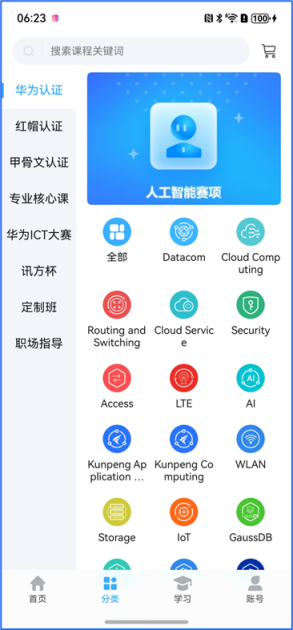
职前通鸿蒙版本,如图所示:

2 实战:页面功能开发
ArkUI为应用的UI开发提供了完整的基础设施,包括简洁的UI语法、丰富的UI功能(组件、布局、动画以及交互事件),以及实时界面预览工具等,可以支持开发者进行可视化界面开发。
UI: 即用户界面。开发者可以将应用的用户界面设计为多个功能页面,每个页面进行单独的文件管理,并通过页面路由API完成页面间的调度管理如跳转、回退等操作,以实现应用内的功能解耦。
组件: UI构建与显示的最小单位,如列表、网格、按钮、单选框、进度条、文本等。开发者通过多种组件的组合,构建出满足自身应用诉求的完整界面。
2.1 首页
homeView.ets文件,自上而下分为搜索栏、banner页、推荐模块,其中推荐模块分为:新上好课及热门课程。
(1)搜索栏,核心代码如下:
|---------------------------------------------------------------------------------------------------------------------------------------------------------------------------------------------------------------------------------------------------------------------------------------------------------------------------------------------------------------------------------------------------------------------------------------------------------------------------------------------------------------------------------------|
| Row() { Image(r('app.media.search')) .width(13) .height(13) .fillColor('#D8D8D8') .margin({ left: 15, right: 12 }) Image(r('app.media.blank')) .width(1) .height(19) .fillColor('#E9EBF5') Text('搜索需要的课程') .fontSize(14) .fontColor(r('\[basic\].color.zqt_Gray_Regular')) .margin({ left: 10 }) } .layoutWeight(1) .height(37) .borderRadius(19) .backgroundColor(r('basic.color.zqt_White')) .onClick(() => { this .navPathStack.pushPath(new NavPathInfo('searchView', new searchViewParam())) }) |
(2)banner页,核心代码如下:
|----------------------------------------------------------------------------------------------------------------------------------------------------------------------------------------------------------------------------------------------------------------------------------------------------------------------------------------------------------------------------------------------------------------------------------------------------------------------------------------------------------------------------------------------------|
| Swiper() { ForEach(this .switchBannerList, (item: indexCenterBannerData, index: number) => { Image('https://static.zhiqiantong.cn' + item.imagesUrl) .width(345) .height(175) .borderRadius(6) .onClick(() => { this .navPathStack.pushPath(new NavPathInfo( 'toWebView', new toWebViewParam(item.bannerUrl) )) }) }) } .autoPlay(true ) .borderRadius(6) .indicator( // 设置圆点导航点样式 new DotIndicator() .color(r('\[basic\].color.zqt_Blue')) .selectedColor(r('basic.color.zqt_Blue'))) |
(3)推荐模块,核心代码如下:
|--------------------------------------------------------------------------------------------------------------------------------------------------------------------------------------------------------------------------------------------------------------------------------------------------------------------------------------------------------------------------------------------------------------------------------------------------------------------------------------------------------------------------------------------------------------------------------------------------------------------------------------------------------------------------------------------------------------------------------------------------------------------------------------------------------------------------------------------------------------------------------------------------------------------------------------------------------------------------------------------------------------------------------------------------------------------------------------------------------------------------------------------------------------------------------------------------------------------------------------------------------------------------------------------------------------------------------------------------------------------------------------------------------------------------------------------------------------------------------------------------------------------------------------------------------------------------------------|
| @Builder //新上好课 newCourse() { Column({ space: 10 }) { this .HeadBarBuilder ('新上好课', 2) Swiper() { List() { ForEach(this .newCourseList1, (item: classData, index: number) => { CourseCard({ item }) .padding({ right: 5, bottom: index == this .newCourseList1.length - 1 ? 34 : 10 }) }) } List() { ForEach(this .newCourseList2, (item: classData, index: number) => { CourseCard({ item }) .padding({ right: 5, bottom: index == this .newCourseList2.length - 1 ? 34 : 10 }) }) } } .loop(false ) .nextMargin(23) .indicator( // 设置圆点导航点样式 new DotIndicator() /* .itemWidth(12) .itemHeight(3) .selectedItemWidth(25) .selectedItemHeight(3)*/ .color(r('\[basic\].color.zqt_Blue')) .selectedColor(r('basic.color.zqt_Blue'))) } .padding({ top: 15, left: 15 }) .margin({ bottom: 10 }) .backgroundColor(r('\[basic\].color.zqt_White')) } @Builder ****HeadBarBuilder**** (e: string, a: number) { Row() { Row() { Text(e) .fontSize(17) .fontWeight(500) .fontColor(r('basic.color.zqt_Black_Regular')) } Blank() .layoutWeight(1) Row({ space: 5 }) { Text('更多') .fontSize(12) .fontColor(r('\[basic\].color.zqt_Gray_Regular')) Image(r('app.media.go')) .width(5) .height(8) .fillColor('#ADADAD') } .onClick(() => { this .navPathStack.pushPath(new NavPathInfo( 'courseListView', //-1表示选中全部 new courseListViewParam('全部', 0, 0, -1, a))) }) } .width('100%') .padding({ right: 15 }) .justifyContent(FlexAlign.SpaceBetween) } |
使用自定义构建函数@builder完成封装。
实现效果,如图所示:

2.2 导航页
Index.ets。导航页从左至右依次是"首页"、"分类"、"学习"、"账号"。
核心代码如下:
|---------------------------------------------------------------------------------------------------------------------------------------------------------------------------------------------------------------------------------------------------------------------------------------------------------------------------------------------------------------------------------------------------------------------------------------------------------------------------------------------------------------------------------------------------------------------------------------------------------------------------------------------------------------------------------------------------------------------------------------------------------------------------------------------------------------------------------------------------------------------------------------------------------------------------------------------------------------------------------------------------------------------------------------------------------------------------------------------------------------------------------------------------------------------------------------------------------------------------------------------------------------------------------------------------------------------------------------------------------------------------------------------------------------------------------------------|
| Navigation(this .navPathStack) { Tabs({ barPosition: BarPosition.End }) { ForEach(this .list, (item: TabItem, index: number) => { TabContent() { if (index == 0) { homeView() } else if (index == 1) { sortView() } else if (index == 2) { studyView() } else if (index == 3) { accountView() } } .tabBar(this .TabItemBuilder(item, index)) }) } .barHeight(65) .barOverlap(true ) .barBackgroundBlurStyle(BlurStyle.Regular) .onChange(index => { this .activeIndex = index }) .animationDuration(0) } .hideTitleBar(true ) .mode(NavigationMode.Stack) .navDestination(this .navDestination) .zIndex(0) @Component export struct homeView { @StorageProp(auth.KEY) user: iUser = {} as iUser @StorageProp('safeTop') safeTop: number = 0 @StorageProp('safeBottom') safeBottom: number = 0 @Consume navPathStack: NavPathStack //banner页数据 @State switchBannerList: indexCenterBannerData\[\] = \[\] //新上好课数据 @State newCourseList1: classData\[\] = \[\] @State newCourseList2: classData\[\] = \[\] //热门课程数据 @State hotCourseList1: classData\[\] = \[\] @State hotCourseList2: classData\[\] = \[\] dialog = new CustomDialogController({ builder: ZQTLoading({ message: '加载中' }), customStyle: true , alignment: DialogAlignment.Center, autoCancel: false }) ...... } |
其中homeView()、sortView()、studyView()、accountView()使用自定义组件。
实现效果如图:

2.3 课程分类页
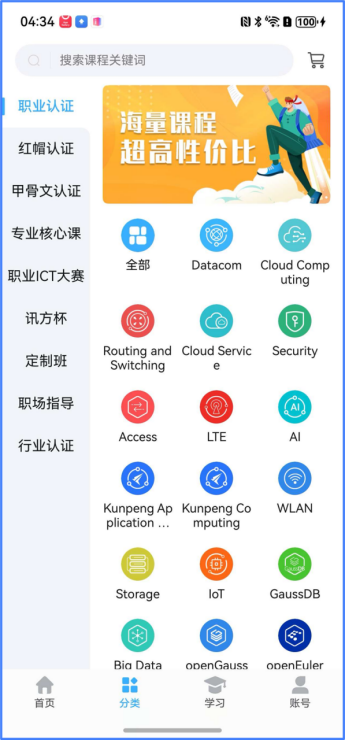
courseListView.ets,展示符合分类的课程。
核心代码如下:
|--------------------------------------------------------------------------------------------------------------------------------------------------------------------------------------------------------------------------------------------------------------------------------------------------------------------------------------------------------------------------------------------------------------------------------------------------------------------------------------------------------------------------------------------------------------------------------------------------------------------------------------------------------------------------------------------------------------------------------------------------------------------------------------------------------------------------------------------------------------------------------------------------------------------------------------------------------------------------------------------------------------------------------------------------------------------------------------------------------------------------------------------------------------------------------------------------------------------------------------------------------------------------------------------------------------------------------------------------------------------------------------------------------------------------------------------------------------------------------------------------------------------------------------------------------------------------------------------------------------------------------------------------------------------------------------------------------------------------------------------------------------------------------------------------------------------------------------------------------------------------------------------------------------------------------------------------------------------------------------------------------------------------------------------------------------------------------------------------------------------------------------------------------------------------------------------------------------------------------------------------------------------------------------------------------------------------------------------------------------------------|
| //分类菜单--一级分类 Column() { List() { ForEach(this .sortFatherList, (item: sortData, index: number) => { ListItem() { Text(item.subjectName) .width('100%') .fontSize(16) .textAlign(TextAlign.Center) .fontColor(this .thisParentName == item.subjectName ? r('\[basic\].color.zqt_Black_Regular') : r('basic.color.zqt_Black_Lighter')) .fontWeight(this .thisParentName == item.subjectName ? 500 : 400) .backgroundColor(this .thisParentName == item.subjectName ? r('\[basic\].color.zqt_White') : r('basic.color.zqt_BackGC')) .padding({ top: 12, bottom: 12 }) .borderRadius({ bottomRight: this .thisParentNameIndex - 1 == index ? 10 : 0, topRight: this .thisParentNameIndex + 1 == index ? 10 : 0 }) } .onClick(() => { this .thisParentNameIndex = index this .thisChildId = 0 this .thisChildIndex = -1 //点了一级菜单默认全部 this .thisParentId = item.subjectId //当前的一级id this .thisParentName = item.subjectName //当前一级的名字 }) }) } .height('100%') .scrollBar(BarState.Off) .backgroundColor(r('\[basic\].color.zqt_White')) } .width(100) **//分类菜单--二级分类** Column() { List() { ListItem() { Text('全部') .width('100%') .fontSize(16) .fontColor(****this**** .thisChildIndex == -1 ? r('basic.color.zqt_Black_Regular') : r('\[basic\].color.zqt_Black_Lighter')) .fontWeight(****this**** .thisChildIndex == -1 ? 500 : 400) .padding({ top: 10, bottom: 8, left: 15 }) .onClick(() =\> { ****this**** .thisChildIndex = -1 **//高亮** ****this**** .thisChildId = 0 }) } ForEach(****this**** .sortAllList, (item: sortData, index: number) =\> { ListItem() { ****if**** (item.parentId == ****this**** .thisParentId \&\& ****this**** .thisParentName != '全部') { Text(item.subjectName) .fontSize(16) .fontWeight(****this**** .thisChildIndex == index ? 500 : 400) .padding({ top: 8, bottom: 8, left: 15 }) .width('100%') .fontColor(****this**** .thisChildIndex == index ? r('basic.color.zqt_Black_Regular') : $r('basic.color.zqt_Black_Lighter')) .fontWeight(this .thisChildIndex == index ? 500 : 400) .onClick(() => { this .thisChildIndex = index //高亮 this .thisChildId = item.subjectId }) } } }) } .height('100%') .scrollBar(BarState.Off) } .width(275) } .layoutWeight(1) |
分类菜单,使用一级分类和二级分类的形式显示,方便对课程进行管理和搜索。
实现效果如图:
2.4 课程列表页
courseListView.ets文件,展示课程列表。
(1)搜素和筛选功能,核心代码如下:
|--------------------------------------------------------------------------------------------------------------------------------------------------------------------------------------------------------------------------------------------------------------------------------------------------------------------------------------------------------------------------------------------------------------------------------------------------------------------------------------------------------------------------------------------------------------------------------------------------------------------------------------------------------------------------------------------------------------------------------------------------------------------------------------------------------------------------------------------------------------------------------------------------------------------------------------------------------------------------------------------------------------------------------------------------------------------------------------------------------------------------------------------------------------------------------------------------------------------------------------------------------------------------------------------------------------------------------------------------------------------------------------------------------------------------------------------------------------------------------------------------------------------------------------------------------------------------------------------------------------------------------------------------------------------------------------------------------------------------------------------------------------------------------------------------------------------------------------------------------------------------------------------------------------------------------------------------------------------------------------------------------------------------------------------------------------------------------------------------------------------------------------------------------------------------------------------------------------------------------------------------------------------------------------------------------------------------------------------------------------------------------------------------------------------------------------------------------------------------------------------------------------------------------------------------------------------------------------------------------------------------------------------------------------------------------------------------------------------------------------------------------------------------------------------------------------------------------------------------------------------------------------------------------------------------------------------------------------------------------------------------------------------------------------------------------------------------------------------------------------------------------------------------------------------------------------------------------------------------------------------------------------------------------------------------------------------------------------------------|
| Row({ space: 30 }) { Row({ space: 7 }) { Text(this .themeName) .fontSize(16) .fontColor(this .sortListBool ? r('\[basic\].color.zqt_Blue') : r('basic.color.zqt_Black_Regular')) .fontWeight(this .sortListBool ? 500 : 400) .maxLines(1) .textOverflow({ overflow: TextOverflow.Ellipsis }) .wordBreak(WordBreak.BREAK_ALL) .constraintSize({ maxWidth: 150, minWidth: 0 }) Image(this .sortListBool ? r('app.media.up') : r('app.media.down')) .width(10) .height(6) .fillColor(this .sortListBool ? r('\[basic\].color.zqt_Blue') : r('basic.color.zqt_Black_Regular')) } .clickEffect({ level: ClickEffectLevel.LIGHT, scale: 0.85 }) .onClick(() => { this .courseLevelBool = false this .sortListBool = !this .sortListBool }) Row({ space: 7 }) { Text(this .level == '' ? '课程级别' : this .levelTxt) .fontSize(16) .fontColor(this .courseLevelBool ? r('\[basic\].color.zqt_Blue') : r('basic.color.zqt_Black_Regular')) .fontWeight(this .courseLevelBool ? 500 : 400) Image(this .courseLevelBool ? r('app.media.up') : r('app.media.down')) .width(10) .height(6) .fillColor(this .courseLevelBool ? r('\[basic\].color.zqt_Blue') : r('basic.color.zqt_Black_Regular')) } .clickEffect({ level: ClickEffectLevel.LIGHT, scale: 0.85 }) .onClick(() => { this .sortListBool = false this .courseLevelBool = !this .courseLevelBool }) } .width('100%') .height(40) .padding({ left: 15, right: 15 }) .shadow({ radius: 4, color: 'rgba(0, 0, 0, 0.04)', offsetY: 3 }) .zIndex(2) // 定义筛选条件 // <editor-fold defaultstate="collapsed" desc="筛选条件"> Row() { this .tabText('综合', 0) this .tabText('最新', 2) this .tabText('最热', 10) Text('精品') .clickEffect({ level: ClickEffectLevel.LIGHT, scale: 0.85 }) .selectText() .fontColor(this .coverTag == '精品' ? r('\[basic\].color.zqt_Blue') : r('basic.color.zqt_Gray_Normal')) .fontWeight(this .coverTag == '精品' ? 500 : 400) .backgroundColor(this .coverTag == '精品' ? '#1a3aafff' : r('\[basic\].color.zqt_BackGC')) .onClick(() =\> { ****this**** .coverTag == '精品' ? ****this**** .coverTag = '' : ****this**** .coverTag = '精品' ****this**** .getCourseCartList(0) }) Text() { Span('免费') .fontColor(****this**** .isPay == 0 ? r('basic.color.zqt_Blue') : r('\[basic\].color.zqt_Gray_Normal')) .fontWeight(****this**** .isPay == 0 ? 500 : 400) Span('/') .fontColor(r('basic.color.zqt_Gray_Normal')) .backgroundColor(r('\[basic\].color.zqt_BackGC')) Span('付费') .fontColor(****this**** .isPay == 1 ? r('basic.color.zqt_Blue') : r('\[basic\].color.zqt_Gray_Normal')) .fontWeight(****this**** .isPay == 1 ? 500 : 400) } .clickEffect({ level: ClickEffectLevel.LIGHT, scale: 0.85 }) .selectText() .backgroundColor(****this**** .isPay != 2 ? '#1a3aafff' : r('basic.color.zqt_BackGC')) .onClick(() => { if (this .isPay == 2) { this .isPay = 0 } else if (this .isPay < 2) { this .isPay += 1 } this .getCourseCartList(0) }) } .padding({ top: 10, bottom: 10 }) .width('100%') .justifyContent(FlexAlign.SpaceEvenly) |
(2)展示课程列表,核心代码如下:
|-----------------------------------------------------------------------------------------------------------------------------------------------------------------------------------------------------------------------------------------------------------------------------------------------------------------------------------------------------------------------------------------------------------------------------------------------------------------------------------------------------------------------------------------------------------------------------------------------------------------------------------------------------------------------------------------------------------------------------------------------------------------------------------------------------------------------------------------------------------------------------------------------------------------------------------------------------------------------------------------------------------------------------------------------------------------------------------------------------------------------------------------------------------------------------------------------------------------------------------------------------------------------------------------------------------------------------------------------------------------------------------------------------------------------------------------------------------------------------------------------------------------------------------------------------------------------------------------------------------------------------------------------------------------------------------------------------------------------------------------------------------------------------------------------------------------------------------------------------------------------------------------------------------------------------------------------------------------------------------------------------------------------------------------------------------------------------------------------------------------------------------------------------------------------------------------------------------------------------------------------------------------------------------------------------------------------------------------------------------------------------------------------------------------------------------------------------------------------------------------------------------------------------------------------------------------------------------------------------------------------------------------------------------------------------------------------------------------------------------------------------------------------------------------------------------------------------------------------------------------------------------------------------------------------------------------------------------------------------------------------------------------------------------------------------------------------------------------------------------------------------------------------------------------------------------------|
| if (this .responsePageData.totalResultSize > 0) { List({ scroller: this .courseCartListScroller }) { LazyForEach (this .courseCartList, (item: classData) => { if (this .courseCartList) { CourseCard({ item }) .padding({ bottom: 10 }) } }, (item: classData, index: number) => { return JSON.stringify(item) + '_' + index }) if (!this .canLoad) { ListItem() { getListComp({ paddingTopNum: 10, paddingBottomNum: 20 }) } } if (this .canLoad && this .currentPage == this .responsePageData.totalPageSize) { ListItem() { noneListComp({ paddingTopNum: 10, paddingBottomNum: 20 }) } } } .width('100%') .height('100%') .layoutWeight(1) .padding({ left: 15, right: 15 }) .onReachEnd(() => { if (this .canLoad && this .currentPage < this .responsePageData.totalPageSize) { this .getCourseCartList(1) } else { return } }) } @Component export struct CourseCard { @Consume navPathStack: NavPathStack @Prop item: classData = {} as classData @State courseId: number = 0 build() { Column() { Row({ space: 12 }) { Row() { Stack() { Image(this .item.courseMobileLogo ? 'https://static.zhiqiantong.cn' + this .item.courseMobileLogo : r('app.media.course_noNetwork')) .borderRadius(4) .width(135) .height(76) ****if**** (****this**** .item.coverTag == '精品') { Text('精品') .width(28) .height(14) .fontSize(11) .textAlign(TextAlign.Center) .align(Alignment.Center) .fontColor(r('app.color.zqt_White')) .backgroundColor(r('app.color.zqt_Red')) .borderRadius({ topLeft: 4, bottomRight: 4 }) .position({ top: 0, left: 0 }) } ****if**** (****this**** .item.coverTag == '新课') { Text('新课') .width(28) .height(14) .fontSize(11) .textAlign(TextAlign.Center) .align(Alignment.Center) .fontColor(r('app.color.zqt_White')) .backgroundColor('#FAAE06') .borderRadius({ topLeft: 4, bottomRight: 4 }) .position({ top: 0, left: 0 }) } } } .width(135) .height(76) Column() { Text(this .item.courseName) .width('100%') .fontSize(15) ... Row({ space: 12 }) { Text(this .item.level) ... Text(this .item.classHour + '节') ... Text() { Span(this .item.courseWatchpersoncount.toString()) Span(this .item.courseCurrentprice == 0 ? '人在学' : '人报名') } ... } .width('100%') Row() { if (this .item.courseCurrentprice == 0) { Text('免费') ... } if (this .item.courseCurrentprice != 0) { Text('¥') ... Text(this .item.courseCurrentprice.toFixed(2)) ... if (this .item.sourceprice > this .item.courseCurrentprice) { Text('¥' + this .item.sourceprice.toFixed(2) + ' ') ... ... } } } ... } ... } .height(80) } .clickEffect({ level: ClickEffectLevel.LIGHT, scale: 0.85 }) .onClick(() => { this .courseId = this .item.courseId this .navPathStack.pushPath(new NavPathInfo( 'courseDetailView', new courseDetailViewParam(this .courseId) )) }) |
其中CourseCard使用自定义组件的形式封装。
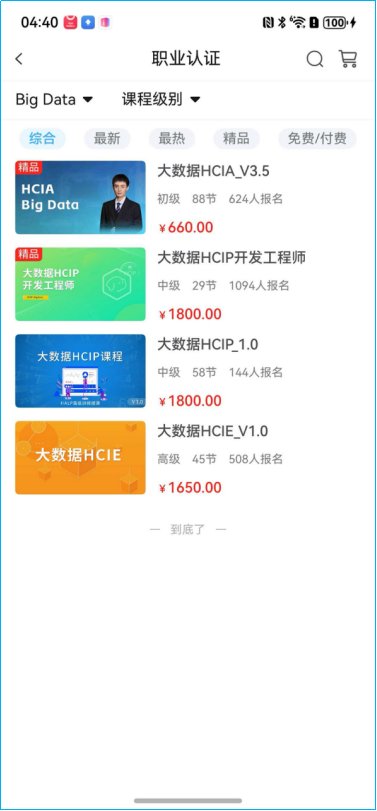
使用'courseDetailView'跳转到课程详情。
实现效果,如图所示:
2.5 课程详情页
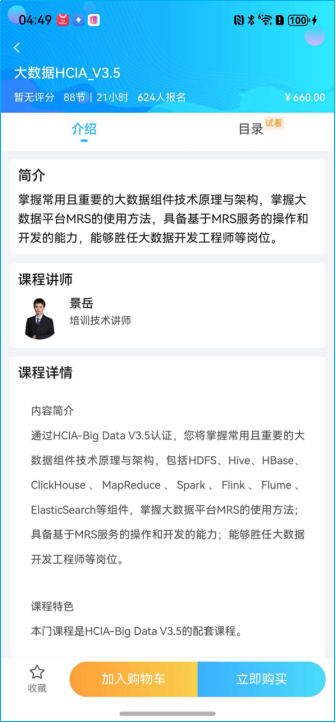
courseDetailView.ets文件,从课程列表,跳转课程详情。
(1)显示详情页面,上方标题、评分及报名信息,核心代码如下:
|---------------------------------------------------------------------------------------------------------------------------------------------------------------------------------------------------------------------------------------------------------------------------------------------------------------------------------------------------------------------------------------------------------------------------------------------------------------------------------------------------------------------------------------------------------------------------------------------------------------------------------------------------------------------------------------------------------------------------------------------------------------------------------------------------------------------------------------------------------------------------------------------------------------------------------------------------------------------------------------------------------------------------------------------------------------------------------------------------------------------------------------------------------------------------------------------------------------------------------------------------------------------------------------------------------------------------------------------------------------------------------------------------------------------------------------------------------------------------------------------------------------------------------------------------------------------------------------------------------------------------------------------------------------------------------------------------------------------------------------------------------------------------------------------------------------------------------------------------------------------------------------------------------------------------------------------------------------------------------------------------------------------------------------------------------------------------------------------------------------------------------------------------------------------------------------------------------------------------------------------------------------------------------------------------------------------------------------------------|
| @Component export struct courseDetailView { build() { Column() { Column() { // <editor-fold defaultstate="collapsed" desc="顶部介绍"> Stack() { Image(r("app.media.background")) .width('100%') .height(130) .resizable({ slice: { left: 30, right: 30 } }) Column() { Blank().width(35).height(30).position({ top: -10, left: -5 }).onClick(() =\> { ****this**** .navPathStack.pop() }) Row() { Image(r("app.media.back")) .width(7) .height(12) .fillColor(r('\[basic\].color.zqt_White')) } .width('100%') .margin({ bottom: 12 }) Text(****this**** .courseDataList.name) .width('100%') .height(23) .fontColor(r('basic.color.zqt_White')) .fontSize(16) .fontWeight(500) .margin({ bottom: 10 }) .maxLines(1) .textOverflow({ overflow: TextOverflow.Ellipsis }) if (this .courseEXP) { Row() { Text(this .courseEXP.gdu ? (this .courseEXP.gdu == 0 ? '暂无评分' : this .courseEXP.gdu.toFixed(1) + '分') : '暂无评分') .fontSize(12) .fontColor(r('\[basic\].color.zqt_White')) .padding({ right: 10 }) Text(****this**** .courseDataList.classHour ? (****this**** .courseDataList.classHour + '节') : ('0节')) .fontSize(12) .fontColor(r('basic.color.zqt_White')) .padding({ right: 5 }) Text('|') .fontSize(12) .fontColor(r('\[basic\].color.zqt_White')) .padding({ right: 5 }) Text(****this**** .courseDataList.lessionnum ? ****this**** .courseDataList.lessionnum + '小时' : '0小时') .fontSize(12) .fontColor(r('basic.color.zqt_White')) .padding({ right: 10 }) if (!this .courseEXP.watchpersoncount) { Text() { Span(this .courseDataList.isPay == 0 ? '暂无在学人数' : '暂无报名人数') .fontWeight(500) } .fontSize(12) .fontColor(r('\[basic\].color.zqt_White')) } ****else if**** (****this**** .courseEXP.watchpersoncount \> 0) { Text() { Span(****this**** .courseDataList.isPay == 0 ? '已有' : '') Span(****this**** .courseEXP.watchpersoncount.toString()).fontWeight(500) Span(****this**** .courseDataList.isPay == 0 ? '人在学' : '人报名') } .fontSize(12) .fontColor(r('basic.color.zqt_White')) } else if (this .courseEXP.watchpersoncount == 0) { Text() { Span(this .courseDataList.isPay == 0 ? '暂无在学人数' : '暂无报名人数') .fontWeight(500) } .fontSize(12) .fontColor($r('basic.color.zqt_White')) } } } |
(2)显示详情页面,介绍和目录标签页信息,核心代码如下:
|----------------------------------------------------------------------------------------------------------------------------------------------------------------------------------------------------------------------------------------------------------------------------------------------------------------------------------------------------------------------------------------------------------------------------------------------------------------------------------------------------------------------------------------------------------------------------------------------------------------------------------------------------------------------------------------------------------------------------------------------------------------------------------------------------------------------------------------------------------------------------------------------------------|
| // <editor-fold defaultstate="collapsed" desc="tab栏"> Column() { Tabs({ barPosition: BarPosition.Start }) { TabContent() { this .IntroduceBuilder() } .tabBar(tabBarBuilder({ activeIndex: this .activeIndex, item: '介绍', index: 0 })) TabContent() { this .ContentsBuilder() }.tabBar(tabBarBuilder({ activeIndex: this .activeIndex, item: '目录', index: 1, tag: this .canTry, isOk: this .isOk })) if (this .showAssess) { TabContent() { this .CommentBuilder() }.tabBar(tabBarBuilder({ activeIndex: this .activeIndex, item: '评价', index: 2 })) } } .barHeight(44) .animationDuration(0) .width('100%') .height('100%') .barBackgroundColor(r('\[basic\].color.zqt_White')) .backgroundColor(r('basic.color.zqt_BackGC')) .onChange(index => { this .activeIndex = index }) } .layoutWeight(1) |
(3)显示详情页面,收藏、加入购物车、购买按钮,核心代码如下:
|---------------------------------------------------------------------------------------------------------------------------------------------------------------------------------------------------------------------------------------------------------------------------------------------------------------------------------------------------------------------------------------------------------------------------------------------------------------------------------------------------------------------------------------------------------------------------------------------------------------------------------------------------------------------------------------------------------------------------------------------------------------------------------------------------------------------------------------------------------------------------------------------------------------------------|
| // <editor-fold defaultstate="collapsed" desc="课程介绍、课程目录、课程评论"> Row({ space: 20 }) { Column({ space: 5 }) { Image(this .flag == 0 ? r('app.media.starFalse') : r('app.media.starTrue')) .width(17) .height(16) Text(this .flag == 0 ? '收藏' : '已收藏') .fontSize(11) ... .onClick(() => { ... } }) Row() { if (!this .isOk) { Button('加入购物车', { type: ButtonType.Normal }) .fontWeight(400) .fontSize(15) ... .onClick(() => { ... }) Button('立即购买', { type: ButtonType.Normal }) .fontWeight(400) .fontSize(15) .fontColor(r('\[basic\].color.zqt_White')) ... .onClick(() =\> { ... }) } ****if**** (****this**** .isOk) { ****if**** (****this**** .courseEXP.rate == '0' \|\| ****this**** .user.isvisitor == 1) { Column() { Button('开始学习') .fontSize(15) .fontColor(r('basic.color.zqt_White')) ... } .onClick(() => { ... }) } ... } ... // </editor-fold> |
(4)显示详情页面,课程介绍、课程目录、课程评论相关显示信息,核心代码如下:
|------------------------------------------------------------------------------------------------------------------------------------------------------------------------------------------------------------------------------------------------------------------------------------------------------------------------------------------------------------------------------------------------------------------------------------------------------------------------------------------------------------------------------------------------------------------------------------------------------------------------------------------------------------------------------------------------------------------------------------------------------------------------------------------------------------------------------------------------------------------------------------------------------------------------------------------------------------------------------------------------------------------------------------------------------------------------------------------------------------------------------------------------------------------------------------------------------------------------------------------------------------------------------------------------------------------------------------------------------------------------------------------------------------------------------------------------------------------------------------------------------------------------------------------------------------------------------------------------------------------------------------------------------------------------------------------------------------------------------------------------------------------------------------------------------------------------------------------------------------------------------------------------------------------------------------------------------------------------------------------------------------------------------------------------------------------------------------------------------------------------------------------------------------------------------------------------------------------------------------------------------------------------------------------------------------------------------------------------------------|
| @Builder IntroduceBuilder () { Scroll() { Column({ space: 10 }) { Column() { Row() { Text('简介') .fontSize(16) .fontWeight(500) .fontColor(r('\[basic\].color.zqt_Black_Regular')) } .width('100%') .padding({ bottom: 10 }) Text(****this**** .courseDataList.title) .width('100%') .fontSize(14) .fontColor(r('basic.color.zqt_Black_Regular')) .lineSpacing(LengthMetrics.vp(2)) } .backgroundColor(r('\[basic\].color.zqt_White')) .borderRadius(5) .padding({ left: 10, right: 10, top: 10, bottom: 10 }) ****if**** (****this**** .courseTeacherDataList) { Column() { Row() { Text('课程讲师') .fontColor(r('basic.color.zqt_Black_Regular')) } .width('100%') .padding({ bottom: 10 }) Row({ space: 10 }) { Image(this .courseTeacherDataList.picPath) .borderRadius(25) Column() { Text(this .courseTeacherDataList.name) .fontWeight(500) .fontColor(r('\[basic\].color.zqt_Black_Regular')) .padding({ bottom: 5 }) Text(****this**** .courseTeacherDataList.education) .fontColor(r('basic.color.zqt_Black_Lighter')) .maxLines(3) .textOverflow({ overflow: TextOverflow.Ellipsis }) } .layoutWeight(1) } .alignItems(VerticalAlign.Top) } .backgroundColor(r('\[basic\].color.zqt_White')) .borderRadius(5) .padding({ left: 10, right: 10, top: 10, bottom: 10 }) } Column() { Row() { Text('课程详情') .fontSize(16) .fontWeight(500) .fontColor(r('basic.color.zqt_Black_Regular')) } .width('100%') .padding({ bottom: 10 }) Web({ src: '', controller: this .web_controller, renderMode: RenderMode.SYNC_RENDER }) .nestedScroll({ scrollForward: NestedScrollMode.PARENT_FIRST, scrollBackward: NestedScrollMode.SELF_FIRST, }) .height('100%') .width('105%') .backgroundColor(r('\[basic\].color.zqt_White')) .layoutMode(WebLayoutMode.FIT_CONTENT)**// 设置web组件高度给予前端页面高度进行自适应** .overScrollMode(OverScrollMode.NEVER)**// 关闭过界回弹效果** .zoomAccess(****false**** ) **// 关闭手势缩放** } .backgroundColor(r('basic.color.zqt_White')) .borderRadius(5) .padding({ left: 10, right: 10, top: 10, }) Column() { }.layoutWeight(1) } .backgroundColor($r('basic.color.zqt_BackGC')) .padding({ left: 10, right: 10, top: 10 }) } .scrollBar(BarState.Off) } // <editor-fold defaultstate="collapsed" desc="章节目录Builder"> <editor-fold defaultstate="collapsed" desc="评论Builder"> |
实现效果,如图所示:
2.6 课程视频播放页
coursePlayView.ets文件。播放课程视频,用到了三方服务:即保利威视频点播。
(1)视频播放区域,核心代码如下:
|-----------------------------------------------------------------------------------------------------------------------------------------------------------------------------------------------------------------------------------------------------------------------------------------------------------------------------------------------------------------------------------------------------------------------------------------------------------------------------------------------------------------------------------------------------------------------------------------------------------------------------------------------------------------------------------------------------------------------------------------------------------------------------------------------------------------------------------------------------------------------------------------------------------------------------------------------------------------------------------------------------------------------------------------------------------------------------------------------------------------------------------------------------------------------------------------------------------------------------------------------------------------------------------------------------------------------------------------------------------------------------------------------------------------------------------------------------------------------------------------------------------------------------------------------------------------------------------------------------------------------------------------------------------------------------------------------------------------------------------------------------------------------------------------------------------------------------------------------------------------------------------------------------------------------------------------------------------------------------------------------------------------------------------------------------------------------------------------------------------------------------------------------------------------------------------------------------------------------------------------------------------------------------------------------------------------------------------------------------------------------------------------------------------------------|
| Stack() { Column() { // <editor-fold defaultstate="collapsed" desc="播放器"> RelativeContainer() { RelativeContainer() { // 视频播放器 XComponent({ id: `plv_media_player_single_video_xcomponent`, type: "surface", libraryname: "plvplayer_xcomponent", controller: this .componentController }) { } .id(this .plv_media_player_single_video_xcomponent) .alignRules({ center: toCenterOf(parent), middle: toMiddleOf(parent) }) .onLoad((xcomponent) => { this .viewModel.setXComponent(xcomponent) this .viewModel.onScreenshot = async () => { return await this .getUIContext() .getComponentSnapshot() .get(this .plv_media_player_single_video_xcomponent) } }) // 播放控制皮肤 PLVMediaPlayerSingleVideoControllerLayout() .id(this .plv_media_player_single_video_controller_layout) .alignRules({ center: toCenterOf(parent), middle: toMiddleOf(parent) }) } .id(this .plv_media_player_single_video_container) .height(this .videoContainerHeight()) .alignRules({ top: toTopOf(parent) }) .backgroundColor('#000000') // 进入后台播放处理逻辑 PLVMediaPlayerHandleOnEnterBackgroundComponent() .id(this .plv_media_player_handle_on_enter_background_component) .visibility(Visibility.None) // 广告播放器布局 PLVMediaPlayerAuxiliaryLayout() .id(this .plv_media_player_auxiliary_layout) } .id(this .plv_media_player_single_video_layout_root) // 屏幕方向监听器 PLVOrientationManagerObserver() // </editor-fold> playerTabComp ({ isPortrait: this .isPortrait, courseId: this .param.courseId, kPointId: this .kPointId, scrollToIndex: this .scrollToIndex + 1, courseKPointsList: this .courseKPointsList, stopPlay: () => { this .viewModel.pause() }, playURL: (playURL: string, kpointId: number) => { this .kPointId = kpointId this .playURL = playURL }, //更换视频 tabActiveIndex: (activeIndex: number) => { this .activeIndex = activeIndex }//tab变化 }) } // <editor-fold defaultstate="collapsed" desc="更多功能弹层布局"> if (this .isFloatActionLayoutVisible) { //视频下载 PLVMediaPlayerSingleVideoFloatActionLayout() .id(this .ids.plv_media_player_single_video_float_action_layout) .width('100%') .height('100%') .zIndex(1) } // </editor-fold> } |
(2)通过选项卡显示章节、评论和资料,核心代码如下:
|-------------------------------------------------------------------------------------------------------------------------------------------------------------------------------------------------------------------------------------------------------------------------------------------------------------------------------------------------------------------------------------------------------------------------------------------------------------------------------------------------------------------------------------------------------------------------------------------------------------------------------------------------------------------------------------------------------------------------------------------------------------------------------------------------------------------------------------------------------------------------------------------------------------------------------------------------------|
| build() { Column() { Tabs() { TabContent() { this .ContentsBuilder() } .tabBar(this .tabBarBuilder('章节', 0)) if (this .showAssess) { TabContent() { this .CommentBuilder() }.tabBar(this .tabBarBuilder('评论', 1)) TabContent() { this .DocumentBuilder() }.tabBar(this .tabBarBuilder('资料', 2)) } if (!this .showAssess) { TabContent() { this .DocumentBuilder() }.tabBar(this .tabBarBuilder('资料', 1)) } } .layoutWeight(1) .barHeight(44) .animationDuration(0) .width('100%') .barBackgroundColor(r('\[basic\].color.zqt_White')) .backgroundColor(r('basic.color.zqt_BackGC')) .onChange(index => { this .activeIndex = index this .tabActiveIndex(this .activeIndex) }) Column() { ... } .backgroundColor($r('basic.color.zqt_White')) .shadow({ radius: 4, color: 'rgba(0, 0, 0, 0.04)', offsetY: -3 }) } } |
(3)视频播放页下方显示收藏、分享和下载图标。核心代码如下:
|--------------------------------------------------------------------------------------------------------------------------------------------------------------------------------------------------------------------------------------------------------------------------------------------------------------------------------------------------------------------------------------------------------------------------------------------------------------------------------------------------------------------------------------------------------------------------------------------------------------------------------------------------------------------------------------------------------------------------------------------------------------------------------------------------------------------|
| Column() { if (this .activeIndex == 0) { Row({ space: 18 }) { Column({ space: 5 }) { Image(this .flag == 0 ? r('app.media.starFalse') : r('app.media.starTrue')) Text(this .flag == 0 ? '收藏' : '已收藏') .fontSize(12) } .onClick(() => { ...... }) Column({ space: 5 }) { Image(r('app.media.share')) Text('分享') .fontColor(r('basic.color.zqt_Gray_Regular')) } .onClick(() => { ...... }) .bindSheet($$this.isShow, this .ShareBuilder, { height: 250, backgroundColor: r('\[basic\].color.zqt_BackGC'), title: { title: "分享" }, }) Column({ space: 5 }) { Image(r('app.media.download')) Text('下载') .fontColor($r('basic.color.zqt_Gray_Regular')) } .onClick(() => { ...... }) } .padding({ top: 9, bottom: this .safeBottom }) } ... } |
3 小结
本文利用ArkUI框架提供的组件和布局,快速构建职前通响应式用户界面。并结合状态管理和页面路由机制,实现复杂的业务逻辑和流畅的页面跳转。引入三方服务和自定义构建函数,以及自定义组件,增强应用的功能性和可扩展性。通过本文的学习,开发者能够深入理解鸿蒙应用开发的流程和技术要点,为开发高质量的鸿蒙应用奠定坚实基础。