1 测试目的
期望使用KTransformers的将部分模型加载到内存和cpu上,达到在GPU资源比较匮乏的情况下运行一些超过显存的模型,并且达到一定的token数,可以多人同时使用
2 测试环境
平台:autodl
基础镜像:PyTorch 2.9.1
硬件:16 vCPU Intel® Xeon® Gold 6430 RTX 4090(24GB) * 1 内存120G
模型:Qwen3-30B-A3B(非量化版和量化版本都已准备)
3 项目部署
3.1 安装 KTransformers
git clone https://github.com/kvcache-ai/ktransformers.git
cd ktransformers
git reset 0bce173e3b9306c181a3cd8f9ef3f8f944a4311e --hard
cd kt-kernel
./install.sh
3.2 安装 SGLang:请安装 KTransformers 里面指定的这个 SGLang 架构
git clone https://github.com/kvcache-ai/sglang.git
cd sglang
pip install -e "pythonall"
3.3 下载对应版本的 KTransformers 和 flash-attention 的 whl 包
ktransformers/doc/en/Kllama_tutorial_DeepSeekV2Lite.ipynb at main · kvcache-ai/ktransformers
pip install ktransformers-0.4.2+cu128torch27fancy-cp311-cp311-linux_x86_64.whl
pip install flash_attn-2.8.3+cu12torch2.7cxx11abiTRUE-cp311-cp311-linux_x86_64.whl
3.4 固定 transformers 版本
pip install transformers==4.56.0
4 模型启动
4.1 参数获取
4.1.1 容器参数
虽然获取vcpu是128但是实际上这是获取的宿主机的数据,所以如果你是本地的宿主机可以使用128这个,实际物理核心需要除以2,64
我是容器里面的实际权限是16个vcpu,所以物理核心为 8
text
lscpu | grep -E "^CPU\(s\)|Thread\(s\) per core|Socket\(s\)|NUMA node\(s\)"
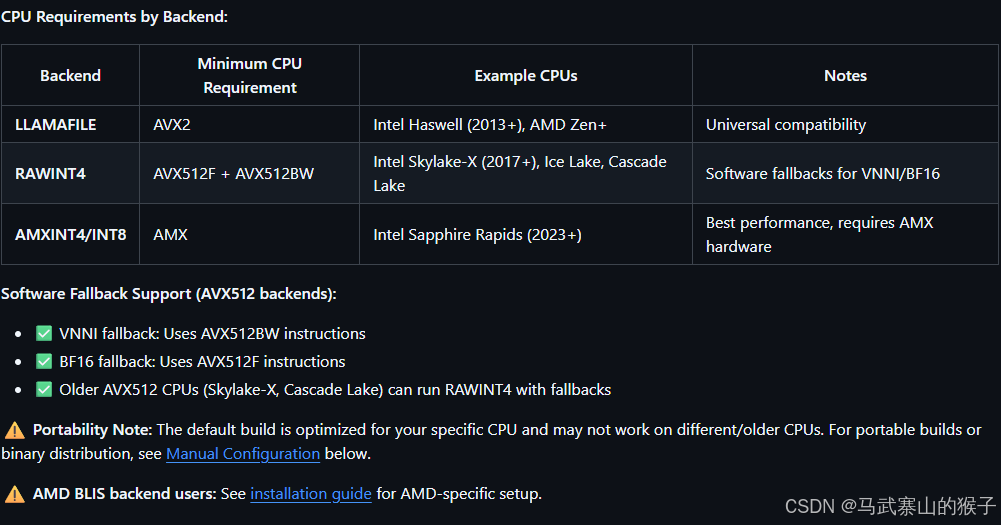
4.1.2 是否AMX
16 vCPU Intel® Xeon® Gold 6430是符合AMX的
text
grep -i amx /proc/cpuinfo输出的内容中包含amx_bf16则是符合AMX的
具体文档:
4.2 下载模型
如果符合AMX 下载原模型之后需要量化为INT8
不符合要使用LLAMAFILE的方式启动后端,所以要下载GGUF量化版本
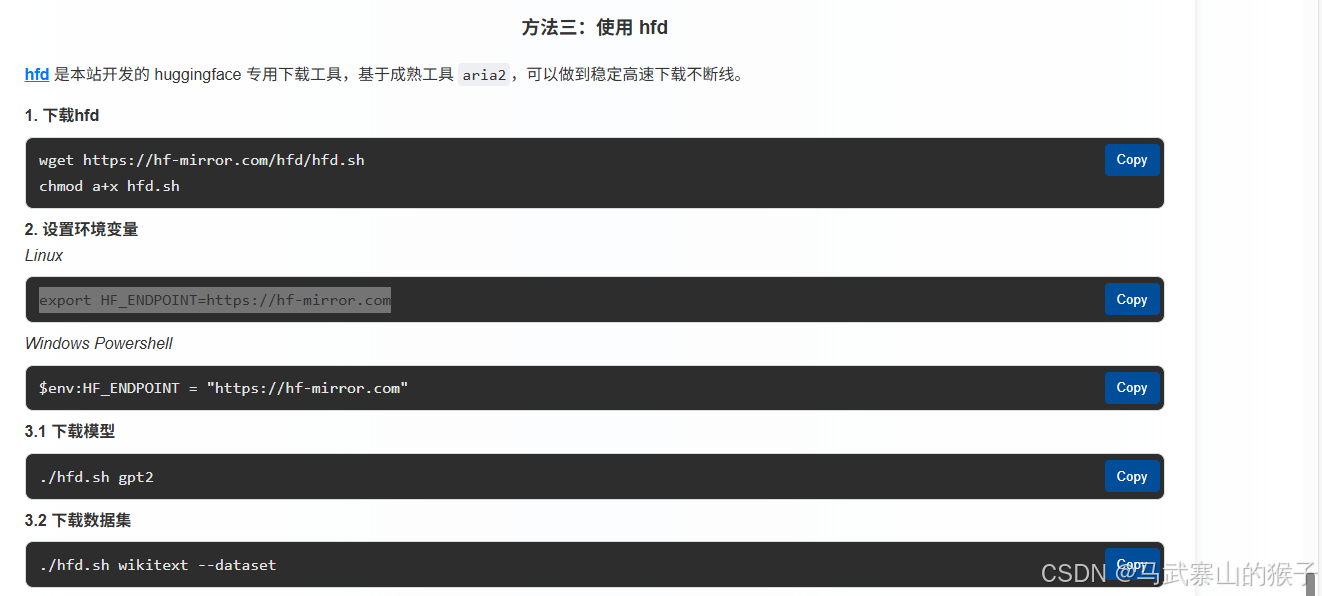
hfd安装
(不建议使用huggingface-cli,可能会导致transformers更新,变得版本不兼容)
4.2.1 AMX Backend
① 下载原模型
text
./hfd.sh Qwen/Qwen3-30B-A3B --local-dir /root/autodl-tmp② 量化为INT8
/root/ktransformers/kt-kernel/scripts目录下的convert_cpu_weights.py
text
python scripts/convert_cpu_weights.py \
  --input-path /root/autodl-tmp/Qwen3-30B-A3B \
  --input-type bf16 \
  --output /root/autodl-tmp/Qwen3-30B-A3B-INT8 \
  --quant-method int8
4.2.2 LLAMAFILE Backend
下载原模型和量化模型
text
./hfd.sh Qwen/Qwen3-30B-A3B --local-dir /root/autodl-tmp
./hfd.sh Qwen/Qwen3-30B-A3B-GGUF --local-dir /root/autodl-tmp/Qwen3-30B-A3B-Q4_K_M --include *Qwen3-30B-A3B-Q4_K_M*
4.3 SGLang启动
kt参数解释
text
Parameter Guidelines:

kt-method: Choose based on your CPU and weight format:

AMXINT4: Best performance on AMX CPUs with INT4 quantized weights (May cause huge accuracy drop for some models, e.g., Qwen3-30B-A3B)
AMXINT8: Higher accuracy with INT8 quantized weights on AMX CPUs
RAWINT4: Native INT4 weights shared by CPU and GPU (AMX backend only, currently supports Kimi-K2-Thinking model). See Kimi-K2-Thinking Native Tutorial for details.
FP8: FP8 weights shared by CPU and GPU
LLAMAFILE: GGUF-based backend
kt-cpuinfer: Set to the number of physical CPU cores (not hyperthreads).

Check physical cores: lscpu | grep -E "^CPU\(s\)|Thread\(s\) per core"
Physical cores = CPU(s) / Thread(s) per core
Example: If CPU(s)=128 and Thread(s) per core=2, then physical cores = 64
Important: Do NOT set to hyperthread count - this will degrade performance
kt-threadpool-count: Set to the number of NUMA nodes.

Check NUMA count: lscpu | grep "NUMA node(s)"
Or use: numactl --hardware | grep "available"
Note: NUMA node count is NOT necessarily the number of physical CPUs
It represents memory domains, which may be divided within a single CPU or across multiple CPUs
Use the NUMA node count from , regardless of physical CPU countlscpu
Typical values: 1-2 for single-socket, 2-4 for dual-socket systems
This enables better memory bandwidth utilization across NUMA domains
kt-num-gpu-experts: Determine based on GPU memory and profiling:

More GPU experts = lower latency but higher GPU memory usage (May cause OOM)
kt-max-deferred-experts-per-token: Enables pipelined execution:

0: Synchronous execution (simpler, higher latency)
1-4: Deferred execution (recommended range; good latency/quality balance, requires tuning)
5-7: Highest latency reduction but may introduce noticeable accuracy loss; use with care
kt-gpu-prefill-token-threshold (FP8 and RAWINT4 only): Controls prefill strategy for native FP8 and INT4 inference:

≤ threshold: Uses hybrid CPU+GPU prefill. No extra VRAM needed, but performance degrades slowly as token count increases.
> threshold: Uses layerwise GPU prefill. Performance scales better with longer sequences, but requires one MoE layer extra VRAM (e.g., ~9GB+ for Kimi-K2-Thinking and ~3.6GB for MiniMax-M2.1).
Only applicable when or is used.--kt-method RAWINT4--kt-method FP8
4.3.1 AMX启动
cpu核心填写 8
text
python -m sglang.launch_server --host 0.0.0.0 --port 8000 --model /root/autodl-tmp/Qwen3-30B-A3B --trust-remote-code --mem-fraction-static 0.92 --chunked-prefill-size 4096 --served-model-name Qwen3-30B-A3B --enable-mixed-chunk --kt-method AMXINT8 --kt-weight-path /root/autodl-tmp/Qwen3-30B-A3B-INT8/ --kt-cpuinfer 8 --kt-threadpool-count 2 --kt-num-gpu-experts 32 --kt-max-deferred-experts-per-token 24.3.2 LLAMAFILE启动
和AMX模式相比 量化模型路径和启动方法不同,其余相同
text
python -m sglang.launch_server --host 0.0.0.0 --port 8000 --model /root/autodl-tmp/Qwen3-30B-A3B --trust-remote-code --mem-fraction-static 0.92 --chunked-prefill-size 4096 --served-model-name Qwen3-30B-A3B --enable-mixed-chunk --kt-method LLAMAFILE --kt-weight-path /root/autodl-tmp/Qwen3-30B-A3B-Q4_K_M --kt-cpuinfer 8 --kt-threadpool-count 2 --kt-num-gpu-experts 32 --kt-max-deferred-experts-per-token 24.4 基本测试
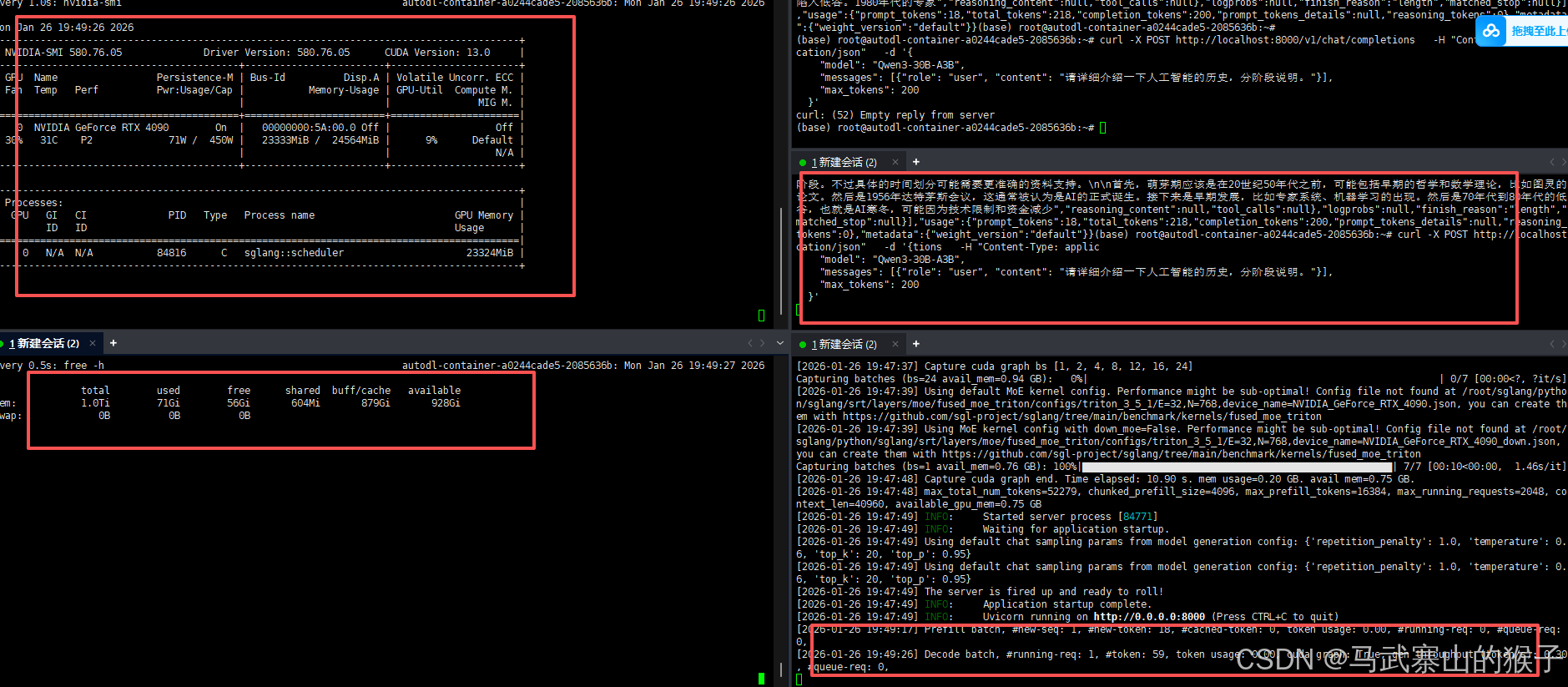
显存使用23G左右,内存未启动时44G,启动后71G,共占用27G内存
使用curl发送请求,也可以成功接收并返回结果
4.5 问题解决
AMX模式启动后4分钟会自动崩溃
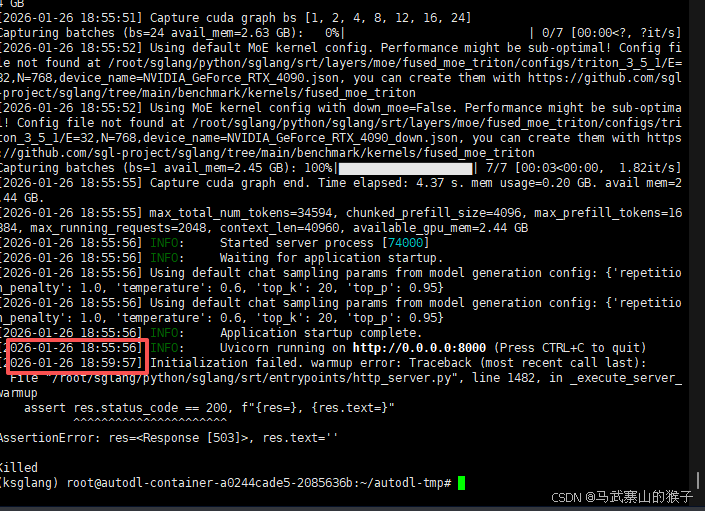
尝试 减少专家,降低静态显存分配等,发现并不是显存和内存的问题,两者都没有溢出
增加 参数跳过自检查
5 基准测试
只做了AMX模式的基准检测
5.1 公共前缀
** SGLang 的前缀缓存能力**:当批量请求存在大量重复前缀时,缓存前缀的 KV 计算结果可显著降低推理延迟。

5.2 并发测试
①测试参数
NUM_REQUESTS = 10 # Total number of requests (each with BATCH_SIZE prompts)
NUM_TOKENS = 500 # Tokens per prompt
BATCH_SIZE = 10 # Number of prompts per request
GEN_TOKENS = 500 # Tokens to generate per prompt
②测试代码
text
import concurrent.futures
import json
import os
import random
import time
from concurrent.futures import ProcessPoolExecutor
from statistics import mean

import requests
from tqdm import tqdm
from transformers import AutoTokenizer

from sglang.lang.backend.runtime_endpoint import RuntimeEndpoint

###############################################################################
# CONFIG
###############################################################################
ENDPOINT_URL = "http://127.0.0.1:8000"
TOKENIZER_DIR = "/root/autodl-tmp/Qwen3-30B-A3B"

# Benchmark configurations
NUM_REQUESTS = 10  # Total number of requests (each with BATCH_SIZE prompts)
NUM_TOKENS = 500  # Tokens per prompt
BATCH_SIZE = 10  # Number of prompts per request
GEN_TOKENS = 500  # Tokens to generate per prompt


###############################################################################
# REQUEST GENERATION (in parallel)
###############################################################################
def generate_random_prompt(index, tokenizer_dir, num_tokens):
    """Generate a single random prompt with specified token count."""
    tokenizer = AutoTokenizer.from_pretrained(tokenizer_dir)
    vocab_size = tokenizer.vocab_size

    def generate_random_text(num_toks):
        random_token_ids = [random.randint(0, vocab_size - 1) for _ in range(num_toks)]
        return tokenizer.decode(random_token_ids, clean_up_tokenization_spaces=True)

    random_text = generate_random_text(num_tokens)
    return f"Prompt {index}: {random_text}"


def prepare_all_prompts(num_requests, batch_size, num_tokens, tokenizer_dir):
    """Generate prompts for all requests in parallel."""
    total_prompts = num_requests * batch_size
    all_prompts = [None] * total_prompts
    max_workers = min(os.cpu_count() or 1, total_prompts)

    with ProcessPoolExecutor(max_workers=max_workers) as executor:
        futures = [
            executor.submit(generate_random_prompt, i, tokenizer_dir, num_tokens)
            for i in range(total_prompts)
        ]
        for future in tqdm(
            concurrent.futures.as_completed(futures),
            total=total_prompts,
            desc="Generating prompts",
        ):
            index = futures.index(future)
            all_prompts[index] = future.result()

    batched_prompts = [
        all_prompts[i * batch_size : (i + 1) * batch_size] for i in range(num_requests)
    ]

    print(
        f"Generated {total_prompts} prompts with {num_tokens} tokens each, grouped into {num_requests} requests of {batch_size} prompts.\n"
    )
    return batched_prompts


###############################################################################
# HTTP CALLS
###############################################################################
def send_batch_request(endpoint, prompts, gen_tokens, request_id):
    """Send a batch of prompts to the /generate endpoint synchronously.
    增量修改:新增TTFT(首次token到达延迟)和单请求token数计算
    """
    sampling_params = {
        "max_new_tokens": gen_tokens,
        "temperature": 0.7,
        "stop": "\n",
    }
    # 仅当需要生成token时,添加stream参数(兼容原有逻辑)
    data = {"text": prompts, "sampling_params": sampling_params}
    if gen_tokens > 0:
        data["stream"] = True  # 生成token时开启流式以捕获TTFT

    start_time = time.perf_counter()
    ttft = 0.0  # 首次token到达延迟(ms)
    first_token_received = False
    # 计算该请求处理的总token数(输入+生成)
    req_total_tokens = len(prompts) * (NUM_TOKENS + gen_tokens)

    try:
        # 生成token时开启流式响应,否则保持原有逻辑
        response_kwargs = {"timeout": 3600}
        if gen_tokens > 0:
            response_kwargs["stream"] = True

        response = requests.post(
            endpoint.base_url + "/generate", json=data, **response_kwargs
        )
        if response.status_code != 200:
            error = response.json()
            raise RuntimeError(f"Request {request_id} failed: {error}")

        # 处理流式响应(仅当生成token时)
        if gen_tokens > 0 and response_kwargs["stream"]:
            for line in response.iter_lines():
                if line:
                    decoded_line = line.decode('utf-8').strip()
                    if decoded_line.startswith('data: '):
                        data_part = decoded_line[6:]
                        if data_part == '[DONE]':
                            break
                        # 捕获第一个token到达时间
                        if not first_token_received and data_part:
                            try:
                                chunk = json.loads(data_part)
                                if chunk.get('text') or chunk.get('outputs'):
                                    ttft = (time.perf_counter() - start_time) * 1000
                                    first_token_received = True
                            except json.JSONDecodeError:
                                continue
        else:
            # 无生成token时,正常解析响应(保留原有逻辑)
            result = response.json()
            # 无生成token时TTFT设为0(无意义)
            ttft = 0.0

        elapsed_time = (time.perf_counter() - start_time) * 1000  # Convert to ms
        avg_per_prompt = elapsed_time / len(prompts) if prompts else 0
        # 增量返回:新增ttft和req_total_tokens
        return request_id, elapsed_time, avg_per_prompt, True, len(prompts), ttft, req_total_tokens
    except Exception as e:
        print(f"[Request] Error for request {request_id}: {e}")
        # 异常时返回默认值
        return request_id, 0, 0, False, len(prompts), 0, 0


def run_benchmark(endpoint, batched_prompts, batch_size, gen_tokens):
    """Run the benchmark sequentially."""
    results = []
    num_requests = len(batched_prompts)

    # Record start time for total latency
    benchmark_start_time = time.perf_counter()

    for i, batch_prompts in enumerate(batched_prompts):
        request_id = i + 1
        assert (
            len(batch_prompts) == batch_size
        ), f"Request {request_id} should have {batch_size} prompts, got {len(batch_prompts)}"

        print(
            f"[Request] Sending request {request_id}/{num_requests} with {len(batch_prompts)} prompts at {int(time.time()*1000)}"
        )
        result = send_batch_request(endpoint, batch_prompts, gen_tokens, request_id)
        results.append(result)

    # Calculate total latency
    total_latency = (time.perf_counter() - benchmark_start_time) * 1000  # Convert to ms
    # 增量:计算基准测试总耗时(秒),用于token/s计算
    total_time_seconds = total_latency / 1000

    # 增量返回:新增total_time_seconds
    return results, total_latency, total_time_seconds


###############################################################################
# RESULTS
###############################################################################
def process_results(results, total_latency, total_time_seconds, num_requests):
    """Process and display benchmark results.
    增量修改:新增TTFT和token/s计算与打印
    """
    total_time = 0
    successful_requests = 0
    failed_requests = 0
    request_latencies = []
    per_prompt_latencies = []
    total_prompts = 0
    # 增量:新增TTFT和token相关变量
    ttft_list = []  # 存储成功请求的TTFT
    total_processed_tokens = 0  # 总处理token数(输入+生成)

    # 增量:遍历结果时收集TTFT和token数
    for request_id, elapsed_time, avg_per_prompt, success, batch_size, ttft, req_total_tokens in results:
        if success:
            successful_requests += 1
            total_prompts += batch_size
            request_latencies.append(elapsed_time)
            per_prompt_latencies.append(avg_per_prompt)
            total_time += elapsed_time / 1000  # Convert to seconds
            # 增量:收集TTFT和总token数
            ttft_list.append(ttft)
            total_processed_tokens += req_total_tokens
        else:
            failed_requests += 1

    avg_request_latency = mean(request_latencies) if request_latencies else 0
    avg_per_prompt_latency = mean(per_prompt_latencies) if per_prompt_latencies else 0
    throughput = total_prompts / total_time if total_time > 0 else 0
    # 增量:计算新增指标
    avg_ttft = mean(ttft_list) if ttft_list else 0  # 平均TTFT
    token_throughput = total_processed_tokens / total_time_seconds if total_time_seconds > 0 else 0  # token/s

    print("\nBenchmark Summary:")
    print(f"  Total requests sent:         {len(results)}")
    print(f"  Total prompts sent:          {total_prompts}")
    print(f"  Successful requests:         {successful_requests}")
    print(f"  Failed requests:             {failed_requests}")
    print(f"  Total latency (all requests): {total_latency:.2f} ms")
    print(f"  Avg per request latency:     {avg_request_latency:.2f} ms")
    print(f"  Avg per prompt latency:      {avg_per_prompt_latency:.2f} ms")
    print(f"  Throughput:                  {throughput:.2f} prompts/second")
    # 增量:新增打印TTFT和token/s
    print(f"  Avg Time To First Token (TTFT): {avg_ttft:.2f} ms")
    print(f"  Total processed tokens:      {total_processed_tokens}")
    print(f"  Token Throughput:            {token_throughput:.2f} tokens/second\n")


###############################################################################
# MAIN
###############################################################################
def main():
    # Initialize endpoint
    endpoint = RuntimeEndpoint(ENDPOINT_URL)

    # Generate prompts
    batched_prompts = prepare_all_prompts(
        NUM_REQUESTS, BATCH_SIZE, NUM_TOKENS, TOKENIZER_DIR
    )

    # Flush cache before benchmark
    # endpoint.flush_cache()

    # Run benchmark
    print(
        f"Starting benchmark: NUM_TOKENS={NUM_TOKENS}, BATCH_SIZE={BATCH_SIZE}, NUM_REQUESTS={NUM_REQUESTS}\n"
    )
    # 增量:接收新增的total_time_seconds参数
    results, total_latency, total_time_seconds = run_benchmark(
        endpoint, batched_prompts, BATCH_SIZE, GEN_TOKENS
    )

    # Process and display results
    # 增量:传递total_time_seconds参数
    process_results(results, total_latency, total_time_seconds, NUM_REQUESTS)


if __name__ == "__main__":
    random.seed(0)
    main()
③ 测试结果
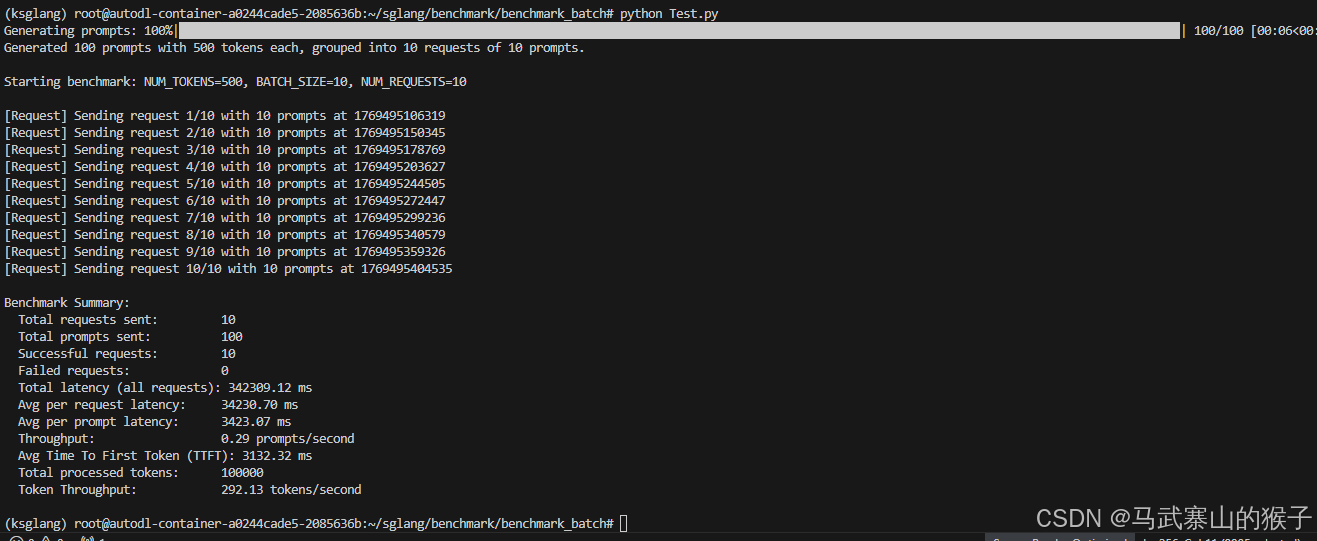
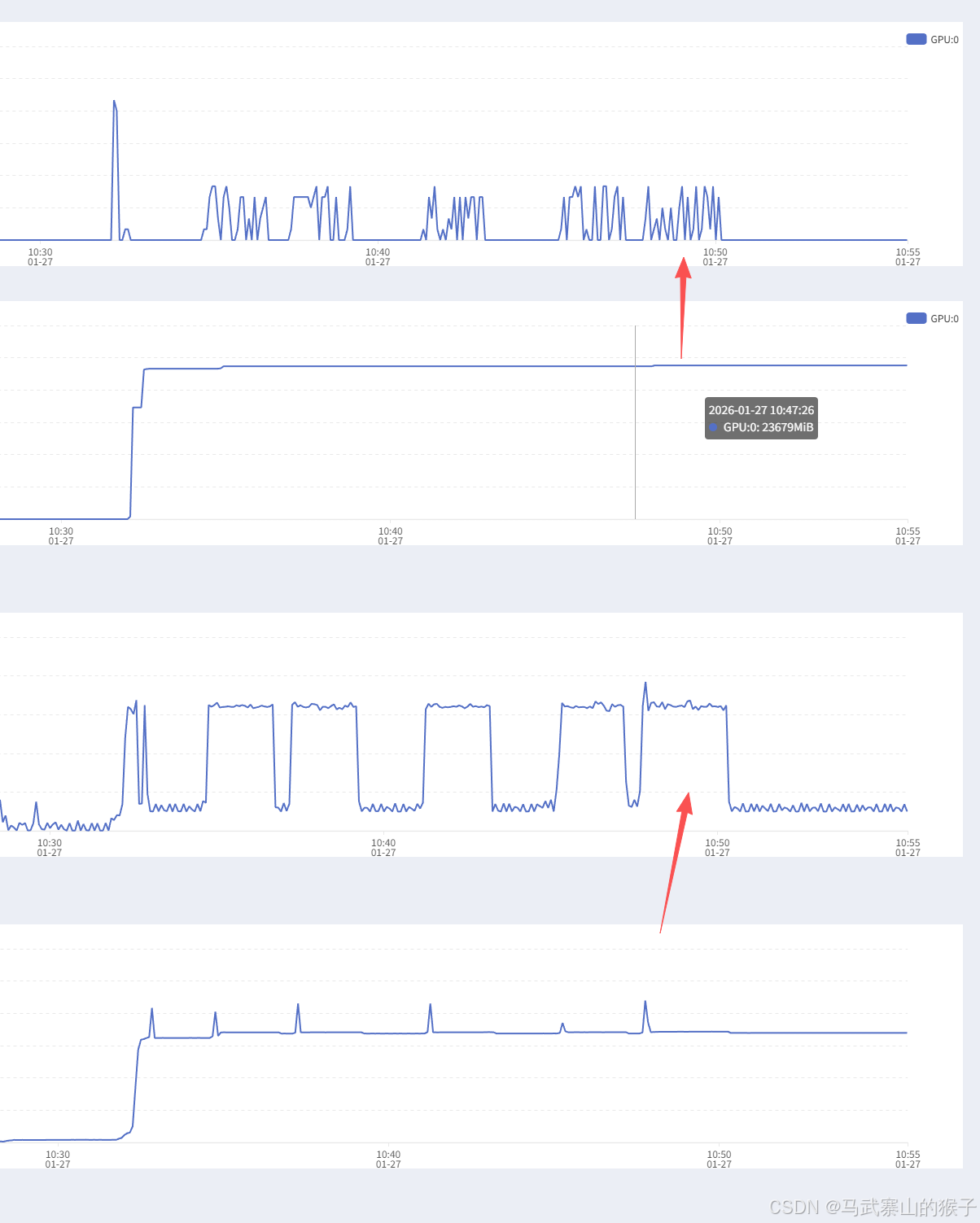
从上往下分别为显卡使用率,显存,cpu使用率,内存
6 结论
项目:KTransformers+SGLang框架
硬件:16 vCPU Intel® Xeon® Gold 6430 RTX 4090(24GB) * 1 内存120G
模型:Qwen3-30B-A3B
标准:20tokens/s/人
在如上环境和标准下,在并发情况下可满足12-13人同步使用(14人是极限,留出一定沉余),在异步情况下sglang自带基础队列,可满足上百人异步使用(不是优先级队列)
基准测试过程中不难发现cpu的波动比gpu的波动还要高,在容器环境下只有16vcpu,如果是本地服务器环境(128vcpu),并发和异步效率会进一步提高