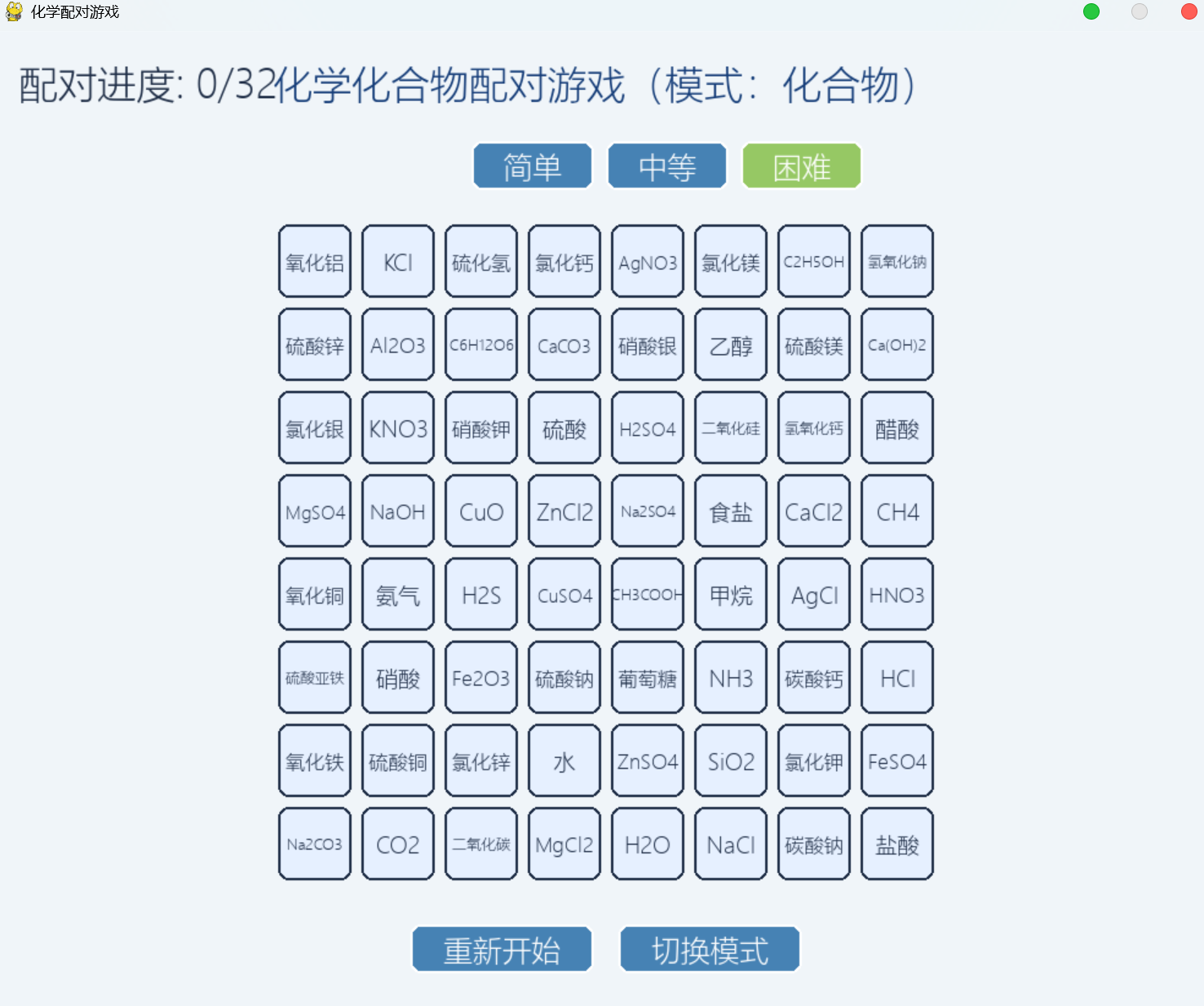
一款使用Python和Pygame开发的化学配对教育游戏,通过创新的记忆配对机制帮助学生学习化学知识。游戏包含元素和化合物两种模式,分别涵盖28种化学元素和32种常见化合物,玩家需要在网格中点击匹配中文名称与对应化学式。游戏设计了三个难度级别(4×4、6×6、8×8网格),具有自适应界面布局、智能字体调整、震动反馈效果和完整的游戏流程管理,既能让学生在轻松互动中掌握化学术语,又展示了如何将编程技术应用于教育领域,是一款兼具教育价值和编程学习意义的开源项目,因为化合物中的下标弄不出来,所以H₂O这种是H2O,也可以自己增加元素和化合物的种类。
python
import pygame
import random
import sys
import math
import os
from pygame.locals import *
# 初始化pygame
pygame.init()
# 获取屏幕尺寸并设置窗口居中
screen_width = 1000
screen_height = 800
screen = pygame.display.set_mode((screen_width, screen_height))
pygame.display.set_caption("化学配对游戏")
# 颜色定义
BACKGROUND = (240, 245, 249)
GRID_BG = (230, 240, 255)
TEXT_COLOR = (30, 45, 70)
SELECTED_COLOR = (100, 180, 255)
CORRECT_COLOR = (100, 220, 150)
WRONG_COLOR = (255, 150, 150)
EMPTY_COLOR = (220, 230, 240)
BUTTON_COLOR = (70, 130, 180)
BUTTON_HOVER = (90, 150, 200)
TITLE_COLOR = (20, 60, 120)
# 单元格边距
CELL_MARGIN = 8
# 字体加载函数
def load_font(font_size=32):
"""安全加载字体,返回一个可用的字体对象"""
try:
# 尝试加载系统字体
font_names = [
'Microsoft YaHei', # Windows 中文
'SimHei', # Windows 黑体
'SimSun', # Windows 宋体
'Arial Unicode MS', # 通用Unicode字体
'DejaVu Sans', # Linux通用字体
'Arial' # 通用字体
]
for font_name in font_names:
try:
font = pygame.font.SysFont(font_name, font_size)
# 测试字体是否能渲染
test_surface = font.render("测试", True, (0, 0, 0))
if test_surface.get_width() > 0:
return font
except:
continue
# 如果都失败,使用默认字体
return pygame.font.Font(None, font_size)
except:
# 终极备用方案
return pygame.font.Font(None, font_size)
# 加载字体
try:
chinese_font = load_font(32)
chinese_font_small = load_font(24)
font_medium = load_font(36)
font_small = load_font(28)
except:
# 如果字体加载失败,使用默认字体
chinese_font = pygame.font.Font(None, 32)
chinese_font_small = pygame.font.Font(None, 24)
font_medium = pygame.font.Font(None, 36)
font_small = pygame.font.Font(None, 28)
# 化学元素数据 - 中文名称和对应的化学式
elements = [
{"chinese": "氢", "formula": "H"},
{"chinese": "氦", "formula": "He"},
{"chinese": "锂", "formula": "Li"},
{"chinese": "铍", "formula": "Be"},
{"chinese": "硼", "formula": "B"},
{"chinese": "碳", "formula": "C"},
{"chinese": "氮", "formula": "N"},
{"chinese": "氧", "formula": "O"},
{"chinese": "氟", "formula": "F"},
{"chinese": "氖", "formula": "Ne"},
{"chinese": "钠", "formula": "Na"},
{"chinese": "镁", "formula": "Mg"},
{"chinese": "铝", "formula": "Al"},
{"chinese": "硅", "formula": "Si"},
{"chinese": "磷", "formula": "P"},
{"chinese": "硫", "formula": "S"},
{"chinese": "氯", "formula": "Cl"},
{"chinese": "氩", "formula": "Ar"},
{"chinese": "钾", "formula": "K"},
{"chinese": "钙", "formula": "Ca"},
{"chinese": "铁", "formula": "Fe"},
{"chinese": "铜", "formula": "Cu"},
{"chinese": "银", "formula": "Ag"},
{"chinese": "金", "formula": "Au"},
{"chinese": "汞", "formula": "Hg"},
{"chinese": "铅", "formula": "Pb"},
{"chinese": "锡", "formula": "Sn"},
{"chinese": "锌", "formula": "Zn"},
]
# 化合物数据 - 使用标准字符,避免特殊字符
compounds = [
{"chinese": "水", "formula": "H2O"},
{"chinese": "二氧化碳", "formula": "CO2"},
{"chinese": "食盐", "formula": "NaCl"},
{"chinese": "氨气", "formula": "NH3"},
{"chinese": "甲烷", "formula": "CH4"},
{"chinese": "硫酸", "formula": "H2SO4"},
{"chinese": "葡萄糖", "formula": "C6H12O6"},
{"chinese": "乙醇", "formula": "C2H5OH"},
{"chinese": "碳酸钙", "formula": "CaCO3"},
{"chinese": "氢氧化钠", "formula": "NaOH"},
{"chinese": "盐酸", "formula": "HCl"},
{"chinese": "硝酸", "formula": "HNO3"},
{"chinese": "醋酸", "formula": "CH3COOH"},
{"chinese": "氧化铁", "formula": "Fe2O3"},
{"chinese": "硫酸铜", "formula": "CuSO4"},
{"chinese": "氯化银", "formula": "AgCl"},
{"chinese": "氧化铝", "formula": "Al2O3"},
{"chinese": "硫化氢", "formula": "H2S"},
{"chinese": "氢氧化钙", "formula": "Ca(OH)2"},
{"chinese": "碳酸钠", "formula": "Na2CO3"},
{"chinese": "氯化钾", "formula": "KCl"},
{"chinese": "硫酸钠", "formula": "Na2SO4"},
{"chinese": "硝酸银", "formula": "AgNO3"},
{"chinese": "硫酸亚铁", "formula": "FeSO4"},
{"chinese": "氧化铜", "formula": "CuO"},
{"chinese": "二氧化硅", "formula": "SiO2"},
{"chinese": "氯化钙", "formula": "CaCl2"},
{"chinese": "氯化镁", "formula": "MgCl2"},
{"chinese": "硫酸镁", "formula": "MgSO4"},
{"chinese": "氯化锌", "formula": "ZnCl2"},
{"chinese": "硫酸锌", "formula": "ZnSO4"},
{"chinese": "硝酸钾", "formula": "KNO3"},
]
class GameCell:
def __init__(self, x, y, width, height, text, cell_type, pair_id):
self.rect = pygame.Rect(x, y, width, height)
self.text = text
self.cell_type = cell_type # 'chinese' 或 'formula'
self.pair_id = pair_id # 配对ID,相同ID的可以配对
self.selected = False
self.matched = False
def draw(self, screen):
if self.matched:
color = EMPTY_COLOR
elif self.selected:
color = SELECTED_COLOR
else:
color = GRID_BG
pygame.draw.rect(screen, color, self.rect, border_radius=8)
pygame.draw.rect(screen, TEXT_COLOR, self.rect, 2, border_radius=8)
if self.text and not self.matched:
# 根据单元格大小选择合适的字体大小
cell_size = min(self.rect.width, self.rect.height)
if cell_size > 100: # 大单元格
font_size = 32
elif cell_size > 70: # 中等单元格
font_size = 24
else: # 小单元格
font_size = 18
# 使用安全的字体加载
try:
font = load_font(font_size)
text_surface = font.render(self.text, True, TEXT_COLOR)
except:
# 如果字体渲染失败,使用默认字体
font = pygame.font.Font(None, font_size)
text_surface = font.render(self.text, True, TEXT_COLOR)
# 如果文本太长,缩小字体
max_width = self.rect.width - 10
while text_surface.get_width() > max_width and font_size > 12:
font_size -= 2
try:
font = load_font(font_size)
text_surface = font.render(self.text, True, TEXT_COLOR)
except:
font = pygame.font.Font(None, font_size)
text_surface = font.render(self.text, True, TEXT_COLOR)
text_rect = text_surface.get_rect(center=self.rect.center)
screen.blit(text_surface, text_rect)
def is_clicked(self, pos):
return self.rect.collidepoint(pos) and not self.matched
class Button:
def __init__(self, x, y, width, height, text):
self.rect = pygame.Rect(x, y, width, height)
self.text = text
self.hovered = False
def draw(self, screen):
color = BUTTON_HOVER if self.hovered else BUTTON_COLOR
pygame.draw.rect(screen, color, self.rect, border_radius=8)
pygame.draw.rect(screen, (255, 255, 255), self.rect, 2, border_radius=8)
# 渲染按钮文本
try:
text_surface = chinese_font_small.render(self.text, True, (255, 255, 255))
except:
font = pygame.font.Font(None, 24)
text_surface = font.render(self.text, True, (255, 255, 255))
text_rect = text_surface.get_rect(center=self.rect.center)
screen.blit(text_surface, text_rect)
def is_clicked(self, pos):
return self.rect.collidepoint(pos)
class DifficultyButton:
def __init__(self, x, y, width, height, text, difficulty):
self.rect = pygame.Rect(x, y, width, height)
self.text = text
self.difficulty = difficulty
self.hovered = False
self.selected = False
def draw(self, screen):
if self.selected:
color = (150, 200, 100)
elif self.hovered:
color = BUTTON_HOVER
else:
color = BUTTON_COLOR
pygame.draw.rect(screen, color, self.rect, border_radius=8)
pygame.draw.rect(screen, (255, 255, 255), self.rect, 2, border_radius=8)
# 渲染按钮文本
try:
text_surface = chinese_font_small.render(self.text, True, (255, 255, 255))
except:
font = pygame.font.Font(None, 24)
text_surface = font.render(self.text, True, (255, 255, 255))
text_rect = text_surface.get_rect(center=self.rect.center)
screen.blit(text_surface, text_rect)
def is_clicked(self, pos):
return self.rect.collidepoint(pos)
class Game:
def __init__(self):
self.mode = "elements" # "elements" 或 "compounds"
self.difficulty = "easy" # "easy", "medium", "hard"
self.cells = []
self.selected_cells = []
self.matched_pairs = 0
self.total_pairs = 0
self.game_over = False
self.shake_time = 0
self.shake_offset = (0, 0)
# 创建按钮
self.create_buttons()
self.init_game()
def calculate_cell_size(self):
"""根据难度计算单元格大小和网格大小"""
if self.difficulty == "easy":
self.grid_size = 4
available_width = screen_width - 100
available_height = screen_height - 250
cell_size = min(available_width // self.grid_size, available_height // self.grid_size)
self.cell_width = cell_size - CELL_MARGIN
self.cell_height = self.cell_width
elif self.difficulty == "medium":
self.grid_size = 6
available_width = screen_width - 100
available_height = screen_height - 250
cell_size = min(available_width // self.grid_size, available_height // self.grid_size)
self.cell_width = cell_size - CELL_MARGIN
self.cell_height = self.cell_width
else: # hard
self.grid_size = 8
available_width = screen_width - 100
available_height = screen_height - 250
cell_size = min(available_width // self.grid_size, available_height // self.grid_size)
self.cell_width = cell_size - CELL_MARGIN
self.cell_height = self.cell_width
def create_buttons(self):
"""创建游戏按钮"""
button_width = 150
button_height = 40
button_margin = 20
button_y = screen_height - 70
self.restart_button = Button(
screen_width // 2 - button_width - button_margin // 2,
button_y,
button_width,
button_height,
"重新开始"
)
self.mode_button = Button(
screen_width // 2 + button_margin // 2,
button_y,
button_width,
button_height,
"切换模式"
)
# 创建难度按钮
diff_button_width = 100
diff_button_margin = 10
diff_button_y = 90
self.easy_button = DifficultyButton(
screen_width // 2 - diff_button_width - diff_button_margin,
diff_button_y,
diff_button_width,
button_height,
"简单",
"easy"
)
self.medium_button = DifficultyButton(
screen_width // 2,
diff_button_y,
diff_button_width,
button_height,
"中等",
"medium"
)
self.hard_button = DifficultyButton(
screen_width // 2 + diff_button_width + diff_button_margin,
diff_button_y,
diff_button_width,
button_height,
"困难",
"hard"
)
# 设置默认难度按钮选中状态
self.easy_button.selected = True
def init_game(self):
self.cells = []
self.selected_cells = []
self.matched_pairs = 0
self.game_over = False
self.shake_time = 0
self.shake_offset = (0, 0)
# 根据模式和难度确定使用的数据
if self.mode == "elements":
data = elements
else:
data = compounds
# 计算单元格大小
self.calculate_cell_size()
# 根据网格大小确定需要的配对数量
total_cells = self.grid_size * self.grid_size
num_pairs_needed = total_cells // 2
# 确保有足够的数据
if len(data) < num_pairs_needed:
# 如果数据不足,重复使用数据
selected_data = []
while len(selected_data) < num_pairs_needed:
remaining = num_pairs_needed - len(selected_data)
selected_data.extend(random.sample(data, min(remaining, len(data))))
else:
selected_data = random.sample(data, num_pairs_needed)
# 创建配对列表
pairs = []
for i, item in enumerate(selected_data):
pairs.append((item["chinese"], "chinese", i))
pairs.append((item["formula"], "formula", i))
# 随机打乱顺序
random.shuffle(pairs)
# 计算网格位置使其居中
grid_width = self.grid_size * (self.cell_width + CELL_MARGIN) + CELL_MARGIN
grid_height = self.grid_size * (self.cell_height + CELL_MARGIN) + CELL_MARGIN
start_x = max(50, (screen_width - grid_width) // 2) # 确保不超出左边界
start_y = 150
# 创建单元格
self.cells = []
for i in range(self.grid_size):
for j in range(self.grid_size):
index = i * self.grid_size + j
if index < len(pairs):
text, cell_type, pair_id = pairs[index]
x = start_x + j * (self.cell_width + CELL_MARGIN) + CELL_MARGIN
y = start_y + i * (self.cell_height + CELL_MARGIN) + CELL_MARGIN
# 确保不超出屏幕边界
if x + self.cell_width > screen_width - 50:
self.cell_width = (screen_width - 50 - x) - CELL_MARGIN
cell = GameCell(x, y, self.cell_width, self.cell_height, text, cell_type, pair_id)
self.cells.append(cell)
self.total_pairs = len(selected_data)
def handle_click(self, pos):
# 游戏结束后仍然可以点击按钮重新开始
# 检查按钮点击(放在最前面,这样游戏结束后也能点击)
if self.restart_button.is_clicked(pos):
self.init_game()
return
if self.mode_button.is_clicked(pos):
self.mode = "compounds" if self.mode == "elements" else "elements"
self.init_game()
return
# 检查难度按钮点击
if self.easy_button.is_clicked(pos) and self.difficulty != "easy":
self.difficulty = "easy"
self.easy_button.selected = True
self.medium_button.selected = False
self.hard_button.selected = False
self.init_game()
return
if self.medium_button.is_clicked(pos) and self.difficulty != "medium":
self.difficulty = "medium"
self.easy_button.selected = False
self.medium_button.selected = True
self.hard_button.selected = False
self.init_game()
return
if self.hard_button.is_clicked(pos) and self.difficulty != "hard":
self.difficulty = "hard"
self.easy_button.selected = False
self.medium_button.selected = False
self.hard_button.selected = True
self.init_game()
return
# 如果游戏结束,不再处理单元格点击
if self.game_over:
return
# 检查单元格点击
for cell in self.cells:
if cell.is_clicked(pos):
if cell.selected or cell.matched:
return
cell.selected = True
self.selected_cells.append(cell)
# 如果选中了两个单元格
if len(self.selected_cells) == 2:
cell1, cell2 = self.selected_cells
# 检查是否配对成功
if cell1.pair_id == cell2.pair_id and cell1.cell_type != cell2.cell_type:
# 配对成功
cell1.matched = True
cell2.matched = True
self.selected_cells.clear()
self.matched_pairs += 1
# 检查游戏是否结束
if self.matched_pairs == self.total_pairs:
self.game_over = True
else:
# 配对失败,触发震动效果
self.shake_time = pygame.time.get_ticks()
self.shake_offset = (random.randint(-10, 10), random.randint(-10, 10))
# 短暂显示后取消选择
pygame.time.set_timer(pygame.USEREVENT, 800)
return
def cancel_selection(self):
for cell in self.selected_cells:
cell.selected = False
self.selected_cells.clear()
def update(self):
current_time = pygame.time.get_ticks()
# 处理震动效果
if self.shake_time > 0:
shake_duration = 300
if current_time - self.shake_time < shake_duration:
elapsed = current_time - self.shake_time
progress = elapsed / shake_duration
intensity = 10 * (1 - progress)
angle = elapsed * 0.1
self.shake_offset = (
intensity * math.sin(angle * 2),
intensity * math.cos(angle * 3)
)
else:
self.shake_time = 0
self.shake_offset = (0, 0)
# 更新按钮悬停状态
mouse_pos = pygame.mouse.get_pos()
self.restart_button.hovered = self.restart_button.rect.collidepoint(mouse_pos)
self.mode_button.hovered = self.mode_button.rect.collidepoint(mouse_pos)
self.easy_button.hovered = self.easy_button.rect.collidepoint(mouse_pos)
self.medium_button.hovered = self.medium_button.rect.collidepoint(mouse_pos)
self.hard_button.hovered = self.hard_button.rect.collidepoint(mouse_pos)
def draw(self, screen):
# 应用震动偏移
if self.shake_time > 0:
screen_scroll = screen.copy()
screen.fill(BACKGROUND)
screen.blit(screen_scroll, self.shake_offset)
else:
screen.fill(BACKGROUND)
# 绘制标题 - 将模式和标题合并显示
if self.mode == "elements":
title = "化学元素配对游戏(模式:元素)"
else:
title = "化学化合物配对游戏(模式:化合物)"
try:
title_surface = chinese_font.render(title, True, TITLE_COLOR)
except:
font = pygame.font.Font(None, 32)
title_surface = font.render(title, True, TITLE_COLOR)
screen.blit(title_surface, (screen_width // 2 - title_surface.get_width() // 2, 20))
# 绘制进度
progress_text = f"配对进度: {self.matched_pairs}/{self.total_pairs}"
try:
progress_surface = chinese_font.render(progress_text, True, TEXT_COLOR)
except:
font = pygame.font.Font(None, 24)
progress_surface = font.render(progress_text, True, TEXT_COLOR)
screen.blit(progress_surface, (20, 20))
# 绘制难度按钮
self.easy_button.draw(screen)
self.medium_button.draw(screen)
self.hard_button.draw(screen)
# 绘制所有单元格
for cell in self.cells:
cell.draw(screen)
# 绘制按钮(在遮罩之前绘制,这样按钮不会被遮住)
self.restart_button.draw(screen)
self.mode_button.draw(screen)
# 如果游戏结束,显示胜利消息
if self.game_over:
# 创建一个透明遮罩,但不要太暗,让玩家能看到下面的按钮
overlay = pygame.Surface((screen_width, screen_height), pygame.SRCALPHA)
overlay.fill((0, 0, 0, 100)) # 降低透明度,让按钮可见
screen.blit(overlay, (0, 0))
win_text = "恭喜!游戏胜利!"
try:
win_surface = chinese_font.render(win_text, True, (255, 255, 255))
except:
font = pygame.font.Font(None, 32)
win_surface = font.render(win_text, True, (255, 255, 255))
screen.blit(win_surface, (screen_width // 2 - win_surface.get_width() // 2, screen_height // 2 - 50))
restart_text = "点击重新开始按钮或按Enter键再来一局"
try:
restart_surface = chinese_font.render(restart_text, True, (255, 255, 255))
except:
font = pygame.font.Font(None, 24)
restart_surface = font.render(restart_text, True, (255, 255, 255))
screen.blit(restart_surface,
(screen_width // 2 - restart_surface.get_width() // 2, screen_height // 2 + 30))
def main():
game = Game()
clock = pygame.time.Clock()
running = True
while running:
for event in pygame.event.get():
if event.type == QUIT:
running = False
elif event.type == MOUSEBUTTONDOWN:
if event.button == 1:
game.handle_click(event.pos)
elif event.type == KEYDOWN:
# 游戏结束后按任意键重新开始
if game.game_over:
game.init_game()
elif event.type == pygame.USEREVENT:
# 计时器事件,用于取消错误选择
game.cancel_selection()
pygame.time.set_timer(pygame.USEREVENT, 0)
game.update()
game.draw(screen)
pygame.display.flip()
clock.tick(60)
pygame.quit()
sys.exit()
if __name__ == "__main__":
main()