1,配置测试:
2,定位思路:
对比其他商品的打印:
printenv,查看端口的映射关系。
手动测试设置参数:
setenv board_args 09ffffff:00000000
setenv 8811phy_addr 0-0-0-0-F
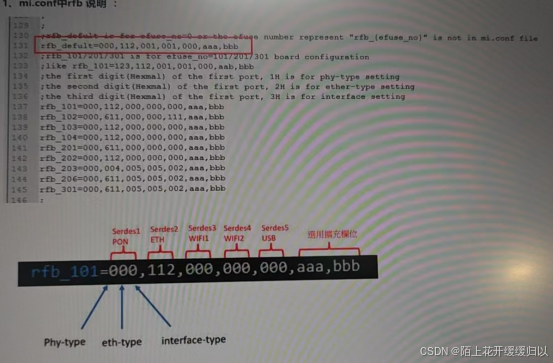
修改rb_defaultsetenv rb_default "123,112,001,001,000,aab,bbb"
设置后saveenv,重启,查看端口情况。
主要差异在phy_addr
在 mi.conf 中,其他与 SerDes 相关的配置包括:
srdsEtherPhyTypeAllComp=7,NONE,an8811,A,B,C,D,E: 设置 phy_type。
srdsEtherTypeAllComp=3,NONE,LAN,WAN: 设置 ether type,目前仅支持三种类型。
srdsIfNameAllComp=12,NONE,XFI,USXGMII,HSGMII,PON,PCIE_G3_1LANE,PCIE_G2_1LANE,USB3.0,USB2.0_only,HSGMII+USB2.0,5G_BaseR,FTTR_OLT: 设置整体的 SerDes 类型,目前总共支持 12 种。
srdsPortCnt=5: SerDes 的总数,例如 SerDes PON, SerDes Ethernet 等
1.2.5Gxmac的口是怎么定义的,比如port口是几
可在mi.conf文件或boot命令行使用printenv查看board_args参数,以值ffffffff:0c000000按照从左往右16位,每2位代表一个Port,共计8个Port.ff表示GSW,09表示hsgmii_USB,0A表示
hsgmll_pcie0,0B表示hsgml_pcie1,0C表示hsgmilether.因此上面的值表示port0/1/2/3-gsw,port4对应etherserdes,5/6/7未配置。启动的接口会有eth0.1/0.2/0.3/0.4/0.5
改成:09ffffff:00000000, eth0.1使用hsgmii_USB。
eth0.1怎么和serdes 关联的。
root@openwrt:/# sys serdes
Serdes-1:IF=PON, EtherType=NONE, Ether PHY Type=NONE
Serdes-2:IF=FTTR_OLT, EtherType=NONE, Ether PHY Type=NONE
Serdes-3:IF=PCIE_G2-iLANE, EtherType=NONE, Ether PHY Type=NONE
Serdes-4:IF=PCIE_G2-iLANE, EtherType=NONE, Ether PHY Type=NONE
Serdes-5:IF=HSGMII+USB2.0, Ether Type=NONE,Ether PHY_Type=an8811
8811phy_addr=0-0-0-0-F
第1位(最左边):PON SerDes PHY地址
第2位:ETH SerDes PHY地址
第3位:PCIe0 SerDes PHY地址
第4位:PCIe1 SerDes PHY地址
第5位(最右边):USB1 SerDes PHY地址
2.怎么获取2.5G口link状态,配置协商模式等等
mac层查看链接状态,cat/proc/tc3162/hsgmil后Tab键,看生成了哪些proc方法,本例中由于boardargs配置了oc即etherserdes因此生成了eth_lan相关的proc方法,可查看link状态
phy层,以airoha2.5Gphy8811为例,如果s8811相关ko加载可查看/proc/tc3162/en8811linkst关方法如果你们使用自已的phy,则需要自己实现相关方法;
查看mdio访问phy相关寄存器
cat /sys/kernel/debug/eth0.1/link_status
查看mac测的link 状态
在 mi.conf 中,其他与 SerDes 相关的配置包括:
srdsEtherPhyTypeAllComp=7,NONE,an8811,A,B,C,D,E: 设置 phy_type。
srdsEtherTypeAllComp=3,NONE,LAN,WAN: 设置 ether type,目前仅支持三种类型。
srdsIfNameAllComp=12,NONE,XFI,USXGMII,HSGMII,PON,PCIE_G3_1LANE,PCIE_G2_1LANE,USB3.0,USB2.0_only,HSGMII+USB2.0,5G_BaseR,FTTR_OLT: 设置整体的 SerDes 类型,目前总共支持 12 种。
srdsPortCnt=5: SerDes 的总数,例如 SerDes PON, SerDes Ethernet 等
The figure above indicates which MACs are shared by each Serdes.
serdes_0: Shared by XSI MAC and PON MAC under GDMA2;
serdes_1: An XSI MAC under GDMA4 is exclusively used
serdes_2/serdes_3: Shared by XSI MAC under GDMA3 and PCIE 0/PCIE1 MAC;
serdes_4: Shared by HSGMII MAC and USB MAC under GDMA4.
serdes_5: This Serdes is not used by XSI shared by USB / PCIE2 MAC.
如何查看端口状态:
01.27-21:45:08root@OpenWrt:/# cat /proc/tc3162/hsgmii_usb_lan_link_status
01.27-21:45:08hsgmii_lan_phy_link_status = up
01.27-21:45:08hsgmii_lan_phy_mode = 5
01.27-21:45:08hsgmii_lan_linkrate = 3
01.27-21:45:38root@OpenWrt:/# cat /proc/tc3162/en8811_link_st
01.27-21:45:38PHYeth0.6: 1000Mbps/Full
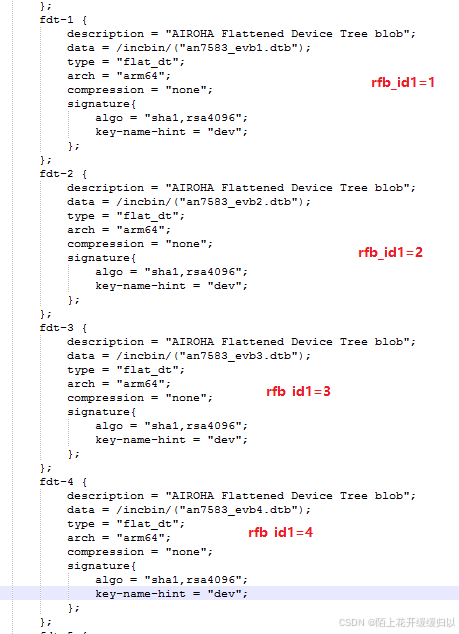
如何闲着dts:select by rfb_id
7583 OpenWrt firmware supports that same firmware used on different RFB testboard, which gpio or
configurations are different. After startup , boot will select the DTB based by rfb_id1 config.
an7583_evb1.dtb: corresponds to all boards of rfb_id1=1series.
an7583_evb2.dtb corresponds to the rfb_id1=2series, and so on.