在电商应用中,客服咨询系统是提升用户满意度、解决用户问题的重要功能。本文将深入分析一个基于 React Native 实现的客服咨询与求助系统,探讨其架构设计、技术实现以及鸿蒙跨端适配策略。
状态管理
该系统采用了 React Hooks 中的 useState 进行轻量级状态管理:
typescript
const [message, setMessage] = useState<string>('');
const [contactMethod, setContactMethod] = useState<'chat' | 'ai' | 'phone'>('chat');
const [issueType, setIssueType] = useState<string>('');
这种状态管理方式具有以下优势:
- 模块化:将消息内容、联系方法和问题类型分离管理,提高代码可读性
- 响应式:状态变更自动触发组件重渲染,确保 UI 与数据同步
- 跨端兼容:React Hooks 在鸿蒙系统的 React Native 实现中通常都有良好支持
- 灵活性:支持实时更新选择状态和消息内容,提高用户体验
系统实现了完整的客服咨询功能,包括:
咨询方式
系统支持三种咨询方式:
- 在线客服:通过文字聊天与客服人员沟通
- AI助手:通过人工智能自动回答常见问题
- 电话咨询:通过电话与客服人员沟通
用户可以根据实际情况选择合适的咨询方式,系统会根据选择提供相应的操作流程。
问题描述
系统实现了多行文本输入功能,支持用户输入详细的问题描述:
- 使用 TextInput 组件,设置为多行模式
- 提供占位符文本,引导用户输入
- 实时更新消息内容状态
常见问题
系统提供了常见问题的快速选择功能,用户可以点击常见问题快速填充到问题描述中,提高用户操作效率。
消息发送
系统实现了消息发送功能:
- 进行表单验证,确保消息内容和问题类型已填写
- 显示确认对话框,避免误操作
- 发送成功后显示提示信息,完成流程闭环
typescript
const handleSendMessage = () => {
  if (!message.trim()) {
    Alert.alert('提示', '请输入您的问题');
    return;
  }

  if (!issueType) {
    Alert.alert('提示', '请选择问题类型');
    return;
  }

  Alert.alert(
    '提交咨询',
    `您选择通过${contactMethod === 'chat' ? '在线客服' : contactMethod === 'ai' ? 'AI助手' : '电话'}咨询${issueType}问题`,
    [
      {
        text: '取消',
        style: 'cancel'
      },
      {
        text: '确定',
        onPress: () => {
          Alert.alert('成功', '您的咨询已提交,我们会尽快回复您');
          setMessage('');
        }
      }
    ]
  );
};
电话咨询
系统实现了电话咨询功能,点击电话咨询后会显示客服电话号码,并提供拨打选项:
typescript
const handleCall = () => {
  Alert.alert('客服电话', '400-123-4567', [
    { text: '取消', style: 'cancel' },
    { text: '拨打', onPress: () => Alert.alert('正在拨打电话...') }
  ]);
};
基础架构
该实现采用了 React Native 核心组件库,确保了在鸿蒙系统上的基本兼容性:
SafeAreaView:适配刘海屏等异形屏ScrollView:处理内容滚动,确保长页面可浏览TouchableOpacity:提供触摸反馈,增强用户体验TextInput:提供文本输入功能,支持问题描述输入Text和View:构建基本 UI 结构Alert:系统级弹窗提示,提供操作反馈
Base64 图标
系统使用 Base64 编码的图标库,这种处理方式在跨端开发中尤为重要:
- 避免了不同平台对资源文件格式的兼容性问题
- 减少了网络请求,提高了加载速度
- 简化了构建流程,无需处理多平台资源文件
- 确保图标在不同设备上的显示一致性
屏幕尺寸
系统通过 Dimensions API 获取屏幕尺寸,确保了在不同屏幕尺寸的设备上都能获得一致的布局体验,无论是 React Native 环境还是鸿蒙系统:
typescript
const { width, height } = Dimensions.get('window');系统采用了模块化的样式定义,确保了样式的一致性和可维护性:
typescript
const styles = StyleSheet.create({
  container: {
    flex: 1,
    backgroundColor: '#f5f5f5',
  },
  // 其他样式...
});
这种方式为后续的主题定制和深色模式适配预留了扩展空间。
在鸿蒙系统上使用 React Native 时,应注意以下 API 兼容性问题:
- TextInput API:鸿蒙系统的 TextInput 实现可能与 React Native 有所差异,建议测试确认多行输入行为
- Alert API:鸿蒙系统的 Alert 实现可能与 React Native 有所差异,建议测试确认弹窗行为
- ScrollView API:鸿蒙系统的 ScrollView 实现可能与 React Native 有所差异,建议测试确认滚动行为
本客服咨询系统实现了一个功能完整、用户友好的客服咨询与求助界面,通过合理的架构设计和代码组织,为用户提供了良好的咨询体验。在跨端开发场景下,该实现充分考虑了 React Native 和鸿蒙系统的兼容性需求,为后续的功能扩展和性能优化预留了空间。
通过咨询方式选择、问题类型选择、问题描述输入等核心功能,结合 Base64 图标处理、卡片式布局等技术手段,该系统不仅功能完善,而且具有良好的可维护性和可扩展性。这些实践经验对于构建其他跨端应用组件也具有参考价值。
客服咨询是电商应用的核心服务闭环环节,承载着用户问题解答、售后支持、体验优化等关键诉求。这份 React Native 客服咨询页面代码,从多渠道咨询选择、问题分类、智能快捷回复、安全提示四个维度构建了完整的客服交互体系。本文将深度拆解其技术设计思路,并提供鸿蒙(HarmonyOS)ArkTS 端的完整适配方案,为跨端电商客服模块开发提供可落地的技术参考。
1. 状态管理
客服咨询的核心是咨询渠道选择 + 问题分类 + 文本输入 的多维度交互,代码通过 React 的 useState 实现了状态的精细化管理,保证各维度选择的独立性和关联性:
typescript
// 核心状态定义
const [message, setMessage] = useState<string>(''); // 问题描述文本
const [contactMethod, setContactMethod] = useState<'chat' | 'ai' | 'phone'>('chat'); // 咨询渠道
const [issueType, setIssueType] = useState<string>(''); // 问题类型状态设计亮点:
- 状态粒度合理:每个交互维度对应独立状态,便于单独控制和联动;
- 默认值符合场景:默认咨询渠道为"在线客服"(高频使用场景),降低用户操作成本;
- 类型约束精准 :
contactMethod使用联合类型限定仅能选择三种咨询渠道,避免非法值; - 状态联动自然:咨询渠道切换时,底部操作按钮自动适配(在线咨询/AI助手展示"提交咨询",电话咨询展示"拨打客服电话")。
2. 核心交互
客服咨询涉及不同渠道的差异化交互逻辑,代码实现了兼顾数据完整性和场景适配的交互流程:
typescript
const handleSendMessage = () => {
  // 1. 表单校验:确保核心字段完整
  if (!message.trim()) {
    Alert.alert('提示', '请输入您的问题');
    return;
  }

  if (!issueType) {
    Alert.alert('提示', '请选择问题类型');
    return;
  }

  // 2. 操作确认:展示完整的咨询信息
  Alert.alert(
    '提交咨询',
    `您选择通过${contactMethod === 'chat' ? '在线客服' : contactMethod === 'ai' ? 'AI助手' : '电话'}咨询${issueType}问题`,
    [
      { text: '取消', style: 'cancel' },
      {
        text: '确定',
        onPress: () => {
          // 3. 结果反馈 + 表单重置
          Alert.alert('成功', '您的咨询已提交,我们会尽快回复您');
          setMessage(''); // 提交后清空输入框
        }
      }
    ]
  );
};流程设计亮点:
- 场景化校验:针对在线咨询/AI助手渠道,强制校验问题描述和问题类型两个核心字段;
- 空文本过滤 :使用
trim()过滤纯空格的问题描述,避免无效提交; - 个性化确认文案:根据用户选择的咨询渠道和问题类型生成确认文案,提升操作透明度;
- 表单重置:提交成功后自动清空问题描述输入框,符合用户操作习惯;
- 电话渠道差异化处理:电话咨询渠道跳过文本校验,直接展示拨号确认弹窗,符合电话沟通的交互逻辑。
3. 智能快捷回复:
代码通过预设常见问题的方式,实现了智能快捷回复功能,显著降低用户输入成本:
typescript
<TouchableOpacity
  style={styles.quickQuestionButton}
  onPress={() => setMessage('如何查询订单状态?')}
>
  <Text style={styles.quickQuestionText}>如何查询订单状态?</Text>
</TouchableOpacity>设计亮点:
- 高频问题覆盖:预设的常见问题涵盖订单查询、退货申请、质量问题、地址修改等电商高频咨询场景;
- 一键填充:点击快捷问题按钮,自动将问题文本填充到输入框,无需手动输入;
- 视觉区分:快捷问题按钮使用浅蓝色背景 + 蓝色文字,与问题类型选择按钮形成视觉区分;
- 流式布局:支持多行展示,适配不同数量的快捷问题。
4. 多渠道咨询:
客服咨询的核心体验在于不同渠道的差异化交互,代码通过条件渲染实现了按钮的场景化适配:
typescript
<View style={styles.bottomActions}>
  {contactMethod === 'phone' ? (
    <TouchableOpacity
      style={styles.phoneButton}
      onPress={handleCall}
    >
      <Text style={styles.phoneButtonText}>拨打客服电话</Text>
    </TouchableOpacity>
  ) : (
    <TouchableOpacity
      style={styles.sendButton}
      onPress={handleSendMessage}
    >
      <Text style={styles.sendButtonText}>提交咨询</Text>
    </TouchableOpacity>
  )}
</View>交互亮点:
- 视觉差异化 :电话咨询按钮使用绿色(
#10b981),在线咨询/AI助手使用蓝色(#3b82f6),符合用户对"电话"和"提交"操作的视觉认知; - 功能适配:电话渠道触发拨号逻辑,其他渠道触发文本提交逻辑,功能与渠道匹配;
- 位置固定:操作按钮固定在底部,始终保持在视野内,提升操作便捷性;
- 尺寸充足:垂直内边距 14px,保证点击区域足够大,降低误触概率。
5. 客服咨询场景
代码通过 StyleSheet.create 构建了一套完整的视觉规范,核心设计原则包括:
(1)卡片式布局
所有功能模块(咨询渠道、问题类型、问题描述等)采用统一的卡片样式:
- 白色背景(
#ffffff) - 12px 圆角(
borderRadius: 12) - 轻微阴影(
elevation: 1)提升层次感 - 16px 内边距保证内容呼吸空间
- 12px 上下间距,视觉节奏舒适
| 元素类型 | 颜色值 | 语义 |
|---|---|---|
| 主色调 | #3b82f6 |
选中状态、提交按钮、强调色 |
| 电话按钮色 | #10b981 |
电话咨询按钮,传递"沟通、服务"的语义 |
| 警示色 | #ef4444 |
安全提示文本,传递"警告、注意"的语义 |
| 快捷问题色 | #0ea5e9 |
快捷问题文本,传递"帮助、指引"的语义 |
| 背景色 | #f5f7fa |
页面整体背景 |
| 表单背景 | #f8fafc |
输入框背景 |
| 文本主色 | #1e293b |
标题、重要文本 |
| 文本次要色 | #64748b |
说明文本、未选中状态 |
将 React Native 客服咨询页面迁移至鸿蒙平台,核心是基于 ArkTS + ArkUI 实现状态管理、交互逻辑、视觉规范的对等还原,同时适配鸿蒙的组件特性和布局范式。
1. 核心适配
鸿蒙端适配遵循逻辑复用、语法适配、体验统一的原则,业务逻辑和视觉规范 100% 复用,仅需适配平台特有 API 和组件语法:
typescript
@Entry
@Component
struct SupportApp {
  // 状态管理:对等实现 useState → @State
  @State message: string = '';
  @State contactMethod: 'chat' | 'ai' | 'phone' = 'chat';
  @State issueType: string = '';

  // 业务逻辑:完全复用 RN 端实现
  handleSendMessage() {/* 提交咨询 */}
  handleCall() {/* 拨打电话 */}

  // 预设常见问题
  issueTypes: string[] = [/* 问题类型列表 */];

  // 页面构建:镜像 RN 端布局结构
  build() {
    Column() {
      // 头部区域
      // 滚动内容区
      // 底部操作按钮
      // 底部导航
    }
  }
}| React Native 特性 | 鸿蒙 ArkUI 对应实现 | 适配关键说明 |
|---|---|---|
useState |
@State 装饰器 |
状态初始化与更新逻辑完全复用 |
TouchableOpacity |
Button + onClick |
可点击组件的交互逻辑复用 |
Alert.alert |
AlertDialog.show |
弹窗 API 语法差异,交互逻辑对等 |
StyleSheet |
链式样式 | 样式属性 100% 复用 |
| 条件渲染 | if/else 渲染 |
底部按钮场景化渲染逻辑复用 |
Array.map |
ForEach 组件 |
问题类型/快捷问题列表渲染语法差异,逻辑一致 |
ScrollView |
Scroll 组件 |
滚动容器语法差异,功能一致 |
| 绝对定位 | position: Position.Fixed |
定位语法差异,效果一致 |
| 流式布局 | flexWrap: FlexWrap.Wrap |
布局属性对等实现 |
3. 鸿蒙代码
typescript
// 鸿蒙 ArkTS 完整实现
@Entry
@Component
struct SupportApp {
@State message: string = '';
@State contactMethod: 'chat' | 'ai' | 'phone' = 'chat';
@State issueType: string = '';
issueTypes: string[] = [
'商品咨询',
'订单查询',
'售后服务',
'物流问题',
'支付问题',
'账户问题',
'其他问题'
];
handleSendMessage() {
if (!this.message.trim()) {
AlertDialog.show({
title: '提示',
message: '请输入您的问题',
confirm: { value: '确定' }
});
return;
}
if (!this.issueType) {
AlertDialog.show({
title: '提示',
message: '请选择问题类型',
confirm: { value: '确定' }
});
return;
}
const methodName = this.contactMethod === 'chat'
? '在线客服'
: this.contactMethod === 'ai'
? 'AI助手'
: '电话';
AlertDialog.show({
title: '提交咨询',
message: `您选择通过${methodName}咨询${this.issueType}问题`,
confirm: {
value: '确定',
action: () => {
AlertDialog.show({
title: '成功',
message: '您的咨询已提交,我们会尽快回复您',
confirm: { value: '确定' }
});
this.message = '';
}
},
cancel: { value: '取消' }
});
}
handleCall() {
AlertDialog.show({
title: '客服电话',
message: '400-123-4567',
confirm: {
value: '拨打',
action: () => {
AlertDialog.show({
title: '提示',
message: '正在拨打电话...',
confirm: { value: '确定' }
});
}
},
cancel: { value: '取消' }
});
}
build() {
Column()
.flex(1)
.backgroundColor('#f5f7fa')
.safeArea(true) {
// 头部
Column()
.padding(16)
.backgroundColor('#ffffff')
.borderBottom({ width: 1, color: '#e2e8f0' }) {
Text('客服咨询')
.fontSize(20)
.fontWeight(FontWeight.Bold)
.fontColor('#1e293b')
.marginBottom(4);
Text('我们随时为您服务')
.fontSize(14)
.fontColor('#64748b');
}
// 滚动内容区
Scroll()
.flex(1)
.marginTop(12) {
Column() {
// 服务类型选择
Column()
.backgroundColor('#ffffff')
.marginLeft(16)
.marginRight(16)
.marginBottom(12)
.borderRadius(12)
.padding(16)
.shadow({ color: '#000', offsetX: 0, offsetY: 1, opacity: 0.1, radius: 2 }) {
Text('选择咨询方式')
.fontSize(16)
.fontWeight(FontWeight.Medium)
.fontColor('#1e293b')
.marginBottom(12);
Row()
.justifyContent(FlexAlign.SpaceBetween) {
Button()
.flexGrow(0.3)
.padding(12)
.borderRadius(6)
.backgroundColor(this.contactMethod === 'chat' ? '#3b82f6' : '#f1f5f9')
.onClick(() => {
this.contactMethod = 'chat';
}) {
Text('在线客服')
.fontSize(14)
.fontColor(this.contactMethod === 'chat' ? '#ffffff' : '#64748b');
}
Button()
.flexGrow(0.3)
.padding(12)
.borderRadius(6)
.backgroundColor(this.contactMethod === 'ai' ? '#3b82f6' : '#f1f5f9')
.onClick(() => {
this.contactMethod = 'ai';
}) {
Text('AI助手')
.fontSize(14)
.fontColor(this.contactMethod === 'ai' ? '#ffffff' : '#64748b');
}
Button()
.flexGrow(0.3)
.padding(12)
.borderRadius(6)
.backgroundColor(this.contactMethod === 'phone' ? '#3b82f6' : '#f1f5f9')
.onClick(() => {
this.contactMethod = 'phone';
}) {
Text('电话咨询')
.fontSize(14)
.fontColor(this.contactMethod === 'phone' ? '#ffffff' : '#64748b');
}
}
}
// 问题类型
Column()
.backgroundColor('#ffffff')
.marginLeft(16)
.marginRight(16)
.marginBottom(12)
.borderRadius(12)
.padding(16)
.shadow({ color: '#000', offsetX: 0, offsetY: 1, opacity: 0.1, radius: 2 }) {
Text('问题类型')
.fontSize(16)
.fontWeight(FontWeight.Medium)
.fontColor('#1e293b')
.marginBottom(12);
Row()
.flexWrap(FlexWrap.Wrap) {
ForEach(this.issueTypes, (type: string) => {
Button()
.paddingHorizontal(12)
.paddingVertical(8)
.borderRadius(20)
.backgroundColor(this.issueType === type ? '#3b82f6' : '#f1f5f9')
.marginRight(8)
.marginBottom(8)
.onClick(() => {
this.issueType = type;
}) {
Text(type)
.fontSize(14)
.fontColor(this.issueType === type ? '#ffffff' : '#64748b');
}
})
}
}
// 问题描述
Column()
.backgroundColor('#ffffff')
.marginLeft(16)
.marginRight(16)
.marginBottom(12)
.borderRadius(12)
.padding(16)
.shadow({ color: '#000', offsetX: 0, offsetY: 1, opacity: 0.1, radius: 2 }) {
Text('问题描述')
.fontSize(16)
.fontWeight(FontWeight.Medium)
.fontColor('#1e293b')
.marginBottom(12);
TextInput({
value: this.message,
placeholder: '请详细描述您的问题,我们会尽快为您解答...'
})
.border({ width: 1, color: '#e2e8f0' })
.borderRadius(6)
.padding(12)
.fontSize(14)
.backgroundColor('#f8fafc')
.minHeight(100)
.multiline(true)
.onChange((value) => {
this.message = value;
});
}
// 快速问题
Column()
.backgroundColor('#ffffff')
.marginLeft(16)
.marginRight(16)
.marginBottom(12)
.borderRadius(12)
.padding(16)
.shadow({ color: '#000', offsetX: 0, offsetY: 1, opacity: 0.1, radius: 2 }) {
Text('常见问题')
.fontSize(16)
.fontWeight(FontWeight.Medium)
.fontColor('#1e293b')
.marginBottom(12);
Row()
.flexWrap(FlexWrap.Wrap) {
Button()
.paddingHorizontal(12)
.paddingVertical(8)
.borderRadius(20)
.backgroundColor('#e0f2fe')
.marginRight(8)
.marginBottom(8)
.onClick(() => {
this.message = '如何查询订单状态?';
}) {
Text('如何查询订单状态?')
.fontSize(14)
.fontColor('#0ea5e9');
}
Button()
.paddingHorizontal(12)
.paddingVertical(8)
.borderRadius(20)
.backgroundColor('#e0f2fe')
.marginRight(8)
.marginBottom(8)
.onClick(() => {
this.message = '如何申请退货?';
}) {
Text('如何申请退货?')
.fontSize(14)
.fontColor('#0ea5e9');
}
Button()
.paddingHorizontal(12)
.paddingVertical(8)
.borderRadius(20)
.backgroundColor('#e0f2fe')
.marginRight(8)
.marginBottom(8)
.onClick(() => {
this.message = '商品有质量问题怎么办?';
}) {
Text('商品有质量问题怎么办?')
.fontSize(14)
.fontColor('#0ea5e9');
}
Button()
.paddingHorizontal(12)
.paddingVertical(8)
.borderRadius(20)
.backgroundColor('#e0f2fe')
.marginRight(8)
.marginBottom(8)
.onClick(() => {
this.message = '如何修改收货地址?';
}) {
Text('如何修改收货地址?')
.fontSize(14)
.fontColor('#0ea5e9');
}
}
}
// 服务时间
Column()
.backgroundColor('#ffffff')
.marginLeft(16)
.marginRight(16)
.marginBottom(12)
.borderRadius(12)
.padding(16)
.shadow({ color: '#000', offsetX: 0, offsetY: 1, opacity: 0.1, radius: 2 }) {
Text('服务时间')
.fontSize(16)
.fontWeight(FontWeight.Medium)
.fontColor('#1e293b')
.marginBottom(12);
Text('周一至周日 9:00 - 21:00')
.fontSize(14)
.fontColor('#64748b')
.marginBottom(4);
Text('节假日正常服务')
.fontSize(14)
.fontColor('#64748b');
}
// 联系方式
Column()
.backgroundColor('#ffffff')
.marginLeft(16)
.marginRight(16)
.marginBottom(12)
.borderRadius(12)
.padding(16)
.shadow({ color: '#000', offsetX: 0, offsetY: 1, opacity: 0.1, radius: 2 }) {
Text('联系方式')
.fontSize(16)
.fontWeight(FontWeight.Medium)
.fontColor('#1e293b')
.marginBottom(12);
Column()
.paddingLeft(16) {
Text('客服热线:400-123-4567')
.fontSize(14)
.fontColor('#64748b')
.marginBottom(4);
Text('在线客服:24小时在线')
.fontSize(14)
.fontColor('#64748b')
.marginBottom(4);
Text('邮箱:support@example.com')
.fontSize(14)
.fontColor('#64748b');
}
}
// 服务承诺
Column()
.backgroundColor('#ffffff')
.marginLeft(16)
.marginRight(16)
.marginBottom(12)
.borderRadius(12)
.padding(16)
.shadow({ color: '#000', offsetX: 0, offsetY: 1, opacity: 0.1, radius: 2 }) {
Text('服务承诺')
.fontSize(16)
.fontWeight(FontWeight.Medium)
.fontColor('#1e293b')
.marginBottom(12);
Text('• 30秒内快速响应')
.fontSize(14)
.fontColor('#64748b')
.lineHeight(20)
.marginBottom(4);
Text('• 专业客服团队')
.fontSize(14)
.fontColor('#64748b')
.lineHeight(20)
.marginBottom(4);
Text('• 7×24小时服务')
.fontSize(14)
.fontColor('#64748b')
.lineHeight(20)
.marginBottom(4);
Text('• 问题解决率99%')
.fontSize(14)
.fontColor('#64748b')
.lineHeight(20);
}
// 安全提示
Column()
.backgroundColor('#ffffff')
.marginLeft(16)
.marginRight(16)
.marginBottom(80)
.borderRadius(12)
.padding(16)
.shadow({ color: '#000', offsetX: 0, offsetY: 1, opacity: 0.1, radius: 2 }) {
Text('安全提示')
.fontSize(16)
.fontWeight(FontWeight.Medium)
.fontColor('#1e293b')
.marginBottom(12);
Text('• 我们不会主动索要您的密码')
.fontSize(14)
.fontColor('#ef4444')
.lineHeight(20)
.marginBottom(4);
Text('• 请勿相信非官方客服信息')
.fontSize(14)
.fontColor('#ef4444')
.lineHeight(20)
.marginBottom(4);
Text('• 任何涉及金钱的操作请谨慎')
.fontSize(14)
.fontColor('#ef4444')
.lineHeight(20);
}
}
}
// 底部操作按钮
Column()
.position(Position.Fixed)
.bottom(60)
.left(16)
.right(16)
.padding(8)
.backgroundColor('#ffffff') {
if (this.contactMethod === 'phone') {
Button()
.width('100%')
.backgroundColor('#10b981')
.paddingVertical(14)
.borderRadius(8)
.onClick(() => {
this.handleCall();
}) {
Text('拨打客服电话')
.fontSize(16)
.fontWeight(FontWeight.Medium)
.fontColor('#ffffff');
}
} else {
Button()
.width('100%')
.backgroundColor('#3b82f6')
.paddingVertical(14)
.borderRadius(8)
.onClick(() => {
this.handleSendMessage();
}) {
Text('提交咨询')
.fontSize(16)
.fontWeight(FontWeight.Medium)
.fontColor('#ffffff');
}
}
}
// 底部导航
Row()
.justifyContent(FlexAlign.SpaceAround)
.backgroundColor('#ffffff')
.borderTop({ width: 1, color: '#e2e8f0' })
.paddingVertical(12)
.position(Position.Fixed)
.bottom(0)
.width('100%') {
Column()
.alignItems(ItemAlign.Center)
.flexGrow(1) {
Text('🏠')
.fontSize(20)
.fontColor('#94a3b8')
.marginBottom(4);
Text('首页')
.fontSize(12)
.fontColor('#94a3b8');
}
Column()
.alignItems(ItemAlign.Center)
.flexGrow(1) {
Text('🔍')
.fontSize(20)
.fontColor('#94a3b8')
.marginBottom(4);
Text('分类')
.fontSize(12)
.fontColor('#94a3b8');
}
Column()
.alignItems(ItemAlign.Center)
.flexGrow(1) {
Text('🛒')
.fontSize(20)
.fontColor('#94a3b8')
.marginBottom(4);
Text('购物车')
.fontSize(12)
.fontColor('#94a3b8');
}
Column()
.alignItems(ItemAlign.Center)
.flexGrow(1)
.paddingTop(4)
.borderTop({ width: 2, color: '#3b82f6' }) {
Text('👤')
.fontSize(20)
.fontColor('#3b82f6')
.marginBottom(4);
Text('我的')
.fontSize(12)
.fontColor('#3b82f6')
.fontWeight(FontWeight.Medium);
}
}
}
}- 客服咨询的核心是多渠道交互与问题精准分类:通过在线客服/AI助手/电话咨询多渠道覆盖不同用户习惯,问题类型分类便于快速定位和解决问题;
- 智能快捷回复显著降低用户输入成本:预设高频问题一键填充,是提升客服咨询体验的关键优化点;
- 场景化交互适配提升操作自然度:不同咨询渠道对应差异化的操作按钮和交互逻辑,符合用户对不同沟通方式的认知习惯;
- 跨端适配的关键是逻辑复用+体验统一:业务逻辑和视觉规范可跨端复用,仅需适配平台特有 API 和组件语法,保证跨端体验一致性;
- 完整的信息架构提升服务透明度:服务时间、联系方式、服务承诺、安全提示等信息,既管理用户预期,又提升服务信任度;
- 表单校验保障咨询质量:必填字段校验、空文本过滤,既保证咨询信息完整,又减少无效咨询对客服的干扰。
这份客服咨询页面的跨端适配实践,验证了 React Native 与鸿蒙 ArkTS 在电商核心客服场景下的高度兼容性,为跨端电商应用的客服模块开发提供了可落地的技术参考,同时也为其他服务类跨端场景提供了设计思路和实现范式。
真实演示案例代码:
js
// App.tsx
import React, { useState } from 'react';
import { SafeAreaView, View, Text, StyleSheet, TouchableOpacity, ScrollView, Dimensions, Alert, TextInput, Image } from 'react-native';

// Base64 图标库
const ICONS_BASE64 = {
  chat: 'data:image/png;base64,iVBORw0KGgoAAAANSUhEUgAAAAEAAAABCAYAAAAfFcSJAAAADUlEQVR42mNkYPhfDwAChwGA60e6kgAAAABJRU5ErkJggg==',
  ai: 'data:image/png;base64,iVBORw0KGgoAAAANSUhEUgAAAAEAAAABCAYAAAAfFcSJAAAADUlEQVR42mNkYPhfDwAChwGA60e6kgAAAABJRU5ErkJggg==',
  phone: 'data:image/png;base64,iVBORw0KGgoAAAANSUhEUgAAAAEAAAABCAYAAAAfFcSJAAAADUlEQVR42mNkYPhfDwAChwGA60e6kgAAAABJRU5ErkJggg==',
  question: 'data:image/png;base64,iVBORw0KGgoAAAANSUhEUgAAAAEAAAABCAYAAAAfFcSJAAAADUlEQVR42mNkYPhfDwAChwGA60e6kgAAAABJRU5ErkJggg==',
  check: 'data:image/png;base64,iVBORw0KGgoAAAANSUhEUgAAAAEAAAABCAYAAAAfFcSJAAAADUlEQVR42mNkYPhfDwAChwGA60e6kgAAAABJRU5ErkJggg==',
  clock: 'data:image/png;base64,iVBORw0KGgoAAAANSUhEUgAAAAEAAAABCAYAAAAfFcSJAAAADUlEQVR42mNkYPhfDwAChwGA60e6kgAAAABJRU5ErkJggg==',
  home: 'data:image/png;base64,iVBORw0KGgoAAAANSUhEUgAAAAEAAAABCAYAAAAfFcSJAAAADUlEQVR42mNkYPhfDwAChwGA60e6kgAAAABJRU5ErkJggg==',
  user: 'data:image/png;base64,iVBORw0KGgoAAAANSUhEUgAAAAEAAAABCAYAAAAfFcSJAAAADUlEQVR42mNkYPhfDwAChwGA60e6kgAAAABJRU5ErkJggg==',
};

const { width, height } = Dimensions.get('window');

// 客服咨询与求助应用组件
const SupportApp: React.FC = () => {
  const [message, setMessage] = useState<string>('');
  const [contactMethod, setContactMethod] = useState<'chat' | 'ai' | 'phone'>('chat');
  const [issueType, setIssueType] = useState<string>('');

  const issueTypes = [
    '商品咨询',
    '订单查询',
    '售后服务',
    '物流问题',
    '支付问题',
    '账户问题',
    '其他问题'
  ];

  const handleSendMessage = () => {
    if (!message.trim()) {
      Alert.alert('提示', '请输入您的问题');
      return;
    }

    if (!issueType) {
      Alert.alert('提示', '请选择问题类型');
      return;
    }

    Alert.alert(
      '提交咨询',
      `您选择通过${contactMethod === 'chat' ? '在线客服' : contactMethod === 'ai' ? 'AI助手' : '电话'}咨询${issueType}问题`,
      [
        {
          text: '取消',
          style: 'cancel'
        },
        {
          text: '确定',
          onPress: () => {
            Alert.alert('成功', '您的咨询已提交,我们会尽快回复您');
            setMessage('');
          }
        }
      ]
    );
  };

  const handleCall = () => {
    Alert.alert('客服电话', '400-123-4567', [
      { text: '取消', style: 'cancel' },
      { text: '拨打', onPress: () => Alert.alert('正在拨打电话...') }
    ]);
  };

  return (
    <SafeAreaView style={styles.container}>
      {/* 头部 */}
      <View style={styles.header}>
        <Text style={styles.title}>客服咨询</Text>
        <Text style={styles.subtitle}>我们随时为您服务</Text>
      </View>

      <ScrollView style={styles.content}>
        {/* 服务类型选择 */}
        <View style={styles.sectionCard}>
          <Text style={styles.sectionTitle}>选择咨询方式</Text>
          <View style={styles.methodContainer}>
            <TouchableOpacity
              style={[
                styles.methodButton,
                contactMethod === 'chat' && styles.selectedMethod
              ]}
              onPress={() => setContactMethod('chat')}
            >
              <Text style={[
                styles.methodText,
                contactMethod === 'chat' && styles.selectedMethodText
              ]}>在线客服</Text>
            </TouchableOpacity>
            <TouchableOpacity
              style={[
                styles.methodButton,
                contactMethod === 'ai' && styles.selectedMethod
              ]}
              onPress={() => setContactMethod('ai')}
            >
              <Text style={[
                styles.methodText,
                contactMethod === 'ai' && styles.selectedMethodText
              ]}>AI助手</Text>
            </TouchableOpacity>
            <TouchableOpacity
              style={[
                styles.methodButton,
                contactMethod === 'phone' && styles.selectedMethod
              ]}
              onPress={() => setContactMethod('phone')}
            >
              <Text style={[
                styles.methodText,
                contactMethod === 'phone' && styles.selectedMethodText
              ]}>电话咨询</Text>
            </TouchableOpacity>
          </View>
        </View>

        {/* 问题类型 */}
        <View style={styles.sectionCard}>
          <Text style={styles.sectionTitle}>问题类型</Text>
          <View style={styles.issueTypesContainer}>
            {issueTypes.map((type, index) => (
              <TouchableOpacity
                key={index}
                style={[
                  styles.issueTypeButton,
                  issueType === type && styles.selectedIssueType
                ]}
                onPress={() => setIssueType(type)}
              >
                <Text style={[
                  styles.issueTypeText,
                  issueType === type && styles.selectedIssueTypeText
                ]}>{type}</Text>
              </TouchableOpacity>
            ))}
          </View>
        </View>

        {/* 问题描述 */}
        <View style={styles.sectionCard}>
          <Text style={styles.sectionTitle}>问题描述</Text>
          <TextInput
            style={styles.messageInput}
            value={message}
            onChangeText={setMessage}
            placeholder="请详细描述您的问题,我们会尽快为您解答..."
            multiline
            numberOfLines={4}
          />
        </View>

        {/* 快速问题 */}
        <View style={styles.quickQuestionsCard}>
          <Text style={styles.sectionTitle}>常见问题</Text>
          <View style={styles.quickQuestionsContainer}>
            <TouchableOpacity
              style={styles.quickQuestionButton}
              onPress={() => setMessage('如何查询订单状态?')}
            >
              <Text style={styles.quickQuestionText}>如何查询订单状态?</Text>
            </TouchableOpacity>
            <TouchableOpacity
              style={styles.quickQuestionButton}
              onPress={() => setMessage('如何申请退货?')}
            >
              <Text style={styles.quickQuestionText}>如何申请退货?</Text>
            </TouchableOpacity>
            <TouchableOpacity
              style={styles.quickQuestionButton}
              onPress={() => setMessage('商品有质量问题怎么办?')}
            >
              <Text style={styles.quickQuestionText}>商品有质量问题怎么办?</Text>
            </TouchableOpacity>
            <TouchableOpacity
              style={styles.quickQuestionButton}
              onPress={() => setMessage('如何修改收货地址?')}
            >
              <Text style={styles.quickQuestionText}>如何修改收货地址?</Text>
            </TouchableOpacity>
          </View>
        </View>

        {/* 服务时间 */}
        <View style={styles.serviceHoursCard}>
          <Text style={styles.sectionTitle}>服务时间</Text>
          <Text style={styles.serviceHoursText}>周一至周日 9:00 - 21:00</Text>
          <Text style={styles.serviceHoursText}>节假日正常服务</Text>
        </View>

        {/* 联系方式 */}
        <View style={styles.contactCard}>
          <Text style={styles.sectionTitle}>联系方式</Text>
          <View style={styles.contactInfo}>
            <Text style={styles.contactText}>客服热线:400-123-4567</Text>
            <Text style={styles.contactText}>在线客服:24小时在线</Text>
            <Text style={styles.contactText}>邮箱:support@example.com</Text>
          </View>
        </View>

        {/* 服务承诺 */}
        <View style={styles.commitmentCard}>
          <Text style={styles.sectionTitle}>服务承诺</Text>
          <Text style={styles.commitmentText}>• 30秒内快速响应</Text>
          <Text style={styles.commitmentText}>• 专业客服团队</Text>
          <Text style={styles.commitmentText}>• 7×24小时服务</Text>
          <Text style={styles.commitmentText}>• 问题解决率99%</Text>
        </View>

        {/* 安全提示 */}
        <View style={styles.securityCard}>
          <Text style={styles.sectionTitle}>安全提示</Text>
          <Text style={styles.securityText}>• 我们不会主动索要您的密码</Text>
          <Text style={styles.securityText}>• 请勿相信非官方客服信息</Text>
          <Text style={styles.securityText}>• 任何涉及金钱的操作请谨慎</Text>
        </View>
      </ScrollView>

      {/* 底部操作按钮 */}
      <View style={styles.bottomActions}>
        {contactMethod === 'phone' ? (
          <TouchableOpacity
            style={styles.phoneButton}
            onPress={handleCall}
          >
            <Text style={styles.phoneButtonText}>拨打客服电话</Text>
          </TouchableOpacity>
        ) : (
          <TouchableOpacity
            style={styles.sendButton}
            onPress={handleSendMessage}
          >
            <Text style={styles.sendButtonText}>提交咨询</Text>
          </TouchableOpacity>
        )}
      </View>

      {/* 底部导航 */}
      <View style={styles.bottomNav}>
        <TouchableOpacity style={styles.navItem}>
          <Text style={styles.navIcon}>🏠</Text>
          <Text style={styles.navText}>首页</Text>
        </TouchableOpacity>
        <TouchableOpacity style={styles.navItem}>
          <Text style={styles.navIcon}>🔍</Text>
          <Text style={styles.navText}>分类</Text>
        </TouchableOpacity>
        <TouchableOpacity style={styles.navItem}>
          <Text style={styles.navIcon}>🛒</Text>
          <Text style={styles.navText}>购物车</Text>
        </TouchableOpacity>
        <TouchableOpacity style={[styles.navItem, styles.activeNavItem]}>
          <Text style={styles.navIcon}>👤</Text>
          <Text style={styles.navText}>我的</Text>
        </TouchableOpacity>
      </View>
    </SafeAreaView>
  );
};

const styles = StyleSheet.create({
  container: {
    flex: 1,
    backgroundColor: '#f5f7fa',
  },
  header: {
    flexDirection: 'column',
    padding: 16,
    backgroundColor: '#ffffff',
    borderBottomWidth: 1,
    borderBottomColor: '#e2e8f0',
  },
  title: {
    fontSize: 20,
    fontWeight: 'bold',
    color: '#1e293b',
    marginBottom: 4,
  },
  subtitle: {
    fontSize: 14,
    color: '#64748b',
  },
  content: {
    flex: 1,
    marginTop: 12,
  },
  sectionCard: {
    backgroundColor: '#ffffff',
    marginHorizontal: 16,
    marginBottom: 12,
    borderRadius: 12,
    padding: 16,
    elevation: 1,
    shadowColor: '#000',
    shadowOffset: { width: 0, height: 1 },
    shadowOpacity: 0.1,
    shadowRadius: 2,
  },
  sectionTitle: {
    fontSize: 16,
    fontWeight: '500',
    color: '#1e293b',
    marginBottom: 12,
  },
  methodContainer: {
    flexDirection: 'row',
    justifyContent: 'space-between',
  },
  methodButton: {
    flex: 0.3,
    padding: 12,
    borderRadius: 6,
    backgroundColor: '#f1f5f9',
    alignItems: 'center',
  },
  selectedMethod: {
    backgroundColor: '#3b82f6',
  },
  methodText: {
    fontSize: 14,
    color: '#64748b',
  },
  selectedMethodText: {
    color: '#ffffff',
  },
  issueTypesContainer: {
    flexDirection: 'row',
    flexWrap: 'wrap',
  },
  issueTypeButton: {
    paddingHorizontal: 12,
    paddingVertical: 8,
    borderRadius: 20,
    backgroundColor: '#f1f5f9',
    marginRight: 8,
    marginBottom: 8,
  },
  selectedIssueType: {
    backgroundColor: '#3b82f6',
  },
  issueTypeText: {
    fontSize: 14,
    color: '#64748b',
  },
  selectedIssueTypeText: {
    color: '#ffffff',
  },
  messageInput: {
    borderWidth: 1,
    borderColor: '#e2e8f0',
    borderRadius: 6,
    padding: 12,
    fontSize: 14,
    backgroundColor: '#f8fafc',
    minHeight: 100,
    textAlignVertical: 'top',
  },
  quickQuestionsCard: {
    backgroundColor: '#ffffff',
    marginHorizontal: 16,
    marginBottom: 12,
    borderRadius: 12,
    padding: 16,
    elevation: 1,
    shadowColor: '#000',
    shadowOffset: { width: 0, height: 1 },
    shadowOpacity: 0.1,
    shadowRadius: 2,
  },
  quickQuestionsContainer: {
    flexDirection: 'row',
    flexWrap: 'wrap',
  },
  quickQuestionButton: {
    paddingHorizontal: 12,
    paddingVertical: 8,
    borderRadius: 20,
    backgroundColor: '#e0f2fe',
    marginRight: 8,
    marginBottom: 8,
  },
  quickQuestionText: {
    fontSize: 14,
    color: '#0ea5e9',
  },
  serviceHoursCard: {
    backgroundColor: '#ffffff',
    marginHorizontal: 16,
    marginBottom: 12,
    borderRadius: 12,
    padding: 16,
    elevation: 1,
    shadowColor: '#000',
    shadowOffset: { width: 0, height: 1 },
    shadowOpacity: 0.1,
    shadowRadius: 2,
  },
  serviceHoursText: {
    fontSize: 14,
    color: '#64748b',
    marginBottom: 4,
  },
  contactCard: {
    backgroundColor: '#ffffff',
    marginHorizontal: 16,
    marginBottom: 12,
    borderRadius: 12,
    padding: 16,
    elevation: 1,
    shadowColor: '#000',
    shadowOffset: { width: 0, height: 1 },
    shadowOpacity: 0.1,
    shadowRadius: 2,
  },
  contactInfo: {
    paddingLeft: 16,
  },
  contactText: {
    fontSize: 14,
    color: '#64748b',
    marginBottom: 4,
  },
  commitmentCard: {
    backgroundColor: '#ffffff',
    marginHorizontal: 16,
    marginBottom: 12,
    borderRadius: 12,
    padding: 16,
    elevation: 1,
    shadowColor: '#000',
    shadowOffset: { width: 0, height: 1 },
    shadowOpacity: 0.1,
    shadowRadius: 2,
  },
  commitmentText: {
    fontSize: 14,
    color: '#64748b',
    lineHeight: 20,
    marginBottom: 4,
  },
  securityCard: {
    backgroundColor: '#ffffff',
    marginHorizontal: 16,
    marginBottom: 80,
    borderRadius: 12,
    padding: 16,
    elevation: 1,
    shadowColor: '#000',
    shadowOffset: { width: 0, height: 1 },
    shadowOpacity: 0.1,
    shadowRadius: 2,
  },
  securityText: {
    fontSize: 14,
    color: '#ef4444',
    lineHeight: 20,
    marginBottom: 4,
  },
  bottomActions: {
    position: 'absolute',
    bottom: 60,
    left: 16,
    right: 16,
    padding: 8,
    backgroundColor: '#ffffff',
  },
  sendButton: {
    backgroundColor: '#3b82f6',
    paddingVertical: 14,
    borderRadius: 8,
    alignItems: 'center',
  },
  phoneButton: {
    backgroundColor: '#10b981',
    paddingVertical: 14,
    borderRadius: 8,
    alignItems: 'center',
  },
  sendButtonText: {
    color: '#ffffff',
    fontSize: 16,
    fontWeight: '500',
  },
  phoneButtonText: {
    color: '#ffffff',
    fontSize: 16,
    fontWeight: '500',
  },
  bottomNav: {
    flexDirection: 'row',
    justifyContent: 'space-around',
    backgroundColor: '#ffffff',
    borderTopWidth: 1,
    borderTopColor: '#e2e8f0',
    paddingVertical: 12,
    position: 'absolute',
    bottom: 0,
    left: 0,
    right: 0,
  },
  navItem: {
    alignItems: 'center',
    flex: 1,
  },
  activeNavItem: {
    paddingTop: 4,
    borderTopWidth: 2,
    borderTopColor: '#3b82f6',
  },
  navIcon: {
    fontSize: 20,
    color: '#94a3b8',
    marginBottom: 4,
  },
  activeNavIcon: {
    color: '#3b82f6',
  },
  navText: {
    fontSize: 12,
    color: '#94a3b8',
  },
  activeNavText: {
    color: '#3b82f6',
    fontWeight: '500',
  },
});

export default SupportApp;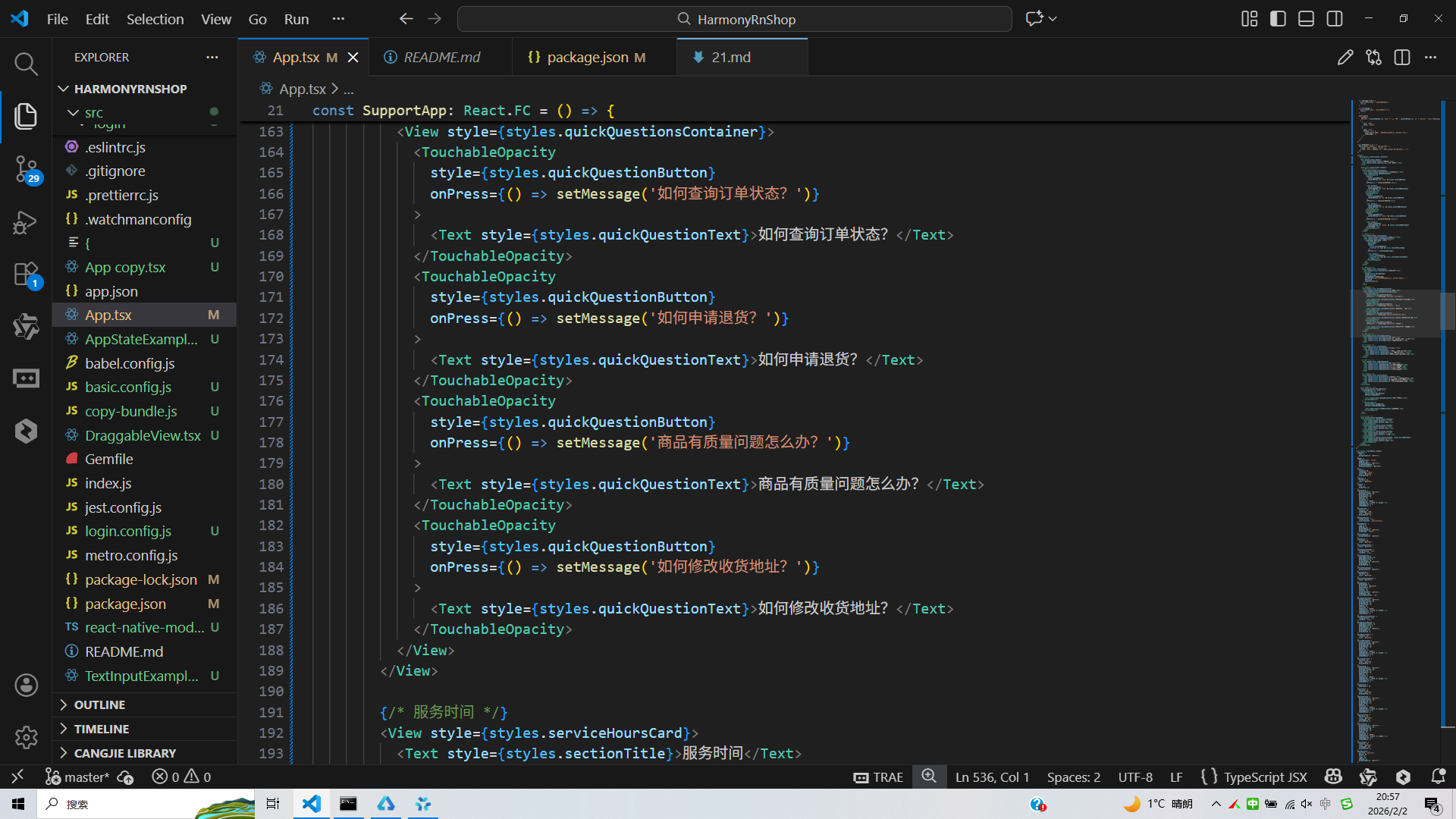
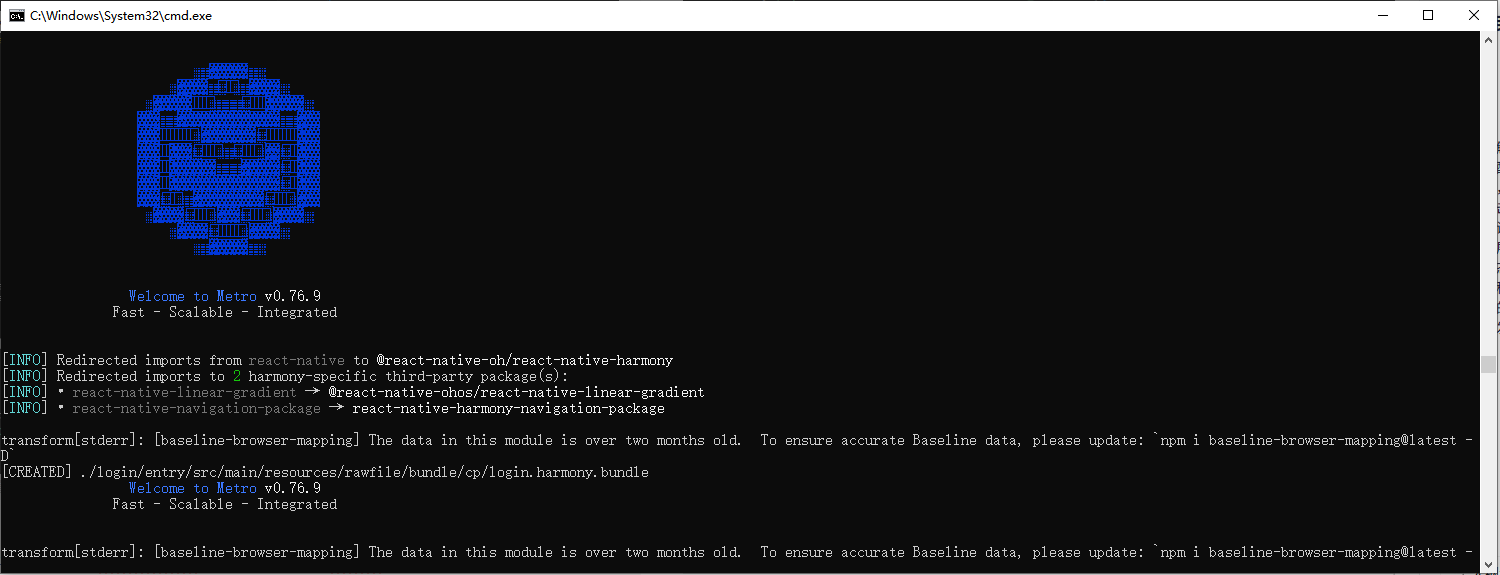
打包
接下来通过打包命令npn run harmony将reactNative的代码打包成为bundle,这样可以进行在开源鸿蒙OpenHarmony中进行使用。
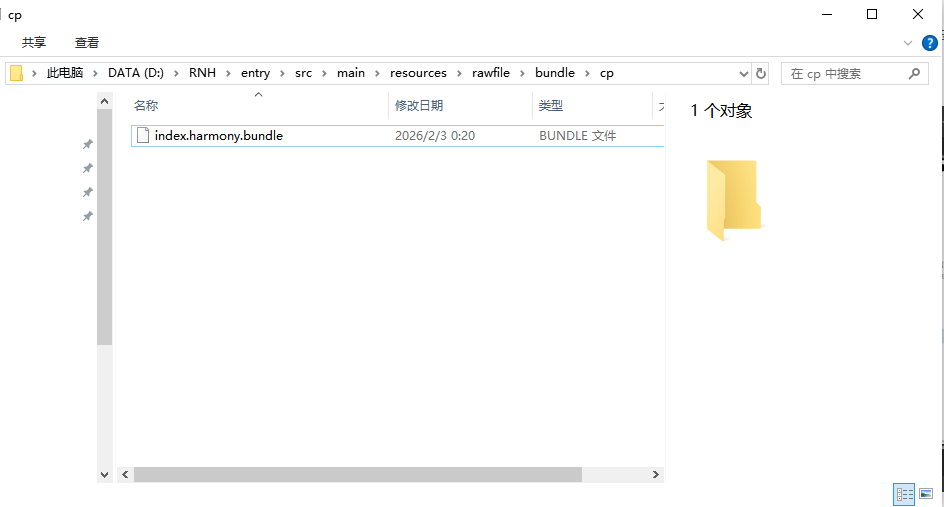
打包之后再将打包后的鸿蒙OpenHarmony文件拷贝到鸿蒙的DevEco-Studio工程目录去:
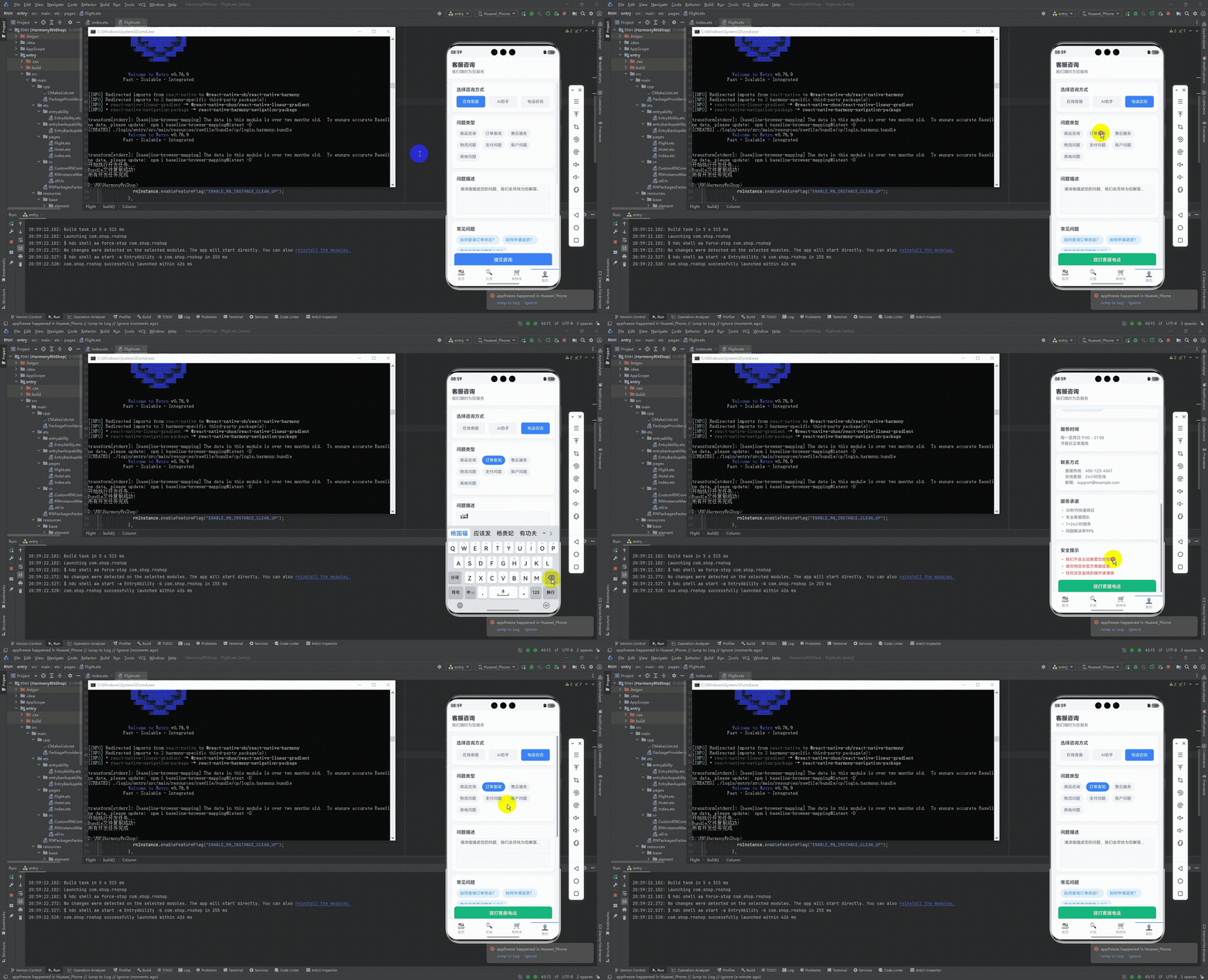
最后运行效果图如下显示:
本文探讨了一个基于React Native实现的电商客服咨询系统,重点分析了其架构设计、技术实现和跨端适配策略。系统采用React Hooks进行模块化状态管理,支持在线客服、AI助手和电话咨询三种方式,并实现了问题分类、智能快捷回复等功能。技术亮点包括:1)精细化的状态管理设计;2)场景化的交互流程校验;3)Base64图标处理提升跨端兼容性;4)通过Dimensions API确保多设备适配。文章还提供了鸿蒙系统适配建议,为跨端电商客服开发提供了可落地的技术方案,兼顾功能完整性和用户体验优化。