摘要
本文展示了如何在某个激活的视图内,从主视点中为所有3D表达内的对象创建操纵器。
它说明了创建操纵器对象的方法。
通过此用例您将学到什么
本用例旨在展示如何在CAAVisBasics MDI交互式应用程序内的激活文档的3D视图中,从它的主3D视点为所有三维表达创建操纵器 对象,通过操纵器完成拖拽移动三维表达的交互操作。
CAAVisBasics用例
CAAVisBasics是CAAVisualization.edu框架的一组用例,展示了3DExperience Visualization框架的功能。
CAAVisBasics应用程序演示了如何:
- 构建一个具有菜单栏的MDI交互式应用程序框架,其中包含多个命令,使用户能够与CGR模型进行交互。
- 在3D导航查看器中打开并显示CGR文件文档。
- 将现有的CGR模型插入到激活的CGR文档中。
- 创建默认的精细度3D表达。
- 为激活的3D表达构建渲染边界框。
- 在激活视图中重定主3D视点的帧。
- 操纵选定的3D表达。
本文仅关注CAAVisBasics应用程序中负责"操纵器"子菜单下的"操纵器"勾选项命令的部分。
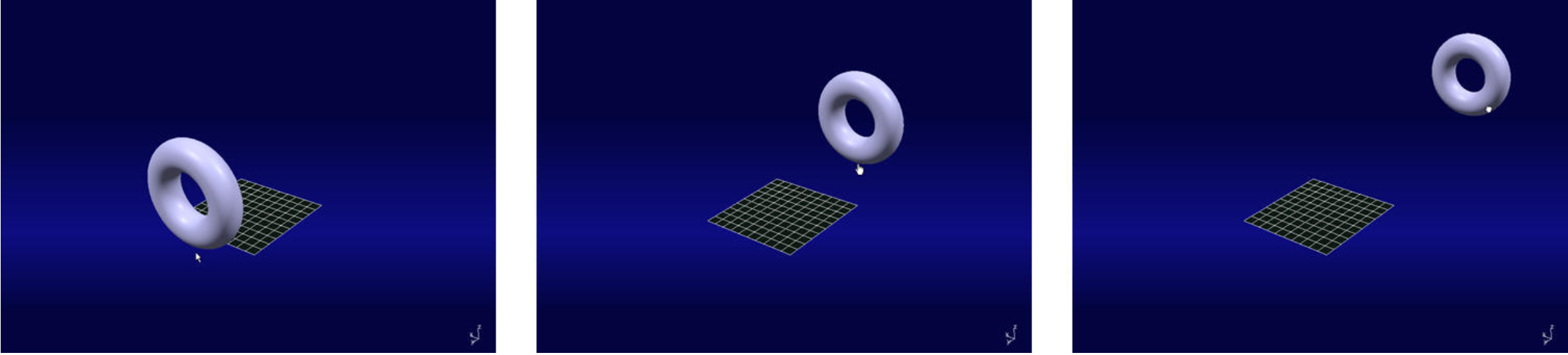
当用户选择并激活"操纵器"勾选项时,用户可以选择激活文档视图中的3D表达,并沿Y方向移动它们。
CAAVisBasics做什么
CAAVisBasics包含一个MDI交互式应用程序,在其模型窗口中显示视图。应用程序启动时会显示其中一个视图,其中包含一个圆环面的表达。
用户可以在应用程序中打开一个现有的CGR文件。然后会创建一个新的激活窗口,其中包含一个CAAVisBaseCGRDocument类的实例,该类嵌入了一个3D导航查看器,其主3D视点包含了CGR模型的所有3D表达。
MDI CAAVisBasics应用程序展示了CAA Visualization模型器的以下使用场景:
- 如何打开CGR文档文件并在3D查看器中显示其内容(参见[1](#1))。
- 如何创建圆环面的细分曲面,构建其图元并将其添加到自定义3D表达中(参见[2](#2))。
- 如何创建细节级别3D表达(参见[3](#3))。
- 如何为视图内主3D视点的所有3D表达构建渲染边界框(本文内容)。
- 如何重定帧和修改激活视图主视点的参数(参见[4](#4))。
- 如何移动激活视图主3D视点的所有表达。
本文重点介绍如何移动激活视图主3D视点的3D表达。
如何启动CAAVisBasics
要启动CAAVisBasics,您需要设置构建时环境,然后编译CAAVisBasics及其先决条件,设置运行时环境,最后执行用例[5](#5)。
通过运行以下命令来运行用例:
mkrun -c CAAVisBasics.exe当您启动CAAVisBasics时,会显示以下内容:
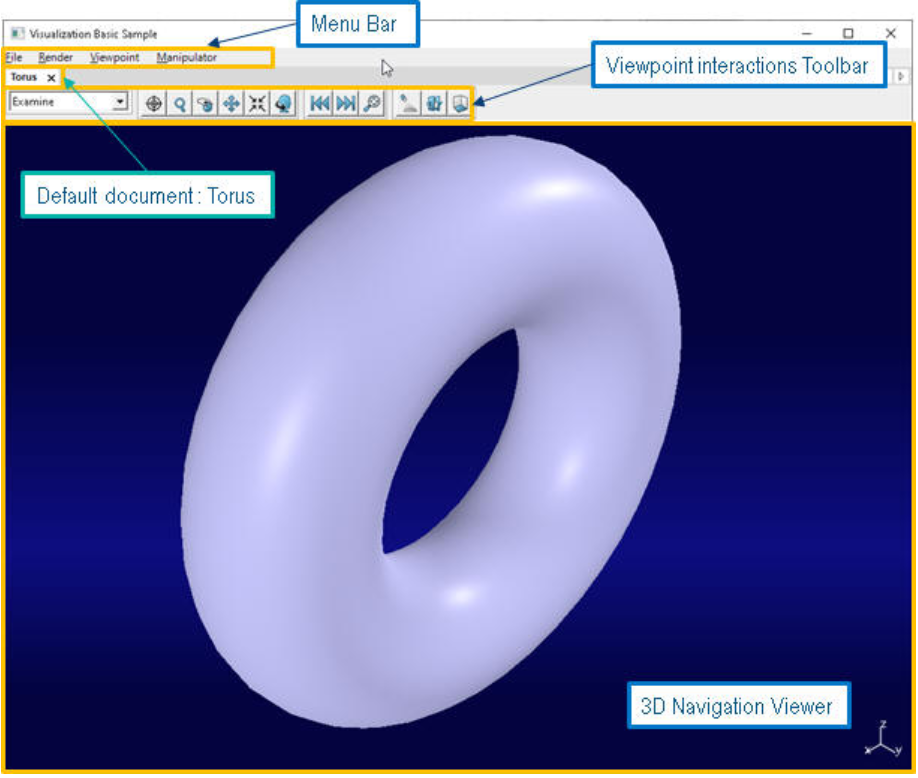
图片:应用程序启动界面,显示圆环面在3D导航查看器中。
圆环面在应用程序启动时立即显示在3D导航查看器中。
如果用户选择并激活"操纵器"勾选项,则激活视图的表达变得可选,并且用户能够沿Y方向移动它们。
在哪里找到CAAVisBasics代码?
CAAVisBasics用例由位于CAAVisualization.edu框架的CAAVisBasics.m模块中的几个类组成:
InstallRootFolder\CAADoc\CAAVisualization.edu\CAAVisBasics.m\其中InstallRootFolder [5](#5)是安装API CD-ROM的文件夹。
此用例涉及以下类:
- CAAVisBaseApplication - 用于承载查看器的交互式应用程序的类
- CAAVisBaseApplicationFrame - 模型基类的类
- CAAVisBaseManipulatorNotification - 与"操纵器"事件对应的通知
- CAAVisBaseView - 包含用于显示模型的查看器的模型窗口的类
操纵器命令架构
CAAVisBasics是一个可以包含多个对话窗口的交互式应用程序。
主类是CAAVisBaseApplication,它继承自CATInteractiveApplication类,这是所有交互式应用程序的基类。
CAAVisBaseApplication聚合了CAAVisBaseApplicationFrame,它建模了CAAVisBasics应用程序的主窗口。
"操纵器"勾选项命令
"操纵器"子菜单及其"操纵器"勾选项是在CAAVisBaseApplicationFrame的Build()方法中创建的。
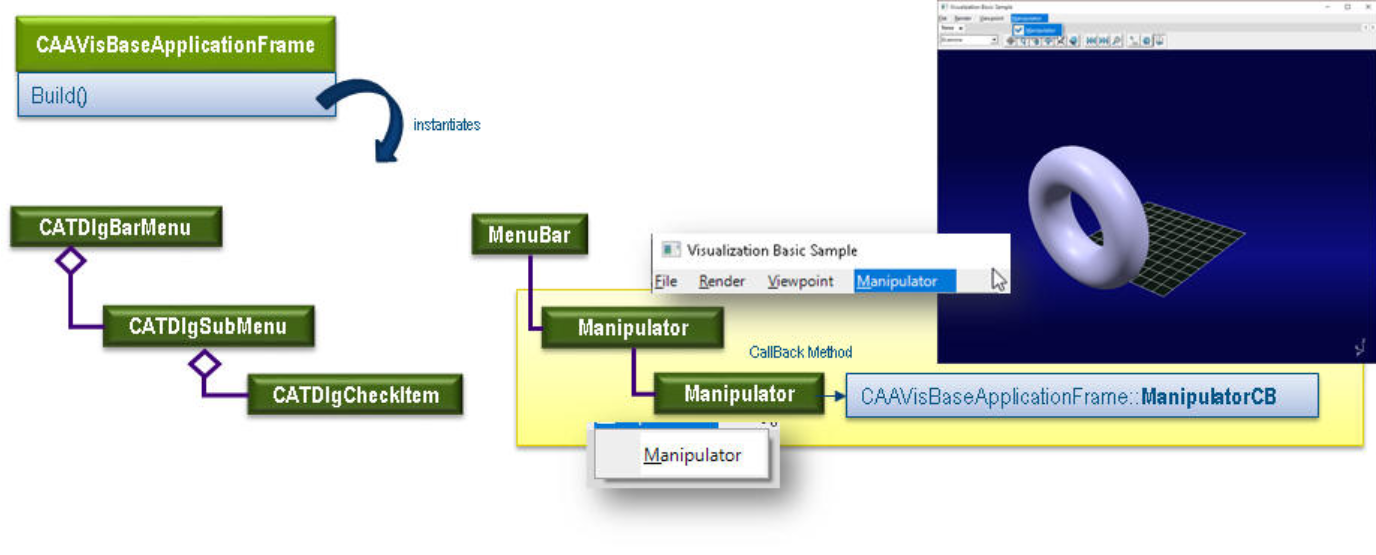
当用户首次启动CAAVisBasics交互式应用程序时,会调用以下代码来构建操纵器子菜单:
cpp
void CAAVisBaseApplicationFrame::Build()
{
  // ...
  // Manipulator 菜单
  // - Manipulator
  CATDlgSubMenu *pManipulatorMenu = new CATDlgSubMenu(pMenuBar, "Manipulator");
  _pManipulatorChkItem = new CATDlgCheckItem(pManipulatorMenu, "Manipulator");
  AddAnalyseNotificationCB( _pManipulatorChkItem, _pManipulatorChkItem->GetChkIModifyNotification(),
                            (CATCommandMethod)& CAAVisBaseApplicationFrame::ManipulatorCB,
                            NULL);
  // ...
}当用户点击勾选项"操纵器"时,会发送一个通知,该通知将调用回调方法CAAVisBaseApplicationFrame::ManipulatorCB。
CAAVisBaseApplicationFrame类具有以下数据成员:
- _pManipulatorChkItem : "操纵器"勾选项对话框对象。
- _aManipulatorStates,_ManipulatorStatesArraySize : 用于存储每个打开模型的"操纵器"勾选项状态的数组。
- _ActiveDocIndex : 一个int,用于跟踪当前激活模型的索引。
- _NumberOfDocuments : 一个int,用于跟踪打开的模型数量。
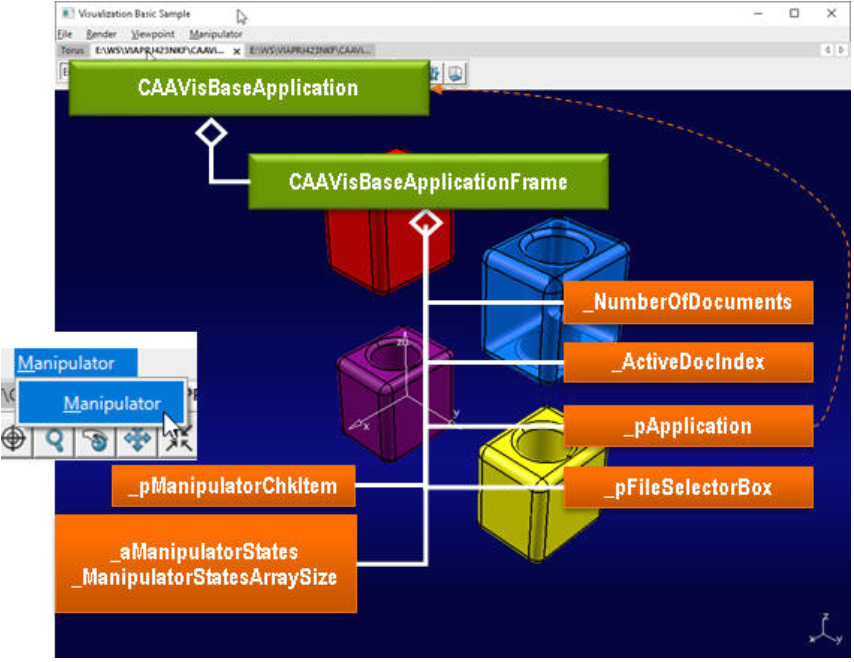
CAAVisBasics应用程序如何被通知向激活的3D表达添加操纵器
当用户调用回调方法CAAVisBaseApplicationFrame::ManipulatorCB时,CAAVisBaseApplicationFrame类实例化通知CAAVisBaseManipulatorNotification并将其发送给CAAVisBaseApplication类,后者订阅了该通知。
以下代码说明了此操作:
cpp
void CAAVisBaseApplicationFrame::ManipulatorCB( CATCommand *iPublisher,
                                                CATNotification *iNotification,
                                                CATCommandClientData iData)
{
    int itemChecked = 0;
    // 如果 _pManipulatorChkItem 被勾选,我们需要添加操纵器。
    if(CATDlgCheck == _pManipulatorChkItem->GetState())
    {
        itemChecked = 1;
        // 更新激活模型的 _pManipulatorChkItem 状态。
        _aManipulatorStates[_ActiveDocIndex] = 1;
    }
    else
    {
        itemChecked = 0;
        // 更新 _pManipulatorChkItem 状态。
        _aManipulatorStates[_ActiveDocIndex] = 0;
    }
    // 通知应用程序需要添加操纵器:
    CAAVisBaseManipulatorNotification *pNotification = new CAAVisBaseManipulatorNotification(itemChecked);
    SendNotification(_pApplication, pNotification);
}在CAAVisBaseApplication类中,通知CAAVisBaseManipulatorNotification与回调方法CAAVisBaseApplication::ManipulatorCB相关联。
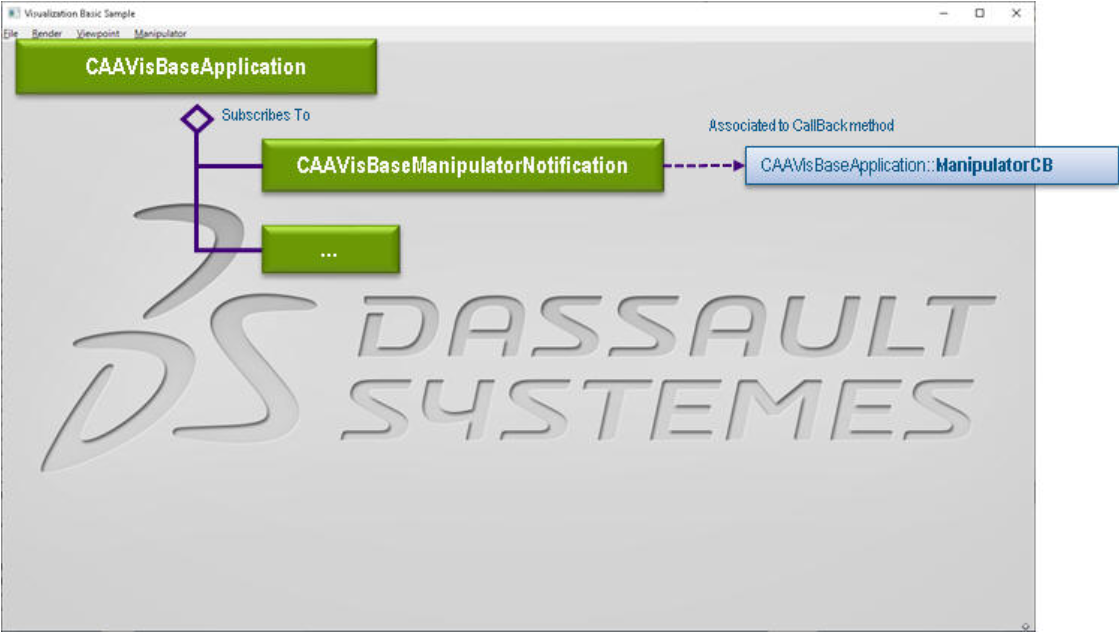
当CAAVisBaseApplication类收到CAAVisBaseManipulatorNotification 时,它会调用其回调方法CAAVisBaseApplication::ManipulatorCB,该方法通过调用CAAVisBaseApplication::AddManipulator()方法向三维表达添加一个3D操纵器:
cpp
void CAAVisBaseApplication::ManipulatorCB( CATCommand *iPublisher,
                                            CATNotification *iNotification,
                                            CATCommandClientData iData)
{
    CAAVisBaseManipulatorNotification *pNotification = NULL ;
    pNotification = (CAAVisBaseManipulatorNotification *)iNotification;
    if(NULL != pNotification)
    {
        AddManipulator(pNotification->GetState());
    }
}如文章[1](#1)中所述,激活窗口的CGR模型(3D Bag Rep)附加到由CAAVisBaseView类聚合的导航3D查看器。
CAAVisBaseApplicationFrame聚合了CGR应用程序文档(CAAVisBaseCGRDocument),其中包含包含CGR模型的CAAVisBaseView 实例类。
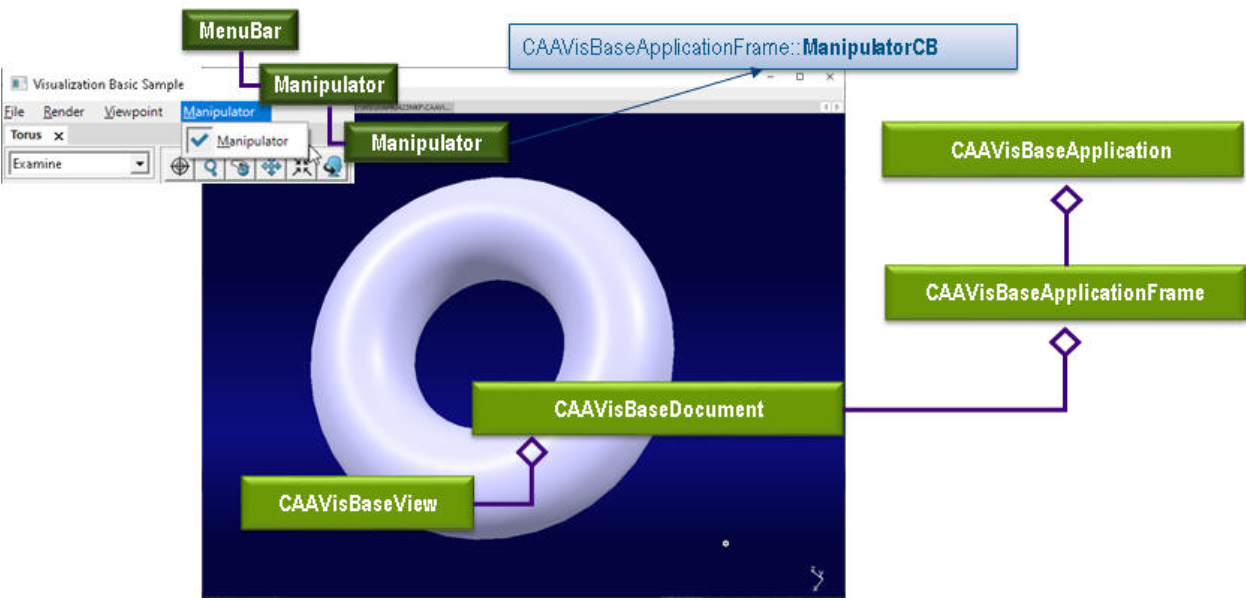
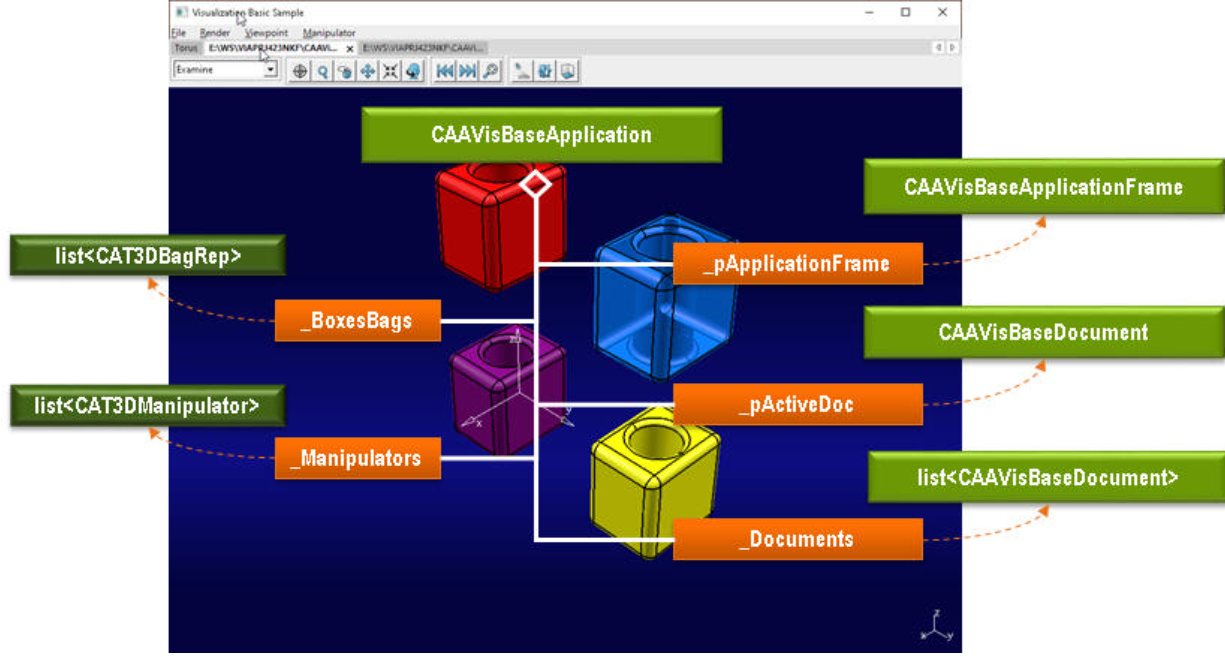
CAAVisBaseApplication类包含以下用于操纵器的数据成员:
- _BoxesBags : 包含每个打开模型的边界框的表达集合列表。
- _pApplicationFrame : 指向CAAVisBasics应用程序框架的指针。
- _pActiveDoc : 指向当前激活文档的指针。
- _Documents : 打开的文档列表。
- _Manipulators : 每个打开模型的3D表达的3D操纵器列表(每个打开的模型可能有一个操纵器)。
分步指南
现在让我们详细了解如何创建3D操纵器对象。
主要有三个步骤:
| # | 步骤 | 位置 |
|---|---|---|
| 1 | [向3D表达添加操纵器](# 步骤 位置 1 向3D表达添加操纵器 CAAVisBaseApplication的AddManipulator方法 2 操纵和移动激活的3D表达 CAAVisBaseApplication的OnManipulateCB方法) | CAAVisBaseApplication的AddManipulator方法 |
| 2 | [操纵和移动激活的3D表达](# 步骤 位置 1 向3D表达添加操纵器 CAAVisBaseApplication的AddManipulator方法 2 操纵和移动激活的3D表达 CAAVisBaseApplication的OnManipulateCB方法) | CAAVisBaseApplication的OnManipulateCB方法 |
向三维表达添加操纵器
CAAVisBaseApplication::AddManipulator确保创建一个附加到嵌入激活窗口中所有CAT3DRep的包的操纵器对象。
为此,该方法从激活文档检索模型(表达集合)并实例化一个附加到该集合的3D操纵器。
接下来,该方法实例化一个回调以接收关于操纵的通知。当表达被操纵时,会调用回调方法CAAVisBaseApplication::OnManipulateCB,以便根据用户的意图修改3D表达的位置。
以下是CAAVisBaseApplication::AddManipulator方法的代码概述:
cpp
void CAAVisBaseApplication::AddManipulator(int iItemChecked)
{
    // 如果没有打开模型,则无法添加或移除操纵器。
    if(0 == _Documents.length())
        return;
    // 获取查看器
    CAAVisBaseView *pDocView = NULL;
    if( NULL != _pActiveDoc )
    {
        pDocView = _pActiveDoc->GetView();
    }
    CATViewer *pViewer = pDocView->GetViewer();
    if(1 == iItemChecked && NULL != _pActiveDoc) // 我们必须添加一个操纵器
    {
        // 检索模型:
        // 这是我们将在其上添加操纵器的包:
        CAT3DBagRep *pRoot = _pActiveDoc->GetModel();
        // 现在,我们将实例化一个附加到此包的3D操纵器:
        // 我们希望我们的表达能沿一个方向移动
        CAT3DManipulator *pManipulator = new CAT3DManipulator(this,
                                                              "Manipulator",
                                                              pRoot,
                                                              CAT3DManipulator::DirectionTranslation);
        // 我们必须为操纵器设置一个初始位置。
        // 该位置不一定与包的位置相同。
        // 实际上,当操纵器移动时检索到的数据是相对于此初始位置的偏移量。
        // 这里,初始位置设置为原点。
        CATMathAxis initialPosition;
        pManipulator->SetPosition(initialPosition);
        // 设置变换特性:
        // 这里,我们有一个方向平移,因此我们将使用SetTranslationDirection方法:
        // 我们希望我们的对象沿y方向平移。
        CATMathDirection yDirection(0, 1, 0);
        pManipulator->SetTranslationDirection(yDirection);
        // 添加回调以接收关于操纵的通知:
        AddAnalyseNotificationCB(pManipulator, CATManipulator::GetCATManipulate(),
                                 (CATCommandMethod)& CAAVisBaseApplication::OnManipulateCB, NULL);
        // 我们维护一个与打开的模型列表相关联的操纵器列表。
        // 每个打开的模型都有一个关联的指向操纵器的指针,如果需要可以填充。
        _Manipulators += pManipulator;
        _Manipulators.swap(_ActiveDocIndex, _Manipulators.length()-1);
        _Manipulators -= _Manipulators[_Manipulators.length()-1];
    }
    else // 我们必须移除操纵器
    {
        // 我们跟踪已添加的操纵器
        // 更新我们的边界框列表
        CAT3DManipulator *pManipulatorToDelete = _Manipulators[_ActiveDocIndex];
        _Manipulators.fastadd(NULL);
        _Manipulators.swap(_ActiveDocIndex, _Manipulators.length()-1);
        _Manipulators -= _Manipulators[_Manipulators.length()-1];
        // 销毁操纵器
        if ( NULL != pManipulatorToDelete ) pManipulatorToDelete->Destroy();
        pManipulatorToDelete = NULL ;
    }
}
操纵和移动激活的三维表达
方法CAAVisBaseApplication::OnManipulateCB确保当表达被操纵时,对象的变换矩阵会根据接收到的平移进行更新。
我们检索包含从操纵器通知接收到的变换的CATTransformationNotification。
从该变换中提取平移向量,并用它来构建一个4x4的可视化矩阵。然后将此矩阵与表达集合(Bag Rep)的当前矩阵相乘,以更新其位置。操纵器的位置被重置为原点,以便后续操作。最后,强制重新绘制场景以反映更新。
以下是CAAVisBaseApplication::OnManipulateCB方法的代码概述:
cpp
void CAAVisBaseApplication::OnManipulateCB( CATCommand *iPublisher,
                                           CATNotification *iNotification,
                                           CATCommandClientData iData)
{
    // 我们希望我们的表达遵循操纵器的位置,并受限于定义的轴。
    CAAVisBaseView *pDocView = _pActiveDoc->GetView();
    CATViewer *pViewer = pDocView->GetViewer();
    // 我们正在检索包含变换的通知:
    CATTransformationNotification *pTransfoNotif = ((CATTransformationNotification *) iPublisher->SendCommandSpecificObject(CATTransformationNotification::ClassName(), iNotification));
    // ...
    // 我们从该通知中检索变换:
    const CATMathTransformation &pTransformation = pTransfoNotif->GetTransformation();
    // ...
    // 我们希望通过检索到的变换来移动我们的表达。
    // 要移动我们的表达集合(Bag Rep),我们可以将其变换矩阵乘以与检索到的变换对应的变换矩阵。
    // 我们为操纵器授权的变换是平移。我们首先需要检索平移向量:
    CATMathVector translationVector;
    pTransformation.GetVector(translationVector);
    // 我们正在从该平移向量构建一个4x4矩阵(可视化矩阵)。
    CAT4x4Matrix visuMatrix(translationVector);
    // 现在我们可以将此矩阵乘以表达集合(Bag Rep)的矩阵:
    // 检索模型:
    CAT3DBagRep *pRoot = _pActiveDoc->GetModel();
    // 获取初始矩阵:
    CAT4x4Matrix *pInitialMatrix = NULL ;
    if(NULL == pRoot->GetMatrix())
    {
        pInitialMatrix = new CAT4x4Matrix;
    }
    else
    {
        pInitialMatrix = new CAT4x4Matrix(*(pRoot->GetMatrix()));
    }
    // 将两个矩阵相乘:
    *pInitialMatrix *= visuMatrix;
    // 设置新矩阵
    pRoot->SetMatrix(*pInitialMatrix);
    pInitialMatrix->Release() ;
    pInitialMatrix = NULL ;
    // 重新初始化操纵器位置
    CAT3DManipulator *pManipulator = (CAT3DManipulator *)iPublisher;
    CATMathAxis origin;
    pManipulator->SetPosition(origin);
    // 强制重新绘制场景。
    pViewer->Draw();
}
简而言之
本用例展示了创建操纵器对象时涉及的对象。
这使得能够构建一个对象,允许在3D导航查看器的主视点中选择和操纵所有定义的CAT3DRep对象。
历史
版本:1 2020年8月 文档创建