目录
简介
- 通义灵码 AI 程序员,具备多文件代码修改(Multi-file Edit)和工具使用(Tool-use)的能力
- 可以与开发者协同完成编码任务,如需求实现、问题解决、单元测试用例生成、批量代码修改等。
使用
我们介绍两种编辑器插件的使用,一个是VSCODE,另外一个是IDE
VSCODE
- 在新版的通义灵码中,AI程序员已经修改为 文件编辑模式 点击,
- 文件编辑模式:目前只支持 VSCODE
- 打开通义灵码的对话框
- 选择文件编辑模式
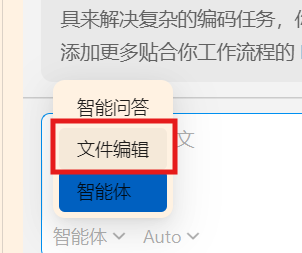
- 然后再对话框中输入想要实现的需求便可
- 此外,我们还可以选择相应的模型
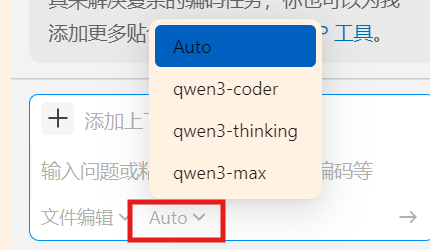 ,一般用auto便可
IDE
- 打开通义灵码的对话框
- 在左下角选择智能体
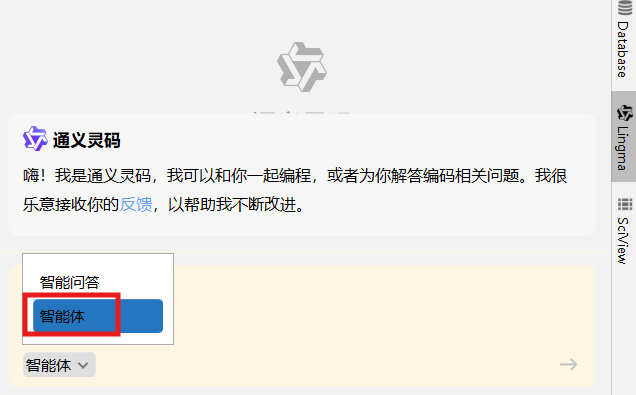
- 然后再对话框中输入想要实现的需求便可
协作过程
程序员与AI程序员的协作过程如下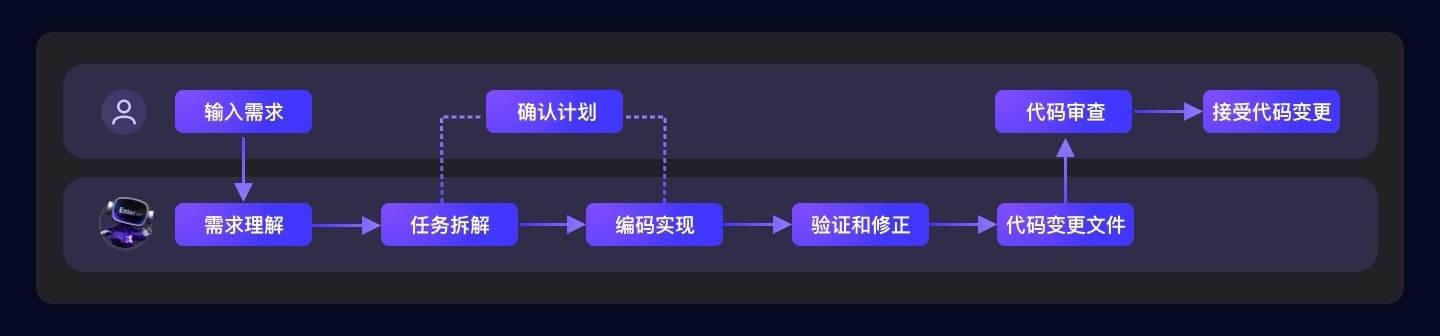
在整个过程中,我们需要完成的也就是四个步骤
- 输入需求
- 确认计划
- 代码审查
- 接受代码变更
实例
写一个贪吃蛇的游戏
VSCODE
-
输入需求时,我们尽量需求的各个细节进行明确,比如我们给如下的简要模板
请用原生JavaScript开发一个贪吃蛇游戏,要求:
2. 20×20网格,键盘控制
3. 包含分数系统和速度递增
4. 代码用面向对象方式组织
5. 包含详细的代码注释 -
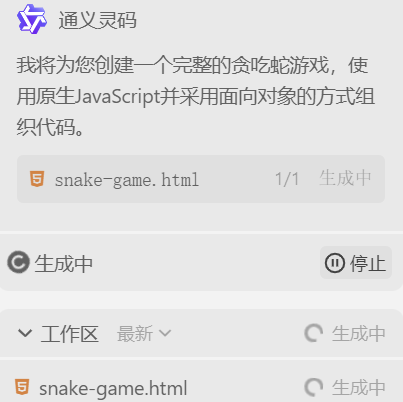
选择文件编辑模式,输入需求都对话框,通一灵码开始进行思考
-
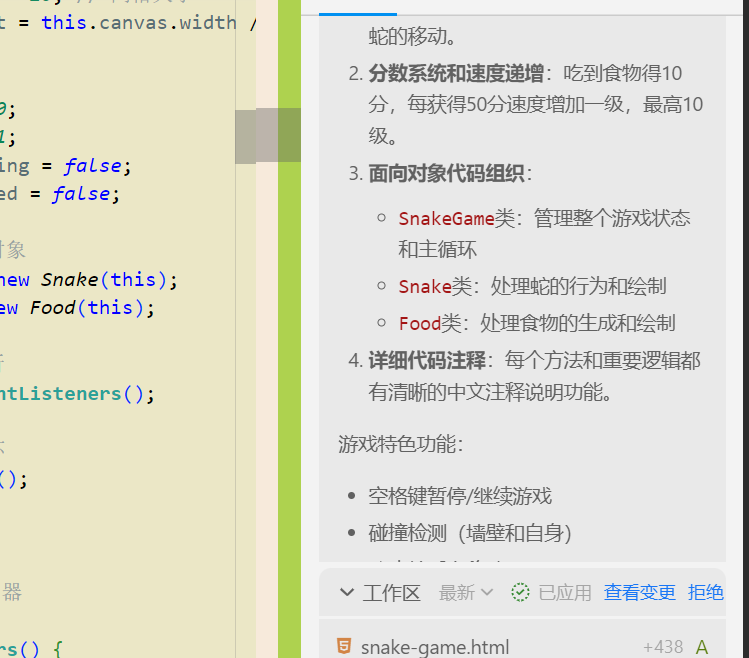
思考完成后,通一灵码已经将代码写好了,并带有相应的代码解释
-
相关按钮:
-
查看变更:通过查看变更按钮,可以查看变更的代码;此时会有diff页面出现

-
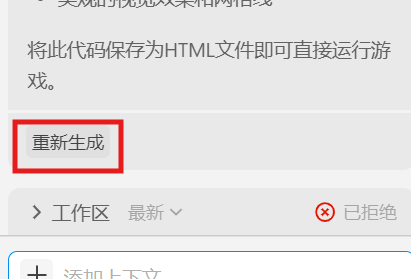
拒绝:通过绝按钮删除人工智能的书写。拒绝后,可以点击对话框的重新生成按钮,重新生成代码
这个时统一灵码写的代码
-
html
<!DOCTYPE html>
<html lang="zh-CN">
<head>
    <meta charset="UTF-8">
    <meta name="viewport" content="width=device-width, initial-scale=1.0">
    <title>贪吃蛇游戏</title>
    <style>
        body {
            display: flex;
            justify-content: center;
            align-items: center;
            height: 100vh;
            margin: 0;
            background-color: #f0f0f0;
            font-family: Arial, sans-serif;
        }

        .game-container {
            text-align: center;
        }

        #gameCanvas {
            border: 2px solid #333;
            background-color: #fff;
        }

        .score-board {
            margin-top: 20px;
            font-size: 24px;
            font-weight: bold;
        }

        .controls {
            margin-top: 15px;
            font-size: 16px;
            color: #666;
        }
    </style>
</head>
<body>
    <div class="game-container">
        <canvas id="gameCanvas" width="400" height="400"></canvas>
        <div class="score-board">得分: <span id="score">0</span></div>
        <div class="controls">使用方向键控制蛇的移动</div>
    </div>

    <script>
        /**
         * 贪吃蛇游戏主类
         */
        class SnakeGame {
            constructor() {
                // 获取画布和上下文
                this.canvas = document.getElementById('gameCanvas');
                this.ctx = this.canvas.getContext('2d');

                // 游戏网格设置
                this.gridSize = 20; // 网格大小
                this.tileCount = this.canvas.width / this.gridSize; // 网格数量

                // 初始化游戏对象
                this.snake = new Snake(this.tileCount);
                this.food = new Food(this.tileCount);

                // 游戏状态
                this.score = 0;
                this.gameSpeed = 150; // 毫秒
                this.gameRunning = false;

                // 绑定键盘事件
                this.bindKeyboardEvents();

                // 开始游戏循环
                this.gameLoop();
            }

            /**
             * 绑定键盘控制事件
             */
            bindKeyboardEvents() {
                document.addEventListener('keydown', (e) => {
                    switch(e.key) {
                        case 'ArrowUp':
                            this.snake.changeDirection(0, -1);
                            break;
                        case 'ArrowDown':
                            this.snake.changeDirection(0, 1);
                            break;
                        case 'ArrowLeft':
                            this.snake.changeDirection(-1, 0);
                            break;
                        case 'ArrowRight':
                            this.snake.changeDirection(1, 0);
                            break;
                    }
                });
            }

            /**
             * 游戏主循环
             */
            gameLoop() {
                if (this.gameRunning) {
                    this.update();
                    this.draw();
                }

                setTimeout(() => {
                    requestAnimationFrame(() => this.gameLoop());
                }, this.gameSpeed);
            }

            /**
             * 更新游戏状态
             */
            update() {
                // 移动蛇
                this.snake.move();

                // 检查是否吃到食物
                if (this.snake.head.x === this.food.x && this.snake.head.y === this.food.y) {
                    this.snake.grow();
                    this.food.spawn(this.tileCount);
                    this.score += 10;
                    this.updateScore();

                    // 增加游戏速度
                    if (this.gameSpeed > 50) {
                        this.gameSpeed -= 2;
                    }
                }

                // 检查碰撞
                if (this.snake.checkCollision(this.tileCount)) {
                    this.gameOver();
                }
            }

            /**
             * 绘制游戏画面
             */
            draw() {
                // 清空画布
                this.ctx.fillStyle = '#fff';
                this.ctx.fillRect(0, 0, this.canvas.width, this.canvas.height);

                // 绘制网格线
                this.drawGrid();

                // 绘制食物
                this.food.draw(this.ctx, this.gridSize);

                // 绘制蛇
                this.snake.draw(this.ctx, this.gridSize);
            }

            /**
             * 绘制网格线
             */
            drawGrid() {
                this.ctx.strokeStyle = '#eee';
                this.ctx.lineWidth = 1;

                // 绘制垂直线
                for (let i = 0; i <= this.tileCount; i++) {
                    this.ctx.beginPath();
                    this.ctx.moveTo(i * this.gridSize, 0);
                    this.ctx.lineTo(i * this.gridSize, this.canvas.height);
                    this.ctx.stroke();
                }

                // 绘制水平线
                for (let i = 0; i <= this.tileCount; i++) {
                    this.ctx.beginPath();
                    this.ctx.moveTo(0, i * this.gridSize);
                    this.ctx.lineTo(this.canvas.width, i * this.gridSize);
                    this.ctx.stroke();
                }
            }

            /**
             * 更新分数显示
             */
            updateScore() {
                document.getElementById('score').textContent = this.score;
            }

            /**
             * 游戏结束处理
             */
            gameOver() {
                this.gameRunning = false;
                alert(`游戏结束!最终得分: ${this.score}`);
                this.reset();
            }

            /**
             * 重置游戏
             */
            reset() {
                this.snake = new Snake(this.tileCount);
                this.food = new Food(this.tileCount);
                this.score = 0;
                this.gameSpeed = 150;
                this.updateScore();
                this.gameRunning = true;
            }
        }

        /**
         * 蛇类
         */
        class Snake {
            constructor(tileCount) {
                // 初始化蛇的位置(网格坐标)
                this.body = [
                    {x: 10, y: 10}, // 头部
                    {x: 9, y: 10},  // 身体
                    {x: 8, y: 10}   // 尾部
                ];

                // 初始移动方向(向右)
                this.dx = 1;
                this.dy = 0;

                // 下一帧的方向(防止反向移动)
                this.nextDx = this.dx;
                this.nextDy = this.dy;
            }

            /**
             * 改变移动方向
             */
            changeDirection(dx, dy) {
                // 防止反向移动(不能直接掉头)
                if (dx !== -this.dx || dy !== -this.dy) {
                    this.nextDx = dx;
                    this.nextDy = dy;
                }
            }

            /**
             * 移动蛇
             */
            move() {
                // 应用下一帧的方向
                this.dx = this.nextDx;
                this.dy = this.nextDy;

                // 计算新头部位置
                const head = {
                    x: this.body[0].x + this.dx,
                    y: this.body[0].y + this.dy
                };

                // 将新头部添加到身体前端
                this.body.unshift(head);

                // 移除尾部(除非正在生长)
                if (!this.growing) {
                    this.body.pop();
                } else {
                    this.growing = false;
                }
            }

            /**
             * 蛇生长(吃到食物时调用)
             */
            grow() {
                this.growing = true;
            }

            /**
             * 检查碰撞
             */
            checkCollision(tileCount) {
                const head = this.body[0];

                // 检查边界碰撞
                if (head.x < 0 || head.x >= tileCount ||
                    head.y < 0 || head.y >= tileCount) {
                    return true;
                }

                // 检查自身碰撞
                for (let i = 1; i < this.body.length; i++) {
                    if (head.x === this.body[i].x && head.y === this.body[i].y) {
                        return true;
                    }
                }

                return false;
            }

            /**
             * 绘制蛇
             */
            draw(ctx, gridSize) {
                // 绘制蛇身
                ctx.fillStyle = '#4CAF50';
                for (let i = 0; i < this.body.length; i++) {
                    ctx.fillRect(
                        this.body[i].x * gridSize,
                        this.body[i].y * gridSize,
                        gridSize - 1,
                        gridSize - 1
                    );
                }

                // 绘制蛇头(不同颜色)
                ctx.fillStyle = '#2E7D32';
                ctx.fillRect(
                    this.body[0].x * gridSize,
                    this.body[0].y * gridSize,
                    gridSize - 1,
                    gridSize - 1
                );
            }

            /**
             * 获取蛇头位置
             */
            get head() {
                return this.body[0];
            }
        }

        /**
         * 食物类
         */
        class Food {
            constructor(tileCount) {
                this.spawn(tileCount);
            }

            /**
             * 生成食物位置
             */
            spawn(tileCount) {
                this.x = Math.floor(Math.random() * tileCount);
                this.y = Math.floor(Math.random() * tileCount);
            }

            /**
             * 绘制食物
             */
            draw(ctx, gridSize) {
                ctx.fillStyle = '#F44336';
                ctx.fillRect(
                    this.x * gridSize,
                    this.y * gridSize,
                    gridSize - 1,
                    gridSize - 1
                );
            }
        }

        // 启动游戏
        window.onload = function() {
            const game = new SnakeGame();
            game.gameRunning = true;
        };
    </script>
</body>
</html>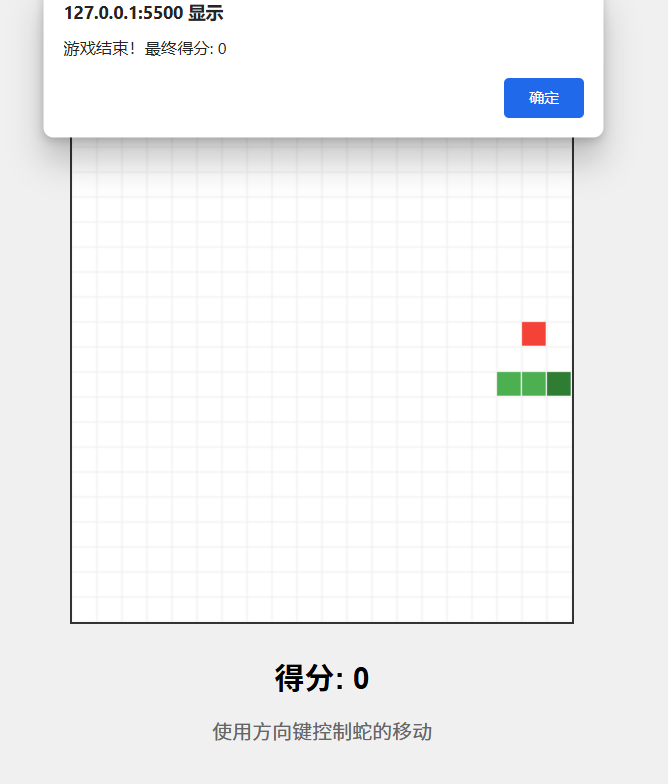
-
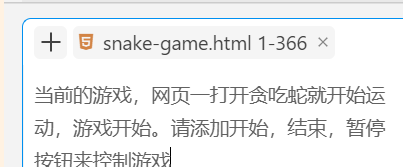
我们发现打开这个代码,蛇就开始移动,往往反应不过来,这个时候我们增加需求:添加开始/暂停按钮来开始和暂停游戏,我们在对话框中输入如下
当前的游戏,网页一打开贪吃蛇就开始运动,游戏开始。请添加开始,结束,暂停按钮来控制游戏
-
注意需要把文件添加为上下文
修改后的代码如下
html
<!DOCTYPE html>
<html lang="zh-CN">
<head>
<meta charset="UTF-8">
<meta name="viewport" content="width=device-width, initial-scale=1.0">
<title>贪吃蛇游戏</title>
<style>
body {
display: flex;
justify-content: center;
align-items: center;
height: 100vh;
margin: 0;
background-color: #f0f0f0;
font-family: Arial, sans-serif;
}
.game-container {
text-align: center;
}
#gameCanvas {
border: 2px solid #333;
background-color: #fff;
}
.score-board {
margin-top: 20px;
font-size: 24px;
font-weight: bold;
}
.controls {
margin-top: 15px;
font-size: 16px;
color: #666;
}
.game-buttons {
margin-top: 20px;
}
.game-buttons button {
padding: 10px 20px;
margin: 0 10px;
font-size: 16px;
cursor: pointer;
border: none;
border-radius: 5px;
background-color: #4CAF50;
color: white;
}
.game-buttons button:hover {
background-color: #45a049;
}
.game-buttons button:disabled {
background-color: #cccccc;
cursor: not-allowed;
}
</style>
</head>
<body>
<div class="game-container">
<canvas id="gameCanvas" width="400" height="400"></canvas>
<div class="score-board">得分: <span id="score">0</span></div>
<div class="controls">使用方向键控制蛇的移动</div>
<div class="game-buttons">
<button id="startBtn">开始游戏</button>
<button id="pauseBtn" disabled>暂停游戏</button>
<button id="resetBtn">重新开始</button>
</div>
</div>
<script>
/**
* 贪吃蛇游戏主类
*/
class SnakeGame {
constructor() {
// 获取画布和上下文
this.canvas = document.getElementById('gameCanvas');
this.ctx = this.canvas.getContext('2d');
// 游戏网格设置
this.gridSize = 20; // 网格大小
this.tileCount = this.canvas.width / this.gridSize; // 网格数量
// 初始化游戏对象
this.snake = new Snake(this.tileCount);
this.food = new Food(this.tileCount);
// 游戏状态
this.score = 0;
this.gameSpeed = 150; // 毫秒
this.gameRunning = false;
this.gamePaused = false;
// 获取按钮元素
this.startBtn = document.getElementById('startBtn');
this.pauseBtn = document.getElementById('pauseBtn');
this.resetBtn = document.getElementById('resetBtn');
// 绑定事件
this.bindKeyboardEvents();
this.bindButtonEvents();
// 初始化显示
this.updateButtonStates();
this.draw();
}
/**
* 绑定键盘控制事件
*/
bindKeyboardEvents() {
document.addEventListener('keydown', (e) => {
// 只有游戏运行时才响应键盘事件
if (!this.gameRunning || this.gamePaused) return;
switch(e.key) {
case 'ArrowUp':
this.snake.changeDirection(0, -1);
break;
case 'ArrowDown':
this.snake.changeDirection(0, 1);
break;
case 'ArrowLeft':
this.snake.changeDirection(-1, 0);
break;
case 'ArrowRight':
this.snake.changeDirection(1, 0);
break;
}
});
}
/**
* 绑定按钮事件
*/
bindButtonEvents() {
this.startBtn.addEventListener('click', () => {
this.startGame();
});
this.pauseBtn.addEventListener('click', () => {
this.togglePause();
});
this.resetBtn.addEventListener('click', () => {
this.resetGame();
});
}
/**
* 开始游戏
*/
startGame() {
if (!this.gameRunning) {
this.gameRunning = true;
this.gamePaused = false;
this.updateButtonStates();
this.gameLoop();
} else if (this.gamePaused) {
this.gamePaused = false;
this.updateButtonStates();
this.gameLoop();
}
}
/**
* 暂停/继续游戏
*/
togglePause() {
this.gamePaused = !this.gamePaused;
this.updateButtonStates();
if (!this.gamePaused) {
this.gameLoop();
}
}
/**
* 重置游戏
*/
resetGame() {
this.gameRunning = false;
this.gamePaused = false;
this.snake = new Snake(this.tileCount);
this.food = new Food(this.tileCount);
this.score = 0;
this.gameSpeed = 150;
this.updateScore();
this.updateButtonStates();
this.draw();
}
/**
* 更新按钮状态
*/
updateButtonStates() {
if (!this.gameRunning) {
this.startBtn.disabled = false;
this.startBtn.textContent = '开始游戏';
this.pauseBtn.disabled = true;
this.pauseBtn.textContent = '暂停游戏';
} else if (this.gamePaused) {
this.startBtn.disabled = false;
this.startBtn.textContent = '继续游戏';
this.pauseBtn.disabled = false;
this.pauseBtn.textContent = '继续游戏';
} else {
this.startBtn.disabled = true;
this.startBtn.textContent = '游戏中...';
this.pauseBtn.disabled = false;
this.pauseBtn.textContent = '暂停游戏';
}
}
/**
* 游戏主循环
*/
gameLoop() {
if (this.gameRunning && !this.gamePaused) {
this.update();
this.draw();
}
if (this.gameRunning && !this.gamePaused) {
setTimeout(() => {
requestAnimationFrame(() => this.gameLoop());
}, this.gameSpeed);
}
}
/**
* 更新游戏状态
*/
update() {
// 移动蛇
this.snake.move();
// 检查是否吃到食物
if (this.snake.head.x === this.food.x && this.snake.head.y === this.food.y) {
this.snake.grow();
this.food.spawn(this.tileCount);
this.score += 10;
this.updateScore();
// 增加游戏速度
if (this.gameSpeed > 50) {
this.gameSpeed -= 2;
}
}
// 检查碰撞
if (this.snake.checkCollision(this.tileCount)) {
this.gameOver();
}
}
/**
* 绘制游戏画面
*/
draw() {
// 清空画布
this.ctx.fillStyle = '#fff';
this.ctx.fillRect(0, 0, this.canvas.width, this.canvas.height);
// 绘制网格线
this.drawGrid();
// 绘制食物
this.food.draw(this.ctx, this.gridSize);
// 绘制蛇
this.snake.draw(this.ctx, this.gridSize);
// 如果游戏暂停,显示暂停提示
if (this.gamePaused) {
this.ctx.fillStyle = 'rgba(0, 0, 0, 0.5)';
this.ctx.fillRect(0, 0, this.canvas.width, this.canvas.height);
this.ctx.fillStyle = '#ffffff';
this.ctx.font = '30px Arial';
this.ctx.textAlign = 'center';
this.ctx.fillText('游戏已暂停', this.canvas.width/2, this.canvas.height/2);
}
}
/**
* 绘制网格线
*/
drawGrid() {
this.ctx.strokeStyle = '#eee';
this.ctx.lineWidth = 1;
// 绘制垂直线
for (let i = 0; i <= this.tileCount; i++) {
this.ctx.beginPath();
this.ctx.moveTo(i * this.gridSize, 0);
this.ctx.lineTo(i * this.gridSize, this.canvas.height);
this.ctx.stroke();
}
// 绘制水平线
for (let i = 0; i <= this.tileCount; i++) {
this.ctx.beginPath();
this.ctx.moveTo(0, i * this.gridSize);
this.ctx.lineTo(this.canvas.width, i * this.gridSize);
this.ctx.stroke();
}
}
/**
* 更新分数显示
*/
updateScore() {
document.getElementById('score').textContent = this.score;
}
/**
* 游戏结束处理
*/
gameOver() {
this.gameRunning = false;
this.gamePaused = false;
alert(`游戏结束!最终得分: ${this.score}`);
this.updateButtonStates();
}
}
/**
* 蛇类
*/
class Snake {
constructor(tileCount) {
// 初始化蛇的位置(网格坐标)
this.body = [
{x: 10, y: 10}, // 头部
{x: 9, y: 10}, // 身体
{x: 8, y: 10} // 尾部
];
// 初始移动方向(向右)
this.dx = 1;
this.dy = 0;
// 下一帧的方向(防止反向移动)
this.nextDx = this.dx;
this.nextDy = this.dy;
}
/**
* 改变移动方向
*/
changeDirection(dx, dy) {
// 防止反向移动(不能直接掉头)
if (dx !== -this.dx || dy !== -this.dy) {
this.nextDx = dx;
this.nextDy = dy;
}
}
/**
* 移动蛇
*/
move() {
// 应用下一帧的方向
this.dx = this.nextDx;
this.dy = this.nextDy;
// 计算新头部位置
const head = {
x: this.body[0].x + this.dx,
y: this.body[0].y + this.dy
};
// 将新头部添加到身体前端
this.body.unshift(head);
// 移除尾部(除非正在生长)
if (!this.growing) {
this.body.pop();
} else {
this.growing = false;
}
}
/**
* 蛇生长(吃到食物时调用)
*/
grow() {
this.growing = true;
}
/**
* 检查碰撞
*/
checkCollision(tileCount) {
const head = this.body[0];
// 检查边界碰撞
if (head.x < 0 || head.x >= tileCount ||
head.y < 0 || head.y >= tileCount) {
return true;
}
// 检查自身碰撞
for (let i = 1; i < this.body.length; i++) {
if (head.x === this.body[i].x && head.y === this.body[i].y) {
return true;
}
}
return false;
}
/**
* 绘制蛇
*/
draw(ctx, gridSize) {
// 绘制蛇身
ctx.fillStyle = '#4CAF50';
for (let i = 0; i < this.body.length; i++) {
ctx.fillRect(
this.body[i].x * gridSize,
this.body[i].y * gridSize,
gridSize - 1,
gridSize - 1
);
}
// 绘制蛇头(不同颜色)
ctx.fillStyle = '#2E7D32';
ctx.fillRect(
this.body[0].x * gridSize,
this.body[0].y * gridSize,
gridSize - 1,
gridSize - 1
);
}
/**
* 获取蛇头位置
*/
get head() {
return this.body[0];
}
}
/**
* 食物类
*/
class Food {
constructor(tileCount) {
this.spawn(tileCount);
}
/**
* 生成食物位置
*/
spawn(tileCount) {
this.x = Math.floor(Math.random() * tileCount);
this.y = Math.floor(Math.random() * tileCount);
}
/**
* 绘制食物
*/
draw(ctx, gridSize) {
ctx.fillStyle = '#F44336';
ctx.fillRect(
this.x * gridSize,
this.y * gridSize,
gridSize - 1,
gridSize - 1
);
}
}
// 启动游戏
window.onload = function() {
const game = new SnakeGame();
};
</script>
</body>
</html>画面如下
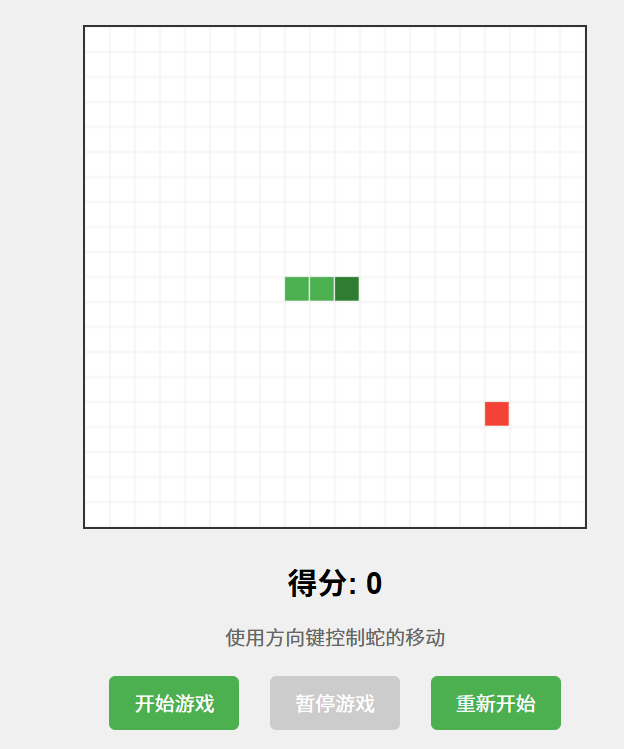
现在游戏就可以玩了。
IDE
这里使用的是pycharm来做示例
-
打开通义灵码的对话框。我们可以通过快捷键
ctrl+shift+L,或者点击侧边栏的按钮打开对话框
-
在对话框中,左下角两个选项,一个是智能体,另外另外一个是智能问答
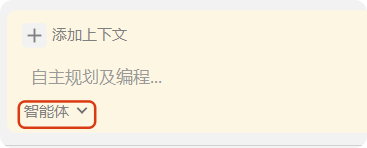
- 智能问答普通的问答模式,而智能体模式具备自主决策、环境感知、工具使用等能力
- 更适合项目级别的开发,他可以自动感知工程框架、技术栈、所需代码文件、错误信息等工程内信息,无需手动添加工程上下文,任务描述更轻松
-
我们选择智能体,把上面的需求粘贴并发送
请用原生JavaScript开发一个贪吃蛇游戏,要求:
4. 20×20网格,键盘控制
5. 包含分数系统和速度递增
6. 代码用面向对象方式组织
7. 包含详细的代码注释 -
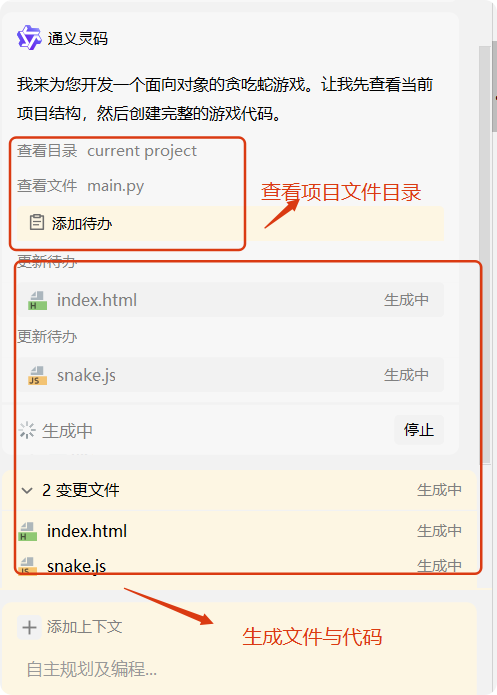
当发送后,智能体开始思考并生成代码,如图
-
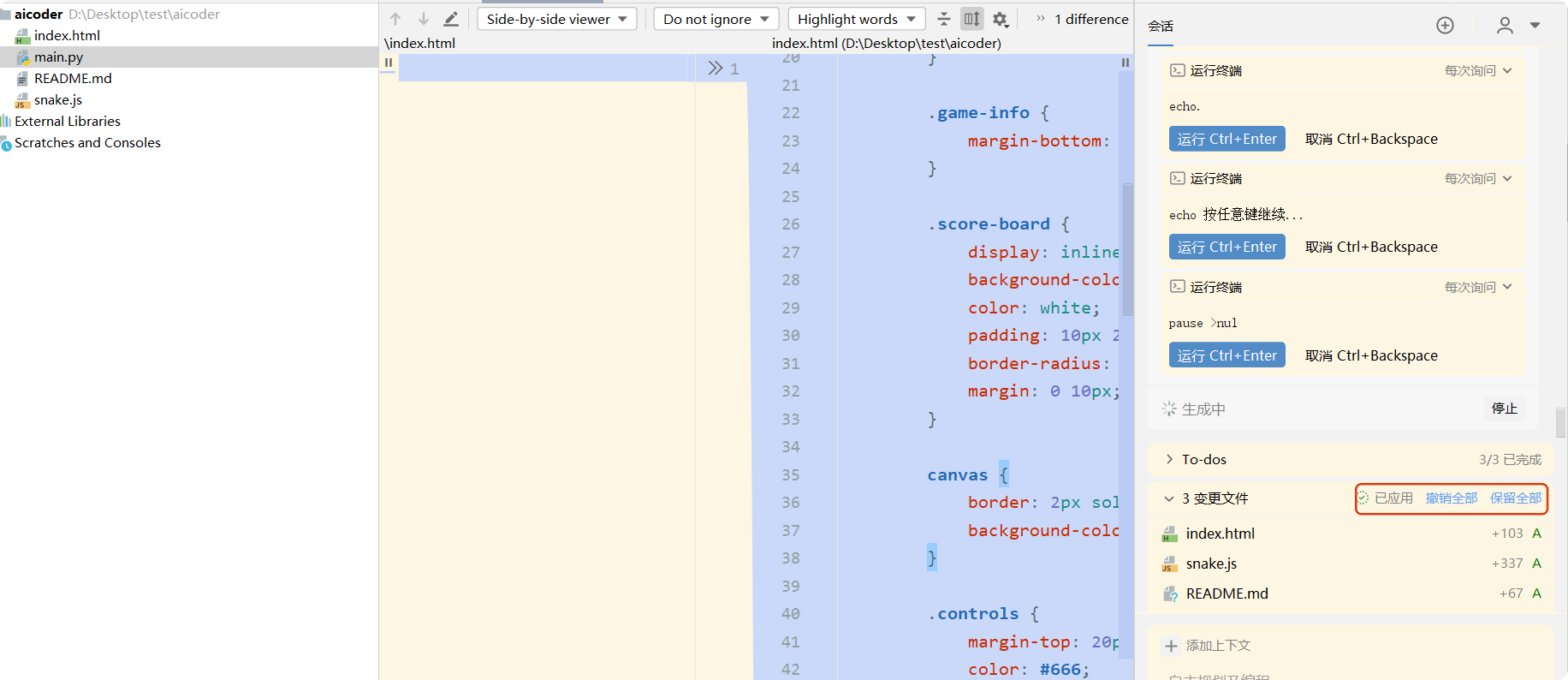
当运行完成后,界面直接进入diff模式查看代码,同时也具有vscode的相应的按钮,来决定是否接受代码
-
如果接受代码,那么可以直接关闭diff模式的弹窗,查看项目代码或者直接运行项目
-
不接受代码也可以让他重新生成。