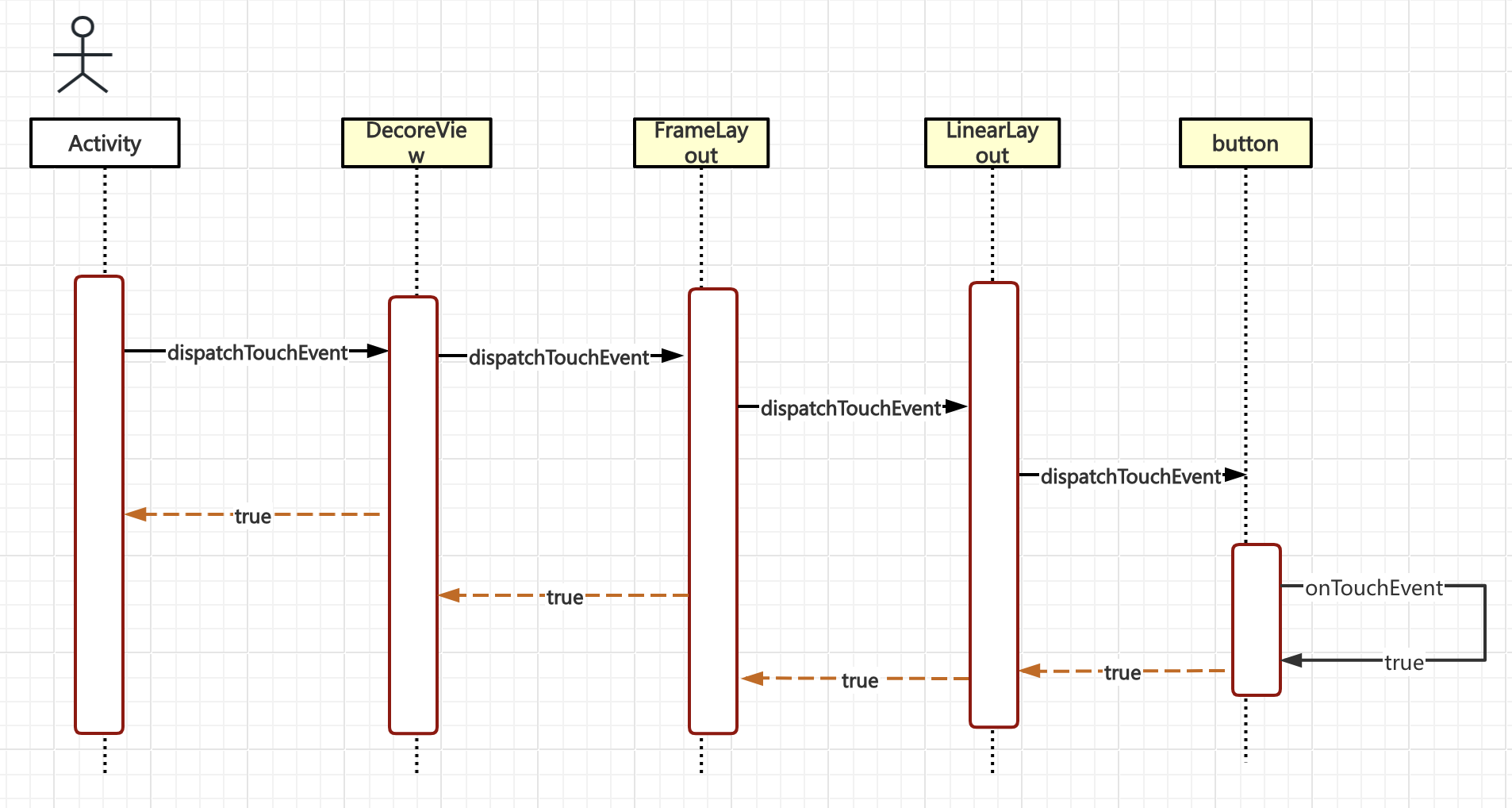
现在我们的ACTION_DOWN事件终于来到了button,我们来看button是怎样处理的。
button的dispatchTouchEvent
源码中呢,Button类和TextView类没有重写dispatchTouchEvent方法,但是都集成自View,直接看View的dispatchTouchEvent方法:
java
//View.java
//返回true或者false
public boolean dispatchTouchEvent(MotionEvent event) {
    // If the event should be handled by accessibility focus first.
    if (event.isTargetAccessibilityFocus()) {//无障碍服务 略过
        // We don't have focus or no virtual descendant has it, do not handle the event.
        if (!isAccessibilityFocusedViewOrHost()) {
            return false;
        }
        // We have focus and got the event, then use normal event dispatch.
        event.setTargetAccessibilityFocus(false);
    }
    boolean result = false;//默认为false

    if (mInputEventConsistencyVerifier != null) {//启动非用户机器,略过
        mInputEventConsistencyVerifier.onTouchEvent(event, 0);
    }

    final int actionMasked = event.getActionMasked();
    if (actionMasked == MotionEvent.ACTION_DOWN) {//执行
        // Defensive cleanup for new gesture
        stopNestedScroll();
    }

    if (onFilterTouchEventForSecurity(event)) {
        //enable的可滚动组件
        if ((mViewFlags & ENABLED_MASK) == ENABLED && handleScrollBarDragging(event)) {//不进入
            result = true;
        }
        //noinspection SimplifiableIfStatement
//如果设置了onTouchListener且onTouch返回了true
        ListenerInfo li = mListenerInfo;
        if (li != null && li.mOnTouchListener != null
                && (mViewFlags & ENABLED_MASK) == ENABLED
                && li.mOnTouchListener.onTouch(this, event)) {
            result = true;
        }
        //如果前面都返回的false,那么查看onTouchEvent
        if (!result && onTouchEvent(event)) {
            result = true;
        }
    }

    if (!result && mInputEventConsistencyVerifier != null) {
        mInputEventConsistencyVerifier.onUnhandledEvent(event, 0);
    }

    // Clean up after nested scrolls if this is the end of a gesture;
    // also cancel it if we tried an ACTION_DOWN but we didn't want the rest
    // of the gesture.
    if (actionMasked == MotionEvent.ACTION_UP ||
            actionMasked == MotionEvent.ACTION_CANCEL ||
            (actionMasked == MotionEvent.ACTION_DOWN && !result)) {
        stopNestedScroll();
    }

    return result;
}
上面的代码中,主要是做了两件事情
- 1.检查动作的环境,是否无障碍模式,是否落在了可滚动的view上等,
我们的例子是button。所以不考虑
- 2.先执行View的onTouchListener,再执行onTouchEvent,流程如下
是否设置了onTouchListener
├─ false ===> View.OnTouchEvent
└─true ===> OnTouchListerner.onTouch
├─ 返回true 直接return
└─ 返回false ====> View.OnTouchEvent
这里呢,假设button没有设置onTouchListener,那么直接进入onTouchEvent。
OnTouchEvent:
button并没有重写OnTouchEvent,但是TextView重写了这个方法
java
//TextView.java

@Override
    public boolean onTouchEvent(MotionEvent event) {
        if (DEBUG_CURSOR) {
            logCursor("onTouchEvent", "%d: %s (%f,%f)",
                    event.getSequenceNumber(),
                    MotionEvent.actionToString(event.getActionMasked()),
                    event.getX(), event.getY());
        }
        if (!isFromPrimePointer(event, false)) {
            return true;
        }

        final int action = event.getActionMasked();
        if (mEditor != null) {//可编辑,对应Edittext等情况
            mEditor.onTouchEvent(event);

            if (mEditor.mInsertionPointCursorController != null
                    && mEditor.mInsertionPointCursorController.isCursorBeingModified()) {
                return true;
            }
            if (mEditor.mSelectionModifierCursorController != null
                    && mEditor.mSelectionModifierCursorController.isDragAcceleratorActive()) {
                return true;
            }
        }

        final boolean superResult = super.onTouchEvent(event);//执行View的onTouchEvent方法
        if (DEBUG_CURSOR) {
            logCursor("onTouchEvent", "superResult=%s", superResult);
        }

        /*
         * Don't handle the release after a long press, because it will move the selection away from
         * whatever the menu action was trying to affect. If the long press should have triggered an
         * insertion action mode, we can now actually show it.
         */
        if (mEditor != null && mEditor.mDiscardNextActionUp && action == MotionEvent.ACTION_UP) {
            mEditor.mDiscardNextActionUp = false;
            if (DEBUG_CURSOR) {
                logCursor("onTouchEvent", "release after long press detected");
            }
            if (mEditor.mIsInsertionActionModeStartPending) {
                mEditor.startInsertionActionMode();
                mEditor.mIsInsertionActionModeStartPending = false;
            }
            return superResult;
        }

        final boolean touchIsFinished = (action == MotionEvent.ACTION_UP)
                && (mEditor == null || !mEditor.mIgnoreActionUpEvent) && isFocused();

        if ((mMovement != null || onCheckIsTextEditor()) && isEnabled()
                && mText instanceof Spannable && mLayout != null) {//对应文本为Spannable的情况
            boolean handled = false;

            if (mMovement != null) {
                handled |= mMovement.onTouchEvent(this, mSpannable, event);
            }

            final boolean textIsSelectable = isTextSelectable();
            if (touchIsFinished && mLinksClickable && mAutoLinkMask != 0 && textIsSelectable) {
                // The LinkMovementMethod which should handle taps on links has not been installed
                // on non editable text that support text selection.
                // We reproduce its behavior here to open links for these.
                ClickableSpan[] links = mSpannable.getSpans(getSelectionStart(),
                    getSelectionEnd(), ClickableSpan.class);

                if (links.length > 0) {
                    links[0].onClick(this);
                    handled = true;
                }
            }

            if (touchIsFinished && (isTextEditable() || textIsSelectable)) {
                // Show the IME, except when selecting in read-only text.
                final InputMethodManager imm = getInputMethodManager();
                viewClicked(imm);
                if (isTextEditable() && mEditor.mShowSoftInputOnFocus && imm != null) {
                    imm.showSoftInput(this, 0);
                }

                // The above condition ensures that the mEditor is not null
                mEditor.onTouchUpEvent(event);

                handled = true;
            }

            if (handled) {
                return true;
            }
        }

        return superResult;
    }
可以看到,虽然TextView重写了这个方法,但是只有可编辑模式下,比如EditText (没错,EditText也是TextView的子类😂)才会单独处理。
其余情况下依然是直接执行父类(也就是View)的OnTouchEvent.
View的OnTouchEvent
java
//View.java
public boolean onTouchEvent(MotionEvent event) {
        final float x = event.getX();
        final float y = event.getY();
        final int viewFlags = mViewFlags;
        final int action = event.getAction();

        final boolean clickable = ((viewFlags & CLICKABLE) == CLICKABLE
                || (viewFlags & LONG_CLICKABLE) == LONG_CLICKABLE)
                || (viewFlags & CONTEXT_CLICKABLE) == CONTEXT_CLICKABLE;

        if ((viewFlags & ENABLED_MASK) == DISABLED) {
            if (action == MotionEvent.ACTION_UP && (mPrivateFlags & PFLAG_PRESSED) != 0) {
                setPressed(false);
            }
            mPrivateFlags3 &= ~PFLAG3_FINGER_DOWN;
            // A disabled view that is clickable still consumes the touch
            // events, it just doesn't respond to them.
            return clickable;
        }
        if (mTouchDelegate != null) {
            if (mTouchDelegate.onTouchEvent(event)) {
                return true;
            }
        }

        if (clickable || (viewFlags & TOOLTIP) == TOOLTIP) {
            switch (action) {
                case MotionEvent.ACTION_UP:
                    .....
                    .....//篇幅原因,暂时省略
                    break;

                case MotionEvent.ACTION_DOWN:
                    if (event.getSource() == InputDevice.SOURCE_TOUCHSCREEN) {
                        mPrivateFlags3 |= PFLAG3_FINGER_DOWN;
                    }
                    mHasPerformedLongPress = false;

                    if (!clickable) {
                        checkForLongClick(
                                ViewConfiguration.getLongPressTimeout(),
                                x,
                                y,
                                TOUCH_GESTURE_CLASSIFIED__CLASSIFICATION__LONG_PRESS);
                        break;
                    }

                    if (performButtonActionOnTouchDown(event)) {
                        break;
                    }

                    // Walk up the hierarchy to determine if we're inside a scrolling container.
                    boolean isInScrollingContainer = isInScrollingContainer();

                    // For views inside a scrolling container, delay the pressed feedback for
                    // a short period in case this is a scroll.
                    if (isInScrollingContainer) {
                        mPrivateFlags |= PFLAG_PREPRESSED;
                        if (mPendingCheckForTap == null) {
                            mPendingCheckForTap = new CheckForTap();
                        }
                        mPendingCheckForTap.x = event.getX();
                        mPendingCheckForTap.y = event.getY();
                        postDelayed(mPendingCheckForTap, ViewConfiguration.getTapTimeout());
                    } else {
                        // Not inside a scrolling container, so show the feedback right away
                        setPressed(true, x, y);
                        checkForLongClick(
                                ViewConfiguration.getLongPressTimeout(),
                                x,
                                y,
                                TOUCH_GESTURE_CLASSIFIED__CLASSIFICATION__LONG_PRESS);
                    }
                    break;

                case MotionEvent.ACTION_CANCEL:
                    if (clickable) {
                        setPressed(false);
                    }
                    removeTapCallback();
                    removeLongPressCallback();
                    mInContextButtonPress = false;
                    mHasPerformedLongPress = false;
                    mIgnoreNextUpEvent = false;
                    mPrivateFlags3 &= ~PFLAG3_FINGER_DOWN;
                    break;

                case MotionEvent.ACTION_MOVE:
                    //.....
                    //....

                    break;
            }

            return true;
        }

        return false;
    }
可以看出在switch---case这段代码中,始终返回true,而进入这段代码的一个重要条件就是clickable。
当前例子中,View是button,看下这个clickable的设置。
在view的初始话方法中,有这样一段
public View(Context context, @Nullable AttributeSet attrs, int defStyleAttr, int defStyleRes) {
......
case com.android.internal.R.styleable.View_clickable:
    if (a.getBoolean(attr, false)) {
        viewFlagValues |= CLICKABLE;
        viewFlagMasks |= CLICKABLE;
    }
    break;
.......
}
可以看出,如果在style布局中,clickable为true的话,就是可以的。
打开platforms/android-31/data/res/values/styles.xml,可以看到系统设置的属性
<style name="Widget.Button">
    <item name="background">@drawable/btn_default</item>
    <item name="focusable">true</item>
    <item name="clickable">true</item>
    <item name="textAppearance">?attr/textAppearanceSmallInverse</item>
    <item name="textColor">@color/primary_text_light</item>
    <item name="gravity">center_vertical|center_horizontal</item>
</style>
由此可知,clickable为true, 也就是直接进入了switch case代码段中的down事件
case MotionEvent.ACTION_DOWN:
    if (event.getSource() == InputDevice.SOURCE_TOUCHSCREEN) {
        mPrivateFlags3 |= PFLAG3_FINGER_DOWN;
    }
    mHasPerformedLongPress = false;

    if (!clickable) {
        checkForLongClick(
                ViewConfiguration.getLongPressTimeout(),
                x,
                y,
                TOUCH_GESTURE_CLASSIFIED__CLASSIFICATION__LONG_PRESS);
        break;
    }

    if (performButtonActionOnTouchDown(event)) {
        break;
    }

    // Walk up the hierarchy to determine if we're inside a scrolling container.
    boolean isInScrollingContainer = isInScrollingContainer();

    // For views inside a scrolling container, delay the pressed feedback for
    // a short period in case this is a scroll.
    if (isInScrollingContainer) {
        mPrivateFlags |= PFLAG_PREPRESSED;
        if (mPendingCheckForTap == null) {
            mPendingCheckForTap = new CheckForTap();
        }
        mPendingCheckForTap.x = event.getX();
        mPendingCheckForTap.y = event.getY();
        postDelayed(mPendingCheckForTap, ViewConfiguration.getTapTimeout());
    } else {
        // Not inside a scrolling container, so show the feedback right away
        setPressed(true, x, y);//设置为按下状态
        checkForLongClick(
                ViewConfiguration.getLongPressTimeout(),
                x,
                y,
                TOUCH_GESTURE_CLASSIFIED__CLASSIFICATION__LONG_PRESS);
    }
    break;
这个方法主要是针对鼠标事件、滚动容器和长按时间进行了预处理。当前实例中的button有关系的就是讲pressed状态设置为true.
不过重要的是:这里的onTouchEvent是返回了true.
onTouchEvent方法终于执行完毕,回到本文最开始的代码片段
回归父类的dispatchTouchEvent:
java
//View.java
//返回true或者false
public boolean dispatchTouchEvent(MotionEvent event) {
        ......
        //如果前面都返回的false,那么查看onTouchEvent
        if (!result && onTouchEvent(event)) {
            result = true;
        }
    }

   ......
    return result;
}
可知这个方法,在执行完button的down时间后返回为true.
接合上篇文章流程图,这个dispatchTouchEvent的执行时机是在上层LinearLayout的dispatchTouchEvent中调用的,返回去看看拿到为true的结果后会怎样。
java
//ViewGroup.java

public boolean dispatchTouchEvent(MotionEvent ev) {


        boolean handled = false;
        if (onFilterTouchEventForSecurity(ev)) {
            final int action = ev.getAction();
            final int actionMasked = action & MotionEvent.ACTION_MASK;

            // Handle an initial down.
            if (actionMasked == MotionEvent.ACTION_DOWN) {
                // Throw away all previous state when starting a new touch gesture.
                // The framework may have dropped the up or cancel event for the previous gesture
                // due to an app switch, ANR, or some other state change.
                cancelAndClearTouchTargets(ev);
                resetTouchState();
            }

            // Check for interception.
            final boolean intercepted;
            if (actionMasked == MotionEvent.ACTION_DOWN
                    || mFirstTouchTarget != null) {
                final boolean disallowIntercept = (mGroupFlags & FLAG_DISALLOW_INTERCEPT) != 0;
                if (!disallowIntercept) {
                    intercepted = onInterceptTouchEvent(ev);
                    ev.setAction(action); // restore action in case it was changed
                } else {
                    intercepted = false;
                }
            } else {
                // There are no touch targets and this action is not an initial down
                // so this view group continues to intercept touches.
                intercepted = true;
            }

            .....
            TouchTarget newTouchTarget = null;
            boolean alreadyDispatchedToNewTouchTarget = false;
            if (!canceled && !intercepted) {
                .....

                    final int childrenCount = mChildrenCount;
                    if (newTouchTarget == null && childrenCount != 0) {
                        final float x =
                                isMouseEvent ? ev.getXCursorPosition() : ev.getX(actionIndex);
                        final float y =
                                isMouseEvent ? ev.getYCursorPosition() : ev.getY(actionIndex);
                        // Find a child that can receive the event.
                        // Scan children from front to back.
                        final ArrayList<View> preorderedList = buildTouchDispatchChildList();
                        final boolean customOrder = preorderedList == null
                                && isChildrenDrawingOrderEnabled();
                        final View[] children = mChildren;
                        for (int i = childrenCount - 1; i >= 0; i--) {
                            final int childIndex = getAndVerifyPreorderedIndex(
                                    childrenCount, i, customOrder);
                            final View child = getAndVerifyPreorderedView(
                                    preorderedList, children, childIndex);
                            if (!child.canReceivePointerEvents()
                                    || !isTransformedTouchPointInView(x, y, child, null)) {
                                continue;
                            }

                            newTouchTarget = getTouchTarget(child);
                            ....
                            .....
/*******前面的内容,上篇文章讲了,这篇重点从这里开始看********/
                            if (dispatchTransformedTouchEvent(ev, false, child, idBitsToAssign)) {//此处为true,执行此if
                                // Child wants to receive touch within its bounds.
                                mLastTouchDownTime = ev.getDownTime();
                                if (preorderedList != null) {
                                    // childIndex points into presorted list, find original index
                                    for (int j = 0; j < childrenCount; j++) {
                                        if (children[childIndex] == mChildren[j]) {
                                            mLastTouchDownIndex = j;
                                            break;
                                        }
                                    }
                                } else {
                                    mLastTouchDownIndex = childIndex;
                                }
                                mLastTouchDownX = ev.getX();
                                mLastTouchDownY = ev.getY();
                                newTouchTarget = addTouchTarget(child, idBitsToAssign);//重要(配合mFirsrTaeget)
                                alreadyDispatchedToNewTouchTarget = true;
                                break;//跳出循环
                            }

                            ......
                        }
                        if (preorderedList != null) preorderedList.clear();
                    }

                    if (newTouchTarget == null && mFirstTouchTarget != null) {//不成立,跳过
                        // Did not find a child to receive the event.
                        // Assign the pointer to the least recently added target.
                        newTouchTarget = mFirstTouchTarget;
                        while (newTouchTarget.next != null) {
                            newTouchTarget = newTouchTarget.next;
                        }
                        newTouchTarget.pointerIdBits |= idBitsToAssign;
                    }
                }
            }

            // Dispatch to touch targets.
            if (mFirstTouchTarget == null) {
                // No touch targets so treat this as an ordinary view.
                handled = dispatchTransformedTouchEvent(ev, canceled, null,
                        TouchTarget.ALL_POINTER_IDS);
            } else {
                // Dispatch to touch targets, excluding the new touch target if we already
                // dispatched to it.  Cancel touch targets if necessary.
                TouchTarget predecessor = null;
                TouchTarget target = mFirstTouchTarget;
                while (target != null) {
                    final TouchTarget next = target.next;
                    if (alreadyDispatchedToNewTouchTarget && target == newTouchTarget) {//执行此if
                        handled = true;
                    } else {
                        final boolean cancelChild = resetCancelNextUpFlag(target.child)
                                || intercepted;
                        if (dispatchTransformedTouchEvent(ev, cancelChild,
                                target.child, target.pointerIdBits)) {
                            handled = true;
                        }
                        if (cancelChild) {
                            if (predecessor == null) {
                                mFirstTouchTarget = next;
                            } else {
                                predecessor.next = next;
                            }
                            target.recycle();
                            target = next;
                            continue;
                        }
                    }
                    predecessor = target;//改为mFirstTouchTarget
                    target = next;//null 跳出循环
                }
            }

            ......
        return handled;
    }
因为上篇内容讲过了一部分,这一篇就从dispatchTransformedTouchEvent这个地方开始看(代码中有标注)
dispatchTransformedTouchEvent方法的返回值就是我们之前解析的button的dispatchtouchevent的返回值,也就是true.
if (dispatchTransformedTouchEvent(ev, false, child, idBitsToAssign)) {
....
newTouchTarget = addTouchTarget(child, idBitsToAssign);//配置mFirstTouchTarget
alreadyDispatchedToNewTouchTarget = true;//标记点击事件已分发
break;
}
这个语句得以执行,主要做了三件事
1.给mFirstTouchTarget赋值 2.做分发标记 3.跳出循环
private TouchTarget addTouchTarget(@NonNull View child, int pointerIdBits) {
    final TouchTarget target = TouchTarget.obtain(child, pointerIdBits);
    target.next = mFirstTouchTarget;
    mFirstTouchTarget = target;
    return target;
};
mFirstTouchTarget也由原来的null 变为 TouchTarget实例,其中 属性child : button,属性next : null
跳出循环后代码,进入了while循环
TouchTarget predecessor = null;
TouchTarget target = mFirstTouchTarget;
while (target != null) {
            final TouchTarget next = target.next;
            if (alreadyDispatchedToNewTouchTarget && target == newTouchTarget) {//执行
                handled = true;
            } else {
                .....
            }
            predecessor = target;//置为mFirstTouchTarget
            target = next;//置为null,跳出循环
        }
    }
.....
   }
.....
return handled;
最终,button所在的父布局(LinearLayout)的dispatchTouchEvent执行完毕,返回true.
反馈到内容容器FrameLayout,再次执行上述步骤后反馈到DecoreView, DecoreView同理反映到
Activity中
java
//Activity.java
public boolean dispatchTouchEvent(MotionEvent ev) {
        if (ev.getAction() == MotionEvent.ACTION_DOWN) {
            onUserInteraction();
        }
        if (getWindow().superDispatchTouchEvent(ev)) {//这里为true
            return true;
        }
        return onTouchEvent(ev);
返回true. Activity的onTouchEvent不予执行。
是不是感觉执行了一个寂寞,onclicklistener没有作用吗,不着急,后面这些自会浮出水面。
至此,ACTION_DOWN时间的分发执行完毕,下一篇分析ActionMove,就会简单一些了。
整理的ACTION_DOWN的流程图如下