目录
[1 查看操作系统版本](#1 查看操作系统版本)
[2 添加 MySQL APT 源](#2 添加 MySQL APT 源)
[2.1 访问下载页⾯并下载发布包](#2.1 访问下载页⾯并下载发布包)
[2.2 将发布包上传至Linux机器上](#2.2 将发布包上传至Linux机器上)
[2.3 安装发布包](#2.3 安装发布包)
[3 安装MySQL](#3 安装MySQL)
[4 查看MySQL状态](#4 查看MySQL状态)
[5 开启自动启动](#5 开启自动启动)
[6 登录MySQL](#6 登录MySQL)
此文章使用的Linux系统为Ubuntu系统
1 查看操作系统版本
root@VM-8-15-ubuntu:~# lsb_release -a
No LSB modules are available.
Distributor ID:	Ubuntu
Description:	Ubuntu 24.04 LTS
Release:	24.04
Codename:	noble
2 添加 MySQL APT 源
2.1 访问下载页⾯并下载发布包
下载地址:MySQL :: Download MySQL APT Repository
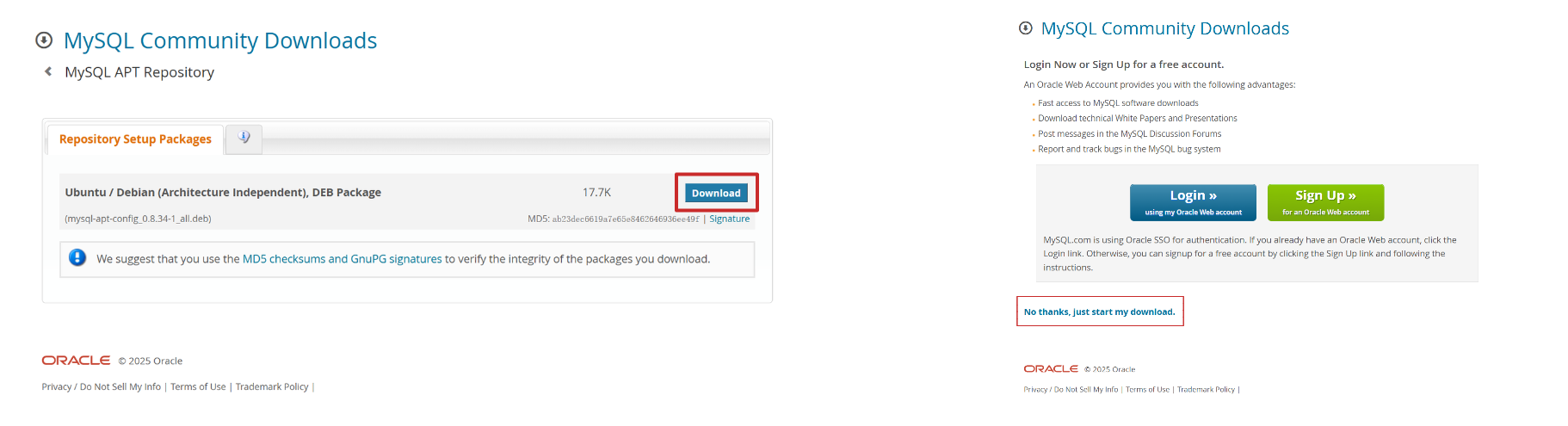
2.2 将发布包上传至Linux机器上
(1)安装 rz 工具
apt install lrzsz(2)使用 rz 命令将发布包上传至Linux机器上
rz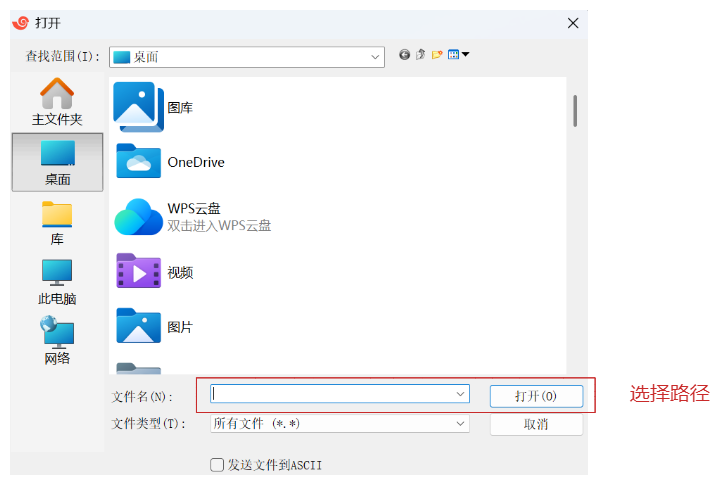
root@VM-8-15-ubuntu:~# ls
mysql-apt-config_0.8.34-1_all.deb
2.3 安装发布包
(1)执行安装命令
dpkg -i [发布包的名字]

root@VM-8-15-ubuntu:~# dpkg -i mysql-apt-config_0.8.34-1_all.deb
Selecting previously unselected package mysql-apt-config.
(Reading database ... 87261 files and directories currently installed.)
Preparing to unpack mysql-apt-config_0.8.34-1_all.deb ...
Unpacking mysql-apt-config (0.8.34-1) ...
Setting up mysql-apt-config (0.8.34-1) ...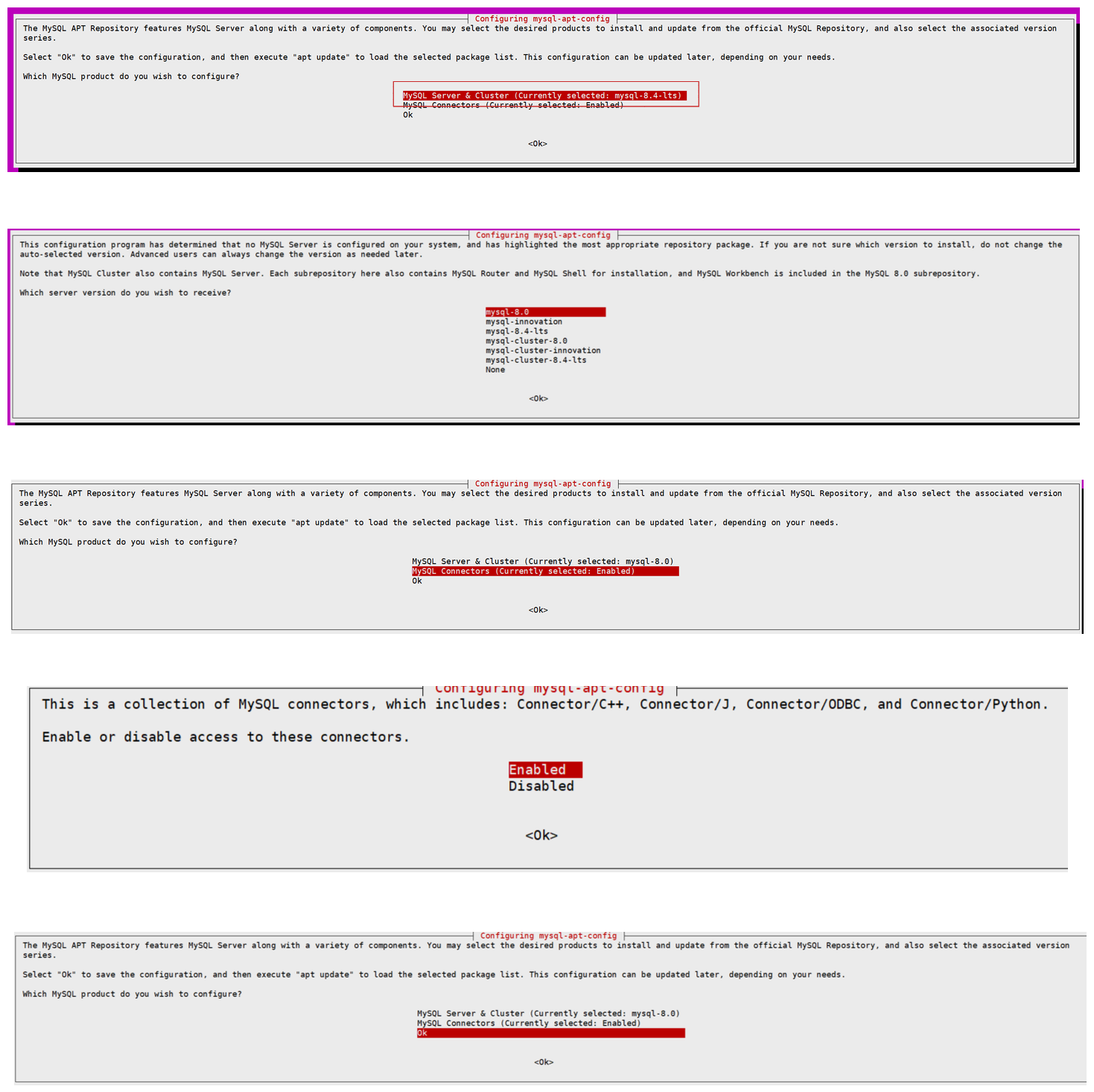
(2)从MySQL APT 源更新包信息
apt-get update

root@VM-8-15-ubuntu:~# apt-get update
Hit:1 http://mirrors.tencentyun.com/ubuntu noble InRelease
Get:2 http://mirrors.tencentyun.com/ubuntu noble-updates InRelease [126 kB]
Get:3 http://mirrors.tencentyun.com/ubuntu noble-backports InRelease [126 kB]
Get:4 http://mirrors.tencentyun.com/ubuntu noble-updates/main amd64 Packages [1,390 kB]
Get:5 http://mirrors.tencentyun.com/ubuntu noble-updates/main amd64 Components [175 kB]
Get:6 http://repo.mysql.com/apt/ubuntu noble InRelease [22.7 kB]
Get:7 http://mirrors.tencentyun.com/ubuntu noble-updates/restricted amd64 Components [212 B]
Get:8 http://mirrors.tencentyun.com/ubuntu noble-updates/universe amd64 Packages [1,481 kB]
Get:9 http://mirrors.tencentyun.com/ubuntu noble-updates/universe amd64 Components [377 kB]
Get:10 http://mirrors.tencentyun.com/ubuntu noble-updates/multiverse amd64 Components [940 B]
Get:11 http://mirrors.tencentyun.com/ubuntu noble-backports/main amd64 Components [7,076 B]
Get:12 http://repo.mysql.com/apt/ubuntu noble/mysql-8.0 Sources [963 B]
Get:13 http://mirrors.tencentyun.com/ubuntu noble-backports/restricted amd64 Components [216 B]
Get:14 http://mirrors.tencentyun.com/ubuntu noble-backports/universe amd64 Components [19.2 kB]
Get:15 http://mirrors.tencentyun.com/ubuntu noble-backports/multiverse amd64 Components [212 B]
Get:16 http://repo.mysql.com/apt/ubuntu noble/mysql-8.0 amd64 Packages [10.7 kB]
Get:17 http://repo.mysql.com/apt/ubuntu noble/mysql-tools amd64 Packages [4,191 B]
Fetched 3,742 kB in 2s (2,216 kB/s)
Reading package lists... Done
3 安装MySQL
(1)执行安装命令
apt install mysql-server

root@VM-8-15-ubuntu:~# apt install mysql-server
Reading package lists... Done
Building dependency tree... Done
Reading state information... Done
The following packages were automatically installed and are no longer required:
  eatmydata libeatmydata1 python3-json-pointer python3-jsonpatch python3-jsonschema python3-pyrsistent
Use 'apt autoremove' to remove them.
The following additional packages will be installed:
  libmecab2 mecab-ipadic mecab-ipadic-utf8 mecab-utils mysql-client mysql-common mysql-community-client mysql-community-client-core mysql-community-client-plugins mysql-community-server mysql-community-server-core
The following NEW packages will be installed:
  libmecab2 mecab-ipadic mecab-ipadic-utf8 mecab-utils mysql-client mysql-common mysql-community-client mysql-community-client-core mysql-community-client-plugins mysql-community-server mysql-community-server-core mysql-server
0 upgraded, 12 newly installed, 0 to remove and 319 not upgraded.
Need to get 40.7 MB of archives.
After this operation, 282 MB of additional disk space will be used.
Do you want to continue? [Y/n] y
Get:1 http://mirrors.tencentyun.com/ubuntu noble/main amd64 libmecab2 amd64 0.996-14ubuntu4 [201 kB]
Get:2 http://mirrors.tencentyun.com/ubuntu noble/main amd64 mecab-utils amd64 0.996-14ubuntu4 [4,804 B]
Get:3 http://mirrors.tencentyun.com/ubuntu noble/main amd64 mecab-ipadic all 2.7.0-20070801+main-3 [6,718 kB]
Get:4 http://repo.mysql.com/apt/ubuntu noble/mysql-8.0 amd64 mysql-common amd64 8.0.43-1ubuntu24.04 [59.5 kB]
Get:5 http://mirrors.tencentyun.com/ubuntu noble/main amd64 mecab-ipadic-utf8 all 2.7.0-20070801+main-3 [4,384 B]
Get:6 http://repo.mysql.com/apt/ubuntu noble/mysql-8.0 amd64 mysql-community-client-plugins amd64 8.0.43-1ubuntu24.04 [1,377 kB]
Get:7 http://repo.mysql.com/apt/ubuntu noble/mysql-8.0 amd64 mysql-community-client-core amd64 8.0.43-1ubuntu24.04 [2,117 kB]
Get:8 http://repo.mysql.com/apt/ubuntu noble/mysql-8.0 amd64 mysql-community-client amd64 8.0.43-1ubuntu24.04 [2,037 kB]
Get:9 http://repo.mysql.com/apt/ubuntu noble/mysql-8.0 amd64 mysql-client amd64 8.0.43-1ubuntu24.04 [58.2 kB]
Get:10 http://repo.mysql.com/apt/ubuntu noble/mysql-8.0 amd64 mysql-community-server-core amd64 8.0.43-1ubuntu24.04 [28.0 MB]
Get:11 http://repo.mysql.com/apt/ubuntu noble/mysql-8.0 amd64 mysql-community-server amd64 8.0.43-1ubuntu24.04 [69.8 kB]
Get:12 http://repo.mysql.com/apt/ubuntu noble/mysql-8.0 amd64 mysql-server amd64 8.0.43-1ubuntu24.04 [58.2 kB]
Fetched 40.7 MB in 8s (5,272 kB/s)
Preconfiguring packages ...
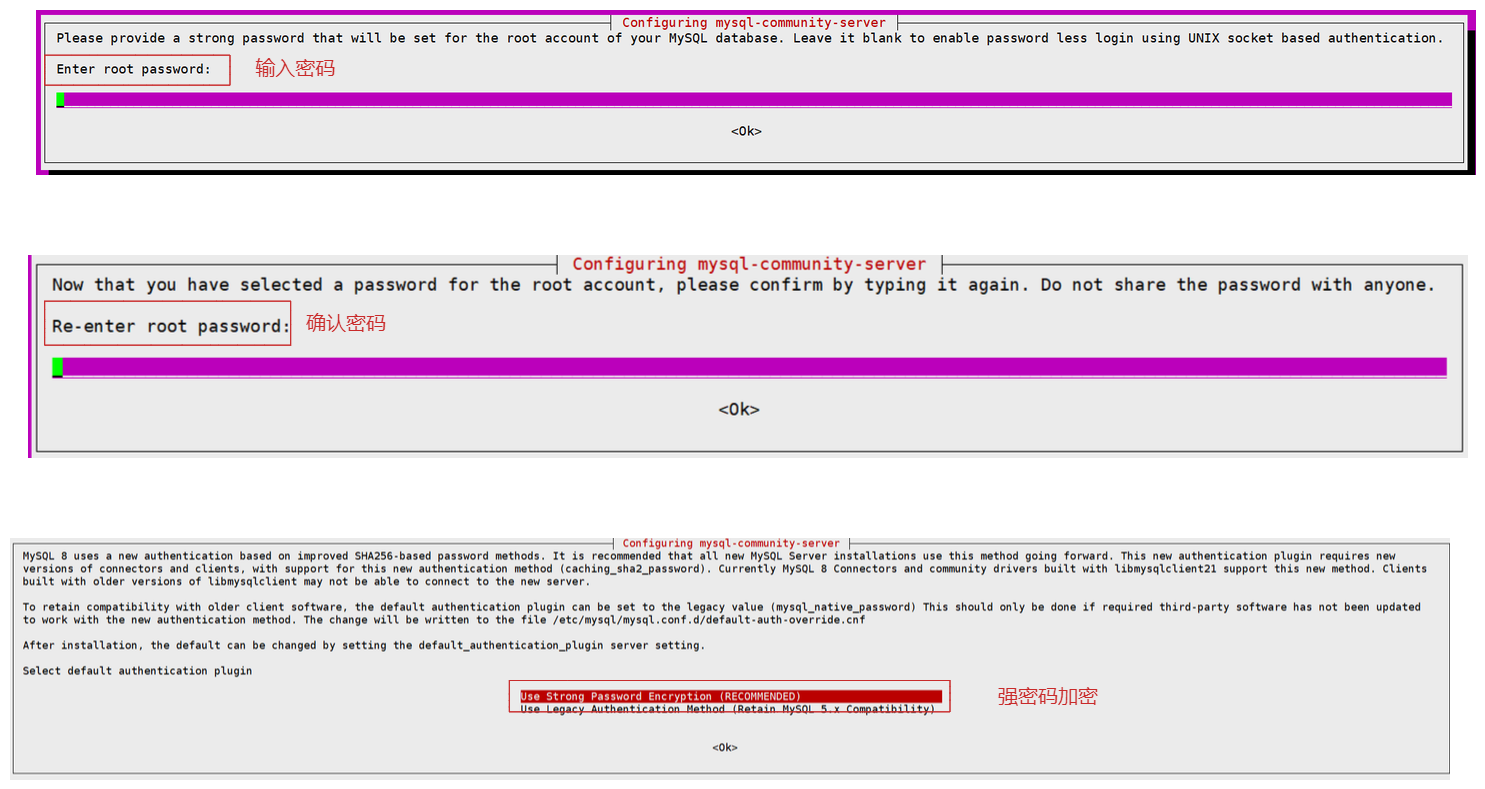
(2)安装过程中会提示设置密码
4 查看MySQL状态
(1)安装完成后的MySQL会自动启动
systemctl status mysql

root@VM-8-15-ubuntu:~# systemctl status mysql
● mysql.service - MySQL Community Server
     Loaded: loaded (/usr/lib/systemd/system/mysql.service; enabled; preset: enabled)
     Active: active (running) since Sat 2025-09-06 18:34:06 CST; 3min 6s ago
       Docs: man:mysqld(8)
             http://dev.mysql.com/doc/refman/en/using-systemd.html
   Main PID: 2586473 (mysqld)
     Status: "Server is operational"
      Tasks: 37 (limit: 2276)
     Memory: 362.8M (peak: 376.8M)
        CPU: 1.227s
     CGroup: /system.slice/mysql.service
             └─2586473 /usr/sbin/mysqld

Sep 06 18:34:05 VM-8-15-ubuntu systemd[1]: Starting mysql.service - MySQL Community Server...
Sep 06 18:34:06 VM-8-15-ubuntu systemd[1]: Started mysql.service - MySQL Community Server.
5 开启自动启动
(1)开启自动启动
systemctl enable mysql(2)查看状态
systemctl list-unit-files|grep mysql

root@VM-8-15-ubuntu:~# systemctl list-unit-files|grep mysql
mysql.service                                enabled         enabled
mysql@.service                               disabled        enabled
6 登录MySQL
mysql -uroot -p

root@VM-8-15-ubuntu:~# mysql -uroot -p
Enter password:
Welcome to the MySQL monitor.  Commands end with ; or \g.
Your MySQL connection id is 8
Server version: 8.0.43 MySQL Community Server - GPL

Copyright (c) 2000, 2025, Oracle and/or its affiliates.

Oracle is a registered trademark of Oracle Corporation and/or its
affiliates. Other names may be trademarks of their respective
owners.

Type 'help;' or '\h' for help. Type '\c' to clear the current input statement.

mysql>