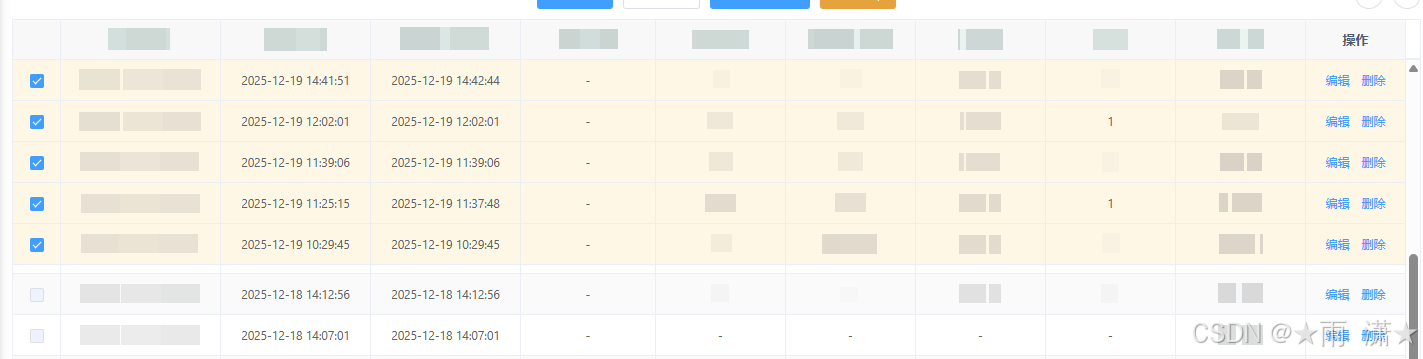
组件
PinnedSelectTable.vue
javascript
<template>
  <div class="pinned-select-table">
    <el-table
      size="mini"
      v-loading="loading"
      :data="displayList"
      :row-key="tableRowKey"
      stripe
      border
      :height="height"
      :row-class-name="rowClassName"
      :cell-style="cellStyle"
    >
      <el-table-column label="" width="48" align="center" fixed="left">
        <template #default="scope">
          <el-checkbox
            :key="`cb-${getRowId(scope.row)}-${isSelected(scope.row)}`"
            :value="isSelected(scope.row)"
            :disabled="isRowCheckboxDisabled(scope.row)"
            @change="(val) => onRowCheckChange(scope.row, val)"
          />
        </template>
      </el-table-column>

      <el-table-column
        v-for="(item, index) in columns"
        :key="index"
        :label="item.label"
        :prop="item.prop"
        :width="item.width"
        align="center"
        v-bind="item.fixed ? { fixed: item.fixed } : {}"
      >
        <template #default="scope">
          <!-- 如果外部传了同名插槽(slot name = prop),就用外部渲染;否则走默认展示 -->
          <slot v-if="item.slot" :name="item.prop" v-bind="scope" />
          <span v-else>{{ scope.row[item.prop] || '-' }}</span>
        </template>
      </el-table-column>
    </el-table>

    <!-- 底部操作栏:页面固定定位,居中底部(勾选后出现) -->
    <div
      v-if="selectedRows.length"
      class="merge-action-bar merge-action-bar--fixed"
    >
      <el-button size="mini" @click="cancelSelection">取消合并</el-button>
      <el-button type="primary" size="mini" @click="confirmSelection">
        确认合并
      </el-button>
    </div>
  </div>
</template>

<script>
export default {
  name: 'PinnedSelectTable',
  props: {
    loading: { type: Boolean, default: false },
    data: { type: Array, default: () => [] },
    columns: { type: Array, default: () => [] },
    // 表格高度(透传给 el-table)
    height: { type: [String, Number], default: null },
    // v-model 绑定:选中的 id 列表
    value: { type: Array, default: () => [] },
    // id 字段名
    rowKey: { type: String, default: 'id' },
    // 最大勾选数量
    maxSelect: { type: Number, default: 5 },
    // 固定行高度(用于多行 sticky 叠加时计算 top 偏移)
    pinnedRowHeight: { type: Number, default: 40 },
    // 行高补偿(表格实际行高 = pinnedRowHeight + 该值,解决 border/padding 导致吸顶差几像素)
    pinnedRowHeightOffset: { type: Number, default: 9 }
  },
  data() {
    return {
      innerSelectedIds: [],
      // 跨页保留:已选行的数据缓存(id -> row),分页后吸顶仍显示这些行
      selectedRowCache: {}
    }
  },
  computed: {
    rowKeyGetter() {
      return (row) => row?.[this.rowKey]
    },
    // 统一用字符串比较,避免 id 数字/字符串不一致导致勾选状态错乱
    getRowId() {
      return (row) => (row == null ? '' : String(this.rowKeyGetter(row)))
    },
    selectedIds() {
      return this.innerSelectedIds
    },
    // 已选行:优先用缓存(跨页仍显示),否则用当前页 data;顺序按 innerSelectedIds
    selectedRows() {
      const ids = this.innerSelectedIds
      return ids
        .map((id) => {
          const sid = String(id)
          if (this.selectedRowCache[sid]) return this.selectedRowCache[sid]
          return (this.data || []).find((r) => this.getRowId(r) === sid)
        })
        .filter(Boolean)
    },
    unselectedRows() {
      const idSet = new Set(this.innerSelectedIds.map((id) => String(id)))
      return (this.data || []).filter((r) => !idSet.has(this.getRowId(r)))
    },
    displayList() {
      return [...this.selectedRows, ...this.unselectedRows]
    },
    selectedOrderMap() {
      return this.selectedRows.reduce((acc, r, idx) => {
        acc[this.getRowId(r)] = idx
        return acc
      }, {})
    }
  },
  watch: {
    value: {
      immediate: true,
      handler(v) {
        this.innerSelectedIds = Array.isArray(v) ? [...v] : []
        // 不再按当前页过滤,勾选跨页保留
      }
    },
    data: {
      deep: true,
      handler() {
        // 仅用当前页 data 更新缓存中对应 id 的 row(保持数据最新),不清理选中
        const idSet = new Set((this.data || []).map((r) => this.getRowId(r)))
        this.innerSelectedIds.forEach((id) => {
          const sid = String(id)
          if (!idSet.has(sid)) return
          const row = (this.data || []).find((r) => this.getRowId(r) === sid)
          if (row) this.$set(this.selectedRowCache, sid, row)
        })
      }
    }
  },
  methods: {
    // 行 key 带上选中状态,取消勾选时该行会重新渲染,背景色能正确清除
    tableRowKey(row) {
      const id = this.getRowId(row)
      const selected = this.isSelected(row)
      return `${id}-${selected}`
    },
    emitChange() {
      this.$emit('input', [...this.innerSelectedIds])
      this.$emit('change', [...this.innerSelectedIds])
    },
    isSelected(row) {
      const rowId = this.getRowId(row)
      return this.innerSelectedIds.some((id) => String(id) === rowId)
    },
    isRowCheckboxDisabled(row) {
      if (this.isSelected(row)) return false
      return this.innerSelectedIds.length >= this.maxSelect
    },
    onRowCheckChange(row, checked) {
      const id = this.rowKeyGetter(row)
      const sid = String(id)
      const exists = this.innerSelectedIds.some((x) => String(x) === sid)
      if (checked && !exists) {
        if (this.innerSelectedIds.length >= this.maxSelect) {
          this.$message.warning(`最多只能勾选 ${this.maxSelect} 条进行合并`)
          return
        }
        this.innerSelectedIds = [...this.innerSelectedIds, id]
        this.$set(this.selectedRowCache, sid, { ...row })
        this.emitChange()
        return
      }
      if (!checked && exists) {
        this.innerSelectedIds = this.innerSelectedIds.filter(
          (x) => String(x) !== sid
        )
        delete this.selectedRowCache[sid]
        this.emitChange()
      }
    },
    rowClassName({ row }) {
      return this.isSelected(row) ? 'is-merge-selected pinned-row' : ''
    },
    cellStyle({ row }) {
      if (!this.isSelected(row)) return {}
      const rowId = this.getRowId(row)
      const pinnedIndex = this.selectedOrderMap?.[rowId] ?? 0
      const rowHeight = this.pinnedRowHeight + this.pinnedRowHeightOffset
      const top = pinnedIndex * rowHeight
      return {
        position: 'sticky',
        top: `${top}px`,
        zIndex: 2,
        backgroundColor: '#fff7e6'
      }
    },
    cancelSelection() {
      this.innerSelectedIds = []
      this.selectedRowCache = {}
      this.emitChange()
      this.$emit('cancel')
    },
    confirmSelection() {
      const rows = this.selectedRows
      const ids = rows.map((r) => this.rowKeyGetter(r))
      this.$emit('confirm', { rows, ids })
    }
  }
}
</script>

<style lang="scss" scoped>
.merge-action-bar {
  display: flex;
  justify-content: center;
  gap: 10px;
}

.merge-action-bar--fixed {
  position: fixed;
  left: 50%;
  bottom: 24px;
  transform: translateX(-50%);
  z-index: 100;
  padding: 8px 16px;
  background: #fff;
  border-radius: 4px;
  box-shadow: 0 2px 12px 0 rgba(0, 0, 0, 0.15);
}
</style>
使用
javascript
<PinnedSelectTable
  ref="tableRef"
  v-model="mergeSelectedIds"
  :loading="loading"
  :data="pointList"
  :columns="columns"
  :height="tableAutoHeight"
  :max-select="maxMergeSelect"
  :pinned-row-height="32"
  @confirm="onConfirmMerge"
  @cancel="onCancelMerge"
>
  <template #householdNum="{ row }">
    <span>{{ formatHouseholdNum(row) || '-' }}</span>
  </template>

  <template #operate="{ row }">
    <el-button size="mini" type="text" @click="editPositionChange(row)">
      编辑
    </el-button>
    <el-popconfirm title="是否确认删除?" @confirm="deleteRowChange(row)">
      <el-button
        slot="reference"
        size="mini"
        type="text"
        style="margin-left: 10px"
      >
        删除
      </el-button>
    </el-popconfirm>
  </template>

  <template #projectAreaName="{ row }">
    <div v-html="areaNameComment(row.projectAreaName)"></div>
  </template>
</PinnedSelectTable>感谢你的阅读,如对你有帮助请收藏+关注!
只分享干货实战 和精品 ,从不啰嗦!!!
如某处不对请留言评论,欢迎指正~
博主可收徒、常玩QQ飞车,可一起来玩玩鸭~