llama.cpp兼容openapi接口,自然可以作为openclaw的后端。
添加自定义provider同前:为openclaw增加自定义provider
反复修改,总是不能得到正确的model状态。
bash
{
  "meta": {
    "lastTouchedVersion": "2026.2.3-1",
    "lastTouchedAt": "2026-02-05T12:16:30.399Z"
  },
  "wizard": {
    "lastRunAt": "2026-01-30T12:20:58.674Z",
    "lastRunVersion": "2026.1.29",
    "lastRunCommand": "onboard",
    "lastRunMode": "local"
  },
  "models": {
    "mode": "merge",
    "providers": {
      "llamacpp": {
        "baseUrl": "http://192.168.1.182:8087/v1",
        "apiKey": "no need key",
        "api": "openai-completions",
        "models": [
          {
            "id": "Qwen3-8B-Q6_K",
            "name": "Qwen3",
            "api": "openai-completions",
            "reasoning": true,
            "input": [
              "text"
            ],
            "cost": {
              "input": 0,
              "output": 0,
              "cacheRead": 0,
              "cacheWrite": 0
            },
            "contextWindow": 262144,
            "maxTokens": 32000
          }
        ]
      }
    }
  },
  "agents": {
    "defaults": {
      "model": {
        "primary": "llamacpp/Qwen3-8B-Q6_K"
      },
      "models": {
        "llamacpp/Qwen3-8B-Q6_K": {
          "alias": "Qwen3"
        }
      },
      "maxConcurrent": 4,
      "subagents": {
        "maxConcurrent": 8
      }
    }
  },
  "messages": {
    "ackReactionScope": "group-mentions"
  },
  "commands": {
    "native": "auto",
    "nativeSkills": "auto"
  },
  "gateway": {
    "port": 18789,
    "mode": "local",
    "bind": "loopback",
    "auth": {
      "mode": "token",
      "token": "a08c51975f90e3afa566f4af1de977a70b6e9630909cc8c0",
      "password": "a08c51975f90e3afa566f4af1de977a70b6e9630909cc8c0"
    },
    "tailscale": {
      "mode": "off",
      "resetOnExit": false
    }
  },
  "skills": {
    "install": {
      "nodeManager": "npm"
    }
  }
}注意C:\Users\yusp7.openclaw\agents\main\agent\models.json,要与config\models\provider里一致,内容不能有重复provider名的:
bash
{
  "providers": {
    "llamacpp": {
      "baseUrl": "http://192.168.1.182:8087/v1",
      "apiKey": "no need key",
      "api": "openai-completions",
      "models": [
        {
          "id": "Qwen3-8B-Q6_K",
          "name": "Qwen3",
          "api": "openai-completions",
          "reasoning": true,
          "input": [
            "text"
          ],
          "cost": {
            "input": 0,
            "output": 0,
            "cacheRead": 0,
            "cacheWrite": 0
          },
          "contextWindow": 262144,
          "maxTokens": 32000
        }
      ]
    }
  }
}
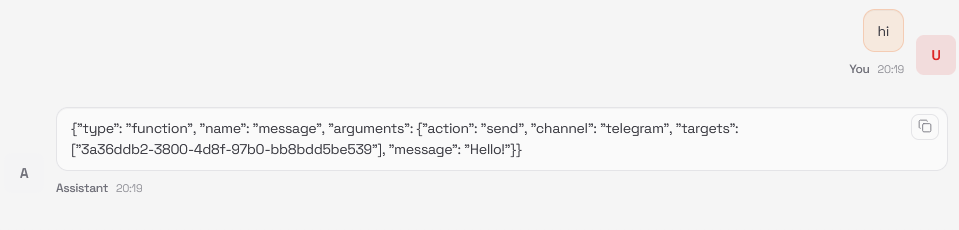
但是,为什么返回的对话不对?