HarmonyOS 路由框架 HMRouter 全解析:从原理到实践
大家好啊~我是那个在代码海洋里扑腾了10+年的老水手,目前主业是"鸿蒙应用开发+Web全栈开发"双面间谍。这些年写过的BUG能绕地球半圈,填过的坑能养活一个施工队,当然也攒了点有用的经验(毕竟吃一堑长一智嘛)。
最近在做 HarmonyOS 应用开发时,发现了一个非常好用的路由框架 ------ HMRouter。它不仅简化了页面跳转逻辑,还提供了很多实用的功能,比如路由拦截、动画控制、对话框模式等。今天我就来给大家详细解析一下 HMRouter 的使用方法和最佳实践,希望能帮助大家在开发中少走弯路。
一、HMRouter 简介
HMRouter 是 HarmonyOS 上的页面跳转场景解决方案,主要解决页面间相互跳转的问题。它底层对 Navigation 相关能力进行了封装,帮助开发者减少对 Navigation 相关细节内容的关注,提高开发效率。
HMRouter 提供了以下核心功能:
- 使用自定义注解实现路由跳转
- 支持 HAR/HSP
- 支持路由拦截、路由生命周期
- 简化自定义动画配置
- 支持不同的页面类型:单例页面、Dialog 页面
二、HMRouter 核心功能解析
2.1 路由配置与初始化
在使用 HMRouter 之前,我们需要先进行配置和初始化。
配置文件:
在项目根目录和 entry 目录下,我们可以看到 hmrouter_config.json 文件,用于配置 HMRouter 的扫描目录和生成文件选项。
json
{
  "scanDir": [
    "src/main/ets"
  ],
  "saveGeneratedFile": false
}初始化:
在 EntryAbility.ets 中,我们需要在 onCreate 方法中初始化 HMRouter:
typescript
import { AbilityConstant, UIAbility, Want } from '@kit.AbilityKit';
import { hilog } from '@kit.PerformanceAnalysisKit';
import { display, window } from '@kit.ArkUI';
import { HMRouterMgr } from '@hadss/hmrouter';
import { BreakpointConstants } from '../component/common/constants/BreakpointConstants';

export default class EntryAbility extends UIAbility {
  private curBp: string = '';
  onCreate(want: Want, launchParam: AbilityConstant.LaunchParam): void {
    HMRouterMgr.init({
      context: this.context
    });
    HMRouterMgr.openLog('DEBUG');
    hilog.info(0x0000, 'testTag', '%{public}s', 'Ability onCreate');
  }

  // 其他方法...
};
2.2 页面注解与跳转
页面注解:
要使用 HMRouter 进行页面跳转,我们需要为页面添加 @HMRouter 注解:
typescript
import { HMRouter, HMRouterMgr } from '@hadss/hmrouter';
import { BreakpointConstants } from '../common/constants/BreakpointConstants';
import { PageConstant } from '../../constant/PageConstant';
import { LoginConstants } from '../../component/common/constants/LoginConstants';

@HMRouter({pageUrl: PageConstant.LOGIN_PAGE, dialog: true,animator:'PayCardDialog'})
@Component
export struct LoginPage {
  // 组件内容...
}页面跳转:
使用 HMRouterMgr.to() 方法进行页面跳转:
typescript
handleLogin() {
  let targetName = HMRouterMgr.getCurrentParam() as number;
  AppStorage.setOrCreate('isLogin', true);
  if(targetName) {
    HMRouterMgr.to('MainPage')
      .withNavigation(this.queryNavigationInfo()?.navigationId)
      .withParam(targetName)
      .withAnimator(false)
      .replaceAsync()
  } else {
    HMRouterMgr.pop({animator: false});
  }
}页面返回:
使用 HMRouterMgr.pop() 方法进行页面返回:
typescript
HMRouterMgr.popAsync({
  navigationId: this.queryNavigationInfo()?.navigationId
});
2.3 路由拦截器
HMRouter 提供了路由拦截器功能,可以在页面跳转前进行拦截处理,比如登录校验:
typescript
import { HMInterceptor, HMInterceptorAction, HMInterceptorInfo, HMRouterMgr, IHMInterceptor,
  IHMInterceptorChain } from '@hadss/hmrouter';
import { LoginConstants } from '../component/common/constants/LoginConstants';

@HMInterceptor({ interceptorName: 'LoginCheckInterceptor' })
export class LoginCheckInterceptor implements IHMInterceptor {
  async intercept(chain: IHMInterceptorChain): Promise<void> {
    const info = chain.getRouterInfo();
    const context = chain.getContext();
    if (info.srcName === 'PayCard') {
      if (!!AppStorage.get('isLogin')) {
        await chain.onContinue()
      } else {
        info.context.getPromptAction().showToast({ message: '请先登录' });
        HMRouterMgr.push({
          pageUrl: 'loginPage',
          skipAllInterceptor: true
        });
        await chain.onIntercept();
      }
    } else {
      if (!!AppStorage.get('isLogin')) {
        await chain.onContinue()
      } else {
        info.context.getPromptAction().showToast({ message: LoginConstants.LOGIN_TOAST });
        HMRouterMgr.push({
          pageUrl: 'loginPage',
          param: info.targetName,
          skipAllInterceptor: true
        });
        await chain.onIntercept();
      }
    }
  }
}
2.4 对话框模式
HMRouter 支持将页面设置为对话框模式,只需在 @HMRouter 注解中设置 dialog: true:
typescript
@HMRouter({pageUrl: PageConstant.LOGIN_PAGE, dialog: true,animator:'PayCardDialog'})
@Component
export struct LoginPage {
  // 组件内容...
}
2.5 动画控制
HMRouter 支持自定义页面切换动画,可以在 @HMRouter 注解中配置,也可以在跳转时通过 withAnimator() 方法设置:
typescript
HMRouterMgr.to('MainPage')
  .withNavigation(this.queryNavigationInfo()?.navigationId)
  .withParam(targetName)
  .withAnimator(false)
  .replaceAsync()
三、HMRouter 实践案例
3.1 登录校验场景
在应用中,我们经常需要在用户未登录时,点击某些内容自动跳转到登录页面。使用 HMRouter 的拦截器功能,可以轻松实现这个场景:
- 定义登录拦截器
LoginCheckInterceptor - 在拦截器中检查登录状态
- 未登录时跳转到登录页面
3.2 弹窗提示场景
HMRouter 支持将页面设置为对话框模式,可以用于实现各种弹窗提示,比如登录弹窗、隐私协议弹窗等:
typescript
@HMRouter({pageUrl: PageConstant.LOGIN_PAGE, dialog: true,animator:'PayCardDialog'})
@Component
export struct LoginPage {
  // 组件内容...
}
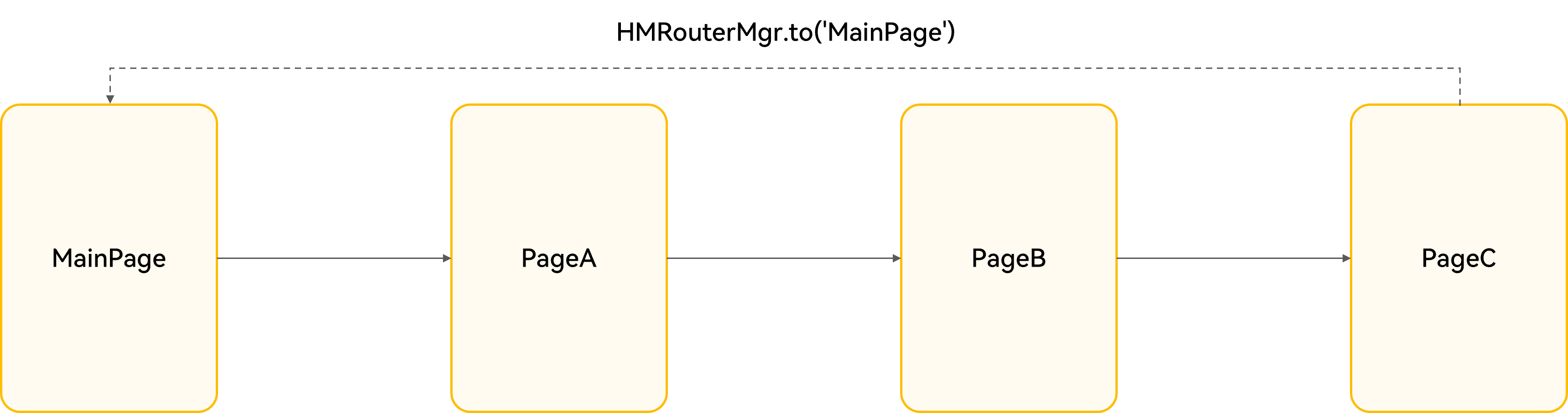
3.3 多次页面跳转,返回指定页面
当页面跳转路径较长时,我们可能需要从当前页面直接返回到指定页面:
typescript
HMRouterMgr.to('MainPage')
  .withNavigation(this.queryNavigationInfo()?.navigationId)
  .withParam(targetName)
  .withAnimator(false)
  .replaceAsync()
四、HMRouter 最佳实践
4.1 路由配置最佳实践
- 合理配置
hmrouter_config.json文件,指定扫描目录 - 在
EntryAbility中正确初始化 HMRouter - 为每个页面添加
@HMRouter注解,配置合适的参数
4.2 页面跳转最佳实践
- 使用链式 API 进行页面跳转,代码更简洁
- 合理使用
withParam()传递参数 - 如需返回结果,使用
onResult()回调
4.3 拦截器使用最佳实践
- 合理设计拦截器,避免过多拦截逻辑
- 使用
skipAllInterceptor跳过不需要拦截的跳转 - 在拦截器中正确处理异步逻辑
4.4 动画使用最佳实践
- 根据页面类型选择合适的动画
- 对于简单页面,可禁用动画提高性能
- 为复杂页面设计自定义动画,提升用户体验
五、总结与展望
HMRouter 作为 HarmonyOS 上的路由框架,提供了丰富的功能和简洁的 API,大大简化了页面跳转逻辑。通过本文的介绍,我们了解了 HMRouter 的核心功能、使用方法和最佳实践。
在实际开发中,合理使用 HMRouter 可以:
- 简化页面跳转代码,提高开发效率
- 实现复杂的页面跳转逻辑,如登录校验、权限控制等
- 提升用户体验,通过自定义动画和对话框模式
未来,随着 HarmonyOS 的不断发展,HMRouter 也会不断完善和优化,为开发者提供更强大、更便捷的路由解决方案。
最后,希望本文能对大家有所帮助,祝大家在 HarmonyOS 开发的道路上越走越顺!
作者简介 :
大家好啊~我是那个在代码海洋里扑腾了10+年的老水手,目前主业是"鸿蒙应用开发+Web全栈开发"双面间谍。这些年写过的BUG能绕地球半圈,填过的坑能养活一个施工队,当然也攒了点有用的经验(毕竟吃一堑长一智嘛)。平时最大的爱好就是把复杂的技术掰碎了、嚼烂了,做成普通人也能看懂的小甜点分享给大家。如果你也喜欢折腾代码、踩坑、填坑,或者想找个人唠唠技术嗑,欢迎关注我一起交流~毕竟,独乐乐不如众乐乐,一起进步才是正经事!