第一次使用deepseek来生成的一个工具 的代码,AI生成了约98%,2%为自己修改,此工具用来保存富文本内容,即可以作为一个知识点笔记记录工具,具体实现采用json文件来保存目录树关键字,用sqLite保存对应每个树节点(文件类型,非目录类型时)的全部富文本内容。
使用说明:
-
首先需要新建项目或打开已有项目
-
项目创建后,会在当前目录生成两个文件:
-
.json文件:存储目录结构
-
.db文件:存储文件内容(SQLite数据库)
-
只有在项目创建后,才能对目录树进行操作
-
请在'文件'菜单中选择'新建项目'或'打开项目'
使用时可在代码目录中创建一"代码.txt"空内容文件用于新建文件时默认导入的内容文
功能特点:
-
选中文件节点自动在右侧显示内容
-
支持富文本编辑和保存,支持对python关键字的亮显,当然也可以定义成c++等关键字的亮显
-
编辑后的内容自动保存到数据库并备份pickle文件格式
-
完整的右键菜单操作
-
支持撤销/重做、复制/粘贴等编辑功能
-
工具栏支持字体、字号、颜色等格式设置
-
支持导入或导出备份pickle文件
程序运行界面如下:
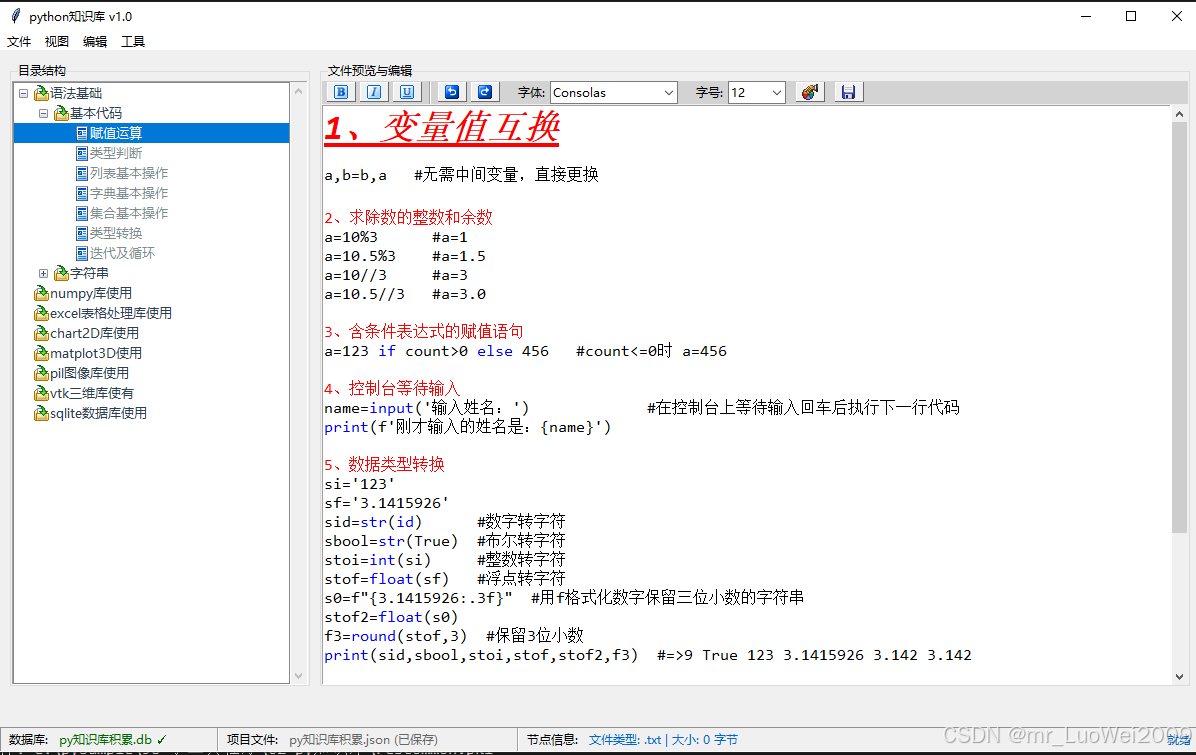
界面初始化时使用了resCommon.pkl文件中的图标集(此文件为我另一工具专门将各种图像资源合并到一个pickle文件中),因此文件无法在文章中发布,故实际运行时无图标,可自行修改为外部图标文件的加载方式来美化界面。
"""
py知识库.py:将各种文件内容保存于sqlite数据库中,文件节点key保存到json文件中,本程序用于管理这两个文件创建和修改,数据库文件可以被外部调用以得到库中的文件数据
"""
import tkinter as tk
from tkinter import ttk, messagebox, simpledialog, filedialog, font
import json
import sqlite3
import os,io
import uuid
import hashlib
from datetime import datetime
from pathlib import Path
from typing import Dict, List, Optional, Tuple, Any
import mimetypes
import base64
from io import BytesIO
from PIL import Image, ImageTk
import keyword
import re
import pickle
from res import * #导入自定义的读取pickle资源库的模块
from rtfWidget import * #导入自定义的富文本编辑控件
from directoryTree import * #导入自定义的目录树控件(加载json)
from fileDatabase import * #导入定义的sqlite数据库
##########################################################################################
class rtfFileManager:
"""rtf文件管理器主应用窗口"""
def __init__(self, root):
self.root = root
self.root.title("python知识库 v1.0")
self.root.geometry("1200x700")
# 数据库管理器
self.db_manager = None
self.current_json_path = None
self.current_db_path = None
self.tree_modified = False #树目录节点内容是否被更改过
# 先创建UI界面元素
self._create_ui()
# 再创建菜单(这时候tree和text_display已经存在了)
self._create_menu()
# 绑定关闭事件
self.root.protocol("WM_DELETE_WINDOW", self.on_closing)
# 初始状态显示提示
self._show_initial_message()
def fromTreeCallBack(self,name,node):
"""从树控件回调信息到状态栏上显示
"""
if name=='选择节点':
self.update_node_info(node)
elif name=='保存json' and self.tree.modified:
print('==================触发保存json==========================')
self.save_json()
def _bind_tree_events(self):
"""绑定树结构修改事件"""
# 监听Treeview的插入、删除、重命名等事件
def track_modification(event=None):
self.tree_modified = True
# 绑定树结构变化事件
self.tree.bind('<<TreeviewOpen>>', track_modification) # 展开节点
self.tree.bind('<<TreeviewClose>>', track_modification) # 折叠节点
def save_json_file(self):
"""如果需要,保存JSON文件"""
if not self.current_json_path:
return False
if self.tree_modified:
try:
# 从树获取字典数据
data_dict = self.tree.save_to_dict()
if data_dict is None or len(data_dict)==0:
print('不保存空目录,防止意外清空原有内容')
self.tree_modified = False
return
# 保存到文件
with open(self.current_json_path, 'w', encoding='utf-8') as f:
json.dump(data_dict, f, ensure_ascii=False, indent=2)
# 重置修改标记
self.tree_modified = False
# 自动创建pickle备份
if self.current_json_path:
self._auto_create_pickle_backup()
# 记录保存日志
print(f"JSON文件已自动保存: {self.current_json_path}")
return True
except Exception as e:
print(f"自动保存JSON文件失败: {e}")
return False
return False
def _auto_create_pickle_backup(self):
"""自动创建pickle备份文件"""
try:
if self.current_json_path:
pickle_path = os.path.splitext(self.current_json_path)[0] + '.pkl'
success = self.export_to_pickle(pickle_path, show_message=False)
if success:
print(f"自动创建pickle备份: {pickle_path}")
except Exception as e:
print(f"自动创建pickle备份失败: {e}")
def on_closing(self):
"""关闭窗口时的简单清理 - 自动保存目录树到json文件"""
# 自动保存JSON文件
if self.current_json_path:
try:
if self.text_display.modified: #如编辑框内容有变化,先更新内容到数据库
self.text_display._save_to_database()
data_dict = self.tree.save_to_dict() #同时保存当前的全部节点到json文件中
if data_dict is not None and len(data_dict)>0: #设置不允许树节点为空时自动保存,防止意外加载时,树控件为空了在不知情的情况下覆盖了数据
with open(self.current_json_path, 'w', encoding='utf-8') as f:
json.dump(data_dict, f, ensure_ascii=False, indent=2)
print(f"JSON文件已自动保存: {self.current_json_path}")
# 自动创建pickle备份
self._auto_create_pickle_backup()
except Exception as e:
print(f"自动保存JSON文件失败: {e}")
# 清理资源
if self.db_manager:
self.db_manager.close()
# 退出程序
self.root.destroy()
def _show_initial_message(self):
"""显示初始提示信息"""
self.text_display.clear_content()
self.text_display.display_text(
"欢迎使用JSON+SQLite文件管理器 v1.0\n"
"=" * 1 + "\n\n"
"使用说明:\n"
"1. 首先需要新建项目或打开已有项目\n"
"2. 项目创建后,会在当前目录生成两个文件:\n"
" - .json文件:存储目录结构\n"
" - .db文件:存储文件内容(SQLite数据库)\n"
"3. 只有在项目创建后,才能对目录树进行操作\n"
"4. 请在'文件'菜单中选择'新建项目'或'打开项目'\n\n"
"功能特点:\n"
"1. 选中文件节点自动在右侧显示内容\n"
"2. 支持富文本编辑和保存\n"
"3. 编辑后的内容自动保存到数据库\n"
"4. 完整的右键菜单操作\n"
"5. 支持撤销/重做、复制/粘贴等编辑功能\n"
"6. 工具栏支持字体、字号、颜色等格式设置\n"
"7. 支持导出为RTF文件\n\n"
"请从'文件'菜单开始操作..."
)
def _create_ui(self):
"""创建用户界面"""
# 主框架
main_frame = ttk.Frame(self.root)
main_frame.pack(fill=tk.BOTH, expand=True, padx=10, pady=(10, 40)) # 底部留出状态栏空间
# 左侧目录树
left_frame = ttk.LabelFrame(main_frame, text="目录结构", width=300)
left_frame.pack(side=tk.LEFT, fill=tk.BOTH, expand=False)
left_frame.pack_propagate(False)
# 先创建右侧的富文本编辑器
# 右侧文件显示区域
right_frame = ttk.LabelFrame(main_frame, text="文件预览与编辑")
right_frame.pack(side=tk.RIGHT, fill=tk.BOTH, expand=True, padx=(10, 0))
# 创建rtfWidget控件(包含工具栏)
self.text_display = rtfWidget(right_frame, show_toolbar=True)
# 布局rtfWidget
self.text_display.pack(fill=tk.BOTH, expand=True)
# 现在创建DirectoryTree,此时text_display已经存在
self.tree = DirectoryTree(
left_frame,
db_manager=None, # 稍后设置
text_display=self.text_display,
main_frame=main_frame,
callBack=self.fromTreeCallBack
)
# 设置Treeview的高度(可选)
self.tree.tree.configure(height=35)
# 布局 - DirectoryTree已经包含了滚动条,直接pack即可
self.tree.pack(side=tk.LEFT, fill=tk.BOTH, expand=True)
# 将text_display关联到tree
self.tree.set_text_display(self.text_display)
# 创建状态栏
self._create_status_bar()
def _create_status_bar(self):
"""创建标准状态栏"""
# 创建一个Frame作为状态栏容器,使用SUNKEN样式
self.status_bar = tk.Frame(self.root, relief=tk.SUNKEN, borderwidth=1, bg='#F0F0F0')
self.status_bar.pack(side=tk.BOTTOM, fill=tk.X, padx=0, pady=0)
# 数据库状态 - 左侧
db_frame = tk.Frame(self.status_bar, bg='#F0F0F0')
db_frame.pack(side=tk.LEFT, fill=tk.Y, padx=(5, 10))
tk.Label(db_frame, text="数据库:", font=('微软雅黑', 9), bg='#F0F0F0').pack(side=tk.LEFT, padx=(0, 5))
self.db_status_label = tk.Label(
db_frame,
text="未连接",
font=('微软雅黑', 9),
fg='#666666',
bg='#F0F0F0',
anchor=tk.W,
width=20
)
self.db_status_label.pack(side=tk.LEFT)
# 分隔线
ttk.Separator(self.status_bar, orient=tk.VERTICAL).pack(side=tk.LEFT, fill=tk.Y, padx=5)
# JSON文件状态 - 中间
json_frame = tk.Frame(self.status_bar, bg='#F0F0F0')
json_frame.pack(side=tk.LEFT, fill=tk.Y, padx=(0, 10))
tk.Label(json_frame, text="项目文件:", font=('微软雅黑', 9), bg='#F0F0F0').pack(side=tk.LEFT, padx=(0, 5))
self.json_status_label = tk.Label(
json_frame,
text="无",
font=('微软雅黑', 9),
fg='#666666',
bg='#F0F0F0',
anchor=tk.W,
width=30
)
self.json_status_label.pack(side=tk.LEFT)
# 分隔线
ttk.Separator(self.status_bar, orient=tk.VERTICAL).pack(side=tk.LEFT, fill=tk.Y, padx=5)
# 节点信息 - 右侧
node_frame = tk.Frame(self.status_bar, bg='#F0F0F0')
node_frame.pack(side=tk.LEFT, fill=tk.BOTH, expand=True, padx=(0, 5))
tk.Label(node_frame, text="节点信息:", font=('微软雅黑', 9), bg='#F0F0F0').pack(side=tk.LEFT, padx=(0, 5))
self.node_info_label = tk.Label(
node_frame,
text="未选择",
font=('微软雅黑', 9),
fg='#666666',
bg='#F0F0F0',
anchor=tk.W
)
self.node_info_label.pack(side=tk.LEFT, fill=tk.X, expand=True)
# 右侧的消息显示区域
self.message_label = tk.Label(
self.status_bar,
text="就绪",
font=('微软雅黑', 9),
fg='#0066CC',
bg='#F0F0F0',
anchor=tk.E,
width=20
)
self.message_label.pack(side=tk.RIGHT, padx=(0, 5))
def show_message(self, message, duration=3000):
"""在状态栏显示临时消息"""
self.message_label.config(text=message)
if duration > 0:
self.root.after(duration, lambda: self.message_label.config(text="就绪"))
def _create_menu(self):
"""创建菜单栏 - 在UI创建后调用"""
menubar = tk.Menu(self.root)
self.root.config(menu=menubar)
# 文件菜单
file_menu = tk.Menu(menubar, tearoff=0)
menubar.add_cascade(label="文件", menu=file_menu)
file_menu.add_command(label="新建项目", command=self.new_project)
file_menu.add_command(label="打开项目", command=self.open_project)
file_menu.add_separator()
file_menu.add_command(label="导入模板", command=self.import_template)
file_menu.add_separator()
file_menu.add_command(label="保存JSON", command=self.save_json)
file_menu.add_command(label="另存为", command=self.save_as_json)
file_menu.add_separator()
# 新增的导出/导入pickle功能
file_menu.add_command(label="导出到pickle文件", command=self.export_to_pickle)
file_menu.add_command(label="导入pickle文件", command=self.import_from_pickle)
file_menu.add_separator()
file_menu.add_command(label="导出RTF", command=self.export_rtf)
file_menu.add_separator()
file_menu.add_command(label="退出", command=self.root.quit)
# 视图菜单
view_menu = tk.Menu(menubar, tearoff=0)
menubar.add_cascade(label="视图", menu=view_menu)
view_menu.add_command(label="展开所有节点", command=self.expand_all_nodes)
view_menu.add_command(label="折叠所有节点", command=self.collapse_all_nodes)
view_menu.add_separator()
view_menu.add_command(label="新建根目录", command=self.add_root_folder)
# 编辑菜单
edit_menu = tk.Menu(menubar, tearoff=0)
menubar.add_cascade(label="编辑", menu=edit_menu)
edit_menu.add_command(label="撤销", command=lambda: self.text_display._undo())
edit_menu.add_command(label="重做", command=lambda: self.text_display._redo())
edit_menu.add_separator()
edit_menu.add_command(label="复制", command=lambda: self.text_display._copy())
edit_menu.add_command(label="粘贴", command=lambda: self.text_display._paste())
edit_menu.add_command(label="剪切", command=lambda: self.text_display._cut())
edit_menu.add_separator()
edit_menu.add_command(label="更新到数据库", command=self.update_to_database)
# 工具菜单
tool_menu = tk.Menu(menubar, tearoff=0)
menubar.add_cascade(label="工具", menu=tool_menu)
tool_menu.add_command(label="检查数据库", command=self.check_database)
tool_menu.add_command(label="测试数据库连接", command=self.test_database)
tool_menu.add_separator()
tool_menu.add_command(label="关于", command=self.show_about_dialog)
def add_root_folder(self):
"""添加根目录"""
if not self.db_manager:
messagebox.showwarning("操作失败", "请先新建或打开项目,再执行此操作")
return
self.tree._add_root_folder()
def expand_all_nodes(self):
"""展开所有节点"""
if hasattr(self, 'tree'):
self.tree.expand_all()
def collapse_all_nodes(self):
"""折叠所有节点"""
if hasattr(self, 'tree'):
self.tree.collapse_all()
def update_to_database(self):
"""将当前显示的内容更新到数据库"""
if self.text_display:
# 调用rtfWidget的update_to_database方法
success = self.text_display.update_to_database()
if success:
# 在状态栏显示更新成功信息
self.show_message("已保存到数据库", 2000)
self.update_node_info(self.tree.current_node if hasattr(self.tree, 'current_node') else None)
def refresh_display(self):
"""刷新当前显示"""
selection = self.tree.selection()
if selection:
node = selection[0]
node_data = self.tree.node_info.get(node, {})
if node_data.get('type') == 'file':
self.tree._display_file_content(node)
def new_project(self):
"""新建项目"""
# 获取当前程序所在目录
current_dir = os.path.dirname(os.path.abspath(__file__))
# 选择保存位置,默认在当前目录
json_path = filedialog.asksaveasfilename(
title="新建项目",
defaultextension=".json",
initialdir=current_dir,
initialfile="新项目.json",
filetypes=[("JSON文件", "*.json"), ("所有文件", "*.*")]
)
if not json_path:
return
# 创建空的字典结构
empty_data = {}
# 保存JSON文件
with open(json_path, 'w', encoding='utf-8') as f:
json.dump(empty_data, f, ensure_ascii=False, indent=2)
# 构建数据库路径
db_path = os.path.splitext(json_path)[0] + '.db'
# 创建数据库
self.db_manager = FileDatabase(db_path)
# 设置当前路径
self.current_json_path = json_path
self.current_db_path = db_path
# 设置树的数据库
self.tree.set_database(self.db_manager)
# 设置rtfWidget的数据库
self.text_display.set_database(self.db_manager)
# 加载空数据
self.tree.load_from_dict(empty_data)
# 更新状态栏
self._update_status_bar()
# 在状态栏显示消息,而不是在编辑器中
self.show_message(f"已创建项目: {os.path.basename(json_path)}", 3000)
self.text_display.clear_content()
self.text_display.display_text(
f"新建项目: {os.path.basename(json_path)}\n"
f"路径: {os.path.dirname(json_path)}\n"
f"数据库: {os.path.basename(db_path)}\n\n"
f"请在Treeview空白处右键新建根目录\n"
f"或在目录节点上右键新建子目录或文件"
)
self.tree_modified=False
def open_project(self):
"""打开项目"""
# 获取当前程序所在目录
current_dir = os.path.dirname(os.path.abspath(__file__))
# 选择JSON文件,默认在当前目录
json_path = filedialog.askopenfilename(
title="打开项目",
initialdir=current_dir,
filetypes=[("JSON文件", "*.json"), ("所有文件", "*.*")]
)
if not json_path:
return
try:
# 读取JSON
with open(json_path, 'r', encoding='utf-8') as f:
data_dict = json.load(f)
# 构建数据库路径
db_path = os.path.splitext(json_path)[0] + '.db'
if not os.path.exists(db_path):
# 数据库不存在,创建新的
create_db = messagebox.askyesno(
"数据库不存在",
f"数据库文件 '{os.path.basename(db_path)}' 不存在。\n"
"是否创建新的数据库文件?"
)
if not create_db:
return
# 创建/连接数据库
self.db_manager = FileDatabase(db_path)
# 设置当前路径
self.current_json_path = json_path
self.current_db_path = db_path
# 设置树的数据库
self.tree.set_database(self.db_manager)
# 设置rtfWidget的数据库
self.text_display.set_database(self.db_manager)
# 加载数据
self.tree.load_from_dict(data_dict)
# 更新状态栏
self._update_status_bar()
# 在状态栏显示消息
self.show_message(f"已加载项目: {os.path.basename(json_path)}", 3000)
# 显示状态信息
self.text_display.clear_content()
self.text_display.display_text(
f"已加载项目: {os.path.basename(json_path)}\n"
f"数据库: {os.path.basename(db_path)}\n"
f"路径: {os.path.dirname(json_path)}\n"
f"文件数量: {self._count_files(data_dict)}\n\n"
f"目录树已加载,可以开始操作..."
)
self.tree_modified=False
except Exception as e:
messagebox.showerror("打开失败", f"打开项目失败: {e}")
def _count_files(self, data_dict: Dict) -> int:
"""递归计算文件数量"""
count = 0
for key, value in data_dict.items():
if isinstance(value, dict):
count += self._count_files(value)
elif isinstance(value, list):
count += 1
return count
def import_template(self):
"""导入模板数据 - 只有目录结构,没有文件"""
# 获取当前程序所在目录
current_dir = os.path.dirname(os.path.abspath(__file__))
# 询问是否创建新项目
create_new = messagebox.askyesno(
"导入模板",
"导入模板将创建一个新的项目结构。\n是否继续?"
)
if not create_new:
return
# 选择保存位置
json_path = filedialog.asksaveasfilename(
title="保存模板项目",
defaultextension=".json",
initialdir=current_dir,
initialfile="模板项目.json",
filetypes=[("JSON文件", "*.json"), ("所有文件", "*.*")]
)
if not json_path:
return
# 构建数据库路径
db_path = os.path.splitext(json_path)[0] + '.db'
# 创建数据库
self.db_manager = FileDatabase(db_path)
# 设置当前路径
self.current_json_path = json_path
self.current_db_path = db_path
# 设置树的数据库
self.tree.set_database(self.db_manager)
# 设置rtfWidget的数据库
self.text_display.set_database(self.db_manager)
# 创建模板数据结构 - 只有目录,没有文件
template_data = {
"项目文档": {
"需求文档": {},
"设计文档": {
"系统设计": {},
"数据库设计": {},
"接口设计": {}
},
"测试文档": {},
"用户手册": {}
},
"源代码": {
"前端": {
"HTML": {},
"CSS": {},
"JavaScript": {}
},
"后端": {
"Python": {},
"数据库": {},
"API接口": {}
},
"工具脚本": {}
},
"资源文件": {
"图片": {},
"图标": {},
"配置文件": {}
},
"测试数据": {
"单元测试": {},
"集成测试": {},
"性能测试": {}
}
}
# 保存模板到JSON文件
with open(json_path, 'w', encoding='utf-8') as f:
json.dump(template_data, f, ensure_ascii=False, indent=2)
# 加载数据到树
self.tree.load_from_dict(template_data)
# 展开所有节点
self.tree.expand_all()
# 更新状态栏
self._update_status_bar()
# 在状态栏显示消息
self.show_message(f"模板项目已创建: {os.path.basename(json_path)}", 3000)
# 显示状态信息
self.text_display.clear_content()
self.text_display.display_text(
f"模板项目已创建: {os.path.basename(json_path)}\n"
f"数据库: {os.path.basename(db_path)}\n"
f"路径: {os.path.dirname(json_path)}\n\n"
f"这是一个干净的目录结构,所有节点都是空目录。\n"
f"您可以通过右键菜单添加真实文件。\n\n"
f"功能说明:\n"
f"1. 选中文件节点会自动在右侧显示内容\n"
f"2. 支持富文本编辑和保存\n"
f"3. 编辑后的内容会自动保存到数据库\n"
f"4. 支持导出为RTF文件"
)
self.tree_modified=False
def save_json(self):
"""保存JSON文件"""
if not self.current_json_path:
messagebox.showwarning("保存失败", "请先创建或打开项目")
return
try:
# 从树获取字典数据
data_dict = self.tree.save_to_dict()
"""
if data_dict is None or len(data_dict)==0:
print("当无树节点时不自动保存,防止代码出错未加载树节点时清空原有文件")
return
"""
# 保存到文件
with open(self.current_json_path, 'w', encoding='utf-8') as f:
json.dump(data_dict, f, ensure_ascii=False, indent=2)
self.tree_modified=False
# 自动创建pickle备份
self._auto_create_pickle_backup()
# 更新状态栏
self.json_status_label.config(text=f"{os.path.basename(self.current_json_path)} (已保存)")
# 在状态栏显示消息
self.show_message("JSON文件已保存", 2000)
self.tree.modified=False
except Exception as e:
messagebox.showerror("保存失败", f"保存JSON文件失败: {e}")
def save_as_json(self):
"""另存为JSON文件"""
if not self.tree.data_dict:
messagebox.showwarning("保存失败", "没有数据可保存")
return
# 获取当前程序所在目录
current_dir = os.path.dirname(os.path.abspath(__file__))
# 选择保存位置,默认在当前目录
json_path = filedialog.asksaveasfilename(
title="另存为",
defaultextension=".json",
initialdir=current_dir,
filetypes=[("JSON文件", "*.json"), ("所有文件", "*.*")]
)
if not json_path:
return
try:
# 从树获取字典数据
data_dict = self.tree.save_to_dict()
if data_dict is None or len(data_dict)==0:
print("当无树节点时不自动保存,防止代码出错未加载树节点时清空原有文件")
return
# 保存到新文件
with open(json_path, 'w', encoding='utf-8') as f:
json.dump(data_dict, f, ensure_ascii=False, indent=2)
# 复制数据库
if self.current_db_path and os.path.exists(self.current_db_path):
import shutil
new_db_path = os.path.splitext(json_path)[0] + '.db'
shutil.copy2(self.current_db_path, new_db_path)
# 更新当前路径
self.current_json_path = json_path
self.current_db_path = new_db_path
self.tree.set_database(self.db_manager)
self.text_display.set_database(self.db_manager)
# 更新状态栏
self._update_status_bar()
self.tree_modified=False
# 在状态栏显示消息
self.show_message(f"项目已另存为: {os.path.basename(json_path)}", 3000)
# 自动创建pickle备份
self._auto_create_pickle_backup()
except Exception as e:
messagebox.showerror("保存失败", f"另存为失败: {e}")
def export_rtf(self):
"""导出当前内容为RTF文件"""
if self.text_display:
success = self.text_display.export_rtf_file()
if success:
self.show_message("RTF文件已导出", 2000)
def export_to_pickle(self, filepath=None, show_message=True):
"""导出当前全部节点树和数据库内容到pickle文件"""
if not self.db_manager:
messagebox.showwarning("导出失败", "请先新建或打开项目")
return False
if filepath is None:
# 使用当前JSON文件名作为默认文件名
if self.current_json_path:
default_name = os.path.splitext(os.path.basename(self.current_json_path))[0] + ".pkl"
else:
default_name = "项目备份.pkl"
filepath = filedialog.asksaveasfilename(
title="导出到pickle文件",
defaultextension=".pkl",
initialfile=default_name,
filetypes=[("Pickle文件", "*.pkl"), ("所有文件", "*.*")]
)
if not filepath:
return False
try:
# 1. 获取目录树数据
tree_data = self.tree.save_to_dict()
# 2. 获取数据库中的所有文件数据
cursor = self.db_manager.conn.cursor()
cursor.execute("SELECT file_path, file_name, file_content, file_type, description FROM file_contents")
file_data = cursor.fetchall()
# 3. 构建导出数据
export_data = {
'tree_data': tree_data,
'file_data': {},
'metadata': {
'export_time': datetime.now().strftime('%Y-%m-%d %H:%M:%S'),
'file_count': len(file_data),
'json_file': os.path.basename(self.current_json_path) if self.current_json_path else None,
'db_file': os.path.basename(self.current_db_path) if self.current_db_path else None
}
}
# 4. 存储文件数据
for row in file_data:
file_path, file_name, file_content, file_type, description = row
export_data['file_data'][file_path] = {
'file_name': file_name,
'content': file_content,
'file_type': file_type,
'description': description
}
# 5. 保存到pickle文件
with open(filepath, 'wb') as f:
pickle.dump(export_data, f, protocol=pickle.HIGHEST_PROTOCOL)
if show_message:
messagebox.showinfo("导出成功",
f"已成功导出到pickle文件:\n{filepath}\n"
f"包含 {len(file_data)} 个文件")
self.show_message(f"已导出到pickle文件: {os.path.basename(filepath)}", 3000)
return True
except Exception as e:
messagebox.showerror("导出失败", f"导出到pickle文件失败: {e}")
print(f"导出到pickle文件失败: {e}")
return False
def import_from_pickle(self):
"""从pickle文件导入项目"""
# 获取当前程序所在目录
current_dir = os.path.dirname(os.path.abspath(__file__))
# 选择pickle文件
pickle_path = filedialog.askopenfilename(
title="导入pickle文件",
initialdir=current_dir,
filetypes=[("Pickle文件", "*.pkl"), ("所有文件", "*.*")]
)
if not pickle_path:
return
try:
# 1. 加载pickle数据
with open(pickle_path, 'rb') as f:
import_data = pickle.load(f)
# 2. 验证数据格式
if 'tree_data' not in import_data or 'file_data' not in import_data:
messagebox.showerror("导入失败", "pickle文件格式不正确")
return
# 3. 询问保存位置
base_name = os.path.splitext(os.path.basename(pickle_path))[0]
default_json_name = base_name + ".json"
json_path = filedialog.asksaveasfilename(
title="保存导入的项目",
defaultextension=".json",
initialdir=current_dir,
initialfile=default_json_name,
filetypes=[("JSON文件", "*.json"), ("所有文件", "*.*")]
)
if not json_path:
return
# 4. 创建数据库路径
db_path = os.path.splitext(json_path)[0] + '.db'
# 5. 创建新的数据库
db_manager = FileDatabase(db_path)
# 6. 导入文件数据到数据库
file_data = import_data['file_data']
import_count = 0
import_errors = []
for file_path, file_info in file_data.items():
try:
success = db_manager.insert_file_data(
file_path=file_path,
file_name=file_info['file_name'],
file_data=file_info['content'],
file_type=file_info['file_type'],
description=file_info.get('description', '')
)
if success:
import_count += 1
else:
import_errors.append(f"导入失败: {file_path}")
except Exception as e:
import_errors.append(f"导入错误 {file_path}: {str(e)}")
# 7. 保存JSON文件
tree_data = import_data['tree_data']
with open(json_path, 'w', encoding='utf-8') as f:
json.dump(tree_data, f, ensure_ascii=False, indent=2)
# 8. 在界面中加载项目
self.db_manager = db_manager
self.current_json_path = json_path
self.current_db_path = db_path
# 设置树的数据库
self.tree.set_database(self.db_manager)
# 设置rtfWidget的数据库
self.text_display.set_database(self.db_manager)
# 加载数据
self.tree.load_from_dict(tree_data)
# 更新状态栏
self._update_status_bar()
# 9. 显示导入结果
result_msg = f"导入成功!\n\n" \
f"项目文件: {os.path.basename(json_path)}\n" \
f"数据库文件: {os.path.basename(db_path)}\n" \
f"成功导入文件数: {import_count}\n"
if import_errors:
result_msg += f"\n导入错误 ({len(import_errors)}个):\n"
for error in import_errors[:5]: # 只显示前5个错误
result_msg += f" • {error}\n"
if len(import_errors) > 5:
result_msg += f" • ...还有 {len(import_errors) - 5} 个错误\n"
messagebox.showinfo("导入完成", result_msg)
# 在状态栏显示消息
self.show_message(f"已导入项目: {os.path.basename(json_path)}", 3000)
# 显示状态信息
self.text_display.clear_content()
self.text_display.display_text(
f"已从pickle文件导入项目\n"
f"项目文件: {os.path.basename(json_path)}\n"
f"数据库: {os.path.basename(db_path)}\n"
f"导入文件数: {import_count}\n"
f"目录节点数: {self._count_files(tree_data)}\n\n"
f"项目已成功导入,可以开始操作..."
)
self.tree_modified=False
except Exception as e:
messagebox.showerror("导入失败", f"导入pickle文件失败: {e}")
print(f"导入pickle文件失败: {e}")
def test_database(self):
"""测试数据库连接和操作"""
if not self.db_manager:
messagebox.showinfo("测试", "未连接数据库,请先新建或打开项目")
return
try:
# 获取当前程序所在目录
current_dir = os.path.dirname(os.path.abspath(__file__))
test_file = os.path.join(current_dir, "test.txt")
# 创建测试文件
with open(test_file, 'w', encoding='utf-8') as f:
f.write("这是一个测试文件。\n用于测试数据库功能。")
# 插入到数据库
success = self.db_manager.insert_file(
file_path="测试/测试文件",
file_name="test.txt",
source_file_path=test_file,
description="测试文件"
)
if success:
# 查询文件
result = self.db_manager.get_file_content("测试/测试文件")
if result:
messagebox.showinfo("测试成功",
f"数据库连接正常\n"
f"文件名: {result[0]}\n"
f"文件大小: {result[6]}字节\n"
f"描述: {result[5]}")
else:
messagebox.showinfo("测试", "数据库连接正常,但查询失败")
else:
messagebox.showinfo("测试", "数据库插入失败")
# 删除测试文件
if os.path.exists(test_file):
os.remove(test_file)
except Exception as e:
messagebox.showerror("测试失败", f"数据库测试失败: {e}")
def check_database(self):
"""检查数据库状态 - 使用对话框显示"""
if not self.db_manager:
messagebox.showinfo("数据库状态", "未连接数据库,请先新建或打开项目")
return
try:
cursor = self.db_manager.conn.cursor()
# 获取文件数量
cursor.execute("SELECT COUNT(*) FROM file_contents")
count = cursor.fetchone()[0]
# 获取数据库大小
cursor.execute("SELECT page_count * page_size FROM pragma_page_count(), pragma_page_size()")
db_size_result = cursor.fetchone()
db_size = db_size_result[0] if db_size_result else 0
# 获取文件类型统计
cursor.execute("SELECT file_type, COUNT(*) FROM file_contents GROUP BY file_type")
type_stats = cursor.fetchall()
# 获取最后更新时间
cursor.execute("SELECT MAX(updated_at) FROM file_contents")
last_updated = cursor.fetchone()[0]
# 构建显示信息
info_text = f"数据库文件: {os.path.basename(self.current_db_path) if self.current_db_path else '未知'}\n"
info_text += f"文件数量: {count}个\n"
info_text += f"数据库大小: {db_size:,} 字节 ({db_size/1024/1024:.2f} MB)\n"
info_text += f"最后更新: {last_updated or '从未更新'}\n\n"
info_text += "文件类型统计:\n"
for file_type, type_count in type_stats:
info_text += f" {file_type or '无类型'}: {type_count}个\n"
# 使用对话框显示
messagebox.showinfo("数据库检查结果", info_text)
except Exception as e:
messagebox.showerror("检查失败", f"检查数据库失败: {e}")
def show_about_dialog(self):
"""显示关于信息对话框"""
about_text = """JSON+SQLite富文本管理器 v1.0
功能特点:
1. 使用JSON存储目录结构,SQLite存储文件内容
2. 选中文件节点自动在右侧显示内容
3. 支持富文本编辑和保存
4. 编辑后的内容自动保存到数据库
5. 完整的右键菜单操作
6. 支持撤销/重做、复制/粘贴等编辑功能
7. 工具栏支持字体、字号、颜色等格式设置
8. 支持导出为RTF文件(解决中文乱码问题)
9. 集成的节点信息输入对话框
10. 完善的项目管理机制
新增功能:
1. 导出到pickle文件: 备份完整项目数据
2. 导入pickle文件: 恢复项目备份
3. 自动备份: 保存JSON时自动创建pickle备份
使用说明:
1. 从'文件'菜单新建或打开项目
2. 项目创建后,在Treeview空白处右键新建根目录
3. 选中文件节点自动预览内容
4. 编辑文本后,自动保存到数据库
5. 使用工具栏设置文本格式
6. 右键菜单可显示/隐藏工具栏
7. 使用'导出RTF'功能保存为外部文件
8. 定期使用'导出到pickle文件'进行项目备份
开发: Python + Tkinter + SQLite
版本: 1.0.0
更新日期: 2024年
"""
about_dialog = tk.Toplevel(self.root)
about_dialog.title("关于")
about_dialog.geometry("500x500")
about_dialog.resizable(False, False)
about_dialog.transient(self.root)
about_dialog.grab_set()
# 使对话框居中显示
about_dialog.update_idletasks()
parent_x = self.root.winfo_rootx()
parent_y = self.root.winfo_rooty()
parent_width = self.root.winfo_width()
parent_height = self.root.winfo_height()
dialog_width = about_dialog.winfo_width()
dialog_height = about_dialog.winfo_height()
x = parent_x + (parent_width - dialog_width) // 2
y = parent_y + (parent_height - dialog_height) // 2
about_dialog.geometry(f"+{x}+{y}")
# 创建文本控件
text_widget = tk.Text(about_dialog, wrap=tk.WORD, font=('微软雅黑', 10))
text_widget.insert('1.0', about_text)
text_widget.config(state='disabled')
text_widget.pack(fill=tk.BOTH, expand=True, padx=10, pady=10)
# 添加关闭按钮
button_frame = ttk.Frame(about_dialog)
button_frame.pack(fill=tk.X, padx=10, pady=(0, 10))
ttk.Button(button_frame, text="关闭", command=about_dialog.destroy).pack()
def _update_status_bar(self):
"""更新状态栏信息"""
# 数据库状态
if self.db_manager and self.current_db_path:
db_name = os.path.basename(self.current_db_path)
self.db_status_label.config(text=f"{db_name} ✓", fg='#006600')
else:
self.db_status_label.config(text="未连接", fg='#CC0000')
# JSON文件状态
if self.current_json_path:
json_name = os.path.basename(self.current_json_path)
self.json_status_label.config(text=json_name)
else:
self.json_status_label.config(text="无")
def update_node_info(self, node_id=None):
"""更新节点信息显示"""
if node_id and hasattr(self, 'tree'):
node_data = self.tree.node_info.get(node_id, {})
node_type = node_data.get('type')
if node_type == 'file':
file_info = node_data.get('file_info', {})
file_size = file_info.get('file_size', 0)
file_type = file_info.get('file_type', '未知')
description = file_info.get('description', '')
info_text = f"文件类型: {file_type} | 大小: {file_size:,} 字节"
if description:
info_text += f" | 描述: {description[:30]}..."
self.node_info_label.config(text=info_text, fg='#0066CC')
elif node_type == 'folder':
# 统计文件夹中的文件数量
file_count = self._count_files_in_folder(node_id)
info_text = f"文件夹 | 包含 {file_count} 个文件"
self.node_info_label.config(text=info_text, fg='#009900')
else:
info_text = "未选择节点"
self.node_info_label.config(text=info_text, fg='#666666')
else:
info_text = "未选择节点"
self.node_info_label.config(text=info_text, fg='#666666')
def _count_files_in_folder(self, node_id):
"""统计文件夹中的文件数量"""
count = 0
if hasattr(self.tree, 'node_info'):
def count_files(nid):
nonlocal count
node_data = self.tree.node_info.get(nid, {})
if node_data.get('type') == 'file':
count += 1
elif node_data.get('type') == 'folder':
for child in self.tree.tree.get_children(nid):
count_files(child)
count_files(node_id)
return count
#===============================================================
def main():
"""主函数"""
root = tk.Tk()
app = rtfFileManager(root)
root.mainloop()
if __name__ == "__main__":
main()2、界面左侧目录树控件模块:directoryTree.py,对应文件节点key保存到json文件中
python
"""
directoryTree.py:目录树控件,文件节点key保存到json文件中
"""
import os,io,sys
from io import BytesIO
import tkinter as tk
from tkinter import ttk, messagebox, simpledialog, filedialog, font
import base64
from PIL import Image, ImageTk
import keyword
import re
import pickle
from fileDatabase import * #导入自定义的sqlite数据库
from res import * #导入自定义的从外部pickle库文件中得到图标文件
#=============================================================================================
class NodeInputDialog:
"""自定义节点输入对话框"""
def __init__(self, parent, title, path_prefix="", default_name="", default_desc=""):
self.parent = parent #此parent应为主窗体的主框架,不应为左边部分框架
self.title = title
self.path_prefix = path_prefix
self.default_name = default_name
self.default_desc = default_desc
self.result = None
self._setup_ui()
def _setup_ui(self):
"""设置对话框界面"""
self.dialog = tk.Toplevel(self.parent)
self.dialog.title(self.title)
self.dialog.geometry("500x220")
self.dialog.resizable(False, False)
self.dialog.transient(self.parent)
self.dialog.grab_set() # 模态对话框
# 使对话框居中显示
self.dialog.update_idletasks()
x=int(self.parent.winfo_x()+self.parent.winfo_width()/2-self.dialog.winfo_width()/2)
y=int(self.parent.winfo_y()+self.parent.winfo_height()/2-self.dialog.winfo_height()/2)
parent_x = self.parent.winfo_rootx()
parent_y = self.parent.winfo_rooty()
parent_width = self.parent.winfo_width()
parent_height = self.parent.winfo_height()
dialog_width = self.dialog.winfo_width()
dialog_height = self.dialog.winfo_height()
x = parent_x + (parent_width - dialog_width) // 2
y = parent_y + (parent_height - dialog_height) // 2
self.dialog.geometry(f"+{x}+{y}")
# 创建主框架
main_frame = ttk.Frame(self.dialog, padding="20")
main_frame.pack(fill=tk.BOTH, expand=True)
# 第一行:路径信息
ttk.Label(main_frame, text="父节点路径:", font=('微软雅黑', 10, 'bold')).grid(
row=0, column=0, sticky=tk.W, pady=(0, 5))
path_label = ttk.Label(main_frame, text=self.path_prefix,
font=('微软雅黑', 10), foreground="#3498db")
path_label.grid(row=0, column=1, sticky=tk.W, pady=(0, 5))
# 第二行:节点名称
ttk.Label(main_frame, text="节点名称:", font=('微软雅黑', 10, 'bold')).grid(
row=1, column=0, sticky=tk.W, pady=(0, 5))
self.name_var = tk.StringVar(value=self.default_name)
name_entry = ttk.Entry(main_frame, textvariable=self.name_var, width=40)
name_entry.grid(row=1, column=1, sticky=tk.W, pady=(0, 5))
name_entry.focus_set()
name_entry.select_range(0, tk.END)
# 第三行:节点说明
ttk.Label(main_frame, text="节点说明:", font=('微软雅黑', 10, 'bold')).grid(
row=2, column=0, sticky=tk.W, pady=(0, 10))
self.desc_var = tk.StringVar(value=self.default_desc)
desc_entry = ttk.Entry(main_frame, textvariable=self.desc_var, width=40)
desc_entry.grid(row=2, column=1, sticky=tk.W, pady=(0, 10))
# 按钮区域
button_frame = ttk.Frame(main_frame)
button_frame.grid(row=3, column=0, columnspan=2, pady=(10, 0))
ttk.Button(button_frame, text="确定", command=self._on_ok).pack(
side=tk.LEFT, padx=(0, 10))
ttk.Button(button_frame, text="取消", command=self._on_cancel).pack(
side=tk.LEFT)
# 绑定回车和ESC键
self.dialog.bind('<Return>', lambda e: self._on_ok())
self.dialog.bind('<Escape>', lambda e: self._on_cancel())
def _on_ok(self):
"""确定按钮点击事件"""
node_name = self.name_var.get().strip()
if not node_name:
messagebox.showwarning("输入错误", "节点名称不能为空", parent=self.dialog)
return
node_desc = self.desc_var.get().strip()
self.result = (node_name, node_desc)
self.dialog.destroy()
def _on_cancel(self):
"""取消按钮点击事件"""
self.result = None
self.dialog.destroy()
def show(self):
"""显示对话框并返回结果"""
self.parent.wait_window(self.dialog)
return self.result
#======================================================================================
class DirectoryTree(tk.Frame):
"""目录树控件 - 继承自Frame,内部封装Treeview和滚动条"""
def __init__(self, parent, db_manager: FileDatabase = None, text_display=None, main_frame=None, callBack=None,**kwargs):
# 初始化Frame
super().__init__(parent)
# 保存参数
self.parent = parent # 此parent为主窗体的左框架
self.main_frame = main_frame
self.db_manager = db_manager
self.text_display = text_display # 关联的rtfWidget控件
self.callBack=callBack
self.modified=False #节点是否发生变化,若发生变化,通知保存到json文件,防止因意外终止程序后,数据库中有节点的数据,但json中的节点丟失了
self.data_dict = {}
# 节点映射:node_id -> {type, path, file_info}
self.node_info = {}
# 路径映射:full_path -> node_id
self.path_to_node = {}
# 当前选中节点
self.current_node = None
self.current_nodeType='none' #'file'之外的类型均叫'folder' 或'none'
self.context_menu = None
# 配置Frame
self._configure_frame()
# 创建内部控件
self._create_widgets()
# 初始化图标
self.create_icons()
# 配置Treeview
self._configure_treeview()
# 绑定事件
self._bind_events()
def _configure_frame(self):
"""配置Frame"""
self.configure(relief=tk.SUNKEN, borderwidth=1)
def _create_widgets(self):
"""创建内部控件"""
# 创建Treeview
self.tree = ttk.Treeview(self, show="tree", selectmode="browse")
# 创建垂直滚动条
self.v_scrollbar = ttk.Scrollbar(self, orient="vertical", command=self.tree.yview)
self.tree.configure(yscrollcommand=self.v_scrollbar.set)
# 使用grid布局确保滚动条正确显示
self.tree.grid(row=0, column=0, sticky="nsew")
self.v_scrollbar.grid(row=0, column=1, sticky="ns")
# 配置grid权重
self.grid_rowconfigure(0, weight=1)
self.grid_columnconfigure(0, weight=1)
def _configure_treeview(self):
"""配置Treeview样式"""
# 配置标签样式
self.tree.tag_configure(
"folder",
font=('微软雅黑', 10),
foreground="#2C3E50"
)
self.tree.tag_configure(
"file",
font=('微软雅黑', 10),
foreground="#7F8C8D"
)
# ====================== Treeview代理方法 ======================
# 以下是Treeview的常用方法代理,以便外部代码可以像使用原始Treeview一样使用DirectoryTree
def insert(self, *args, **kwargs):
"""插入节点代理"""
return self.tree.insert(*args, **kwargs)
def delete(self, *args, **kwargs):
"""删除节点代理"""
return self.tree.delete(*args, **kwargs)
def item(self, *args, **kwargs):
"""获取/设置项目属性代理"""
return self.tree.item(*args, **kwargs)
def get_children(self, *args, **kwargs):
"""获取子节点代理"""
return self.tree.get_children(*args, **kwargs)
def selection(self):
"""获取选中项代理"""
return self.tree.selection()
def selection_set(self, *args, **kwargs):
"""设置选中项代理"""
return self.tree.selection_set(*args, **kwargs)
def selection_remove(self, *args, **kwargs):
"""移除选中项代理"""
return self.tree.selection_remove(*args, **kwargs)
def configure(self, *args, **kwargs):
"""配置Treeview代理"""
# 如果是针对Frame的配置,调用父类的configure
if 'show' in kwargs or 'selectmode' in kwargs:
self.tree.configure(*args, **kwargs)
else:
super().configure(*args, **kwargs)
def bind(self, *args, **kwargs):
"""绑定事件代理"""
# 绑定到Treeview
return self.tree.bind(*args, **kwargs)
def tag_configure(self, *args, **kwargs):
"""配置标签代理"""
return self.tree.tag_configure(*args, **kwargs)
def identify_row(self, *args, **kwargs):
"""识别行代理"""
return self.tree.identify_row(*args, **kwargs)
def yview(self, *args, **kwargs):
"""垂直视图代理"""
return self.tree.yview(*args, **kwargs)
def focus_set(self):
"""设置焦点代理"""
return self.tree.focus_set()
def focus(self):
"""获取焦点代理"""
return self.tree.focus()
def pack(self, *args, **kwargs):
"""pack布局代理"""
super().pack(*args, **kwargs)
def grid(self, *args, **kwargs):
"""grid布局代理"""
super().grid(*args, **kwargs)
# ====================== 原有方法保持逻辑不变 ======================
def create_icons(self):
"""创建图标 - 两种方式:外部文件自绘"""
resFile=sys.path[0]+'\\resCommon.pkl' #确保用类似软件已经正确生成了'resCommon.pkl'资源包文件
print(resFile)
self.folder_icon = None
self.file_icon = None
if os.path.exists(resFile):
try:
resource = res(res.type_pickle,resFile)
# 使用/分隔的关键字路径从资源库中得到要用的图标
self.file_icon = resource.get_resFileDatas('PNG/16x16/文件',conver_totkImage=True)
self.folder_icon=resource.get_resFileDatas('PNG/16x16/文件夹',conver_totkImage=True)
except Exception as e:
print(f"加载外部图标文件时出错: {e}")
self.create_fallback_icons()
else:
print(f"没有指定外部图标库文件resCommon.pkl,采用自绘图标")
self.create_fallback_icons()
def create_fallback_icons(self):
"""创建简单的后备图标,防程序因无图标出错"""
from PIL import Image, ImageDraw
# 创建简单的文件夹图标
if self.folder_icon is None:
img = Image.new('RGBA', (16, 16), (255, 255, 255, 0))
draw = ImageDraw.Draw(img)
draw.rectangle([2, 3, 14, 15], fill='#FFA500', outline='#CC8400')
draw.rectangle([2, 1, 14, 4], fill='#FFA500', outline='#CC8400')
self.folder_icon = ImageTk.PhotoImage(img)
# 创建简单的文件图标
if self.file_icon is None:
img = Image.new('RGBA', (16, 16), (255, 255, 255, 0))
draw = ImageDraw.Draw(img)
draw.rectangle([2, 2, 14, 15], fill='#FFFFFF', outline='#666666')
draw.polygon([2, 2, 10, 2, 14, 6, 14, 15, 2, 15], fill='#E0E0E0')
self.file_icon = ImageTk.PhotoImage(img)
print("使用后备图标")
def _bind_events(self):
"""绑定事件"""
# 绑定选择事件,当选中节点时自动显示内容
self.tree.bind("<<TreeviewSelect>>", self._on_node_select)
# 右键事件
self.tree.bind("<Button-3>", self._on_right_click)
self.tree.bind("<Button-2>", self._on_right_click) # Mac支持
self.tree.bind("<Button-1>", self._hide_context_menu)
self.tree.bind("<Double-1>", self._on_double_click)
# 绑定Treeview空白区域右键事件
self.tree.bind("<Button-3>", self._on_treeview_right_click, add='+')
# 绑定树节点失去焦点事件
self.tree.bind("<FocusOut>", self._on_tree_focus_out)
def _on_tree_focus_out(self, event=None):
"""当树控件失去焦点时,保存当前节点的修改"""
# 检查是否有文件节点被选中
if self.current_node and self.text_display and self.text_display.modified:
# 强制保存当前编辑内容到数据库
success = self.text_display._save_to_database()
if success:
print(f"节点失去焦点时变化的内容已保存: {self.current_node}")
else:
print(f"节点失去焦点时保存失败: {self.current_node}")
def _on_node_select(self, event):
"""节点选择事件 - 自动显示文件内容"""
# 首先保存之前节点的修改(如果有的话)
if self.modified:
self.callBack('保存json',None) #尝试保存json(如节点有变化)
if self.current_node and self.text_display and self.text_display.modified:
# 检查之前节点是否是文件节点
old_node_data = self.node_info.get(self.current_node, {})
if old_node_data.get('type') == 'file':
# 保存之前节点的修改
success = self.text_display._save_to_database()
if success:
print(f"切换节点前已保存: {self.current_node}")
selection = self.tree.selection()
if not selection:
return
node = selection[0]
node_data = self.node_info.get(node, {})
# 更新主应用的状态栏
self.callBack('选择节点',node)
# 如果是文件节点,自动显示内容
if node_data.get('type') == 'file':
print(f'当前选择的节点{node}是文件类型')
self.current_nodeType='file'
self.text_display.current_nodeType='file'
self._display_file_content(node)
else: #是目录类型节点
print(f'当前选择的节点{node}是目录类型')
self.current_nodeType='folder' # 修复拼写错误
self.text_display.current_nodeType='folder'
self.text_display.clear_content()
self.text_display.text.insert(1.0,'当前是节点为目录类型,无对应的内容')
# 更新当前节点
self.current_node = node
def _display_file_content(self, node: str):
"""显示文件内容到rtfWidget控件 - 修复:确保JSON中有但数据库中无对应数据的节点可以正常工作"""
if not self.db_manager or not self.text_display:
return
node_data = self.node_info.get(node, {})
node_key = node_data.get('path') #即文件类型节点的完整路径:如:根目录xx\子目录xx...\文件节点名称xx
if not node_key:
print(f"显示文件内容失败: 节点{node}没有有效的path")
return
if self.current_nodeType != 'file':
self.text_display.clear_content()
return
# 从数据库获取文件内容
file_data = self.db_manager.get_file_content(node_key)
# 问题1修复:如果数据库中没有对应数据,创建默认内容
if not file_data:
print(f"数据库中没有找到{node_key},创建默认内容")
# 创建默认内容
default_content = "数据库中无节点".encode('utf-8')
default_file_name = "新建文件.txt"
# 插入默认内容到数据库
success = self.db_manager.insert_file_data(
file_path=node_key,
file_name=default_file_name,
file_data=default_content,
file_type='.txt',
description='自动创建的默认内容'
)
if success:
# 重新获取文件内容
file_data = self.db_manager.get_file_content(node_key)
if not file_data:
print(f"即使插入默认内容后,仍无法获取{node_key}的内容")
self.text_display.clear_content()
return
else:
print(f"插入默认内容失败: {node_key}")
self.text_display.clear_content()
return
file_name, file_content, text_content, file_type, mime_type, description, file_size, created_at, updated_at = file_data
# 重要:设置文件信息到text_display,包括current_file_id
if not node_key:
node_key = f"file_{node}_{datetime.now().strftime('%Y%m%d%H%M%S')}"
#print(f"设置文件信息: node_key={node_key}, node={node}, file_name={file_name}")
self.text_display.set_file_info(
file_id=node_key, # 这个就是current_file_id
node_id=node,
file_path=file_name
)
# 显示富文本内容
self.text_display.display_rtf_from_database(file_content, file_name)
# 更新状态栏中的文件信息
if self.main_frame and hasattr(self.main_frame, 'parent'):
main_app = self.main_frame.parent
if hasattr(main_app, 'update_node_info'):
main_app.update_node_info(node)
def _on_treeview_right_click(self, event):
"""在Treeview空白区域右键点击"""
# 获取点击位置
item = self.tree.identify_row(event.y)
# 如果点击的是空白区域
if not item:
# 检查是否有数据库连接
if not self.db_manager:
messagebox.showwarning("操作失败", "请先新建或打开项目,再执行此操作")
return
self._hide_context_menu()
# 取消任何选中的节点
self.tree.selection_remove(self.tree.selection())
# 创建空白区域菜单
self.context_menu = tk.Menu(self, tearoff=0)
self.context_menu.add_command(
label="新建根目录",
command=self._add_root_folder
)
# 显示菜单
self.context_menu.tk_popup(event.x_root, event.y_root)
# 阻止事件继续传递
return "break"
def _add_root_folder(self):
"""新建根目录"""
if not self.db_manager:
messagebox.showwarning("操作失败", "请先新建或打开项目,再执行此操作")
return
dialog = NodeInputDialog(
self.main_frame, #原为self.parent,改为self.root
"新建根目录",
path_prefix="根目录",
default_name="",
default_desc=""
)
result = dialog.show()
if not result:
return
folder_name, description = result
# 检查根目录是否已存在
if folder_name in self.path_to_node:
messagebox.showerror("错误", f"根目录 '{folder_name}' 已存在")
return
# 插入根节点
node_id = self.tree.insert(
"",
"end",
text=folder_name,
tags=("folder",),
image=self.folder_icon
)
# 保存节点信息
self.node_info[node_id] = {
'type': 'folder',
'path': folder_name,
'original_value': {} # 空目录
}
self.path_to_node[folder_name] = node_id
self.modified=True
# 更新状态栏
if self.main_frame and hasattr(self.main_frame, 'parent'):
main_app = self.main_frame.parent
if hasattr(main_app, 'update_node_info'):
main_app.update_node_info(node_id)
def load_from_dict(self, data_dict: Dict):
"""从字典加载目录结构"""
self.data_dict = data_dict
self._clear_tree()
self._load_dict_to_tree(data_dict)
def _clear_tree(self):
"""清空树"""
for item in self.tree.get_children():
self.tree.delete(item)
self.node_info.clear()
self.path_to_node.clear()
self.current_node = None
self.modified=True
def _load_dict_to_tree(self, data_dict: Dict, parent: str = "", path: str = ""):
"""递归加载字典到树"""
for key, value in data_dict.items():
# 构建完整路径
full_path = f"{path}/{key}" if path else key
# 判断节点类型
if isinstance(value, dict):
# 目录节点
node_type = "folder"
node_tags = ("folder",)
ico= self.folder_icon
elif isinstance(value, list) and len(value) >= 4:
# 文件节点
node_type = "file"
node_tags = ("file",)
ico= self.file_icon
else:
# 未知类型,跳过
continue
# 插入节点
node_id = self.tree.insert(
parent,
"end",
text=key,
tags=node_tags,
image=ico
)
# 保存节点信息
node_data = {
'type': node_type,
'path': full_path,
'original_value': value
}
if node_type == 'file':
node_data['file_info'] = {
'file_type': value[0] if len(value) > 0 else '',
'file_path': value[1] if len(value) > 1 else '',
'file_size': value[2] if len(value) > 2 else 0,
'description': value[3] if len(value) > 3 else ''
}
self.node_info[node_id] = node_data
self.path_to_node[full_path] = node_id
# 递归加载子节点
if node_type == 'folder' and isinstance(value, dict):
self._load_dict_to_tree(value, node_id, full_path)
def save_to_dict(self) -> Dict:
"""将当前树结构保存为字典"""
result = {}
def build_dict(node_id, current_dict):
node_data = self.node_info.get(node_id, {})
node_text = self.tree.item(node_id, 'text')
node_type = node_data.get('type')
if node_type == 'folder':
# 目录节点
child_dict = {}
for child_id in self.tree.get_children(node_id):
build_dict(child_id, child_dict)
current_dict[node_text] = child_dict
elif node_type == 'file':
# 文件节点
file_info = node_data.get('file_info', {})
file_data = [
file_info.get('file_type', ''),
file_info.get('file_path', ''),
file_info.get('file_size', 0),
file_info.get('description', '')
]
current_dict[node_text] = file_data
# 从根节点开始构建
for root_id in self.tree.get_children():
build_dict(root_id, result)
return result
def _on_right_click(self, event):
"""右键点击事件 - 处理节点上的右键点击"""
# 获取点击位置
node = self.tree.identify_row(event.y)
# 如果点击的是空白区域,让_treeview_right_click处理
if not node:
return
# 隐藏之前的菜单
self._hide_context_menu()
# 选中该节点
self.tree.selection_set(node)
self.current_node = node
# 获取节点类型
node_data = self.node_info.get(node, {})
node_type = node_data.get('type', 'folder')
# 检查是否有数据库连接(对于文件操作)
if node_type == 'file' and not self.db_manager:
messagebox.showwarning("操作失败", "请先新建或打开项目,再执行此操作")
return
# 创建上下文菜单
self.context_menu = tk.Menu(self, tearoff=0)
if node_type == 'folder':
# 目录节点菜单
self.context_menu.add_command(
label="新建目录",
command=lambda: self._add_folder(node)
)
self.context_menu.add_command(
label="新建文件",
command=lambda: self._add_file(node)
)
else:
# 文件节点菜单
self.context_menu.add_command(
label="打开文件",
command=lambda: self._open_file(node)
)
self.context_menu.add_command(
label="更新文件",
command=lambda: self._update_file(node)
)
# 公共菜单项
self.context_menu.add_separator()
self.context_menu.add_command(
label="重命名",
command=lambda: self._rename_node(node)
)
self.context_menu.add_command(
label="删除",
command=lambda: self._delete_node(node)
)
# 显示菜单
self.context_menu.tk_popup(event.x_root, event.y_root)
# 阻止事件继续传递
return "break"
def _on_double_click(self, event):
"""双击事件 - 保留原有功能,不影响自动显示"""
node = self.tree.identify_row(event.y)
if node:
node_data = self.node_info.get(node, {})
if node_data.get('type') == 'file':
self._open_file(node)
def _hide_context_menu(self, event=None):
"""隐藏上下文菜单"""
if self.context_menu:
self.context_menu.destroy()
self.context_menu = None
def _add_folder(self, parent_node: str):
"""新建目录节点"""
if not self.db_manager:
messagebox.showwarning("操作失败", "请先新建或打开项目,再执行此操作")
return
# 获取父节点信息
parent_data = self.node_info.get(parent_node, {})
parent_path = parent_data.get('path', '')
dialog = NodeInputDialog(
self.main_frame,
"新建目录",
path_prefix=parent_path,
default_name="",
default_desc=""
)
result = dialog.show()
if not result:
return
folder_name, description = result
# 构建完整路径
full_path = f"{parent_path}/{folder_name}" if parent_path else folder_name
# 检查路径是否已存在
if full_path in self.path_to_node:
messagebox.showerror("错误", f"目录 '{folder_name}' 已存在")
return
# 插入树节点
node_id = self.tree.insert(
parent_node,
"end",
text=folder_name,
tags=("folder",),
image=self.folder_icon
)
# 保存节点信息
self.node_info[node_id] = {
'type': 'folder',
'path': full_path,
'original_value': {} # 空目录
}
self.path_to_node[full_path] = node_id
self.modified=True
# 自动展开父节点
self.tree.item(parent_node, open=True)
# 更新状态栏
if self.main_frame and hasattr(self.main_frame, 'parent'):
main_app = self.main_frame.parent
if hasattr(main_app, 'update_node_info'):
main_app.update_node_info(node_id)
def _add_file(self, parent_node: str):
"""新建文件节点"""
if not self.db_manager:
messagebox.showwarning("操作失败", "请先新建或打开项目,再执行此操作")
return
# 选择文件
source_file = filedialog.askopenfilename(
title="选择文件",
filetypes=[
("所有文件", "*.*"),
("文本文件", "*.txt;*.md;*.py;*.js;*.html;*.css"),
("RTF文件", "*.rtf"),
("文档文件", "*.pdf;*.doc;*.docx;*.xls;*.xlsx")
]
)
if not source_file:
return
# 获取父节点信息
parent_data = self.node_info.get(parent_node, {})
parent_path = parent_data.get('path', '')
# 默认节点名称(不带扩展名)
default_name = os.path.splitext(os.path.basename(source_file))[0]
# 使用自定义对话框输入节点信息
dialog = NodeInputDialog(
self.main_frame,
"新建文件",
path_prefix=parent_path,
default_name=default_name,
default_desc=""
)
result = dialog.show()
if not result:
return
node_name, description = result
# 构建完整路径
full_path = f"{parent_path}/{node_name}" if parent_path else node_name
# 问题2修复:检查数据库是否已存在相同路径
db_exists = self.db_manager.file_exists(full_path)
# 检查JSON中是否已存在相同路径
json_exists = full_path in self.path_to_node
if json_exists:
messagebox.showerror("错误", f"文件节点 '{node_name}' 在JSON中已存在")
return
if db_exists:
# 数据库中已存在相同路径的文件
choice = messagebox.askyesnocancel(
"冲突处理",
f"数据库中已存在路径 '{full_path}' 的文件。\n是否关联到现有文件?\n\n"
f"是:关联到现有数据库内容\n"
f"否:创建新文件(覆盖数据库中的内容)\n"
f"取消:中止操作"
)
if choice is None: # 取消
return
elif choice: # 是:关联到现有数据库内容
# 直接从数据库加载现有内容
file_data = self.db_manager.get_file_content(full_path)
if not file_data:
messagebox.showerror("错误", "无法从数据库加载现有文件")
return
else: # 否:创建新文件(覆盖数据库中的内容)
# 继续正常流程,会覆盖数据库中的内容
pass
# 读取文件内容
with open(source_file, 'rb') as f:
file_content = f.read()
# 获取文件信息
file_name = os.path.basename(source_file)
file_size = os.path.getsize(source_file)
file_ext = os.path.splitext(file_name)[1].lower()
# 插入或更新数据库
if db_exists and not json_exists:
# 更新数据库中已存在但JSON中不存在的文件
success = self.db_manager.update_file_data(
file_path=full_path,
file_data=file_content,
file_name=file_name,
description=description or ""
)
else:
# 插入新文件到数据库
success = self.db_manager.insert_file_data(
file_path=full_path,
file_name=file_name,
file_data=file_content,
file_type=file_ext,
description=description or ""
)
if not success:
messagebox.showerror("错误", "添加文件到数据库失败")
return
# 插入树节点
node_id = self.tree.insert(
parent_node,
"end",
text=node_name,
tags=("file",),
image=self.file_icon
)
# 保存节点信息
file_info = {
'file_type': file_ext,
'file_path': source_file,
'file_size': file_size,
'description': description or ""
}
self.node_info[node_id] = {
'type': 'file',
'path': full_path,
'file_info': file_info,
'original_value': [
file_ext,
source_file,
file_size,
description or ""
]
}
self.path_to_node[full_path] = node_id
# 自动展开父节点
self.tree.item(parent_node, open=True)
# 自动选中并显示新添加的文件
self.tree.selection_set(node_id)
self._display_file_content(node_id)
self.modified=True
# 更新状态栏
if self.main_frame and hasattr(self.main_frame, 'parent'):
main_app = self.main_frame.parent
if hasattr(main_app, 'update_node_info'):
main_app.update_node_info(node_id)
def _open_file(self, node: str):
"""打开文件 - 保存到本地"""
if not self.db_manager:
messagebox.showwarning("操作失败", "请先新建或打开项目,再执行此操作")
return
node_data = self.node_info.get(node, {})
file_path = node_data.get('path')
if not file_path:
return
# 从数据库获取文件内容
file_data = self.db_manager.get_file_content(file_path)
if not file_data:
messagebox.showerror("错误", f"无法从数据库读取文件内容\n路径: {file_path}")
return
file_name, file_content, text_content, file_type, mime_type, description, file_size, created_at, updated_at = file_data
# 询问保存位置
save_path = filedialog.asksaveasfilename(
title="保存文件",
initialfile=file_name,
defaultextension=file_type if file_type else ""
)
if save_path:
with open(save_path, 'wb') as f:
f.write(file_content)
messagebox.showinfo("保存成功", f"文件已保存到: {save_path}")
def _update_file(self, node: str):
"""更新文件"""
if not self.db_manager:
messagebox.showwarning("操作失败", "请先新建或打开项目,再执行此操作")
return
node_data = self.node_info.get(node, {})
file_path = node_data.get('path')
old_name = self.tree.item(node, 'text')
if not file_path:
return
# 选择新文件
new_source_file = filedialog.askopenfilename(
title="选择新文件"
)
if not new_source_file:
return
# 获取父节点路径
if '/' in file_path:
parent_path = '/'.join(file_path.split('/')[:-1])
else:
parent_path = ''
# 使用自定义对话框输入节点信息
dialog = NodeInputDialog(
self.main_frame,
"更新文件",
path_prefix=parent_path,
default_name=old_name,
default_desc=node_data.get('file_info', {}).get('description', '')
)
result = dialog.show()
if not result:
return
new_name, new_description = result
# 构建新路径
if parent_path:
new_path = f"{parent_path}/{new_name}"
else:
new_path = new_name
# 问题2修复:如果节点名称改变,检查数据库是否已存在新路径
if new_path != file_path and self.db_manager.file_exists(new_path):
# 数据库中已存在相同路径
choice = messagebox.askyesno(
"路径冲突",
f"数据库中已存在路径 '{new_path}' 的文件。\n是否覆盖该文件?\n\n"
f"是:覆盖现有文件\n"
f"否:取消重命名"
)
if not choice:
return
# 如果节点名称改变,检查JSON新路径是否已存在
if new_path != file_path and new_path in self.path_to_node:
messagebox.showerror("错误", f"路径 '{new_path}' 在JSON中已存在")
return
# 读取新文件内容
with open(new_source_file, 'rb') as f:
new_content = f.read()
# 更新数据库
success = self.db_manager.update_file_data(
file_path=file_path,
file_data=new_content,
file_name=os.path.basename(new_source_file),
description=new_description
)
if not success:
messagebox.showerror("错误", "文件更新失败")
return
# 如果节点名称改变,需要重命名路径
if new_path != file_path:
# 更新数据库中的文件路径
rename_success = self.db_manager.rename_file_path(file_path, new_path)
if not rename_success:
messagebox.showerror("错误", "文件路径重命名失败")
return
# 更新路径映射
if file_path in self.path_to_node:
del self.path_to_node[file_path]
self.path_to_node[new_path] = node
# 更新节点信息
file_name = os.path.basename(new_source_file)
file_size = os.path.getsize(new_source_file)
file_ext = os.path.splitext(file_name)[1].lower()
file_info = {
'file_type': file_ext,
'file_path': new_source_file,
'file_size': file_size,
'description': new_description or ""
}
node_data['file_info'] = file_info
node_data['path'] = new_path
node_data['original_value'] = [
file_ext,
new_source_file,
file_size,
new_description or ""
]
self.node_info[node] = node_data
# 更新Treeview中的节点文本
self.tree.item(node, text=new_name)
# 重新显示文件内容
self._display_file_content(node)
# 更新状态栏
if self.main_frame and hasattr(self.main_frame, 'parent'):
main_app = self.main_frame.parent
if hasattr(main_app, 'update_node_info'):
main_app.update_node_info(node)
messagebox.showinfo("成功", "文件更新成功")
def _rename_node(self, node: str):
"""重命名节点"""
if not self.db_manager:
messagebox.showwarning("操作失败", "请先新建或打开项目,再执行此操作")
return
old_name = self.tree.item(node, 'text')
node_data = self.node_info.get(node, {})
old_path = node_data.get('path', '')
node_type = node_data.get('type')
# 获取父节点路径
if '/' in old_path:
parent_path = '/'.join(old_path.split('/')[:-1])
path_prefix = parent_path
else:
parent_path = ''
path_prefix = "根目录"
# 获取当前说明
current_desc = ""
if node_type == 'file':
current_desc = node_data.get('file_info', {}).get('description', '')
# 使用自定义对话框
dialog = NodeInputDialog(
self.main_frame,
"重命名节点",
path_prefix=path_prefix,
default_name=old_name,
default_desc=current_desc
)
result = dialog.show()
if not result:
return
new_name, new_description = result
if not new_name or new_name == old_name:
# 如果只修改了说明,更新说明即可
if new_description != current_desc and node_type == 'file':
# 更新数据库中的说明
file_content = self.db_manager.get_file_binary_content(old_path)
if file_content:
success = self.db_manager.update_file_data(
file_path=old_path,
file_data=file_content,
description=new_description
)
if success:
# 更新节点信息
if 'file_info' in node_data:
node_data['file_info']['description'] = new_description
self.node_info[node] = node_data
messagebox.showinfo("成功", "文件说明已更新")
return
# 构建新路径
new_path = f"{parent_path}/{new_name}" if parent_path else new_name
# 问题2修复:检查数据库是否已存在新路径
db_exists = self.db_manager.file_exists(new_path)
# 检查新路径是否在JSON中已存在
json_exists = new_path in self.path_to_node and new_path != old_path
if json_exists:
messagebox.showerror("错误", f"路径 '{new_path}' 在JSON中已存在")
return
if db_exists:
# 数据库中已存在相同路径
choice = messagebox.askyesno(
"路径冲突",
f"数据库中已存在路径 '{new_path}' 的文件。\n是否覆盖该文件?\n\n"
f"是:覆盖现有文件,并关联到当前节点\n"
f"否:取消重命名"
)
if not choice:
return
# 更新Treeview
self.tree.item(node, text=new_name)
# 更新节点信息中的路径
node_data['path'] = new_path
# 如果是文件节点,更新数据库和说明
if node_type == 'file':
# 如果数据库中存在新路径但JSON中不存在,直接重命名路径
if db_exists and not json_exists:
# 直接删除旧路径,保留新路径的内容
self.db_manager.delete_file(old_path)
elif new_path != old_path:
# 重命名路径
rename_success = self.db_manager.rename_file_path(old_path, new_path)
if not rename_success:
messagebox.showerror("错误", "文件路径重命名失败")
# 恢复Treeview显示
self.tree.item(node, text=old_name)
node_data['path'] = old_path
self.node_info[node] = node_data
return
# 更新说明
if new_description != current_desc:
file_content = self.db_manager.get_file_binary_content(new_path)
if file_content:
success = self.db_manager.update_file_data(
file_path=new_path,
file_data=file_content,
description=new_description
)
if not success:
messagebox.showwarning("警告", "文件说明更新失败")
# 更新节点信息中的文件说明
if 'file_info' in node_data:
node_data['file_info']['description'] = new_description
self.node_info[node] = node_data
self.modified=True
# 更新路径映射
if old_path in self.path_to_node:
del self.path_to_node[old_path]
self.path_to_node[new_path] = node
# 更新text_display中的文件信息
if self.text_display and node_type == 'file':
file_info = self.text_display.get_file_info()
if file_info.get('file_id') == old_path:
self.text_display.set_file_info(new_path, node, file_info.get('file_path'))
# 如果是文件夹,更新所有子节点的路径
if node_type == 'folder':
self._update_children_paths(old_path, new_path)
# 如果是文件节点,重新显示内容
if node_type == 'file':
self._display_file_content(node)
# 更新状态栏
if self.main_frame and hasattr(self.main_frame, 'parent'):
main_app = self.main_frame.parent
if hasattr(main_app, 'update_node_info'):
main_app.update_node_info(node)
def _update_children_paths(self, old_parent_path: str, new_parent_path: str):
"""更新子节点路径"""
for node_id, node_data in list(self.node_info.items()):
current_path = node_data.get('path', '')
if current_path.startswith(f"{old_parent_path}/"):
# 更新路径
new_path = current_path.replace(old_parent_path, new_parent_path, 1)
node_data['path'] = new_path
self.node_info[node_id] = node_data
# 更新路径映射
if current_path in self.path_to_node:
del self.path_to_node[current_path]
self.path_to_node[new_path] = node_id
# 如果是文件节点,更新数据库
if node_data.get('type') == 'file' and self.db_manager:
self.db_manager.rename_file_path(current_path, new_path)
def _delete_node(self, node: str):
"""删除节点"""
if not self.db_manager:
messagebox.showwarning("操作失败", "请先新建或打开项目,再执行此操作")
return
node_data = self.node_info.get(node, {})
node_text = self.tree.item(node, 'text')
node_type = node_data.get('type', 'folder')
node_path = node_data.get('path', '')
# 确认删除
confirm = messagebox.askyesno(
"确认删除",
f"确定要删除 '{node_text}' 吗?\n"
f"({'包含所有子节点' if node_type == 'folder' else '仅此文件'})"
)
if not confirm:
return
# 收集要删除的所有节点
nodes_to_delete = []
def collect_nodes(n):
nodes_to_delete.append(n)
if self.node_info.get(n, {}).get('type') == 'folder':
for child in self.tree.get_children(n):
collect_nodes(child)
collect_nodes(node)
# 删除数据库记录
if self.db_manager:
file_paths_to_delete = []
for n in nodes_to_delete:
n_data = self.node_info.get(n, {})
if n_data.get('type') == 'file':
file_path = n_data.get('path')
if file_path:
file_paths_to_delete.append(file_path)
# 逐个删除文件
for file_path in file_paths_to_delete:
self.db_manager.delete_file(file_path)
# 如果是文件夹,也删除所有子文件(使用前缀匹配)
if node_type == 'folder':
self.db_manager.delete_files_by_prefix(node_path)
# 从Treeview删除并清理映射
for n in nodes_to_delete:
n_data = self.node_info.get(n, {})
path = n_data.get('path', '')
# 从Treeview删除
try:
self.tree.delete(n)
except:
pass
# 清理映射
if path in self.path_to_node:
del self.path_to_node[path]
if n in self.node_info:
del self.node_info[n]
# 清空右侧显示
if self.text_display:
self.text_display.clear_content()
self.modified=True
# 更新状态栏
if self.main_frame and hasattr(self.main_frame, 'parent'):
main_app = self.main_frame.parent
if hasattr(main_app, 'update_node_info'):
main_app.update_node_info(None)
def set_database(self, db_manager: FileDatabase):
"""设置数据库管理器"""
self.db_manager = db_manager
# 同时设置给text_display
if self.text_display:
self.text_display.set_database(db_manager)
def set_text_display(self, text_display):
"""设置文本显示控件"""
self.text_display = text_display
# 设置数据库管理器到text_display
if self.db_manager and text_display:
text_display.set_database(self.db_manager)
def expand_all(self):
"""展开所有节点"""
def _expand(node):
try:
self.tree.item(node, open=True)
for child in self.tree.get_children(node):
_expand(child)
except:
pass
for root in self.tree.get_children():
_expand(root)
def collapse_all(self):
"""折叠所有节点"""
def _collapse(node):
try:
self.tree.item(node, open=False)
for child in self.tree.get_children(node):
_collapse(child)
except:
pass
for root in self.tree.get_children():
_collapse(root)3、界面右侧富文本编辑器模块rtfWidget.py:自带工具栏和右键菜单,富文本内容同sqLite数据库交互
python
"""
rtfWidget.py:可编辑富文本的控件,自带工具栏和右键菜单
"""
import os,io
from io import BytesIO
import tkinter as tk
from tkinter import ttk, messagebox, simpledialog, filedialog, font
from PIL import Image, ImageTk
import keyword
import re
import pickle
from directoryTree import * #导入自定义的目录树控件(加载json格式目录树)
from fileDatabase import * #导入自定义的sqlite数据库
from res import * #导入自定义的读取pickle资源库的模块
#=============================================================================================
class rtfWidget(tk.Frame):
"""支持RTF格式的写字板控件(包含工具栏)- 优化高亮版本"""
# Python关键字列表
PYTHON_KEYWORDS = [ 'print','for','in','while','if','elif','else',
'abs', 'all', 'any', 'ascii', 'bin', 'bool', 'bytearray', 'bytes',
'callable', 'chr', 'classmethod', 'compile', 'complex', 'delattr',
'dict', 'dir', 'divmod', 'enumerate', 'eval', 'exec', 'filter',
'float', 'format', 'frozenset', 'getattr', 'globals', 'hasattr',
'hash', 'help', 'hex', 'id', 'input', 'int', 'isinstance',
'issubclass', 'iter', 'len', 'list', 'locals', 'map', 'max',
'memoryview', 'min', 'next', 'object', 'oct', 'open', 'ord',
'pow', 'property', 'range', 'repr', 'reversed',
'round', 'set', 'setattr', 'slice', 'sorted', 'staticmethod',
'str', 'sum', 'super', 'tuple', 'type', 'vars', 'zip',
]
def __init__(self, parent, db_manager=None, show_toolbar=True, **kwargs):
super().__init__(parent, **kwargs)
self.parent = parent
self.db_manager = db_manager
self.show_toolbar = show_toolbar
self.current_file_id = None
self.current_node_id = None
self.current_file_path = None
self.current_file_type = 'rtf' # 固定为富文本类型
self.current_nodeType='none' # 当前目录树中选择的节点类型,
# 图标缓存
self.bold_icon = None
self.italic_icon = None
self.underline_icon = None
self.undo_icon = None
self.redo_icon = None
self.color_icon = None
self.saveRtf_icon = None
# 样式状态跟踪
self.style_tags = {} # 存储样式标签信息
self._highlight_paused = False # 高亮是否暂停
self.modified=False
# 高亮优化相关变量
self.highlight_queue = set() # 高亮任务队列(使用集合去重)
self.highlight_timer = None # 高亮定时器
self.last_highlight_line = None # 上次高亮的行
self.is_highlighting = False # 是否正在高亮
self.highlight_debounce_time = 200 # 防抖时间(毫秒)
self.highlight_batch_size = 10 # 批量高亮数量(减少批量大小提高响应性)
self.pending_highlight = False # 是否有待处理的高亮
# 创建控件
self._create_widgets()
self._setup_tags()
self._bind_events()
# 增强选择视觉效果
self._enhance_selection_visual()
# 初始关键字高亮
self.after(500, self._schedule_initial_highlight) # 延迟执行初始高亮
def _create_widgets(self):
"""创建控件界面"""
# 使用网格布局
self.grid_rowconfigure(1, weight=1) # 第1行(文本区域)可扩展
self.grid_columnconfigure(0, weight=1)
# 创建工具栏(如果需要)
if self.show_toolbar:
self._create_toolbar()
# 创建文本框区域
self.text_frame = tk.Frame(self)
self.text_frame.grid(row=1, column=0, sticky="nsew")
self.text_frame.grid_rowconfigure(0, weight=1)
self.text_frame.grid_columnconfigure(0, weight=1)
# 创建滚动条
self.v_scrollbar = tk.Scrollbar(self.text_frame)
self.h_scrollbar = tk.Scrollbar(self.text_frame, orient=tk.HORIZONTAL)
# 创建文本框
self.text = tk.Text(
self.text_frame,
wrap=tk.NONE,
yscrollcommand=self._update_v_scrollbar,
xscrollcommand=self._update_h_scrollbar,
undo=True,
maxundo=100,
font=('Consolas', 12)
)
self.v_scrollbar.config(command=self.text.yview)
self.h_scrollbar.config(command=self.text.xview)
# 布局
self.text.grid(row=0, column=0, sticky="nsew")
# 创建右键菜单
self._create_context_menu()
def _create_toolbar(self):
"""创建工具栏"""
self.toolbar = tk.Frame(self, height=30, bg='lightgray')
self.toolbar.grid(row=0, column=0, sticky="ew", pady=(0, 1))
self.toolbar.grid_propagate(False) # 固定高度
# 加载图标
self._load_toolbar_icons()
# 加粗按钮
self.bold_btn = tk.Button(
self.toolbar,
image=self.bold_icon if self.bold_icon else None,
text="B" if not self.bold_icon else "",
command=self._toggle_bold,
relief=tk.RAISED,
bd=1,
width=25 if self.bold_icon else 2
)
self.bold_btn.pack(side=tk.LEFT, padx=(5, 2))
# 倾斜按钮
self.italic_btn = tk.Button(
self.toolbar,
image=self.italic_icon if self.italic_icon else None,
text="I" if not self.italic_icon else "",
command=self._toggle_italic,
relief=tk.RAISED,
bd=1,
width=25 if self.italic_icon else 2
)
self.italic_btn.pack(side=tk.LEFT, padx=2)
# 下划线按钮
self.underline_btn = tk.Button(
self.toolbar,
image=self.underline_icon if self.underline_icon else None,
text="U" if not self.underline_icon else "",
command=self._toggle_underline,
relief=tk.RAISED,
bd=1,
width=25 if self.underline_icon else 2
)
self.underline_btn.pack(side=tk.LEFT, padx=2)
# 分隔符
ttk.Separator(self.toolbar, orient=tk.VERTICAL).pack(side=tk.LEFT, padx=5, fill=tk.Y)
# 撤销按钮
self.undo_btn = tk.Button(
self.toolbar,
image=self.undo_icon if self.undo_icon else None,
text="撤销" if not self.undo_icon else "",
command=self._undo,
relief=tk.RAISED,
bd=1,
width=25 if self.undo_icon else 4
)
self.undo_btn.pack(side=tk.LEFT, padx=2)
# 重做按钮
self.redo_btn = tk.Button(
self.toolbar,
image=self.redo_icon if self.redo_icon else None,
text="重做" if not self.redo_icon else "",
command=self._redo,
relief=tk.RAISED,
bd=1,
width=25 if self.redo_icon else 4
)
self.redo_btn.pack(side=tk.LEFT, padx=(2, 10))
# 字体选择
tk.Label(self.toolbar, text="字体:", bg='lightgray').pack(side=tk.LEFT, padx=(5, 2))
self.font_family = ttk.Combobox(
self.toolbar,
values=sorted(font.families()),
width=15,
state='readonly'
)
self.font_family.pack(side=tk.LEFT, padx=(0, 10))
self.font_family.set('Consolas')
self.font_family.bind('<<ComboboxSelected>>', self._change_selected_font)
# 字号选择
tk.Label(self.toolbar, text="字号:", bg='lightgray').pack(side=tk.LEFT, padx=(5, 2))
self.font_size = ttk.Combobox(
self.toolbar,
values=[8, 9, 10, 11, 12, 14, 16, 18, 20, 22, 24, 26, 28, 36, 48, 72],
width=5,
state='readonly'
)
self.font_size.pack(side=tk.LEFT, padx=(0, 10))
self.font_size.set('12')
self.font_size.bind('<<ComboboxSelected>>', self._change_selected_font_size)
# 字体颜色按钮
self.color_btn = tk.Button(
self.toolbar,
image=self.color_icon if self.color_icon else None,
text="颜色" if not self.color_icon else "",
command=self._choose_color,
relief=tk.RAISED,
bd=1,
width=25 if self.color_icon else 4
)
self.color_btn.pack(side=tk.LEFT, padx=(0, 10))
# 导出RTF按钮
self.export_rtf_btn = tk.Button(
self.toolbar,
image=self.saveRtf_icon if self.saveRtf_icon else None,
text="导出RTF" if not self.saveRtf_icon else "",
command=self.export_rtf_file,
relief=tk.RAISED,
bd=1,
width=25 if self.saveRtf_icon else 4
)
self.export_rtf_btn.pack(side=tk.LEFT, padx=(0, 10))
def _load_toolbar_icons(self):
"""加载工具栏图标"""
try:
# 尝试加载外部图标文件
resFile='resCommon.pkl' #确保用类似软件已经正确生成了'resCommon.pkl'资源包文件
if os.path.exists(resFile):
self.resource = res(res.type_pickle,resFile)
# 使用/分隔的关键字路径从资源库中得到要用的图标
self.bold_icon = self.resource.get_resFileDatas('PNG/16x16/加粗',conver_totkImage=True)
self.italic_icon=self.resource.get_resFileDatas('PNG/16x16/倾斜',conver_totkImage=True)
self.underline_icon = self.resource.get_resFileDatas('PNG/16x16/下划线',conver_totkImage=True)
self.undo_icon=self.resource.get_resFileDatas('PNG/16x16/撤销',conver_totkImage=True)
self.redo_icon = self.resource.get_resFileDatas('PNG/16x16/重做',conver_totkImage=True)
self.color_icon=self.resource.get_resFileDatas('PNG/16x16/颜色',conver_totkImage=True)
self.saveRtf_icon=self.resource.get_resFileDatas('PNG/16x16/保存',conver_totkImage=True)
except Exception as e:
print(f"加载工具栏图标时出错: {e}")
# 使用默认文本按钮
def _create_context_menu(self):
"""创建右键菜单"""
self.context_menu = tk.Menu(self.text, tearoff=0)
self.context_menu.add_separator()
self.context_menu.add_command(label="复制", command=self._copy)
self.context_menu.add_command(label="粘贴", command=self._paste)
self.context_menu.add_command(label="剪切", command=self._cut)
self.context_menu.add_command(label="选择所有", command=self._select_all) # 添加在这里
self.context_menu.add_separator()
self.context_menu.add_command(label="撤销", command=self._undo)
self.context_menu.add_command(label="重做", command=self._redo)
self.context_menu.add_separator()
self.context_menu.add_command(label="更新到数据库", command=self.update_to_database)
self.context_menu.add_command(label="导出RTF文件", command=self.export_rtf_file)
self.context_menu.add_separator()
self.context_menu.add_command(label="导入文件", command=self._insert_text_file)
self.context_menu.add_separator()
self.context_menu.add_command(
label="显示/隐藏工具栏",
command=self._toggle_toolbar
)
def _toggle_toolbar(self):
"""切换工具栏显示"""
self.show_toolbar = not self.show_toolbar
if self.show_toolbar:
if not hasattr(self, 'toolbar'):
self._create_toolbar()
else:
self.toolbar.grid(row=0, column=0, sticky="ew", pady=(0, 1))
self.toolbar.grid_propagate(False)
else:
if hasattr(self, 'toolbar'):
self.toolbar.grid_forget()
def _setup_tags(self):
"""设置文本标签样式"""
# Python关键字高亮
self.text.tag_config('PYTHON_KEYWORD', foreground='blue')
def _bind_events(self):
"""绑定事件 - 优化版本"""
# 按键事件 - 使用防抖技术
self.text.bind('<KeyPress>', self._on_key_press)
self.text.bind('<KeyRelease>', self._on_key_release)
# 其他事件
self.text.bind('<Button-3>', self._show_context_menu)
self.text.bind('<Configure>', self._auto_scrollbars)
# 监控文本变化
self.text.bind('<<Modified>>', self._on_text_modified)
# 绑定文本框失去焦点事件
self.text.bind('<FocusOut>', self._on_focus_out)
# 绑定快捷键
self.text.bind('<Control-z>', lambda e: self._undo())
self.text.bind('<Control-y>', lambda e: self._redo())
self.text.bind('<Control-s>', lambda e: self.update_to_database())
# 绑定粘贴事件
self.text.bind('<<Paste>>', self._on_paste)
# 绑定鼠标滚轮事件,用于延迟高亮
self.text.bind('<MouseWheel>', self._on_mouse_wheel)
# 绑定文本选择事件
self.text.bind('<<Selection>>', self._on_selection_change)
def _update_v_scrollbar(self, *args):
"""更新垂直滚动条"""
try:
if self.text.yview() != (0.0, 1.0):
self.v_scrollbar.grid(row=0, column=1, sticky="ns")
if args:
self.v_scrollbar.set(*args)
else:
self.v_scrollbar.grid_forget()
except:
pass
def _update_h_scrollbar(self, *args):
"""更新水平滚动条"""
try:
if self.text.xview() != (0.0, 1.0):
self.h_scrollbar.grid(row=1, column=0, sticky="ew")
if args:
self.h_scrollbar.set(*args)
else:
self.h_scrollbar.grid_forget()
except:
pass
def _auto_scrollbars(self, event=None):
"""自动显示/隐藏滚动条"""
self._update_v_scrollbar()
self._update_h_scrollbar()
def _on_key_press(self, event=None):
"""按键按下事件 - 记录需要高亮的行"""
# 取消之前的高亮定时器
if self.highlight_timer:
self.after_cancel(self.highlight_timer)
self.highlight_timer = None
return None # 让事件继续传递
def _on_key_release(self, event=None):
"""按键释放事件 - 调度延迟高亮"""
# 获取当前行
cursor_index = self.text.index(tk.INSERT)
try:
current_line = int(cursor_index.split('.')[0])
except:
return
# 记录需要高亮的行
self.highlight_queue.add(current_line)
# 特殊字符处理(如回车、退格)
if event and event.keysym in ['Return', 'BackSpace', 'Delete', 'Tab']:
# 这些操作可能影响多行,需要扩展高亮范围
self._schedule_multi_line_highlight(cursor_index)
# 使用防抖技术,延迟执行高亮
if self.highlight_timer:
self.after_cancel(self.highlight_timer)
self.highlight_timer = self.after(
self.highlight_debounce_time,
self._process_highlight_queue
)
self.modified=True
def _select_all(self):
"""选择所有文本"""
try:
# 直接使用Tkinter的文本控件内置选择所有功能
self.text.focus_set() # 确保控件获得焦点
self.text.tag_add('sel', '1.0', 'end')
self.text.mark_set(tk.INSERT, '1.0')
self.text.see(tk.INSERT)
# 强制更新显示,确保选择效果可见
self.text.update_idletasks()
except tk.TclError:
pass
def _pause_highlighting(self):
"""暂停高亮处理"""
if self.highlight_timer:
self.after_cancel(self.highlight_timer)
self.highlight_timer = None
self._highlight_paused = True
def _resume_highlighting(self):
"""恢复高亮处理"""
self._highlight_paused = False
# 延迟执行高亮,确保选择效果完成
self._schedule_visible_highlight()
def _on_paste(self, event=None):
"""粘贴事件处理 - 粘贴后需要高亮"""
# 延迟执行高亮
self.after(100, self._schedule_visible_highlight)
self.modified=True
return None # 让默认粘贴操作继续
def _on_mouse_wheel(self, event=None):
"""鼠标滚轮事件 - 可视区域变化时高亮可见行"""
# 延迟高亮可见区域
self.after(200, self._schedule_visible_highlight)
def _on_selection_change(self, event=None):
"""选择变化事件 - 可能影响高亮"""
try:
# 检查是否有文本被选中
# 使用try-except处理可能出现的异常
try:
sel_start = self.text.index('sel.first')
sel_end = self.text.index('sel.last')
if sel_start and sel_end:
# 检查是否是全选(或接近全选)
content_end = self.text.index('end-1c')
if sel_start == '1.0' and sel_end == content_end:
# 全选时,不立即处理高亮,避免影响选择效果
# 而是延迟处理可见区域
self.after(150, self._schedule_visible_highlight)
else:
# 部分选择,高亮选中的行
start_line = int(sel_start.split('.')[0])
end_line = int(sel_end.split('.')[0])
# 如果选择的行数较少,直接高亮
if end_line - start_line <= 20:
for line in range(start_line, end_line + 1):
self.highlight_queue.add(line)
self._process_highlight_queue()
else:
# 没有选择,不需要特别处理
pass
except tk.TclError:
# 当没有选中文本时,'sel.first'和'sel.last'会抛出异常
# 这是正常情况,直接忽略
pass
except Exception as e:
print(f"选择变化事件处理错误: {e}")
def _enhance_selection_visual(self):
"""增强选择视觉效果"""
try:
# 改变选中文本的背景色,使其更明显
self.text.tag_configure('sel',
background='#316AC5', # 蓝色背景
foreground='white') # 白色文字
except:
pass
def _schedule_initial_highlight(self):
"""调度初始高亮"""
# 获取可见区域
visible_lines = self._get_visible_lines()
if visible_lines:
for line in visible_lines:
self.highlight_queue.add(line)
self._process_highlight_queue()
def _schedule_visible_highlight(self):
"""调度可见区域高亮"""
visible_lines = self._get_visible_lines()
if visible_lines:
for line in visible_lines:
self.highlight_queue.add(line)
self._process_highlight_queue()
def _schedule_multi_line_highlight(self, cursor_index):
"""调度多行高亮(用于回车、删除等操作)"""
try:
cursor_line = int(cursor_index.split('.')[0])
# 高亮当前行和前一行(受影响的行)
lines_to_highlight = list(range(max(1, cursor_line - 1), cursor_line + 2))
for line in lines_to_highlight:
self.highlight_queue.add(line)
# 立即处理队列
self._process_highlight_queue()
except:
pass
def _process_highlight_queue(self):
"""处理高亮队列"""
if self.is_highlighting or not self.highlight_queue or self._highlight_paused:
return
self.is_highlighting = True
try:
# 将集合转换为列表并排序
lines = sorted(self.highlight_queue)
self.highlight_queue.clear()
# 批量处理
for i in range(0, len(lines), self.highlight_batch_size):
batch = lines[i:i+self.highlight_batch_size]
self._highlight_lines_batch(batch)
# 更新UI以保持响应性
if i + self.highlight_batch_size < len(lines):
self.update_idletasks()
except Exception as e:
print(f"高亮处理错误: {e}")
finally:
self.is_highlighting = False
self.pending_highlight = False
def _highlight_lines_batch(self, lines):
"""批量高亮多行"""
if not lines:
return
try:
# 按行号排序
lines = sorted(set(lines))
for line_num in lines:
try:
line_num_int = int(line_num)
self._highlight_single_line(line_num_int)
except (ValueError, IndexError):
continue
except Exception as e:
print(f"批量高亮错误: {e}")
def _highlight_single_line(self, line_num):
"""高亮单行 - 优化版本"""
try:
# 检查行号是否有效
line_count = int(self.text.index('end-1c').split('.')[0])
if line_num < 1 or line_num > line_count:
return
# 获取行内容
line_start = f"{line_num}.0"
line_end = f"{line_num}.end"
# 先移除该行的旧关键字标签
self.text.tag_remove('PYTHON_KEYWORD', line_start, line_end)
# 获取行文本
line_text = self.text.get(line_start, line_end)
if not line_text:
return
# 跳过已有样式标签的行
tags_at_start = self.text.tag_names(line_start)
has_style_tag = any(tag not in ['sel', 'PYTHON_KEYWORD'] and not tag.startswith('Tk') for tag in tags_at_start)
if has_style_tag:
return
# 在该行中查找并高亮关键字
for keyword in self.PYTHON_KEYWORDS:
# 使用正则表达式匹配整个单词
pattern = r'\b' + re.escape(keyword) + r'\b'
# 在当前行查找所有匹配
start_pos = 0
while True:
match = re.search(pattern, line_text[start_pos:], re.IGNORECASE)
if not match:
break
# 计算在文本中的位置
abs_start = start_pos + match.start()
abs_end = start_pos + match.end()
# 转换为文本索引
start_index = f"{line_num}.{abs_start}"
end_index = f"{line_num}.{abs_end}"
# 检查这个位置是否已经有样式标签
tags_at_pos = self.text.tag_names(start_index)
has_style_at_pos = any(tag not in ['sel', 'PYTHON_KEYWORD'] and not tag.startswith('Tk') for tag in tags_at_pos)
# 如果没有样式标签,添加关键字高亮
if not has_style_at_pos:
self.text.tag_add('PYTHON_KEYWORD', start_index, end_index)
start_pos += match.end()
self.last_highlight_line = line_num
except Exception as e:
print(f"高亮行 {line_num} 错误: {e}")
def _get_visible_lines(self):
"""获取当前可见区域的行范围"""
try:
# 获取可见区域
first_visible = self.text.index('@0,0')
last_visible = self.text.index(f'@0,{self.text.winfo_height()}')
if not first_visible or not last_visible:
return []
start_line = int(first_visible.split('.')[0])
end_line = int(last_visible.split('.')[0])
# 扩展一些额外的行,以防滚动
start_line = max(1, start_line - 2)
end_line = min(end_line + 2, int(self.text.index('end-1c').split('.')[0]))
return list(range(start_line, end_line + 1))
except Exception as e:
print(f"获取可见区域错误: {e}")
return []
def _on_text_modified(self, event=None):
"""文本修改事件处理 - 优化版本"""
if self.modified:
# 如果是大量文本修改(如粘贴),延迟执行高亮
self.pending_highlight = True
self.after(300, self._schedule_visible_highlight)
def _show_context_menu(self, event):
"""显示右键菜单"""
self.context_menu.post(event.x_root, event.y_root)
def _change_selected_font(self, event=None):
"""改变选中文本的字体"""
try:
font_family = self.font_family.get()
start = self.text.index('sel.first')
end = self.text.index('sel.last')
# 获取当前字号
current_size = 12
# 尝试从现有标签获取字号
tags_at_start = self.text.tag_names(start)
for tag in tags_at_start:
if tag.startswith('fontsize_'):
try:
current_size = int(tag.split('_')[1])
break
except:
pass
# 获取现有样式
existing_styles = []
style_tags = ['bold', 'italic', 'underline']
for style in style_tags:
if style in tags_at_start:
existing_styles.append(style)
# 创建字体标签
font_tag_name = f"font_{font_family}_{current_size}"
if font_tag_name not in self.text.tag_names():
self.text.tag_config(font_tag_name, font=(font_family, current_size))
# 应用字体标签
self.text.tag_add(font_tag_name, start, end)
self.modified=True
# 重新应用样式标签
for style in existing_styles:
style_tag_name = f"{font_family}_{current_size}_{style}"
if style_tag_name not in self.text.tag_names():
font_config = {
'font': (font_family, current_size)
}
if style == 'bold':
font_config['font'] = (font_family, current_size, 'bold')
elif style == 'italic':
font_config['font'] = (font_family, current_size, 'italic')
elif style == 'underline':
font_config['font'] = (font_family, current_size)
font_config['underline'] = True
self.text.tag_config(style_tag_name, **font_config)
self.text.tag_add(style_tag_name, start, end)
# 标记受影响的行需要重新高亮
start_line = int(start.split('.')[0])
end_line = int(end.split('.')[0])
for line in range(start_line, end_line + 1):
self.highlight_queue.add(line)
self._process_highlight_queue()
except tk.TclError:
pass
def _change_selected_font_size(self, event=None):
"""改变选中文本的字号"""
try:
size = int(self.font_size.get())
start = self.text.index('sel.first')
end = self.text.index('sel.last')
# 获取当前字体和样式
current_font = 'Consolas'
tags_at_start = self.text.tag_names(start)
self.modified=True
# 检查现有字体
for tag in tags_at_start:
if tag.startswith('font_'):
parts = tag.split('_')
if len(parts) >= 2:
current_font = parts[1]
break
# 获取现有样式
existing_styles = []
style_tags = ['bold', 'italic', 'underline']
for style in style_tags:
if style in tags_at_start:
existing_styles.append(style)
# 创建字体标签
font_tag_name = f"font_{current_font}_{size}"
if font_tag_name not in self.text.tag_names():
self.text.tag_config(font_tag_name, font=(current_font, size))
# 应用字体标签
self.text.tag_add(font_tag_name, start, end)
# 重新应用样式标签
for style in existing_styles:
style_tag_name = f"{current_font}_{size}_{style}"
if style_tag_name not in self.text.tag_names():
font_config = {
'font': (current_font, size)
}
if style == 'bold':
font_config['font'] = (current_font, size, 'bold')
elif style == 'italic':
font_config['font'] = (current_font, size, 'italic')
elif style == 'underline':
font_config['font'] = (current_font, size)
font_config['underline'] = True
self.text.tag_config(style_tag_name, **font_config)
self.text.tag_add(style_tag_name, start, end)
# 标记受影响的行需要重新高亮
start_line = int(start.split('.')[0])
end_line = int(end.split('.')[0])
for line in range(start_line, end_line + 1):
self.highlight_queue.add(line)
self._process_highlight_queue()
except (tk.TclError, ValueError):
pass
def _toggle_bold(self):
"""切换加粗"""
try:
start = self.text.index('sel.first')
end = self.text.index('sel.last')
self.modified = True
# 获取当前选中文本的所有样式
current_styles = self._get_current_styles(start)
# 切换加粗状态
current_styles['bold'] = not current_styles.get('bold', False)
# 移除选中区域的现有样式标签
self._remove_style_tags(start, end)
# 应用新的样式
self._apply_style_to_selection(current_styles, start, end)
# 重新高亮受影响的行
self._schedule_highlight_for_selection(start, end)
except tk.TclError:
pass
def _toggle_italic(self):
"""切换倾斜"""
try:
start = self.text.index('sel.first')
end = self.text.index('sel.last')
self.modified = True
# 获取当前选中文本的所有样式
current_styles = self._get_current_styles(start)
# 切换倾斜状态
current_styles['italic'] = not current_styles.get('italic', False)
# 移除选中区域的现有样式标签
self._remove_style_tags(start, end)
# 应用新的样式
self._apply_style_to_selection(current_styles, start, end)
# 重新高亮受影响的行
self._schedule_highlight_for_selection(start, end)
except tk.TclError:
pass
def _toggle_underline(self):
"""切换下划线"""
try:
start = self.text.index('sel.first')
end = self.text.index('sel.last')
self.modified = True
# 获取当前选中文本的所有样式
current_styles = self._get_current_styles(start)
# 切换下划线状态
current_styles['underline'] = not current_styles.get('underline', False)
# 移除选中区域的现有样式标签
self._remove_style_tags(start, end)
# 应用新的样式
self._apply_style_to_selection(current_styles, start, end)
# 重新高亮受影响的行
self._schedule_highlight_for_selection(start, end)
except tk.TclError:
pass
def _change_selected_font(self, event=None):
"""改变选中文本的字体 - 确保保留其他样式"""
try:
font_family = self.font_family.get()
start = self.text.index('sel.first')
end = self.text.index('sel.last')
self.modified = True
# 获取当前选中文本的所有样式
current_styles = self._get_current_styles(start)
# 更新字体,但保留其他所有样式
current_styles['font_family'] = font_family
# 重要:更新UI控件以反映当前样式
self.font_family.set(font_family)
self.font_size.set(str(current_styles.get('font_size', 12)))
# 移除选中区域的现有样式标签
self._remove_style_tags(start, end)
# 应用新的样式
self._apply_style_to_selection(current_styles, start, end)
# 重新高亮受影响的行
self._schedule_highlight_for_selection(start, end)
except tk.TclError:
pass
def _change_selected_font_size(self, event=None):
"""改变选中文本的字号 - 确保保留其他样式"""
try:
size = int(self.font_size.get())
start = self.text.index('sel.first')
end = self.text.index('sel.last')
self.modified = True
# 获取当前选中文本的所有样式
current_styles = self._get_current_styles(start)
# 更新字号,但保留其他所有样式
current_styles['font_size'] = size
# 重要:更新UI控件以反映当前样式
self.font_size.set(str(size))
if current_styles.get('font_family'):
self.font_family.set(current_styles['font_family'])
# 移除选中区域的现有样式标签
self._remove_style_tags(start, end)
# 应用新的样式
self._apply_style_to_selection(current_styles, start, end)
# 重新高亮受影响的行
self._schedule_highlight_for_selection(start, end)
except (tk.TclError, ValueError):
pass
def _choose_color(self):
"""选择颜色 - 确保保留其他样式"""
from tkinter.colorchooser import askcolor
color = askcolor(title="选择字体颜色")
if color[1]:
try:
start = self.text.index('sel.first')
end = self.text.index('sel.last')
self.modified = True
# 获取当前选中文本的所有样式
current_styles = self._get_current_styles(start)
# 更新颜色,但保留其他所有样式
current_styles['color'] = color[1]
# 移除选中区域的现有样式标签
self._remove_style_tags(start, end)
# 应用新的样式
self._apply_style_to_selection(current_styles, start, end)
# 重新高亮受影响的行
self._schedule_highlight_for_selection(start, end)
except tk.TclError:
pass
# ======================格式设置辅助方法 ======================
def _get_current_styles(self, position):
"""获取指定位置的所有样式信息"""
styles = {
'font_family': 'Consolas',
'font_size': 12,
'bold': False,
'italic': False,
'underline': False,
'color': None
}
tags_at_position = self.text.tag_names(position)
# 从现有标签中提取样式信息
for tag in tags_at_position:
if tag.startswith('style_'):
# 解析样式标签
parts = tag.split('_')
# 提取字体和字号 - 修复字体名可能包含下划线的问题
if len(parts) >= 2:
# 字体名可能包含下划线,所以需要更智能的解析
style_parts = []
i = 1 # 从位置1开始(跳过'style')
# 尝试提取字体名称(可能包含多个部分)
font_parts = []
while i < len(parts) and not parts[i].isdigit() and not parts[i] in ['bold', 'italic', 'underline'] and not parts[i].startswith('col'):
font_parts.append(parts[i])
i += 1
if font_parts:
styles['font_family'] = '_'.join(font_parts)
# 提取字号
while i < len(parts) and parts[i].isdigit():
try:
styles['font_size'] = int(parts[i])
i += 1
break
except:
i += 1
# 检查样式标志
while i < len(parts):
if parts[i] == 'bold':
styles['bold'] = True
elif parts[i] == 'italic':
styles['italic'] = True
elif parts[i] == 'underline':
styles['underline'] = True
elif parts[i].startswith('col'):
# 格式: colRRGGBB
color_code = parts[i][3:]
if len(color_code) == 6:
styles['color'] = f'#{color_code}'
i += 1
# 检查独立的颜色标签(旧格式)
elif tag.startswith('color_'):
try:
color_value = self.text.tag_cget(tag, 'foreground')
if color_value:
styles['color'] = color_value
except:
pass
# 检查独立的字体标签(旧格式)
elif tag.startswith('font_') and 'style_' not in tag:
# 尝试从旧格式标签提取信息
parts = tag.split('_')
if len(parts) >= 3:
font_parts = []
i = 1 # 从位置1开始(跳过'font')
# 提取字体名称(可能包含多个部分)
while i < len(parts) and not parts[i].isdigit() and not parts[i] in ['bold', 'italic', 'underline']:
font_parts.append(parts[i])
i += 1
if font_parts:
styles['font_family'] = '_'.join(font_parts)
# 提取字号
while i < len(parts) and parts[i].isdigit():
try:
styles['font_size'] = int(parts[i])
i += 1
break
except:
i += 1
# 检查样式标志
while i < len(parts):
if parts[i] == 'bold':
styles['bold'] = True
elif parts[i] == 'italic':
styles['italic'] = True
elif parts[i] == 'underline':
styles['underline'] = True
i += 1
# 尝试从文本控件直接获取颜色信息(如果标签没有颜色信息)
if styles['color'] is None:
try:
# 检查是否有颜色配置
current_tags = self.text.tag_names(position)
for tag in current_tags:
if tag.startswith('color_'):
try:
color_value = self.text.tag_cget(tag, 'foreground')
if color_value:
styles['color'] = color_value
break
except:
pass
except:
pass
return styles
def _remove_style_tags(self, start, end):
"""移除选中区域的所有样式标签(保留关键字标签)"""
# 获取所有样式标签
all_tags = self.text.tag_names()
for tag in all_tags:
if (tag.startswith('style_') or tag.startswith('color_') or
tag.startswith('font_')) and tag not in ['PYTHON_KEYWORD', 'sel']:
self.text.tag_remove(tag, start, end)
def _apply_style_to_selection(self, styles, start, end):
"""将样式应用到选中区域"""
# 构建标签名
tag_name = self._build_style_tag_name(styles)
# 创建并配置标签
tag_config = self._build_tag_config(styles)
if tag_name not in self.text.tag_names():
self.text.tag_config(tag_name, **tag_config)
# 应用标签
self.text.tag_add(tag_name, start, end)
def _build_style_tag_name(self, styles):
"""根据样式构建唯一的标签名"""
font_family = styles.get('font_family', 'Consolas')
# 替换空格为下划线,但保留其他字符
font_family_clean = font_family.replace(' ', '_').replace('-', '_')
font_size = styles.get('font_size', 12)
tag_parts = ['style', font_family_clean, str(font_size)]
if styles.get('bold', False):
tag_parts.append('bold')
if styles.get('italic', False):
tag_parts.append('italic')
if styles.get('underline', False):
tag_parts.append('underline')
# 如果有颜色,添加到标签名
if styles.get('color'):
color_code = styles['color'].replace('#', '')
# 确保颜色代码是6位十六进制
if len(color_code) == 6:
tag_parts.append(f'col{color_code}')
elif len(color_code) == 3:
# 扩展3位颜色代码到6位
color_code = color_code[0]*2 + color_code[1]*2 + color_code[2]*2
tag_parts.append(f'col{color_code}')
return '_'.join(tag_parts)
def _build_tag_config(self, styles):
"""根据样式构建标签配置"""
config = {}
# 构建字体
font_family = styles.get('font_family', 'Consolas')
font_size = styles.get('font_size', 12)
font_parts = [font_family, font_size]
if styles.get('bold', False):
font_parts.append('bold')
if styles.get('italic', False):
font_parts.append('italic')
config['font'] = tuple(font_parts)
# 添加下划线
if styles.get('underline', False):
config['underline'] = True
# 添加颜色
if styles.get('color'):
config['foreground'] = styles['color']
return config
def _schedule_highlight_for_selection(self, start, end):
"""为选中区域调度高亮"""
try:
start_line = int(start.split('.')[0])
end_line = int(end.split('.')[0])
for line in range(start_line, end_line + 1):
self.highlight_queue.add(line)
self._process_highlight_queue()
except:
pass
def _undo(self):
"""撤销"""
try:
if self.text.edit_undo():
# 撤销后需要重新高亮受影响的行
cursor_index = self.text.index(tk.INSERT)
cursor_line = int(cursor_index.split('.')[0])
for line in range(max(1, cursor_line - 2), cursor_line + 3):
self.highlight_queue.add(line)
self._process_highlight_queue()
self.modified=True
except tk.TclError:
pass
def _redo(self):
"""重做"""
try:
if self.text.edit_redo():
# 重做后需要重新高亮受影响的行
cursor_index = self.text.index(tk.INSERT)
cursor_line = int(cursor_index.split('.')[0])
for line in range(max(1, cursor_line - 2), cursor_line + 3):
self.highlight_queue.add(line)
self._process_highlight_queue()
self.modified=True
except tk.TclError:
pass
def _cut(self):
"""剪切"""
try:
self._copy()
self.text.delete('sel.first', 'sel.last')
# 剪切后需要重新高亮受影响的行
cursor_index = self.text.index(tk.INSERT)
cursor_line = int(cursor_index.split('.')[0])
for line in range(max(1, cursor_line - 2), cursor_line + 3):
self.highlight_queue.add(line)
self._process_highlight_queue()
self.modified=True
except tk.TclError:
pass
def _insert_text_file(self, filepath=None):
"""插入文本文件到当前光标位置"""
if filepath is None:
filepath = filedialog.askopenfilename(
title="选择文本文件",
filetypes=[
("文本文件", "*.txt"),
("Python文件", "*.py"),
("所有文件", "*.*")
]
)
if filepath:
try:
insert_pos = self.text.index(tk.INSERT)
insert_line = int(insert_pos.split('.')[0])
with open(filepath, 'r', encoding='utf-8', errors='ignore') as f:
content = f.read()
self.text.insert(insert_pos, content)
self.modified=True
# 插入后需要重新高亮受影响的行
lines_inserted = content.count('\n') + 1
for line in range(insert_line, insert_line + lines_inserted + 2):
self.highlight_queue.add(line)
self._process_highlight_queue()
return True
except Exception as e:
messagebox.showerror("错误", f"无法读取文件: {str(e)}")
return False
return False
def _copy(self):
"""复制"""
try:
self.clipboard_clear()
selection = self.text.get('sel.first', 'sel.last')
self.clipboard_append(selection)
except tk.TclError:
pass
def _paste(self):
"""粘贴到当前光标位置"""
try:
cursor_pos = self.text.index(tk.INSERT)
cursor_line = int(cursor_pos.split('.')[0])
clipboard_content = self.clipboard_get()
self.text.insert(tk.INSERT, clipboard_content)
self.modified=True
# 粘贴后需要重新高亮受影响的行
lines_inserted = clipboard_content.count('\n') + 1
for line in range(cursor_line, cursor_line + lines_inserted + 2):
self.highlight_queue.add(line)
self._process_highlight_queue()
except tk.TclError:
pass
# ====================== 数据库操作方法 ======================
def _save_to_database(self, event=None, force_save=False):
"""保存当前内容到数据库"""
print(f"尝试保存到数据库: current_file_id={self.current_file_id}, db_manager={self.db_manager is not None}")
# 修复:检查当前节点类型,只允许文件类型节点保存
if self.current_nodeType != 'file':
print(f'非文件类型节点不能保存内容到数据库')
if force_save:
messagebox.showwarning("保存失败", "只有文件类型的节点才能保存内容")
return False
if not self.db_manager or not self.current_file_id:
print(f"保存失败: db_manager={self.db_manager is not None}, current_file_id={self.current_file_id}")
if force_save:
messagebox.showwarning("保存失败", "未连接数据库或未选择文件")
return False
try:
# 确保文件ID有效
if not self.current_file_id or self.current_file_id.strip() == '':
print("保存失败: current_file_id为空或无效")
return False
# 获取序列化的富文本数据
content_data = self.get_content('sqlite')
if not content_data:
print("获取内容失败:内容为空")
if force_save:
messagebox.showwarning("保存失败", "内容为空")
return False
print(f"获取内容成功,大小: {len(content_data)} 字节")
# 获取当前文件名
file_name = self.current_file_path or "document.rtf"
if not file_name.endswith('.rtf'):
file_name = f"{file_name}.rtf"
# 检查数据库是否已存在该文件
if self.db_manager.file_exists(self.current_file_id):
# 更新现有文件
success = self.db_manager.update_file_data(
file_path=self.current_file_id,
file_data=content_data,
file_name=file_name,
description=None
)
else:
# 插入新文件
success = self.db_manager.insert_file_data(
file_path=self.current_file_id,
file_name=file_name,
file_data=content_data,
file_type='.rtf',
description=None
)
if success:
if force_save:
messagebox.showinfo("保存成功", "内容已更新到数据库")
print(f"内容已保存到数据库: {self.current_file_id}")
self.modified=False
return True
else:
if force_save:
messagebox.showerror("保存失败", "保存到数据库失败")
print(f"保存到数据库失败: {self.current_file_id}")
return False
except Exception as e:
if force_save:
messagebox.showerror("保存失败", f"保存到数据库时出错: {e}")
print(f"保存到数据库时出错: {e}")
import traceback
traceback.print_exc()
return False
def get_content(self, format='dict'):
"""获取内容 - 支持多种格式"""
content = self.get_text_content()
# 收集所有格式信息
formats_data = []
# 获取所有标签(排除系统标签)
all_tags = [tag for tag in self.text.tag_names()
if tag not in ['PYTHON_KEYWORD', 'sel']
and not tag.startswith('Tk')]
for tag in all_tags:
ranges = self.text.tag_ranges(tag)
if ranges:
tag_config = {}
# 获取标签配置
try:
# 获取字体配置
font_config = self.text.tag_cget(tag, 'font')
if font_config and font_config != '{}':
tag_config['font'] = font_config
except:
pass
# 获取其他样式配置
style_keys = ['foreground', 'background', 'underline', 'overstrike']
for key in style_keys:
try:
value = self.text.tag_cget(tag, key)
if value not in ['', '{}', '0']:
tag_config[key] = value
except:
pass
# 记录标签范围
for i in range(0, len(ranges), 2):
try:
formats_data.append({
'tag': tag,
'start': str(ranges[i]),
'end': str(ranges[i+1]),
'config': tag_config
})
except:
continue
if format == 'dict':
return {
'text': content,
'formats': formats_data,
'metadata': {
'has_toolbar': self.show_toolbar,
'file_path': self.current_file_path,
'file_type': self.current_file_type,
'file_id': self.current_file_id # 添加file_id到元数据
}
}
elif format == 'pickle':
return pickle.dumps({
'text': content,
'formats': formats_data,
'metadata': {
'has_toolbar': self.show_toolbar,
'file_path': self.current_file_path,
'file_type': self.current_file_type,
'file_id': self.current_file_id
}
}, protocol=pickle.HIGHEST_PROTOCOL)
elif format == 'sqlite':
# 序列化数据 - 使用最新的协议以确保兼容性
serialized_data = pickle.dumps({
'text': content,
'formats': formats_data,
'metadata': {
'has_toolbar': self.show_toolbar,
'file_path': self.current_file_path,
'file_type': self.current_file_type,
'file_id': self.current_file_id
}
}, protocol=pickle.HIGHEST_PROTOCOL)
return serialized_data
elif format == 'rtf':
return self.get_rtf_content()
else:
return content
def set_content(self, content):
"""设置内容"""
self.text.delete('1.0', tk.END)
if isinstance(content, dict) and 'text' in content:
# 处理序列化数据
text_content = content['text']
if text_content:
self.text.insert('1.0', text_content)
# 恢复格式
formats_data = content.get('formats', [])
for fmt in formats_data:
tag_name = fmt.get('tag')
start = fmt.get('start')
end = fmt.get('end')
config = fmt.get('config', {})
if tag_name and start and end:
# 确保标签存在并配置
if tag_name not in self.text.tag_names():
# 解析字体配置
if 'font' in config:
# 字体配置可能是元组或字符串
font_value = config['font']
if isinstance(font_value, tuple):
config['font'] = font_value
elif isinstance(font_value, str):
# 尝试解析字符串格式的字体
try:
# 示例: ('Consolas', 12, 'bold italic')
if font_value.startswith('(') and font_value.endswith(')'):
font_value = eval(font_value)
config['font'] = font_value
except:
pass
self.text.tag_config(tag_name, **config)
# 应用标签
try:
self.text.tag_add(tag_name, start, end)
except tk.TclError:
# 如果索引无效,跳过
pass
# 恢复元数据
metadata = content.get('metadata', {})
self.show_toolbar = metadata.get('has_toolbar', self.show_toolbar)
self.current_file_path = metadata.get('file_path', self.current_file_path)
self.current_file_type = metadata.get('file_type', self.current_file_type)
elif isinstance(content, str):
self.text.insert('1.0', content)
# 重置修改标志
self.modified=False
# 延迟高亮
self.after(200, self._schedule_visible_highlight)
def load_serialized_content(self, serialized_data):
"""从序列化数据加载富文本内容 - 修复反序列化问题"""
try:
# 检查数据是否有效
if not serialized_data:
print("数据为空")
return False
# 尝试多种方式反序列化
content_data = None
# 方式1: 尝试正常反序列化
try:
content_data = pickle.loads(serialized_data)
except Exception as e1:
print(f"pickle正常反序列化失败: {e1}")
# 方式2: 尝试使用不同的协议
try:
# 尝试移除可能的无效前缀
if len(serialized_data) > 0:
# 检查是否是文本数据
try:
# 尝试作为文本解码
text_content = serialized_data.decode('utf-8')
print("数据是文本格式,不是pickle数据")
# 创建简单的内容字典
content_data = {
'text': text_content,
'formats': [],
'metadata': {}
}
except UnicodeDecodeError:
# 是二进制数据但不是pickle
print("数据是二进制格式但不是pickle")
return False
except Exception as e2:
print(f"备选反序列化方法失败: {e2}")
return False
if not content_data:
return False
# 验证数据结构
if not isinstance(content_data, dict):
print(f"数据不是字典类型: {type(content_data)}")
return False
if 'text' not in content_data:
print("数据中缺少'text'字段")
# 检查是否是旧格式
if isinstance(content_data, str):
# 如果是字符串,直接作为文本
content_data = {
'text': content_data,
'formats': [],
'metadata': {}
}
else:
return False
# 加载内容
self.set_content(content_data)
return True
except Exception as e:
print(f"加载序列化内容时出错: {e}")
return False
# ====================== 公共接口方法 ======================
def clear_content(self):
"""清空内容"""
self.text.delete('1.0', tk.END)
# 修复:不能清空文件ID,否则无法保存新建文件的内容
# 只在选择非文件节点时才清空这些信息
if self.current_nodeType != 'file':
self.current_file_id = None
self.current_node_id = None
self.current_file_path = None
self.modified=False
# 清空高亮队列和定时器
self.highlight_queue.clear()
if self.highlight_timer:
self.after_cancel(self.highlight_timer)
self.highlight_timer = None
def get_text_content(self) -> str:
"""获取纯文本内容"""
return self.text.get('1.0', 'end-1c')
def get_rtf_content(self, with_encoding=True):
"""获取RTF格式内容 - 支持中文编码,解决乱码问题"""
text_content = self.get_text_content()
if not text_content:
text_content = ""
# 完整的RTF头部,支持中文和解决乱码问题
rtf_header = r"{\rtf1\ansi\ansicpg936\deff0\nouicompat\deflang2052"
rtf_header += r"{\fonttbl{\f0\fnil\fcharset134 \'cb\'ce\'cc\'e5;}}"
rtf_header += r"\viewkind4\uc1\pard\sa200\sl276\slmult1\f0\fs24\lang2052 "
# 处理文本内容,转义特殊字符
rtf_body = ""
lines = text_content.split('\n')
for i, line in enumerate(lines):
if line:
# 转义RTF特殊字符
escaped_line = line
# 先替换反斜杠
escaped_line = escaped_line.replace('\\', '\\\\')
# 替换大括号
escaped_line = escaped_line.replace('{', '\\{')
escaped_line = escaped_line.replace('}', '\\}')
# 替换换行符(已处理)
# 处理中文字符和特殊字符
encoded_chars = []
for char in escaped_line:
if ord(char) < 128:
# ASCII字符直接添加
encoded_chars.append(char)
else:
# 非ASCII字符(包括中文)使用Unicode转义
# RTF中的Unicode转义格式: \u<code>?
unicode_code = ord(char)
if unicode_code > 0xFFFF:
# 处理扩展字符(不太可能出现)
encoded_chars.append('?')
else:
encoded_chars.append(f'\\u{unicode_code}?')
rtf_body += ''.join(encoded_chars)
# 添加段落标记(除了最后一行)
if i < len(lines) - 1:
rtf_body += r"\par "
elif line: # 最后一行如果有内容也添加段落标记
rtf_body += r"\par "
rtf_footer = "}"
if with_encoding:
# 编码为GB2312以确保中文兼容性
try:
full_rtf = (rtf_header + rtf_body + rtf_footer).encode('gb2312', 'ignore').decode('gb2312')
except:
full_rtf = rtf_header + rtf_body + rtf_footer
else:
full_rtf = rtf_header + rtf_body + rtf_footer
return full_rtf
def set_file_info(self, file_id: str = None, node_id: str = None, file_path: str = None):
"""设置文件信息"""
print(f"设置文件信息: file_id={file_id}, node_id={node_id}, file_path={file_path}")
# 确保file_id不为空
if file_id is None:
print("警告: file_id为None,使用默认值")
if file_path:
file_id = file_path
else:
file_id = f"file_{datetime.now().strftime('%Y%m%d%H%M%S')}"
self.current_file_id = file_id
self.current_node_id = node_id
self.current_file_path = file_path
if self.current_file_id:
print(f"当前文件ID已设置为: {self.current_file_id}")
def get_file_info(self) -> Dict:
"""获取文件信息"""
file_info= {
'file_id': self.current_file_id,
'node_id': self.current_node_id,
'file_path': self.current_file_path,
'file_type': self.current_file_type,
'show_toolbar': self.show_toolbar
}
print(f'\n获取的文件信息:{file_info}\n')
return file_info
def set_database(self, db_manager):
"""设置数据库管理器"""
self.db_manager = db_manager
def update_to_database(self):
"""更新当前内容到数据库(用于菜单调用)"""
return self._save_to_database(force_save=True)
def display_text(self, text_content: str, file_name: str = ""):
"""显示文本内容"""
self.clear_content()
self.current_file_type = 'rtf'
self.current_file_path = file_name
# 插入文本内容
if text_content:
self.text.insert('1.0', text_content)
# 延迟高亮
self.after(200, self._schedule_visible_highlight)
def display_rtf_from_database(self, file_content: bytes, file_name: str = ""):
"""从数据库内容显示富文本 - 优化版本"""
if not file_content:
# 修复:当数据库内容为空时,不清除文件ID
self.text.delete('1.0', tk.END)
return
try:
# 首先尝试作为pickle数据加载
if self.load_serialized_content(file_content):
print(f"成功加载序列化内容: {file_name}")
return
# 如果pickle加载失败,尝试作为普通文本
try:
# 尝试UTF-8解码
text_content = file_content.decode('utf-8')
print(f"作为UTF-8文本加载: {len(text_content)} 字符")
self.display_text(text_content, file_name)
except UnicodeDecodeError:
# 尝试GBK解码
try:
text_content = file_content.decode('gbk', errors='ignore')
print(f"作为GBK文本加载: {len(text_content)} 字符")
self.display_text(text_content, file_name)
except:
# 如果都失败,显示为二进制数据
print(f"无法解码,显示为二进制数据: {len(file_content)} 字节")
self.display_text(f"[二进制数据,无法显示]\n大小: {len(file_content)} 字节", file_name)
except Exception as e:
print(f"显示数据库内容时出错: {e}")
# 显示错误信息
try:
self.display_text(f"[显示内容时出错: {str(e)}]", file_name)
except:
pass
def export_rtf_file(self, filepath=None):
"""将当前内容导出为RTF文件"""
if not self.text.get('1.0', 'end-1c').strip():
messagebox.showwarning("导出失败", "当前内容为空,无法导出")
return False
if filepath is None:
# 使用当前文件名或默认文件名
default_name = self.current_file_path or "document.rtf"
if not default_name.endswith('.rtf'):
default_name = f"{default_name}.rtf"
filepath = filedialog.asksaveasfilename(
title="导出RTF文件",
defaultextension=".rtf",
initialfile=default_name,
filetypes=[
("RTF文件", "*.rtf"),
("所有文件", "*.*")
]
)
if not filepath:
return False
try:
# 获取RTF内容(确保中文编码正确)
rtf_content = self.get_rtf_content()
# 保存文件
with open(filepath, 'wb') as f:
# 使用GB2312编码以确保中文兼容性
f.write(rtf_content.encode('gb2312', 'ignore'))
messagebox.showinfo("导出成功", f"RTF文件已保存到:\n{filepath}")
print(f"RTF文件已导出: {filepath}")
return True
except Exception as e:
messagebox.showerror("导出失败", f"导出RTF文件时出错: {e}")
print(f"导出RTF文件失败: {e}")
return False
def _on_focus_out(self, event=None):
"""文本框失去焦点时自动保存"""
# 只有文件类型节点才在失去焦点时保存
if self.current_nodeType == 'file' and self.modified:
print('\n编辑框失焦点,且内容发生了变化,现在准备保存到数据库\n')
self._save_to_database()
self.modified=False3、fileDatabase.py:联接及处理同目录及点相关的sqlite数据库模块
python
"""
fileDatabase.py:联接及处理同目录及点相关的sqlite数据库
"""
import json
import sqlite3
import os,io
import uuid
import hashlib
from datetime import datetime
from pathlib import Path
from typing import Dict, List, Optional, Tuple, Any
import mimetypes
from io import BytesIO
from PIL import Image, ImageTk
import keyword
import re
import pickle

#=================================================================================================
class FileDatabase:
    """SQLite数据库管理器 - 只负责文件内容存储和查询"""

    def __init__(self, db_path: str):
        self.db_path = db_path
        self.conn = None
        self._init_database()

    def _init_database(self):
        """初始化数据库表结构"""
        self.conn = sqlite3.connect(self.db_path)
        cursor = self.conn.cursor()

        # 创建文件内容表 - 根据完整节点路径存储
        cursor.execute('''
        CREATE TABLE IF NOT EXISTS file_contents (
            file_path TEXT PRIMARY KEY,        -- 完整节点路径,如: 代码/python/tk窗体
            file_name TEXT NOT NULL,           -- 实际文件名
            file_content BLOB,                 -- 文件内容(二进制或需原字节保存的内容,rtf格式字节流也保存在此字段内)
            text_content TEXT,                 -- 文本内容(如果可转文本)
            file_size INTEGER,                 -- 文件大小
            file_type TEXT,                    -- 文件扩展名
            mime_type TEXT,                    -- MIME类型
            description TEXT,                  -- 说明
            created_at TIMESTAMP,
            updated_at TIMESTAMP
        )
        ''')

        # 创建索引
        cursor.execute('CREATE INDEX IF NOT EXISTS idx_file_path ON file_contents(file_path)')
        cursor.execute('CREATE INDEX IF NOT EXISTS idx_file_type ON file_contents(file_type)')

        self.conn.commit()

    def insert_file(self, file_path: str, file_name: str, source_file_path: str,
                   description: str = "") -> bool:
        """插入文件到数据库"""
        try:
            # 读取文件
            with open(source_file_path, 'rb') as f:
                file_content = f.read()

            # 获取文件信息
            file_size = os.path.getsize(source_file_path)
            file_ext = os.path.splitext(file_name)[1].lower()

            # 获取MIME类型
            mime_type, _ = mimetypes.guess_type(file_name)
            if not mime_type:
                mime_type = 'application/octet-stream'

            # 计算文件哈希
            file_hash = hashlib.md5(file_content).hexdigest()

            # 尝试解码文本内容
            text_content = None
            if mime_type.startswith('text/'):
                try:
                    text_content = file_content.decode('utf-8')
                except:
                    pass

            # 插入数据库
            cursor = self.conn.cursor()
            cursor.execute('''
            INSERT OR REPLACE INTO file_contents
            (file_path, file_name, file_content, text_content, file_size,
             file_type, mime_type, description, created_at, updated_at)
            VALUES (?, ?, ?, ?, ?, ?, ?, ?, ?, ?)
            ''', (
                file_path, file_name, file_content, text_content, file_size,
                file_ext, mime_type, description,
                datetime.now(), datetime.now()
            ))

            self.conn.commit()
            return True

        except Exception as e:
            print(f"插入文件失败: {e}")
            return False

    def insert_file_data(self, file_path: str, file_name: str, file_data: bytes,
                        file_type: str, description: str = "") -> bool:
        """直接插入文件数据到数据库"""
        try:
            # 获取文件信息
            file_size = len(file_data)
            file_ext = os.path.splitext(file_name)[1].lower()

            # 获取MIME类型
            mime_type, _ = mimetypes.guess_type(file_name)
            if not mime_type:
                mime_type = 'application/octet-stream'

            # 尝试解码文本内容
            text_content = None
            if mime_type.startswith('text/'):
                try:
                    text_content = file_data.decode('utf-8')
                except:
                    pass

            # 插入数据库
            cursor = self.conn.cursor()
            cursor.execute('''
            INSERT OR REPLACE INTO file_contents
            (file_path, file_name, file_content, text_content, file_size,
             file_type, mime_type, description, created_at, updated_at)
            VALUES (?, ?, ?, ?, ?, ?, ?, ?, ?, ?)
            ''', (
                file_path, file_name, file_data, text_content, file_size,
                file_ext, mime_type, description,
                datetime.now(), datetime.now()
            ))

            self.conn.commit()
            return True

        except Exception as e:
            print(f"插入文件数据失败: {e}")
            return False

    def get_file_content(self, file_path: str) -> Optional[Tuple]:
        """根据完整节点路径获取文件内容"""
        try:
            cursor = self.conn.cursor()
            cursor.execute('''
            SELECT file_name, file_content, text_content, file_type,
                   mime_type, description, file_size, created_at, updated_at
            FROM file_contents
            WHERE file_path = ?
            ''', (file_path,))

            result = cursor.fetchone()
            return result

        except Exception as e:
            print(f"获取文件内容失败: {e}")
            return None

    def get_file_binary_content(self, file_path: str) -> Optional[bytes]:
        """获取文件的二进制内容"""
        try:
            cursor = self.conn.cursor()
            cursor.execute('''
            SELECT file_content FROM file_contents
            WHERE file_path = ?
            ''', (file_path,))

            result = cursor.fetchone()
            return result[0] if result else None

        except Exception as e:
            print(f"获取二进制内容失败: {e}")
            return None

    def update_file(self, file_path: str, new_source_file: str,
                   new_description: str = "") -> bool:
        """更新文件内容"""
        try:
            # 读取新文件
            with open(new_source_file, 'rb') as f:
                new_content = f.read()

            # 更新文件信息
            file_size = os.path.getsize(new_source_file)
            file_name = os.path.basename(new_source_file)
            file_ext = os.path.splitext(file_name)[1].lower()

            # 获取MIME类型
            mime_type, _ = mimetypes.guess_type(file_name)
            if not mime_type:
                mime_type = 'application/octet-stream'

            # 尝试解码文本内容
            text_content = None
            if mime_type.startswith('text/'):
                try:
                    text_content = new_content.decode('utf-8')
                except:
                    pass

            # 更新数据库
            cursor = self.conn.cursor()
            cursor.execute('''
            UPDATE file_contents
            SET file_content = ?, text_content = ?, file_size = ?,
                file_name = ?, file_type = ?, mime_type = ?,
                updated_at = ?, description = COALESCE(?, description)
            WHERE file_path = ?
            ''', (new_content, text_content, file_size, file_name,
                  file_ext, mime_type, datetime.now(),
                  new_description, file_path))

            self.conn.commit()
            return True

        except Exception as e:
            print(f"更新文件失败: {e}")
            return False

    def update_file_data(self, file_path: str, file_data: bytes,
                        file_name: str = None, description: str = None) -> bool:
        """直接更新文件数据"""
        try:
            # 获取文件信息
            file_size = len(file_data)

            # 获取当前文件信息
            cursor = self.conn.cursor()
            cursor.execute('''
            SELECT file_name, file_type, mime_type, description
            FROM file_contents WHERE file_path = ?
            ''', (file_path,))

            current_info = cursor.fetchone()
            if not current_info:
                return False

            current_name, current_type, current_mime, current_desc = current_info

            # 使用提供的值或保持原值
            new_file_name = file_name if file_name else current_name
            new_description = description if description is not None else current_desc

            # 尝试解码文本内容
            text_content = None
            if current_mime and current_mime.startswith('text/'):
                try:
                    text_content = file_data.decode('utf-8')
                except:
                    pass

            # 更新数据库
            cursor.execute('''
            UPDATE file_contents
            SET file_content = ?, text_content = ?, file_size = ?,
                file_name = ?, updated_at = ?, description = ?
            WHERE file_path = ?
            ''', (file_data, text_content, file_size, new_file_name,
                  datetime.now(), new_description, file_path))

            self.conn.commit()
            return True

        except Exception as e:
            print(f"更新文件数据失败: {e}")
            return False

    def rename_file_path(self, old_path: str, new_path: str) -> bool:
        """重命名文件路径"""
        try:
            cursor = self.conn.cursor()
            cursor.execute('''
            UPDATE file_contents
            SET file_path = ?
            WHERE file_path = ?
            ''', (new_path, old_path))

            self.conn.commit()
            return True

        except Exception as e:
            print(f"重命名文件路径失败: {e}")
            return False

    def delete_file(self, file_path: str) -> bool:
        """删除文件"""
        try:
            cursor = self.conn.cursor()
            cursor.execute('DELETE FROM file_contents WHERE file_path = ?', (file_path,))
            self.conn.commit()
            return True

        except Exception as e:
            print(f"删除文件失败: {e}")
            return False

    def delete_files_by_prefix(self, path_prefix: str) -> bool:
        """删除指定前缀路径下的所有文件"""
        try:
            cursor = self.conn.cursor()
            cursor.execute('''
            DELETE FROM file_contents
            WHERE file_path LIKE ? || '%'
            ''', (path_prefix,))

            self.conn.commit()
            return True

        except Exception as e:
            print(f"删除前缀路径文件失败: {e}")
            return False

    def get_file_info(self, file_path: str) -> Optional[Dict]:
        """获取文件信息"""
        try:
            cursor = self.conn.cursor()
            cursor.execute('''
            SELECT file_name, file_size, file_type, mime_type,
                   description, created_at, updated_at
            FROM file_contents
            WHERE file_path = ?
            ''', (file_path,))

            row = cursor.fetchone()
            if row:
                return {
                    'file_name': row[0],
                    'file_size': row[1],
                    'file_type': row[2],
                    'mime_type': row[3],
                    'description': row[4],
                    'created_at': row[5],
                    'updated_at': row[6]
                }
            return None

        except Exception as e:
            print(f"获取文件信息失败: {e}")
            return None

    def file_exists(self, file_path: str) -> bool:
        """检查文件是否存在"""
        try:
            cursor = self.conn.cursor()
            cursor.execute('SELECT 1 FROM file_contents WHERE file_path = ?', (file_path,))
            return cursor.fetchone() is not None

        except Exception as e:
            print(f"检查文件存在失败: {e}")
            return False

    def close(self):
        """关闭数据库连接"""
        if self.conn:
self.conn.close()4、res.py:从sqlite数据库或pickle文件中得到指定关键字对应的文件原始数据内容,对应的文件是用本软件生成的
python
"""
res.py:从sqlite数据库或pickle文件中得到指定关键字对应的文件原始数据内容,对应的文件是用本软件生成的
"""
import json
import sqlite3
import os,io
from io import BytesIO
from PIL import Image, ImageTk
import pickle

#*********************************************************************************************************************
class res():
    """从sqlite数据库或pickle文件中得到指定关键字对应的文件原始数据内容,对应的文件是用本软件生成的"""
    type_sqlite = 0
    type_pickle = 1

    def __init__(self, dataType, resFileName, tableName='file_contents', fieldName='file_content'):
        self.dataType = dataType
        self.resFileName = resFileName    # 当前要操作的资源文件(sqllite数据库文件或pickle文件)
        self.tableName = tableName        # 如是数据库存储的文件数据,对应的表名
        self.fieldName = fieldName        # 如是数据库存储的文件数据,对应的表中字段名(字段类型一般就是BLOB类型)
        self.pickle_datas = None          # 如果是pickle文件,一次性从文件中得到全部内容(含全部节点信息和文件数据)加载到内存中
        self.curFile_data = None          # 当前指定的节点key对应的文件数据(不区分是从数据库还是pickle文件中得到的)
        self.conn = None                  # SQLite数据库连接
        self.cursor = None                # SQLite游标
        self.key_path = None              #查询关键字段名,格式为:根目录\子目录...\文件key名

        # 检查文件是否存在
        if not os.path.exists(self.resFileName):
            print(f"错误: 资源文件 '{self.resFileName}' 不存在")
            return

        if self.dataType == res.type_sqlite:   # 当前对象打开的是sqlite数据类型文件
            try:
                self.conn = sqlite3.connect(self.resFileName)
                self.cursor = self.conn.cursor()
                print(f"成功连接到SQLite数据库: {self.resFileName}")
            except Exception as e:
                print(f"连接SQLite数据库失败: {e}")

        elif self.dataType == res.type_pickle:  # 当前对象打开的是pickle类型文件
            try:
                with open(self.resFileName, 'rb') as f:
                    self.pickle_datas = pickle.load(f)
                print(f"成功加载pickle文件: {self.resFileName}")
                print(f"Pickle数据结构类型: {type(self.pickle_datas)}")
            except Exception as e:
                print(f"加载pickle文件失败: {e}")

        else:
            print('不支持的文件类型')

    def get_resFileDatas(self, key_path,conver_totkImage=False,new_width=None, new_height=None):
        """
        根据指定的节点关键字路径得到对应原存储的文件数据
        参数:
        key_path:关键字路径,如'PNG/16x16/打印'
        conver_totkImage=True,从库中得到文件的原始二进制数据后,如是图像数据,是否进定步转换到可供tk控件直接使用的图像数据
        如果conver_totkImage为真,且指定了new_width和 new_height,将同时转换图像的尺寸再返回
        """
        if not key_path:
            print("错误: 关键字路径不能为空")
            self.curFile_data = None
            return None

        # 存储传入的关键字路径
        self.key_path = key_path

        if self.dataType == res.type_sqlite and self.cursor:  # 对sqlite数据库存储的数据,用SQL查询语句得到文件数据
            try:
                # 构建SQL查询语句,使用完整的路径作为查询条件
                sql = f"SELECT {self.fieldName} FROM {self.tableName} WHERE file_path = ?"
                self.cursor.execute(sql, (key_path,))
                result = self.cursor.fetchone()

                if result:
                    self.curFile_data = result[0]
                    #print(f"从SQLite数据库成功获取数据 '{key_path}',数据大小: {len(self.curFile_data) if self.curFile_data else 0} 字节")
                else:
                    # 尝试使用模糊查询
                    sql = f"SELECT {self.fieldName} FROM {self.tableName} WHERE file_path LIKE ?"
                    self.cursor.execute(sql, (f'%{key_path}%',))
                    result = self.cursor.fetchone()

                    if result:
                        self.curFile_data = result[0]
                        #print(f"从SQLite数据库模糊查询获取数据 '{key_path}',数据大小: {len(self.curFile_data) if self.curFile_data else 0} 字节")
                    else:
                        #print(f"未找到关键字 '{key_path}' 对应的数据")
                        self.curFile_data = None

            except Exception as e:
                print(f"SQL查询失败: {e}")
                self.curFile_data = None

        elif self.dataType == res.type_pickle and self.pickle_datas:  # 对pickle存储的数据,直接从已得到的self.pickle_datas中得到对应的文件数据
            try:
                # 将路径分解为多级关键字
                keys = key_path.split('/')
                #print(f"查找pickle数据,关键字路径: {key_path} -> 分解为: {keys}")

                # 方法1: 逐级查找嵌套字典
                current_data = self.pickle_datas
                found = True

                for i, key in enumerate(keys):
                    if isinstance(current_data, dict) and key in current_data:
                        current_data = current_data[key]
                        #print(f"  第{i+1}级: 找到键 '{key}' -> 类型: {type(current_data)}")
                    else:
                        #print(f"  第{i+1}级: 未找到键 '{key}'")
                        found = False
                        break

                if found:
                    # 如果找到了所有级别的键
                    if isinstance(current_data, bytes):
                        # 如果最后一级就是二进制数据
                        self.curFile_data = current_data
                        #print(f"成功获取二进制数据,大小: {len(self.curFile_data)} 字节")
                    elif isinstance(current_data, dict):
                        # 如果最后一级是字典,尝试从中获取文件内容
                        if 'file_content' in current_data:
                            self.curFile_data = current_data['file_content']
                            #print(f"从字典中获取file_content,大小: {len(self.curFile_data)} 字节")
                        elif 'data' in current_data:
                            self.curFile_data = current_data['data']
                            #print(f"从字典中获取data,大小: {len(self.curFile_data)} 字节")
                        else:
                            # 查找字典中的二进制数据
                            for sub_key, value in current_data.items():
                                if isinstance(value, bytes):
                                    self.curFile_data = value
                                    #print(f"从键 '{sub_key}' 获取二进制数据,大小: {len(self.curFile_data)} 字节")
                                    break
                    else:
                        print(f"最终数据类型不符合预期: {type(current_data)}")

                # 方法2: 如果逐级查找失败,尝试使用完整路径作为键查找
                if self.curFile_data is None and isinstance(self.pickle_datas, dict):
                    if key_path in self.pickle_datas:
                        data = self.pickle_datas[key_path]
                        if isinstance(data, bytes):
                            self.curFile_data = data
                            #print(f"使用完整路径键获取二进制数据,大小: {len(self.curFile_data)} 字节")
                        elif isinstance(data, dict) and 'file_content' in data:
                            self.curFile_data = data['file_content']
                            #print(f"使用完整路径键获取file_content,大小: {len(self.curFile_data)} 字节")

                # 方法3: 深度搜索所有可能的路径
                if self.curFile_data is None:
                    def deep_search(data, target_keys, current_path=""):
                        """深度搜索嵌套字典"""
                        if isinstance(data, dict):
                            for key, value in data.items():
                                # 构建当前路径
                                new_path = f"{current_path}/{key}" if current_path else key

                                # 检查当前路径是否匹配目标路径
                                if new_path == key_path:
                                    if isinstance(value, bytes):
                                        return value
                                    elif isinstance(value, dict) and 'file_content' in value:
                                        return value['file_content']
                                    elif isinstance(value, dict) and 'data' in value:
                                        return value['data']

                                # 递归搜索
                                result = deep_search(value, target_keys, new_path)
                                if result is not None:
                                    return result
                        elif isinstance(data, (list, tuple)):
                            for item in data:
                                result = deep_search(item, target_keys, current_path)
                                if result is not None:
                                    return result
                        return None

                    result = deep_search(self.pickle_datas, keys)
                    if result:
                        self.curFile_data = result
                        #print(f"深度搜索获取数据,大小: {len(self.curFile_data)} 字节")

                if self.curFile_data is None:
                    print(f"未能在pickle数据中找到 '{key_path}' 对应的文件数据")

            except Exception as e:
                print(f"从pickle数据获取失败: {e}")
                self.curFile_data = None

        if conver_totkImage:
            original_image = Image.open(io.BytesIO(self.curFile_data))
            orig_width, orig_height = original_image.size
            if not new_width:
                new_width = orig_width
            if not new_height:
                new_height = orig_height

            # 调整图像大小(没有保持宽高比)
            resized_image =original_image.resize((int(new_width), int(new_height)), Image.Resampling.LANCZOS)

            # 转换为PhotoImage
            photo = ImageTk.PhotoImage(resized_image)

            return  photo  #返回经过处理的图像可以直接用一tk控件显示

        return self.curFile_data   #返回原始图像数据

    def close_sqlite(self):
        """对sqlite类型的资源文件,不用时,关闭数据库的连接"""
        if self.cursor:
            self.cursor.close()
            self.cursor = None
        if self.conn:
            self.conn.close()
            self.conn = None
            print("SQLite数据库连接已关闭")
代码中用到的resCommon.pkl文件,请用我的文章中另一个工具资源库来将要用的全部图标文件保存生成resCommon.pkl文件即可,此工具界面及原理同本工具相近