📋 写在前面
在 React 中,渲染列表你一定写过这样的代码:
ts
{items.map(item => <Item key={item.id} {...item} />)}但在 HarmonyOS 的 ArkTS 中,不要用 for 循环或 map 来渲染 UI 列表 !
取而代之的是官方推荐的 ForEach ------ 它不仅是语法糖,更是高性能列表的核心机制。
本期我们将深入:
ForEach的正确写法与 key 函数设计- 为什么它比
map更高效? - 如何实现上拉加载、下拉刷新等常见场景?
🔁 1. ForEach vs map:不只是语法差异
❌ 错误做法:用 for 或 map 渲染列表(性能差!)
ts
// 危险!不要这样做!
build() {
  Column() {
    for (let i = 0; i < this.items.length; i++) {
      Item({ data: this.items[i] }) // ← 每次重建所有子组件
    }
  }
}
⚠️ 问题:每次状态更新,整个列表都会被销毁重建,无法复用视图,内存和 CPU 开销巨大。
✅ 正确做法:使用 ForEach
ts
interface ListItemData {
  id: number;
  title: string;
}

@Preview
@Component
export struct ListDemo {

  @State items: ListItemData[] = [
    { id: 1, title: 'Item 1' },
    { id: 2, title: 'Item 2' }
  ]

  build() {
    List() {
      ForEach(this.items, (item: ListItemData) => {
        ListItem() {
          Item({
            data: item
          })
        }
      }, (item: ListItemData) => item.id.toString())
    }
  }
}

@Component
struct Item {
  @Prop data: ListItemData;

  build() {
    Row() {
      Text(this.data.title)
    }
    .justifyContent(FlexAlign.Center)
    .width('100%')
    .height(30)
  }
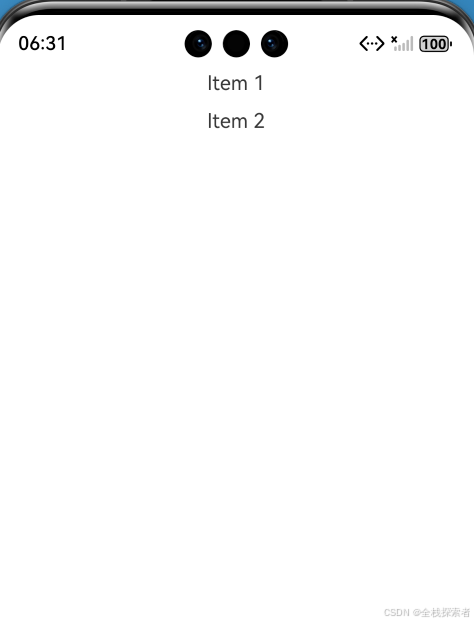
}
✅ 核心优势
| 能力 | map / for |
ForEach |
|---|---|---|
| 视图复用 | ❌ 无 | ✅ 自动复用相同 key 的节点 |
| 增量更新 | ❌ 全量重建 | ✅ 仅更新变化项 |
| 内存占用 | 高 | 低(尤其长列表) |
| 滚动性能 | 卡顿 | 流畅 |
💡 关键 :
ForEach是鸿蒙 声明式 UI 的核心优化点,不是可选项,而是必选项。
🔑 2. Key 函数:稳定、唯一、不变
ForEach 的第三个参数是 key 函数 ,其作用与 React 的 key 完全一致:
ts
(item) => item.id.toString()✅ 正确 key 原则
- 唯一性:同一列表中每个 key 必须唯一
- 稳定性:数据不变时,key 不应变化
- 简单类型 :返回
string或number
❌ 常见错误
ts
// 错误 1:用 index 当 key(数据变动时错乱)
(item, index) => index.toString()

// 错误 2:返回对象(非 string/number)
(item) => item // ❌

// 错误 3:key 不稳定(如时间戳)
(item) => Date.now().toString() // ❌
✅ 最佳实践:使用数据本身的唯一 ID(如数据库主键)。
🧩 3. 实战:构建一个高性能 TodoList
子组件:TodoItem
ts
@Component
struct TodoItem {
  @Prop data: ListItemData;

  build() {
    Row() {
      Text(this.data.text)
        .decoration({
          type: this.data.completed ? TextDecorationType.LineThrough : TextDecorationType.None
        })
      Toggle({
        type: ToggleType.Checkbox,
        isOn: this.data.completed
      })
        .margin({ left: 20 })
    }
    .justifyContent(FlexAlign.SpaceBetween)
    .padding(15)
    .width('100%')
  }
}
父组件:使用 ForEach
ts
export struct TodoList {
  @State todos: ListItemData[] = [
    { id: 1, text: '学习 ArkTS', completed: false },
    { id: 2, text: '写 CSDN 文章', completed: true }
  ];

  build() {
    List() {
      ForEach(
        this.todos,
        (todo: ListItemData) => {
          ListItem() {
            TodoItem({ data: todo })
          }
        },
        (todo: ListItemData) => todo.id.toString()
      )
    }
    .height('100%')
  }
}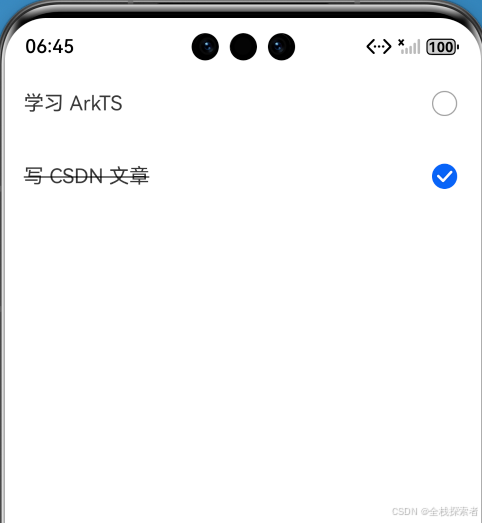
✅ 这样写,即使列表有 1000 项,滚动依然流畅。
🔄 4. 上拉加载 & 下拉刷新
List 组件原生支持加载状态:
ts
@Preview
@Component
export struct TodoList {
  todos: ListItemData[] = [
    { id: 1, text: '学习 ArkTS', completed: false },
    { id: 2, text: '写 CSDN 文章', completed: true },
    { id: 3, text: '写 CSDN 文章', completed: true },
    { id: 4, text: '写 CSDN 文章', completed: true },
    { id: 5, text: '写 CSDN 文章', completed: true },
    { id: 6, text: '写 CSDN 文章', completed: true },
    { id: 7, text: '写 CSDN 文章', completed: true },
    { id: 8, text: '写 CSDN 文章', completed: true },
    { id: 9, text: '写 CSDN 文章', completed: true },
    { id: 10, text: '写 CSDN 文章', completed: true },
    { id: 11, text: '学习 ArkTS', completed: false },
    { id: 12, text: '写 CSDN 文章', completed: true },
    { id: 13, text: '写 CSDN 文章', completed: true },
    { id: 14, text: '写 CSDN 文章', completed: true },
    { id: 15, text: '写 CSDN 文章', completed: true },
    { id: 16, text: '写 CSDN 文章', completed: true },
    { id: 17, text: '写 CSDN 文章', completed: true },
    { id: 18, text: '写 CSDN 文章', completed: true },
    { id: 19, text: '写 CSDN 文章', completed: true },
    { id: 20, text: '写 CSDN 文章', completed: true },
  ];
  @State isRefreshing: boolean = false;
  @State refreshOffset: number = 0;
  @State refreshState: RefreshStatus = RefreshStatus.Inactive;
  @State isLoading: boolean = false;

  @Builder
  refreshBuilder() {
    Stack({ alignContent: Alignment.Bottom }) {
      // 可以通过刷新状态控制是否存在Progress组件。
      // 当刷新状态处于下拉中或刷新中状态时Progress组件才存在。
      if (this.refreshState != RefreshStatus.Inactive && this.refreshState != RefreshStatus.Done) {
        Progress({ value: this.refreshOffset, total: 64, type: ProgressType.Ring })
          .width(32).height(32)
          .style({ status: this.isRefreshing ? ProgressStatus.LOADING : ProgressStatus.PROGRESSING })
          .margin(10)
      }
    }
    .clip(true)
    .height('100%')
    .width('100%')
  }

  @Builder
  footer() {
    Row() {
      LoadingProgress().height(32).width(48)
      Text("加载中")
    }.width('100%')
    .height(64)
    .justifyContent(FlexAlign.Center)
    // 当不处于加载中状态时隐藏组件。
    .visibility(this.isLoading ? Visibility.Visible : Visibility.Hidden)
  }

  build() {
    Column() {
      Refresh({
        refreshing: $$this.isRefreshing,
        builder: this.refreshBuilder()
      }) {
        List() {
          ForEach(
            this.todos,
            (todo: ListItemData) => {
              ListItem() {
                TodoItem({ data: todo })
              }
            },
            (todo: ListItemData) => todo.id.toString()
          )
          ListItem() {
            this.footer();
          }
        }
        .onScrollIndex((start: number, end: number) => {
          // 当达到列表末尾时,触发新数据加载。
          if (end >= this.todos.length - 1) {
            this.isLoading = true;
            // 模拟新数据加载。
            const newTodos = [...this.todos];
            this.todos = []
            setTimeout(() => {
              for (let i = 0; i < newTodos.length; i++) {
                this.todos.push(newTodos[i]);
              }
              this.isLoading = false;
            }, 700)
          }
        })

        .width('100%')
        .height('100%')
        .alignListItem(ListItemAlign.Center)
        .scrollBar(BarState.Off)
        // 开启边缘滑动效果。
          .edgeEffect(EdgeEffect.Spring, { alwaysEnabled: true })
      }
      .width('100%')
      .height('100%')
      .onOffsetChange((offset: number) => {
        this.refreshOffset = offset;
      })
      .onStateChange((state: RefreshStatus) => {
        this.refreshState = state;
      })
      .onRefreshing(() => {
        setTimeout(() => {
          this.isRefreshing = false
        }, 2000)
        console.info('onRefreshing test')
      })
    }
  }
}
💡 结合
Refresh和onScrollIndex,轻松实现分页加载。
⚠️ 5. 新手常见错误(避坑指南)
❌ 错误 1:忘记给 List 设置高度
ts
List() { /* ... */ } // ❌ 无法滚动!✅ 正确:
ts
List() { /* ... */ }.height('100%') // 或固定值❌ 错误 2:在 ForEach 外包裹额外容器
ts
Column() {
  ForEach(...) // ❌ Column 会破坏 List 的复用机制
}
✅ 正确:ForEach 必须直接作为 List、Column 或 Row 的子节点
❌ 错误 3:key 函数返回 undefined
ts
(item) => item.missingId // 若 missingId 不存在,返回 undefined → 崩溃!✅ 正确:确保 key 值存在且有效
ts
(item) => (item.id ?? item.tempId).toString()✅ 小结
- ✅ 不要用
map或for渲染 UI 列表 - ✅ 必须用
ForEach+ 稳定 key 函数 - ✅
ForEach= 鸿蒙的 高性能列表基石 - ✅ 结合
List+Refresh+onReachEnd实现完整列表交互
你不是在放弃 React 的习惯,而是在拥抱更高效的原生方案。
🔜 下期预告
《从 useEffect 到 onAppear/onPageShow》
我们将深入:
- 组件挂载/卸载时如何执行逻辑?
- 页面级生命周期如何监听?
- 如何正确清理定时器、取消订阅?
关注我,持续解锁 React → 鸿蒙实战技能!
📚 参考资料
作者简介 :全栈探索者,多年 React/Vue 开发经验,现专注 HarmonyOS 应用开发与前端技术演进。
系列名称:《React 开发者的鸿蒙入门指南》
✅ 欢迎点赞、收藏、评论交流!你的支持是我持续输出的动力!
✅ 点击主页关注,获取更多前端 × 鸿蒙实战内容!
💬 互动提问 :你在使用
ForEach时遇到过 key 相关的 bug 吗?留言告诉我,我会在下期集中解答!