前言
在处理海量数据渲染(如万级甚至十万级列表)时,直接操作 DOM 会导致严重的页面卡顿甚至崩溃。虚拟列表(Virtual List) 作为前端性能优化的"核武器",通过"只渲染可视区"的策略,能将渲染性能提升数个量级。本文将带你从零实现一个支持动态高度的通用虚拟列表。

一、 核心原理解析
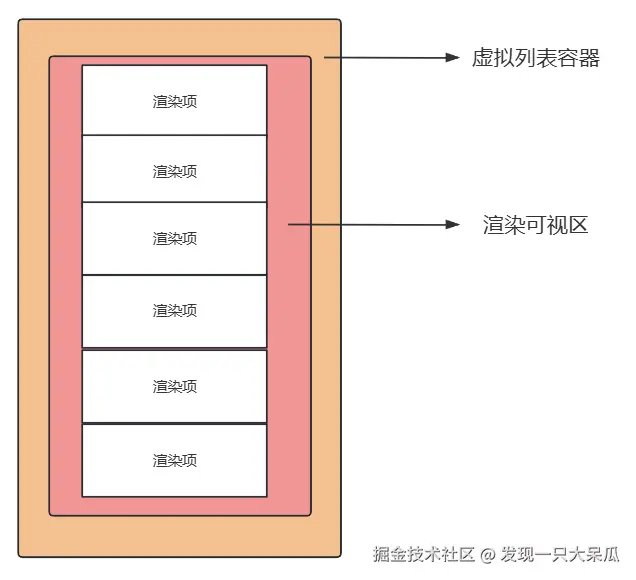
虚拟列表本质上是一个"障眼法",其结构通常分为三层:
- 外层容器(Container) :固定高度,设置
overflow: auto,负责监听滚动事件。 - 占位背景(Placeholder) :高度等于"总数据量 × 列表项高度",用于撑开滚动条,模拟真实滚动的视觉效果。
- 渲染内容区(Content Area) :绝对定位,根据滚动距离动态计算起始索引,并通过
translateY偏移到当前可视区域。
二、 定高虚拟列表
1. 设计思路
- 可视项数计算 :
Math.ceil(容器高度 / 固定高度) ± 缓冲区 (BUFFER)。 - 起始索引 :
Math.floor(滚动距离 / 固定高度)。 - 偏移量 :
起始索引 * 固定高度。
2. Vue 3 + TailwindCSS实现
vue
<template>
  <div
    class="min-h-screen bg-gradient-to-br from-indigo-600 to-purple-600 py-10 px-5"
  >
    <div class="bg-white mt-20 h-[calc(100vh-200px)] rounded-xl">
      <!-- 滚动容器 -->
      <div
        ref="virtualListRef"
        class="h-full overflow-auto relative"
        @scroll="handleScroll"
      >
        <!-- 占位容器:用于撑开滚动条,高度 = 总数据量 * 每项高度 -->
        <div :style="{ height: `${totalHeight}px` }"></div>

        <!-- 可视区域列表:通过 transform 定位到滚动位置 -->
        <div
          class="absolute top-0 left-0 right-0"
          :style="{ transform: `translateY(${offsetY}px)` }"
        >
          <div
            v-for="item in visibleList"
            :key="item.id"
            class="py-2 px-4 border-b border-gray-200"
            :class="{
              'bg-pink-200 h-[100px]': item.id % 2 !== 0,
              'bg-green-200 h-[100px]': item.id % 2 === 0,
            }"
          >
            {{ item.name }}
          </div>
        </div>
      </div>
    </div>
    <div
      class="fixed top-2 left-24 -translate-x-1/2 px-8 py-3 bg-white text-indigo-600 rounded-full text-base font-semibold cursor-pointer shadow-lg transition-all duration-300 hover:-translate-x-1/2 hover:-translate-y-0.5 hover:shadow-2xl"
      @click="goBack"
    >
      ← 返回首页
    </div>
  </div>
</template>

<script setup lang="ts">
import { ref, onMounted, computed } from 'vue';
import { useRouter } from 'vue-router';

const router = useRouter();

const ITEM_HEIGHT = 100; // 列表项固定高度(与样式中的 h-[100px] 一致)
const BUFFER = 5; // 缓冲区数量,避免滚动时出现空白

const virtualListRef = ref<HTMLDivElement | null>(null);

const ListData = ref<any[]>([]); // 完整列表数据
const scrollTop = ref(0); // 滚动容器的滚动距离

// 总列表高度(撑开滚动条用)
const totalHeight = computed(() => ListData.value.length * ITEM_HEIGHT);

// 可视区域高度(滚动容器的高度)
const viewportHeight = computed(() => {
  return virtualListRef.value?.clientHeight || 0;
});

// 可视区域可显示的列表项数量(向上取整 + 缓冲区)
const visibleCount = computed(() => {
  return Math.ceil(viewportHeight.value / ITEM_HEIGHT) + BUFFER;
});

// 当前显示的起始索引
const startIndex = computed(() => {
  // 滚动距离 / 每项高度 = 跳过的项数(向下取整)
  const index = Math.floor(scrollTop.value / ITEM_HEIGHT);
  // 防止索引为负数
  return Math.max(0, index);
});

// 当前显示的结束索引
const endIndex = computed(() => {
  const end = startIndex.value + visibleCount.value;
  // 防止超出总数据长度
  return Math.min(end, ListData.value.length);
});

// 可视区域需要渲染的列表数据
const visibleList = computed(() => {
  return ListData.value.slice(startIndex.value, endIndex.value);
});

// 可视区域的偏移量(让列表项定位到正确位置)
const offsetY = computed(() => {
  return startIndex.value * ITEM_HEIGHT;
});

// 处理滚动事件
const handleScroll = () => {
  if (virtualListRef.value) {
    scrollTop.value = virtualListRef.value.scrollTop;
  }
};

// 返回首页
const goBack = () => {
  router.push('/home');
};

// 初始化
onMounted(() => {
  // 生成模拟数据
  ListData.value = Array.from({ length: 1000 }, (_, index) => ({
    id: index,
    name: `Item ${index}`,
  }));
});
</script>
3. 实现效果图
三、 进阶:不定高(动态高度)虚拟列表

在实际业务(如社交动态、聊天记录)中,每个 Item 的高度往往是不固定的。
1. 核心改进思路
- 高度映射表(Map) :记录每一个 Item 渲染后的真实高度。
- 累计高度数组(Cumulative Heights) :存储每一项相对于顶部的偏移位置。
- ResizeObserver:利用该 API 监听子组件高度变化,实时更新映射表,解决图片加载或文本折行导致的位移。
2. Vue 3 + tailwindCSS 实现(子组件抽离)
子组件: 负责上报真实高度:
vue
<template>
  <div
    ref="itemRef"
    class="py-2 px-4 border-b border-gray-200"
    :class="{
      'bg-pink-200': item.id % 2 !== 0,
      'bg-green-200': item.id % 2 === 0,
    }"
    :style="{ height: item.id % 2 === 0 ? '150px' : '100px' }"
  >
    {{ item.name }}
  </div>
</template>

<script setup lang="ts">
import { ref, onMounted, onUpdated, onUnmounted, watch, nextTick } from 'vue';

// 定义props:接收父组件传递的item数据
const props = defineProps<{
  item: {
    id: number;
    name: string;
  };
}>();

// 定义emit:向父组件传递高度更新事件
const emit = defineEmits<{
  (e: 'update-height', id: number, height: number): void;
}>();

const itemRef = ref<HTMLDivElement | null>(null);
let resizeObserver: ResizeObserver | null = null;

// 计算并发送当前组件的高度
const sendItemHeight = () => {
  if (!itemRef.value) return;
  const realHeight = itemRef.value.offsetHeight;
  emit('update-height', props.item.id, realHeight);
};

// 监听组件挂载:首次发送高度 + 监听高度变化
onMounted(() => {
  // 首次渲染完成后发送高度
  nextTick(() => {
    sendItemHeight();
  });

  // 监听元素高度变化(适配动态内容导致的高度变化)
  if (window.ResizeObserver) {
    resizeObserver = new ResizeObserver(() => {
      sendItemHeight();
    });
    if (itemRef.value) {
      resizeObserver.observe(itemRef.value);
    }
  }
});

// 组件更新后重新发送高度(比如内容变化)
onUpdated(() => {
  nextTick(() => {
    sendItemHeight();
  });
});

// 组件卸载:清理监听
onUnmounted(() => {
  if (resizeObserver) {
    resizeObserver.disconnect();
    resizeObserver = null;
  }
});

// 监听item变化:如果item替换,重新计算高度
watch(
  () => props.item.id,
  () => {
    nextTick(() => {
      sendItemHeight();
    });
  }
);
</script>父组件:核心逻辑
vue
<template>
  <div
    class="min-h-screen bg-gradient-to-br from-indigo-600 to-purple-600 py-10 px-5"
  >
    <div class="bg-white mt-20 h-[calc(100vh-200px)] rounded-xl">
      <!-- 滚动容器 -->
      <div
        ref="virtualListRef"
        class="h-full overflow-auto relative"
        @scroll="handleScroll"
      >
        <!-- 占位容器:撑开滚动条 -->
        <div :style="{ height: `${totalHeight}px` }"></div>

        <!-- 可视区域列表 -->
        <div
          class="absolute top-0 left-0 right-0"
          :style="{ transform: `translateY(${offsetY}px)` }"
        >
          <!-- 渲染子组件,监听高度更新事件 -->
          <VirtualListItem
            v-for="item in visibleList"
            :key="item.id"
            :item="item"
            @update-height="handleItemHeightUpdate"
          />
        </div>
      </div>
    </div>
    <div
      class="fixed top-2 left-24 -translate-x-1/2 px-8 py-3 bg-white text-indigo-600 rounded-full text-base font-semibold cursor-pointer shadow-lg transition-all duration-300 hover:-translate-x-1/2 hover:-translate-y-0.5 hover:shadow-2xl"
      @click="goBack"
    >
      ← 返回首页
    </div>
  </div>
</template>

<script setup lang="ts">
import { ref, onMounted, computed, onUnmounted, nextTick } from 'vue';
import { useRouter } from 'vue-router';
import VirtualListItem from './listItem.vue'; // 引入子组件

const router = useRouter();

const MIN_ITEM_HEIGHT = 100; // 子项预设的最小高度
const BUFFER = 5; //上下缓冲区数目
const virtualListRef = ref<HTMLDivElement | null>(null); // 滚动容器引用

const ListData = ref<any[]>([]); // 完整列表数据
const scrollTop = ref(0); // 滚动距离
const itemHeights = ref<Map<number, number>>(new Map()); // 子组件高度映射表
const cumulativeHeights = ref<number[]>([0]); // 累计高度数组
const scrollTimer = ref<number | null>(null); // 滚动节流定时器
const isUpdatingCumulative = ref(false); // 累计高度更新防抖

// 初始化位置数据
const initPositionData = () => {
  // 初始化高度映射表(默认最小高度)
  const heightMap = new Map<number, number>();
  ListData.value.forEach((item) => {
    heightMap.set(item.id, MIN_ITEM_HEIGHT);
  });
  // 初始化累计高度
  updateCumulativeHeights();
};

// 更新累计高度(核心)
const updateCumulativeHeights = () => {
  if (isUpdatingCumulative.value) return;
  isUpdatingCumulative.value = true;

  const itemCount = ListData.value.length;
  const cumulative = [0];
  let sum = 0;

  for (let i = 0; i < itemCount; i++) {
    const itemId = ListData.value[i].id;
    sum += itemHeights.value.get(itemId) || MIN_ITEM_HEIGHT;
    cumulative.push(sum);
  }

  cumulativeHeights.value = cumulative;
  isUpdatingCumulative.value = false;
};

// 处理子组件的高度更新事件
const handleItemHeightUpdate = (id: number, height: number) => {
  // 高度未变化则跳过
  if (itemHeights.value.get(id) === height) return;

  // 更新高度映射表
  itemHeights.value.set(id, height);

  // 异步更新累计高度(避免同步更新导致的性能问题)
  nextTick(() => {
    updateCumulativeHeights();
  });
};

// 总高度,根据统计高度数组最后一个值计算得出
const totalHeight = computed(() => {
  return cumulativeHeights.value[cumulativeHeights.value.length - 1] || 0;
});

// 列表可视区域高度
const viewportHeight = computed(() => {
  return virtualListRef.value?.clientHeight || MIN_ITEM_HEIGHT * 5;
});

// 计算起始索引
const startIndex = computed(() => {
  const totalItemCount = ListData.value.length;
  if (totalItemCount === 0) return 0;
  if (scrollTop.value <= 0) return 0;

  let baseStartIndex = 0;
  // 反向遍历找起始索引
  for (let i = cumulativeHeights.value.length - 1; i >= 0; i--) {
    if (cumulativeHeights.value[i] <= scrollTop.value) {
      baseStartIndex = i;
      break;
    }
  }
  const finalIndex = Math.max(0, baseStartIndex - BUFFER); // 确保不小于0
  return Math.min(finalIndex, totalItemCount - 1);
});

// 计算结束索引
const endIndex = computed(() => {
  const totalItemCount = ListData.value.length;
  const viewportHeightVal = viewportHeight.value;
  if (totalItemCount === 0) return 0;

  const targetScrollBottom = scrollTop.value + viewportHeightVal; // 目标滚动到底部位置
  let baseEndIndex = totalItemCount - 1;
  for (let i = 0; i < cumulativeHeights.value.length; i++) {
    if (cumulativeHeights.value[i] > targetScrollBottom) {
      baseEndIndex = i - 1;
      break;
    }
  }
  const finalEndIndex = Math.min(baseEndIndex + BUFFER, totalItemCount - 1); // 确保不大于总项数-1
  return finalEndIndex;
});

// 可见列表
const visibleList = computed(() => {
  const start = startIndex.value;
  const end = endIndex.value;
  return start <= end ? ListData.value.slice(start, end + 1) : [];
});

const offsetY = computed(() => {
  return cumulativeHeights.value[startIndex.value] || 0;
});

// 滚动节流处理
const handleScroll = () => {
  if (!virtualListRef.value) return;

  if (scrollTimer.value) clearTimeout(scrollTimer.value);
  scrollTimer.value = window.setTimeout(() => {
    scrollTop.value = virtualListRef.value!.scrollTop;
  }, 20);
};

const handleResize = () => {
  if (virtualListRef.value) {
    scrollTop.value = virtualListRef.value.scrollTop;
  }
};

const goBack = () => {
  router.push('/home');
};

// 生命周期
onMounted(() => {
  // 生成模拟数据
  ListData.value = Array.from({ length: 1000 }, (_, index) => ({
    id: index,
    name: `Item ${index}`,
  }));
  initPositionData();
  window.addEventListener('resize', handleResize); // 监听窗口大小变化
});

onUnmounted(() => {
  window.removeEventListener('resize', handleResize);
  if (scrollTimer.value) clearTimeout(scrollTimer.value);
  isUpdatingCumulative.value = false;
  itemHeights.value.clear();
});
</script>
3. React + tailwindCSS 实现(子组件抽离)
子组件:
tsx
import React, { useEffect, useRef, useState, useCallback } from 'react';

interface VirtualListItemProps {
  item: {
    id: number;
    name: string;
  };
  onUpdateHeight: (id: number, height: number) => void; // 替代 Vue 的 emit
}

const VirtualListItem: React.FC<VirtualListItemProps> = ({
  item,
  onUpdateHeight,
}) => {
  const itemRef = useRef<HTMLDivElement>(null);
  // 存储 ResizeObserver 实例(避免重复创建)
  const resizeObserverRef = useRef<ResizeObserver | null>(null);

  // 计算并上报高度
  const sendItemHeight = useCallback(() => {
    if (!itemRef.current) return;
    const realHeight = itemRef.current.offsetHeight;
    onUpdateHeight(item.id, realHeight);
  }, [item.id, onUpdateHeight]);

  useEffect(() => {
    const timer = setTimeout(() => {
      sendItemHeight();
    }, 0);

    // 初始化 ResizeObserver 监听高度变化
    if (window.ResizeObserver) {
      resizeObserverRef.current = new ResizeObserver(() => {
        sendItemHeight();
      });
      if (itemRef.current) {
        resizeObserverRef.current.observe(itemRef.current);
      }
    }

    // 清理定时器(对应 Vue 的 onUnmounted 部分)
    return () => {
      clearTimeout(timer);
      if (resizeObserverRef.current) {
        resizeObserverRef.current.disconnect();
        resizeObserverRef.current = null;
      }
    };
  }, [sendItemHeight]); // 仅首次挂载执行

  //监听 item 变化重新计算高度
  useEffect(() => {
    const timer = setTimeout(() => {
      sendItemHeight();
    }, 0);
    return () => clearTimeout(timer);
  }, [item.id, sendItemHeight]); // item.id 变化时执行

  const itemClass = `py-2 px-4 border-b border-gray-200 ${
    item.id % 2 !== 0 ? 'bg-pink-200' : 'bg-green-200'
  }`;

  const itemStyle: React.CSSProperties = {
    height: item.id % 2 === 0 ? '150px' : '100px',
  };

  return (
    <div ref={itemRef} className={itemClass} style={itemStyle}>
      {item.name}
    </div>
  );
};

export default VirtualListItem;
父组件:
tsx
import React, {
  useEffect,
  useRef,
  useState,
  useCallback,
  useMemo,
} from 'react';
import VirtualListItem from './listItem';

const VirtualList: React.FC = () => {
  const MIN_ITEM_HEIGHT = 100; // 最小项高度
  const BUFFER = 5; // 缓冲区项数

  const virtualListRef = useRef<HTMLDivElement>(null); // 虚拟列表容器引用

  const [listData, setListData] = useState<Array<{ id: number; name: string }>>(
    []
  ); // 列表数据
  const [scrollTop, setScrollTop] = useState(0); // 滚动位置
  const [itemHeights, setItemHeights] = useState<Map<number, number>>(
    new Map()
  ); // 高度映射表(Map 结构)
  const [cumulativeHeights, setCumulativeHeights] = useState<number[]>([0]); // 累计高度数组
  const scrollTimerRef = useRef<number | null>(null); // 滚动节流定时器

  // 初始化模拟数据
  const initData = () => {
    const mockData = Array.from({ length: 1000 }, (_, index) => ({
      id: index,
      name: `Item ${index}`,
    }));
    setListData(mockData);
    // 初始化高度映射表(默认最小高度)
    const initHeightMap = new Map<number, number>();
    mockData.forEach((item) => {
      initHeightMap.set(item.id, MIN_ITEM_HEIGHT);
    });
    setItemHeights(initHeightMap);
    // 初始化累计高度
    updateCumulativeHeights(initHeightMap, mockData);
  };

  useEffect(() => {
    initData();
    // 监听窗口大小变化
    const handleResize = () => {
      if (virtualListRef.current) {
        setScrollTop(virtualListRef.current.scrollTop);
      }
    };
    window.addEventListener('resize', handleResize);

    // 清理监听
    return () => {
      window.removeEventListener('resize', handleResize);
      if (scrollTimerRef.current) {
        clearTimeout(scrollTimerRef.current);
      }
      itemHeights.clear(); // 清空 Map 释放内存
    };
  }, []);

  // 更新累计高度(核心函数)
  const updateCumulativeHeights = useCallback(
    (heightMap: Map<number, number>, data: typeof listData) => {
      const cumulative = [0];
      let sum = 0;
      for (let i = 0; i < data.length; i++) {
        const itemId = data[i].id;
        sum += heightMap.get(itemId) || MIN_ITEM_HEIGHT;
        cumulative.push(sum);
      }
      setCumulativeHeights(cumulative);
    },
    [MIN_ITEM_HEIGHT]
  );

  // 处理子组件的高度更新事件(对应 Vue 的 handleItemHeightUpdate)
  const handleItemHeightUpdate = useCallback(
    (id: number, height: number) => {
      // 高度未变化则跳过
      if (itemHeights.get(id) === height) return;

      // 更新高度映射表
      const newHeightMap = new Map(itemHeights);
      newHeightMap.set(id, height);
      setItemHeights(newHeightMap);

      // 异步更新累计高度
      setTimeout(() => {
        updateCumulativeHeights(newHeightMap, listData);
      }, 0);
    },
    [itemHeights, listData, updateCumulativeHeights]
  );

  // 滚动节流处理
  const handleScroll = useCallback(() => {
    if (!virtualListRef.current) return;

    // 节流:20ms 内只更新一次 scrollTop
    if (scrollTimerRef.current) {
      clearTimeout(scrollTimerRef.current);
    }
    scrollTimerRef.current = setTimeout(() => {
      setScrollTop(virtualListRef.current!.scrollTop);
    }, 20);
  }, []);

  // 可视区域高度
  const viewportHeight = useMemo(() => {
    return virtualListRef.current?.clientHeight || MIN_ITEM_HEIGHT * 5;
  }, []);

  //  总列表高度
  const totalHeight = useMemo(() => {
    return cumulativeHeights[cumulativeHeights.length - 1] || 0;
  }, [cumulativeHeights]);

  // 起始索引
  const startIndex = useMemo(() => {
    const totalItemCount = listData.length;
    if (totalItemCount === 0) return 0;
    if (scrollTop <= 0) return 0;

    // 反向遍历找起始索引
    let baseStartIndex = 0;
    for (let i = cumulativeHeights.length - 1; i >= 0; i--) {
      if (cumulativeHeights[i] <= scrollTop) {
        baseStartIndex = i;
        break;
      }
    }

    const finalIndex = Math.max(0, baseStartIndex - BUFFER);
    return Math.min(finalIndex, totalItemCount - 1);
  }, [
    scrollTop,
    viewportHeight,
    totalHeight,
    cumulativeHeights,
    listData.length,
  ]);

  // 结束索引
  const endIndex = useMemo(() => {
    const totalItemCount = listData.length;
    if (totalItemCount === 0) return 0;

    const targetScrollBottom = scrollTop + viewportHeight;
    let baseEndIndex = totalItemCount - 1;

    for (let i = 0; i < cumulativeHeights.length; i++) {
      if (cumulativeHeights[i] > targetScrollBottom) {
        baseEndIndex = i - 1;
        break;
      }
    }

    let finalEndIndex = baseEndIndex + BUFFER;
    finalEndIndex = Math.min(finalEndIndex, totalItemCount - 1);
    return finalEndIndex;
  }, [scrollTop, viewportHeight, cumulativeHeights, listData.length]);

  // 可视区列表
  const visibleList = useMemo(() => {
    return startIndex <= endIndex
      ? listData.slice(startIndex, endIndex + 1)
      : [];
  }, [startIndex, endIndex, listData]);

  // 偏移量
  const offsetY = useMemo(() => {
    return cumulativeHeights[startIndex] || 0;
  }, [startIndex, cumulativeHeights]);

  return (
    <div className="h-full bg-gradient-to-br from-indigo-600 to-purple-600 py-10 px-5">
      <div className="bg-white mt-10 h-[calc(100vh-200px)] rounded-xl">
        {/* 滚动容器 */}
        <div
          ref={virtualListRef}
          className="h-full overflow-auto relative"
          onScroll={handleScroll}
        >
          {/* 占位容器:撑开滚动条 */}
          <div style={{ height: `${totalHeight}px` }}></div>

          {/* 可视区域列表:transform 偏移 */}
          <div
            className="absolute top-0 left-0 right-0"
            style={{ transform: `translateY(${offsetY}px)` }}
          >
            {visibleList.map((item) => (
              <VirtualListItem
                key={item.id}
                item={item}
                onUpdateHeight={handleItemHeightUpdate}
              />
            ))}
          </div>
        </div>
      </div>
    </div>
  );
};

export default VirtualList;
4. 实现效果图
四、 总结与避坑指南
1. 为什么需要缓冲区(BUFFER)?
如果只渲染可见部分,用户快速滚动时,异步渲染可能会导致瞬间的"白屏"。设置上下缓冲区可以预加载部分 DOM,让滑动更顺滑。
2. 性能进一步优化
- 滚动节流(Throttle) :虽然滚动监听很快,但在
handleScroll中加入requestAnimationFrame或 20ms 的节流,能有效减轻主线程压力。 - Key 的选择 :在虚拟列表中,
key必须是唯一的id,绝对不能使用index,否则在滚动重用 DOM 时会出现状态错乱。
3. 注意事项
- 定高:逻辑简单,性能极高。
- 不定高 :依赖
ResizeObserver,需注意频繁重排对性能的影响,建议对updateCumulativeHeights做异步批处理。