Mongodump备份mongodb数据库
在前面二期文章中介绍了如何安装单节点的mongodb数据库和升级数据库。
在本期文章将介绍mongodump备份数据库
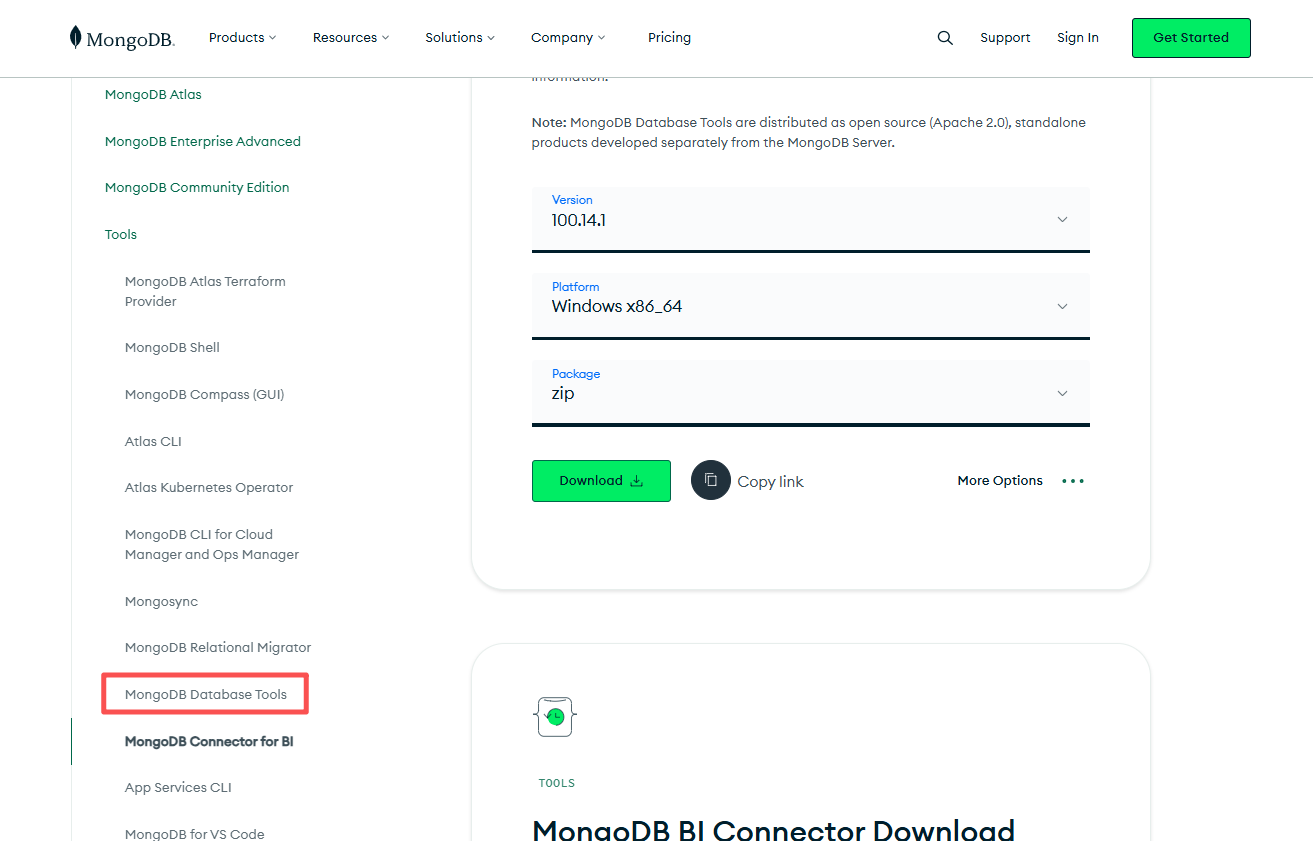
下载mongodump工具包
https://www.mongodb.com/try/download/bi-connector
使用如下命令备份数据库
方式1
mongodump.exe --host 127.0.0.1 --port 27017 --username sysadmin --password 123456 --authenticationDatabase admin -d demodb -o D:\database_backup\demodb
D:\mongodb-database-tools-windows-x86_64-100.14.1\bin>mongodump.exe --host 127.0.0.1 --port 27017 --username sysadmin --password 123456 --authenticationDatabase admin -d demodb -o D:\database_backup\demodb
2026-02-09T23:48:09.152+0800    writing demodb.students to D:\database_backup\demodb\demodb\students.bson
2026-02-09T23:48:09.163+0800    writing demodb.user to D:\database_backup\demodb\demodb\user.bson
2026-02-09T23:48:09.167+0800    done dumping demodb.user (1 document)
2026-02-09T23:48:09.168+0800    done dumping demodb.students (3 documents)

D:\mongodb-database-tools-windows-x86_64-100.14.1\bin>
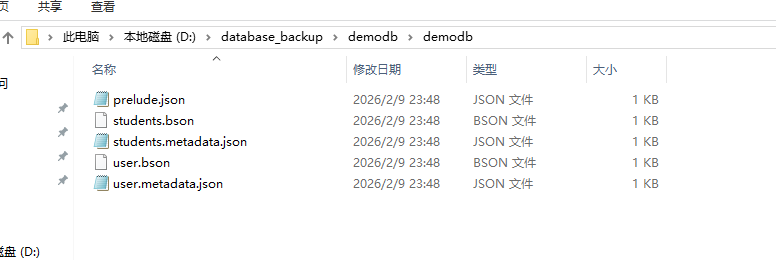
备份结果查看,从结果可以看出mongodump会自动创建数据库名字的文件夹。
方式2
mongodump.exe --uri "mongodb://sysadmin:123456@127.0.0.1:27017/demodb?authSource=admin" -o D:\database_backup\
D:\mongodb-database-tools-windows-x86_64-100.14.1\bin>mongodump.exe --uri "mongodb://sysadmin:123456@127.0.0.1:27017/demodb?authSource=admin" -o D:\database_backup\
2026-02-09T23:52:43.026+0800    writing demodb.students to D:\database_backup\demodb\students.bson
2026-02-09T23:52:43.034+0800    writing demodb.user to D:\database_backup\demodb\user.bson
2026-02-09T23:52:43.040+0800    done dumping demodb.students (3 documents)
2026-02-09T23:52:43.041+0800    done dumping demodb.user (1 document)

D:\mongodb-database-tools-windows-x86_64-100.14.1\bin>
mongodbstore恢复数据库
恢复前删除数据库
admin> show dbs
admin   132.00 KiB
config   96.00 KiB
demodb   80.00 KiB
local    72.00 KiB
admin> use demodb
switched to db demodb
demodb>

demodb> db.dropDatabase()
{ ok: 1, dropped: 'demodb' }
demodb>

demodb> use admin
switched to db admin
admin> show dbs
admin   132.00 KiB
config   96.00 KiB
local    72.00 KiB
admin>

admin>

admin> show dbs
admin   132.00 KiB
config   96.00 KiB
local    72.00 KiB
admin> exit
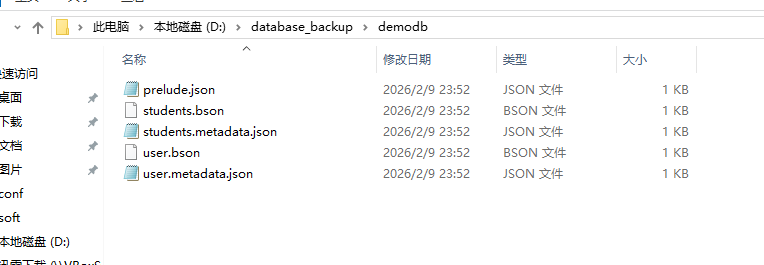
查看备份文件信息
D:\database_backup\demodb
恢复数据库
命令如下:
方法1:明确指定认证参数
mongorestore.exe --host 127.0.0.1 --port 27017 --username sysadmin --password 123456 --authenticationDatabase admin --db demodb D:\database_backup\demodb
方法2:使用URI格式(推荐)mongorestore.exe --uri "mongodb://sysadmin:123456@127.0.0.1:27017/demodb?authSource=admin" D:\database_backup\demodb
方法1:
D:\mongodb-database-tools-windows-x86_64-100.14.1\bin>mongorestore.exe --host 127.0.0.1 --port 27017 --username sysadmin --password 123456 --authenticationDatabase admin --db demodb D:\database_backup\demodb
2026-02-10T00:21:21.974+0800    The --db and --collection flags are deprecated for this use-case; please use --nsInclude instead, i.e. with --nsInclude=${DATABASE}.${COLLECTION}
2026-02-10T00:21:21.981+0800    building a list of collections to restore from D:\database_backup\demodb dir
2026-02-10T00:21:21.982+0800    don't know what to do with file "D:\database_backup\demodb\prelude.json", skipping...
2026-02-10T00:21:21.982+0800    reading metadata for demodb.students from D:\database_backup\demodb\students.metadata.json
2026-02-10T00:21:21.982+0800    reading metadata for demodb.user from D:\database_backup\demodb\user.metadata.json
2026-02-10T00:21:22.009+0800    restoring demodb.students from D:\database_backup\demodb\students.bson
2026-02-10T00:21:22.023+0800    finished restoring demodb.students (3 documents, 0 failures)
2026-02-10T00:21:22.026+0800    restoring demodb.user from D:\database_backup\demodb\user.bson
2026-02-10T00:21:22.038+0800    finished restoring demodb.user (1 document, 0 failures)
2026-02-10T00:21:22.039+0800    no indexes to restore for collection demodb.students
2026-02-10T00:21:22.040+0800    no indexes to restore for collection demodb.user
2026-02-10T00:21:22.040+0800    4 document(s) restored successfully. 0 document(s) failed to restore.
方法2:
D:\mongodb-database-tools-windows-x86_64-100.14.1\bin>mongorestore.exe --uri "mongodb://sysadmin:123456@127.0.0.1:27017/demodb?authSource=admin" D:\database_backup\demodb
2026-02-10T00:14:49.637+0800    WARNING: On some systems, a password provided directly in a connection string or using --uri may be visible to system status programs such as `ps` that may be invoked by other users. Consider omitting the password to provide it via stdin, or using the --config option to specify a configuration file with the password.
2026-02-10T00:14:49.654+0800    The --db and --collection flags are deprecated for this use-case; please use --nsInclude instead, i.e. with --nsInclude=${DATABASE}.${COLLECTION}
2026-02-10T00:14:49.654+0800    building a list of collections to restore from D:\database_backup\demodb dir
2026-02-10T00:14:49.655+0800    don't know what to do with file "D:\database_backup\demodb\prelude.json", skipping...
2026-02-10T00:14:49.655+0800    reading metadata for demodb.students from D:\database_backup\demodb\students.metadata.json
2026-02-10T00:14:49.656+0800    reading metadata for demodb.user from D:\database_backup\demodb\user.metadata.json
2026-02-10T00:14:49.694+0800    restoring demodb.students from D:\database_backup\demodb\students.bson
2026-02-10T00:14:49.698+0800    restoring demodb.user from D:\database_backup\demodb\user.bson
2026-02-10T00:14:49.709+0800    finished restoring demodb.students (3 documents, 0 failures)
2026-02-10T00:14:49.711+0800    finished restoring demodb.user (1 document, 0 failures)
2026-02-10T00:14:49.712+0800    no indexes to restore for collection demodb.students
2026-02-10T00:14:49.713+0800    no indexes to restore for collection demodb.user
2026-02-10T00:14:49.713+0800    4 document(s) restored successfully. 0 document(s) failed to restore.
以上命令会提示db过期参数
由于你的版本提示 --db 已弃用,使用新语法:
恢复整个数据库
mongorestore.exe --uri "mongodb://sysadmin:123456@127.0.0.1:27017/?authSource=admin" --nsInclude="demodb.*" D:\database_backup
或者指定特定集合mongorestore.exe --uri "mongodb://sysadmin:123456@127.0.0.1:27017/?authSource=admin" --nsInclude="demodb.students" --nsInclude="demodb.user" D:\database_backup
请注意如上2个命令的指定的备份文件夹的路径与之前的区别。路径指向 D:\database_backup\,不是 D:\database_backup\demodb\ 。
恢复整个数据库:
D:\mongodb-database-tools-windows-x86_64-100.14.1\bin>mongorestore.exe --uri "mongodb://sysadmin:123456@127.0.0.1:27017/?authSource=admin" --nsInclude="demodb.*" D:\database_backup
2026-02-10T00:28:01.676+0800    preparing collections to restore from
2026-02-10T00:28:01.683+0800    don't know what to do with file "D:\database_backup\demodb\prelude.json", skipping...
2026-02-10T00:28:01.684+0800    reading metadata for demodb.students from D:\database_backup\demodb\students.metadata.json
2026-02-10T00:28:01.684+0800    reading metadata for demodb.user from D:\database_backup\demodb\user.metadata.json
2026-02-10T00:28:01.714+0800    restoring demodb.students from D:\database_backup\demodb\students.bson
2026-02-10T00:28:01.726+0800    finished restoring demodb.students (3 documents, 0 failures)
2026-02-10T00:28:01.731+0800    restoring demodb.user from D:\database_backup\demodb\user.bson
2026-02-10T00:28:01.741+0800    finished restoring demodb.user (1 document, 0 failures)
2026-02-10T00:28:01.743+0800    no indexes to restore for collection demodb.students
2026-02-10T00:28:01.743+0800    no indexes to restore for collection demodb.user
2026-02-10T00:28:01.744+0800    4 document(s) restored successfully. 0 document(s) failed to restore.

D:\mongodb-database-tools-windows-x86_64-100.14.1\bin>
D:\mongodb-database-tools-windows-x86_64-100.14.1\bin>
查看数据已恢复
D:\mongosh-2.6.0-win32-x64\bin>mongosh mongodb://127.0.0.1:27017/admin -u sysadmin -p
Enter password: ******
Current Mongosh Log ID: 698a081ea4cf8350c6628c9f
Connecting to:          mongodb://<credentials>@127.0.0.1:27017/admin?directConnection=true&serverSelectionTimeoutMS=2000&appName=mongosh+2.6.0
Using MongoDB:          7.0.29
Using Mongosh:          2.6.0

For mongosh info see: https://www.mongodb.com/docs/mongodb-shell/

admin> show dbs;
admin   132.00 KiB
config  108.00 KiB
demodb   80.00 KiB
local    72.00 KiB
admin> use demodb
switched to db demodb
demodb> show tables
students
user
demodb> db.user.find()
[
  {
    _id: ObjectId('6989f6468b0747a5a4628ca0'),
    name: 'Chaitanya',
    age: 30
  }
]
demodb> db.students.find()
[
  {
    _id: ObjectId('6989f7798b0747a5a4628ca1'),
    StudentId: 1001,
    StudentName: 'Steve',
    age: 30
  },
  {
    _id: ObjectId('6989f7798b0747a5a4628ca2'),
    StudentId: 1002,
    StudentName: 'Negan',
    age: 42
  },
  {
    _id: ObjectId('6989f7798b0747a5a4628ca3'),
    StudentId: 3333,
    StudentName: 'Rick',
    age: 35
  }
]
demodb>