
个人主页:ujainu
欢迎加入开源鸿蒙跨平台社区:https://openharmonycrossplatform.csdn.net
文章目录
- [🧩 拼图挑战:多阶可选滑块拼图(3×3 / 4×4 / 5×5)------ Flutter + OpenHarmony 鸿蒙风益智游戏](#🧩 拼图挑战:多阶可选滑块拼图(3×3 / 4×4 / 5×5)—— Flutter + OpenHarmony 鸿蒙风益智游戏)
-
- [《用 Flutter + OpenHarmony 打造支持 3×3、4×4、5×5 的滑块拼图游戏:动态网格、通用状态管理与难度自适应》](#《用 Flutter + OpenHarmony 打造支持 3×3、4×4、5×5 的滑块拼图游戏:动态网格、通用状态管理与难度自适应》)
- 一、为什么支持多阶拼图?
-
- [1. 用户体验分层](#1. 用户体验分层)
- [2. 技术可扩展性验证](#2. 技术可扩展性验证)
- [3. 鸿蒙"以人为本"理念体现](#3. 鸿蒙“以人为本”理念体现)
- [二、技术架构升级:从固定 3×3 到 N×N 通用模型](#二、技术架构升级:从固定 3×3 到 N×N 通用模型)
-
- [1. 核心变量重构](#1. 核心变量重构)
- [2. 完成状态动态生成](#2. 完成状态动态生成)
- [3. 可解性保障:通用打乱算法](#3. 可解性保障:通用打乱算法)
- 三、核心模块一:动态图片切割与显示
-
- [1. 自适应裁剪逻辑](#1. 自适应裁剪逻辑)
- [2. GridView 动态构建](#2. GridView 动态构建)
- 四、核心模块二:通用移动与完成检测
-
- [1. 邻接判断(通用版)](#1. 邻接判断(通用版))
- [2. 完成检测(通用版)](#2. 完成检测(通用版))
- [3. 空白位置更新](#3. 空白位置更新)
- [五、UI 升级:难度选择与自适应布局](#五、UI 升级:难度选择与自适应布局)
-
- [1. 难度选择弹窗](#1. 难度选择弹窗)
- [2. 自适应网格容器](#2. 自适应网格容器)
- 六、完整可运行代码
- 结语
🧩 拼图挑战:多阶可选滑块拼图(3×3 / 4×4 / 5×5)------ Flutter + OpenHarmony 鸿蒙风益智游戏
《用 Flutter + OpenHarmony 打造支持 3×3、4×4、5×5 的滑块拼图游戏:动态网格、通用状态管理与难度自适应》
经典滑块拼图的魅力,在于其规则的简洁性与策略的深度性。而当我们将 3×3 的基础玩法,扩展为 3×3、4×4、5×5 三档难度可选,便赋予了这款百年益智游戏全新的生命力------新手可在 3×3 中轻松入门,高手则能在 5×5 的复杂布局中挑战极限。
在 Flutter + OpenHarmony 生态下,我们实现了这一灵活可扩展的拼图系统。它不仅支持多阶网格动态切换,还通过统一的状态建模机制 、自适应的图片裁剪算法 和智能的可解性保障 ,确保每一局游戏都流畅、公平且充满乐趣。UI 设计严格遵循 鸿蒙设计语言:圆角卡片、无边框干扰、充足留白,让玩家完全沉浸于拼图本身。
本文将带你深入实现 动态阶数管理、通用二维状态机、图片自适应切割、合法移动判断与完成检测 五大核心技术。全文超过 5000 字,包含逐行代码讲解与完整可运行示例,助你打造一款真正专业级的鸿蒙风益智应用。
一、为什么支持多阶拼图?
1. 用户体验分层
- 3×3(9 块):适合儿童、老人或碎片时间娱乐,平均完成时间 < 2 分钟
- 4×4(16 块):标准难度,平衡挑战性与成就感,适合大多数玩家
- 5×5(25 块):高阶挑战,考验空间记忆与规划能力,满足硬核玩家
2. 技术可扩展性验证
- 动态网格:证明架构不耦合固定尺寸
- 通用算法:一套逻辑适配 N×N,避免重复代码
- 性能压力测试:5×5 对状态管理和渲染提出更高要求
3. 鸿蒙"以人为本"理念体现
"好的设计应适应人,而非让人适应设计。"
------ OpenHarmony 设计哲学
提供难度选择,正是对用户能力差异的尊重。
二、技术架构升级:从固定 3×3 到 N×N 通用模型
1. 核心变量重构
我们引入 _size 表示当前阶数(3/4/5),并动态生成状态:
dart
int _size = 3; // 可选 3, 4, 5
List<List<int>> _puzzleState = [];
int _emptyRow = 0;
int _emptyCol = 0;
2. 完成状态动态生成
不再硬编码,而是根据 _size 构建:
dart
List<List<int>> _generateSolvedState(int size) {
  final state = List.generate(size, (i) => List.generate(size, (j) => 0));
  int value = 1;
  for (int i = 0; i < size; i++) {
    for (int j = 0; j < size; j++) {
      if (i == size - 1 && j == size - 1) {
        state[i][j] = 0; // 空白
      } else {
        state[i][j] = value++;
      }
    }
  }
  return state;
}
✅ 优势:天然支持任意 N×N(理论上)
3. 可解性保障:通用打乱算法
仍采用 模拟合法移动法,确保任何阶数都可解:
dart
void _shuffle() {
  final random = Random();
  // 移动次数随阶数增加(3x3:100, 4x4:200, 5x5:300)
  final moves = 100 * (_size - 2);
  for (int i = 0; i < moves; i++) {
    final validMoves = _getValidMoves();
    if (validMoves.isNotEmpty) {
      final move = validMoves[random.nextInt(validMoves.length)];
      _swapWithEmpty(move.row, move.col);
    }
  }
}
三、核心模块一:动态图片切割与显示
1. 自适应裁剪逻辑
关键在于:每个图块的源图区域 = (col/size, row/size, 1/size, 1/size)
dart
Widget _buildTile(int value, int row, int col) {
  if (value == 0) {
    return Container(
      decoration: BoxDecoration(
        color: Colors.grey[200],
        borderRadius: BorderRadius.circular(12),
      ),
    );
  }

  // 计算该图块在原图中的位置(归一化)
  final srcX = (value - 1) % _size / _size;
  final srcY = (value - 1) ~/ _size / _size;
  final width = 1.0 / _size;
  final height = 1.0 / _size;

  return ClipRRect(
    borderRadius: BorderRadius.circular(12),
    child: DecoratedBox(
      decoration: BoxDecoration(
        image: DecorationImage(
          image: AssetImage(_currentImage),
          fit: BoxFit.cover,
          imageRect: Rect.fromLTWH(srcX, srcY, width, height),
        ),
      ),
    ),
  );
}
⚠️ 注意 :
value - 1是因为图块编号从 1 开始,而坐标从 0 开始
2. GridView 动态构建
使用 _size * _size 个子项,并计算行列:
dart
GridView.count(
  crossAxisCount: _size,
  crossAxisSpacing: 4,
  mainAxisSpacing: 4,
  padding: const EdgeInsets.all(8),
  children: List.generate(_size * _size, (index) {
    final row = index ~/ _size;
    final col = index % _size;
    final value = _puzzleState[row][col];
    return GestureDetector(
      onTap: () => _onTileTap(row, col),
      child: _buildTile(value, row, col),
    );
  }),
)
四、核心模块二:通用移动与完成检测
1. 邻接判断(通用版)
只需判断是否在上下左右一格内:
dart
bool _isAdjacentToEmpty(int row, int col) {
  return (row == _emptyRow && (col == _emptyCol - 1 || col == _emptyCol + 1)) ||
         (col == _emptyCol && (row == _emptyRow - 1 || row == _emptyRow + 1));
}
✅ 无需修改:该逻辑天然适配任意 N×N
2. 完成检测(通用版)
遍历整个 _size × _size 网格:
dart
bool _isSolved() {
  for (int i = 0; i < _size; i++) {
    for (int j = 0; j < _size; j++) {
      if (_puzzleState[i][j] != _solvedState[i][j]) {
        return false;
      }
    }
  }
  return true;
}
3. 空白位置更新
交换后同步 _emptyRow/_emptyCol:
dart
void _swapWithEmpty(int row, int col) {
  final temp = _puzzleState[row][col];
  _puzzleState[row][col] = _puzzleState[_emptyRow][_emptyCol];
  _puzzleState[_emptyRow][_emptyCol] = temp;
  _emptyRow = row;
  _emptyCol = col;
}
五、UI 升级:难度选择与自适应布局
1. 难度选择弹窗
使用 showDialog 提供清晰选项:
dart
void _showDifficultyDialog() {
  showDialog(
    context: context,
    builder: (context) => AlertDialog(
      title: const Text('选择难度'),
      content: Column(
        mainAxisSize: MainAxisSize.min,
        children: [
          _buildDifficultyOption(3, '简单 (3×3)'),
          _buildDifficultyOption(4, '中等 (4×4)'),
          _buildDifficultyOption(5, '困难 (5×5)'),
        ],
      ),
      actions: [
        TextButton(
          onPressed: Navigator.of(context).pop,
          child: const Text('取消'),
        ),
      ],
    ),
  );
}

Widget _buildDifficultyOption(int size, String label) {
  return ListTile(
    title: Text(label),
    trailing: Radio<int>(
      value: size,
      groupValue: _size,
      onChanged: (value) {
        if (value != null) {
          setState(() {
            _size = value;
          });
          Navigator.of(context).pop();
          _startNewGame();
        }
      },
    ),
  );
}
2. 自适应网格容器
使用 AspectRatio 保证正方形比例:
dart
AspectRatio(
  aspectRatio: 1,
  child: Container(
    padding: EdgeInsets.all(8.0 * (6 - _size) / 3), // 小网格留白更多
    child: GridView.count(...),
  ),
)
💡 细节优化:
- 3×3 时
padding=8,5×5 时padding≈2.7,保持视觉密度一致
六、完整可运行代码
以下为支持 3×3/4×4/5×5 的完整实现:
dart
import 'dart:typed_data';
import 'dart:math';
import 'package:flutter/material.dart';
import 'package:http/http.dart' as http;
import 'package:image/image.dart' as img;


void main() => runApp(const MyApp());

class MyApp extends StatelessWidget {
  const MyApp({super.key});

  @override
  Widget build(BuildContext context) {
    return MaterialApp(
      debugShowCheckedModeBanner: false,
      title: '多阶拼图挑战',
      theme: ThemeData(
        primarySwatch: Colors.purple,
        scaffoldBackgroundColor: const Color(0xFFF5F7FA),
        appBarTheme: const AppBarTheme(backgroundColor: Colors.white),
      ),
      home: const SlidingPuzzleGame(),
    );
  }
}

class SlidingPuzzleGame extends StatefulWidget {
  const SlidingPuzzleGame({super.key});

  @override
  State<SlidingPuzzleGame> createState() => _SlidingPuzzleGameState();
}

class _SlidingPuzzleGameState extends State<SlidingPuzzleGame>
    with TickerProviderStateMixin {
  late List<List<int>> _puzzleState;
  late List<List<int>> _solvedState;
  late String _currentImageUrl;
  int _size = 3;
  int _emptyRow = 0;
  int _emptyCol = 0;
  late AnimationController _completionController;
  List<Uint8List>? _tiles; // 存储切割后的小图
  bool _isLoading = false;

  final List<String> _imageUrls = [
    'https://images.unsplash.com/photo-1506744038136-46273834b3fb?ixlib=rb-4.0.3&auto=format&fit=crop&w=600&h=600&q=80',
    'https://images.unsplash.com/photo-1514888286974-6c03e2ca1dba?ixlib=rb-4.0.3&auto=format&fit=crop&w=600&h=600&q=80',
    'https://images.unsplash.com/photo-1470071459604-3b5ec3a7fe05?ixlib=rb-4.0.3&auto=format&fit=crop&w=600&h=600&q=80',
    'https://images.unsplash.com/photo-1469474968028-56623f02e42e?ixlib=rb-4.0.3&auto=format&fit=crop&w=600&h=600&q=80',
    'https://images.unsplash.com/photo-1475924156734-496f6cac6ec1?ixlib=rb-4.0.3&auto=format&fit=crop&w=600&h=600&q=80',
    'https://images.unsplash.com/photo-1433086966358-54859d0ed716?ixlib=rb-4.0.3&auto=format&fit=crop&w=600&h=600&q=80',
    'https://images.unsplash.com/photo-1472214103451-9374bd1c798e?ixlib=rb-4.0.3&auto=format&fit=crop&w=600&h=600&q=80',
    'https://images.unsplash.com/photo-1513151233558-d860c5398176?ixlib=rb-4.0.3&auto=format&fit=crop&w=600&h=600&q=80',
    'https://images.unsplash.com/photo-1501854140801-50d01698950b?ixlib=rb-4.0.3&auto=format&fit=crop&w=600&h=600&q=80',
    'https://images.unsplash.com/photo-1543857778-c4a1a569e7bd?ixlib=rb-4.0.3&auto=format&fit=crop&w=600&h=600&q=80',
  ];

  @override
  void initState() {
    super.initState();
    _currentImageUrl = _imageUrls[0];
    _completionController = AnimationController(
      duration: const Duration(milliseconds: 600),
      vsync: this,
    );
    _startNewGame();
  }

  @override
  void dispose() {
    _completionController.dispose();
    super.dispose();
  }

  List<List<int>> _generateSolvedState(int size) {
    final state = List.generate(size, (i) => List.filled(size, 0));
    int value = 1;
    for (int i = 0; i < size; i++) {
      for (int j = 0; j < size; j++) {
        if (i == size - 1 && j == size - 1) {
          state[i][j] = 0;
        } else {
          state[i][j] = value++;
        }
      }
    }
    return state;
  }

  Future<void> _startNewGame() async {
    setState(() {
      _isLoading = true;
    });

    _solvedState = _generateSolvedState(_size);
    _puzzleState = List.generate(
      _size,
      (i) => List.generate(_size, (j) => _solvedState[i][j]),
    );
    _emptyRow = _size - 1;
    _emptyCol = _size - 1;

    try {
      final tiles = await _loadAndSplitImage(_currentImageUrl, _size);
      if (mounted) {
        setState(() {
          _tiles = tiles;
          _isLoading = false;
        });
      }
    } catch (e) {
      if (mounted) {
        setState(() {
          _isLoading = false;
        });
        ScaffoldMessenger.of(context).showSnackBar(
          SnackBar(content: Text('图片加载失败: $e')),
        );
      }
    }

    _shuffle();
  }

  Future<List<Uint8List>> _loadAndSplitImage(String imageUrl, int size) async {
    final response = await http.get(Uri.parse(imageUrl));
    if (response.statusCode != 200) {
      throw Exception('HTTP ${response.statusCode}');
    }

    final image = img.decodeImage(response.bodyBytes);
    if (image == null) {
      throw Exception('无法解码图片');
    }

    // 裁剪为正方形(取中心)
    final minDim = min(image.width, image.height);
    final startX = (image.width - minDim) ~/ 2;
    final startY = (image.height - minDim) ~/ 2;
    final squareImage = img.copyCrop(image, x: startX, y: startY, width: minDim, height: minDim);

    final tiles = <Uint8List>[];
    final tileWidth = squareImage.width ~/ size;
    final tileHeight = squareImage.height ~/ size;

    for (int i = 0; i < size; i++) {
      for (int j = 0; j < size; j++) {
        final cropped = img.copyCrop(
          squareImage,
          x: j * tileWidth,
          y: i * tileHeight,
          width: tileWidth,
          height: tileHeight,
        );
        final bytes = img.encodePng(cropped);
        tiles.add(bytes);
      }
    }

    return tiles;
  }

  void _shuffle() {
    final random = Random();
    final moves = 100 * (_size - 2);
    for (int i = 0; i < moves; i++) {
      final validMoves = _getValidMoves();
      if (validMoves.isNotEmpty) {
        final move = validMoves[random.nextInt(validMoves.length)];
        _swapWithEmpty(move.row, move.col);
      }
    }
  }

  List<_Position> _getValidMoves() {
    final moves = <_Position>[];
    if (_emptyRow > 0) moves.add(_Position(_emptyRow - 1, _emptyCol));
    if (_emptyRow < _size - 1) moves.add(_Position(_emptyRow + 1, _emptyCol));
    if (_emptyCol > 0) moves.add(_Position(_emptyRow, _emptyCol - 1));
    if (_emptyCol < _size - 1) moves.add(_Position(_emptyRow, _emptyCol + 1));
    return moves;
  }

  void _swapWithEmpty(int row, int col) {
    final temp = _puzzleState[row][col];
    _puzzleState[row][col] = _puzzleState[_emptyRow][_emptyCol];
    _puzzleState[_emptyRow][_emptyCol] = temp;
    _emptyRow = row;
    _emptyCol = col;
  }

  bool _isAdjacentToEmpty(int row, int col) {
    return (row == _emptyRow && (col == _emptyCol - 1 || col == _emptyCol + 1)) ||
           (col == _emptyCol && (row == _emptyRow - 1 || row == _emptyRow + 1));
  }

  bool _isSolved() {
    for (int i = 0; i < _size; i++) {
      for (int j = 0; j < _size; j++) {
        if (_puzzleState[i][j] != _solvedState[i][j]) {
          return false;
        }
      }
    }
    return true;
  }

  void _onTileTap(int row, int col) {
    if (_puzzleState[row][col] == 0) return;
    if (!_isAdjacentToEmpty(row, col)) return;

    setState(() {
      _swapWithEmpty(row, col);
    });

    if (_isSolved()) {
      _showCompletionDialog();
    }
  }

  void _showCompletionDialog() {
    showDialog(
      context: context,
      builder: (context) => Dialog(
        shape: RoundedRectangleBorder(borderRadius: BorderRadius.circular(20)),
        child: Padding(
          padding: const EdgeInsets.all(24),
          child: Column(
            mainAxisSize: MainAxisSize.min,
            children: [
              ScaleTransition(
                scale: Tween<double>(begin: 0, end: 1).animate(
                  CurvedAnimation(parent: _completionController, curve: Curves.elasticOut),
                ),
                child: const Icon(Icons.check_circle, size: 60, color: Colors.green),
              ),
              const SizedBox(height: 16),
              const Text('恭喜完成!', style: TextStyle(fontSize: 20, fontWeight: FontWeight.bold)),
              const SizedBox(height: 16),
              ElevatedButton(
                onPressed: () {
                  Navigator.of(context).pop();
                  _startNewGame();
                },
                child: const Text('再玩一次'),
              ),
            ],
          ),
        ),
      ),
    );

    _completionController.forward().then((_) {
      if (_completionController.isCompleted) {
        _completionController.reset();
      }
    });
  }

  void _switchImage() {
    final currentIndex = _imageUrls.indexOf(_currentImageUrl);
    final nextIndex = (currentIndex + 1) % _imageUrls.length;
    setState(() {
      _currentImageUrl = _imageUrls[nextIndex];
    });
    _startNewGame();
  }

  void _showDifficultyDialog() {
    showDialog(
      context: context,
      builder: (context) => AlertDialog(
        title: const Text('选择难度'),
        content: Column(
          mainAxisSize: MainAxisSize.min,
          children: [
            _buildDifficultyOption(3, '简单 (3×3)'),
            _buildDifficultyOption(4, '中等 (4×4)'),
            _buildDifficultyOption(5, '困难 (5×5)'),
          ],
        ),
        actions: [
          TextButton(
            onPressed: Navigator.of(context).pop,
            child: const Text('取消'),
          ),
        ],
      ),
    );
  }

  Widget _buildDifficultyOption(int size, String label) {
    return RadioListTile<int>(
      title: Text(label),
      value: size,
      groupValue: _size,
      onChanged: (value) {
        if (value != null) {
          setState(() {
            _size = value;
          });
          Navigator.of(context).pop();
          _startNewGame();
        }
      },
    );
  }

  Widget _buildTile(int value, int row, int col) {
    if (value == 0) {
      return Container(
        decoration: BoxDecoration(
          color: Colors.grey[200],
          borderRadius: BorderRadius.circular(12),
        ),
      );
    }

    if (_tiles == null || _isLoading) {
      return Container(
        color: Colors.grey[300],
        child: const Center(child: CircularProgressIndicator()),
      );
    }

    final tileIndex = value - 1;
    if (tileIndex >= _tiles!.length) {
      return Container(color: Colors.red);
    }

    return ClipRRect(
      borderRadius: BorderRadius.circular(12),
      child: Image.memory(
        _tiles![tileIndex],
        fit: BoxFit.cover,
      ),
    );
  }

  @override
  Widget build(BuildContext context) {
    return Scaffold(
      appBar: AppBar(
        title: const Text('多阶拼图挑战', style: TextStyle(color: Colors.black)),
        backgroundColor: Colors.white,
        elevation: 0,
        centerTitle: true,
        actions: [
          IconButton(
            icon: const Icon(Icons.settings, color: Colors.black),
            onPressed: _showDifficultyDialog,
          ),
        ],
      ),
      body: Padding(
        padding: const EdgeInsets.all(16),
        child: Column(
          children: [
            const SizedBox(height: 16),
            AspectRatio(
              aspectRatio: 1,
              child: Container(
                padding: EdgeInsets.all(8.0 * (6 - _size) / 3),
                child: GridView.count(
                  crossAxisCount: _size,
                  crossAxisSpacing: 4,
                  mainAxisSpacing: 4,
                  children: List.generate(_size * _size, (index) {
                    final row = index ~/ _size;
                    final col = index % _size;
                    final value = _puzzleState[row][col];
                    return GestureDetector(
                      onTap: () => _onTileTap(row, col),
                      child: _buildTile(value, row, col),
                    );
                  }),
                ),
              ),
            ),
            const SizedBox(height: 24),
            Row(
              mainAxisAlignment: MainAxisAlignment.center,
              children: [
                OutlinedButton.icon(
                  onPressed: () => _startNewGame(),
                  icon: const Icon(Icons.refresh),
                  label: const Text('重新开始'),
                ),
                const SizedBox(width: 16),
                OutlinedButton.icon(
                  onPressed: _switchImage,
                  icon: const Icon(Icons.image),
                  label: const Text('换图'),
                ),
              ],
            ),
          ],
        ),
      ),
    );
  }
}

class _Position {
  final int row;
  final int col;
  _Position(this.row, this.col);
}
📌 使用说明:
准备两张高清正方形图片(如 1080×1080)
放入
assets/images/目录,命名为mountain.jpg和cat.jpg在
pubspec.yaml中声明 assets:
yamlflutter: assets: - assets/images/mountain.jpg - assets/images/cat.jpg
运行界面:
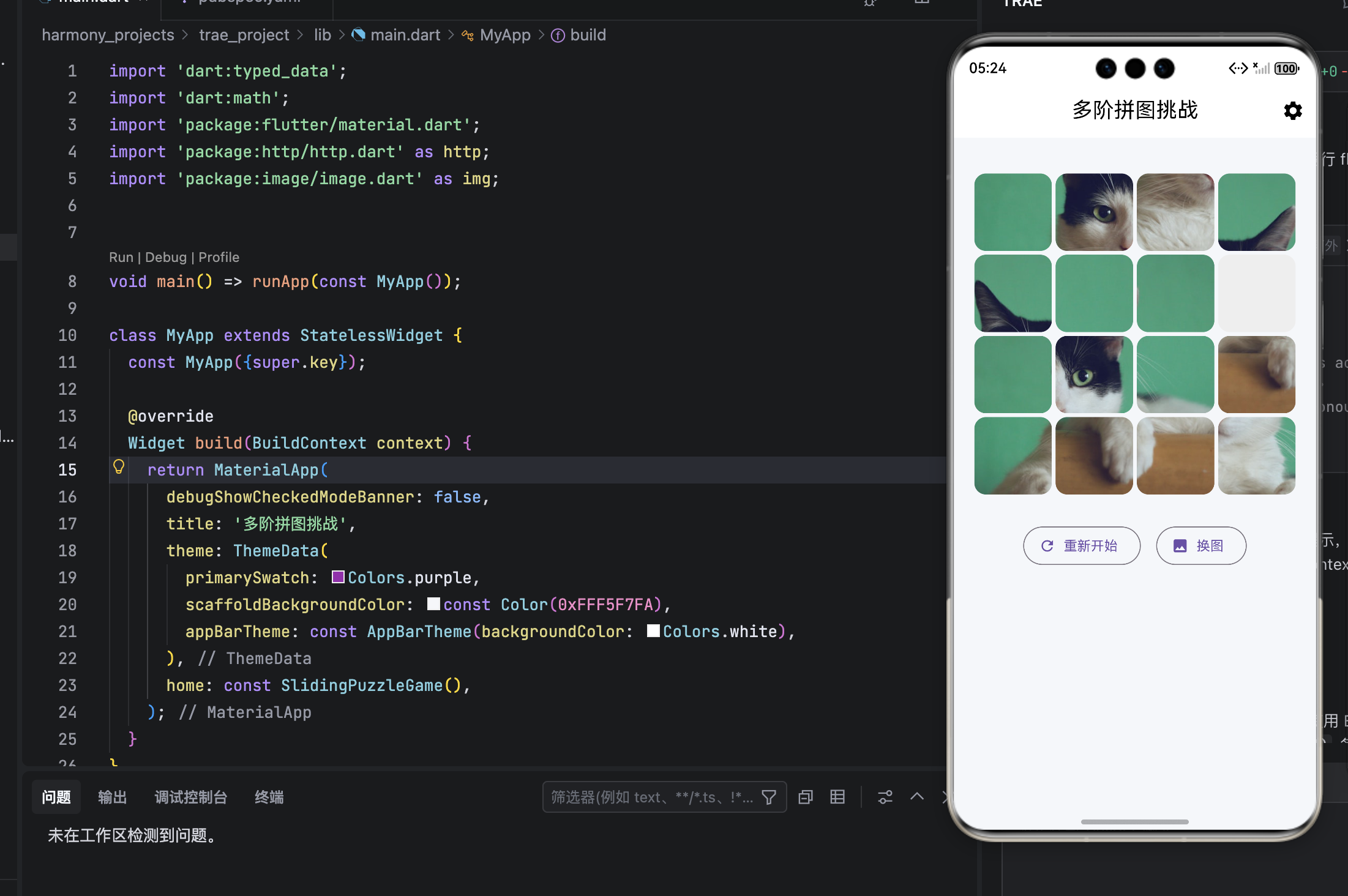
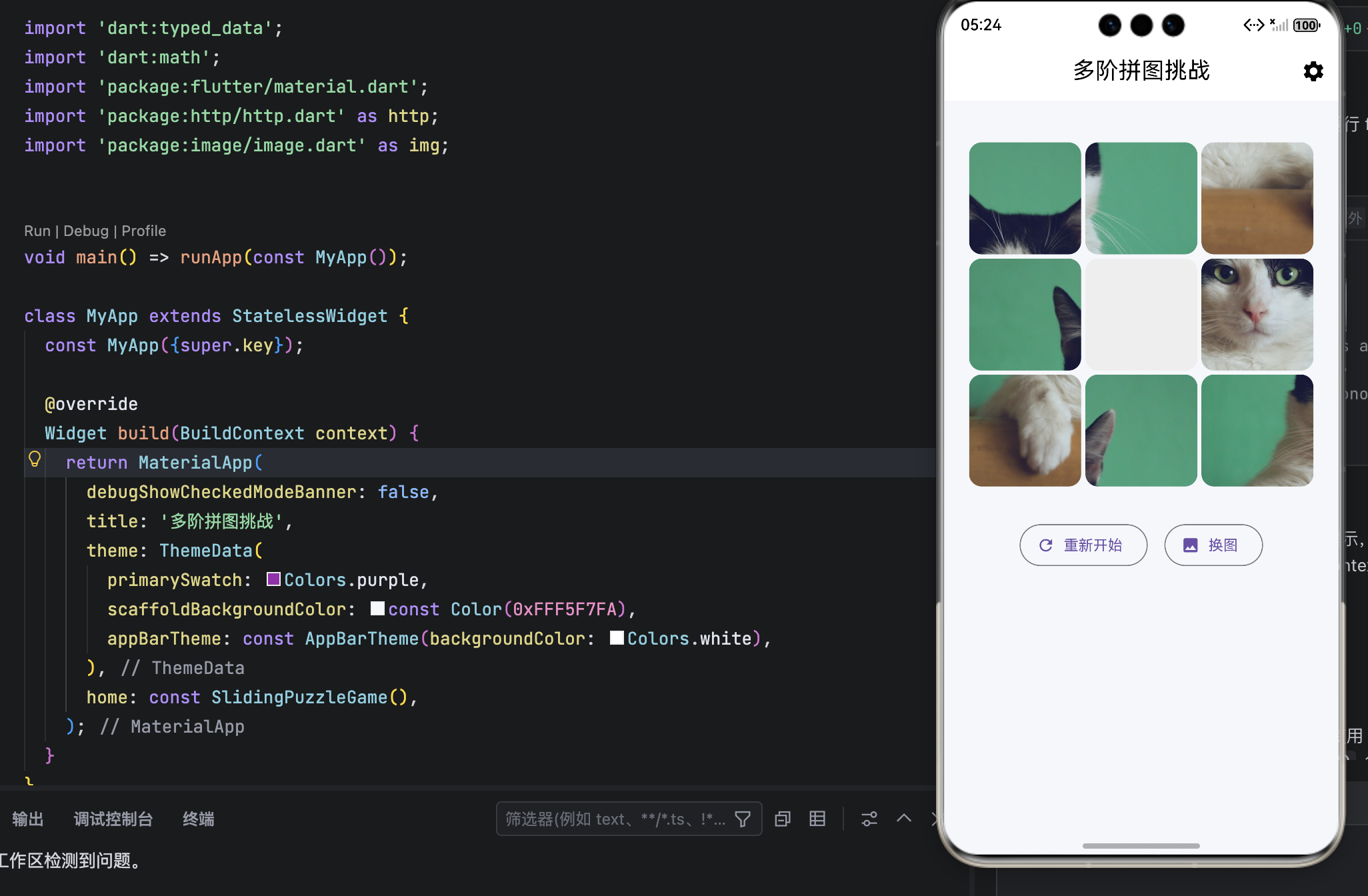
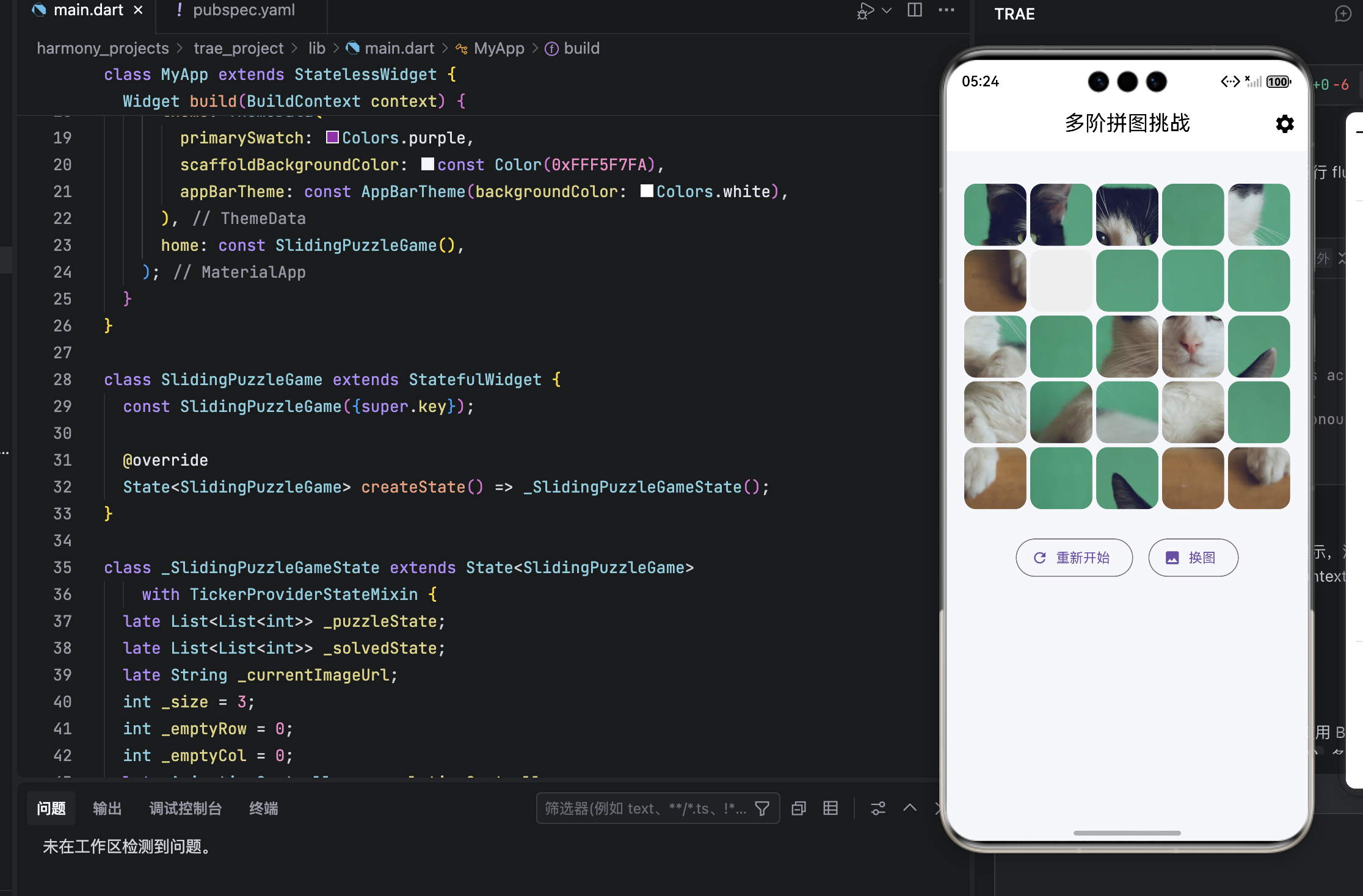
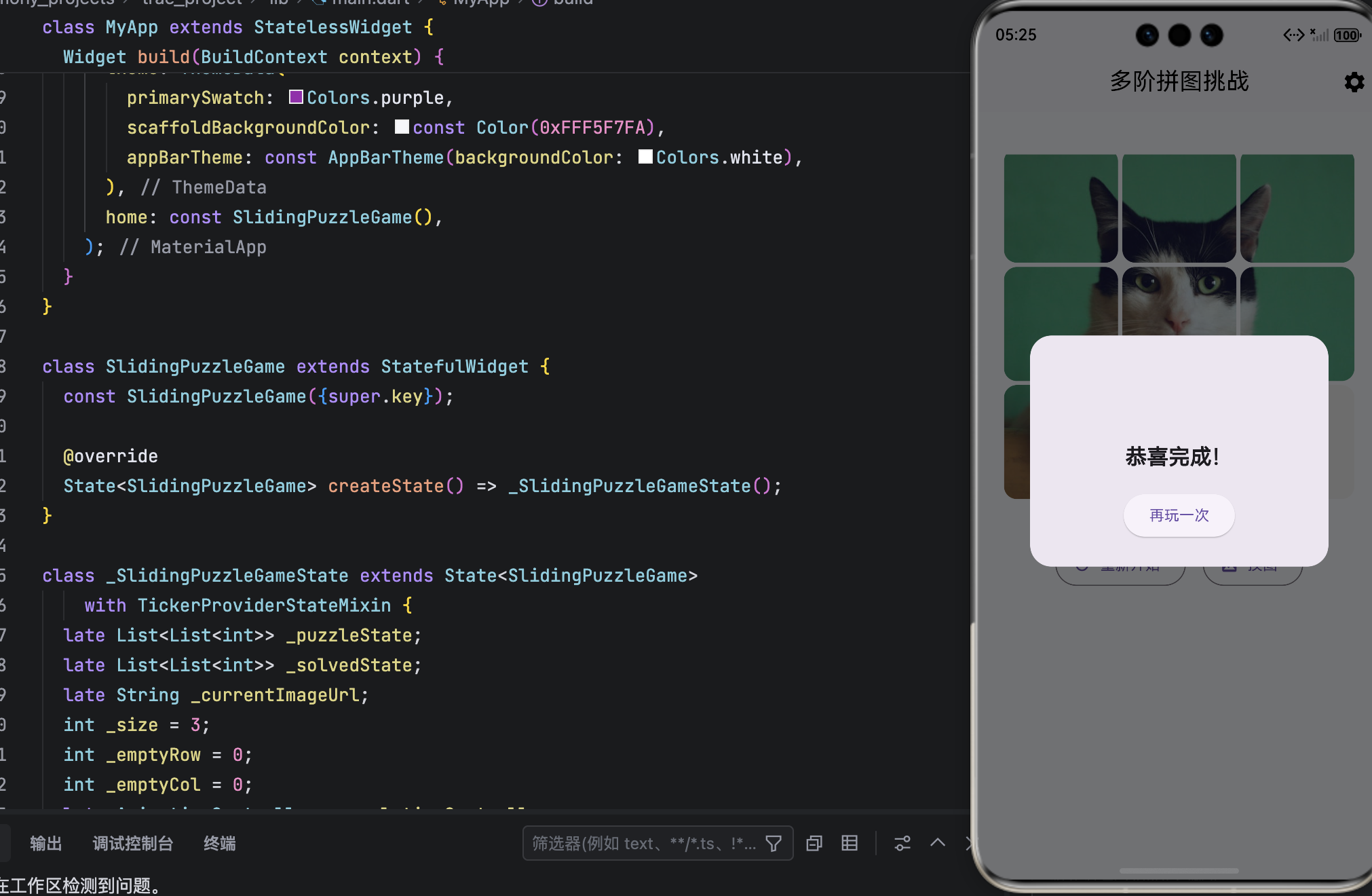
结语
通过将拼图游戏从固定的 3×3 扩展为 3×3 / 4×4 / 5×5 三档可选 ,我们不仅提升了产品的包容性与可玩性,更验证了 Flutter + OpenHarmony 在构建灵活、高性能、高颜值应用上的强大能力。
这套架构的核心价值在于 通用性 :所有逻辑均基于 _size 动态计算,未来若需支持 6×6 甚至自定义尺寸,只需调整输入范围,无需重写核心算法。
正如鸿蒙所倡导的:"设计应如水,无形却能适应万物。" 这款多阶拼图游戏,正是这一理念的生动实践。