【写在前面】这篇原创双语精译源于一位热心读者给我的留言,当时在理解上确实有疏漏,通过仔细对比查证,更正了笔记中的问题。在查阅资料的过程中,我发现将笔记和书中内容快速对应颇为不易,于是决定将相关内容整理出来,以求温故知新。毕竟 Git 属于典型的 小众、稳定且各领域通吃 的瑞士军刀级常用工具。如果也能顺便帮到正在进阶 Git 的朋友们,就再好不过了。
Navigating Git 第一章:Git 入门指南
In this chapter, we will cover the following topics:
本章将涵盖以下主题:
- Git's objects
Git 对象- The three stages
三个阶段- Viewing the DAG
有向无环图(DAG)的查看- Extracting fixed issues
提炼已修复事项- Getting a list of the changed files
获取变更文件的列表- Viewing the history with gitk
使用 gitk 查看提交历史- Finding commits in the history
在历史记录中查找提交版本- Searching through the history code
在历史代码中检索信息
1.1 Introduction 引言
In this chapter, we will take a look at Git's data model. We will learn how Git references its objects and how the history is recorded. We will learn how to navigate the history, from finding certain text snippets in commit messages, to the introducing a particular string in the code.
在本章中,我们将深入探讨 Git 的数据模型。我们将学习 Git 如何引用其对象,以及历史记录是如何被记录的。我们将掌握历史记录中的导航方法------从在提交信息中查找特定文本片段,到追溯某个字符串在代码中的首次出现。
The data model of Git is different from other common version control systems (VCSs ) in the way Git handles its data. Traditionally, a VCS will store its data as an initial file, followed by a list of patches for each new version of the file:
Git 的数据模型在处理数据的方式上与其他常见的 版本控制系统(VCS) 不同。传统上,VCS 会将数据存储为初始文件,随后为该文件的每个新版本添加补丁列表:
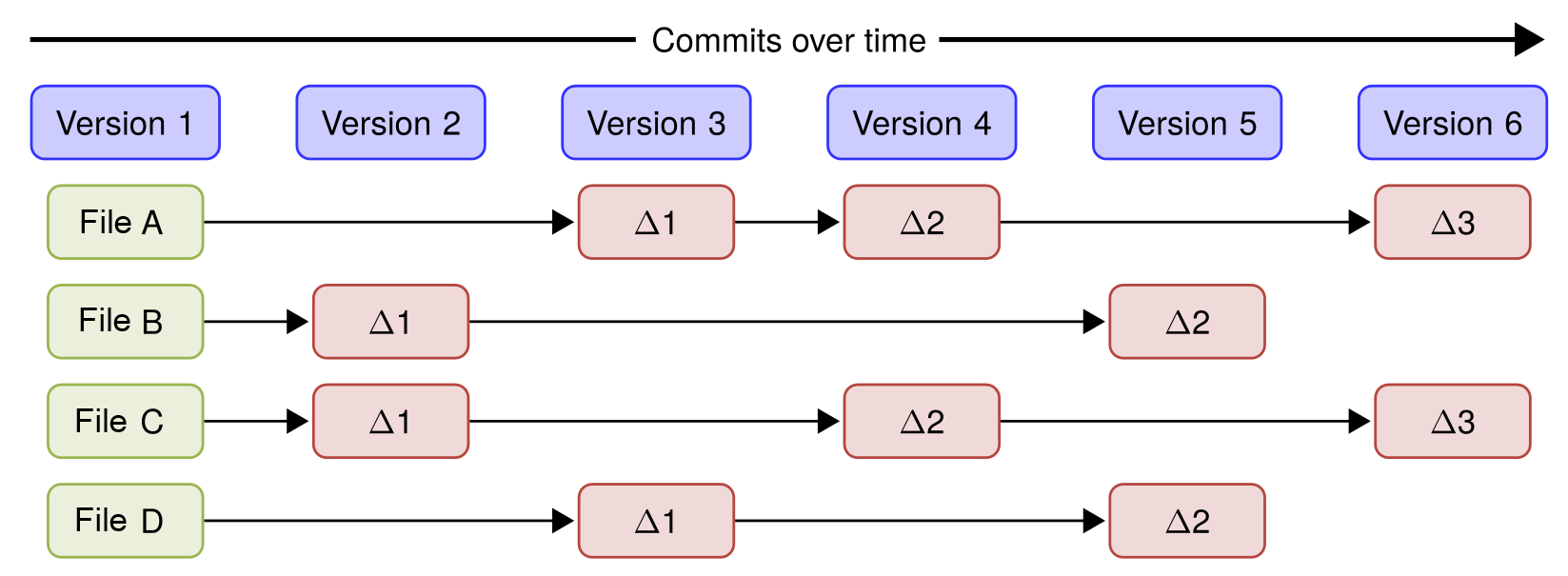
Git is different: Instead of the regular file and patches list, Git records a snapshot of all the files tracked by Git and their paths relative to the repository root---that is, the files tracked by Git in the filesystem tree. Each commit in Git records the full tree state. If a file does not change between commits, Git will not store the file again. Instead, Git stores a link to the file. This is shown in the diagram below where you see how the files will be after every commit/version.
Git 则不同:它不记录常规的文件和补丁列表,而是记录所有被 Git 跟踪的文件及其相对路径(相对于仓库根目录)------即文件系统树中被 Git 跟踪的文件。 Git 中的每次提交都记录着完整的树形结构的状态。若文件在两次提交间未发生变更,Git 不会重复存储该文件,而是存储指向该文件的 链接(link)。下图展示了每次提交(或版本)更新后文件的存储方式:
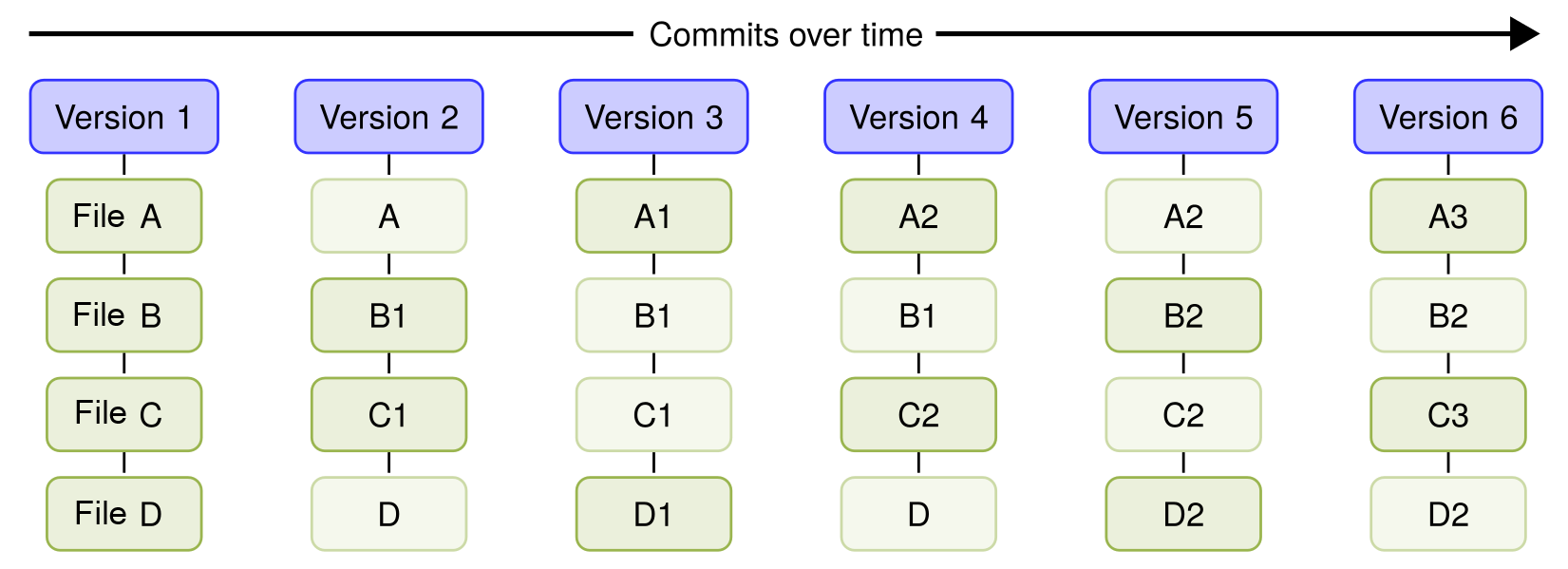
This is what makes Git different from most other VCSs, and, in the following chapters, we will explore some of the benefits of this powerful model.
这正是 Git 区别于大多数其他版本控制系统的关键所在;后续章节我们将深入探讨这类强大的模型所带来的诸多优势。
The way Git references files and directories is directly built into the data model. In short, the Git data model can be summarized as shown in the following diagram:
Git 将文件和目录的引用方式直接构建到了它的数据模型中。简而言之,Git 的数据模型可概括为如下图所示:
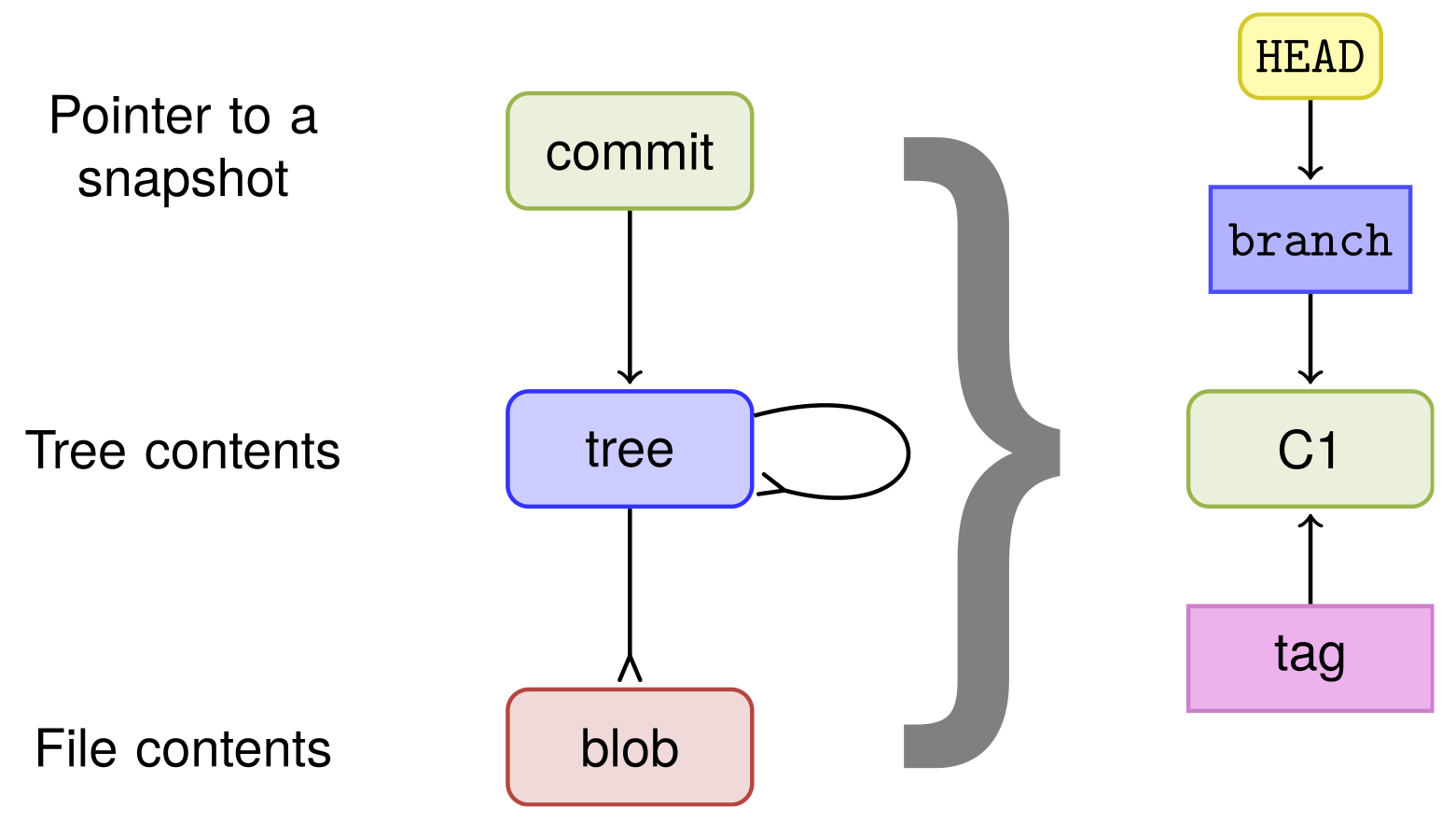
The commit object points to the root tree. The root tree points to subtrees and files.
其中,commit 对象指向 顶级树(root tree);顶级树指向子树和文件。
Branches and tags point to a commit object and the HEAD object points to the branch that is currently checked out. So, for every commit, the full tree state and snapshot are identified by the root tree.
分支(branch)和标签(tag)则指向某个 commit 对象;而 HEAD 对象指向当前检出的 分支。因此,对于每次提交,完整的树状态和快照都由顶级树标识。
1.2 Git's objects(Git 对象)
Now, since you know that Git stores every commit as a full tree state or snapshot, let's take a closer look at the object's Git store in the repository.
既然你已经知道 Git 会将每次提交都存储为完整的树状态或快照,下面就来仔细看看对象在 Git 仓库中的存储方式。
Git's object storage is a key-value storage, the key being the ID of the object and the value being the object itself. The key is an SHA-1 hash of the object, with some additional information, such as size. There are four types of objects in Git, as well as branches (which are not objects, but which are important) and the special HEAD pointer that refers to the branch/commit currently being checked out. The four object types are as follows:
Git 的对象存储采用了 键值存储机制 ,键是对象的 ID,值则是对象本身。这里的键由对象的 SHA-1 哈希值构成,并附带了一些额外信息(如尺寸大小)。 Git 中存在 四种对象类型 ,此外还有 分支 (虽非对象但至关重要)以及指向当前检出分支(或提交)的特殊 HEAD 指针。四种对象类型如下:
- Files, or
blobsas they are also called in the Git context
文件 :在Git语境下也被称为blobs[1](#1) - Directories, or
treesin the Git context
目录 :在Git语境下也被称为 树 - Commits
提交 - Tags
标签
We will start by looking at the most recent commit object in the repository we just cloned, keeping in mind that the special HEAD pointer points to the branch that is currently being checked out.
下面就从刚克隆好的代码仓库中的最新 commit 对象开始考察,同时要牢记:特殊指针 HEAD 指向的是当前检出的分支。
Getting ready 准备阶段
To view the objects in the Git database, we first need a repository to be examined. For this recipe, we will clone an example repository in the following location:
要查看 Git 数据库中的对象,首先需要一个方便考察学习的代码库。本例中,我们将克隆下列位置的示例代码库:
bash
$ git clone https://github.com/PacktPublishing/Git-Version-Control-Cookbook-Second-Edition.git
$ cd Git-Version-Control-Cookbook-Second-Edition
Now you are ready to look at the objects in the database. We will start by looking first at the commit object, followed by the trees, the files, and finally, the branches and tags.
这样就能查看数据库中的对象了。我们将首先考察 commit 对象,接着是 树 、文件 ,最后是 分支 和 标签。
How to do it... 具体操作
Let's take a closer look at the object's Git stores in the repository.
让我们仔细看看代码库中这些对象的 Git 存储。
1.2.1 The commit object 提交对象
The Git's special HEAD object always points to the current snapshot/commit, so we can use that as the target for our request of the commit that we want to have a look at:
鉴于 Git 特殊的 HEAD 对象始终指向当前快照(或提交),因此不妨将其作为请求目标,来查看我们想考察的 commit 提交对象:
bash
$ git cat-file -p HEAD
tree 34fa038544bcd9aed660c08320214bafff94150b
parent 5c662c018efced42ca5e9cce709787c40a849f34
author John Doe <john.doe@example.com> 1386933960 +0100
committer John Doe <john.doe@example.com> 1386941455 +0100
DIY 温馨提示
由于
Packt官方后续又新增了两次关于该书优惠促销的提交记录,导致上述命令的实测结果与原书不符:
bash$ git cat-file -p HEAD tree 34fa038544bcd9aed660c08320214bafff94150b parent 80e59448db14aac8774dd65eb90fe77def5f252f author Packt-ITService <62882280+Packt-ITService@users.noreply.github.com> 1610689252 +0000 committer Packt-ITService <62882280+Packt-ITService@users.noreply.github.com> 1610689252 +0000 remove $5 campaign要与原书完全相符,须让
HEAD退回到和原书同样的版本。提前运行如下命令即可:
bash$ git reset 13dcada如果不想手动同步版本,可以直接
clone我在Gitee同步好的版本:
bash$ git clone https://gitee.com/PeacefulWinter2020/Git-Version-Control-Cookbook-Second-Edition.git $ cd Git-Version-Control-Cookbook-Second-Edition $ git cat-file -p HEAD tree 34fa038544bcd9aed660c08320214bafff94150b parent 5c662c018efced42ca5e9cce709787c40a849f34 author John Doe <john.doe@example.com> 1386933960 +0100 committer John Doe <john.doe@example.com> 1386941455 +0100 This is the subject line of the commit message It should be followed by a blank line then the body, which is this text. Here you can have multiple paragraphs etc. and explain your commit. It's like an email with subject and body, so get people's attention in the subject这样结果就和原书版本完全一致了。
This is the subject line of the commit message. It should be followed by a blank line and then the body, which is this text. Here, you can use multiple paragraphs to explain your commit. It's like an email with a subject and a body to try to attract people's attention to the subject.
这是提交信息的主题行,后面应当空出一行,再接正文部分,即当前段落文字。这里可用多个段落描述您的提交内容。这就好比带有主题和正文的电子邮件,旨在吸引人们对主题的关注。
The cat-file command with the -p option prints the object given on the command line; in this case, HEAD, points to master, which, in turn, points to the most recent commit on the branch.
cat-file 命令配合 -p 选项可打印命令行中指定的对象;在此示例中, HEAD 指向 master ,而后者又指向该分支最新提交的版本。
We can now see the commit object, consisting of the root tree (tree), the parent commit object's ID (parent), the author and timestamp information (author), the committer and timestamp information (committer), and the commit message.
下面来考察 commit 对象:它包含顶级树(tree)、父级 commit 对象的 ID(parent)、作者和时间戳信息(author)、提交者和时间戳信息(committer)以及提交信息。
DIY 拓展知识
git cat-file命令中的-p选项表示pretty print(优雅打印输出),此外还可以用-t查看对象类型(四大类型之一)、-e判定存在与否、-s显示尺寸大小。另外,根据返回的时间戳,
HEAD的两个本地提交时间分别为2013/12/13 10:26:00和2013/12/13 12:30:55,约 12 年前提交的,可见Git记录的稳定性。计算过程(当前为东八区,提交时区为西一区):
jsconst fmt = t => new Date((t - 9 * 3600) * 1e3).toLocaleString(); console.log(fmt(1386933960)); // '2013/12/13 10:26:00' console.log(fmt(1386941455)); // '2013/12/13 12:30:55'
1.2.2 The tree object 树对象
To see the tree object, we can run the same command on the tree, but with the tree ID (34fa038544bcd9aed660c08320214bafff94150b) as the target:
要查看 tree 对象,我们可以在对象树上运行相同的命令,只要将对象树的 ID( 34fa038544bcd9aed660c08320214bafff94150b )作为目标即可:
bash
$ git cat-file -p 34fa038544bcd9aed660c08320214bafff94150b
100644 blob f21dc2804e888fee6014d7e5b1ceee533b222c15    README.md
040000 tree abc267d04fb803760b75be7e665d3d69eeed32f8    a_sub_directory
100644 blob b50f80ac4d0a36780f9c0636f43472962154a11a    another-file.txt
100644 blob 92f046f17079aa82c924a9acf28d623fcb6ca727    cat-me.txt
100644 blob bb2fe940924c65b4a1cefcbdbe88c74d39eb23cd    hello_world.c
We can also specify that we want the tree object from the commit pointed to by HEAD by specifying git cat-file -p HEAD^{tree}, which would give the same results as the previous command. The special notation HEAD^{tree} means that from the reference given, HEAD recursively dereferences the object at the reference until a tree object is found.
我们还可以用 git cat-file -p HEAD^{tree} 命令,指明从 HEAD 指向的提交中获取 tree 对象,结果也与上述命令相同。这里的特殊标记 HEAD^{tree} 表示从给定引用 HEAD 开始,递归地解引用(dereference)对当前引用指向的对象,直到找到 tree 对象为止。
DIY:实测备忘
命令
git cat-file -p HEAD^{tree}在WSL环境下可直接运行,而在PowerShell环境下特殊引用需要加单引号或双引号:
powershell$ git cat-file -p "HEAD^{tree}" # Or $ git cat-file -p 'HEAD^{tree}'
The first tree object is the root tree object found from the commit pointed to by the master branch, which is pointed to by HEAD. A generic form of the notation is <rev>^<type>, and will return the first object of <type>, searching recursively from <rev>.
首个 tree 对象是顶级树对象,从 master 分支指向的 commit 提交对象中获取;而 master 分支又被 HEAD 引用。上述特殊写法的通用格式为 <rev>^<type>,它将从 <rev> 开始递归检索,直到返回第一个类型为 <type> 的对象。
From the tree object, we can see what it contains: the file type/permissions, type (tree/blob), ID, and pathname:
从选定的 tree 对象中,还可以进一步查看其包含的内容,包括:文件类型(或权限)、对象类型(tree 还是 blob)、ID 以及路径名:
| Type / Permissions | Type | ID/SHA-1 | Pathname |
|---|---|---|---|
| 100644 | blob |
f21dc2804e888fee6014d7e5b1ceee533b222c15 |
README.md |
| 040000 | tree |
abc267d04fb803760b75be7e665d3d69eeed32f8 |
a_sub_directory |
| 100644 | blob |
b50f80ac4d0a36780f9c0636f43472962154a11a |
another-file.txt |
| 100644 | blob |
92f046f17079aa82c924a9acf28d623fcb6ca727 |
cat-me.txt |
| 100644 | blob |
bb2fe940924c65b4a1cefcbdbe88c74d39eb23cd |
hello-world.c |
DIY:关于第一列的解读
根据
Gitee官方提供的注释,上述表格中的第一列的六位数代表了文件权限的变更情况,其中数字前 3 位为文件类型,数字后 3 位为文件权限。如:100代表普通文件,644代表rw-r--r--权限。
1.2.3 The blob object 二进制大对象 blog
Now, we can investigate the blob (file) object. We can do this using the same command, giving the blob ID as the target for the cat-me.txt file:
接下来考察 blob(文件)对象。使用相同的命令即可:将 blob 标识符作为 cat-me.txt 文件的对象目标:
bash
$ git cat-file -p 92f046f17079aa82c924a9acf28d623fcb6ca727
This is the content of the file: "cat-me.txt"

Not really that exciting, huh?
This is simply the content of the file, which we can also get by running a normal cat cat-me.txt command. So, the objects are tied together, blobs to trees, trees to other trees, and the root tree to the commit object, all connected by the SHA-1 identifier of the object.
得到的就是该文件的内容,与运行普通的 cat cat-me.txt 命令是一样的。至此,对象间实现了相互关联:blob 与树对象关联,树对象又与其他树关联,而顶级树对象则与 commit 对象关联,所有关联都是通过对象的 SHA-1 标识符实现的。
1.2.4 The branch object 分支对象
The branch object is not really like any other Git objects; you can't print it using the cat-file command as we can with the others (if you specify the -p pretty print, you'll just get the commit object it points to), as shown in the following code:
分支对象 branch 与其他 Git 对象截然不同,无法像处理其他对象那样使用 cat-file 命令打印对象信息(若利用 -p 选项格式化打印,只会得到它指向的 commit 对象),执行结果如下:
bash
$ git cat-file master
usage: git cat-file (-t|-s|-e|-p|<type>|--textconv) <object>
or: git cat-file (--batch|--batch-check) < <list_of_objects>

<type> can be one of: blob, tree, commit, tag.
...
$ git cat-file -p master
tree 34fa038544bcd9aed660c08320214bafff94150b
parent a90d1906337a6d75f1dc32da647931f932500d83
...
Instead, we can take a look at the branch inside the .git folder where the whole Git repository is stored. If we open the text file .git/refs/heads/master, we can actually see the commit ID that the master branch points to. We can do this using cat, as follows:
不过,倒是可以查看存储整个 Git 仓库信息的 .git 文件夹内的分支信息:打开文本文件 .git/refs/heads/master,就能看到 master 分支指向的 commit 对象的 ID。具体操作如下:
bash
$ cat .git/refs/heads/master
13dcada077e446d3a05ea9cdbc8ecc261a94e42d
We can verify that this is the latest commit by running git log -1:
再运行命令 git log -1 即可验证这就是最新的 commit 提交对象:
bash
$ git log -1
commit 34acc370b4d6ae53f051255680feaefaf7f7850d (HEAD -> master, origin/master, origin/HEAD)
Author: John Doe <john.doe@example.com>
Date:   Fri Dec 13 12:26:00 2013 +0100

This is the subject line of the commit message
...
We can also see that HEAD is pointing to the active branch by using cat with the .git/HEAD file:
此外,用 cat 命令去查看 .git/HEAD 文件,还可以发现 HEAD 正指向当前的活跃分支:
bash
$ cat .git/HEAD
ref: refs/heads/master
The branch object is simply a pointer to a commit, identified by its SHA-1 hash.
branch 对象不过是一个指向 commit 对象的指针,引用的是该 commit 对象的 SHA-1 哈希值标识。
1.2.5 The tag object 标签对象
The last object to be analyzed is the tag object. There are three different kinds of tag: a lightweight (just a label) tag, an annotated tag, and a signed tag. In the example repository, there are two annotated tags:
最后要分析的 Git 对象是标签对象 tag,它又分为三种类型:
- 轻量级标签(只有一个
label标签) - 注解标签
- 签名标签。
示例仓库中有两个注解标签:
bash
$ git tag
v0.1
v1.0
Let's take a closer look at the v1.0 tag:
一起来仔细看看 v1.0 标签:
bash
$ git cat-file -p v1.0
object f55f7383b57ad7c11cf56a7c55a8d738af4741ce
type commit
tag v1.0
tagger John Doe <john.doe@example.com> 1526017989 +0200

We got the hello world C program merged, let's call that a release 1.0
As you can see, the tag consists of an object---which, in this case, is the latest commit on the master branch---the object's type (commits, blobs, and trees can be tagged), the tag name, the tagger and timestamp, and finally the tag message.
可以看到,tag 标签包含以下要素:
- 一个对象(本例中即
master分支最新的commit对象); - 上述对象的类型(
commit提交对象、blob对象以及对象树tree均可标记); - 标签名称、标记人信息及时间戳;
- (位于末尾的)标签说明。
How it works... 工作原理
The Git command git cat-file -p will print the object given as an input. Normally, it is not used in everyday Git commands, but it is quite useful to investigate how it ties the objects together.
Git 命令 git cat-file -p 后跟一个 Git 对象,可以打印出该对象的相关信息。该命令通常不会出现在 Git 的日常命令中,但对于探究对象间的关联关系却非常实用。
We can also verify the output of git cat-file by rehashing it with the Git command git hash-object; for example, if we want to verify the commit object at HEAD (34acc370b4d6ae53f051255680feaefaf7f7850d), we can run the following command:
我们还可以通过 Git 中的 git hash-object 命令来重新计算哈希值,并以此来验证 git cat-file 的输出结果;例如,若要验证 HEAD(13dcada077e446d3a05ea9cdbc8ecc261a94e42d)指向的 commit 对象,可执行如下命令:
bash
$ git cat-file -p HEAD | git hash-object -t commit --stdin
13dcada077e446d3a05ea9cdbc8ecc261a94e42d
If you see the same commit hash as HEAD pointing towards you, you can verify whether it is correct using git log -1.
若发现指向你的提交哈希与 HEAD 相同,可通过 git log -1 验证其正确性。
There's more... 其它方法
There are many ways to see the objects in the Git database. The git ls-tree command can easily show the content of trees and subtrees, and git show can show the Git objects, but in a different way.
查看 Git 数据库中对象的方法还有很多。git ls-tree 命令可以轻松显示树和子树的内容,而 git show 则能以另一种方式展示 Git 对象。
blobs的全称为binary large objects,这里特指Git中用于表示存储文件内容的二进制大对象,与目录(trees)的概念相对应。 ↩︎