1.制作Free Marker模板
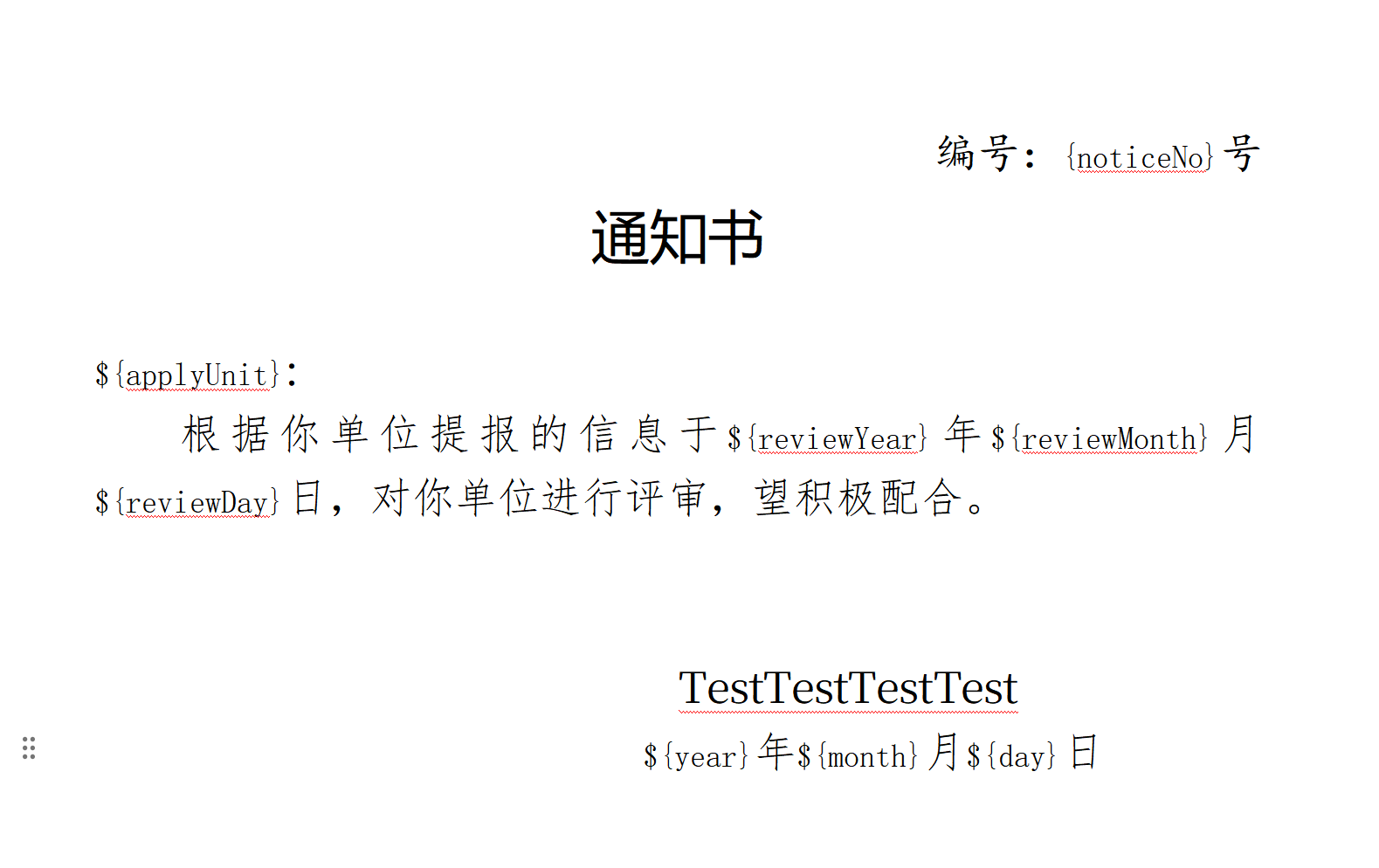
- 将模板中需要补充的数据,用${}填充
-
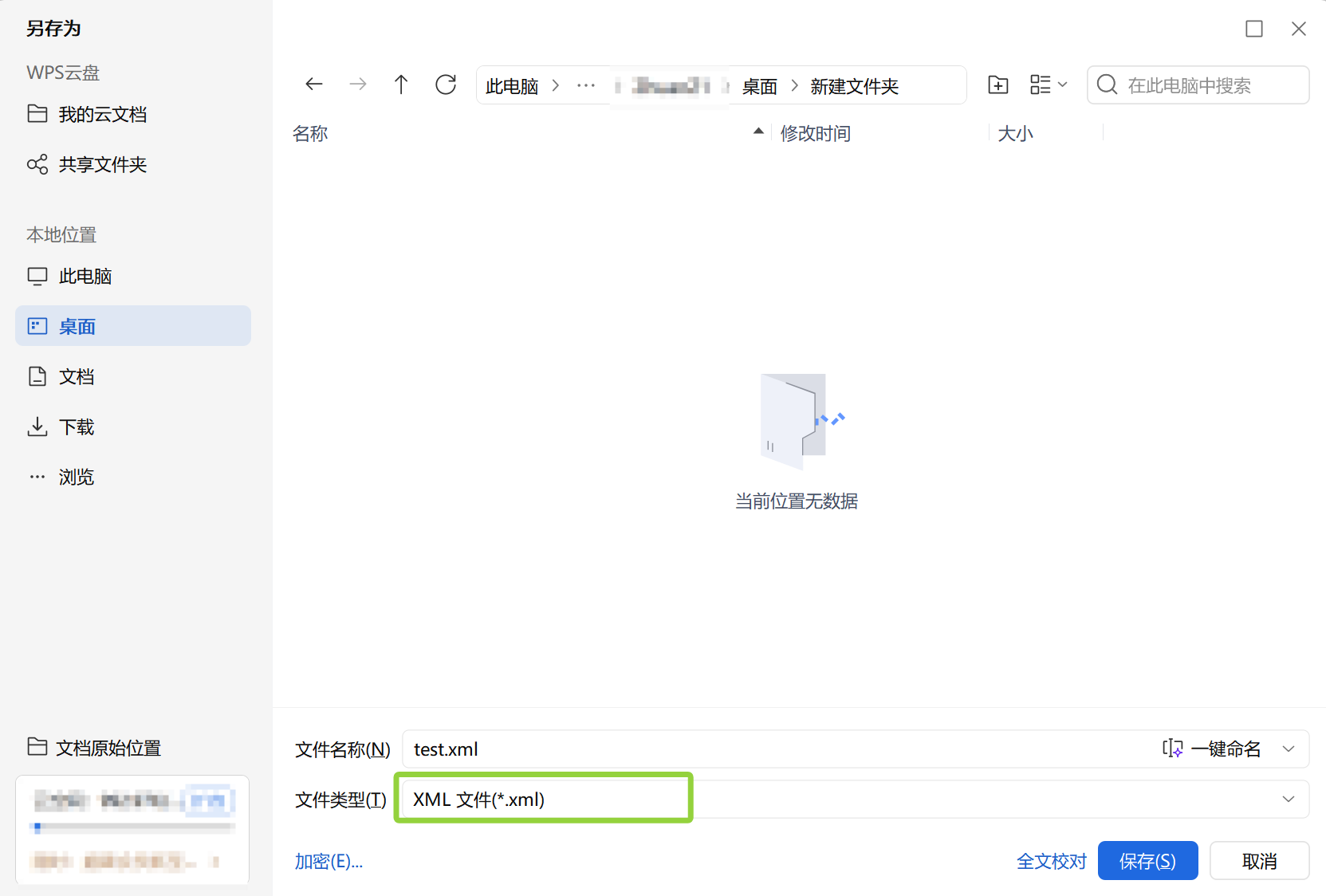
将模板另存为xml类型
-
修改xml后缀为ftl后缀

-
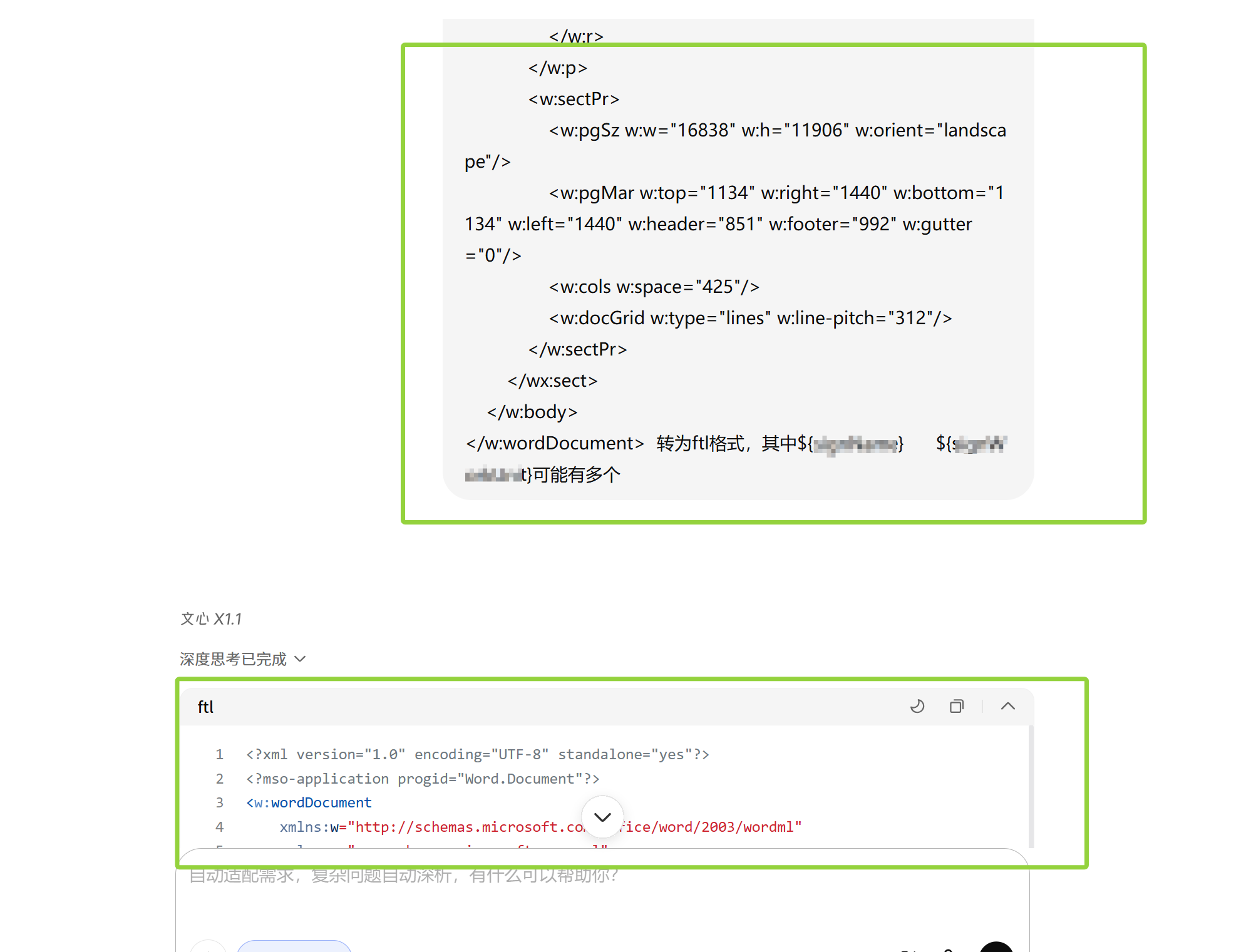
将ftl文件数据,修改为正常格式的数据
注:如果不知道ftl指令的话,可以让ai修复,推荐文心一言,因为豆包会超长而导致输出不完整
-
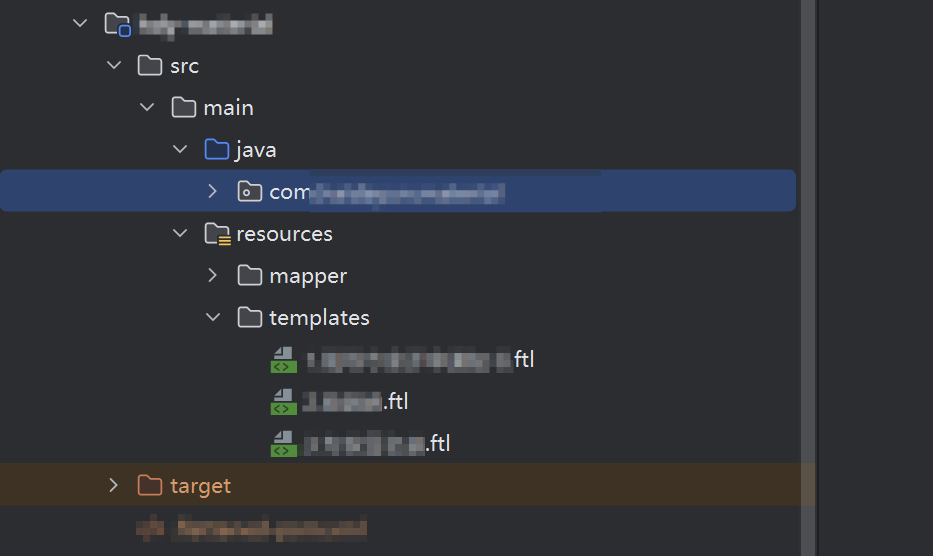
将ftl文件放入
-
传输数据,生成文件并压缩示例
java
  //pom依赖:
  <dependency>
      <groupId>org.freemarker</groupId>
      <artifactId>freemarker</artifactId>
  </dependency>
java
//公共方法
package com.xxx.common;

import freemarker.template.Configuration;
import freemarker.template.Template;
import freemarker.template.TemplateException;
import jakarta.servlet.http.HttpServletResponse;

import java.io.*;
import java.net.URLEncoder;
import java.util.Map;

/**
 * FreeMarker 导出Word文档通用工具类
 * 支持ftl模板(XML格式),直接渲染生成docx/doc文件
 */
public class WordTemplateExportUtil {
    // 初始化FreeMarker配置
    private static final Configuration CONFIGURATION = new Configuration(Configuration.VERSION_2_3_32);

    static {
        try {
            // 配置1:加载classpath下的模板文件(核心!ftl放src/main/resources下即可)
            CONFIGURATION.setClassLoaderForTemplateLoading(WordTemplateExportUtil.class.getClassLoader(), "");
            // 配置2:设置中文编码,解决乱码
            CONFIGURATION.setDefaultEncoding("UTF-8");
            // 配置3:设置模板异常处理
            CONFIGURATION.setClassicCompatible(true);
        } catch (Exception e) {
            throw new RuntimeException("FreeMarker初始化失败", e);
        }
    }

    /**
     * 导出Word文档到本地
     * @param templateName 模板文件名(如reviewNotice.ftl,放src/main/resources下)
     * @param dataMap       模板渲染数据
     * @param outputPath    生成文件路径(如D:/xx通知书.docx 或 xx2通知书.docx)
     */
    public static void exportWord(String templateName, Map<String, Object> dataMap, String outputPath) {
        // 声明流对象(try-with-resources自动关闭,避免资源泄漏)
        try (Writer writer = new BufferedWriter(new OutputStreamWriter(new FileOutputStream(outputPath), "UTF-8"))) {
            // 加载模板
            Template template = CONFIGURATION.getTemplate(templateName);
            // 渲染模板+写入文件
            template.process(dataMap, writer);
            System.out.println("Word文档生成成功!路径:" + new File(outputPath).getAbsolutePath());
        } catch (IOException e) {
            throw new RuntimeException("模板加载失败或文件写入异常", e);
        } catch (TemplateException e) {
            throw new RuntimeException("模板渲染失败(变量不匹配/语法错误)", e);
        }
    }

    /**
     * 导出文档到HttpServletResponse(浏览器下载)
     * @param templatePath 模板路径(如test.ftl,放src/main/resources下)
     * @param dataMap       模板渲染数据
     * @param outputFileName 输出文件名(如xxx.docx)
     * @param response HttpServletResponse对象(用于输出)
     * @throws Exception 导出异常
     */
    public static void exportWordToResponse(
        String templatePath,
        Map<String, Object> dataMap,
        String outputFileName,
        HttpServletResponse response) throws Exception {

        Template template = CONFIGURATION.getTemplate(templatePath, "UTF-8");

        // 设置响应头
        response.setContentType("application/vnd.ms-word"); // 或用 "application/octet-stream"
        response.setCharacterEncoding("UTF-8");
        response.setHeader("Content-Disposition", "attachment;filename*=UTF-8''"
            + URLEncoder.encode(outputFileName, "UTF-8"));

        try (Writer out = response.getWriter()) {
            template.process(dataMap, out);
        }
    }

    /**
     * 将Word模板渲染为字节数组
     * @param templatePath 模板路径
     * @param dataMap 渲染数据
     * @return 渲染后的字节数组
     * @throws Exception 渲染异常
     */
    public static byte[] renderWordToByteArray(
        String templatePath,
        Map<String, Object> dataMap) throws Exception {

        Template template = CONFIGURATION.getTemplate(templatePath, "UTF-8");
        try (ByteArrayOutputStream outputStream = new ByteArrayOutputStream();
             Writer out = new OutputStreamWriter(outputStream, "UTF-8")) {
            template.process(dataMap, out);
            return outputStream.toByteArray();
        }
    }

}
java
//调用方法
	@PostMapping("/exportMx")
    public void exportMx(TestBo bo, HttpServletResponse response)  {

        // 1. 构建模板渲染数据(所有变量与ftl模板完全对应,缺一不可)
        Map<String, Object> dataMap = new HashMap<>();
        dataMap.put("noticeNo", "xxx");
        dataMap.put("applyUnit", "xxx");
        dataMap.put("reviewYear", "xxx");
        dataMap.put("reviewMonth", "xxx");
        dataMap.put("reviewDay", "xxx");
        dataMap.put("year", "xxx");
        dataMap.put("month", "xxx");
        dataMap.put("day", "xxx");

        // 2. 调用工具类导出Word【核心修改:模板路径改为templates/xx.ftl】
        //单个文件导出
//        try {
//            WordTemplateExportUtil.exportWordToResponse(
//                "templates/文件1.ftl", // 你的实际模板路径+完整文件名
//                dataMap,
//                "输出文件的名称.xml", //前端为word类型,这里必须是xml
//                response
//            );
//        }catch (Throwable throwable){
//            throw new RuntimeException("生成文件失败,请联系管理员!");
//        }


        // 文件2数据
        List<Map<String, Object>> test2= new ArrayList<>();
        for(Test test : tests) {
            //导出文件2
            Map<String, Object> data = new HashMap<>();
            data.put("test2", "导出文件2填充数据");
            data.put("personName", "导出文件2填充数据");
            ............................
            test2.add(data);
        }
        // 文件三、文件四.....

        // 3. 打包为ZIP并导出
        try {
            // 设置响应头
            response.setContentType("application/zip");
            response.setCharacterEncoding("UTF-8");
            String zipFileName = URLEncoder.encode("文件包.zip", "UTF-8");
            response.setHeader("Content-Disposition", "attachment;filename*=UTF-8''" + zipFileName);

            // 创建ZIP输出流
            try (ZipOutputStream zipOut = new ZipOutputStream(response.getOutputStream())) {
                // 添加文件1到ZIP
                byte[] noticeBytes = WordTemplateExportUtil.renderWordToByteArray(
                    "templates/文件1.ftl",
                    dataMap);
                ZipEntry noticeEntry = new ZipEntry("1.文件1.docx");
                //开启一个新的压缩条目
                zipOut.putNextEntry(noticeEntry);
                //写入文件内容
                zipOut.write(noticeBytes);
                //关闭当前压缩条目
                zipOut.closeEntry();

                for (Map<String, Object> test : test2) {
                    // 添加文件2到ZIP
                    byte[] letterBytes = WordTemplateExportUtil.renderWordToByteArray(
                        "templates/2.文件2.ftl",
                        test);
                    String expertLetterName = "2.文件二_"+test.get("personName")+".docx";
                    ZipEntry letterEntry = new ZipEntry(expertLetterName);
                    zipOut.putNextEntry(letterEntry);
                    zipOut.write(letterBytes);
                    zipOut.closeEntry();
                }

            }
        }catch (Throwable throwable){
            throw new RuntimeException("生成文件失败,请联系管理员!");
        }
    }
- 生成文件示例
