1、什么是skill
Cursor 的 Skill = 预定义的、可复用的"任务型 Prompt 模板"。
本质是:
-
一段你事先写好的 Prompt
-
每次点击就会发给 AI
-
可能带变量 / 占位符
2、 和 rules 的本质区别:
-
rules = 背景约束(自动生效)
-
skills = 主动指令(手动触发)
| 维度 | Rules | Skills |
|---|---|---|
| 是否自动生效 | ✅ 是 | ❌ 否 |
| 是否需要点击 | ❌ | ✅ |
| 适合内容 | 项目规范、长期习惯 | 具体任务流程 |
| 是否改写行为 | 约束 AI | 指挥 AI |
| 是否可参数化 | ❌ | ✅(部分) |
👉 不要用 Skill 去写"规范", Skill 里写"一次任务怎么做"
👉 **不要用 rules 去写"流程",**rules 里写"永远成立的事实"
**3、**Skill 什么时候用最合适?
-
数据库字段变更(你这个就很典型)
-
新增一个接口(Controller → Service → Mapper)
-
代码审查
-
自动生成测试
-
按公司规范写注释
这些都是:
重复 + 有固定步骤 + 每次都要你打一堆话
4、如何新增
Cursor Settings → Skills → New Skill
之后填写:
-
Name:技能名
-
Prompt / Instruction:真正的内容
点击new:

demo:
This is a Spring Boot project using MyBatis XML.

Task:
A new database field needs to be added.

Steps:
1. Update the database model / entity if present.
2. Update request and response DTOs.
3. Update controller.
4. Update service.
5. Update mapper interface.
6. Update mapper XML.

Constraints:
- Do not modify unrelated files.
- Follow existing code style.

Input:
{{describe the field and table}}
👉 {``{ }} 是 Skill 常见的"变量占位"用法(Cursor UI 会提示你填)
我这里有几个安装open spec自动生成的skill:
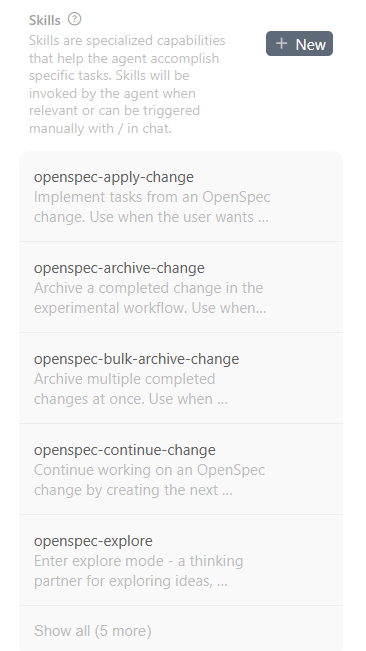
看下第一个apply的: