这里写目录标题
一、创建流程引擎
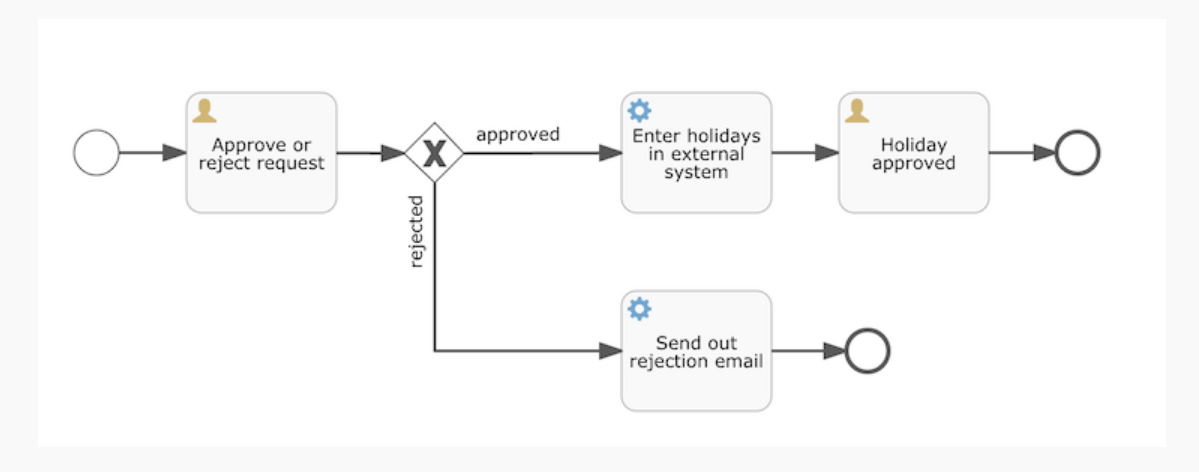
我们将构建的例子是一个简单的请假(holiday request)流程:
-
雇员(employee)申请几天的假期
-
经理(manager)批准或驳回申请
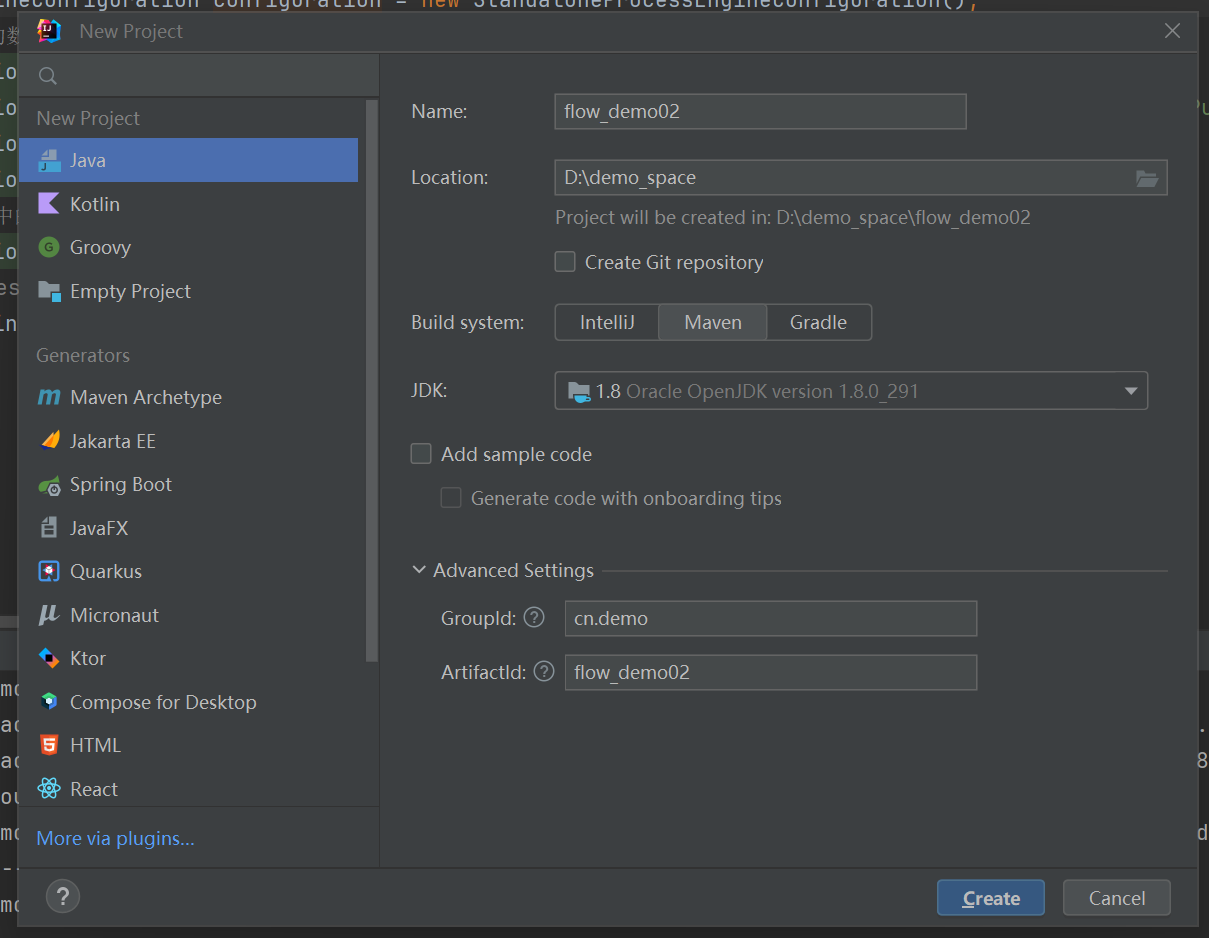
1.1、新建工程
首先,通过File → New → Project创建一个新的项目:
1.2、添加maven依赖
xml
    <dependencies>
        <!-- flowable -->
        <dependency>
            <groupId>org.flowable</groupId>
            <artifactId>flowable-engine</artifactId>
            <version>6.3.0</version>
        </dependency>
        <!-- MySQL 驱动 -->
        <dependency>
            <groupId>mysql</groupId>
            <artifactId>mysql-connector-java</artifactId>
            <version>8.0.21</version>
        </dependency>
        <!-- 添加日志相关信息 -->
        <dependency>
            <groupId>org.slf4j</groupId>
            <artifactId>slf4j-api</artifactId>
            <version>1.7.21</version>
        </dependency>
        <dependency>
            <groupId>org.slf4j</groupId>
            <artifactId>slf4j-log4j12</artifactId>
            <version>1.7.21</version>
        </dependency>
    </dependencies>
依赖JAR包可能存在无法自动获取情况,可以右键点击项目,并选择'Maven → Update Project'以强制手动刷新
1.3、添加日志信息
在src/main/resources文件夹下添加log4j.properties文件,并写入下列内容:
xml
log4j.rootLogger=DEBUG, CA

log4j.appender.CA=org.apache.log4j.ConsoleAppender

log4j.appender.CA.layout=org.apache.log4j.PatternLayout
log4j.appender.CA.layout.ConversionPattern=%-4r [%t] %-5p %c %x - %m%n
二、初始化ProcessEngine流程引擎
ProcessEngine负责加载配置、管理流程定义、执行流程实例、处理任务等。通常,一个应用程序只需要一个ProcessEngine实例。
java
public class HolidayRequest {

    public static void main(String[] args) {
        //获取 ProccessEngineConfiguration 对象
        ProcessEngineConfiguration configuration = new StandaloneProcessEngineConfiguration();
        //配置 相关的数据库的连接信息
        configuration.setJdbcDriver("com.mysql.cj.jdbc.Driver");
        configuration.setJdbcUrl("jdbc:mysql://192.168.247.155:3306/flow?useSSL=false&serverTimezone=UTC&allowPublicKeyRetrieval=true&nullCatalogMeansCurrent=true");
        configuration.setJdbcUsername("root");
        configuration.setJdbcPassword("123456");
        //如果数据库中的表结构不存在就新建
        configuration.setDatabaseSchemaUpdate(ProcessEngineConfiguration.DB_SCHEMA_UPDATE_TRUE);
        //通过 ProcessEngineConfiguration 构建我们需要的processEngine对象
        ProcessEngine processEngine = configuration.buildProcessEngine();
    }

}
ProcessEngine由ProcessEngineConfiguration实例创建。该实例可以配置与调整流程引擎的设置。 通常使用一个配置XML文件创建ProcessEngineConfiguration,但是(像在这里做的一样)也可以编程方式创建它。 ProcessEngineConfiguration所需的最小配置,是数据库JDBC连接。
Flowable使用SLF4J作为内部日志框架,在启动时候可以看到关于引擎启动与创建数据库表结构。
三、流程定义
3.1、流程定义概念
Flowable引擎需要流程定义为BPMN 2.0格式,这是一个业界广泛接受的XML标准。 在Flowable术语中,我们将其称为一个流程定义(process definition) 。一个流程定义****可以启动多个 流程实例(process instance)**。
我们要构建的流程是一个请假流程。流程定义可以看做是重复执行流程的蓝图。
在这个例子中,流程定义定义了请假的各个步骤,而一个流程实例对应某个雇员提出的一个请假申请。
3.2、流程定义概念定义xml文件
xml
<?xml version="1.0" encoding="UTF-8"?>
<definitions xmlns="http://www.omg.org/spec/BPMN/20100524/MODEL" xmlns:xsi="http://www.w3.org/2001/XMLSchema-instance" xmlns:xsd="http://www.w3.org/2001/XMLSchema" xmlns:flowable="http://flowable.org/bpmn" xmlns:bpmndi="http://www.omg.org/spec/BPMN/20100524/DI" xmlns:omgdc="http://www.omg.org/spec/DD/20100524/DC" xmlns:omgdi="http://www.omg.org/spec/DD/20100524/DI" typeLanguage="http://www.w3.org/2001/XMLSchema" expressionLanguage="http://www.w3.org/1999/XPath" targetNamespace="http://www.flowable.org/processdef">
  <process id="holidayRequest" name="holidayRequest" isExecutable="true">
    <startEvent id="startEvent"/>
    <endEvent id="approveEnd"/>
    <userTask id="approveTask" name="Approve or reject request"/>
    <serviceTask id="externalSystemCall" flowable:exclusive="true" name="Enter holidays in external system" flowable:class="org.flowable.CallExternalSystemDelegate"/>
    <userTask id="holidayApprovedTask" name="Holiday approved"/>
    <serviceTask id="sendRejectionMail" flowable:exclusive="true" name="Send out rejection email" flowable:class="org.flowable.SendRejectionMail"/>
    <endEvent id="rejectEnd"/>
    <sequenceFlow id="sid-1b045d77-3ad3-4fde-805c-b5154062193d" sourceRef="startEvent" targetRef="approveTask"/>
    <exclusiveGateway id="decision"/>
    <sequenceFlow id="sid-8b757c29-19b1-46a4-a956-0ff3af67dd9b" sourceRef="approveTask" targetRef="decision"/>
    <sequenceFlow id="sid-a59d9a58-5a8b-470b-9447-0a8f8b6ee6c7" sourceRef="decision" targetRef="externalSystemCall">
      <conditionExpression xsi:type="tFormalExpression">${approved}</conditionExpression>
    </sequenceFlow>
    <sequenceFlow id="sid-8c7124df-82c7-4527-a4c2-abc5d7d05038" sourceRef="externalSystemCall" targetRef="holidayApprovedTask"/>
    <sequenceFlow id="sid-73ad3232-5158-4686-879b-9e1378a7a28a" sourceRef="decision" targetRef="sendRejectionMail">
      <conditionExpression xsi:type="tFormalExpression">{!approved}</conditionExpression>
    </sequenceFlow>
    <sequenceFlow id="sid-1d5e61dd-5f5d-4551-8044-49c5bad2bce3" sourceRef="sendRejectionMail" targetRef="rejectEnd"/>
    <sequenceFlow id="sid-b08eda13-fbc7-4885-8a42-cd8d3ac9850d" sourceRef="holidayApprovedTask" targetRef="approveEnd"/>
  </process>
  <bpmndi:BPMNDiagram id="BPMNDiagram_holidayRequest">
    <bpmndi:BPMNPlane bpmnElement="holidayRequest" id="BPMNPlane_holidayRequest">
      <bpmndi:BPMNShape id="shape-c6c91b09-13ef-4060-b8aa-0ea346c93506" bpmnElement="startEvent">
        <omgdc:Bounds x="-195.0" y="-70.0" width="30.0" height="30.0"/>
      </bpmndi:BPMNShape>
      <bpmndi:BPMNShape id="shape-aa155800-63a0-4444-b363-fa14e113b14f" bpmnElement="approveEnd">
        <omgdc:Bounds x="340.0" y="-75.0" width="30.0" height="30.0"/>
      </bpmndi:BPMNShape>
      <bpmndi:BPMNShape id="shape-dcaa3727-3d93-4d48-8b4c-2419f4e98e65" bpmnElement="approveTask">
        <omgdc:Bounds x="-145.0" y="-95.0" width="100.0" height="80.0"/>
      </bpmndi:BPMNShape>
      <bpmndi:BPMNShape id="shape-ebf5220c-56bd-482e-93d9-997fce5344fd" bpmnElement="externalSystemCall">
        <omgdc:Bounds x="60.0" y="-95.0" width="100.0" height="80.0"/>
      </bpmndi:BPMNShape>
      <bpmndi:BPMNShape id="shape-b9302d21-5edf-4170-90de-c42782dc2f2b" bpmnElement="holidayApprovedTask">
        <omgdc:Bounds x="200.0" y="-95.0" width="100.0" height="80.0"/>
      </bpmndi:BPMNShape>
      <bpmndi:BPMNShape id="shape-7642bee4-256b-424c-9c96-a42bafa71523" bpmnElement="sendRejectionMail">
        <omgdc:Bounds x="65.0" y="35.0" width="100.0" height="80.0"/>
      </bpmndi:BPMNShape>
      <bpmndi:BPMNShape id="shape-a873481a-708b-42f1-8eb4-d82c4984d055" bpmnElement="rejectEnd">
        <omgdc:Bounds x="234.43323" y="60.566757" width="30.0" height="30.0"/>
      </bpmndi:BPMNShape>
      <bpmndi:BPMNEdge id="edge-ff8a757e-ab95-455a-ad5d-225eaa642609" bpmnElement="sid-1b045d77-3ad3-4fde-805c-b5154062193d">
        <omgdi:waypoint x="-165.0" y="-55.0"/>
        <omgdi:waypoint x="-145.0" y="-55.0"/>
      </bpmndi:BPMNEdge>
      <bpmndi:BPMNShape id="shape-44715581-7a30-434d-b40a-8c584a696306" bpmnElement="decision">
        <omgdc:Bounds x="-20.0" y="-75.0" width="40.0" height="40.0"/>
      </bpmndi:BPMNShape>
      <bpmndi:BPMNEdge id="edge-554788c0-377a-4175-9b49-de07bc122ad7" bpmnElement="sid-8b757c29-19b1-46a4-a956-0ff3af67dd9b">
        <omgdi:waypoint x="-45.0" y="-55.0"/>
        <omgdi:waypoint x="-20.0" y="-55.0"/>
      </bpmndi:BPMNEdge>
      <bpmndi:BPMNEdge id="edge-abee54d4-98e8-4598-8aec-96579063cbb2" bpmnElement="sid-a59d9a58-5a8b-470b-9447-0a8f8b6ee6c7">
        <omgdi:waypoint x="20.0" y="-55.0"/>
        <omgdi:waypoint x="60.0" y="-55.0"/>
      </bpmndi:BPMNEdge>
      <bpmndi:BPMNEdge id="edge-17b08aa8-ecd8-42cc-9669-f79749555161" bpmnElement="sid-8c7124df-82c7-4527-a4c2-abc5d7d05038">
        <omgdi:waypoint x="160.0" y="-55.0"/>
        <omgdi:waypoint x="200.0" y="-55.0"/>
      </bpmndi:BPMNEdge>
      <bpmndi:BPMNEdge id="edge-1586ee90-c2be-4d2b-8040-c6905f1549d2" bpmnElement="sid-73ad3232-5158-4686-879b-9e1378a7a28a">
        <omgdi:waypoint x="0.0" y="-35.0"/>
        <omgdi:waypoint x="0.0" y="75.0"/>
        <omgdi:waypoint x="65.0" y="75.0"/>
      </bpmndi:BPMNEdge>
      <bpmndi:BPMNEdge id="edge-82e9405e-2ce4-4fbc-a820-c7b65716d447" bpmnElement="sid-1d5e61dd-5f5d-4551-8044-49c5bad2bce3">
        <omgdi:waypoint x="165.0" y="75.0"/>
        <omgdi:waypoint x="234.43323" y="75.56676"/>
      </bpmndi:BPMNEdge>
      <bpmndi:BPMNEdge id="edge-e1fdc688-6b74-4a4f-98aa-e7c8ee766505" bpmnElement="sid-b08eda13-fbc7-4885-8a42-cd8d3ac9850d">
        <omgdi:waypoint x="300.0" y="-55.0"/>
        <omgdi:waypoint x="340.0" y="-52.5"/>
      </bpmndi:BPMNEdge>
    </bpmndi:BPMNPlane>
  </bpmndi:BPMNDiagram>
</definitions>
3.3、部署(deploy)流程定义
现在我们已经有了流程BPMN 2.0 XML文件,下来需要将它部署(deploy)到引擎中。部署一个流程定义意味着:
- 流程引擎会将XML文件存储在数据库中,这样可以在需要的时候获取它。
- 流程定义转换为内部的、可执行的对象模型,这样使用它就可以启动流程实例。
将流程定义部署至Flowable引擎,需要使用RepositoryService,其可以从ProcessEngine对象获取。使用RepositoryService,可以通过XML文件的路径创建一个新的部署(Deployment),并调用deploy()方法实际执行:
java
RepositoryService repositoryService = processEngine.getRepositoryService();
Deployment deployment = repositoryService.createDeployment()
  .addClasspathResource("holiday-request.bpmn20.xml")
  .deploy();
3.4、启动流程实例
现在已经在流程引擎中部署了流程定义,因此可以使用这个流程定义作为"蓝图"启动流程实例。
要启动流程实例,需要提供一些初始化流程变量。一般来说,可以通过呈现给用户的表单,或者在流程由其他系统自动触发时通过REST API,来获取这些变量。在这个例子里,我们简化为使用java.util.Scanner类在命令行输入一些数据:
java
 // 模拟请假流程
        Scanner scanner= new Scanner(System.in);
        System.out.println("Who are you?");
        String employee = scanner.nextLine();
        System.out.println("How many holidays do you want to request?");
        Integer nrOfHolidays = Integer.valueOf(scanner.nextLine());
        System.out.println("Why do you need them?");
        String description = scanner.nextLine();

        // 启动流程
        RuntimeService runtimeService = processEngine.getRuntimeService();
        Map<String, Object> variables = new HashMap<String, Object>();
        variables.put("employee", employee);
        variables.put("nrOfHolidays", nrOfHolidays);
        variables.put("description", description);
        ProcessInstance processInstance =
                runtimeService.startProcessInstanceByKey("holidayRequest", variables);
3.5、查询与完成任务
java
 		 //通过 ProcessEngineConfiguration 构建我们需要的processEngine对象
        ProcessEngine processEngine = configuration.buildProcessEngine();
        TaskService taskService = processEngine.getTaskService();
        //List<Task> tasks = taskService.createTaskQuery().taskCandidateGroup("managers").list();
        List<Task> tasks = taskService.createTaskQuery().taskCandidateOrAssigned("zhangsan").list();
        System.out.println("You have " + tasks.size() + " tasks:");
        for (int i=0; i<tasks.size(); i++) {
            System.out.println((i+1) + ") " + tasks.get(i).getName());
        }
四、流程定义的部署、查看、删除
4.1、流程定义的部署
java
//获取 ProccessEngineConfiguration 对象
       ProcessEngineConfiguration configuration = new StandaloneProcessEngineConfiguration();
       //配置 相关的数据库的连接信息
       configuration.setJdbcDriver("com.mysql.cj.jdbc.Driver");
       configuration.setJdbcUrl("jdbc:mysql://192.168.247.155:3306/flow?useSSL=false&serverTimezone=UTC&allowPublicKeyRetrieval=true&nullCatalogMeansCurrent=true");
       configuration.setJdbcUsername("root");
       configuration.setJdbcPassword("123456");
       //通过 ProcessEngineConfiguration 构建我们需要的processEngine对象
       ProcessEngine processEngine = configuration.buildProcessEngine();
       RepositoryService repositoryService = processEngine.getRepositoryService();
       repositoryService.createDeployment()
               .addClasspathResource("holidayRequest.bpmn20.xml")
               .name("second-holiday")
               .key("second-holiday").deploy();
4.2、流程定义的查看
java
//获取 ProccessEngineConfiguration 对象
       ProcessEngineConfiguration cfg = new StandaloneProcessEngineConfiguration();
       //配置 相关的数据库的连接信息
       cfg.setJdbcDriver("com.mysql.cj.jdbc.Driver");
       cfg.setJdbcUrl("jdbc:mysql://192.168.247.155:3306/flow?useSSL=false&serverTimezone=UTC&allowPublicKeyRetrieval=true&nullCatalogMeansCurrent=true");
       cfg.setJdbcUsername("root");
       cfg.setJdbcPassword("123456");
       // 获取流程引擎对象
       ProcessEngine processEngine = cfg.buildProcessEngine();
       // 部署流程 获取RepositoryService对象
       RepositoryService repositoryService = processEngine.getRepositoryService();
       // 获取流程定义对象
       List<Deployment> list = repositoryService.createDeploymentQuery().list();
       for (Deployment deployment : list) {
           System.out.println(deployment.getId()+": "+deployment.getKey());
       }
4.3、流程定义的删除
java
//获取 ProccessEngineConfiguration 对象
       ProcessEngineConfiguration cfg = new StandaloneProcessEngineConfiguration();
       //配置 相关的数据库的连接信息
       cfg.setJdbcDriver("com.mysql.cj.jdbc.Driver");
       cfg.setJdbcUrl("jdbc:mysql://192.168.247.155:3306/flow?useSSL=false&serverTimezone=UTC&allowPublicKeyRetrieval=true&nullCatalogMeansCurrent=true");
       cfg.setJdbcUsername("root");
       cfg.setJdbcPassword("123456");
       // 获取流程引擎对象
       ProcessEngine processEngine = cfg.buildProcessEngine();
       // 部署流程 获取RepositoryService对象
       RepositoryService repositoryService = processEngine.getRepositoryService();
       // 删除流程,这里的deploymentId是流程定义的部署ID,第二个参数true表示级联删除,会将和本次部署有关的资源一起删除
       repositoryService.deleteDeployment("27501", true);