maplibre-gl 精灵图 雪碧图制作
目录
1.maplibre-gl展示精灵图icon效果
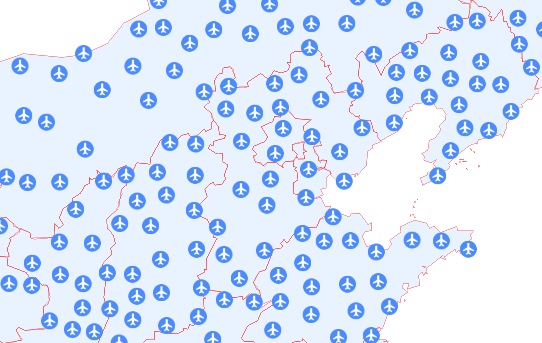
2.精灵图制作流程
1 snipaset等截图软件,对各自专业的icon图标进行截图(建议40*40像素以内),放到ppt里面,"设置透明色",然后另存PNG图片,放到指定文件夹
2采用本文的python代码,设置输入文件夹路径,输出文件夹路径,自动生成sprite.json、sprite@2x.json、sprite@2x.png、sprite.png。如图为精灵图效果(sprite@2x.png)
3替换对应的maplibre-gl、mapbox-gl的精灵图、雪碧图也就是icon集合图像即可!

3.精灵图生成python代码
python
"""
    maplibre-gl 精灵图-雪碧图 生成制作代码
    1.先将icon分别截图(建议40*40以内), 放到ppt中设置背景透明色, 另存PNG图片, 放到指定路径下
    2.修改input_folder路径, output_folder路径, 然后将生成的精灵图及其json 替换即可。
"""
from PIL import Image
import os
import json
import glob
from pathlib import Path

def generate_mapbox_sprite(input_folder, output_folder, columns=10, output_name="sprite"):
    """
    生成 Mapbox 精灵图和对应的 JSON 配置文件

    参数:
        input_folder: 输入 PNG 图片的文件夹路径
        output_folder: 输出精灵图和 JSON 的文件夹路径
        columns: 每行包含的图片数量(列数)
        output_name: 输出文件名前缀
    """

    # 1. 获取所有 PNG 图片路径并按名称排序
    png_pattern = os.path.join(input_folder, "*.png")
    image_paths = sorted(glob.glob(png_pattern))

    if not image_paths:
        print(f"错误: 在 {input_folder} 中没有找到 PNG 图片")
        return None

    print(f"找到 {len(image_paths)} 张图片")
    print(f"列数设置为: {columns}")

    # 2. 按行分组,每行 columns 个图片
    rows = []
    for i in range(0, len(image_paths), columns):
        row = image_paths[i:i + columns]
        rows.append(row)

    print(f"将分成 {len(rows)} 行")

    # 3. 计算精灵图的整体尺寸
    max_width = 0
    max_height = 0

    # 存储每行的信息: (图片列表, 该行总宽度, 该行最大高度)
    row_info = []

    for row_paths in rows:
        row_images = []
        row_total_width = 0
        row_max_height = 0

        for img_path in row_paths:
            # 打开图片获取尺寸(不加载像素数据,节省内存)
            with Image.open(img_path) as img:
                width, height = img.size
                row_images.append({
                    'path': img_path,
                    'width': width,
                    'height': height,
                    'name': Path(img_path).stem  # 获取文件名(不含扩展名)
                })
                row_total_width += width
                row_max_height = max(row_max_height, height)

        row_info.append({
            'images': row_images,
            'total_width': row_total_width,
            'max_height': row_max_height
        })

        # 更新整体尺寸
        max_width = max(max_width, row_total_width)
        max_height += row_max_height

    print(f"精灵图尺寸: {max_width} x {max_height}")

    # 4. 创建精灵图画布
    sprite_image = Image.new('RGBA', (max_width, max_height), (0, 0, 0, 0))

    # 5. 逐个复制图片到精灵图,并记录 JSON 信息
    sprite_json = {}
    current_y = 0

    for row_idx, row in enumerate(row_info):
        current_x = 0
        row_max_height = row['max_height']

        print(f"\n处理第 {row_idx + 1} 行,Y 偏移: {current_y}")

        for img_data in row['images']:
            # 打开并复制图片
            with Image.open(img_data['path']) as img:
                # 确保是 RGBA 模式
                if img.mode != 'RGBA':
                    img = img.convert('RGBA')

                # 粘贴到精灵图
                sprite_image.paste(img, (current_x, current_y))

                # 记录 JSON 信息
                sprite_json[img_data['name']] = {
                    "height": img_data['height'],
                    "width": img_data['width'],
                    "pixelRatio": 1,
                    "x": current_x,
                    "y": current_y
                }

                print(f"  添加: {img_data['name']} ({img_data['width']}x{img_data['height']}) at ({current_x}, {current_y})")

                # 更新 X 偏移
                current_x += img_data['width']

        # 更新 Y 偏移
        current_y += row_max_height

    # 6. 确保输出文件夹存在
    os.makedirs(output_folder, exist_ok=True)

    # 7. 保存精灵图(PNG 和 @2x 版本)
    sprite_path = os.path.join(output_folder, f"{output_name}.png")
    sprite_image.save(sprite_path, 'PNG')
    print(f"\n精灵图已保存: {sprite_path}")

    # 生成 @2x 版本(像素比例 2x)
    sprite_2x = sprite_image.resize((max_width * 2, max_height * 2), Image.Resampling.LANCZOS)
    sprite_2x_path = os.path.join(output_folder, f"{output_name}@2x.png")
    sprite_2x.save(sprite_2x_path, 'PNG')
    print(f"@2x 精灵图已保存: {sprite_2x_path}")

    # 8. 生成 JSON 配置文件(1x 和 2x)
    json_path = os.path.join(output_folder, f"{output_name}.json")
    with open(json_path, 'w', encoding='utf-8') as f:
        json.dump(sprite_json, f, ensure_ascii=False, indent=2)
    print(f"JSON 配置已保存: {json_path}")

    # 生成 @2x JSON(坐标和尺寸都乘以 2)
    sprite_json_2x = {}
    for name, data in sprite_json.items():
        sprite_json_2x[name] = {
            "height": data['height'] * 2,
            "width": data['width'] * 2,
            "pixelRatio": 2,
            "x": data['x'] * 2,
            "y": data['y'] * 2
        }

    json_2x_path = os.path.join(output_folder, f"{output_name}@2x.json")
    with open(json_2x_path, 'w', encoding='utf-8') as f:
        json.dump(sprite_json_2x, f, ensure_ascii=False, indent=2)
    print(f"@2x JSON 配置已保存: {json_2x_path}")

    return {
        'sprite_path': sprite_path,
        'json_path': json_path,
        'dimensions': (max_width, max_height),
        'image_count': len(image_paths)
    }


# 使用示例
if __name__ == "__main__":

    # 基础用法
    result = generate_mapbox_sprite(
        input_folder="D:\精灵图\images",      # 输入文件夹:包含 PNG 图片
        output_folder="D:\精灵图\output",     # 输出文件夹
        columns=10,                   # 每行 10 列
        output_name="sprite"          # 输出文件名
    )