前言
我们接着上期把注册界面完善一下
一、完善注册类界面
先在注册类构造函数里添加lineEdit的模式为密码模式
cpp
ui->pass_Edit->setEchoMode(QLineEdit::Password);
ui->confirm_Edit->setEchoMode(QLineEdit::Password);
我们在注册界面的ui里添加一个widget,widget内部包含一个tip居中显示,用来提示错误。设置label的显示为文字居中。
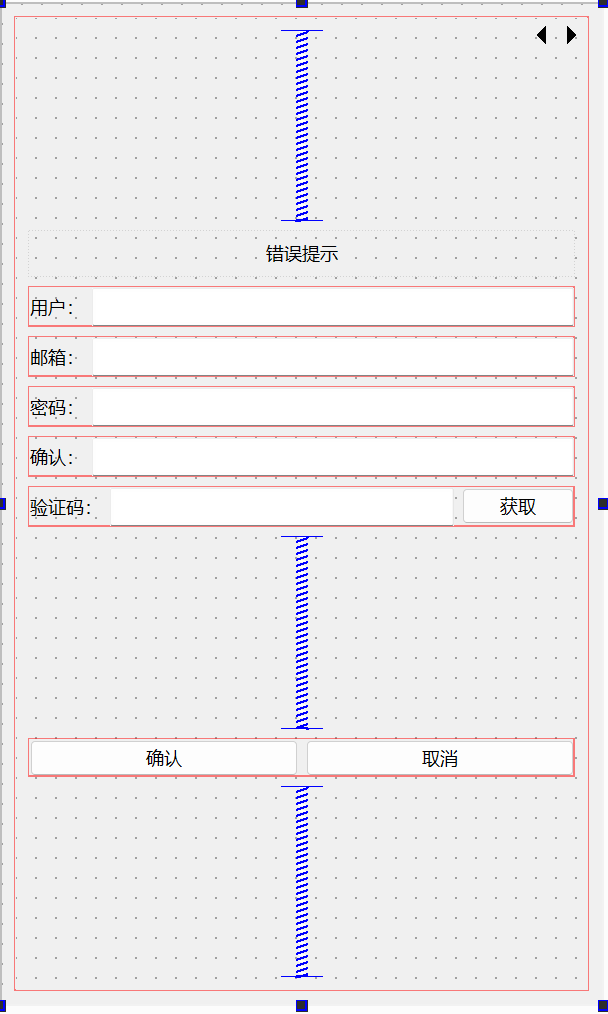
我们在qss里添加err_tip样式,根据不同的状态做字体显示
cpp
#err_tip[state='normal']{
   color: green;
}
#err_tip[state='err']{
   color: red;
}
1.创建全局通用类
接下来项目中添加global.h和global.cpp文件,global.h声明repolish函数,global.cpp用来定义这个函数。
global.h中的声明
cpp
#ifndef GLOBAL_H
#define GLOBAL_H
#include <QWidget>
#include <functional>
#include "QStyle"
extern std::function<void(QWidget*)> repolish;
global.cpp中的定义
cpp
#include "global.h"
std::function<void(QWidget*)> repolish =[](QWidget *w){
    w->style()->unpolish(w);
    w->style()->polish(w);
};
在Register的构造函数中添加样式设置。
cpp
 ui->err_tip->setProperty("state","normal");
    repolish(ui->err_tip);
2.实现获取验证码的逻辑
接下来实现获取验证码的逻辑,ui里关联get_code按钮的槽事件,并实现槽函数
cpp
//获取验证码按钮响应
void RegisterDialog::on_getBtn_clicked()
{
    //验证邮箱的地址正则表达式
    auto email = ui->email_Edit->text();
    // 邮箱地址的正则表达式
    QRegularExpression regex(R"((\w+)(\.|_)?(\w*)@(\w+)(\.(\w+))+)");
    bool match = regex.match(email).hasMatch(); // 执行正则表达式匹配
    if(match)
    {
         //发送http请求获取验证码
    }else
    {
        ShowTips("邮箱地址不正确",false);
    }
}
在RegisterDialog中添加showTip函数控制提示
cpp
void RegisterDialog::ShowTips(QString str,bool isok)
{
    if(isok)
    {
         ui->err_tip->setProperty("state","normal");
    }else
    {
         ui->err_tip->setProperty("state","err");
    }
    ui->err_tip->setText(str);

    repolish(ui->err_tip);
}
二、单例类封装
网络请求类要做成一个单例类,这样方便在任何需要发送http请求的时候调用,我们先实现单例类,添加singleton.h实现如下
cpp
#ifndef SINGLETON_H
#define SINGLETON_H
#include"global.h"
template <typename T>
class Singleton
{
protected :
    //默认无参构造函数
    Singleton()=default;
    //禁用拷贝构造函数
    Singleton(const Singleton<T>&)=delete;
    //禁用赋值运算符重载
    Singleton& operator=(const Singleton<T>& st)=delete;
    //静态智能指针,存储单例对象
    static std::shared_ptr<T> _instance;
public:
    static std::shared_ptr<T> GetInstance()
    {
        // 静态局部变量:整个程序生命周期内只初始化一次
        static std::once_flag s_flag;
        //线程安全的一次性调用:确保 lambda 里的代码只执行一次
        std::call_once(s_flag,[&]()
        {
            _instance=std::shared_ptr<T>(new T);

        });
        return _instance;
    }

    void PrintAddress()
    {
        std::cout<<_instance.get()<<std::endl;
    }
    ~Singleton()
    {
        std::cout<<"this is singleton destruct"<<std::endl;
    }

};

template <typename T>
std::shared_ptr<T> Singleton<T>::_instance=nullptr;//初始化为空
三、http管理类
http管理类主要用来管理http发送接收等请求得,我们需要在pro中添加网络库
cpp
QT += core gui network在pro中添加C++类,命名为HttpMgr,然后头文件如下
cpp
#include "singleton.h"
#include <QString>
#include <QUrl>
#include <QObject>
#include <QNetworkAccessManager>
#include "global.h"
#include <memory>
#include <QJsonObject>
#include <QJsonDocument>
//CRTP 安全地获取当前对象地智能指针
class HttpMgr:public QObject, public Singleton<HttpMgr>,
        public std::enable_shared_from_this<HttpMgr>
{
    Q_OBJECT
public:
    ~HttpMgr();
private:
    friend class Singleton<HttpMgr>;
    HttpMgr();
//网络请求管理器
    QNetworkAccessManager _manager;
signals:
//网络请求完成时触发
    void sig_http_finish();
};
我们先实现PostHttpReq请求的函数,也就是发送http的post请求, 发送请求要用到请求的url,请求的数据(json或者protobuf序列化),以及请求的id,以及哪个模块发出的请求mod,那么一个请求接口应该是这样的
cpp
void PostHttpReq(QUrl url, QJsonObject json, ReqId req_id, Modules mod);我们去global.h定义ReqId枚举类型
cpp
enum ReqId
{
    ID_GETVARIFY_CODE=1001,//获取验证码
    ID_REG_USER=1002,//注册用户
};
在global.h定义ErrorCodes
cpp
enum ErrorCodes
{
    SUCCESS=0,
    ERR_JSON=1,// json 解析失败
    ERR_NETWORK=2,//网络错误
};
在global.h中定义模块
cpp
enum Modules
{
    REGISTERMOD=0,
};
还需要修改下要发送的信号,在HttpMgr的头文件里,让他携带参数
cpp
// 信号:网络请求完成时触发
    void sig_http_finish(ReqId id,QString res,ErrorCodes err,Modules mod);
实现PostHttpReq
cpp
void HttpMgr::PostHttpReq(QUrl url, QJsonObject json, ReqId req_id, Modules mod)
{
    //把json文件转换为字节数组
    QByteArray data=QJsonDocument(json).toJson();
    //创建一个请求对象初始化url
    QNetworkRequest request(url);
    //声明请求体的格式为 JSON
    request.setHeader(QNetworkRequest::ContentTypeHeader,"application/json");
    //将 data 的字节长度转换为字符串,传给请求头
    request.setHeader(QNetworkRequest::ContentLengthHeader,QByteArray::number(data.length()));
    //获取当前类对象的智能指针
    auto self=shared_from_this();
    //向 request 指定的 URL 发送包含 data 数据的 POST 请求,异步返回 QNetworkReply 对象
    QNetworkReply *reply=_manager.post(request,data);
    //设置信号和槽等待发送完成
    QObject::connect(reply,&QNetworkReply::finished,[self,reply,req_id,mod](){
        //处理错误情况
        if(reply->error()!=QNetworkReply::NoError)
        {
            qDebug()<<reply->errorString();
            //发送信号通知完成
            emit self->sig_http_finish(req_id,"",ErrorCodes::ERR_NETWORK,mod);
            //等当前所有事件处理完后,再销毁 reply 对象,保证内存安全
            reply->deleteLater();
            return;
        }

        QString res=reply->readAll();
        //发送信号通知完成
        emit self->sig_http_finish(req_id,res,ErrorCodes::SUCCESS,mod);
        reply->deleteLater();
    });

}
接下来HttpMgr内实现一个slot_http_finish的槽函数用来接收sig_http_finish信号。
cpp
void HttpMgr::slotHttpFinish(ReqId id, QString res, ErrorCodes err, Modules mod)
{
    if(mod==Modules::REGISTERMOD)
    {
        //发送信号通知指定模块http的响应结束了
        emit sig_reg_mod_finish(id,res,err);
    }
}
我们在HttpMgr.h中添加信号sig_reg_mod_finish
cpp
class HttpMgr:public QObject, public Singleton<HttpMgr>,
        public std::enable_shared_from_this<HttpMgr>
{
    Q_OBJECT
public:
   //...省略
signals:
    void sig_http_finish(ReqId id, QString res, ErrorCodes err, Modules mod);
    void sig_reg_mod_finish(ReqId id, QString res, ErrorCodes err);
};
并且在cpp文件中连接slot_http_finish和sig_http_finish.
cpp
HttpMgr::HttpMgr()
{
    connect(this,&HttpMgr::sig_http_finish,this,&HttpMgr::slotHttpFinish);

}
我们在注册界面连接sig_reg_mod_finish信号
cpp
RegisterDialog::RegisterDialog(QWidget *parent)
    : QDialog(parent)
    , ui(new Ui::RegisterDialog)
{
    ui->setupUi(this);
    ui->pass_Edit->setEchoMode(QLineEdit::Password);
    ui->confirm_Edit->setEchoMode(QLineEdit::Password);
    ui->err_tip->setProperty("state","normal");
    repolish(ui->err_tip);
    //连接sig_reg_mod_finish信号
connect(HttpMgr::GetInstance().get(),&HttpMgr::sig_reg_mod_finish,this,&RegisterDialog::slotRegModFinish);


}
实现slotRegModFinish函数
cpp
void RegisterDialog::slotRegModFinish(ReqId id, QString res, ErrorCodes err)
{
    if(err!=ErrorCodes::SUCCESS)
    {
        ShowTips(tr("网络请求错误"),false);
        return;
    }
    //解析json 字符串, res 转化为QByteArray
    QJsonDocument jsonDoc=QJsonDocument::fromJson(res.toUtf8());
    if(jsonDoc.isNull())
    {
        ShowTips(tr("json解析失败"),false);
        return;
    }

    //json 解析错误
    if(!jsonDoc.isObject())
    {
        ShowTips(tr("json解析失败"),false);
        return;
    }
    //调用对应的逻辑,根据id回调。
    _handlers[id](jsonDoc.object());
    return;
}
四、注册消息处理
我们需要对RegisterDialog注册消息处理,头文件声明
cpp
QMap<ReqId, std::function<void(const QJsonObject&)>> _handlers;在RegisterDialog中添加注册消息处理的声明和定义
cpp
void RegisterDialog::initHttpHandlers()
{
    //注册获取验证码回包逻辑
    _handlers.insert(ReqId::ID_GETVARIFY_CODE,[this](const QJsonObject& jsonObj){
        int error=jsonObj["error"].toInt();
        if(error!=ErrorCodes::SUCCESS)
        {
            ShowTips(tr("参数错误"),false);
            return;
        }

        auto email = jsonObj["email"].toString();
        ShowTips(tr("验证码已发送到邮箱,注意查收"), true);
        qDebug()<< "email is " << email ;
    });
}
今天就到这里了,咱们下期再见...