基础环境搭建
下载nvm安装包
安装目录为:C:\Users\admin\AppData\Local\nvm
C:\nvm4w\nodejs
重启,使环境变量生效
安装nodejs:
nvm install 16.12.0
切换到刚安装的低版本,因为有可能装了不同版本,nvm use 16.12.0
验证版本:
node -v
npm -v
将安装的版本设为默认版本(新终端自动生效)
nvm alias default 16.12.0
常用补充命令
命令 作用
nvm list / nvm ls 查看本地已安装的所有 node 版本
nvm uninstall 20.19.4 卸载旧的高版本(切换后可选)
nvm current 查看当前生效的 node 版本
设置淘宝镜像:npm config set registry http://registry.npm.taobao.org/
Npm install
下载vue-admin-template-4.4.0
官方下载地址:https://panjiachen.github.io/vue-element-admin-site/zh/
将它解压到一个没有中文字的路径下(避免出现奇怪的问题)
用VScode打开
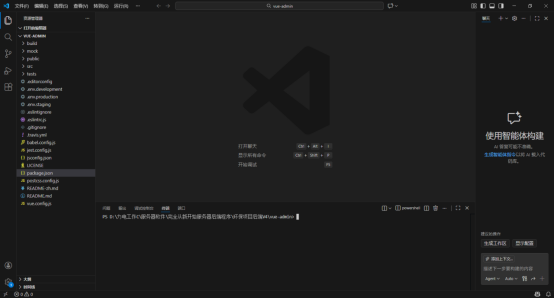
进入终端,输入 npm install
注意要在package.json这个同级的目录中执行npm install
安装依赖,然后 npm run dev
更改配置文件:vue.config.js
'use strict'
const path = require('path')
const defaultSettings = require('./src/settings.js')

function resolve(dir) {
  return path.join(__dirname, dir)
}

const name = defaultSettings.title || 'vue Admin Template' // page title

// If your port is set to 80,
// use administrator privileges to execute the command line.
// For example, Mac: sudo npm run
// You can change the port by the following methods:
// port = 9528 npm run dev OR npm run dev --port = 9528
const port = process.env.port || process.env.npm_config_port || 9528 // dev port

// All configuration item explanations can be find in https://cli.vuejs.org/config/
module.exports = {
  /**
   * You will need to set publicPath if you plan to deploy your site under a sub path,
   * for example GitHub Pages. If you plan to deploy your site to https://foo.github.io/bar/,
   * then publicPath should be set to "/bar/".
   * In most cases please use '/' !!!
   * Detail: https://cli.vuejs.org/config/#publicpath
   */
  publicPath: '/',
  outputDir: 'dist',
  assetsDir: 'static',
  lintOnSave: process.env.NODE_ENV === 'development',
  productionSourceMap: false,
  devServer: {
    port: port,
    open: true,
    overlay: {
      warnings: false,
      errors: true
    },
    before: require('./mock/mock-server.js')
  },
  configureWebpack: {
    // provide the app's title in webpack's name field, so that
    // it can be accessed in index.html to inject the correct title.
    name: name,
    resolve: {
      alias: {
        '@': resolve('src')
      }
    }
  },
  chainWebpack(config) {
    // it can improve the speed of the first screen, it is recommended to turn on preload
    // config.plugins.delete('preload')

    // when there are many pages, it will cause too many meaningless requests
    config.plugins.delete('prefetch')

    // set svg-sprite-loader
    config.module
      .rule('svg')
      .exclude.add(resolve('src/icons'))
      .end()
    config.module
      .rule('icons')
      .test(/\.svg$/)
      .include.add(resolve('src/icons'))
      .end()
      .use('svg-sprite-loader')
      .loader('svg-sprite-loader')
      .options({
        symbolId: 'icon-[name]'
      })
      .end()

    // set preserveWhitespace
    config.module
      .rule('vue')
      .use('vue-loader')
      .loader('vue-loader')
      .tap(options => {
        options.compilerOptions.preserveWhitespace = true
        return options
      })
      .end()

    config
      .when(process.env.NODE_ENV !== 'development',
        config => {
          config
            .plugin('ScriptExtHtmlWebpackPlugin')
            .after('html')
            .use('script-ext-html-webpack-plugin', [{
            // `runtime` must same as runtimeChunk name. default is `runtime`
              inline: /runtime\..*\.js$/
            }])
            .end()
          config
            .optimization.splitChunks({
              chunks: 'all',
              cacheGroups: {
                libs: {
                  name: 'chunk-libs',
                  test: /[\\/]node_modules[\\/]/,
                  priority: 10,
                  chunks: 'initial' // only package third parties that are initially dependent
                },
                elementUI: {
                  name: 'chunk-elementUI', // split elementUI into a single package
                  priority: 20, // the weight needs to be larger than libs and app or it will be packaged into libs or app
                  test: /[\\/]node_modules[\\/]_?element-ui(.*)/ // in order to adapt to cnpm
                },
                commons: {
                  name: 'chunk-commons',
                  test: resolve('src/components'), // can customize your rules
                  minChunks: 3, //  minimum common number
                  priority: 5,
                  reuseExistingChunk: true
                }
              }
            })
          config.optimization.runtimeChunk('single')
        }
      )
  }
}

const port = process.env.port || process.env.npm_config_port || 9528 // dev port
改成:
const port = 8888因语法检查太严格,不好用,所以将
lintOnSave: process.env.NODE_ENV === 'development',改成:
lintOnSave: false,下面是否打开浏览器:(open 改成 false)
devServer: {

    port: port,

    open: true,

    overlay: {

      warnings: false,

      errors: true

    },
改成:
  devServer: {

    port: port,

    open: false,

    overlay: {

      warnings: false,

      errors: true

    },
模拟数据的服务删除掉,
before: require('./mock/mock-server.js')将 publicPath: '/',改成 publicPath: './',
更改后的代码:
'use strict'
const path = require('path')
const defaultSettings = require('./src/settings.js')

function resolve(dir) {
  return path.join(__dirname, dir)
}

const name = defaultSettings.title || 'vue Admin Template' // page title

// If your port is set to 80,
// use administrator privileges to execute the command line.
// For example, Mac: sudo npm run
// You can change the port by the following methods:
// port = 9528 npm run dev OR npm run dev --port = 9528
//const port = process.env.port || process.env.npm_config_port || 9528 // dev port

const port = 8888
// All configuration item explanations can be find in https://cli.vuejs.org/config/
module.exports = {
  /**
   * You will need to set publicPath if you plan to deploy your site under a sub path,
   * for example GitHub Pages. If you plan to deploy your site to https://foo.github.io/bar/,
   * then publicPath should be set to "/bar/".
   * In most cases please use '/' !!!
   * Detail: https://cli.vuejs.org/config/#publicpath
   */
  publicPath: './',
  outputDir: 'dist',
  assetsDir: 'static',
  lintOnSave: false,
  productionSourceMap: false,
  devServer: {
    port: port,
    open: false,
    overlay: {
      warnings: false,
      errors: true
    },
  //  before: require('./mock/mock-server.js')
  },
  configureWebpack: {
    // provide the app's title in webpack's name field, so that
    // it can be accessed in index.html to inject the correct title.
    name: name,
    resolve: {
      alias: {
        '@': resolve('src')
      }
    }
  },
  chainWebpack(config) {
    // it can improve the speed of the first screen, it is recommended to turn on preload
    // config.plugins.delete('preload')

    // when there are many pages, it will cause too many meaningless requests
    config.plugins.delete('prefetch')

    // set svg-sprite-loader
    config.module
      .rule('svg')
      .exclude.add(resolve('src/icons'))
      .end()
    config.module
      .rule('icons')
      .test(/\.svg$/)
      .include.add(resolve('src/icons'))
      .end()
      .use('svg-sprite-loader')
      .loader('svg-sprite-loader')
      .options({
        symbolId: 'icon-[name]'
      })
      .end()

    // set preserveWhitespace
    config.module
      .rule('vue')
      .use('vue-loader')
      .loader('vue-loader')
      .tap(options => {
        options.compilerOptions.preserveWhitespace = true
        return options
      })
      .end()

    config
      .when(process.env.NODE_ENV !== 'development',
        config => {
          config
            .plugin('ScriptExtHtmlWebpackPlugin')
            .after('html')
            .use('script-ext-html-webpack-plugin', [{
            // `runtime` must same as runtimeChunk name. default is `runtime`
              inline: /runtime\..*\.js$/
            }])
            .end()
          config
            .optimization.splitChunks({
              chunks: 'all',
              cacheGroups: {
                libs: {
                  name: 'chunk-libs',
                  test: /[\\/]node_modules[\\/]/,
                  priority: 10,
                  chunks: 'initial' // only package third parties that are initially dependent
                },
                elementUI: {
                  name: 'chunk-elementUI', // split elementUI into a single package
                  priority: 20, // the weight needs to be larger than libs and app or it will be packaged into libs or app
                  test: /[\\/]node_modules[\\/]_?element-ui(.*)/ // in order to adapt to cnpm
                },
                commons: {
                  name: 'chunk-commons',
                  test: resolve('src/components'), // can customize your rules
                  minChunks: 3, //  minimum common number
                  priority: 5,
                  reuseExistingChunk: true
                }
              }
            })
          config.optimization.runtimeChunk('single')
        }
      )
  }
}
生产和开发环境的配置
文件:.env.development
# just a flag
ENV = 'development'

# base api
VUE_APP_BASE_API = 'http://localhost:9999'
文件:.env.production
# just a flag
ENV = 'production'

# base api
VUE_APP_BASE_API = 'http://localhost:9999'
在终端中输入打包命令:
-
打包正式环境
- npm run build:prod
会生成dist文件夹。
前后端对接:
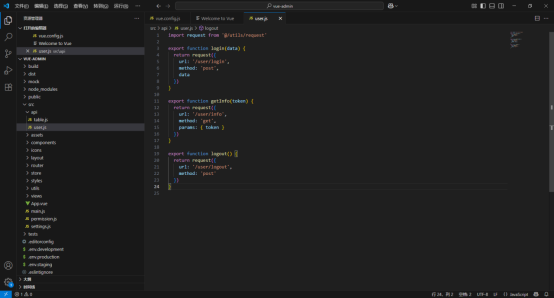
User.js,把URL 改成下面的代码:
import request from '@/utils/request'


export function login(data) {

  return request({

    url: '/user/login',

    method: 'post',

    data

  })

}


export function getInfo(token) {

  return request({

    url: '/user/info',

    method: 'get',

    params: { token }

  })

}


export function logout() {

  return request({

    url: '/user/logout',

    method: 'post'

  })

}