Nginx + Redis + srcache + PHP-FPM 架构
-
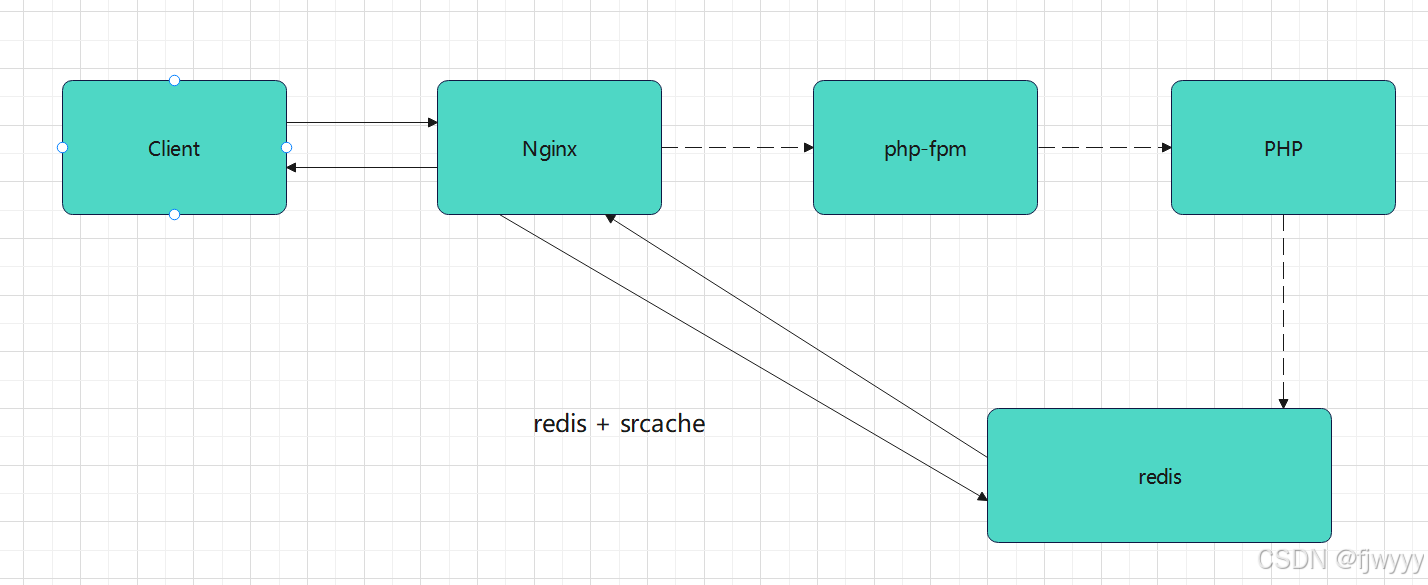
请求流程
- 客户端发起 HTTP 请求 → Nginx 接收。
- Nginx 先检查 Redis 中是否有对应缓存:
- 命中:直接从 Redis 读取内容并返回给客户端,无需 PHP 参与。
- 未命中:将请求转发给 PHP-FPM 处理,PHP 生成内容后,Nginx 再将其缓存到 Redis,同时返回给客户端。
-
核心模块
ngx_http_redis_module:让 Nginx 直接与 Redis 通信,读取缓存。ngx_http_srcache_module:负责将 PHP 生成的响应内容缓存到 Redis。
流程图
源码安装nginx
bash
[root@nginx ~]# wget https://nginx.org/download/nginx-1.28.1.tar.gz

[root@nginx ~]# tar zxf nginx-1.28.1.tar.gz
[root@nginx ~]# cd nginx-1.28.1/

#安装依赖
[root@nginx ~]# dnf install gcc pcre-devel zlib-devel openssl-devel -y

#选择要使用的模块
[root@nginx nginx-1.28.1]# ./configure  --prefix=/usr/local/nginx --user=nginx --group=nginx --with-http_ssl_module --with-http_v2_module --with-http_realip_module --with-http_stub_status_module --with-http_gzip_static_module --with-pcre --with-stream --with-stream_ssl_module --with-stream_realip_module  --add-module=/root/echo-nginx-module-0.64 --add-module=/root/redis2-nginx-module-0.15 --add-module=/root/srcache-nginx-module-0.33

[root@nginx nginx-1.28.1]# make && make install

#创建运行用户
[root@nginx]# useradd  -s /sbin/nologin -M nginx

#设定环境变量
[root@nginx sbin]# vim  ~/.bash_profile
export PATH=$PATH:/usr/local/nginx/sbin

[root@nginx sbin]# source   ~/.bash_profile

#编写Nginx启动文件systemd
[root@nginx ~]# cd /lib/systemd/system
[root@nginx system]# vim nginx.service
[Unit]
Description=The NGINX HTTP and reverse proxy server
After=syslog.target network.target remote-fs.target nss-lookup.target

[Service]
Type=forking
PIDFile=/usr/local/nginx/logs/nginx.pid			#指定nginx启动的pid
ExecStartPre=/usr/local/nginx/sbin/nginx -t		#指定nginx -t检查配置文件命令
ExecStart=/usr/local/nginx/sbin/nginx			#指定nginx启动命令
ExecReload=/bin/kill -s HUP $MAINPID
ExecStop=/bin/kill -s QUIT $MAINPID
PrivateTmp=true

[Install]
WantedBy=multi-user.target

#使编写的配置生效
[root@nginx system]# systemctl daemon-reload
#在启动时要确保nginx已经关闭不然会冲突导致报错
[root@nginx system]# systemctl enable --now nginx
源码安装php
bash
[root@nginx ~]# wget https://www.php.net/distributions/php-8.3.30.tar.gz
[root@nginx ~]# wget https://mirrors.aliyun.com/rockylinux/9.7/devel/x86_64/os/Packages/o/oniguruma-devel-6.9.6-1.el9.6.x86_64.rpm     #下载依赖包

[root@nginx ~]# tar zxf php-8.3.30.tar.gz

#安装依赖
[root@nginx ~]# dnf install gcc systemd-devel-252-51.el9.x86_64 libxml2-devel.x86_64 sqlite-devel.x86_64  libcurl-devel.x86_64  libpng-devel.x86_64 oniguruma-devel-6.9.6-1.el9.6.x86_64.rpm -y

[root@nginx php-8.3.30]# ./configure \
--prefix=/usr/local/php \		#安装路径
--with-config-file-path=/usr/local/php/etc \	#指定配置路径
--enable-fpm  \			#用cgi方式启动程序
--with-fpm-user=nginx \	#指定运行用户身份
--with-fpm-group=nginx \
--with-curl \			#打开curl浏览器支持
--with-iconv \			#启用iconv函数,转换字符编码
--with-mhash \			#mhash加密方式扩展库
--with-zlib \			#支持zlib库,用于压缩http压缩传输
--with-openssl \		#支持ssl加密
--enable-mysqlnd \		#mysql数据库
--with-mysqli \
--with-pdo-mysql \
--disable-debug \		#关闭debug功能
--enable-sockets \		#支持套接字访问
--enable-soap \			#支持soap扩展协议
--enable-xml \			#支持xml
--enable-ftp \			#支持ftp
--enable-gd \			#支持gd库
--enable-exif \			#支持图片元数据
--enable-mbstring \		#支持多字节字符串
--enable-bcmath \		#打开图片大小调整,用到zabbix监控的时候用到了这个模块
--with-fpm-systemd		#支持systemctl 管理cgi

[root@nginx php-8.3.30]# make && make instsall
配置优化php
bash
[root@nginx ~]# cd /usr/local/php/etc
[root@nginx etc]# cp php-fpm.conf.default php-fpm.conf	#复制模板
[root@nginx etc]# vim php-fpm.conf
#去掉注释
pid = run/php-fpm.pid 		#指定pid文件存放位置

[root@nginx etc]# cd php-fpm.d/
[root@nginx php-fpm.d]# cp www.conf.default www.conf
[root@nginx php-fpm.d]# vim www.conf
41 listen = 0.0.0.0:9000	#可以修改端口

#生成主配置文件
[root@nginx php-8.3.30]# cp php.ini-production /usr/local/php/etc/php.ini
[root@nginx ~]# vim /usr/local/php/etc/php.ini
989 date.timezone = Asia/Shanghai #修改时区

#生成启动文件
[root@nginx etc]# cp ~/php-8.3.30/sapi/fpm/php-fpm.service /lib/systemd/system/
[root@nginx etc]# vim /lib/systemd/system/php-fpm.service
#ProtectSystem=full 		#注释该内容
[root@nginx etc]# systemctl daemon-reload
[root@nginx etc]# systemctl enable --now php-fpm.service
[root@nginx etc]# netstat -antlupe | grep php
tcp        0      0 127.0.0.1:9000          0.0.0.0:*               LISTEN      0          120615     147595/php-fpm: mas
rpm包安装redis
bash
[root@nginx ~]# dnf install redis -ynginx配置整合redis与php
bash
[root@nginx ~]# vim /usr/local/nginx/conf.d/php.conf
upstream redis {
   server 127.0.0.1:6379;
   keepalive 10;
}

server {
    listen 80;
    server_name php.fjw.org;
    root /webdir/fjw.org/php/html;

    location /redis {
        internal;
        set $redis_key $query_string;
        redis2_query get $redis_key;
        redis2_query setex $redis_key 300 $srcache_response_body;
        redis2_pass redis;
    }

    location ~ \.php$ {
        set $key $uri$args;
        srcache_fetch GET /redis $key;
        srcache_store PUT /redis $key;

        fastcgi_pass 127.0.0.1:9000;
        fastcgi_index index.php;
        include fastcgi.conf;
    }
}

[root@nginx ~]# nginx -s reload
测试
编写测试文件
bash
[root@nginx ~]# vim /webdir/fjw.org/php/html/test.php
<?php
echo "Generated by PHP at " . date('Y-m-d H:i:s');
?>访问测试:
- 第一次访问
http://服务器IP/test.php,页面显示当前时间,此时 Nginx 缓存未命中,请求由 PHP 处理并缓存到 Redis。 - 刷新页面,若显示的时间与第一次相同,说明缓存命中,Nginx 直接从 Redis 返回内容,绕过了 PHP。