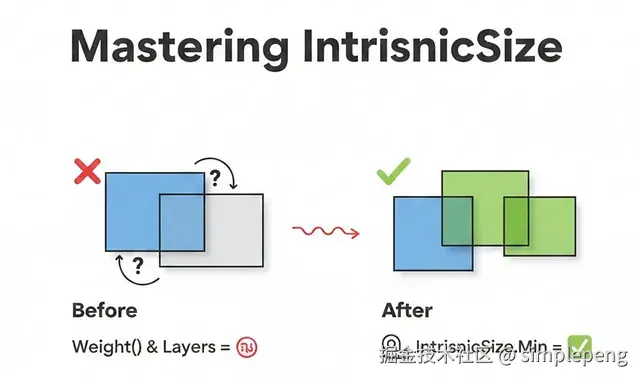
If you've been working with Jetpack Compose, you've probably hit that frustrating moment where your layout just doesn't behave the way you expect. Maybe a weight() modifier inside a Box causes weird behavior, or your layered UI elements don't size correctly.
如果你一直在使用 Jetpack Compose,或许已经遇到过这样令人沮丧的时刻:你的布局并没有按预期表现。也许一个 weight() 修饰符放在 Box 内会导致奇怪的行为,或者你叠放的 UI 元素无法正确调整大小。
That's where **IntrinsicSize** comes in --- and trust me, once you understand it, it becomes one of the most powerful tools in your Compose toolkit.
这就是 **IntrinsicSize** 的用武之地------相信我,一旦你理解了它,它就会成为你 Compose 工具箱中最强大的工具之一。
The Problem: A Real Production Scenario 问题:一个真实的生产场景
Recently, I was building a details screen for an app. The design required:
最近,我在为一个应用构建详情屏。设计要求:
- A header image at the top
顶部的头图 - A card that overlaps the header by 56dp
一个与标题重叠 56dp 的卡片 - A smooth background transition from the header to a soft gray background
从页眉到柔和灰色背景的平滑过渡
Here's what we wanted to achieve:
这是我们想要实现的:
💡 Design Goal: Create a card that elegantly overlaps a header image, with a seamless background transition.
💡 设计目标:创建一个优雅地与头图重叠的卡片,并实现无缝的背景过渡。

The Challenge 挑战
I needed to create a Box with two layers:
我需要创建一个具有两层的布局:
- Layer 1 (Background): 56dp transparent space at top, then soft gray background
顶部 56dp 透明间距,然后柔和的灰色背景 - Layer 2 (Card): The actual content card drawn on top
绘制在上方的实际内容卡片
Here's my first attempt: 这是我的第一次尝试:
kotlin
@Composable
fun OverlappingCardContent(overlapHeight: Dp) {
    Box(modifier = Modifier.fillMaxWidth()) {
        // Layer 1: Background
        Column(modifier = Modifier.fillMaxWidth()) {
            Spacer(modifier = Modifier.height(overlapHeight)) // 56dp transparent
            Box(
                modifier = Modifier
                    .fillMaxWidth()
                    .weight(1f)  // Fill remaining space with soft background
                    .background(color = Color.LightGray)
            )
        }

        // Layer 2: Card
        Card(modifier = Modifier.fillMaxWidth()) {
            // Card content...
        }
    }
}
But this didn't work! 😩
但这没用!😩
The weight(1f) modifier was causing issues. The layout either collapsed or expanded unexpectedly.
weight(1f) 修饰符导致了问题。布局要么意外折叠,要么意外展开。
Understanding the Root Cause 理解根本原因
To understand why this failed, let's revisit how Compose layout works.
要理解为何会失败,让我们回顾一下 Compose 布局的工作原理。
Compose Layout: The Single-Pass SystemCompose 布局:单次传递系统
Compose measures layouts in a single pass for performance. Each composable:
Compose 为了性能采用单次遍历来测量布局。每个可组合函数:
- Receives constraints from its parent 从其父元素接收约束
- Measures its children 测量其子项
- Decides its own size 决定自己的尺寸
- Places its children 放置其子项
The problem? When a parent like Box measures its children, each child doesn't know what the other children's sizes are. They're measured independently.
问题?当像 Box 这样的父容器测量其子项时,每个子项不知道其他子项的尺寸。它们是独立测量的。
Why weight(1f) Failed 为什么 weight(1f) 失败了
The weight() modifier says: " Take up X proportion of the remaining space."
weight() 修饰符表示:"占用剩余空间的 X 比例。"
But remaining space of what ? The Box hasn't decided its height yet --- it's waiting for its children to tell it how big they need to be. This creates a circular dependency:
但"剩余空间"指的是什么? Box 本身还没有决定它的高度------它在等待子元素告知它们需要多大。这就产生了一个循环依赖:
rb
Box: "Children, how tall are you?"
  ├─ Column: "I need 56dp + whatever weight(1f) gives me"
  │          "But weight depends on your height, Box!"
  └─ Card: "I need ~180dp for my content"

Box: "I'm confused..." 🤯
Enter IntrinsicSize: Breaking the Circular Dependency 引入 IntrinsicSize:打破循环依赖
IntrinsicSize is Compose's way of asking children a hypothetical question before the actual measurement:
IntrinsicSize 是 Compose 在实际测量之前向子元素提出的一个假设性问题:
"If I gave you infinite space, what's the minimum (or maximum) height you'd need?"
"如果我给你无限的空间,你需要的最小(或最大)高度是多少?"
IntrinsicSize.Min vs IntrinsicSize.Max

The Fix 修复方法
rb
Box(
    modifier = Modifier
        .fillMaxWidth()
        .height(IntrinsicSize.Min)  // ← The magic line!
) {
    // Layer 1: Background
    Column(modifier = Modifier.fillMaxWidth()) {
        Spacer(modifier = Modifier.height(56.dp))
        Box(
            modifier = Modifier
                .fillMaxWidth()
                .weight(1f)
                .background(color = Color.LightGray)
        )
    }

    // Layer 2: Card
    Card(modifier = Modifier.fillMaxWidth()) {
        // Card content...
    }
}
Now the layout works! Here's why:
现在布局正常工作了!原因如下:
How IntrinsicSize.Min Resolves the Conflict IntrinsicSize.Min 如何解决冲突
When the Box uses height(IntrinsicSize.Min), it asks each child:
当 Box 使用 height(IntrinsicSize.Min) 时,它会询问每个子项:
Column's minimum intrinsic height:
Column 的最小内在高度:
rb
Spacer: 56dp (fixed)
Weighted Box: 0dp (minimum, can shrink to nothing)
Total: 56dp
Card's minimum intrinsic height:
卡片的最小内在高度:
rb
Status row + Title + Subtitle + Button + Padding = ~180dp
Total: ~180dp
Box picks: max(56dp, 180dp) = 180dp
Box 选择: max(56dp, 180dp) = 180dp
Why max()? Because the Box needs to be tall enough for all children to fit!
为什么是 max() ?因为 Box 需要足够高以容纳所有子项!
Now the layout knows exactly how tall to be, and the weight(1f) can work correctly:
现在布局确切地知道需要多高, weight(1f) 就能正确工作:
- Box height: 180dp Box 高度:180dp
- Spacer: 56dp 间隔:56dp
- Weighted background Box: 180dp --- 56dp = 124dp
加权背景盒子:180dp --- 56dp = 124dp
The Complete Solution: Overlapping Card UI
完整方案:重叠卡片界面
Here's the production-ready code that powers this UI:
这是驱动该用户界面的可投入生产使用的代码:
rb
private val OVERLAP_HEIGHT = 56.dp
rb
@Composable
fun HeaderWithOverlappingCard(imageHeight: Dp) {
    LazyColumn {
        // Create overlap: position content before header ends
        item {
            Spacer(modifier = Modifier.height(imageHeight - OVERLAP_HEIGHT))
        }

        item {
            OverlappingCardContent(overlapHeight = OVERLAP_HEIGHT)
        }
    }
}
rb
@Composable
fun OverlappingCardContent(overlapHeight: Dp) {
    Box(
        modifier = Modifier
            .fillMaxWidth()
            .height(IntrinsicSize.Min)
    ) {
        // Layer 1: Background transition
        Column(modifier = Modifier.fillMaxWidth()) {
            Spacer(modifier = Modifier.height(overlapHeight)) // Transparent over header
            Box(
                modifier = Modifier
                    .fillMaxWidth()
                    .weight(1f)
                    .background(color = SoftGrayBackground)
            )
        }

        // Layer 2: Card content (drawn on top)
        Card(
            modifier = Modifier
                .fillMaxWidth()
                .padding(horizontal = 8.dp),
            shape = RoundedCornerShape(12.dp)
        ) {
            Column(modifier = Modifier.padding(24.dp)) {
                Text("✓ Success", color = Color.Green)
                Text("₹100 Cashback", style = MaterialTheme.typography.h4)
                Text("Transaction complete")
                Spacer(modifier = Modifier.height(16.dp))
                Button(onClick = {}) { Text("View Details") }
            }
        }
    }
}
Visual Breakdown 视觉拆解
rb
imageHeight = 200dp
overlapHeight = 56dp
rb
LazyColumn positions:
├─ Spacer: 144dp (200 - 56)
└─ OverlappingCardContent starts at Y = 144dp
rb
Inside OverlappingCardContent (height = 180dp via IntrinsicSize.Min):
├─ Column Layer:
│   ├─ Spacer: 56dp (transparent, header shows through)
│   └─ Background Box: 124dp (soft gray)
└─ Card Layer: 180dp (drawn from top, overlaps header)
Common Use Cases for IntrinsicSize
IntrinsicSize 的常见用例
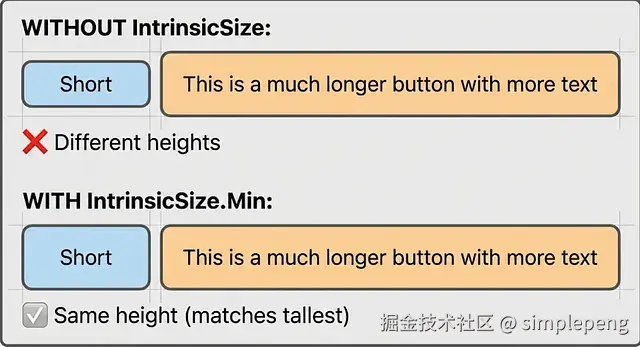
1. Equal Height Buttons in a Row
- 行内等高按钮
Problem: Buttons with different text lengths end up with different heights.
问题:文本长度不同的按钮会导致高度不一致。
Solution:解决方案:
rb
Row(modifier = Modifier.height(IntrinsicSize.Min)) {
    Button(
        modifier = Modifier.weight(1f).fillMaxHeight(),
        onClick = {}
    ) { Text("Short") }

    Button(
        modifier = Modifier.weight(1f).fillMaxHeight(),
        onClick = {}
    ) { Text("This is a much\nlonger button\nwith more text") }
}
Result: Both buttons match the height of the tallest one.
结果:两个按钮的高度与最高的按钮一致。
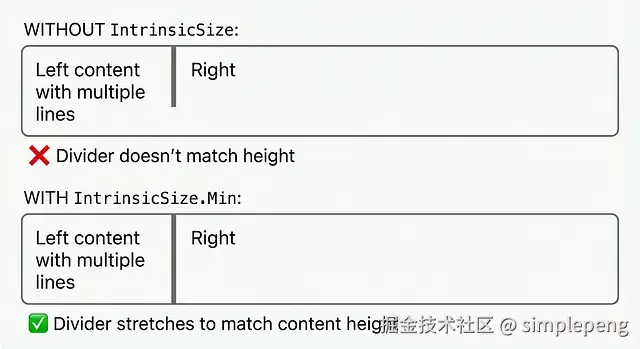
2. Divider Matching Parent Height
- 分割线匹配父高度
Problem: Divider doesn't stretch to match multi-line content.
问题:Divider 不会拉伸以匹配多行内容的高度。
Solution:解决方案:
rb
Row(modifier = Modifier.height(IntrinsicSize.Min)) {
    Text("Left content\nwith multiple\nlines")

    Divider(
        modifier = Modifier
            .fillMaxHeight()
            .width(1.dp)
    )

    Text("Right")
}
Result: The divider stretches to match the multi-line text height.
结果:分隔线会拉伸以匹配多行文本的高度。
3. Card with Dynamic Content and Fixed Overlay
- 带有动态内容和固定叠加层的卡片
**Problem:**Overlay needs to match card width, but card width is dynamic.
问题:叠加层需要与卡片宽度匹配,但卡片宽度是动态的。
Solution:解决方案:
rb
Box(modifier = Modifier.width(IntrinsicSize.Max)) {
    Card {
        Column {
            Text("Dynamic content here...")
            // More content
        }
    }

    // Badge that should match card width
    Badge(
        modifier = Modifier
            .align(Alignment.TopEnd)
            .fillMaxWidth()
    )
}
Performance Considerations ⚠️ 性能注意事项 ⚠️
IntrinsicSize triggers a two-pass measurement :
触发一次两遍测量:
- First pass: Query intrinsic sizes
第一遍:查询固有尺寸 - Second pass: Actual measurement and layout
第二次传递:实际测量和布局
This has a performance cost. Use it judiciously:
这会带来性能开销。请谨慎使用:
✅ Good Use Cases ✅ 适用场景
- Complex layered UIs (like our overlapping card)
复杂的分层界面(例如我们重叠的卡片) - Equalizing sibling sizes
使兄弟元素尺寸相等 - Matching dividers/separators to content
使分隔线/分割线与内容匹配 - When you need children to coordinate their sizes
当你需要子元素协调它们的尺寸时
❌ Avoid When ❌ 避免使用情况
- Inside
LazyColumn/LazyRowitems that repeat hundreds of times
在内部 / 重复出现数百次的项目 - Deeply nested intrinsic measurements
深度嵌套的内在测量 - When a fixed size or
wrapContentHeight()works
当固定大小起作用或有效时 - In performance- critical paths
在性能关键路径上
Key Takeaways 关键要点
**IntrinsicSize.Min**= "Use the minimum height needed by children"
**IntrinsicSize.Min**= "使用子元素所需的最小高度"**IntrinsicSize.Max**= "Use the maximum height children could want"
**IntrinsicSize.Max**= "使用子元素可能需要的最大高度"- It resolves circular dependencies between parent and child sizing
它解决了父元素和子元素之间的循环尺寸依赖关系 - Essential for layered UIs where children use
weight()or
对于使用或依赖父布局尺寸的子元素的分层用户界面而言至关重要,适用于......fillMaxHeight() - Comes with a performance cost --- use wisely
伴随性能成本 --- 明智使用
Conclusion 结论
IntrinsicSize might seem like a niche API, but it's essential for building sophisticated UIs in Compose. The overlapping card pattern we built is just one example --- you'll find it invaluable whenever you need siblings to coordinate their sizes or when layered layouts need to "agree" on dimensions.
IntrinsicSize 可能看起来像是一个小众的 API,但它对于在 Compose 中构建复杂的用户界面至关重要。我们构建的重叠卡片模式只是一个示例------每当你需要同级元素协调它们的尺寸,或是分层布局需要在尺寸上"达成一致"时,你都会发现它非常有用。
Next time your Compose layout behaves unexpectedly with weight() or fillMaxHeight(), remember: IntrinsicSize might be the answer .
下次当你的 Compose 布局在使用 weight() 或 fillMaxHeight() 时表现异常时,请记住:IntrinsicSize 可能就是答案。