概述
Flying-Saucer是一个基于iText5的HTML到PDF渲染引擎,它能够将HTML/CSS文档渲染为PDF格式。本文档深入剖析其核心渲染流程,包括CSS处理、表格和图片的生成过程。
项目结构
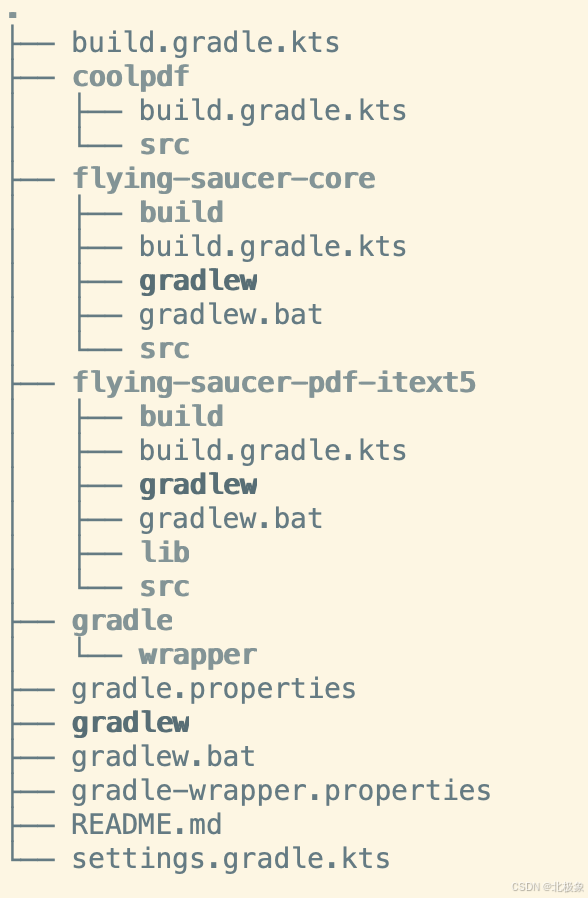
项目主要包含三个模块:
- flying-saucer-core: 核心渲染引擎,包含CSS解析、布局计算、渲染等核心功能
- flying-saucer-pdf-itext5: PDF输出模块,基于iText5实现PDF生成
- coolpdf: 封装层,提供更简洁的API
核心渲染流程
1. 初始化流程
渲染流程从ITextRenderer的构造开始:
java
public ITextRenderer(float dotsPerPoint, int dotsPerPixel) {
    _dotsPerPoint = dotsPerPoint;

    _outputDevice = new ITextOutputDevice(_dotsPerPoint);

    ITextUserAgent userAgent = new ITextUserAgent(_outputDevice);
    _sharedContext = new SharedContext();
    _sharedContext.setUserAgentCallback(userAgent);
    _sharedContext.setCss(new StyleReference(userAgent));
    userAgent.setSharedContext(_sharedContext);
    _outputDevice.setSharedContext(_sharedContext);

    ITextFontResolver fontResolver = new ITextFontResolver(_sharedContext);
    _sharedContext.setFontResolver(fontResolver);

    ITextReplacedElementFactory replacedElementFactory = new ITextReplacedElementFactory(_outputDevice);
    _sharedContext.setReplacedElementFactory(replacedElementFactory);

    _sharedContext.setTextRenderer(new ITextTextRenderer());
    _sharedContext.setDPI(72 * _dotsPerPoint);
    _sharedContext.setDotsPerPixel(dotsPerPixel);
    _sharedContext.setPrint(true);
    _sharedContext.setInteractive(false);
}
关键组件:
ITextOutputDevice: PDF输出设备,负责将渲染结果写入PDFSharedContext: 共享上下文,存储全局状态StyleReference: CSS样式引用管理器ITextFontResolver: 字体解析器ITextReplacedElementFactory: 替换元素工厂(如图片、表单元素)
2. 文档加载流程
setDocument()方法负责加载HTML文档并初始化样式:
java
public void setDocument(Document doc, String url, NamespaceHandler nsh) {
    _doc = doc;

    getFontResolver().flushFontFaceFonts();

    _sharedContext.reset();
    if (Configuration.isTrue("xr.cache.stylesheets", true)) {
        _sharedContext.getCss().flushStyleSheets();
    } else {
        _sharedContext.getCss().flushAllStyleSheets();
    }
    _sharedContext.setBaseURL(url);
    _sharedContext.setNamespaceHandler(nsh);
    _sharedContext.getCss().setDocumentContext(_sharedContext, _sharedContext.getNamespaceHandler(), doc, new NullUserInterface());
    getFontResolver().importFontFaces(_sharedContext.getCss().getFontFaceRules());
}
3. 布局计算流程
layout()方法执行布局计算,将DOM树转换为Box树:
java
public void layout() {
    LayoutContext c = newLayoutContext();
    BlockBox root = BoxBuilder.createRootBox(c, _doc);
    root.setContainingBlock(new ViewportBox(getInitialExtents(c)));
    root.layout(c);
    _dim = root.getLayer().getPaintingDimension(c);
    root.getLayer().trimEmptyPages(c, _dim.height);
    root.getLayer().layoutPages(c);
    _root = root;
}
布局流程详解:
- 创建根Box :
BoxBuilder.createRootBox()根据文档根元素创建对应的Box - 设置包含块: 根Box的包含块设置为视口
- 执行布局 :
root.layout(c)递归计算所有Box的位置和尺寸 - 获取绘制尺寸: 计算总绘制尺寸
- 页面管理: 修剪空页面并布局页面
4. PDF生成流程
createPDF()方法将布局结果渲染为PDF:
java
public void createPDF(OutputStream os, boolean finish, int initialPageNo) throws DocumentException, IOException {
    List pages = _root.getLayer().getPages();

    RenderingContext c = newRenderingContext();
    c.setInitialPageNo(initialPageNo);
    PageBox firstPage = (PageBox) pages.get(0);

    int pageWidth = calculateWidth(c, firstPage);
    com.itextpdf.text.Rectangle firstPageSize = new com.itextpdf.text.Rectangle(0, 0, pageWidth / _dotsPerPoint,
            firstPage.getHeight(c) / _dotsPerPoint);

    if(_pdfDoc == null){
        doc = new com.itextpdf.text.Document(firstPageSize, 0, 0, 0, 0);
        _pdfDoc = doc;
    }

    if(_writer == null){
        writer = PdfWriter.getInstance(doc, os);
        _writer = writer;
    }

    doc.open();

    writePDF(pages, c, firstPageSize, doc, writer);

    if (finish) {
        doc.close();
    }
}
PDF生成流程:
- 获取页面列表: 从根Layer获取所有页面
- 创建渲染上下文: 初始化渲染上下文
- 创建PDF文档: 使用iText创建PDF文档和Writer
- 写入PDF: 遍历所有页面进行渲染
writePDF()方法逐页渲染:
java
private void writePDF(List pages, RenderingContext c, com.itextpdf.text.Rectangle firstPageSize, com.itextpdf.text.Document doc,
        PdfWriter writer) throws DocumentException, IOException {
    _outputDevice.setRoot(_root);

    _outputDevice.start(_doc);
    _outputDevice.setWriter(writer);
    _outputDevice.initializePage(writer.getDirectContent(), firstPageSize.getHeight());

    _root.getLayer().assignPagePaintingPositions(c, Layer.PAGED_MODE_PRINT);

    int pageCount = _root.getLayer().getPages().size();
    c.setPageCount(pageCount);

    for (int i = 0; i < pageCount; i++) {
        PageBox currentPage = (PageBox) pages.get(i);
        c.setPage(i, currentPage);
        paintPage(c, writer, currentPage);
        _outputDevice.finishPage();

        if (i != pageCount - 1) {
            PageBox nextPage = (PageBox) pages.get(i + 1);
            int pageWidth = calculateWidth(c, nextPage);
            com.itextpdf.text.Rectangle nextPageSize = new com.itextpdf.text.Rectangle(0, 0, pageWidth / _dotsPerPoint,
                    nextPage.getHeight(c) / _dotsPerPoint);
            doc.newPage();
            _outputDevice.initializePage(writer.getDirectContent(), nextPageSize.getHeight());
        }
    }

    _outputDevice.finish(c, _root);
}
CSS处理机制
1. CSS样式加载
StyleReference是CSS样式管理的核心类:
java
public void setDocumentContext(SharedContext context, NamespaceHandler nsh, Document doc, UserInterface ui) {
    _context = context;
    _nsh = nsh;
    _doc = doc;
    AttributeResolver attRes = new StandardAttributeResolver(_nsh, _uac, ui);

    List infos = getStylesheets();
    _matcher = new org.xhtmlrenderer.css.newmatch.Matcher(
            new DOMTreeResolver(),
            attRes,
            _stylesheetFactory,
            readAndParseAll(infos, _context.getMedia()),
            _context.getMedia());
}
2. CSS选择器匹配
Matcher类负责CSS选择器的匹配:
java
public Matcher(
        TreeResolver tr, AttributeResolver ar, StylesheetFactory factory, List stylesheets, String medium) {
    newMaps();
    _treeRes = tr;
    _attRes = ar;
    _styleFactory = factory;

    _pageRules = new ArrayList();
    _fontFaceRules = new ArrayList();
    docMapper = createDocumentMapper(stylesheets, medium);
}
选择器匹配流程:
- 创建文档映射器 :
createDocumentMapper()遍历所有样式表,提取选择器 - 构建选择器映射: 将选择器按优先级排序
- 元素匹配 :
matchElement()为每个元素匹配适用的样式规则
java
protected Mapper matchElement(Object e) {
    synchronized (e) {
        Object parent = _treeRes.getParentElement(e);
        Mapper child;
        if (parent != null) {
            Mapper m = getMapper(parent);
            child = m.mapChild(e);
        } else {
            child = docMapper.mapChild(e);
        }
        return child;
    }
}
3. 样式计算
CalculatedStyle存储元素的计算样式:
java
private CalculatedStyle(CalculatedStyle parent, CascadedStyle matched) {
    this();
    _parent = parent;

    derive(matched);

    checkPaddingAllowed();
    checkMarginsAllowed();
    checkBordersAllowed();
}
样式计算过程:
- 继承父样式: 从父元素继承可继承的属性
- 应用匹配样式: 应用匹配的CSS规则
- 计算派生值: 计算相对值(如em、%)的绝对值
- 验证约束: 检查display属性对padding、margin、border的限制
4. 样式应用
样式通过BoxBuilder应用到Box:
java
public static BlockBox createRootBox(LayoutContext c, Document document) {
    Element root = document.getDocumentElement();

    CalculatedStyle style = c.getSharedContext().getStyle(root);

    BlockBox result;
    if (style.isTable() || style.isInlineTable()) {
        result = new TableBox();
    } else {
        result = new BlockBox();
    }

    result.setStyle(style);
    result.setElement(root);

    c.resolveCounters(style);

    c.pushLayer(result);
    if (c.isPrint()) {
        if (! style.isIdent(CSSName.PAGE, IdentValue.AUTO)) {
            c.setPageName(style.getStringProperty(CSSName.PAGE));
        }
        c.getRootLayer().addPage(c);
    }

    return result;
}
表格生成过程
1. 表格Box创建
TableBox是表格的核心类,继承自BlockBox:
java
public class TableBox extends BlockBox {
    private final List _columns = new ArrayList();
    private int[] _columnPos;
    private TableLayout _tableLayout;

    private List _styleColumns;

    private int _pageClearance;

    private boolean _marginAreaRoot;

    private ContentLimitContainer _contentLimitContainer;

    private int _extraSpaceTop;
    private int _extraSpaceBottom;
}
2. 表格布局策略
根据table-layout属性选择布局策略:
java
public void setStyle(CalculatedStyle style) {
    super.setStyle(style);

    if (isMarginAreaRoot()) {
        _tableLayout = new MarginTableLayout(this);
    } else if (getStyle().isIdent(CSSName.TABLE_LAYOUT, IdentValue.AUTO) || getStyle().isAutoWidth()) {
        _tableLayout = new AutoTableLayout(this);
    } else {
        _tableLayout = new FixedTableLayout(this);
    }
}
三种布局策略:
- AutoTableLayout: 自动布局,根据内容计算列宽
- FixedTableLayout: 固定布局,使用指定的列宽
- MarginTableLayout: 边距盒布局,用于页眉页脚
3. 表格布局流程
java
public void layout(LayoutContext c) {
    calcMinMaxWidth(c);
    calcDimensions(c);
    calcWidth();
    calcPageClearance(c);

    if (! isAnonymous()) {
        setDimensionsCalculated(false);
        calcDimensions(c, getContentWidth());
    }

    _tableLayout.layout(c);

    setCellWidths(c);

    layoutTable(c);
}
布局流程详解:
- 计算最小最大宽度 :
calcMinMaxWidth()计算表格的最小和最大宽度 - 计算尺寸 :
calcDimensions()计算表格的尺寸 - 计算宽度 :
calcWidth()确定表格宽度 - 执行布局 :
_tableLayout.layout(c)执行具体的布局算法 - 设置单元格宽度 :
setCellWidths()将计算出的列宽应用到单元格 - 布局表格内容 :
layoutTable()布局表格内部内容
4. 单元格处理
TableCellBox处理表格单元格:
java
public class TableCellBox extends BlockBox {
    private int _row;
    private int _col;

    private TableBox _table;
    private TableSectionBox _section;

    private BorderPropertySet _collapsedLayoutBorder;
    private BorderPropertySet _collapsedPaintingBorder;

    private CollapsedBorderValue _collapsedBorderTop;
    private CollapsedBorderValue _collapsedBorderRight;
    private CollapsedBorderValue _collapsedBorderBottom;
    private CollapsedBorderValue _collapsedBorderLeft;
}
5. 边框合并处理
当border-collapse: collapse时,需要处理边框合并:
java
public void calcCollapsedBorder(CssContext c) {
    CollapsedBorderValue top = collapsedTopBorder(c);
    CollapsedBorderValue right = collapsedRightBorder(c);
    CollapsedBorderValue bottom = collapsedBottomBorder(c);
    CollapsedBorderValue left = collapsedLeftBorder(c);

    _collapsedPaintingBorder = new BorderPropertySet(top, right, bottom, left);

    top.setWidth((top.width()+1)/2);
    right.setWidth(right.width()/2);
    bottom.setWidth(bottom.width()/2);
    left.setWidth((left.width()+1)/2);

    _collapsedLayoutBorder = new BorderPropertySet(top, right, bottom, left);

    _collapsedBorderTop = top;
    _collapsedBorderRight = right;
    _collapsedBorderBottom = bottom;
    _collapsedBorderLeft = left;
}
边框优先级规则:
- 边框样式优先级: double > solid > dashed > dotted > ridge > outset > groove > inset
- 元素优先级: 单元格 > 行 > 行组 > 列 > 表格
6. 列管理
表格使用有效列来管理列和colspan:
java
public int numEffCols() {
    return _columns.size();
}

public int spanOfEffCol(int effCol) {
    return ((ColumnData)_columns.get(effCol)).getSpan();
}

public int colToEffCol(int col) {
    int c = 0;
    int i = 0;
    while (c < col && i < numEffCols()) {
        c += spanOfEffCol(i);
        i++;
    }
    return i;
}
图片生成过程
1. 替换元素工厂
ITextReplacedElementFactory负责创建替换元素(如图片、表单元素):
java
public class ITextReplacedElementFactory implements ReplacedElementFactory {
    private ITextOutputDevice _outputDevice;

    private Map _radioButtonsByElem = new HashMap();
    private Map _radioButtonsByName = new HashMap();

    public ReplacedElement createReplacedElement(LayoutContext c, BlockBox box,
            UserAgentCallback uac, int cssWidth, int cssHeight) {
        Element e = box.getElement();
        if (e == null) {
            return null;
        }

        String nodeName = e.getNodeName();
        if (nodeName.equals("img")) {
            String srcAttr = e.getAttribute("src");
            String dataSrc = e.getAttribute("data-src");
            if (dataSrc != null && dataSrc.trim().length() > 0) {
                srcAttr = dataSrc;
            }
            if (srcAttr != null && srcAttr.length() > 0) {
                if (uac.getImageResource(srcAttr) == null)
                    return null;
                FSImage fsImage = uac.getImageResource(srcAttr).getImage();
                if (fsImage != null) {
                    if (cssWidth != -1 || cssHeight != -1) {
                        fsImage.scale(cssWidth, cssHeight);
                    }
                    return new ITextImageElement(fsImage);
                }
            }
        } else if (nodeName.equals("input")) {
            String type = e.getAttribute("type");
            if (type.equals("hidden")) {
                return new EmptyReplacedElement(1, 1);
            } else if (type.equals("checkbox")) {
                return new CheckboxFormField(c, box, cssWidth, cssHeight);
            } else if (type.equals("radio")) {
                return new EmptyReplacedElement(0, 0);
            } else {
                return new TextFormField(c, box, cssWidth, cssHeight);
            }
        } else if (nodeName.equals("bookmark")) {
            BookmarkElement result = new BookmarkElement();
            if (e.hasAttribute("name")) {
                String name = e.getAttribute("name");
                c.addBoxId(name, box);
                result.setAnchorName(name);
            }
            return result;
        }

        return null;
    }
}
2. 图片元素
ITextImageElement表示HTML中的img元素:
java
public class ITextImageElement implements ITextReplacedElement {
    private FSImage _image;

    private Point _location = new Point(0, 0);

    public ITextImageElement(FSImage image) {
        _image = image;
    }

    public int getIntrinsicWidth() {
        return (int) _image.getWidth();
    }

    public int getIntrinsicHeight() {
        return (int) _image.getHeight();
    }

    public void paint(RenderingContext c, ITextOutputDevice outputDevice, BlockBox box) {
        Rectangle contentBounds = box.getContentAreaEdge(box.getAbsX(), box.getAbsY(), c);
        ReplacedElement element = box.getReplacedElement();
        outputDevice.drawImage(
                ((ITextImageElement) element).getImage(),
                contentBounds.x, contentBounds.y);
    }
}
3. 图片封装
ITextFSImage封装iText的Image对象:
java
public class ITextFSImage implements FSImage, Cloneable {
    private Image _image;

    public ITextFSImage(Image image) {
        _image = image;
    }

    public int getWidth() {
        return (int)_image.getPlainWidth();
    }

    public int getHeight() {
        return (int)_image.getPlainHeight();
    }

    public void scale(int width, int height) {
        if (width > 0 || height > 0) {
            int currentWith = getWidth();
            int currentHeight = getHeight();
            int targetWidth = width;
            int targetHeight = height;

            if (targetWidth == -1) {
                targetWidth = (int)(currentWith * ((double)targetHeight / currentHeight));
            }

            if (targetHeight == -1) {
                targetHeight = (int)(currentHeight * ((double)targetWidth / currentWith));
            }

            if (currentWith != targetWidth || currentHeight != targetHeight) {
                _image.scaleAbsolute(targetWidth, targetHeight);
            }
        }
    }
}
4. 图片渲染
ITextOutputDevice负责将图片渲染到PDF:
java
public void paintReplacedElement(RenderingContext c, BlockBox box) {
    ITextReplacedElement element = (ITextReplacedElement) box.getReplacedElement();
    element.paint(c, this, box);
}
图片渲染流程:
- 获取替换元素: 从Box获取替换元素
- 调用paint方法: 调用替换元素的paint方法
- 绘制图片 :
ITextImageElement.paint()将图片绘制到PDF
5. 图片缩放处理
图片缩放支持以下几种情况:
- 指定宽高: 使用指定的宽高进行缩放
- 只指定宽度: 根据宽高比计算高度
- 只指定高度: 根据宽高比计算宽度
- 都不指定: 使用原始尺寸
java
public void scale(int width, int height) {
    if (width > 0 || height > 0) {
        int currentWith = getWidth();
        int currentHeight = getHeight();
        int targetWidth = width;
        int targetHeight = height;

        if (targetWidth == -1) {
            targetWidth = (int)(currentWith * ((double)targetHeight / currentHeight));
        }

        if (targetHeight == -1) {
            targetHeight = (int)(currentHeight * ((double)targetWidth / currentWith));
        }

        if (currentWith != targetWidth || currentHeight != targetHeight) {
            _image.scaleAbsolute(targetWidth, targetHeight);
        }
    }
}
渲染流程总结
完整的渲染流程可以总结为以下步骤:
- 初始化: 创建ITextRenderer,初始化输出设备、字体解析器等组件
- 加载文档: 加载HTML文档,解析CSS样式
- 构建Box树: 将DOM树转换为Box树,应用CSS样式
- 布局计算: 计算每个Box的位置和尺寸
- 页面管理: 分页处理,修剪空页面
- PDF生成: 创建PDF文档,逐页渲染内容
- 输出PDF: 将渲染结果写入输出流
关键技术点
1. Box模型
Flying-Saucer使用Box模型来表示HTML元素:
- BlockBox: 块级元素
- InlineBox: 内联元素
- TableBox: 表格元素
- TableCellBox: 表格单元格
2. 层叠上下文
Layer类实现了CSS的层叠上下文:
java
public class Layer {
    private Layer _parent;
    private boolean _stackingContext;
    private List _children;
    private Box _master;

    private List _floats;

    private boolean _fixedBackground;

    private boolean _inline;
    private boolean _requiresLayout;

    private List _pages;
}
3. 块格式化上下文
BlockFormattingContext(BFC)处理浮动和定位:
java
public class BlockFormattingContext {
    private BlockBox _owner;

    private int _x;
    private int _y;

    private int _width;
    private int _height;

    private List _floats;
}
4. 分页处理
分页处理包括:
- 页面分割: 将内容分割到多个页面
- 避免孤行寡行: 避免段落的第一行或最后一行单独出现在页面
- 表格分页: 支持表格跨页,可配置表头重复
- 浮动处理: 处理浮动元素的分页
性能优化
1. 样式缓存
CalculatedStyle使用子样式缓存:
java
private final java.util.HashMap _childCache = new java.util.HashMap();2. 样式表缓存
支持样式表缓存,避免重复解析:
java
if (Configuration.isTrue("xr.cache.stylesheets", true)) {
    _sharedContext.getCss().flushStyleSheets();
} else {
    _sharedContext.getCss().flushAllStyleSheets();
}
3. 布局缓存
布局结果可以缓存,避免重复计算。
扩展点
1. 自定义替换元素
通过实现ReplacedElementFactory接口可以添加自定义替换元素。
2. 自定义字体
通过ITextFontResolver可以添加自定义字体。
3. 自定义输出设备
通过继承ITextOutputDevice可以实现自定义输出设备。
总结
Flying-Saucer是一个功能强大的HTML到PDF渲染引擎,其核心流程包括:
- 文档加载: 加载HTML文档和CSS样式
- 样式应用: 使用CSS选择器匹配和应用样式
- 布局计算: 将DOM树转换为Box树并计算布局
- PDF生成: 使用iText5将渲染结果输出为PDF
CSS处理机制包括样式加载、选择器匹配、样式计算和样式应用。表格生成过程包括表格Box创建、布局策略选择、单元格处理和边框合并。图片生成过程包括替换元素工厂创建、图片元素封装和图片渲染。
通过理解这些核心流程,可以更好地使用和扩展Flying-Saucer库。