1.直接复制代码就能用。
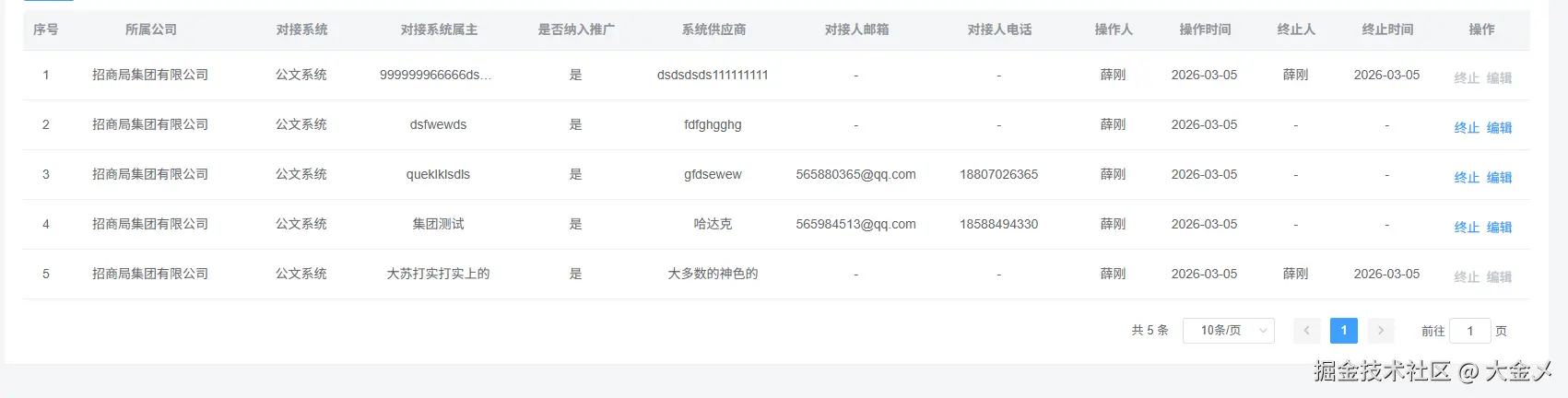
效果图
js
<template>
<!-- 数据表格 -->
<!-- 树形需要指定row-key -->
<section class="ces-table">
<el-table
:data="tableData"
:show-header="showHeader"
:size="size"
fit
:key="keyDom"
:header-cell-style="headClass"
:border="isBorder"
:max-height="tableHeight"
:row-key="rowKey"
:row-class-name="handleRowClassName"
:cell-style="handleCellStyle"
v-loading="loading"
highlight-current-row
ref="cesTable"
@select="checkboxSelect"
@select-all="selectAll"
@row-click="handleRowItem"
@selection-change="handleSelectionChange"
@expand-change="expandChange"
@sort-change="handleSortChange"
@cell-mouse-enter="enterSelectionRows"
@cell-mouse-leave="leaveSelectionRows"
>
<!-- 多选框 -->
<el-table-column
v-if="isSelection"
type="selection"
:reserve-selection="true"
align="center"
:selectable="columObj.selectable"
>
</el-table-column>
<el-table-column v-if="isSelectRadio" width="80">
<template #default="scope">
<el-radio
:label="scope.row.id"
v-model="selectRadioValaue"
@change="changeSelectRadioVal(scope.row)"
></el-radio>
</template>
</el-table-column>
<!-- 任意插槽 -->
<slot></slot>
<!-- 序号 -->
<el-table-column
v-if="isIndex"
type="index"
fixed="left"
:label="indexLabel"
align="center"
width="50"
>
<template #default="scope">
<span>{{ indexAdd(scope.$index) }}</span>
</template>
</el-table-column>
<!-- 数据栏 -->
<template v-for="(item, index) in tableCols">
<!-- 多级表头 -->
<template v-if="item.isMultiHeader && item.children.length > 0">
<el-table-column
:key="`${item.prop}-multi`"
:label="item.label"
:align="item.align || 'center'"
>
<el-table-column
v-for="(col, colIndex) in item.children"
:key="`col-${colIndex}`"
:prop="col.prop"
:sortable="col.sortable"
:label="col.label"
:min-width="col.width"
:align="col.align"
:render-header="col.require ? renderHeader : null"
:show-overflow-tooltip="
col.showOverflowTooltip !== undefined
? col.showOverflowTooltip
: true
"
:fixed="col.fixed !== undefined ? col.fixed : undefined"
>
<!-- 新增表头插槽 -->
<template #header v-if="col.slotHeader">
<slot :name="col.slotHeader"></slot>
</template>
<template #default="scope">
<slot
v-if="col.slot && col.istrue"
:name="col.slot"
:row="scope.row"
:index="scope.$index"
></slot>
<!-- a -->
<a
style="color: #0080ff"
v-if="col.type === 'Text'"
@click="handlerTypeText(scope.row)"
>{{ scope.row[col.prop] }}</a
>
<!-- html -->
<span
v-if="col.type === 'Html'"
v-html="col.html(scope.row)"
></span>
<!-- 按钮 -->
<div v-if="col.type === 'Button'" class="but_sty_flex">
<div v-for="(btn, index) in col.btnList" :key="index">
<template v-if="btn.type">
<el-button
:type="btn.type"
:size="btn.size || size"
:icon="btn.icon"
:class="btn.className"
@click="btn.handle?.(scope.row, scope.$index)"
>
<template v-if="btn.setValue">
<slot
:name="btn.setValue"
:row="scope.row"
></slot>
</template>
<p v-else style="padding: 0 5px">{{ btn.label }}</p>
</el-button>
</template>
<template v-else>
<div
@click="btn.handle?.(scope.row, scope.$index)"
class="btn_item"
>
<template v-if="btn.setValue">
<slot
:name="btn.setValue"
:row="scope.row"
></slot>
</template>
<template v-else>{{ btn.label }}</template>
</div>
</template>
</div>
</div>
<!-- 输入框 -->
<el-input
v-if="col.type === 'Input'"
v-model.trim="scope.row[col.prop]"
:size="size"
:placeholder="col.placeholder || '请填写'"
:maxlength="col.maxlength"
:disabled="col.disabled && scope.row.disabled"
@focus="col.focus && col.focus(scope.row, scope.$index)"
@blur="col.blur && col.blur(scope.row, scope.$index)"
></el-input>
<!-- 下拉框 -->
<el-select
v-if="col.type === 'Select'"
v-model="scope.row[col.prop]"
:size="size"
:clearable="col.clearable"
:multiple="col.multiple"
:disabled="
col.disabled && col.hasDisabled(scope.row, scope.$index)
"
:filterable="col.filterable"
:class="`id${scope.$index}`"
@change="
col.change && col.change(scope.row, scope.$index)
"
style="width: 100%"
>
<el-option
v-for="op in col.options"
:props="col.props"
:label="op[col.props.label]"
:value="op[col.props.value]"
:key="op[col.props.value]"
></el-option>
</el-select>
<!-- 分组下拉框 -->
<el-select
v-if="col.type === 'SelectGroup'"
v-model="scope.row[col.prop]"
:filterable="col.filterable"
:clearable="col.clearable"
:multiple="col.multiple"
:size="size"
collapse-tags
:class="`id${scope.$index}`"
@change="col.change && col.change(scope.row)"
style="width: 100%"
>
<el-option-group
v-for="op in col.options"
:key="op[col.props.value]"
:label="op[col.props.label]"
>
<el-option
v-for="val in op.children"
:key="val[col.props.value]"
:label="val[col.props.label]"
:value="val[col.props.value]"
>
</el-option>
</el-option-group>
</el-select>
<!-- 评价 -->
<el-rate
v-if="col.type === 'Rate'"
v-model="scope.row[col.prop]"
:disabled="col.isDisabled && col.isDisabled(scope.row)"
@change="col.change && col.change(scope.row)"
></el-rate>
<!-- 开关 -->
<el-switch
v-if="col.type === 'Switch'"
v-model="scope.row[col.prop]"
active-color="#17C3E6"
inactive-color="#ccc"
:disabled="col.isDisabled && col.isDisabled(scope.row)"
@change="col.change && col.change(scope.row)"
></el-switch>
<!-- 单张图片预览 -->
<span v-if="col.type === 'Image'">
<el-image
style="max-width: 30px; max-height: 30px"
:src="scope.row[col.prop]"
:preview-src-list="[scope.row[col.prop]]"
>
</el-image>
</span>
<!-- 多张图片预览 -->
<span>
<el-image
style="width: 23px; height: 25px"
v-if="col.type === 'ImageArr'"
:src="scope.row[col.prop]"
:preview-src-list="guidePic"
@click.stop="handlerImage(scope.row)"
></el-image>
</span>
<!-- 滑块 -->
<el-slider
v-if="col.type === 'Slider'"
v-model="scope.row[col.prop]"
:disabled="col.isDisabled && col.isDisabled(scope.row)"
@change="col.change && col.change(scope.row)"
></el-slider>
<!-- 默认 -->
<span
v-if="!col.type && !col.slot"
:style="col.itemStyle && col.itemStyle(scope.row)"
:class="col.itemClass && col.item.itemClass(scope.row)"
>{{
(col.formatter && col.formatter(scope.row)) ||
scope.row[col.prop] ||
"-"
}}</span
>
</template>
</el-table-column>
</el-table-column>
</template>
<!-- 一级表头 -->
<el-table-column
v-else
:key="index"
:prop="item.prop"
:sortable="item.sortable"
:label="item.label"
:min-width="item.width"
:align="item.align"
:render-header="item.require ? renderHeader : null"
:show-overflow-tooltip="
item.showOverflowTooltip !== undefined
? item.showOverflowTooltip
: true
"
:fixed="item.fixed !== undefined ? item.fixed : undefined"
>
<!-- 新增表头插槽 -->
<template #header v-if="item.slotHeader">
<slot :name="item.slotHeader"></slot>
</template>
<template #default="scope">
<slot
v-if="item.slot && item.istrue"
:name="item.slot"
:row="scope.row"
:index="scope.$index"
></slot>
<!-- a -->
<a
style="color: #0080ff"
v-if="item.type === 'Text'"
@click="handlerTypeText(scope.row)"
>{{ scope.row[item.prop] }}</a
>
<!-- html -->
<span
v-if="item.type === 'Html'"
v-html="item.html(scope.row)"
></span>
<!-- 按钮 -->
<div v-if="item.type === 'Button'" class="but_sty_flex">
<div v-for="(btn, index) in item.btnList" :key="index">
<template v-if="btn.type">
<el-button
:type="btn.type"
:size="btn.size || size"
:icon="btn.icon"
:class="btn.className"
@click="btn.handle?.(scope.row, scope.$index)"
>
<template v-if="btn.setValue">
<slot :name="btn.setValue" :row="scope.row"></slot>
</template>
<p v-else style="padding: 0 5px">{{ btn.label }}</p>
</el-button>
</template>
<template v-else>
<div
@click="btn.handle?.(scope.row, scope.$index)"
class="btn_item"
>
<template v-if="btn.setValue">
<slot :name="btn.setValue" :row="scope.row"></slot>
</template>
<template v-else>{{ btn.label }}</template>
</div>
</template>
</div>
</div>
<!-- 输入框 -->
<el-input
v-if="item.type === 'Input'"
v-model.trim="scope.row[item.prop]"
:size="size"
:placeholder="item.placeholder || '请填写'"
:maxlength="item.maxlength"
:disabled="item.disabled && scope.row.disabled"
@focus="item.focus && item.focus(scope.row, scope.$index)"
@blur="item.blur && item.blur(scope.row, scope.$index)"
></el-input>
<!-- 下拉框 -->
<el-select
v-if="item.type === 'Select'"
v-model="scope.row[item.prop]"
:size="size"
:clearable="item.clearable"
:multiple="item.multiple"
:disabled="
item.disabled && item.hasDisabled(scope.row, scope.$index)
"
:filterable="item.filterable"
:class="`id${scope.$index}`"
@change="item.change && item.change(scope.row, scope.$index)"
style="width: 100%"
>
<el-option
v-for="op in item.options"
:props="item.props"
:label="op[item.props.label]"
:value="op[item.props.value]"
:key="op[item.props.value]"
></el-option>
</el-select>
<!-- 分组下拉框 -->
<el-select
v-if="item.type === 'SelectGroup'"
v-model="scope.row[item.prop]"
:filterable="item.filterable"
:clearable="item.clearable"
:multiple="item.multiple"
:size="size"
collapse-tags
:class="`id${scope.$index}`"
@change="item.change && item.change(scope.row)"
style="width: 100%"
>
<el-option-group
v-for="op in item.options"
:key="op[item.props.value]"
:label="op[item.props.label]"
>
<el-option
v-for="val in op.children"
:key="val[item.props.value]"
:label="val[item.props.label]"
:value="val[item.props.value]"
>
</el-option>
</el-option-group>
</el-select>
<!-- 评价 -->
<el-rate
v-if="item.type === 'Rate'"
v-model="scope.row[item.prop]"
:disabled="btn.isDisabled && btn.isDisabled(scope.row)"
@change="item.change && item.change(scope.row)"
></el-rate>
<!-- 开关 -->
<el-switch
v-if="item.type === 'Switch'"
v-model="scope.row[item.prop]"
active-color="#17C3E6"
inactive-color="#ccc"
:disabled="btn.isDisabled && btn.isDisabled(scope.row)"
@change="item.change && item.change(scope.row)"
></el-switch>
<!-- 单张图片预览 -->
<span v-if="item.type === 'Image'">
<el-image
style="max-width: 30px; max-height: 30px"
:src="scope.row[item.prop]"
:preview-src-list="[scope.row[item.prop]]"
>
</el-image>
</span>
<!-- 多张图片预览 -->
<span>
<el-image
style="width: 23px; height: 25px"
v-if="item.type === 'ImageArr'"
:src="scope.row[item.prop]"
:preview-src-list="guidePic"
@click.stop="handlerImage(scope.row)"
></el-image>
</span>
<!-- 滑块 -->
<el-slider
v-if="item.type === 'Slider'"
v-model="scope.row[item.prop]"
:disabled="btn.isDisabled && btn.isDisabled(scope.row)"
@change="item.change && item.change(scope.row)"
></el-slider>
<!-- 默认 -->
<span
v-if="!item.type && !item.slot"
:style="item.itemStyle && item.itemStyle(scope.row)"
:class="item.itemClass && item.item.itemClass(scope.row)"
>{{
(item.formatter && item.formatter(scope.row)) ||
scope.row[item.prop] ||
"-"
}}</span
>
</template>
</el-table-column>
</template>
</el-table>
</section>
<section class="ces-pagination" v-if="isPagination">
<Pagination
:total="pagination.total"
:page="pagination.pageNum"
:limit="pagination.pageSize"
@pagination="handPagination"
/>
</section>
</section>
</template>
<script>
import Pagination from "../pagination";
export default {
components: {
Pagination,
},
data() {
return {
selectRadioValaue: "",
isShowTips: false,
};
},
props: {
// 表格型号:mini,medium,small
size: { type: String, default: "medium" },
//表格设置边框
isBorder: { type: Boolean, default: false },
//表格加载loading
loading: { type: Boolean, default: false },
// 表格操作
isHandle: { type: Boolean, default: false },
//表格新增按钮
tableHandles: { type: Array, default: () => [] },
// 表格数据
tableData: { type: Array, default: () => [] },
// 表格列配置
tableCols: { type: Array, default: () => [] },
// 是否显示表格复选框
isSelection: { type: Boolean, default: false },
// 是否显示表格单选框
isSelectRadio: { type: Boolean, default: false },
defaultSelections: { type: [Array, Object], default: () => null },
// 是否显示表格索引
isIndex: { type: Boolean, default: true },
//是否显示序号
indexLabel: { type: String, default: "序号" },
//是否显示复选框已勾选
isDisableCheckbox: { type: Boolean, default: true },
// 是否显示分页
isPagination: { type: Boolean, default: true },
// 分页数据
pagination: {
type: Object,
default: () => ({ pageNum: 1, pageSize: 10, total: 0 }),
},
guidePic: {
//图片接受的存储地址
type: Array,
default: () => [],
},
tableHeight: {
//表格高度
type: String,
default: "385",
},
rowKey: {
//树形需要指定row-key
type: String,
},
showHeader: {
//默认显示表头
type: Boolean,
default: true,
},
// 表格行key
keyDom: {
type: Number,
default: 0,
},
// 表头设置
columObj: {
type: Object,
},
// 是否选中复选框
isSelectCheckbox: {
type: Boolean,
default: false,
},
// 是否设置表格背景颜色
setBcColor: {
type: Boolean,
default: false,
},
},
methods: {
// 表格背景颜色设置
handleCellStyle({ row, column, rowIndex, columnIndex }) {
if (this.setBcColor) {
if (row.dataProblemType === "1") {
row.isShowTips = true;
return "background:rgb(255, 166, 0, 0.8)";
}
}
},
/**
* 表格单选处理函数
* 当选择多行时自动取消之前的选择,保持单选效果
* @param {Array} rows - 当前选中的行数组
* @param {Object} row - 最新选中的行对象
* @emits radioSelect - 触发单选选择事件,传递选中行信息
*/
checkboxSelect(rows, row) {
// 表格单选
this.$emit("radioSelect", rows, row);
},
selectAll(rows) {
// 全选
this.$emit("selectAll", rows);
},
// 表头带红星
renderHeader(h, { column }) {
return [
h("span", { style: "color: red" }, "*"),
h("span", " " + column.label),
];
},
headClass() {
//设置表头颜色
return "background:#F5F6F7";
},
handlerTypeText(row) {
//点击文本类型
this.$emit("clickTypeText", row);
},
handleSelectionChange(val) {
//多选的值
this.$emit("selectionChange", val);
},
handlerImage(row) {
//点击图片
this.$emit("imageEvent", row);
},
changeSelectRadioVal(row) {
//单选的值
this.$emit("SelectRadioVal", row);
},
handleRowItem(row) {
//点击表格某一行
this.$emit("eventTableRowItem", row);
},
handPagination(obj) {
//分页事件
this.$emit("eventPagination", obj);
},
expandChange(row, expandedRows) {
this.$emit("eventToggleRowExpansion", row, expandedRows);
},
handleSortChange({ column, prop, order }) {
this.$emit("handleSortChange", { column, prop, order });
},
// 选中行背景色
handleRowClassName({ row }) {
if (row.isHight === true) {
return "bgc_hight";
}
},
// 默认勾选复选框
toggleSelection(rows) {
if (!rows) return;
rows.forEach((row) => {
this.$nextTick(() => {
this.$refs.cesTable?.toggleRowSelection(row, true);
});
});
},
// 清空选中
clearSelection() {
this.$nextTick(() => {
this.$refs.cesTable?.clearSelection();
});
},
getHeadTop() {
this.$nextTick(() => {
this.$refs.cesTable?.doLayout();
});
},
// type序号 - 页面切换递增
indexAdd(index) {
const page = this.pagination.pageNum; // 当前页码
const pagesize = this.pagination.pageSize; // 每页条数
return index + 1 + (page - 1) * pagesize;
},
// 鼠标移入一行中
enterSelectionRows(row, column, cell, event) {
if (row.isShowTips && column.property) {
this.createTips(
event,
row,
"因模板更新导致该事项审批流程节点被删除,请及时更新"
);
}
},
// 鼠标移出一行中
leaveSelectionRows(row, column, cell, event) {
if (row.isShowTips) {
this.removeTips(row);
}
},
// 创建toolTip
createTips(el, row, value) {
const { matterId } = row;
const tooltipDom = document.createElement("div");
tooltipDom.style.cssText = `
display: inline-block;
max-width: 400px;
max-height: 400px;
position: absolute;
top: ${el.clientY + 5}px;
left: ${el.clientX}px;
padding:5px 10px;
overflow: auto;
font-size: 12px;
font-family: PingFangSC-Regular, PingFang SC;
font-weight: 400;
color: rgb(255, 166, 0, 0.8);
background: #000;
border-radius: 5px;
z-index: 19999;
box-shadow: 0 4px 12px 1px #ccc;
`;
tooltipDom.innerHTML = value;
tooltipDom.setAttribute("id", `tooltip-${matterId}`);
// 将浮层插入到body中
document.body.appendChild(tooltipDom);
},
// 删除tooltip
removeTips(row) {
const { matterId } = row;
const tooltipDomLeave = document.querySelectorAll(
`#tooltip-${matterId}`
);
if (tooltipDomLeave.length) {
tooltipDomLeave.forEach((dom) => {
document.body.removeChild(dom);
});
}
},
},
directives: {
// 自动获取光标
focus: {
inserted: function (el) {
el.querySelector("input").focus();
},
},
},
watch: {
tableData: {
handler(newV, oldV) {
if (this.isSelectCheckbox) {
// 默认选中
this.toggleSelection(newV);
}
},
deep: true,
},
},
mounted() {
this.getHeadTop(); //表格高度
},
};
</script>
<style lang="less" scoped>
.hiddenCheck {
display: none;
}
.ces-handle {
text-align: left;
margin-bottom: 10px;
}
.but_sty_flex {
display: flex;
justify-content: center;
align-items: center;
.btn_item {
cursor: pointer;
color: #1890ff;
}
}
.ces-table-require::before {
content: "*";
color: red;
}
.ces-pagination {
display: flex;
justify-content: flex-end;
align-items: center;
padding-bottom: 20px;
padding-right: 20px;
}
// 高亮选中行背景色
:v-deep(.el-table tr) {
&.bgc_hight {
background-color: #1d528f !important;
}
}
.ces-table {
::-webkit-scrollbar {
width: 10px;
height: 10px;
}
/*外层轨道。可以用display:none让其不显示,也可以添加背景图片,颜色改变显示效果*/
::-webkit-scrollbar-track {
width: 6px;
// background-color: #fff;
-webkit-border-radius: 2em;
-moz-border-radius: 2em;
border-radius: 2em;
}
/*滚动条的设置*/
::-webkit-scrollbar-thumb {
background-clip: padding-box;
min-height: 28px;
-webkit-border-radius: 2em;
-moz-border-radius: 2em;
border-radius: 2em;
}
/deep/ .el-table__fixed::before {
background-color: transparent !important;
}
/deep/ .el-table__fixed-right::before,
.el-table__fixed::before {
background-color: transparent !important;
}
/deep/ .el-table__fixed {
height: auto !important;
bottom: 10px !important;
}
/deep/ .el-table__fixed-right {
height: auto !important;
bottom: 10px !important;
}
}
</style>2.创建一个pagination分页文件,里面建一个index.vue,存放分页组件
js
<template>
  <div :class="{ hidden: hidden }" class="pagination-container clearfix">
    <el-pagination class="fr" :background="background" :small="small"
      :current-page.sync="currentPage" :page-size.sync="pageSize" :layout="layout"
      :page-sizes="pageSizes" :total="total" v-bind="$attrs" @size-change="handleSizeChange"
      @current-change="handleCurrentChange" />
  </div>
</template>

<script>
import { scrollTo } from "@/utils/scroll-to";
export default {
  name: "Pagination",
  props: {
    total: {
      required: true,
      type: Number,
    },
    page: {
      type: Number,
      default: 1,
    },
    limit: {
      type: Number,
      default: 20,
    },
    pageSizes: {
      type: Array,
      default () {
        return [10, 20, 50, 100];
      },
    },
    layout: {
      type: String,
      default: "total, sizes, prev, pager, next, jumper",
    },
    background: {
      type: Boolean,
      default: true,
    },
    autoScroll: {
      type: Boolean,
      default: true,
    },
    hidden: {
      type: Boolean,
      default: false,
    },
    small: {
      type: Boolean,
      default: false,
    },
  },
  computed: {
    currentPage: {
      get () {
        return this.page;
      },
      set (val) {
        this.$emit("update:page", val);
      },
    },
    pageSize: {
      get () {
        return this.limit;
      },
      set (val) {
        this.$emit("update:limit", val);
      },
    },
  },
  methods: {
    handleSizeChange (val) {
      this.$emit("pagination", { page: this.currentPage, limit: val });
      if (this.autoScroll) {
        scrollTo(0, 800);
      }
    },
    handleCurrentChange (val) {
      this.$emit("pagination", { page: val, limit: this.pageSize });
      if (this.autoScroll) {
        scrollTo(0, 800);
      }
    },
  },
};
</script>

<style lang="less" scoped>
.pagination-container {
  /* padding: 25px 0; */
  display: flex;
  justify-content: flex-end;
  align-items: center;
  :v-deep(.el-input__inner) {
    background-color: #0e2b55;
    border: 1px solid #409eff;
    color: #fff;
  }
  :v-deep(.btn-prev) {
    background-color: transparent;
    color: #409eff;
  }
  :v-deep(.btn-next) {
    background-color: transparent;
    color: #409eff;
  }
  :v-deep(.el-pager li) {
    background-color: transparent;
    color: #fff;
  }
  :v-deep(.el-pagination.is-background .el-pager li:not(.disabled).active) {
    // width: 28px !important;
    height: 28px !important;
    background: #409eff;
    text-align: center;
    line-height: 28px;
    border-radius: 50%;
  }
}
.pagination-container.hidden {
  display: none;
}
:v-deep(.el-pagination__jump) {
  color: #fff;
}
</style>
3.在utils文件夹中建立一个scroll-to.js文件
js
Math.easeInOutQuad = function(t, b, c, d) {
  t /= d / 2
  if (t < 1) {
    return c / 2 * t * t + b
  }
  t--
  return -c / 2 * (t * (t - 2) - 1) + b
}

// requestAnimationFrame for Smart Animating http://goo.gl/sx5sts
var requestAnimFrame = (function() {
  return window.requestAnimationFrame || window.webkitRequestAnimationFrame || window.mozRequestAnimationFrame || function(callback) { window.setTimeout(callback, 1000 / 60) }
})()

/**
 * Because it's so fucking difficult to detect the scrolling element, just move them all
 * @param {number} amount
 */
function move(amount) {
  document.documentElement.scrollTop = amount
  document.body.parentNode.scrollTop = amount
  document.body.scrollTop = amount
}

function position() {
  return document.documentElement.scrollTop || document.body.parentNode.scrollTop || document.body.scrollTop
}

/**
 * @param {number} to
 * @param {number} duration
 * @param {Function} callback
 */
export function scrollTo(to, duration, callback) {
  const start = position()
  const change = to - start
  const increment = 20
  let currentTime = 0
  duration = (typeof (duration) === 'undefined') ? 500 : duration
  var animateScroll = function() {
    // increment the time
    currentTime += increment
    // find the value with the quadratic in-out easing function
    var val = Math.easeInOutQuad(currentTime, start, change, duration)
    // move the document.body
    move(val)
    // do the animation unless its over
    if (currentTime < duration) {
      requestAnimFrame(animateScroll)
    } else {
      if (callback && typeof (callback) === 'function') {
        // the animation is done so lets callback
        callback()
      }
    }
  }
  animateScroll()
}
4.页面使用组件的方法(可以使用插槽)
js
      <CompreTable
        tableHeight="614"
        :loading="loadingObj.tableLoading"
        :tableData="tableData"
        :tableCols="tableCols"
        :pagination="pagerParams"
        @eventPagination="eventPagination"
      >
        <template #isHasTerm="{ row }">
          <div class="flex_a_c">
            <el-button
              type="text"
              class="pl_5"
              @click="handlerTerm(row)"
              :disabled="row.setStatus === 'STOP'"
            >
              终止
            </el-button>
          </div>
        </template>
        <template #isHasEdit="{ row }">
          <div class="flex_a_c">
            <el-button
              type="text"
              class="pl_5"
              @click="hanlderEdit(row)"
              :disabled="row.setStatus === 'STOP'"
            >
              编辑
            </el-button>
          </div>
        </template>
      </CompreTable>
5.表格组件中使用到的js
js
  export default {
    data() {
      return {
        loadingObj: {
          tableLoading: false,
        },
        pagerParams: {
          pageNum: 1,
          pageSize: 10,
          total: 0,
        },
        tableData: [],
        tableCols: [
          {
            label: "所属公司",
            prop: "companyName",
            align: "center",
            width: 140,
          },
          {
            label: "对接系统",
            prop: "businessSystemName",
            align: "center",
            width: 120,
          },
          {
            label: "对接系统属主",
            prop: "businessSystemOwner",
            align: "center",
            width: 120,
          },
          {
            label: "是否纳入推广",
            prop: "isPromotionDesc",
            align: "center",
            width: 120,
          },
          {
            label: "系统供应商",
            prop: "systemSupplier",
            align: "center",
            width: 120,
          },
          {
            label: "对接人邮箱",
            prop: "contactPersonEmail",
            align: "center",
            width: 130,
          },
          {
            label: "对接人电话",
            prop: "contactPersonPhone",
            align: "center",
            width: 120,
          },
          {
            label: "操作人",
            prop: "operationUserName",
            align: "center",
            width: 80,
          },
          {
            label: "操作时间",
            prop: "operationTime",
            align: "center",
            width: 80,
            formatter: (row) => {
              return row.operationTime
                ? moment(row.operationTime).format("YYYY-MM-DD")
                : "-";
            },
          },
          {
            label: "终止人",
            prop: "terminateUserName",
            align: "center",
            width: 80,
          },
          {
            label: "终止时间",
            prop: "terminateTime",
            align: "center",
            width: 80,
            formatter: (row) => {
              return row.terminateTime
                ? moment(row.terminateTime).format("YYYY-MM-DD")
                : "-";
            },
          },
          {
            label: "操作",
            type: "Button",
            align: "center",
            width: 85,
            btnList: [
              {
                setValue: "isHasTerm",
              },
              {
                setValue: "isHasEdit",
              },
            ],
          },
        ],
      };
    },
    methods: {

      /**
       * 处理事件分页
       * @param {Object} params - 分页参数对象
       * @param {number} params.page - 当前页码
       * @param {number} params.limit - 每页显示条数
       */
      eventPagination({ page, limit }) {
        this.pagerParams.pageNum = page;
        this.pagerParams.pageSize = limit;
        this.getList();
      },
      async getList() {
        this.loadingObj.tableLoading = true;
        const data = {
          ...this.searchData,
          ...this.pagerParams,
          setType: this.setType,
        };
        if (this.setType == "2") {
          delete data.companyIdList;
          delete data.systemSupplier;
        }
        const res = await this.$QueryService.fetch({
          url: "/api/al/publicPromotionSet/pageList",
          methods: "post",
          data: JSON.stringify(data),
          headers: {
            "Content-Type": "application/json",
          },
        });
        if (res.code === "1") {
          if (res?.result?.list && res?.result?.list.length > 0) {
            const data = res?.result?.list;
            this.tableData = data;
            this.pagerParams.total = res.result.total;
          } else {
            this.tableData = [];
            this.pagerParams.total = 0;
          }
        } else {
          this.$message.error(res.message);
        }
        this.loadingObj.tableLoading = false;
      },

      handlerTerm(row) {

      },

      hanlderEdit(row) {

      },
    },
  };
6.多级表格只显示内容的示例,不可编辑
js
tableCols:[
    {
        label: "工作信息",
        align: "center",
        isMultiHeader:true,
        children: [
            {
                prop: "字段名",
                label: "部门",
                width: "120",
                align: "center",
            },
            {
                prop: "字段名",
                label: "职位",
                width: "120",
                align: "center",
            },
            {
                prop: "字段名",
                label: "薪资",
                width: "100",
                align: "center"
            },
        ],
    },
]
7.多级表格支持input,select,switch等,可编辑操作示例
js
tableCols:[
    {
        label: "工作信息",
        align: "center",
        isMultiHeader:true,
        children: [
            {
                prop: "字段名",
                label: "部门",
                width: "120",
                align: "center",
                type:"Input"
            },
            {
                prop: "字段名",
                label: "职位",
                width: "120",
                align: "center",
                type:"Select",
                props:{
                  label:"label",
                  value:"value"
                },
                options: [
                  {
                    label: "前端开发",
                    value: "1",
                  },
                  {
                    label: "后端开发",
                    value: "2",
                  },
                ]
            },
            {
                prop: "字段名",
                label: "薪资",
                width: "100",
                align: "center",
                type:"Switch",
            },
        ],
    },
]