目录
一.背景
由于需要定制Launcher UI,其中应用列表数量和设备匹配度是一个不好把握的度,有时候这个设备应用列表匹配上了,另一个设备可能就匹配错误了,所以今天我们讲一下如何将当前设置的应用列表的行数、列数精确匹配到当前设备上,并且做到不影响或者说尽可能小的影响其他设备应用列表显示
二.分析
首先应用列表匹配文件在launcher中的device_profiles.xml中,这里默认有匹配各种屏幕的应用列表参数,首先我们分析下默认的device_profiles.xml里面的内容,如下是添加注释的删减版本
XML
<?xml version="1.0" encoding="utf-8"?>
<!--
    Profiles 根节点:包含多种网格配置方案。
    每一种 grid-option 代表一种用户可选或系统预设的布局(如 4x4, 5x5)。
-->
<profiles xmlns:launcher="http://schemas.android.com/apk/res-auto" >

    <!--
        grid-option: 定义一个逻辑网格方案
        name: 内部识别名称
        numRows/numColumns: 桌面主屏幕的行数和列数
        numFolderRows/numFolderColumns: 文件夹内部的行数和列数
        numHotseatIcons: 底部快捷栏(Hotseat)的图标数量
        dbFile: 该网格关联的数据库文件名(不同网格存不同的位置,防止切换时图标乱掉)
        defaultLayoutId: 首次开机时默认加载的桌面图标布局(定义在 res/xml/ 下)
        deviceCategory: 设备类别,用于初筛(phone-手机, tablet-平板, multi_display-折叠屏/多屏)
    -->
    <grid-option
        launcher:name="4_by_4"
        launcher:numRows="4"
        launcher:numColumns="4"
        launcher:numFolderRows="3"
        launcher:numFolderColumns="4"
        launcher:numHotseatIcons="4"
        launcher:numExtendedHotseatIcons="6"
        launcher:dbFile="launcher_4_by_4.db"
        launcher:inlineNavButtonsEndSpacing="@dimen/taskbar_button_margin_split"
        launcher:defaultLayoutId="@xml/default_workspace_4x4"
        launcher:deviceCategory="phone|multi_display" >

        <!--
            display-option: 针对具体屏幕参数的微调方案
            name: 方案描述(如 Nexus 4, Stubby 等)
            minWidthDps / minHeightDps: 匹配触发的最小宽度/高度(单位 dp)。这是匹配的核心!
            iconImageSize: 桌面图标图片的尺寸 (dp)
            iconTextSize: 图标下方文字的大小 (sp)
            allAppsBorderSpace: "所有应用"列表中的图标间距
            allAppsCellHeight: "所有应用"列表中每个格子的高度
            canBeDefault: 是否可以作为该设备的默认匹配项
        -->
        <display-option
            launcher:name="Nexus 4"
            launcher:minWidthDps="359"
            launcher:minHeightDps="567"
            launcher:iconImageSize="54"
            launcher:iconTextSize="13.0"
            launcher:allAppsBorderSpace="16"
            launcher:allAppsCellHeight="104"
            launcher:canBeDefault="true" />

        <!-- 更多 display-option... 系统会选择最接近当前屏幕尺寸的一个 -->
    </grid-option>

    <!--
        tablet 专属配置方案(6x5 网格)
        isScalable: 是否开启缩放支持(通常平板需要动态调整)
        devicePaddingId: 引用特定的间距配置(定义在 paddings.xml 中)
    -->
    <grid-option
        launcher:name="6_by_5"
        launcher:numRows="5"
        launcher:numColumns="6"
        launcher:deviceCategory="tablet" >

        <display-option
            launcher:name="Tablet"
            launcher:minWidthDps="900"
            launcher:minHeightDps="820"
            launcher:iconImageSize="60"
            <!-- 针对平板特有的间距微调 -->
            launcher:borderSpaceHorizontal="16"
            launcher:borderSpaceVertical="64"
            launcher:horizontalMargin="54"
            launcher:hotseatBarBottomSpace="76"
            launcher:canBeDefault="true" />
    </grid-option>

</profiles>
Launcher3 在启动时,会通过 InvariantDeviceProfile.java 类来解析这个 XML。匹配过程遵循 "由大到小,最接近匹配" 的原则:
-
-
设备类别过滤 (
deviceCategory):- 系统首先获取当前设备的类型(Phone, Tablet 或 Two-panel 折叠屏)。
- 只有符合
deviceCategory的grid-option会被列入候选名单。
-
屏幕尺寸匹配 (
minWidthDps/minHeightDps):- 系统测量当前屏幕的实际可用 DP 值(考虑旋转后的短边和长边)。
- 核心逻辑 :系统会遍历该
grid-option下所有的display-option,寻找minWidthDps和minHeightDps都小于或等于当前实际屏幕尺寸的项。 - 如果有多个符合条件的项,系统会选择 最接近(最适配) 实际尺寸的那一个。
-
然后比如我们当前设备如何匹配上的,需要看下屏幕尺寸,注意这里的尺寸是dp位单位的,所以我们要得到设备的分辨率以及屏幕密度进行计算,这两个参数用adb都能获取到
分辨率:adb shell wm size
屏幕密度:adb shell wm density
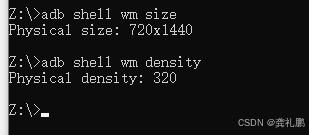
计算dp值方式
3. 计算 dp 值
密度比例 factor = dpi / 160
屏幕宽度 dp = 宽度像素 / factor
示例计算:factor = 440 / 160 = 2.75
屏幕宽度 dp = 1080 / 2.75 ≈ 392 dp
屏幕高度 dp = 2340 / 2.75 ≈ 850 dp
所以我们当前设备的dp值是:360x720
所以匹配的就是minWidthDps小于360并且minHeightDps小于720,如果多个符合条件则找最接近的那个,如下是我添加的适配当前设备的option
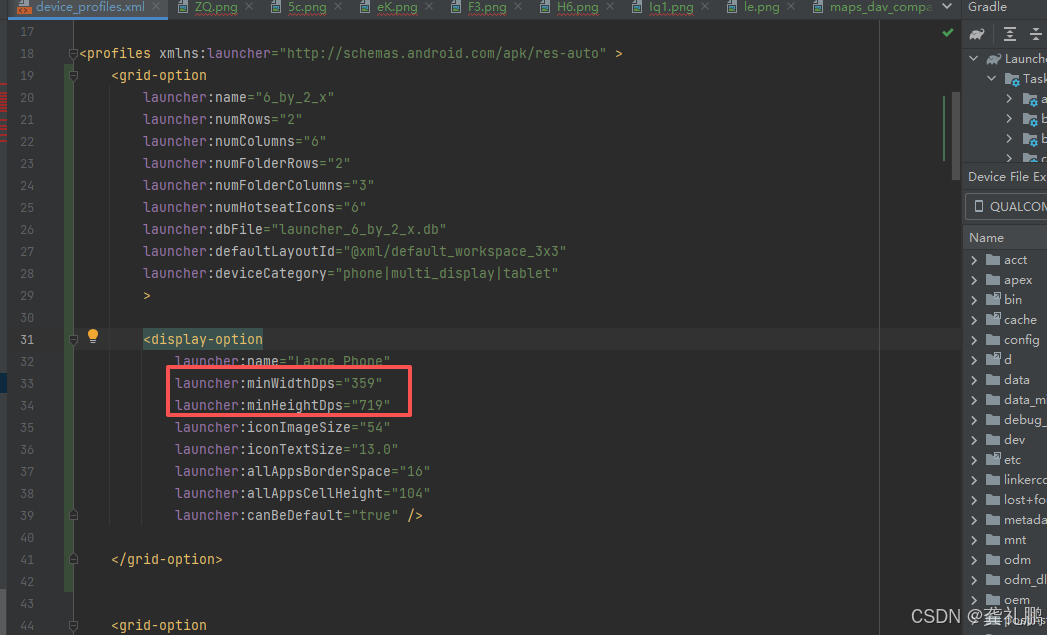
可以看出来这样就可以精确匹配到当前设备了,当然除了宽高还有别的属性可以进行匹配吗?当然是有的,inlineQsb这个属性也可以进行区分,看一下这个属性需要设置哪些值
XML
    <!-- 默认全部关闭 -->
    <attr name="inlineQsb" format="integer">
        <!-- 仅在竖屏启用(值=1) -->
        <flag name="portrait" value="1" />
        <!-- 仅在横屏启用(值=2) -->
        <flag name="landscape" value="2" />
        <!-- 仅在双面板竖屏启用(值=4) -->
        <flag name="twoPanelPortrait" value="4" />
        <!-- 仅在双面板横屏启用(值=8) -->
        <flag name="twoPanelLandscape" value="8" />
    </attr>
所以我们要匹配竖屏的直接设置2,横屏的设置1,这样可以更加精确些,还有许多其他属性,但是我没有使用,不知道是否有用,具体代码如下:
XML
<declare-styleable name="GridDisplayOption">
    <!-- 网格配置的名称,用于标识不同的配置方案 -->
    <attr name="name" format="string" />

    <!-- 基本网格布局参数 -->
    <attr name="numRows" format="integer" />         <!-- 网格行数 -->
    <attr name="numColumns" format="integer" />      <!-- 网格列数 -->
    <!-- 搜索容器列数,默认等于 numColumns -->
    <attr name="numSearchContainerColumns" format="integer" />

    <!-- 单元格样式参考,默认使用 CellStyleDefault -->
    <attr name="cellStyle" format="reference" />

    <!-- 文件夹网格参数,默认使用主网格参数 -->
    <attr name="numFolderRows" format="integer" />    <!-- 文件夹行数 -->
    <attr name="numFolderColumns" format="integer" /> <!-- 文件夹列数 -->
    <attr name="folderStyle" format="reference" />    <!-- 文件夹样式参考 -->

    <!-- 所有应用(应用抽屉)样式,默认使用 AllAppsStyleDefault -->
    <attr name="allAppsStyle" format="reference" />

    <!-- 所有应用(应用抽屉)网格参数 -->
    <attr name="numAllAppsColumns" format="integer" />          <!-- 所有应用列数 -->
    <!-- 扩展所有应用的列数,默认 2 * numAllAppsColumns -->
    <attr name="numExtendedAllAppsColumns" format="integer" />

    <!-- 底部热座(Dock栏)参数 -->
    <attr name="numHotseatIcons" format="integer" />           <!-- 热座图标数量 -->
    <!-- 扩展热座图标数量,默认 2 * numHotseatIcons -->
    <attr name="numExtendedHotseatIcons" format="integer" />

    <!-- 热座在不同布局中的列跨度配置 -->
    <!-- 默认全部等于 numColumns -->
    <attr name="hotseatColumnSpan" format="integer" />               <!-- 普通模式 -->
    <attr name="hotseatColumnSpanLandscape" format="integer" />      <!-- 横屏模式 -->
    <attr name="hotseatColumnSpanTwoPanelLandscape" format="integer" /><!-- 双面板横屏 -->
    <attr name="hotseatColumnSpanTwoPanelPortrait" format="integer" /> <!-- 双面板竖屏 -->

    <!-- 大屏三键导航按钮的结束间距 -->
    <!-- 默认 @dimen/taskbar_button_margin_default -->
    <attr name="inlineNavButtonsEndSpacing" format="reference" />

    <!-- 数据库和布局相关 -->
    <attr name="dbFile" format="string" />           <!-- 数据库文件名 -->
    <attr name="defaultLayoutId" format="reference" /> <!-- 默认布局ID -->
    <attr name="demoModeLayoutId" format="reference" /> <!-- 演示模式布局ID -->
    <attr name="isScalable" format="boolean" />       <!-- 是否支持缩放 -->
    <attr name="devicePaddingId" format="reference" /> <!-- 设备内边距ID -->

    <!-- 设备类别标志位,用于指定此配置适用的设备类型 -->
    <!-- 默认所有类别都启用(phone|tablet|multi_display) -->
    <attr name="deviceCategory" format="integer">
        <!-- 手机设备(值=1) -->
        <flag name="phone" value="1" />
        <!-- 平板设备(值=2) -->
        <flag name="tablet" value="2" />
        <!-- 多显示设备(值=4) -->
        <flag name="multi_display" value="4" />
    </attr>

    <!-- 内联搜索框(Quick Search Box)启用标志位 -->
    <!-- 默认全部关闭 -->
    <attr name="inlineQsb" format="integer">
        <!-- 仅在竖屏启用(值=1) -->
        <flag name="portrait" value="1" />
        <!-- 仅在横屏启用(值=2) -->
        <flag name="landscape" value="2" />
        <!-- 仅在双面板竖屏启用(值=4) -->
        <flag name="twoPanelPortrait" value="4" />
        <!-- 仅在双面板横屏启用(值=8) -->
        <flag name="twoPanelLandscape" value="8" />
    </attr>
</declare-styleable>
XML
<declare-styleable name="ProfileDisplayOption">
    <!-- 基础匹配属性 -->
    <attr name="name" /> <!-- 该布局方案的显示名称(如:Large Phone) -->
    <attr name="minWidthDps" format="float" /> <!-- 触发该方案所需的设备最小宽度 (dp) -->
    <attr name="minHeightDps" format="float" /> <!-- 触发该方案所需的设备最小高度 (dp) -->

    <!-- 桌面网格格子大小 (仅在 GridDisplayOption 的 isScalable 为 true 时生效) -->
    <attr name="minCellHeight" format="float" /> <!-- 竖屏下单元格的最小高度 -->
    <attr name="minCellWidth" format="float" /> <!-- 竖屏下单元格的最小宽度 -->
    <attr name="minCellHeightLandscape" format="float" /> <!-- 横屏下单元格高度,未指定则取 minCellHeight -->
    <attr name="minCellWidthLandscape" format="float" /> <!-- 横屏下单元格宽度,未指定则取 minCellWidth -->

    <!-- 双面板/折叠屏下的网格大小 -->
    <attr name="minCellHeightTwoPanelPortrait" format="float" /> <!-- 双面板竖屏高度 -->
    <attr name="minCellWidthTwoPanelPortrait" format="float" /> <!-- 双面板竖屏宽度 -->
    <attr name="minCellHeightTwoPanelLandscape" format="float" /> <!-- 双面板横屏高度 -->
    <attr name="minCellWidthTwoPanelLandscape" format="float" /> <!-- 双面板横屏宽度 -->

    <!-- 单元格之间的间距 (Border Space) -->
    <!-- 仅在 isScalable 为 true 时使用 -->
    <attr name="borderSpace" format="float" /> <!-- 统一的行列间距 -->
    <attr name="borderSpaceHorizontal" format="float" /> <!-- 横向间距(格子右侧),默认取 borderSpace -->
    <attr name="borderSpaceVertical" format="float" /> <!-- 纵向间距(格子下方),默认取 borderSpace -->

    <!-- 横屏下的间距配置 -->
    <attr name="borderSpaceLandscape" format="float" /> <!-- 横屏统一间距,默认取 borderSpace -->
    <attr name="borderSpaceLandscapeHorizontal" format="float" /> <!-- 横屏横向间距 -->
    <attr name="borderSpaceLandscapeVertical" format="float" /> <!-- 横屏纵向间距 -->

    <!-- 双面板/折叠屏下的间距配置 -->
    <attr name="borderSpaceTwoPanelPortrait" format="float" /> <!-- 双屏竖屏统一间距 -->
    <attr name="borderSpaceTwoPanelPortraitHorizontal" format="float" /> <!-- 双屏竖屏横向 -->
    <attr name="borderSpaceTwoPanelPortraitVertical" format="float" /> <!-- 双屏竖屏纵向 -->
    <attr name="borderSpaceTwoPanelLandscape" format="float" /> <!-- 双屏横屏统一间距 -->
    <attr name="borderSpaceTwoPanelLandscapeHorizontal" format="float" /> <!-- 双屏横屏横向 -->
    <attr name="borderSpaceTwoPanelLandscapeVertical" format="float" /> <!-- 双屏横屏纵向 -->

    <!-- "所有应用"列表(抽屉)的单元格配置 -->
    <!-- 如果 isScalable 为 true,默认取 minCellHeight;如果为 false,则必须定义 -->
    <attr name="allAppsCellHeight" format="float" />
    <attr name="allAppsCellWidth" format="float" /> <!-- 默认取 minCellWidth -->
    <attr name="allAppsCellHeightLandscape" format="float" /> <!-- 抽屉横屏格子高 -->
    <attr name="allAppsCellWidthLandscape" format="float" /> <!-- 抽屉横屏格子宽 -->
    <attr name="allAppsCellHeightTwoPanelPortrait" format="float" /> <!-- 双屏竖屏抽屉格子高 -->
    <attr name="allAppsCellWidthTwoPanelPortrait" format="float" />
    <attr name="allAppsCellHeightTwoPanelLandscape" format="float" /> <!-- 双屏横屏抽屉格子高 -->
    <attr name="allAppsCellWidthTwoPanelLandscape" format="float" />

    <!-- 抽屉内的图标及文字大小 -->
    <attr name="allAppsIconSize" format="float" /> <!-- 默认取 iconImageSize -->
    <attr name="allAppsIconSizeLandscape" format="float" />
    <attr name="allAppsIconSizeTwoPanelPortrait" format="float" />
    <attr name="allAppsIconSizeTwoPanelLandscape" format="float" />
    <attr name="allAppsIconTextSize" format="float" /> <!-- 默认取 iconTextSize -->
    <attr name="allAppsIconTextSizeTwoPanelPortrait" format="float" />
    <attr name="allAppsIconTextSizeTwoPanelLandscape" format="float" />

    <!-- 抽屉内的间距配置(逻辑同上,可独立控制抽屉内的图标疏密程度) -->
    <attr name="allAppsBorderSpace" format="float" /> <!-- 默认取 borderSpace -->
    <attr name="allAppsBorderSpaceHorizontal" format="float" />
    <attr name="allAppsBorderSpaceVertical" format="float" />
    <attr name="allAppsBorderSpaceLandscape" format="float" />
    <attr name="allAppsBorderSpaceLandscapeHorizontal" format="float" />
    <attr name="allAppsBorderSpaceLandscapeVertical" format="float" />
    <attr name="allAppsBorderSpaceTwoPanelPortrait" format="float" />
    <attr name="allAppsBorderSpaceTwoPanelPortraitHorizontal" format="float" />
    <attr name="allAppsBorderSpaceTwoPanelPortraitVertical" format="float" />
    <attr name="allAppsBorderSpaceTwoPanelLandscape" format="float" />
    <attr name="allAppsBorderSpaceTwoPanelLandscapeHorizontal" format="float" />
    <attr name="allAppsBorderSpaceTwoPanelLandscapeVertical" format="float" />

    <!-- 热搜栏(Hotseat/Dock栏)及 搜索框(QSB)空间配置 -->
    <attr name="hotseatBarBottomSpace" format="float" /> <!-- Dock栏距离屏幕底部的间距 -->
    <attr name="hotseatBarBottomSpaceLandscape" format="float" />
    <attr name="hotseatBarBottomSpaceTwoPanelLandscape" format="float" />
    <attr name="hotseatBarBottomSpaceTwoPanelPortrait" format="float" />

    <attr name="hotseatQsbSpace" format="float" /> <!-- Hotseat与搜索框之间的间距 -->
    <attr name="hotseatQsbSpaceLandscape" format="float" />
    <attr name="hotseatQsbSpaceTwoPanelLandscape" format="float" />
    <attr name="hotseatQsbSpaceTwoPanelPortrait" format="float" />

    <!-- Android 13 任务栏(Taskbar)配置 -->
    <attr name="transientTaskbarIconSize" format="float" /> <!-- 悬浮任务栏图标大小 -->
    <attr name="transientTaskbarIconSizeLandscape" format="float" />
    <attr name="transientTaskbarIconSizeTwoPanelLandscape" format="float" />
    <attr name="transientTaskbarIconSizeTwoPanelPortrait" format="float" />

    <!-- 桌面主屏幕图标及文字大小 -->
    <attr name="iconImageSize" format="float" /> <!-- 竖屏图标大小 -->
    <attr name="iconSizeLandscape" format="float" /> <!-- 横屏图标大小,默认取 iconImageSize -->
    <attr name="iconSizeTwoPanelPortrait" format="float" /> <!-- 双屏竖屏图标大小 -->
    <attr name="iconSizeTwoPanelLandscape" format="float" /> <!-- 双屏横屏图标大小 -->

    <attr name="iconTextSize" format="float" /> <!-- 竖屏文字大小 -->
    <attr name="iconTextSizeLandscape" format="float" />
    <attr name="iconTextSizeTwoPanelPortrait" format="float" />
    <attr name="iconTextSizeTwoPanelLandscape" format="float" />

    <!-- 任务栏对齐属性(主要用于大屏/平板的三键导航模式) -->
    <attr name="startAlignTaskbar" format="boolean" /> <!-- 任务栏是否靠左对齐,默认 false(居中) -->
    <attr name="startAlignTaskbarLandscape" format="boolean" />
    <attr name="startAlignTaskbarTwoPanelLandscape" format="boolean" />
    <attr name="startAlignTaskbarTwoPanelPortrait" format="boolean" />

    <!-- 默认配置项标记 -->
    <attr name="canBeDefault" format="boolean" /> <!-- 如果设置,该选项将被用作确定默认网格的基准 -->

    <!-- 工作区(Workspace)页边距 -->
    <attr name="horizontalMargin" format="float"/> <!-- 工作区左右两边的留白间距 (仅 isScalable 为 true 时使用) -->
    <attr name="horizontalMarginLandscape" format="float"/>
    <attr name="horizontalMarginTwoPanelLandscape" format="float"/>
    <attr name="horizontalMarginTwoPanelPortrait" format="float"/>

</declare-styleable>