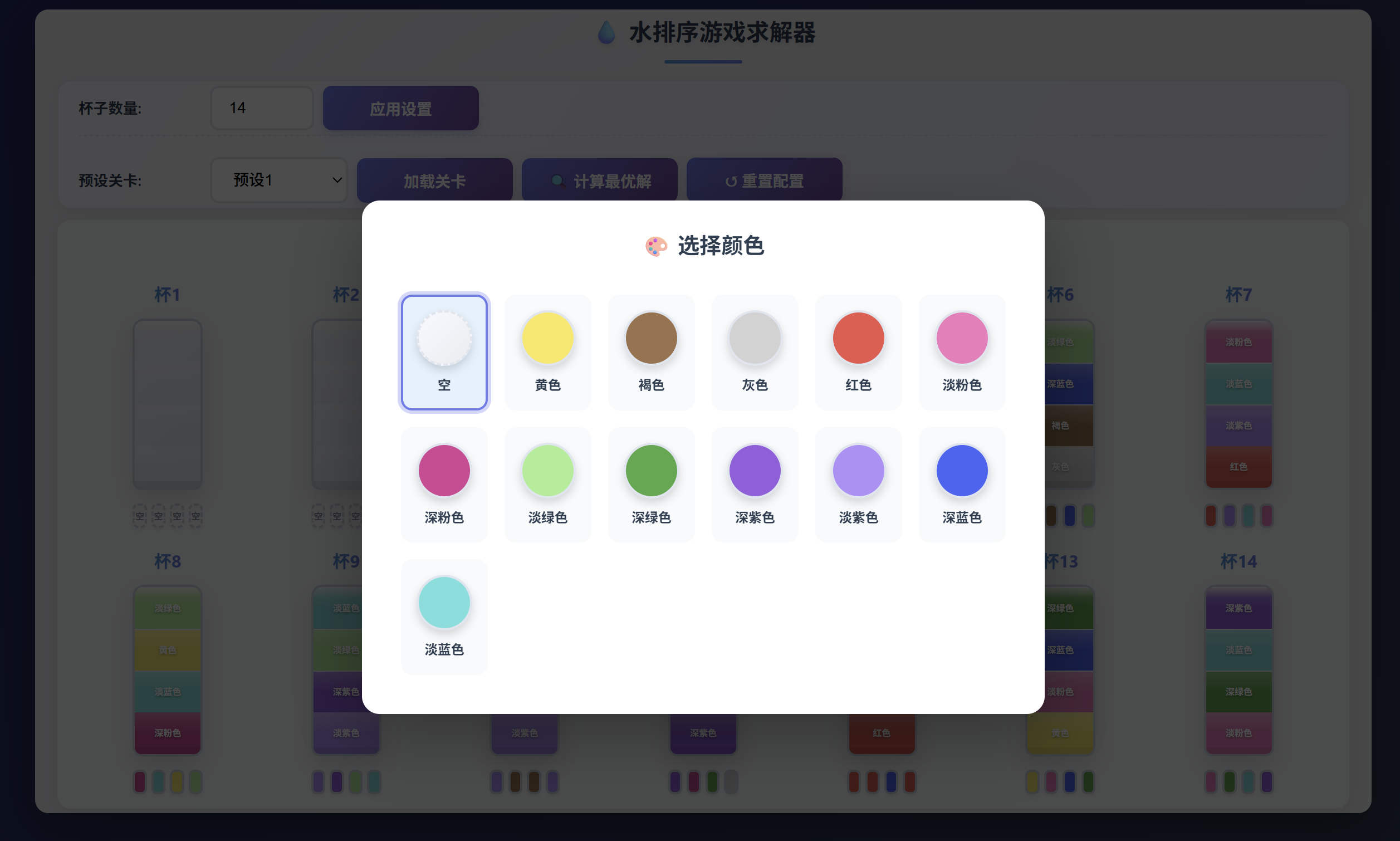
第二版在第一版的基础上,将颜色选择功能移至点击杯子底部的方块,调整页面更为紧凑。
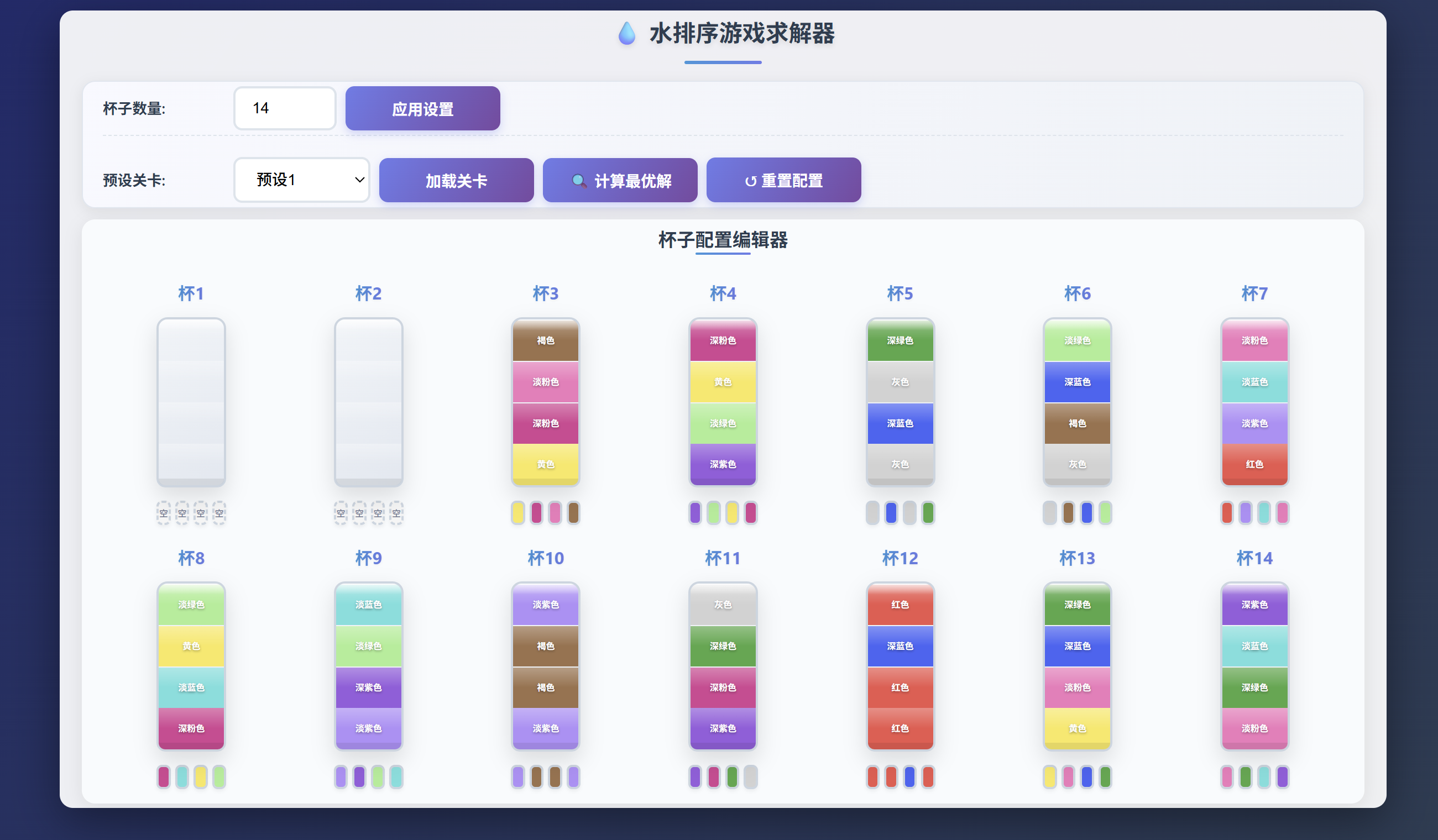
颜色选择界面:
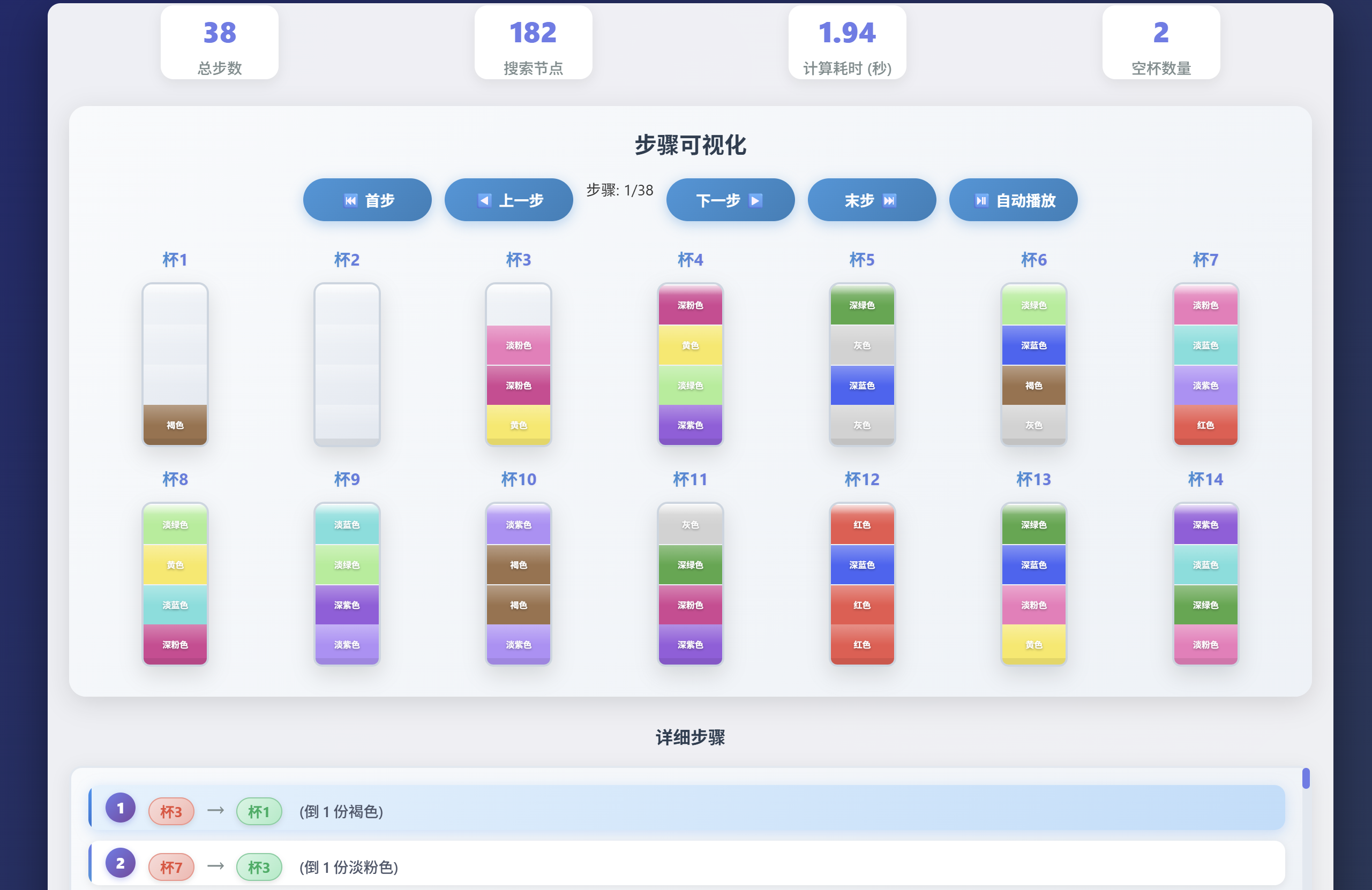
求解步骤:
最后贴上源码:
html
<!DOCTYPE html>
<html lang="zh-CN">
<head>
<meta charset="UTF-8">
<meta name="viewport" content="width=device-width, initial-scale=1.0">
<title>水排序游戏求解器</title>
<style>
* {
margin: 0;
padding: 0;
box-sizing: border-box;
}
body {
font-family: 'Segoe UI', Tahoma, Geneva, Verdana, sans-serif;
background: linear-gradient(135deg, #1a2a6c 0%, #2c3e50 100%);
color: #333;
line-height: 1.5;
padding: 15px;
min-height: 100vh;
font-size: 14px;
}
.container {
max-width: 1200px;
margin: 0 auto;
background: rgba(255, 255, 255, 0.92);
border-radius: 12px;
box-shadow: 0 12px 40px rgba(0, 0, 0, 0.4);
padding: 4px 20px;
position: relative;
overflow: hidden;
}
.container::before {
content: "";
position: absolute;
top: -50%;
left: -50%;
width: 200%;
height: 200%;
background: radial-gradient(circle, rgba(102, 126, 234, 0.15) 0%, rgba(255, 255, 255, 0) 70%);
z-index: -1;
}
h1 {
text-align: center;
color: #2c3e50;
margin-bottom: 8px;
font-size: 1.5em;
text-shadow: 0 2px 4px rgba(0, 0, 0, 0.1);
position: relative;
}
h1::after {
content: "";
display: block;
width: 70px;
height: 3px;
background: linear-gradient(90deg, #3498db, #667eea);
margin: 10px auto 15px;
border-radius: 2px;
}
.controls {
background: linear-gradient(120deg, #f8f9ff, #eef2f7);
padding: 0 18px;
border-radius: 12px;
margin-bottom: 10px;
border: 1px solid #e0e6ef;
box-shadow: 0 3px 12px rgba(0, 0, 0, 0.08);
}
.control-group {
margin-bottom: 15px;
display: flex;
align-items: center;
flex-wrap: wrap;
gap: 8px;
padding: 4px 0;
border-bottom: 1px dashed #dce4ec;
}
.control-group:last-child {
border-bottom: none;
margin-bottom: 0;
}
.control-group label {
font-weight: 600;
min-width: 110px;
color: #2c3e50;
font-size: 0.95em;
}
.control-group input,
.control-group select,
.control-group button {
padding: 10px 15px;
border: 2px solid #dce4ec;
border-radius: 8px;
font-size: 14px;
transition: all 0.3s ease;
background: white;
font-weight: 500;
}
.control-group input:focus,
.control-group select:focus,
.control-group button:focus {
outline: none;
border-color: #667eea;
box-shadow: 0 0 0 2px rgba(102, 126, 234, 0.25);
}
.control-group button {
background: linear-gradient(120deg, #667eea, #764ba2);
color: white;
border: none;
cursor: pointer;
font-weight: bold;
min-width: 140px;
box-shadow: 0 3px 8px rgba(102, 126, 234, 0.3);
position: relative;
overflow: hidden;
}
.control-group button::after {
content: "";
position: absolute;
top: -50%;
left: -50%;
width: 200%;
height: 200%;
background: linear-gradient(120deg, rgba(255, 255, 255, 0.2), rgba(255, 255, 255, 0));
transform: rotate(30deg);
transition: all 0.6s;
opacity: 0;
}
.control-group button:hover::after {
opacity: 1;
left: 100%;
}
.control-group button:hover {
box-shadow: 0 5px 12px rgba(102, 126, 234, 0.4);
}
.control-group button:disabled {
background: linear-gradient(120deg, #bdc3c7, #95a5a6);
cursor: not-allowed;
transform: none;
box-shadow: 0 2px 4px rgba(0, 0, 0, 0.1);
}
.control-group button:disabled:hover::after {
opacity: 0;
}
.color-picker {
display: flex;
flex-wrap: wrap;
gap: 10px;
margin-top: 12px;
padding: 12px;
background: white;
border-radius: 10px;
border: 1px solid #eaeff5;
box-shadow: 0 2px 6px rgba(0, 0, 0, 0.05);
}
.color-option {
display: flex;
align-items: center;
gap: 8px;
cursor: pointer;
padding: 4px 12px;
border-radius: 8px;
transition: all 0.25s ease;
background: #f8fafc;
border: 2px solid transparent;
}
.color-option:hover {
background: #edf2f7;
}
.color-option input[type="radio"]:checked+.color-box {
box-shadow: 0 0 0 2px #667eea, 0 0 0 4px rgba(102, 126, 234, 0.3);
}
.color-option input[type="radio"] {
margin: 0;
width: 16px;
height: 16px;
}
.color-box {
width: 28px;
height: 28px;
border-radius: 50%;
border: 2px solid #e0e6ef;
transition: all 0.3s ease;
flex-shrink: 0;
box-shadow: 0 2px 4px rgba(0, 0, 0, 0.1);
}
.color-box.empty {
border-style: dashed;
background: #f8fafc;
}
.cup-editor {
background: #f9fbfd;
border-radius: 12px;
padding: 5px 20px;
box-shadow: 0 4px 16px rgba(0, 0, 0, 0.08);
}
.cup-editor h2 {
color: #2c3e50;
margin-bottom: 5px;
text-align: center;
font-size: 1.2em;
position: relative;
padding-bottom: 2px;
}
.cup-editor h2::after {
content: "";
position: absolute;
bottom: 0;
left: 50%;
transform: translateX(-50%);
width: 50px;
height: 2px;
background: linear-gradient(90deg, #3498db, #667eea);
border-radius: 2px;
}
.cup-grid {
display: grid;
grid-template-columns: repeat(7, 1fr);
gap: 18px;
margin-top: 15px;
padding: 8px;
}
.cup-container {
display: flex;
flex-direction: column;
align-items: center;
transition: transform 0.3s ease;
}
.cup-label {
font-weight: 700;
margin-bottom: 10px;
color: #2c3e50;
font-size: 1.1em;
background: linear-gradient(90deg, #3498db, #667eea);
-webkit-background-clip: text;
background-clip: text;
color: transparent;
text-shadow: 0 1px 2px rgba(0, 0, 0, 0.05);
}
.cup {
width: 63px;
height: 154px;
background: linear-gradient(145deg, #f0f4f8, #e2e8f0);
border: 2px solid #cbd5e0;
border-radius: 10px 10px 8px 8px;
position: relative;
overflow: hidden;
box-shadow: 0 8px 20px rgba(0, 0, 0, 0.12);
transition: all 0.4s ease;
}
.cup::before {
content: "";
position: absolute;
top: 0;
left: 0;
right: 0;
height: 10px;
background: linear-gradient(0deg, rgba(255, 255, 255, 0) 0%, rgba(255, 255, 255, 0.8) 100%);
border-radius: 8px 8px 0 0;
z-index: 10;
}
.cup::after {
content: "";
position: absolute;
bottom: 0;
left: 0;
right: 0;
height: 6px;
background: rgba(0, 0, 0, 0.08);
border-radius: 0 0 6px 6px;
}
.water-layer {
width: 100%;
height: 25%;
position: absolute;
bottom: 0;
transition: all 0.4s cubic-bezier(0.175, 0.885, 0.32, 1.275);
display: flex;
align-items: center;
justify-content: center;
font-size: 8px;
color: white;
text-shadow: 0 1px 2px rgba(0, 0, 0, 0.4);
font-weight: 600;
padding: 0 3px;
box-sizing: border-box;
background-clip: padding-box;
border-top: 1px solid rgba(255, 255, 255, 0.2);
}
.water-layer:first-child {
border-top: none;
}
.water-layer.empty {
background: transparent;
border-top: none;
}
.water-layer::after {
content: "";
position: absolute;
top: 0;
left: 0;
right: 0;
height: 50%;
background: linear-gradient(180deg, rgba(255, 255, 255, 0.3) 0%, rgba(255, 255, 255, 0) 100%);
}
.water-selector {
margin-top: 12px;
display: grid;
grid-template-columns: repeat(4, 1fr);
gap: 4px;
width: 63px;
}
.water-selector button {
width: 100%;
height: 22px;
border: 2px solid #cbd5e0;
border-radius: 5px;
cursor: pointer;
transition: all 0.25s ease;
padding: 0;
font-weight: 500;
font-size: 8px;
color: #4a5568;
background: white;
box-shadow: 0 2px 3px rgba(0, 0, 0, 0.05);
}
.water-selector button:hover {
border-color: #667eea;
z-index: 2;
box-shadow: 0 3px 6px rgba(102, 126, 234, 0.3);
}
.water-selector button.selected {
border-color: #f39c12;
box-shadow: 0 0 0 3px rgba(243, 156, 18, 0.4), 0 3px 6px rgba(243, 156, 18, 0.3);
background: linear-gradient(135deg, #fef9e7, #fdebd0);
color: #b7950b;
font-weight: 700;
}
.water-selector button.empty {
background: #f8fafc;
border-style: dashed;
color: #718096;
}
.color-modal {
display: none;
position: fixed;
top: 0;
left: 0;
width: 100%;
height: 100%;
background: rgba(0, 0, 0, 0.7);
z-index: 1000;
justify-content: center;
align-items: center;
}
.color-modal.active {
display: flex;
animation: modalFadeIn 0.3s ease-out;
}
@keyframes modalFadeIn {
from {
opacity: 0;
transform: scale(0.9);
}
to {
opacity: 1;
transform: scale(1);
}
}
.color-modal-content {
background: white;
border-radius: 16px;
padding: 25px;
box-shadow: 0 20px 60px rgba(0, 0, 0, 0.3);
max-width: 90%;
max-height: 90%;
overflow-y: auto;
}
.color-modal h3 {
text-align: center;
color: #2c3e50;
margin-bottom: 20px;
font-size: 1.4em;
}
.modal-color-grid {
display: grid;
grid-template-columns: repeat(6, 1fr);
/* 每排6个颜色 */
gap: 15px;
padding: 10px;
}
.modal-color-option {
display: flex;
flex-direction: column;
align-items: center;
gap: 8px;
cursor: pointer;
padding: 12px;
border-radius: 10px;
transition: all 0.25s ease;
background: #f8fafc;
border: 2px solid transparent;
}
.modal-color-option:hover {
background: #edf2f7;
transform: translateY(-2px);
box-shadow: 0 4px 12px rgba(0, 0, 0, 0.1);
}
.modal-color-option.selected {
border-color: #667eea;
box-shadow: 0 0 0 3px rgba(102, 126, 234, 0.3);
background: #e3f2fd;
}
.modal-color-box {
width: 50px;
height: 50px;
border-radius: 50%;
border: 2px solid #e0e6ef;
transition: all 0.3s ease;
box-shadow: 0 4px 8px rgba(0, 0, 0, 0.15);
}
.modal-color-box.empty {
border-style: dashed;
background: linear-gradient(135deg, #f8f9ff, #e9ecef);
}
.modal-color-name {
font-size: 0.85em;
color: #2c3e50;
font-weight: 600;
text-align: center;
}
.solution-section {
margin-top: 25px;
display: none;
animation: fadeIn 0.6s ease-out;
}
@keyframes fadeIn {
from {
opacity: 0;
}
to {
opacity: 1;
}
}
.solution-section h2 {
color: #2c3e50;
margin-bottom: 5px;
text-align: center;
font-size: 1.2em;
position: relative;
padding-bottom: 10px;
}
.solution-section h2::after {
content: "";
position: absolute;
bottom: 0;
left: 50%;
transform: translateX(-50%);
width: 60px;
height: 3px;
background: linear-gradient(90deg, #27ae60, #2ecc71);
border-radius: 2px;
}
.solution-steps {
max-height: 200px;
overflow-y: auto;
border: 2px solid #e2e8f0;
border-radius: 12px;
padding: 16px;
background: linear-gradient(145deg, #f8fafc, #edf2f7);
box-shadow: 0 4px 16px rgba(0, 0, 0, 0.08);
margin-top: 12px;
}
.solution-steps::-webkit-scrollbar {
width: 7px;
}
.solution-steps::-webkit-scrollbar-track {
background: #e2e8f0;
border-radius: 8px;
}
.solution-steps::-webkit-scrollbar-thumb {
background: #667eea;
border-radius: 8px;
}
.step {
padding: 4px 16px;
margin-bottom: 10px;
background: white;
border-radius: 10px;
display: flex;
justify-content: space-between;
align-items: center;
box-shadow: 0 2px 8px rgba(0, 0, 0, 0.08);
transition: all 0.25s ease;
cursor: pointer;
position: relative;
overflow: hidden;
}
.step:hover {
box-shadow: 0 3px 10px rgba(0, 0, 0, 0.12);
background: #f8fafc;
}
.step::before {
content: "";
position: absolute;
top: 0;
left: 0;
width: 3px;
height: 100%;
background: linear-gradient(0deg, #3498db, #667eea);
}
.step.active {
background: linear-gradient(135deg, #e3f2fd, #bbdefb);
border-left-color: #2196f3;
box-shadow: 0 3px 12px rgba(33, 150, 243, 0.25);
}
.step.active::before {
background: linear-gradient(0deg, #1976d2, #2196f3);
}
.step-number {
font-weight: 800;
color: #2c3e50;
min-width: 28px;
height: 28px;
border-radius: 50%;
background: linear-gradient(135deg, #667eea, #764ba2);
color: white;
display: flex;
align-items: center;
justify-content: center;
font-size: 1em;
box-shadow: 0 2px 6px rgba(102, 126, 234, 0.4);
}
.step-action {
flex-grow: 1;
font-size: 1em;
margin: 0 12px;
font-weight: 500;
color: #2c3e50;
}
.step-arrow {
color: #7f8c8d;
font-size: 1.6em;
margin: 0 6px;
font-weight: 300;
}
.step-cup {
font-weight: 700;
padding: 3px 10px;
border-radius: 18px;
font-size: 0.95em;
box-shadow: 0 2px 5px rgba(0, 0, 0, 0.1);
}
.cup-from {
color: #e74c3c;
background: linear-gradient(135deg, #fadbd8, #f5b7b1);
border: 1px solid #f1948a;
}
.cup-to {
color: #27ae60;
background: linear-gradient(135deg, #d5f5e3, #abebc6);
border: 1px solid #7dcea0;
}
.visualization {
margin-top: 25px;
text-align: center;
background: linear-gradient(145deg, #f8fafc, #edf2f7);
border-radius: 16px;
padding: 20px;
box-shadow: 0 6px 24px rgba(0, 0, 0, 0.12);
margin-bottom: 20px;
}
.visualization h3 {
color: #2c3e50;
margin-bottom: 15px;
font-size: 1.5em;
}
.visualization-controls {
margin: 16px 0;
display: flex;
justify-content: center;
gap: 12px;
flex-wrap: wrap;
}
.visualization-controls button {
padding: 10px 20px;
background: linear-gradient(135deg, #3498db, #2980b9);
color: white;
border: none;
border-radius: 40px;
cursor: pointer;
font-weight: 600;
font-size: 1em;
box-shadow: 0 3px 12px rgba(52, 152, 219, 0.4);
transition: all 0.3s ease;
min-width: 120px;
position: relative;
overflow: hidden;
}
.visualization-controls button::after {
content: "";
position: absolute;
top: -50%;
left: -50%;
width: 200%;
height: 200%;
background: linear-gradient(120deg, rgba(255, 255, 255, 0.2), rgba(255, 255, 255, 0));
transform: rotate(30deg);
transition: all 0.6s;
opacity: 0;
}
.visualization-controls button:hover::after {
opacity: 1;
left: 100%;
}
.visualization-controls button:hover {
box-shadow: 0 5px 16px rgba(52, 152, 219, 0.55);
}
.visualization-controls button:active {
box-shadow: 0 2px 6px rgba(52, 152, 219, 0.4);
}
.visualization-controls button:disabled {
background: linear-gradient(135deg, #bdc3c7, #95a5a6);
cursor: not-allowed;
transform: none;
box-shadow: 0 2px 4px rgba(0, 0, 0, 0.1);
}
.visualization-controls button:disabled:hover::after {
opacity: 0;
}
.visualization-controls button.stop {
background: linear-gradient(135deg, #e74c3c, #c0392b);
box-shadow: 0 3px 12px rgba(231, 76, 60, 0.4);
}
.visualization-controls button.stop:hover {
box-shadow: 0 5px 16px rgba(231, 76, 60, 0.55);
}
#autoPlayBtn.playing {
background: linear-gradient(135deg, #e74c3c, #c0392b);
animation: pulse 1.5s infinite;
}
@keyframes pulse {
0% {
box-shadow: 0 0 0 0 rgba(231, 76, 60, 0.4);
}
70% {
box-shadow: 0 0 0 10px rgba(231, 76, 60, 0);
}
100% {
box-shadow: 0 0 0 0 rgba(231, 76, 60, 0);
}
}
.status-message {
padding: 15px 20px;
margin: 20px 0;
border-radius: 12px;
text-align: center;
font-weight: 600;
font-size: 1em;
display: none;
box-shadow: 0 4px 16px rgba(0, 0, 0, 0.15);
position: fixed;
top: 0;
right: 0;
overflow: hidden;
z-index: 10;
}
.status-message::before {
content: "";
position: absolute;
top: 0;
left: 0;
width: 100%;
height: 3px;
z-index: -1;
}
.status-success {
background: linear-gradient(135deg, #d4edda, #c3e6cb);
color: #155724;
border: 1px solid #c3e6cb;
}
.status-success::before {
background: linear-gradient(90deg, #28a745, #20c997);
}
.status-error {
background: linear-gradient(135deg, #f8d7da, #f5c6cb);
color: #721c24;
border: 1px solid #f5c6cb;
}
.status-error::before {
background: linear-gradient(90deg, #dc3545, #e83e8c);
}
.status-info {
background: linear-gradient(135deg, #d1ecf1, #bee5eb);
color: #0c5460;
border: 1px solid #bee5eb;
}
.status-info::before {
background: linear-gradient(90deg, #17a2b8, #1abc9c);
}
.status-warning {
background: linear-gradient(135deg, #fff3cd, #ffeaa7);
color: #856404;
border: 1px solid #ffeaa7;
}
.status-warning::before {
background: linear-gradient(90deg, #ffc107, #fd7e14);
}
.loading {
display: inline-block;
width: 24px;
height: 24px;
border: 3px solid rgba(102, 126, 234, 0.3);
border-radius: 50%;
border-top-color: #667eea;
animation: spin 0.8s linear infinite;
margin-right: 12px;
vertical-align: middle;
}
@keyframes spin {
to {
transform: rotate(360deg);
}
}
.progress-container {
width: 100%;
background: #e9ecef;
border-radius: 8px;
margin: 12px 0;
overflow: hidden;
box-shadow: 0 2px 4px rgba(0, 0, 0, 0.1);
}
.progress-bar {
height: 10px;
background: linear-gradient(90deg, #667eea, #764ba2);
border-radius: 8px;
width: 0%;
transition: width 0.4s ease;
position: relative;
}
.progress-bar::after {
content: "";
position: absolute;
top: 0;
left: 0;
right: 0;
bottom: 0;
background: linear-gradient(90deg, rgba(255, 255, 255, 0.2) 0%, rgba(255, 255, 255, 0.8) 50%, rgba(255, 255, 255, 0.2) 100%);
animation: shine 2s infinite;
}
@keyframes shine {
0% {
transform: translateX(-100%);
}
100% {
transform: translateX(100%);
}
}
.progress-text {
text-align: center;
font-weight: 600;
color: #2c3e50;
margin-top: 6px;
font-size: 1em;
}
.stats-container {
display: flex;
justify-content: space-around;
margin-top: 16px;
flex-wrap: wrap;
gap: 12px;
}
.stat-box {
background: white;
border-radius: 12px;
padding: 0;
text-align: center;
box-shadow: 0 4px 12px rgba(0, 0, 0, 0.08);
min-width: 110px;
transition: all 0.3s ease;
}
.stat-box:hover {
box-shadow: 0 6px 20px rgba(0, 0, 0, 0.15);
}
.stat-value {
font-size: 1.9em;
font-weight: 800;
color: #667eea;
margin: 4px 0;
}
.stat-label {
color: #7f8c8d;
font-weight: 500;
}
@media (max-width: 768px) {
.container {
padding: 12px;
margin: 8px;
}
.cup-grid {
grid-template-columns: repeat(auto-fill, minmax(110px, 1fr));
gap: 12px;
}
.cup {
width: 55px;
height: 135px;
}
.water-selector {
width: 55px;
}
.control-group {
flex-direction: column;
align-items: flex-start;
}
.control-group label {
min-width: auto;
margin-bottom: 6px;
}
h1 {
font-size: 1.5em;
}
.visualization-controls button {
min-width: 100px;
padding: 8px 12px;
font-size: 0.9em;
}
.stats-container {
flex-direction: column;
align-items: center;
}
}
@media (max-width: 480px) {
.cup-grid {
grid-template-columns: repeat(auto-fill, minmax(95px, 1fr));
}
.cup {
width: 48px;
height: 120px;
}
.water-selector {
width: 48px;
gap: 2px;
}
.water-selector button {
height: 18px;
font-size: 7px;
}
.cup-label {
font-size: 0.95em;
}
.control-group input,
.control-group select,
.control-group button {
width: 100%;
max-width: 280px;
}
}
</style>
</head>
<body>
<div class="container">
<h1>💧 水排序游戏求解器</h1>
<div class="controls">
<div class="control-group">
<label for="numCups">杯子数量:</label>
<input type="number" id="numCups" min="2" max="20" value="14">
<button id="applyCups">应用设置</button>
</div>
<!-- <div class="control-group">
<label>选择颜色:</label>
<div class="color-picker" id="colorPicker">
</div>
</div> -->
<div class="control-group">
<label>预设关卡:</label>
<select id="presetSelector">
<option value="">自定义配置</option>
<option value="level1">预设1</option>
</select>
<button id="loadPreset">加载关卡</button>
<button id="solveBtn" disabled>🔍 计算最优解</button>
<button id="resetBtn">↺ 重置配置</button>
</div>
</div>
<div class="cup-editor">
<h2>杯子配置编辑器</h2>
<div class="cup-grid" id="cupGrid">
<!-- 杯子将通过JS动态生成 -->
</div>
</div>
<!-- 颜色选择弹窗 -->
<div class="color-modal" id="colorModal">
<div class="color-modal-content">
<h3>🎨 选择颜色</h3>
<div class="modal-color-grid" id="modalColorGrid">
<!-- 颜色选项将通过JS动态生成 -->
</div>
</div>
</div>
<div class="status-message" id="statusMessage"></div>
<div class="progress-container" id="progressContainer" style="display: none;">
<div class="progress-bar" id="progressBar"></div>
<div class="progress-text" id="progressText">准备开始计算...</div>
</div>
<div class="solution-section" id="solutionSection">
<h2>解决方案</h2>
<div class="stats-container">
<div class="stat-box">
<div class="stat-value" id="totalSteps">0</div>
<div class="stat-label">总步数</div>
</div>
<div class="stat-box">
<div class="stat-value" id="nodesSearched">0</div>
<div class="stat-label">搜索节点</div>
</div>
<div class="stat-box">
<div class="stat-value" id="solveTime">0.0</div>
<div class="stat-label">计算耗时 (秒)</div>
</div>
<div class="stat-box">
<div class="stat-value" id="emptyCups">2</div>
<div class="stat-label">空杯数量</div>
</div>
</div>
<div class="visualization">
<h3>步骤可视化</h3>
<div class="visualization-controls">
<button id="prevStepBtn" disabled>⏮️ 首步</button>
<button id="prevStepBtnSingle" disabled>◀️ 上一步</button>
<span id="currentStep">步骤: 0/0</span>
<button id="nextStepBtnSingle" disabled>下一步 ▶️</button>
<button id="nextStepBtn" disabled>末步 ⏭️</button>
<button id="autoPlayBtn" disabled>⏯️ 自动播放</button>
</div>
<div class="cup-grid" id="visualizationGrid">
<!-- 可视化杯子将通过JS动态生成 -->
</div>
</div>
<h3 style="margin: 25px 0 15px; color: #2c3e50; text-align: center;">详细步骤</h3>
<div class="solution-steps" id="solutionSteps">
<!-- 解决方案步骤将通过JS动态生成 -->
</div>
</div>
</div>
<script>
// 颜色定义 - 优化了颜色选择,确保对比度和可访问性
const COLORS = [
{ name: '空', value: 'empty', color: '#f5f5f5', displayName: '空' },
{ name: '黄色', value: 'yellow', color: '#fce65d', displayName: '黄色' },
{ name: '褐色', value: 'brown', color: '#9d714c', displayName: '褐色' },
{ name: '灰色', value: 'gray', color: '#d2d2d2', displayName: '灰色' },
{ name: '红色', value: 'red', color: '#eb564f', displayName: '红色' },
{ name: '淡粉色', value: 'light_pink', color: '#ee7bbc', displayName: '淡粉色' },
{ name: '深粉色', value: 'dark_pink', color: '#d24594', displayName: '深粉色' },
{ name: '淡绿色', value: 'light_green', color: '#aeed94', displayName: '淡绿色' },
{ name: '深绿色', value: 'dark_green', color: '#57a748', displayName: '深绿色' },
{ name: '深紫色', value: 'dark_purple', color: '#925fde', displayName: '深紫色' },
{ name: '淡紫色', value: 'light_purple', color: '#ac91f8', displayName: '淡紫色' },
{ name: '深蓝色', value: 'dark_blue', color: '#3568f5', displayName: '深蓝色' },
{ name: '淡蓝色', value: 'light_blue', color: '#73e0dd', displayName: '淡蓝色' },
];
// 预设关卡 - 修复了level1的数据并添加了新关卡
const PRESETS = {
level1: {
numCups: 14,
cups: [
['empty', 'empty', 'empty', 'empty'],
['empty', 'empty', 'empty', 'empty'],
['yellow', 'dark_pink', 'light_pink', 'brown'],
['dark_purple', 'light_green', 'yellow', 'dark_pink'],
['gray', 'dark_blue', 'gray', 'dark_green'],
['gray', 'brown', 'dark_blue', 'light_green'],
['red', 'light_purple', 'light_blue', 'light_pink'],
['dark_pink', 'light_blue', 'yellow', 'light_green'],
['light_purple', 'dark_purple', 'light_green', 'light_blue'],
['light_purple', 'brown', 'brown', 'light_purple'],
['dark_purple', 'dark_pink', 'dark_green', 'gray'],
['red', 'red', 'dark_blue', 'red'],
['yellow', 'light_pink', 'dark_blue', 'dark_green'],
['light_pink', 'dark_green', 'light_blue', 'dark_purple']
]
}
};
// 全局变量
let numCups = 14;
let cups = [];
let solution = null;
let currentStepIndex = 0;
let autoPlayInterval = null;
let isSolving = false;
let solveStartTime = 0;
// 颜色选择弹窗相关变量
let pendingSelection = null; // 存储待填充的位置 {cupIndex, layerIndex}
let selectedModalColor = 'empty'; // 弹窗中选中的颜色
// DOM元素
const numCupsInput = document.getElementById('numCups');
const applyCupsBtn = document.getElementById('applyCups');
const cupGrid = document.getElementById('cupGrid');
const solveBtn = document.getElementById('solveBtn');
const resetBtn = document.getElementById('resetBtn');
const presetSelector = document.getElementById('presetSelector');
const loadPresetBtn = document.getElementById('loadPreset');
const solutionSection = document.getElementById('solutionSection');
const solutionSteps = document.getElementById('solutionSteps');
const statusMessage = document.getElementById('statusMessage');
const prevStepBtn = document.getElementById('prevStepBtn');
const prevStepBtnSingle = document.getElementById('prevStepBtnSingle');
const nextStepBtnSingle = document.getElementById('nextStepBtnSingle');
const nextStepBtn = document.getElementById('nextStepBtn');
const autoPlayBtn = document.getElementById('autoPlayBtn');
const currentStepDisplay = document.getElementById('currentStep');
const visualizationGrid = document.getElementById('visualizationGrid');
const progressContainer = document.getElementById('progressContainer');
const progressBar = document.getElementById('progressBar');
const progressText = document.getElementById('progressText');
const totalStepsEl = document.getElementById('totalSteps');
const nodesSearchedEl = document.getElementById('nodesSearched');
const solveTimeEl = document.getElementById('solveTime');
const emptyCupsEl = document.getElementById('emptyCups');
// 颜色弹窗 DOM 元素
const colorModal = document.getElementById('colorModal');
const modalColorGrid = document.getElementById('modalColorGrid');
// 初始化
function init () {
// 生成弹窗颜色选择器
generateModalColorPicker();
// 应用初始杯子数量
applyCupCount();
// 加载事件监听器
setupEventListeners();
// 点击弹窗外部关闭
colorModal.addEventListener('click', (e) => {
if (e.target === colorModal) {
closeColorModal();
}
});
// 按ESC键关闭弹窗
document.addEventListener('keydown', (e) => {
if (e.key === 'Escape') {
closeColorModal();
}
});
// 弹窗中按Enter键确认选择
document.addEventListener('keydown', (e) => {
if (colorModal.classList.contains('active') && e.key === 'Enter') {
applyColorSelection();
}
});
// 加载默认预设
loadPresetLevel('level1');
// 更新空杯数量显示
updateEmptyCupsDisplay();
}
// 生成弹窗颜色选择器
function generateModalColorPicker () {
modalColorGrid.innerHTML = '';
COLORS.forEach(color => {
const div = document.createElement('div');
div.className = 'modal-color-option';
if (color.value === 'empty') {
div.classList.add('selected');
}
const isSpecial = color.value === 'empty' ? 'empty' : '';
div.innerHTML = `
<div class="modal-color-box ${isSpecial}" style="background-color: ${color.color};"></div>
<div class="modal-color-name">${color.displayName}</div>
`;
div.dataset.color = color.value;
div.addEventListener('click', () => {
// 更新选中状态
modalColorGrid.querySelectorAll('.modal-color-option').forEach(opt => {
opt.classList.remove('selected');
});
div.classList.add('selected');
selectedModalColor = color.value;
// 立即应用选择并关闭弹窗
applyColorSelection();
});
modalColorGrid.appendChild(div);
});
}
// 打开颜色选择弹窗
function openColorModal (cupIndex, layerIndex) {
pendingSelection = { cupIndex, layerIndex };
selectedModalColor = 'empty'; // 默认选中空
// 重置选中状态
modalColorGrid.querySelectorAll('.modal-color-option').forEach(opt => {
opt.classList.toggle('selected', opt.dataset.color === 'empty');
});
colorModal.classList.add('active');
}
// 关闭颜色选择弹窗
function closeColorModal () {
colorModal.classList.remove('active');
pendingSelection = null;
selectedModalColor = null;
}
// 应用颜色选择
function applyColorSelection () {
if (!pendingSelection) return;
const { cupIndex, layerIndex } = pendingSelection;
cups[cupIndex][layerIndex] = selectedModalColor;
renderCups();
updateSolveButton();
updateEmptyCupsDisplay();
closeColorModal();
}
// 应用杯子数量
function applyCupCount () {
numCups = parseInt(numCupsInput.value);
if (numCups < 2) numCups = 2;
if (numCups > 20) numCups = 20;
numCupsInput.value = numCups;
// 初始化杯子
cups = [];
for (let i = 0; i < numCups; i++) {
cups.push(['empty', 'empty', 'empty', 'empty']);
}
renderCups();
updateSolveButton();
updateEmptyCupsDisplay();
}
// 渲染杯子编辑器
function renderCups () {
cupGrid.innerHTML = '';
for (let i = 0; i < numCups; i++) {
const cupContainer = document.createElement('div');
cupContainer.className = 'cup-container';
const cupLabel = document.createElement('div');
cupLabel.className = 'cup-label';
cupLabel.textContent = `杯${i + 1}`;
cupContainer.appendChild(cupLabel);
const cup = document.createElement('div');
cup.className = 'cup';
cup.id = `cup-${i}`;
// 添加水层 - 从底部到顶部
for (let j = 0; j < 4; j++) {
const waterLayer = document.createElement('div');
waterLayer.className = 'water-layer';
const colorObj = COLORS.find(c => c.value === cups[i][j]);
if (cups[i][j] === 'empty') {
waterLayer.className += ' empty';
} else {
waterLayer.style.backgroundColor = colorObj.color;
waterLayer.textContent = colorObj.displayName;
}
waterLayer.style.bottom = `${j * 25}%`;
cup.appendChild(waterLayer);
}
cupContainer.appendChild(cup);
// 添加水选择器
const waterSelector = document.createElement('div');
waterSelector.className = 'water-selector';
for (let j = 0; j < 4; j++) {
const btn = document.createElement('button');
btn.dataset.cup = i;
btn.dataset.layer = j;
const colorObj = COLORS.find(c => c.value === cups[i][j]);
btn.style.backgroundColor = colorObj.color;
btn.className = cups[i][j] === 'empty' ? 'empty' : '';
if (cups[i][j] === 'empty') {
btn.textContent = '空';
} else {
btn.title = colorObj.displayName;
}
// 修改点击事件:打开颜色选择弹窗
btn.addEventListener('click', () => {
// 移除同杯子其他层的选中状态
waterSelector.querySelectorAll('button').forEach(b => {
b.classList.remove('selected');
});
// 高亮当前选中的层
btn.classList.add('selected');
// 打开颜色选择弹窗
openColorModal(i, j);
});
waterSelector.appendChild(btn);
}
cupContainer.appendChild(waterSelector);
cupGrid.appendChild(cupContainer);
}
}
// 更新求解按钮状态
function updateSolveButton () {
// 检查是否有足够的数据来求解
const hasNonEmptyCups = cups.some(cup =>
cup.some(layer => layer !== 'empty')
);
solveBtn.disabled = !hasNonEmptyCups || isSolving;
}
// 更新空杯数量显示
function updateEmptyCupsDisplay () {
let emptyCount = 0;
for (const cup of cups) {
if (cup[0] === 'empty' && cup[1] === 'empty' && cup[2] === 'empty' && cup[3] === 'empty') {
emptyCount++;
}
}
emptyCupsEl.textContent = emptyCount;
}
// 设置事件监听器
function setupEventListeners () {
applyCupsBtn.addEventListener('click', applyCupCount);
solveBtn.addEventListener('click', solvePuzzle);
resetBtn.addEventListener('click', resetPuzzle);
loadPresetBtn.addEventListener('click', () => {
if (presetSelector.value) {
loadPresetLevel(presetSelector.value);
} else {
showStatus('请选择一个预设关卡', 'warning');
}
});
// 步骤导航
prevStepBtn.addEventListener('click', () => {
currentStepIndex = 0;
updateVisualization();
});
prevStepBtnSingle.addEventListener('click', () => {
if (currentStepIndex > 0) {
currentStepIndex--;
updateVisualization();
}
});
nextStepBtnSingle.addEventListener('click', () => {
if (currentStepIndex < solution.steps.length) {
currentStepIndex++;
updateVisualization();
}
});
nextStepBtn.addEventListener('click', () => {
currentStepIndex = solution.steps.length;
updateVisualization();
});
autoPlayBtn.addEventListener('click', toggleAutoPlay);
}
// 加载预设关卡
function loadPresetLevel (levelName) {
if (!levelName || !PRESETS[levelName]) {
showStatus('未找到指定的预设关卡', 'error');
return;
}
const preset = PRESETS[levelName];
numCups = preset.numCups;
numCupsInput.value = numCups;
cups = JSON.parse(JSON.stringify(preset.cups));
// 如果预设的杯子数量与当前不同,重新渲染
renderCups();
updateSolveButton();
updateEmptyCupsDisplay();
// 更新下拉框选择
presetSelector.value = levelName;
showStatus(`已加载关卡`, 'success');
}
// 求解谜题
function solvePuzzle () {
if (isSolving) return;
isSolving = true;
solveStartTime = performance.now();
showStatus('🔍 正在计算最优解决方案,请稍候...', 'info');
solveBtn.disabled = true;
resetBtn.disabled = true;
loadPresetBtn.disabled = true;
// 显示进度条
progressContainer.style.display = 'block';
progressBar.style.width = '5%';
progressText.textContent = '初始化搜索...';
// 使用Web Worker或分片处理避免UI冻结
setTimeout(() => {
try {
// 更新进度
progressBar.style.width = '15%';
progressText.textContent = '分析初始状态...';
// 检查初始状态是否有效
if (!isValidState(cups)) {
throw new Error('无效的杯子配置:每种颜色必须恰好有4份水');
}
// 更新进度
progressBar.style.width = '25%';
progressText.textContent = '启动A*搜索算法...';
// 执行A*搜索
solution = aStarSolve(cups);
// 更新进度
progressBar.style.width = '85%';
progressText.textContent = '生成可视化步骤...';
if (solution && solution.steps.length > 0) {
displaySolution(solution);
const solveTime = ((performance.now() - solveStartTime) / 1000).toFixed(2);
showStatus(`✅ 找到最优解决方案!共 ${solution.steps.length} 步,耗时 ${solveTime} 秒`, 'success');
solveTimeEl.textContent = solveTime;
} else if (solution && solution.steps.length === 0) {
showStatus('🎉 恭喜!当前配置已经是完成状态', 'success');
solutionSection.style.display = 'block';
// 隐藏可视化部分
document.querySelector('.visualization').style.display = 'none';
} else {
showStatus('❌ 无法找到解决方案。请检查杯子配置是否有效,或尝试增加空杯数量', 'error');
}
} catch (error) {
console.error('求解出错:', error);
showStatus('❌ 求解过程中出错: ' + error.message, 'error');
} finally {
isSolving = false;
solveBtn.disabled = false;
resetBtn.disabled = false;
loadPresetBtn.disabled = false;
// 隐藏进度条
setTimeout(() => {
progressContainer.style.display = 'none';
}, 500);
}
}, 50);
}
// 检查状态是否有效
function isValidState (state) {
const colorCount = {};
for (const cup of state) {
for (const layer of cup) {
if (layer !== 'empty') {
colorCount[layer] = (colorCount[layer] || 0) + 1;
}
}
}
// 检查每种颜色是否恰好4份
for (const [color, count] of Object.entries(colorCount)) {
if (count !== 4) {
console.warn(`颜色 ${color} 有 ${count} 份,不是4份`);
return false;
}
}
return true;
}
// 显示解决方案
function displaySolution (solution) {
solutionSection.style.display = 'block';
solutionSteps.innerHTML = '';
// 更新统计信息
totalStepsEl.textContent = solution.steps.length;
nodesSearchedEl.textContent = solution.nodesVisited.toLocaleString();
// 显示步骤
solution.steps.forEach((step, index) => {
const stepDiv = document.createElement('div');
stepDiv.className = 'step';
stepDiv.innerHTML = `
<div class="step-number">${index + 1}</div>
<div class="step-action">
<span class="step-cup cup-from">杯${step.from + 1}</span>
<span class="step-arrow">→</span>
<span class="step-cup cup-to">杯${step.to + 1}</span>
<span style="margin-left: 12px; color: #4a5568; font-weight: 500;">(倒 ${step.amount} 份${COLORS.find(c => c.value === step.color)?.displayName || ''})</span>
</div>
`;
stepDiv.addEventListener('click', () => {
currentStepIndex = index + 1;
updateVisualization();
});
solutionSteps.appendChild(stepDiv);
});
// 初始化可视化
currentStepIndex = 0;
renderVisualizationGrid();
updateVisualization();
// 启用导航按钮
prevStepBtn.disabled = true;
prevStepBtnSingle.disabled = true;
nextStepBtnSingle.disabled = false;
nextStepBtn.disabled = false;
autoPlayBtn.disabled = false;
// 滚动到解决方案部分
solutionSection.scrollIntoView({ behavior: 'smooth', block: 'start' });
}
// 渲染可视化网格
function renderVisualizationGrid () {
visualizationGrid.innerHTML = '';
for (let i = 0; i < numCups; i++) {
const cupContainer = document.createElement('div');
cupContainer.className = 'cup-container';
const cupLabel = document.createElement('div');
cupLabel.className = 'cup-label';
cupLabel.textContent = `杯${i + 1}`;
cupContainer.appendChild(cupLabel);
const cup = document.createElement('div');
cup.className = 'cup';
cup.id = `vis-cup-${i}`;
// 添加占位水层
for (let j = 0; j < 4; j++) {
const waterLayer = document.createElement('div');
waterLayer.className = 'water-layer empty';
waterLayer.style.bottom = `${j * 25}%`;
cup.appendChild(waterLayer);
}
cupContainer.appendChild(cup);
visualizationGrid.appendChild(cupContainer);
}
}
// 更新可视化
function updateVisualization () {
// 更新步骤显示
currentStepDisplay.textContent = `步骤: ${currentStepIndex}/${solution.steps.length}`;
// 更新步骤高亮
document.querySelectorAll('.step').forEach((step, index) => {
step.classList.toggle('active', index === currentStepIndex - 1);
});
// 更新按钮状态
prevStepBtn.disabled = currentStepIndex === 0;
prevStepBtnSingle.disabled = currentStepIndex === 0;
nextStepBtnSingle.disabled = currentStepIndex === solution.steps.length;
nextStepBtn.disabled = currentStepIndex === solution.steps.length;
// 获取当前状态
const currentState = solution.states[currentStepIndex];
// 更新杯子显示
for (let i = 0; i < numCups; i++) {
const cupElement = document.getElementById(`vis-cup-${i}`);
const layers = cupElement.querySelectorAll('.water-layer');
for (let j = 0; j < 4; j++) {
const layer = layers[j];
const colorValue = currentState[i][j];
const colorObj = COLORS.find(c => c.value === colorValue);
if (colorValue === 'empty') {
layer.className = 'water-layer empty';
layer.style.backgroundColor = '';
layer.textContent = '';
} else {
layer.className = 'water-layer';
layer.style.backgroundColor = colorObj.color;
layer.textContent = colorObj.displayName;
}
}
}
// 滚动到当前步骤
if (currentStepIndex > 0) {
const activeStep = document.querySelector('.step.active');
if (activeStep) {
activeStep.scrollIntoView({ behavior: 'smooth', block: 'nearest' });
}
}
}
// 切换自动播放
function toggleAutoPlay () {
if (autoPlayInterval) {
clearInterval(autoPlayInterval);
autoPlayInterval = null;
autoPlayBtn.textContent = '⏯️ 自动播放';
autoPlayBtn.classList.remove('playing');
} else {
autoPlayBtn.textContent = '⏹️ 停止播放';
autoPlayBtn.classList.add('playing');
autoPlayInterval = setInterval(() => {
if (currentStepIndex < solution.steps.length) {
currentStepIndex++;
updateVisualization();
} else {
clearInterval(autoPlayInterval);
autoPlayInterval = null;
autoPlayBtn.textContent = '⏯️ 自动播放';
autoPlayBtn.classList.remove('playing');
}
}, 1000);
}
}
// 重置谜题
function resetPuzzle () {
cups = [];
for (let i = 0; i < numCups; i++) {
cups.push(['empty', 'empty', 'empty', 'empty']);
}
renderCups();
solutionSection.style.display = 'none';
showStatus('🔄 已重置谜题配置', 'success');
updateSolveButton();
updateEmptyCupsDisplay();
// 重置统计信息
totalStepsEl.textContent = '0';
nodesSearchedEl.textContent = '0';
solveTimeEl.textContent = '0.0';
}
// 数组洗牌函数(Fisher-Yates算法)
function shuffleArray (array) {
for (let i = array.length - 1; i > 0; i--) {
const j = Math.floor(Math.random() * (i + 1));
[array[i], array[j]] = [array[j], array[i]];
}
return array;
}
// 显示状态消息
function showStatus (message, type) {
statusMessage.textContent = message;
statusMessage.className = 'status-message';
statusMessage.classList.add(`status-${type}`);
statusMessage.style.display = 'block';
// 5秒后自动隐藏(错误消息显示更久)
const duration = type === 'error' ? 8000 : 5000;
setTimeout(() => {
statusMessage.style.display = 'none';
}, duration);
}
// ==================== 优化后的 A* 搜索算法 ====================
// 判断状态是否为目标状态
function isGoalState (state) {
return state.every(cup => {
// 空杯子
if (cup[0] === 'empty') return true;
// 检查是否全为同一种颜色
const firstColor = cup[0];
for (let i = 1; i < 4; i++) {
if (cup[i] !== 'empty' && cup[i] !== firstColor) {
return false;
}
// 如果遇到空层,后续必须全为空
if (cup[i] === 'empty') {
for (let j = i + 1; j < 4; j++) {
if (cup[j] !== 'empty') return false;
}
break;
}
}
return true;
});
}
// 获取所有可能的移动 - 优化版
function getPossibleMoves (state) {
const moves = [];
const numCups = state.length;
for (let from = 0; from < numCups; from++) {
// 找到from杯的顶部非空水块:从顶部(索引3)向下找第一个非空
let topIndex = -1;
let topColor = null;
for (let i = 3; i >= 0; i--) {
if (state[from][i] !== 'empty') {
topIndex = i;
topColor = state[from][i];
break;
}
}
if (topIndex === -1) continue; // 杯子为空
// 计算from杯顶部连续同色数量:从topIndex开始向下(索引减小)连续同色
let topCount = 1;
for (let i = topIndex - 1; i >= 0; i--) {
if (state[from][i] === topColor) {
topCount++;
} else {
break;
}
}
for (let to = 0; to < numCups; to++) {
if (from === to) continue;
// 检查to杯的空余空间:从顶部(索引3)向下找连续的空层数量
let emptySpaces = 0;
for (let i = 3; i >= 0; i--) {
if (state[to][i] === 'empty') {
emptySpaces++;
} else {
break;
}
}
if (emptySpaces === 0) continue; // to杯已满
// 获取to杯的顶部颜色(如果非空)
let toTopColor = null;
if (emptySpaces < 4) {
// 顶部非空层的索引 = 3 - emptySpaces
toTopColor = state[to][3 - emptySpaces];
}
// 规则:to杯为空,或者to杯顶部颜色与from杯顶部颜色相同
if (toTopColor === null || toTopColor === topColor) {
const amount = Math.min(topCount, emptySpaces);
// 避免无意义的移动(倒0份或倒满整个杯子但颜色相同)
if (amount > 0) {
moves.push({ from, to, amount, color: topColor });
}
}
}
}
return moves;
}
// 执行移动 - 优化版
function applyMove (state, move) {
const newState = state.map(cup => [...cup]);
// 从from杯移除水:从顶部非空层开始,向下移除连续的move.amount个move.color
// 找到from杯的顶部非空索引
let fromTopIndex = -1;
for (let i = 3; i >= 0; i--) {
if (newState[move.from][i] !== 'empty') {
fromTopIndex = i;
break;
}
}
if (fromTopIndex === -1) {
// 杯子为空,不应该发生
return newState;
}
// 从fromTopIndex开始,向下(索引减小)移除连续的move.color,移除move.amount个
let removed = 0;
for (let i = fromTopIndex; i >= 0 && removed < move.amount; i--) {
if (newState[move.from][i] === move.color) {
newState[move.from][i] = 'empty';
removed++;
} else {
// 遇到不同颜色,停止(理论上不会,因为move是合法的)
break;
}
}
// 向to杯添加水:找到to杯中第一个空层的索引(从底部开始,即索引0开始)
let firstEmptyIndex = 0;
while (firstEmptyIndex < 4 && newState[move.to][firstEmptyIndex] !== 'empty') {
firstEmptyIndex++;
}
// 从firstEmptyIndex开始,填充move.amount个move.color
for (let i = 0; i < move.amount; i++) {
if (firstEmptyIndex + i < 4) {
newState[move.to][firstEmptyIndex + i] = move.color;
} else {
// 不应该发生,因为emptySpaces>=amount
break;
}
}
return newState;
}
// 优化后的启发函数
function heuristic (state) {
let totalSegments = 0;
let emptyCups = 0;
const colorPositions = new Map(); // 记录每种颜色出现的杯子
for (let cupIndex = 0; cupIndex < state.length; cupIndex++) {
const cup = state[cupIndex];
// 检查空杯
if (cup[0] === 'empty') {
emptyCups++;
continue;
}
// 计算杯子中的段数
let segments = 1;
let currentColor = cup[0];
// 记录颜色出现的杯子
if (!colorPositions.has(currentColor)) {
colorPositions.set(currentColor, new Set());
}
colorPositions.get(currentColor).add(cupIndex);
// 从索引1到3,如果当前层非空且与前一层不同,则段数+1
for (let i = 1; i < 4; i++) {
// 如果当前层为空,则后面都是空,停止
if (cup[i] === 'empty') {
break;
}
// 记录颜色出现的杯子
if (!colorPositions.has(cup[i])) {
colorPositions.set(cup[i], new Set());
}
colorPositions.get(cup[i]).add(cupIndex);
if (cup[i] !== cup[i - 1]) {
segments++;
}
}
totalSegments += segments;
}
// 计算颜色分散度惩罚
let dispersionPenalty = 0;
for (const [color, cups] of colorPositions.entries()) {
// 每种颜色理想情况下应在1个杯子中,每多一个杯子增加惩罚
dispersionPenalty += (cups.size - 1) * 2;
}
// 启发值 = 总段数 + 分散度惩罚 - 空杯子的奖励
// 空杯子可以帮助减少段数,所以是负惩罚
return totalSegments + dispersionPenalty - emptyCups * 1.5;
}
// 优化后的A*搜索算法
function aStarSolve (initialState) {
// 检查初始状态是否已经是目标状态
if (isGoalState(initialState)) {
return {
steps: [],
states: [initialState],
nodesVisited: 0
};
}
// 优先队列(最小堆)
const openSet = [];
// 闭集:使用Map存储已访问状态,键为状态的规范表示
const closedSet = new Map();
// 状态规范化函数(用于高效比较)
function getStateKey (state) {
return state.map(cup =>
cup.join(',')
).join('|');
}
// 初始节点
const startNode = {
state: initialState,
gScore: 0,
fScore: heuristic(initialState),
parent: null,
move: null
};
openSet.push(startNode);
let nodesVisited = 0;
const maxNodes = 100000; // 最大搜索节点数限制
// 最小堆辅助函数
function pushToHeap (heap, node) {
heap.push(node);
// 简单排序(对于小规模搜索足够高效)
heap.sort((a, b) => a.fScore - b.fScore);
}
function popFromHeap (heap) {
return heap.shift();
}
while (openSet.length > 0) {
nodesVisited++;
// 更新进度
if (nodesVisited % 500 === 0) {
const progress = Math.min(80, 25 + (nodesVisited / maxNodes) * 55);
progressBar.style.width = `${progress}%`;
progressText.textContent = `搜索中... 已访问 ${nodesVisited.toLocaleString()} 个节点`;
}
// 检查是否超过最大节点数
if (nodesVisited > maxNodes) {
throw new Error(`搜索过于复杂(已访问 ${nodesVisited.toLocaleString()} 个节点),可能无解或需要更多空杯。尝试增加空杯数量或简化配置。`);
}
// 从优先队列中取出fScore最小的节点
const current = popFromHeap(openSet);
const currentStateKey = getStateKey(current.state);
// 检查是否为目标状态
if (isGoalState(current.state)) {
// 重建路径
const steps = [];
const states = [initialState];
let node = current;
while (node.parent !== null) {
steps.unshift(node.move);
states.unshift(node.state);
node = node.parent;
}
// 添加最终状态
states.unshift(current.state);
return {
steps,
states,
nodesVisited
};
}
// 将当前状态加入闭集
closedSet.set(currentStateKey, current);
// 获取所有可能的移动
const moves = getPossibleMoves(current.state);
for (const move of moves) {
const newState = applyMove(current.state, move);
const newStateKey = getStateKey(newState);
// 跳过已在闭集中的状态
if (closedSet.has(newStateKey)) {
continue;
}
const gScore = current.gScore + 1;
const hScore = heuristic(newState);
const fScore = gScore + hScore;
// 检查是否已在openSet中
let existingNode = null;
for (let i = 0; i < openSet.length; i++) {
if (getStateKey(openSet[i].state) === newStateKey) {
existingNode = openSet[i];
break;
}
}
if (existingNode) {
if (gScore < existingNode.gScore) {
// 更新节点
existingNode.gScore = gScore;
existingNode.fScore = fScore;
existingNode.parent = current;
existingNode.move = move;
// 重新排序
openSet.sort((a, b) => a.fScore - b.fScore);
}
} else {
// 新节点
pushToHeap(openSet, {
state: newState,
gScore,
fScore,
parent: current,
move
});
}
}
}
return null; // 未找到解决方案
}
// 初始化应用
window.addEventListener('DOMContentLoaded', init);
</script>
</body>
</html>