实验简介
1. Keepalived 双主模式基础配置
核心内容 :突破传统主备模式限制,在两台 Keepalived 节点(KA1/KA2)上配置两个 VRRP 实例:KA1 作为 WEB_VIP 的 MASTER、DB_VIP 的 BACKUP,KA2 反之;通过调整优先级、抢占延迟等参数,让两台节点各自承载一个主 VIP,互为备份。验证逻辑 :查看节点 IP 绑定状态,关闭某节点 Keepalived 后,验证另一节点能否接管所有 VIP。
2. IPVS 高可用性实现
核心内容 :先配置真实服务器(RS),在回环网卡(lo)绑定虚拟 IP(VIP)并调整 ARP 参数避免地址冲突,安装 ipvsadm 工具;再通过 Keepalived 配置 IPVS 虚拟服务,采用 DR(直接路由)模式和轮询(rr)算法,对后端 Web 服务器做健康检查,实现 LVS+Keepalived 的负载均衡与高可用。验证逻辑 :监控 IPVS 策略变化、关闭后端 Web 服务 / 主节点 Keepalived,验证策略自动调整和 VIP 漂移。
3. 双主模式代理不同业务实现高可用
核心内容 :在双主模式基础上,扩展 IPVS 配置,让不同 VIP 代理不同业务:172.25.254.100:80 代理 Web 服务,172.25.254.200:3306 代理 MariaDB 数据库服务;同时在真实服务器上部署数据库并授权,实现 Web + 数据库多业务的高可用负载均衡。
4. VRRP Script 实现全能高可用
核心内容 :先部署 HAProxy 反向代理并配置非本地绑定参数,再通过 Keepalived 的vrrp_script自定义检测脚本(先测试文件存在性,再适配 HAProxy 进程检测),脚本检测失败时调整节点优先级,触发 VIP 漂移,实现 HAProxy 服务的高可用兜底。验证逻辑 :通过创建 / 删除检测文件、启停 HAProxy 服务,观察 VIP 是否自动迁移。
Keepalived双主模式
#在KA1中
[root@KA1 yxs]# vim /etc/keepalived/keepalived.conf
vrrp_instance WEB_VIP {						#第一个虚拟路由,以master身份设定
    state MASTER
    interface eth0
    virtual_router_id 51
    priority 100
    advert_int 1
    authentication {
        auth_type PASS
        auth_pass 1111
    }
    virtual_ipaddress {
        172.25.254.100/24 dev eth0 label eth0:0
    }
}

vrrp_instance DB_VIP {				#第二个虚拟路由。以backup身份设定
    state BACKUP
    interface eth0
    virtual_router_id 52
    priority 80
    advert_int 1
    authentication {
        auth_type PASS
        auth_pass 1111
    }
    virtual_ipaddress {
        172.25.254.200/24 dev eth0 label eth0:1
    }
}
[root@KA1 yxs]# systemctl restart keepalived.service
[root@KA2 yxs]# vim /etc/keepalived/keepalived.conf
vrrp_instance WEB_VIP {
    state BACKUP
    interface eth0
    virtual_router_id 51
    preempt_delay 10
    priority 80
    advert_int 1
    authentication {
        auth_type PASS
        auth_pass 1111
    }
    virtual_ipaddress {
      172.25.254.100/24 dev eth0 label eth0:0
    }
}
vrrp_instance DB_VIP {
    state MASTER
    interface eth0
    virtual_router_id 52
    preempt_delay 10
    priority 100
    advert_int 1
    authentication {
        auth_type PASS
        auth_pass 1111
    }
    virtual_ipaddress {
      172.25.254.200/24 dev eth0 label eth0:1
    }
}
[root@KA2 yxs]# systemctl restart keepalived.service

#测试
[root@KA1 yxs]# ifconfig
eth0: flags=4163<UP,BROADCAST,RUNNING,MULTICAST>  mtu 1500
        inet 172.25.254.50  netmask 255.255.255.0  broadcast 172.25.254.255
        inet6 fe80::2548:cded:e9d2:8517  prefixlen 64  scopeid 0x20<link>
        ether 00:0c:29:8b:6e:34  txqueuelen 1000  (Ethernet)
        RX packets 3362  bytes 312453 (305.1 KiB)
        RX errors 0  dropped 0  overruns 0  frame 0
        TX packets 6306  bytes 550931 (538.0 KiB)
        TX errors 0  dropped 0 overruns 0  carrier 0  collisions 0

eth0:0: flags=4163<UP,BROADCAST,RUNNING,MULTICAST>  mtu 1500
        inet 172.25.254.100  netmask 255.255.255.0  broadcast 0.0.0.0
        ether 00:0c:29:8b:6e:34  txqueuelen 1000  (Ethernet)

lo: flags=73<UP,LOOPBACK,RUNNING>  mtu 65536
        inet 127.0.0.1  netmask 255.0.0.0
        inet6 ::1  prefixlen 128  scopeid 0x10<host>
        loop  txqueuelen 1000  (Local Loopback)
        RX packets 615  bytes 121778 (118.9 KiB)
        RX errors 0  dropped 0  overruns 0  frame 0
        TX packets 615  bytes 121778 (118.9 KiB)
        TX errors 0  dropped 0 overruns 0  carrier 0  collisions 0

[root@KA2 yxs]# ifconfig
eth0: flags=4163<UP,BROADCAST,RUNNING,MULTICAST>  mtu 1500
        inet 172.25.254.60  netmask 255.255.255.0  broadcast 172.25.254.255
        inet6 fe80::7a00:745:7105:ccf3  prefixlen 64  scopeid 0x20<link>
        ether 00:0c:29:94:28:97  txqueuelen 1000  (Ethernet)
        RX packets 3376  bytes 424184 (414.2 KiB)
        RX errors 0  dropped 0  overruns 0  frame 0
        TX packets 4969  bytes 360018 (351.5 KiB)
        TX errors 0  dropped 0 overruns 0  carrier 0  collisions 0

eth0:1: flags=4163<UP,BROADCAST,RUNNING,MULTICAST>  mtu 1500
        inet 172.25.254.200  netmask 255.255.255.0  broadcast 0.0.0.0
        ether 00:0c:29:94:28:97  txqueuelen 1000  (Ethernet)

lo: flags=73<UP,LOOPBACK,RUNNING>  mtu 65536
        inet 127.0.0.1  netmask 255.0.0.0
        inet6 ::1  prefixlen 128  scopeid 0x10<host>
        loop  txqueuelen 1000  (Local Loopback)
        RX packets 312  bytes 54201 (52.9 KiB)
        RX errors 0  dropped 0  overruns 0  frame 0
        TX packets 312  bytes 54201 (52.9 KiB)
        TX errors 0  dropped 0 overruns 0  carrier 0  collisions 0

[root@KA1 yxs]# systemctl stop keepalived.service
[root@KA2 yxs]# ifconfig
eth0: flags=4163<UP,BROADCAST,RUNNING,MULTICAST>  mtu 1500
        inet 172.25.254.60  netmask 255.255.255.0  broadcast 172.25.254.255
        inet6 fe80::7a00:745:7105:ccf3  prefixlen 64  scopeid 0x20<link>
        ether 00:0c:29:94:28:97  txqueuelen 1000  (Ethernet)
        RX packets 3415  bytes 426747 (416.7 KiB)
        RX errors 0  dropped 0  overruns 0  frame 0
        TX packets 5025  bytes 363700 (355.1 KiB)
        TX errors 0  dropped 0 overruns 0  carrier 0  collisions 0

eth0:0: flags=4163<UP,BROADCAST,RUNNING,MULTICAST>  mtu 1500
        inet 172.25.254.100  netmask 255.255.255.0  broadcast 0.0.0.0
        ether 00:0c:29:94:28:97  txqueuelen 1000  (Ethernet)

eth0:1: flags=4163<UP,BROADCAST,RUNNING,MULTICAST>  mtu 1500
        inet 172.25.254.200  netmask 255.255.255.0  broadcast 0.0.0.0
        ether 00:0c:29:94:28:97  txqueuelen 1000  (Ethernet)

lo: flags=73<UP,LOOPBACK,RUNNING>  mtu 65536
        inet 127.0.0.1  netmask 255.0.0.0
        inet6 ::1  prefixlen 128  scopeid 0x10<host>
        loop  txqueuelen 1000  (Local Loopback)
        RX packets 312  bytes 54201 (52.9 KiB)
        RX errors 0  dropped 0  overruns 0  frame 0
        TX packets 312  bytes 54201 (52.9 KiB)
        TX errors 0  dropped 0 overruns 0  carrier 0  collisions 0

[root@KA2 yxs]# systemctl stop keepalived.service
[root@KA1 yxs]# systemctl start keepalived.service
[root@KA1 yxs]# ifconfig
eth0: flags=4163<UP,BROADCAST,RUNNING,MULTICAST>  mtu 1500
        inet 172.25.254.50  netmask 255.255.255.0  broadcast 172.25.254.255
        inet6 fe80::2548:cded:e9d2:8517  prefixlen 64  scopeid 0x20<link>
        ether 00:0c:29:8b:6e:34  txqueuelen 1000  (Ethernet)
        RX packets 3409  bytes 316227 (308.8 KiB)
        RX errors 0  dropped 0  overruns 0  frame 0
        TX packets 6358  bytes 554576 (541.5 KiB)
        TX errors 0  dropped 0 overruns 0  carrier 0  collisions 0

eth0:0: flags=4163<UP,BROADCAST,RUNNING,MULTICAST>  mtu 1500
        inet 172.25.254.100  netmask 255.255.255.0  broadcast 0.0.0.0
        ether 00:0c:29:8b:6e:34  txqueuelen 1000  (Ethernet)

eth0:1: flags=4163<UP,BROADCAST,RUNNING,MULTICAST>  mtu 1500
        inet 172.25.254.200  netmask 255.255.255.0  broadcast 0.0.0.0
        ether 00:0c:29:8b:6e:34  txqueuelen 1000  (Ethernet)

lo: flags=73<UP,LOOPBACK,RUNNING>  mtu 65536
        inet 127.0.0.1  netmask 255.0.0.0
        inet6 ::1  prefixlen 128  scopeid 0x10<host>
        loop  txqueuelen 1000  (Local Loopback)
        RX packets 615  bytes 121778 (118.9 KiB)
        RX errors 0  dropped 0  overruns 0  frame 0
        TX packets 615  bytes 121778 (118.9 KiB)
        TX errors 0  dropped 0 overruns 0  carrier 0  collisions 0
实现IPVS的高可用性
配置RS
[root@rs1 yxs]# cd /etc/NetworkManager/system-connections/
[root@rs1 system-connections]# ls
eth0.nmconnection
[root@rs1 system-connections]# cp eth0.nmconnection lo.nmconnection -p
[root@rs1 system-connections]# vim lo.nmconnection
[connection]
id=lo
type=loopback
interface-name=lo


[ipv4]
method=manual
address1=127.0.0.1/8
address2=172.25.254.100/32
[root@rs1 system-connections]# nmcli connection reload
[root@rs1 system-connections]# nmcli connection up lo
连接已成功激活(D-Bus 活动路径:/org/freedesktop/NetworkManager/ActiveConnection/4)
[root@rs1 system-connections]# ip a
1: lo: <LOOPBACK,UP,LOWER_UP> mtu 65536 qdisc noqueue state UNKNOWN group default qlen 1000
    link/loopback 00:00:00:00:00:00 brd 00:00:00:00:00:00
    inet 127.0.0.1/8 scope host lo
       valid_lft forever preferred_lft forever
    inet 172.25.254.100/32 scope global lo
       valid_lft forever preferred_lft forever
    inet6 ::1/128 scope host
       valid_lft forever preferred_lft forever
2: eth0: <BROADCAST,MULTICAST,UP,LOWER_UP> mtu 1500 qdisc mq state UP group default qlen 1000
    link/ether 00:0c:29:d5:22:da brd ff:ff:ff:ff:ff:ff
    altname enp3s0
    altname ens160
    inet 172.25.254.10/24 brd 172.25.254.255 scope global noprefixroute eth0
       valid_lft forever preferred_lft forever
    inet6 fe80::874b:eea4:3fa5:e08b/64 scope link noprefixroute
       valid_lft forever preferred_lft forever
[root@rs2 yxs]# cd /etc/NetworkManager/system-connections/
[root@rs2 system-connections]# ls
eth0.nmconnection
[root@rs2 system-connections]# cp eth0.nmconnection lo.nmconnection -p
[root@rs2 system-connections]# vim lo.nmconnection
[connection]
id=lo
type=loopback
interface-name=lo


[ipv4]
method=manual
address1=127.0.0.1/8
address2=172.25.254.100/32
[root@rs2 system-connections]# nmcli connection reload
[root@rs2 system-connections]# nmcli connection up lo
连接已成功激活(D-Bus 活动路径:/org/freedesktop/NetworkManager/ActiveConnection/4)
[root@rs2 system-connections]# ip a
1: lo: <LOOPBACK,UP,LOWER_UP> mtu 65536 qdisc noqueue state UNKNOWN group default qlen 1000
    link/loopback 00:00:00:00:00:00 brd 00:00:00:00:00:00
    inet 127.0.0.1/8 scope host lo
       valid_lft forever preferred_lft forever
    inet 172.25.254.100/32 scope global lo
       valid_lft forever preferred_lft forever
    inet6 ::1/128 scope host
       valid_lft forever preferred_lft forever
2: eth0: <BROADCAST,MULTICAST,UP,LOWER_UP> mtu 1500 qdisc mq state UP group default qlen 1000
    link/ether 00:0c:29:3a:be:ad brd ff:ff:ff:ff:ff:ff
    altname enp3s0
    altname ens160
    inet 172.25.254.20/24 brd 172.25.254.255 scope global noprefixroute eth0
       valid_lft forever preferred_lft forever
    inet6 fe80::3f1e:ef43:f726:4b12/64 scope link noprefixroute
       valid_lft forever preferred_lft forever
[root@rs1 system-connections]# vim /etc/sysctl.conf
net.ipv4.conf.all.arp_ignore=1
net.ipv4.conf.all.arp_announce=2
net.ipv4.conf.lo.arp_announce=2
net.ipv4.conf.lo.arp_ignore=1
[root@rs1 system-connections]# sysctl  -p
net.ipv4.conf.all.arp_ignore = 1
net.ipv4.conf.all.arp_announce = 2
net.ipv4.conf.lo.arp_announce = 2
net.ipv4.conf.lo.arp_ignore = 1
[root@rs2 system-connections]# vim /etc/sysctl.conf
net.ipv4.conf.all.arp_ignore = 1
net.ipv4.conf.all.arp_announce = 2
net.ipv4.conf.lo.arp_announce = 2
net.ipv4.conf.lo.arp_ignore = 1
[root@rs2 system-connections]# sysctl  -p
net.ipv4.conf.all.arp_ignore = 1
net.ipv4.conf.all.arp_announce = 2
net.ipv4.conf.lo.arp_announce = 2
net.ipv4.conf.lo.arp_ignore = 1

#安装ipvsadm
[root@KA1 yxs]# dnf install ipvsadm -y
[root@KA2 yxs]# dnf install ipvsadm -y
实现方式
#在keepalived的所有主机中
[root@KA1 yxs]# vim /etc/keepalived/keepalived.conf
virtual_server 172.25.254.100 80 {
    delay_loop 6
    lb_algo rr
    lb_kind DR
    protocol TCP

    real_server 172.25.254.10 80 {
        weight 1
        HTTP_GET {
            url {
              path /
              status_code 200
            }
            connect_timeout 1
            retry 3
            delay_before_retry 1
      }
    }

    real_server 172.25.254.20 80 {
        weight 1
        TCP_CHECK {
          connect_timeout 5
          retry 3
          delay_before_retry 3
          connect_port 80
      }
    }
}
[root@KA1 yxs]# systemctl restart keepalived.service
[root@KA2 yxs]# vim /etc/keepalived/keepalived.conf
virtual_server 172.25.254.100 80 {
    delay_loop 6
    lb_algo rr
    lb_kind DR
    protocol TCP

    real_server 172.25.254.10 80 {
        weight 1
        HTTP_GET {
            url {
              path /
              status_code 200
            }
            connect_timeout 1
            retry 3
            delay_before_retry 1
      }
    }

    real_server 172.25.254.20 80 {
        weight 1
        TCP_CHECK {
          connect_timeout 5
          retry 3
          delay_before_retry 3
          connect_port 80
      }
    }
}
[root@KA2 yxs]# systemctl restart keepalived.service
测试
#不要再KA1和KA2中访问vip,会检测不出效果
#在ka1中开启独立的shell
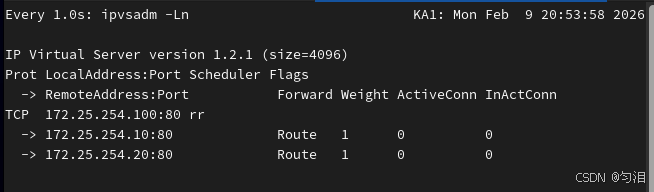
[root@KA1 yxs]# watch -n 1 ipvsadm -Ln
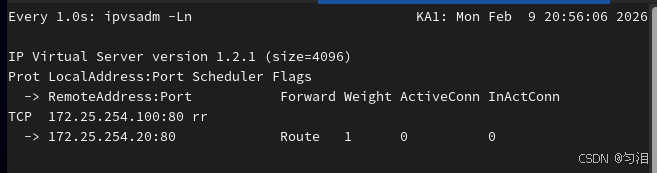
#在RS1中关闭web服务查看lvs策略是否变化
[root@rs1 ~]# systemctl stop httpd.service
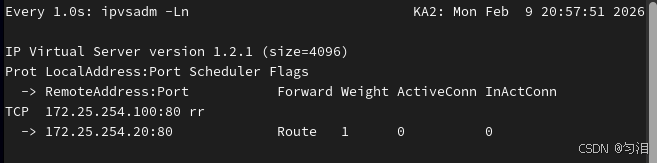
#把ka1中的keepalived关闭查看ka2中是否自动生成lvs策略
[root@KA1 yxs]# systemctl stop keepalived.service
[root@KA2 yxs]# watch -n 1 ipvsadm -Ln
双主模式代理不同业务实现高可用
实验环境
#在rs中设定lo添加vip2 172.25.254.200/32
#在rs中搭建数据库
[root@rs1 ~]# dnf install mariadb-server -y
[root@rs1 ~]# systemctl enable --now mariadb
Created symlink /etc/systemd/system/mysql.service → /usr/lib/systemd/system/mariadb.service.
Created symlink /etc/systemd/system/mysqld.service → /usr/lib/systemd/system/mariadb.service.
Created symlink /etc/systemd/system/multi-user.target.wants/mariadb.service → /usr/lib/systemd/system/mariadb.service.
[root@rs1 ~]# mysql
Welcome to the MariaDB monitor.  Commands end with ; or \g.
Your MariaDB connection id is 3
Server version: 10.5.27-MariaDB MariaDB Server

Copyright (c) 2000, 2018, Oracle, MariaDB Corporation Ab and others.

Type 'help;' or '\h' for help. Type '\c' to clear the current input statement.

MariaDB [(none)]> CREATE USER lee@'%' identified by 'lee';
Query OK, 0 rows affected (0.001 sec)

MariaDB [(none)]> GRANT ALL ON *.* TO lee@'%';
Query OK, 0 rows affected (0.000 sec)

MariaDB [(none)]> quit
Bye
[root@rs2 ~]# dnf install mariadb-server -y
[root@rs2 ~]# systemctl enable --now mariadb
Created symlink /etc/systemd/system/mysql.service → /usr/lib/systemd/system/mariadb.service.
Created symlink /etc/systemd/system/mysqld.service → /usr/lib/systemd/system/mariadb.service.
Created symlink /etc/systemd/system/multi-user.target.wants/mariadb.service → /usr/lib/systemd/system/mariadb.service.
[root@rs2 ~]# mysql
Welcome to the MariaDB monitor.  Commands end with ; or \g.
Your MariaDB connection id is 3
Server version: 10.5.27-MariaDB MariaDB Server

Copyright (c) 2000, 2018, Oracle, MariaDB Corporation Ab and others.

Type 'help;' or '\h' for help. Type '\c' to clear the current input statement.

MariaDB [(none)]> CREATE USER lee@'%' identified by 'lee';
Query OK, 0 rows affected (0.001 sec)

MariaDB [(none)]> GRANT ALL ON *.* TO lee@'%';
Query OK, 0 rows affected (0.000 sec)

MariaDB [(none)]> quit
Bye

#测试
[root@rs1 ~]# mysql -ulee -plee -h172.25.254.10
Welcome to the MariaDB monitor.  Commands end with ; or \g.
Your MariaDB connection id is 4
Server version: 10.5.27-MariaDB MariaDB Server

Copyright (c) 2000, 2018, Oracle, MariaDB Corporation Ab and others.

Type 'help;' or '\h' for help. Type '\c' to clear the current input statement.

MariaDB [(none)]> quit
Bye
[root@rs2 ~]# mysql -ulee -plee -h172.25.254.20
Welcome to the MariaDB monitor.  Commands end with ; or \g.
Your MariaDB connection id is 4
Server version: 10.5.27-MariaDB MariaDB Server

Copyright (c) 2000, 2018, Oracle, MariaDB Corporation Ab and others.

Type 'help;' or '\h' for help. Type '\c' to clear the current input statement.

MariaDB [(none)]> quit
Bye
实现不同vip代理不同业务
#KA1和KA2
[root@KA1 yxs]# vim /etc/keepalived/keepalived.conf
include /etc/keepalived/conf.d/webserver.conf
include /etc/keepalived/conf.d/datebase.conf
[root@KA2 yxs]# vim /etc/keepalived/keepalived.conf
include /etc/keepalived/conf.d/webserver.conf
include /etc/keepalived/conf.d/datebase.conf
[root@KA1 yxs]# vim /etc/keepalived/conf.d/webserver.conf
virtual_server 172.25.254.100 80 {
    delay_loop 6
    lb_algo rr
    lb_kind DR
    protocol TCP

    real_server 172.25.254.10 80 {
        weight 1
        HTTP_GET {
            url {
              path /
              status_code 200
            }
            connect_timeout 1
            retry 3
            delay_before_retry 1
      }
    }

    real_server 172.25.254.20 80 {
        weight 1
        TCP_CHECK {
          connect_timeout 5
          retry 3
          delay_before_retry 3
          connect_port 80
      }
    }
}
[root@KA2 yxs]# vim /etc/keepalived/conf.d/webserver.conf
virtual_server 172.25.254.100 80 {
    delay_loop 6
    lb_algo rr
    lb_kind DR
    protocol TCP

    real_server 172.25.254.10 80 {
        weight 1
        HTTP_GET {
            url {
              path /
              status_code 200
            }
            connect_timeout 1
            retry 3
            delay_before_retry 1
      }
    }

    real_server 172.25.254.20 80 {
        weight 1
        TCP_CHECK {
          connect_timeout 5
          retry 3
          delay_before_retry 3
          connect_port 80
      }
    }
}
[root@KA1 yxs]# vim /etc/keepalived/conf.d/datebase.conf
virtual_server 172.25.254.200 3306 {
    delay_loop 6
    lb_algo rr
    lb_kind DR
    protocol TCP

    real_server 172.25.254.10 3306 {
        weight 1
        TCP_CHECK {
          connect_timeout 5
          retry 3
          delay_before_retry 3
          connect_port 3306
      }
    }

    real_server 172.25.254.20 3306 {
        weight 1
        TCP_CHECK {
          connect_timeout 5
          retry 3
          delay_before_retry 3
          connect_port 3306
      }
    }
}
[root@KA1 yxs]# systemctl restart keepalived.service
[root@KA2 yxs]# systemctl restart keepalived.service
测试
[root@rs2 ~]# mysql -ulee  -plee  -h172.25.254.200
Welcome to the MariaDB monitor.  Commands end with ; or \g.
Your MariaDB connection id is 18
Server version: 10.5.27-MariaDB MariaDB Server

Copyright (c) 2000, 2018, Oracle, MariaDB Corporation Ab and others.

Type 'help;' or '\h' for help. Type '\c' to clear the current input statement.

MariaDB [(none)]> quit
Bye

[root@test yxs]# curl 172.25.254.100
RS1 - 172.25.254.10
[root@test yxs]# curl 172.25.254.100
RS2 - 172.25.254.20
利用VRRP Script 实现全能高可用
实验环境
#在KA1和KA2中安装haproxy
[root@KA1 yxs]# dnf install haproxy-2.4.22-4.el9.x86_64  -y
[root@KA1 yxs]# vim /etc/sysctl.conf
net.ipv4.ip_nonlocal_bind=1
[root@KA1 yxs]# vim /etc/haproxy/haproxy.cfg
listen webserver
    bind 172.25.254.100:80
    mode http
    server web1 172.25.254.10:80 check
    server web2 172.25.254.20:80 check
[root@KA1 yxs]# systemctl enable --now haproxy.service
Created symlink /etc/systemd/system/multi-user.target.wants/haproxy.service → /usr/lib/systemd/system/haproxy.service.
[root@KA2 yxs]# dnf install haproxy-2.4.22-4.el9.x86_64  -y
[root@KA2 yxs]# vim /etc/sysctl.conf
net.ipv4.ip_nonlocal_bind=1
[root@KA1 yxs]# vim /etc/haproxy/haproxy.cfg
listen webserver
    bind 172.25.254.200:80
    mode http
    server web1 172.25.254.10:80 check
    server web2 172.25.254.20:80 check
[root@KA2 yxs]# systemctl enable --now haproxy.service
Created symlink /etc/systemd/system/multi-user.target.wants/haproxy.service → /usr/lib/systemd/system/haproxy.service.
利用案例理解vrrp_scripts
#在KA1主机中
[root@KA1 yxs]# vim /etc/keepalived/scripts/test.sh
#!/bin/bash
[ ! -f "/mnt/lee" ]

[root@KA1 ~]# vim /etc/keepalived/keepalived.conf
vrrp_script check_lee {
    script "/etc/keepalived/scripts/test.sh"
    interval 1
    weight -30
    fall 2
    rise 2
    timeout 2
    user root
}
vrrp_instance DB_VIP {
    state MASTER
    interface eth0
    virtual_router_id 51
    priority 100
    advert_int 1
    authentication {
        auth_type PASS
        auth_pass 1111
    }
    virtual_ipaddress {
        172.25.254.100/24 dev eth0 label eth0:1
    }
    track_script {
        check_lee
    }
}
[root@KA1 yxs]# systemctl restart keepalived.service

#测试
[root@KA1 yxs]# ifconfig
eth0: flags=4163<UP,BROADCAST,RUNNING,MULTICAST>  mtu 1500
        inet 172.25.254.50  netmask 255.255.255.0  broadcast 172.25.254.255
        inet6 fe80::2548:cded:e9d2:8517  prefixlen 64  scopeid 0x20<link>
        ether 00:0c:29:8b:6e:34  txqueuelen 1000  (Ethernet)
        RX packets 11923  bytes 1112762 (1.0 MiB)
        RX errors 0  dropped 0  overruns 0  frame 0
        TX packets 14839  bytes 1002385 (978.8 KiB)
        TX errors 0  dropped 0 overruns 0  carrier 0  collisions 0

eth0:0: flags=4163<UP,BROADCAST,RUNNING,MULTICAST>  mtu 1500
        inet 172.25.254.100  netmask 255.255.255.0  broadcast 0.0.0.0
        ether 00:0c:29:8b:6e:34  txqueuelen 1000  (Ethernet)

lo: flags=73<UP,LOOPBACK,RUNNING>  mtu 65536
        inet 127.0.0.1  netmask 255.0.0.0
        inet6 ::1  prefixlen 128  scopeid 0x10<host>
        loop  txqueuelen 1000  (Local Loopback)
        RX packets 4746  bytes 243658 (237.9 KiB)
        RX errors 0  dropped 0  overruns 0  frame 0
        TX packets 4746  bytes 243658 (237.9 KiB)
        TX errors 0  dropped 0 overruns 0  carrier 0  collisions 0
[root@KA1 yxs]# touch /mnt/lee
[root@KA1 yxs]# ifconfig
eth0: flags=4163<UP,BROADCAST,RUNNING,MULTICAST>  mtu 1500
        inet 172.25.254.50  netmask 255.255.255.0  broadcast 172.25.254.255
        inet6 fe80::2548:cded:e9d2:8517  prefixlen 64  scopeid 0x20<link>
        ether 00:0c:29:8b:6e:34  txqueuelen 1000  (Ethernet)
        RX packets 12110  bytes 1131044 (1.0 MiB)
        RX errors 0  dropped 0  overruns 0  frame 0
        TX packets 15105  bytes 1020669 (996.7 KiB)
        TX errors 0  dropped 0 overruns 0  carrier 0  collisions 0

lo: flags=73<UP,LOOPBACK,RUNNING>  mtu 65536
        inet 127.0.0.1  netmask 255.0.0.0
        inet6 ::1  prefixlen 128  scopeid 0x10<host>
        loop  txqueuelen 1000  (Local Loopback)
        RX packets 4918  bytes 252258 (246.3 KiB)
        RX errors 0  dropped 0  overruns 0  frame 0
        TX packets 4918  bytes 252258 (246.3 KiB)
        TX errors 0  dropped 0 overruns 0  carrier 0  collisions 0

[root@KA1 yxs]# rm -fr /mnt/lee
[root@KA1 yxs]# ifconfig
eth0: flags=4163<UP,BROADCAST,RUNNING,MULTICAST>  mtu 1500
        inet 172.25.254.50  netmask 255.255.255.0  broadcast 172.25.254.255
        inet6 fe80::2548:cded:e9d2:8517  prefixlen 64  scopeid 0x20<link>
        ether 00:0c:29:8b:6e:34  txqueuelen 1000  (Ethernet)
        RX packets 12333  bytes 1152856 (1.0 MiB)
        RX errors 0  dropped 0  overruns 0  frame 0
        TX packets 15423  bytes 1042531 (1018.0 KiB)
        TX errors 0  dropped 0 overruns 0  carrier 0  collisions 0

eth0:0: flags=4163<UP,BROADCAST,RUNNING,MULTICAST>  mtu 1500
        inet 172.25.254.100  netmask 255.255.255.0  broadcast 0.0.0.0
        ether 00:0c:29:8b:6e:34  txqueuelen 1000  (Ethernet)

lo: flags=73<UP,LOOPBACK,RUNNING>  mtu 65536
        inet 127.0.0.1  netmask 255.0.0.0
        inet6 ::1  prefixlen 128  scopeid 0x10<host>
        loop  txqueuelen 1000  (Local Loopback)
        RX packets 5128  bytes 262758 (256.5 KiB)
        RX errors 0  dropped 0  overruns 0  frame 0
        TX packets 5128  bytes 262758 (256.5 KiB)
        TX errors 0  dropped 0 overruns 0  carrier 0  collisions 0
keepalived + haproxy
[root@KA1 yxs]# vim /etc/keepalived/scripts/haproxy_check.sh
#!/bin/bash
killall -0 haproxy &> /dev/null

[root@KA1 ~]# chmod +x /etc/keepalived/scripts/haproxy_check.sh
vrrp_script haporxy_check {
    script "/etc/keepalived/scripts/haproxy_check.sh"
    interval 1
    weight -30
    fall 2
    rise 2
    timeout 2
    user root
}
vrrp_instance WEB_VIP {
    state MASTER
    interface eth0
    virtual_router_id 51
    priority 100
    advert_int 1
    authentication {
        auth_type PASS
        auth_pass 1111
    }
    virtual_ipaddress {
        172.25.254.100/24 dev eth0 label eth0:0
    }
    track_script {
        haporxy_check
    }
}
[root@KA1 yxs]# systemctl restart keepalived.service

#测试
#通过关闭和开启haproxy来观察vip是否迁移
[root@KA1 yxs]# systemctl stop haproxy.service
[root@KA2 ~]# ifconfig
eth0: flags=4163<UP,BROADCAST,RUNNING,MULTICAST>  mtu 1500
        inet 172.25.254.60  netmask 255.255.255.0  broadcast 172.25.254.255
        inet6 fe80::7a00:745:7105:ccf3  prefixlen 64  scopeid 0x20<link>
        ether 00:0c:29:94:28:97  txqueuelen 1000  (Ethernet)
        RX packets 10667  bytes 987449 (964.3 KiB)
        RX errors 0  dropped 0  overruns 0  frame 0
        TX packets 12493  bytes 853825 (833.8 KiB)
        TX errors 0  dropped 0 overruns 0  carrier 0  collisions 0

eth0:0: flags=4163<UP,BROADCAST,RUNNING,MULTICAST>  mtu 1500
        inet 172.25.254.100  netmask 255.255.255.0  broadcast 0.0.0.0
        ether 00:0c:29:8b:6e:34  txqueuelen 1000  (Ethernet)

eth0:1: flags=4163<UP,BROADCAST,RUNNING,MULTICAST>  mtu 1500
        inet 172.25.254.200  netmask 255.255.255.0  broadcast 0.0.0.0
        ether 00:0c:29:94:28:97  txqueuelen 1000  (Ethernet)

lo: flags=73<UP,LOOPBACK,RUNNING>  mtu 65536
        inet 127.0.0.1  netmask 255.0.0.0
        inet6 ::1  prefixlen 128  scopeid 0x10<host>
        loop  txqueuelen 1000  (Local Loopback)
        RX packets 2062  bytes 110074 (107.4 KiB)
        RX errors 0  dropped 0  overruns 0  frame 0
        TX packets 2062  bytes 110074 (107.4 KiB)
        TX errors 0  dropped 0 overruns 0  carrier 0  collisions 0

[root@KA2 ~]# systemctl stop haproxy.service
[root@KA1 yxs]# ifconfig
eth0: flags=4163<UP,BROADCAST,RUNNING,MULTICAST>  mtu 1500
        inet 172.25.254.50  netmask 255.255.255.0  broadcast 172.25.254.255
        inet6 fe80::2548:cded:e9d2:8517  prefixlen 64  scopeid 0x20<link>
        ether 00:0c:29:8b:6e:34  txqueuelen 1000  (Ethernet)
        RX packets 13418  bytes 1260313 (1.2 MiB)
        RX errors 0  dropped 0  overruns 0  frame 0
        TX packets 16911  bytes 1144704 (1.0 MiB)
        TX errors 0  dropped 0 overruns 0  carrier 0  collisions 0

eth0:0: flags=4163<UP,BROADCAST,RUNNING,MULTICAST>  mtu 1500
        inet 172.25.254.100  netmask 255.255.255.0  broadcast 0.0.0.0
        ether 00:0c:29:8b:6e:34  txqueuelen 1000  (Ethernet)

eth0:1: flags=4163<UP,BROADCAST,RUNNING,MULTICAST>  mtu 1500
        inet 172.25.254.200  netmask 255.255.255.0  broadcast 0.0.0.0
        ether 00:0c:29:94:28:97  txqueuelen 1000  (Ethernet)

lo: flags=73<UP,LOOPBACK,RUNNING>  mtu 65536
        inet 127.0.0.1  netmask 255.0.0.0
        inet6 ::1  prefixlen 128  scopeid 0x10<host>
        loop  txqueuelen 1000  (Local Loopback)
        RX packets 5798  bytes 298808 (291.8 KiB)
        RX errors 0  dropped 0  overruns 0  frame 0
        TX packets 5798  bytes 298808 (291.8 KiB)
        TX errors 0  dropped 0 overruns 0  carrier 0  collisions 0