认识响应"报头"(header)
响应报头的基本格式和请求报头的格式基本⼀致.
类似于Content-Type ,Content-Length 等属性的含义也和请求中的含义⼀致.
Content-Type
响应中的Content-Type常⻅取值有以下⼏种:
• text/html :body数据格式是HTML
• text/css :body数据格式是CSS
• application/javascript :body数据格式是JavaScript
• application/json :body数据格式是JSON
关于Content-Type的详细情况:https://developer.mozilla.org/enUS/docs/Web/HTTP/Basics_of_HTTP/MIME_types
认识响应"正⽂"(body)
正⽂的具体格式取决于Content-Type.观察上⾯⼏个抓包结果中的响应部分.
1)text/html
html
Server: nginx/1.17.3
Date: Thu, 10 Jun 2021 07:25:09 GMT
Content-Type: text/html; charset=utf-8
Last-Modified: Thu, 13 May 2021 09:01:26 GMT
Connection: keep-alive
ETag: W/"609ceae6-3206"
Content-Length: 12806
<!DOCTYPE html><html><head><meta charset=utf-8><meta http-equiv=X-UA-Compatible
 body,
 #app {
 height: 100%;
 margin: 0px;
 padding: 0px;
 }
 .chromeframe {
 margin: 0.2em 0;
 background: #ccc;
 color: #000;
 padding: 0.2em 0;
 }
 #loader-wrapper {
 position: fixed;
 top: 0;
left: 0;
 width: 100%;
 height: 100%;
 z-index: 999999;
 }
......
2)text/css
html
HTTP/1.1 200 OK
Server: nginx/1.17.3
Date: Thu, 10 Jun 2021 07:25:09 GMT
Content-Type: text/css
Last-Modified: Thu, 13 May 2021 09:01:26 GMT
Connection: keep-alive
ETag: W/"609ceae6-3cfbe"
Content-Length: 249790
@font-face{font-family:element-icons;src:url(../../static/fonts/element-icons.53
......
3)application/javascript
html
HTTP/1.1 200 OK
Server: nginx/1.17.3
Date: Thu, 10 Jun 2021 07:25:09 GMT
Content-Type: application/javascript; charset=utf-8
Last-Modified: Thu, 13 May 2021 09:01:26 GMT
Connection: keep-alive
ETag: W/"609ceae6-427d4"
Content-Length: 272340
(window["webpackJsonp"]=window["webpackJsonp"]||[]).push([["app"],{0:function(t,
......
4)application/json
html
HTTP/1.1 200
Server: nginx/1.17.3
Date: Thu, 10 Jun 2021 07:25:10 GMT
Content-Type: application/json;charset=UTF-8
Connection: keep-alive
X-Content-Type-Options: nosniff
X-XSS-Protection: 1; mode=block
Cache-Control: no-cache, no-store, max-age=0, must-revalidate
Pragma: no-cache
Expires: 0
vary: accept-encoding
Content-Length: 12268
{"msg":"操作成功","code":200,"permissions":[] }
通过form表单构造HTTP请求
form(表单)是HTML中的⼀个常⽤标签.可以⽤于给服务器发送GET或者POST请求.
不要把form拼写成from!!
form发送GET请求
form的重要参数:
• action:构造的HTTP请求的URL是什么.
• method:构造的HTTP请求的⽅法是GET还是POST(form只⽀持GET和POST). input的重要参数:
• type:表⽰输⼊框的类型.text表⽰⽂本,password表⽰密码,submit表⽰提交按钮.
• name:表⽰构造出的HTTP请求的querystring的key.querystring的value就是输⼊框的⽤⼾输 ⼊的内容.
• value:input标签的值.对于type为submit类型来说,value就对应了按钮上显⽰的⽂本.
html
<form action="http://abcdef.com/myPath" method="GET">
 <input type="text" name="userId">
 <input type="text" name="classId">
 <input type="submit" value="提交">
</form>
⻚⾯展⽰的效果:

在输⼊框随便填写数据,

点击"提交",此时就会构造出HTTP请求并发送出去.
构造的HTTP请求
html
GET http://abcdef.com/myPath?userId=100&classId=200 HTTP/1.1
Host: abcdef.com
Proxy-Connection: keep-alive
Upgrade-Insecure-Requests: 1
User-Agent: Mozilla/5.0 (Windows NT 10.0; Win64; x64) AppleWebKit/537.36 (KHTML,
Accept: text/html,application/xhtml+xml,application/xml;q=0.9,image/avif,image/w
Accept-Encoding: gzip, deflate
Accept-Language: zh-CN,zh;q=0.9,en;q=0.8
注意:由于我们的服务器的地址是随便写的,因此⽆法获取到正确的HTTP响应.
体会form代码和HTTP请求之间的对应关系
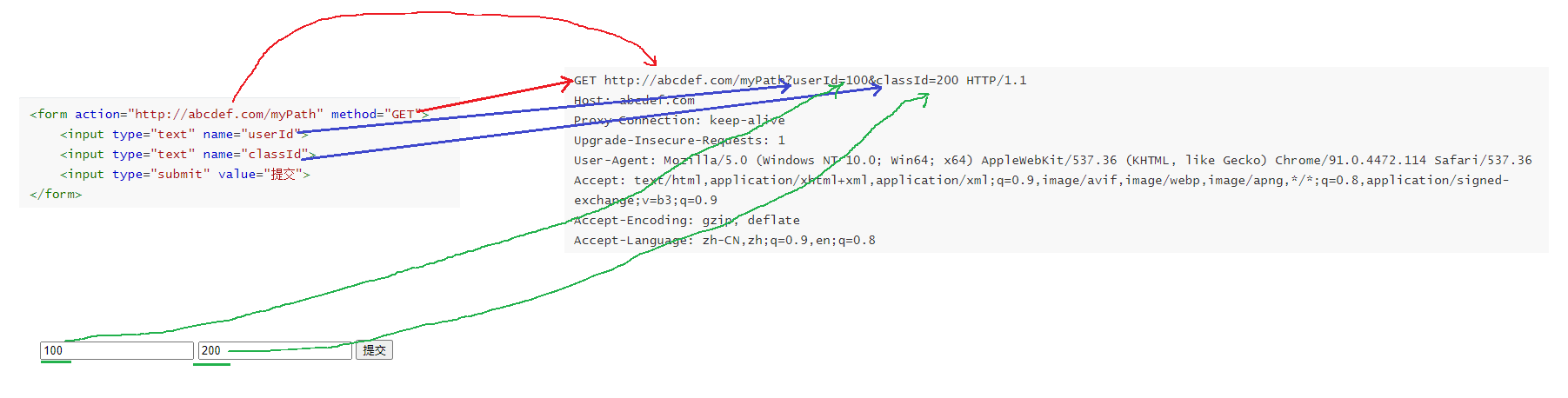
• form的action属性对应HTTP请求的URL
• form的method属性对应HTTP请求的⽅法
• input的name属性对应querystring的key
• input的内容对应querystring的value
form发送POST请求
修改上⾯的代码,把form的method修改为POST
html
<form action="http://abcdef.com/myPath" method="GET">
 <input type="text" name="userId">
 <input type="text" name="classId">
 <input type="submit" value="提交">
</form>
⻚⾯效果不变.

构造的HTTP请求
html
POST http://abcdef.com/myPath HTTP/1.1
Host: abcdef.com
Proxy-Connection: keep-alive
Content-Length: 22
Cache-Control: max-age=0
Upgrade-Insecure-Requests: 1
Origin: null
Content-Type: application/x-www-form-urlencoded
User-Agent: Mozilla/5.0 (Windows NT 10.0; Win64; x64) AppleWebKit/537.36 (KHTML,
Accept: text/html,application/xhtml+xml,application/xml;q=0.9,image/avif,image/w
Accept-Encoding: gzip, deflate
Accept-Language: zh-CN,zh;q=0.9,en;q=0.8
userId=100&classId=200
主要的区别:
• method从GET变成了POST
• 数据从querystring移动到了body中. 使⽤form还可以提交⽂件.
通过ajax构造HTTP请求
从前端⻆度,除了浏览器地址栏能构造GET请求,form表单能构造GET和POST之外,还可以通过 ajax的⽅式来构造HTTP请求.并且功能更强⼤.
ajax全称AsynchronousJavascriptAndXML,是2005年提出的⼀种JavaScript给服务器发送 HTTP请求的⽅式.
特点是可以不需要刷新⻚⾯/⻚⾯跳转就能进⾏数据传输.
在JavaScript中可以通过ajax的⽅式构造HTTP请求.
发送GET请求
创建test.html,在<script>标签中编写以下代码.
此处使⽤的是jquery的ajax,⽽不是原⽣ajax.原⽣ajax⽐较难⽤.
html
<!-- 引⼊ jquery -->
<script src="https://code.jquery.com/jquery-3.6.3.min.js"></script>
<script>
 $.ajax({
 type: 'get',
 url: 'https://www.sogou.com?studentName=zhangsan',
 // 此处 success 就声明了⼀个回调函数, 就会在服务器响应返回到浏览器的时候触发该回调
 // 正是此处的 回调 体现了 "异步"
 success: function(data) {
 // data 则是响应的正⽂部分.
 console.log("当服务器返回的响应到达浏览器之后, 浏览器触发该回调, 通知到咱们
 }
 });
 console.log("浏览器⽴即往下执⾏后续代码");
</script>注意:如果把send中的地址改成其他服务器的地址(⽐如http://www.sogou.com/index.html这种), ⼤概率是会出错的.
错误形如:

这个错误是因为ajax默认不能"跨域",也就是"百度下⾯的html中的ajax不能访问搜狗的内容".这 样的设定也是完全合理的.
如果想要强⾏进⾏跨域,则需要服务器进⾏配合,在服务器的响应中"允许跨域"才可以.
咱们的⽰例服务器42.192.83.143:8080/AjaxMockServer/info 进⾏了允许跨域设置,因 此我们的⻚⾯才能访问到其中的数据.
关于跨域这个话题,此处不深⼊讨论.
浏览器和服务器交互过程(引⼊ajax后):
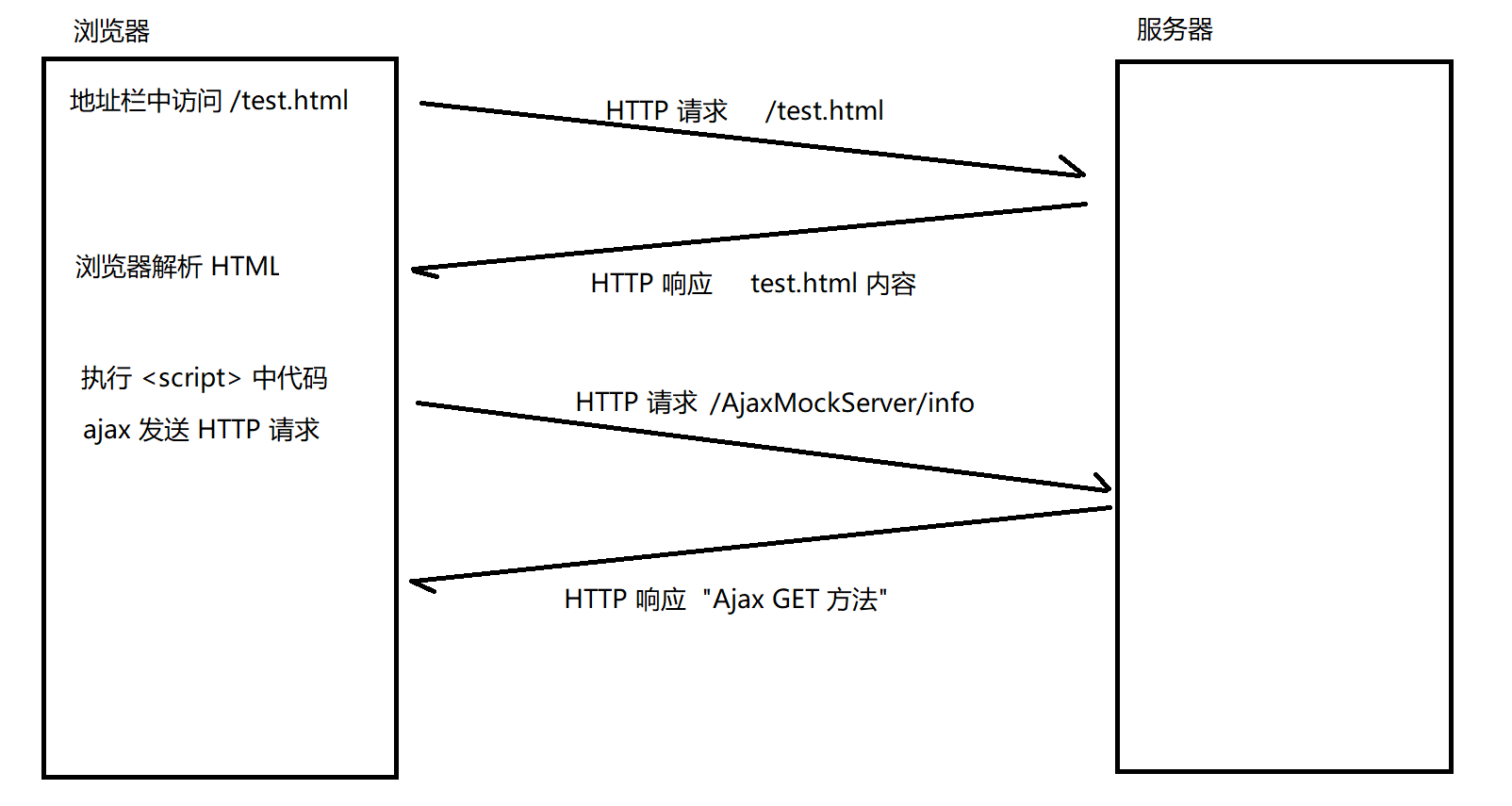
在我们当前的例⼦中,test.html是通过本地⽂件的⽅式打开的,这个环节不涉及HTTP交互.
发送POST请求
对于POST请求,需要设置body的内容
-
先使⽤setRequestHeader设置Content-Type
-
再通过send的参数设置body内容.
发送application/x-www-form-urlencoded数据(数据格式同form的post)
html
<!-- 引⼊ jquery -->
<script src="https://code.jquery.com/jquery-3.6.3.min.js"></script>
<script>
 $.ajax({
 type: 'post',
 url: 'https://www.sogou.com',
 contentType: 'application/x-www-form-urlencoded',
 data: 'studentName=zhangsan',
 success: function(data) {
 // data 则是响应的正⽂部分.
 console.log("当服务器返回的响应到达浏览器之后, 浏览器触发该回调, 通知到咱们
 }
 });
 console.log("浏览器⽴即往下执⾏后续代码");
</script>
发送application/json数据
html
<!-- 引⼊ jquery -->
<script src="https://code.jquery.com/jquery-3.6.3.min.js"></script>
<script>
 $.ajax({
 type: 'post',
 url: 'https://www.sogou.com',
 contentType: 'application/json',
 data: '{ name: "zhangsan" }',
 success: function(data) {
 // data 则是响应的正⽂部分.
 console.log("当服务器返回的响应到达浏览器之后, 浏览器触发该回调, 通知到咱们
 }
 });
 console.log("浏览器⽴即往下执⾏后续代码");
</script>
通过Javasocket构造HTTP请求
所谓的"发送HTTP请求",本质上就是按照HTTP的格式往TCPSocket中写⼊⼀个字符串.
所谓的"接受HTTP响应",本质上就是从TCPSocket中读取⼀个字符串,再按照HTTP的格式来解析.
我们基于Socket的知识,完全可以构造出⼀个简单的HTTP客⼾端程序,⽤来发送各种类型的HTTP请 求.
java
public class HttpClient {
 private Socket socket;
 private String ip;
 private int port;
 public HttpClient(String ip, int port) throws IOException {
 this.ip = ip;
 this.port = port;
 socket = new Socket(ip, port);
 }
 public String get(String url) throws IOException {
 StringBuilder request = new StringBuilder();
 // 构造⾸⾏
request.append("GET " + url + " HTTP/1.1\n");
 // 构造 header
 request.append("Host: " + ip + ":" + port + "\n");
 // 构造 空⾏
 request.append("\n");
 // 发送数据
 OutputStream outputStream = socket.getOutputStream();
 outputStream.write(request.toString().getBytes());
 // 读取响应数据
 InputStream inputStream = socket.getInputStream();
 byte[] buffer = new byte[1024 * 1024];
 int n = inputStream.read(buffer);
 return new String(buffer, 0, n, "utf-8");
 }
 public String post(String url, String body) throws IOException {
 StringBuilder request = new StringBuilder();
 // 构造⾸⾏
 request.append("POST " + url + " HTTP/1.1\n");
 // 构造 header
 request.append("Host: " + ip + ":" + port + "\n");
 request.append("Content-Length: " + body.getBytes().length + "\n");
 request.append("Content-Type: text/plain\n");
 // 构造 空⾏
 request.append("\n");
 // 构造 body
 request.append(body);
 // 发送数据
OutputStream outputStream = socket.getOutputStream();
 outputStream.write(request.toString().getBytes());
 // 读取响应数据
 InputStream inputStream = socket.getInputStream();
 byte[] buffer = new byte[1024 * 1024];
 int n = inputStream.read(buffer);
 return new String(buffer, 0, n, "utf-8");
 }
 public static void main(String[] args) throws IOException {
 HttpClient httpClient = new HttpClient("42.192.83.143", 8080);
 String getResp = httpClient.get("/AjaxMockServer/info");
 System.out.println(getResp);
 String postResp = httpClient.post("/AjaxMockServer/info", "this is body"
 System.out.println(postResp);
 }
}
使⽤Java构造的HTTP客⼾端不再有"跨域"限制了,此时也可以⽤来获取其他服务器的数据了.
跨域只是浏览器的⾏为,对于ajax有效.对于其他语⾔来说⼀般都和跨域⽆关.
java
HttpClient httpClient = new HttpClient("www.sogou.com", 80);
String resp = httpClient.get("/index.html");
System.out.println(resp);
// 此时可以获取到 搜狗主⻚ 的 html